Specs are compiled from manufacturer listings and verified buyer reviews and can change over time — please confirm the key details on the product page before buying.
You bought a router to fix your Wi-Fi, and now it is sitting on a cardboard box next to the modem with three cables bent at ugly angles. A rack fixes that. It holds your router, modem, switch and patch panel in one bolted-down place, keeps the cables short and off the floor, and gets the gear off the shelf where the vacuum keeps hitting it. The picks below cover every setup, from a tiny fold-out shelf for a single router to a 12U open frame that swallows a whole home-lab worth of switches.
This guide is built by comparing the manufacturers’ published specifications and the patterns across verified customer reviews, so you get each pick’s real strengths and trade-offs instead of marketing spin.
The main thing to sort out before you buy is rack units and depth, because a rack that is too shallow cannot hold a full-size switch. Below you will find the strongest options for a wireless router rack, ranked by what actually fits in your space.
Top Picks


How To Choose The Best Wireless Router Rack
A router rack is not a shelf. It is a metal frame with standardized holes, and the gear you bolt to it has to match those holes and the space behind them. Get those two things right and the rest of the install is straightforward.
Start with rack units, not with looks
One rack unit (1U) is roughly 1.75 inches of vertical height. Your modem, switch and router each take up a shelf or a couple of units, so count what you own before you pick. A 4U frame handles a small stack; a 12U frame handles a full home lab with room to grow.
Depth is where most buyers get burned
Depth is how far the rack reaches out from the wall, and it has to be at least as deep as your deepest device. A shallow rack is fine for a router and a patch panel. A full-depth network switch needs a deeper frame or it will stick out the back.
Decide wall or floor before you drill
Many frames do both, which is useful if you rent. Wall mounting keeps the gear high and out of the way; floor standing handles heavier loads and gives you room to slide equipment in from the front. Check the load rating either way — it tells you whether you are anchoring into a stud or into drywall alone.
Side-by-Side Comparison
| Model | Best For | Rack Units | Weight Capacity | Mounting Depth | Amazon |
|---|---|---|---|---|---|
| StarTech 6U Wall-Mount Network Rack★ Best Overall | Home network closets | 6U | 44.2 lb | 13.78 in. | Amazon |
| SKIKEN 2-Tier Router ShelfBest for One Router | Single router and modem | — | 20 lb | 7.5 in. | Amazon |
| Tecmojo 4U Wall Mount RackHeaviest Load for the Size | Small IT stacks | 4U | 110 lb | 14 in. | Amazon |
| Mofangtech 6U Steel Wall Mount Rack | Under-desk mounting | 6U | 44 lb | 11.06 in. | Amazon |
| VEVOR 12U Wall Mount Server Rack | Rear cable access | 12U | 150 lb | 18 in. | Amazon |
| RackPath 12U Open Frame Rack | Heavy gear with shelves | 12U | 150 lb | 14 in. shelves | Amazon |
| Tecmojo 12U Open Frame Network Rack | Warehouse and classroom | 12U | 130 lb wall / 260 lb floor | — | Amazon |
| GeeekPi DeskPi RackMate T1 | Small office and desk setups | 8U | — | 7.87 in. | Amazon |
| ECHOGEAR 10U Open Frame Rack | Deep AV and network gear | 10U | 150 lb | 20.40 in. | Amazon |
Detailed Reviews
1. StarTech 6U Wall-Mount Network Rack
Our pick — 4.5+★ from 3,500+ verified ratings; the strongest balance of quality and price.
Six rack units that arrive already bolted together, so the job is drilling and hanging.
The hassle with most racks is that assembling them eats a whole evening. This one shows up as a single open-frame bracket with the two posts already in place. You drill, you hang it, you slide in your switch and patch panel. That is why it is the pick for a small network closet where you want the gear on the wall by lunchtime.
It holds six rack units of standard 19-inch equipment, with a maximum mounting depth of 35 cm (13.78 inches) and a load ceiling of 19.9 kg (44.2 lbs). That depth covers a router, a patch panel and a shallow switch comfortably. The box includes 12 M6 screws and 12 M6 cage nuts, so you are not hunting for hardware mid-install. It also carries a lifetime backing with free 24/5 multi-lingual technical support.
What wins people over is that it fits in tight spots where nothing else does. It is a popular pick — 4.5+ stars across thousands of owners — and the recurring theme is small closets and narrow cabinets where nothing else fits. The honest catch is the hardware and the wall anchors: a few setups needed different screws or a sturdier anchor than what came in the box, so plan your wall material before you start drilling.
What earns the top spot
- Ships fully assembled with M6 screws and cage nuts included
- 13.78-inch mounting depth fits routers, patch panels and shallow switches
- Cold-rolled steel open frame keeps gear cool and easy to reach
- Holds 44.2 lbs on the wall so a router stack is nowhere near the limit
What to plan around
- The included mounting hardware is the most-discussed gripe; verify your wall anchors first
- 6U runs out fast once you add shelves and a UPS
Go with it if: you want a wall-mounted frame in a tight closet with zero assembly time.
Think bigger if: you plan to add more than six units of gear later.
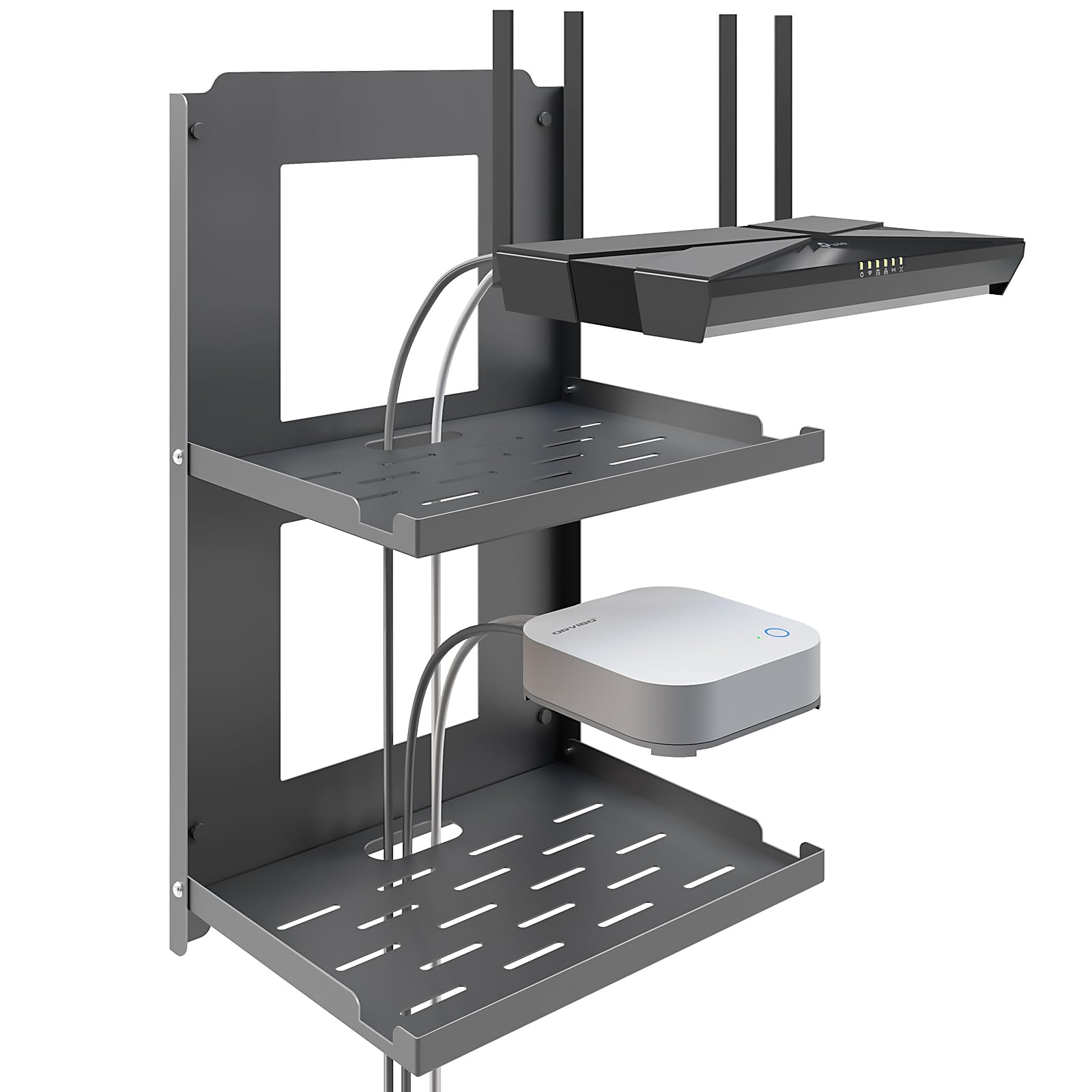
2. SKIKEN 2-Tier Router Shelf
A two-layer steel shelf that folds flat to the wall and covers your outlet plate.
If your “rack” is really one router and one modem sitting on top of each other, buying a 12U frame is overkill. This folds out into two stacked shelves, one for the router and one for the modem, and the base panel has a precision-cut opening sized for a standard single or duplex outlet plate. The whole unit measures 10.0″W x 16.5″H x 7.5″D and weighs 3.5 lbs, so one person can hang it. It carries a 20 lb load limit — enough for two consumer devices with cable slack to spare.
The look is what gets the attention here, along with how simple it is to bolt up and how rigid the cold-rolled steel feels compared to a plastic shelf. It is a decor-friendly answer for a kitchen, an under-stairs corner or an RV where a router on the counter would be an eyesore. Folding both tiers flat against the wall when you move gear around is a small thing that turns out to be genuinely handy.
The catch you have to accept: the outlet opening only fits standard single and duplex plates, so an oversized or decorative faceplate can block the fit. And 20 lbs is the whole budget — do not plan on hanging a UPS here.
Why it earns a spot: it solves the specific problem of “my router and modem have nowhere to live except the countertop” without asking you to build a server closet.
Reach for this if: you have a router plus modem and a standard wall outlet you want to hide behind them.
Look elsewhere if: you are mounting a switch, a UPS or anything heavier than 20 lbs.
3. Tecmojo 4U Wall Mount Rack, 14 inch Depth, 19″ Network Rack
Four units of cold-rolled steel rated to 110 lbs, from the start and straight onto the wall.
Here is a small frame that punches well above its size on load. The Tecmojo 4U is rated to 110 lbs (50 kg) from cold-rolled steel with an electrostatic powder coat that resists rust and corrosion. Compare that to the SKIKEN shelf’s 20 lb ceiling and you can see why this is the pick when you actually want to hang real equipment. It measures 13.8″D x 19.3″W x 7.2″H and weighs 5.3 lbs.
It also refuses to be pigeonholed. You can sit it flat, bolt it to a wall, or mount it vertically under a desk, and it arrives open and ready with no assembly at all. It is EIA/ECA-310-E compliant, which is the standard that guarantees your 19-inch rack-mount gear will line up with the holes. Cables can be tied off on the side panel, and the open frame makes swapping a switch a two-minute job. A 3-year manufacturer warranty covers it.
The one design limit worth knowing: the open frame works best for gear with front-facing ports and controls. If your device needs frequent rear access, a swing-gate design will suit you better than this one.
Where it stands out
- 110 lb capacity in a 4U frame that weighs 5.3 lbs
- Wall, flat or under-desk mounting with no assembly
- EIA/ECA-310-E compliant, so 19-inch gear lines up cleanly
Where it falls short
- Only 4U — a switch plus a patch panel plus a shelf fills it fast
- No rear door, so back-panel access means reaching around
The verdict: the strongest load rating you can get in a 4U wall frame, and the simplest to hang.
skip it if: your gear lives or dies by rear cable access.
4. Mofangtech 6U Steel Wall Mount Rack

A folding 6U frame you can bolt under a desk instead of into drywall.
Not everyone has a wall worth drilling into. This 6U rack folds flat during shipping and unfolds into a full frame that can hang vertically on a wall or sit horizontally under a desk. At 1.2 kg it is the lightest 6U frame here — the StarTech 6U above tips the scale at 4.5 kg — so one person can hold it in place while the other drives the screws.
The frame is 2.0 mm thick cold-rolled steel with a stated max load of 44 lbs. Overall size is 19.29″W x 11.06″D x 3.94″H, compatible with standard 19-inch rack-mount equipment: routers, NAS, servers, audio gear or a power shelf. The kit is unusually complete for the money — 24 M6 screws and cage nuts, 4 self-propelled wood screws for wooden walls, a horizontal bubble level and an installation guide. That bubble level is a small courtesy that saves you a second trip up the ladder.
The hinge joints are the part buyers watch, and they hold up: the fold mechanism is not the weak point people worry it will be. The real trade-off is the 11.06-inch depth — noticeably shallower than the StarTech’s 13.78 inches — so deep switches will not sit fully inside the frame.
What you are really buying: flexibility. One frame that can be a wall rack this month and an under-desk rack next month, with hardware for both in the box.
Worth knowing: the shallow body is the deciding factor — check your deepest device before you commit.
Best fit for: renters and desk-based setups where wall drilling is off the table.
Not for: full-depth switches that need to sit flush inside the frame.
5. VEVOR 12U Wall Mount Server Rack

The hinged gate swings the whole front panel out of your way, so rear cables stop being a yoga problem.
Rear-panel access is the quiet frustration of wall racks. You hang the thing, fill it, and then every cable change means reaching around the side. VEVOR solves it with an open hinged door that swings a full 180 degrees, and you can lift the whole rotating door off during assembly or servicing and put it back when you are done. If you run a patch panel with a dozen cables behind it, that single feature changes your week.
The build backs it up. Q235 carbon steel rated to 150 lbs (68 kg), with M6 screws and cage nuts for mounting switches, firewalls and other devices to the steel frame. Depth is 18 inches and it fits standard 19-inch servers, A/V and network equipment. The spec sheet is unclear whether this is the 9U or 12U version in places, and the listing carries the SPT-505-09 model number, so confirm the unit count on the page before you order. It also comes with pre-drilled square holes, threaded holes, wall-mounting holes and clear measurement markings so you can position brackets without a tape measure.
Buyers find it solid once it is up and steady under load. The honest caveat is assembly: some builds go together quickly and some run into trouble with the screws, so give yourself a full afternoon and a second pair of hands rather than a rushed hour.
The case for the swing gate
- 180-degree hinged door gives full rear-panel and cable access
- 150 lbs capacity from Q235 carbon steel
- Pre-drilled holes and measurement markings speed up bracket placement
What to set aside time for
- Assembly can be fiddly with the screw hardware
- Verify the rack-unit count on the listing, since the description is inconsistent
Pick this one when: you will be behind the rack often and want the gate to do the reaching.
The trade-off: more assembly time than the pre-built frames above.
6. RackPath 12U Open Frame Network Rack
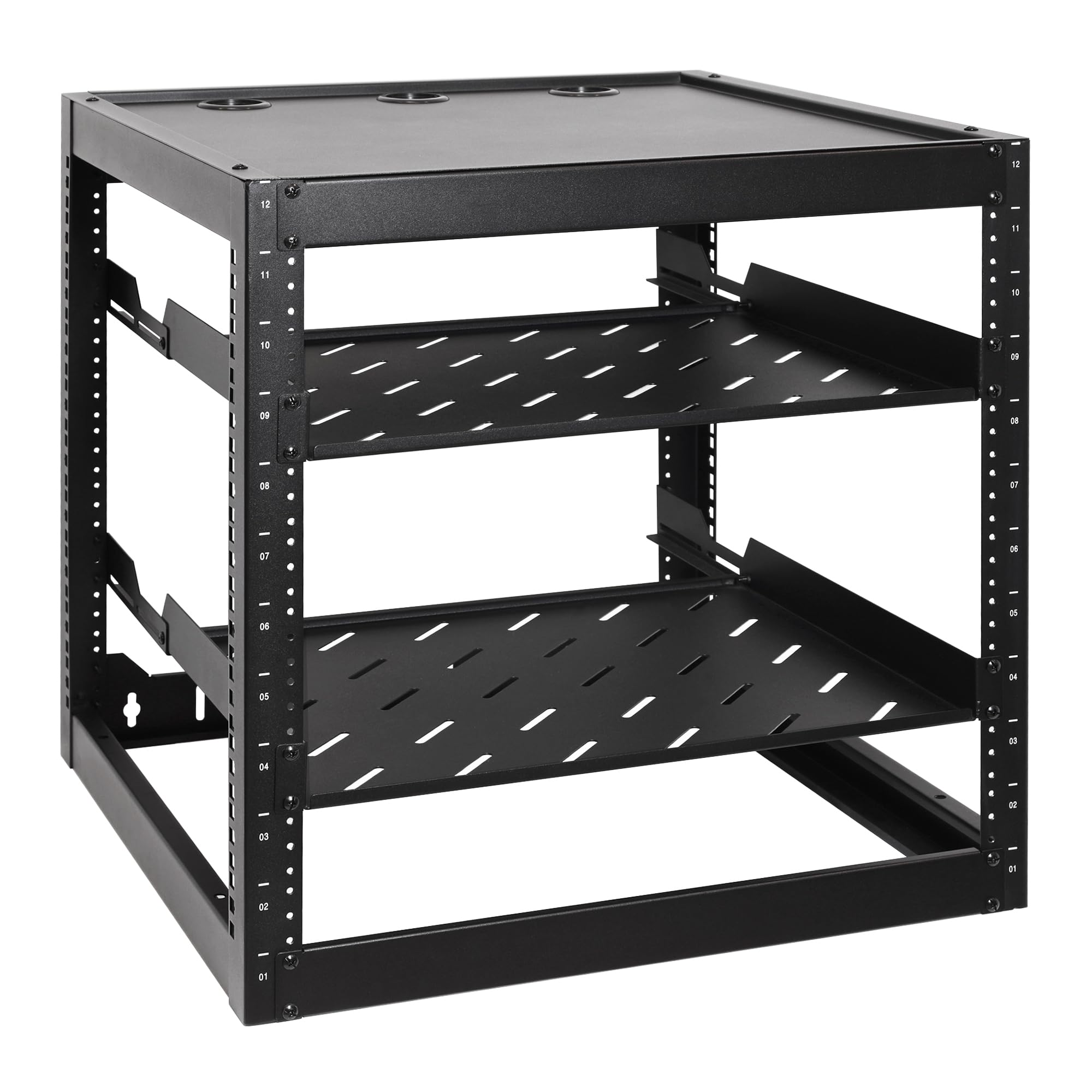
Twelve units, two vented shelves with rear support, and a 150 lb ceiling for the heavy stuff.
Most racks make you buy shelves separately, and rear-support brackets on top of that. This one arrives with two 1U vented shelves at 14-inch depth, each with rear support brackets that spread the load across the frame. That is exactly the setup you want for a modem, a DVR or a UPS unit — the kind of dense, heavy boxes that make cheap shelves sag in the middle.
The frame itself is reinforced cold-rolled steel with a black powder coat, rated to 150 lbs — a stated ceiling the brand pitches as exceeding most competitors in its class. It takes all standard 19-inch rack-mountable gear, and the 12U height covers network switches, patch panels and AV equipment with room left over. You can wall-mount it or set it free-standing, which matters in a home lab where the wall is already full or the floor plan keeps changing. The hardware kit includes 30 10-32 mounting screws and 8 M5 wood screws — enough that running short mid-build is unlikely.
Buyers keep coming back to how well it is made for the money, and few complain about assembly. The mounting hardware itself gets a mixed read — a portion of owners found the supplied fasteners needed swapping out — so keep a small box of spares on hand and you will be fine.
Why it is on the list: the included rear-supported shelves are the differentiator. They turn a bare frame into a working rack without an extra order.
Right for you if: you are hanging a UPS or DVR and need shelf support that does not flex.
Check first: your wall can take the weight — 150 lbs of gear plus a 23.1 lb frame is a stud-or-concrete job.
7. Tecmojo 12U Open Frame Network Rack for IT and AV Gear
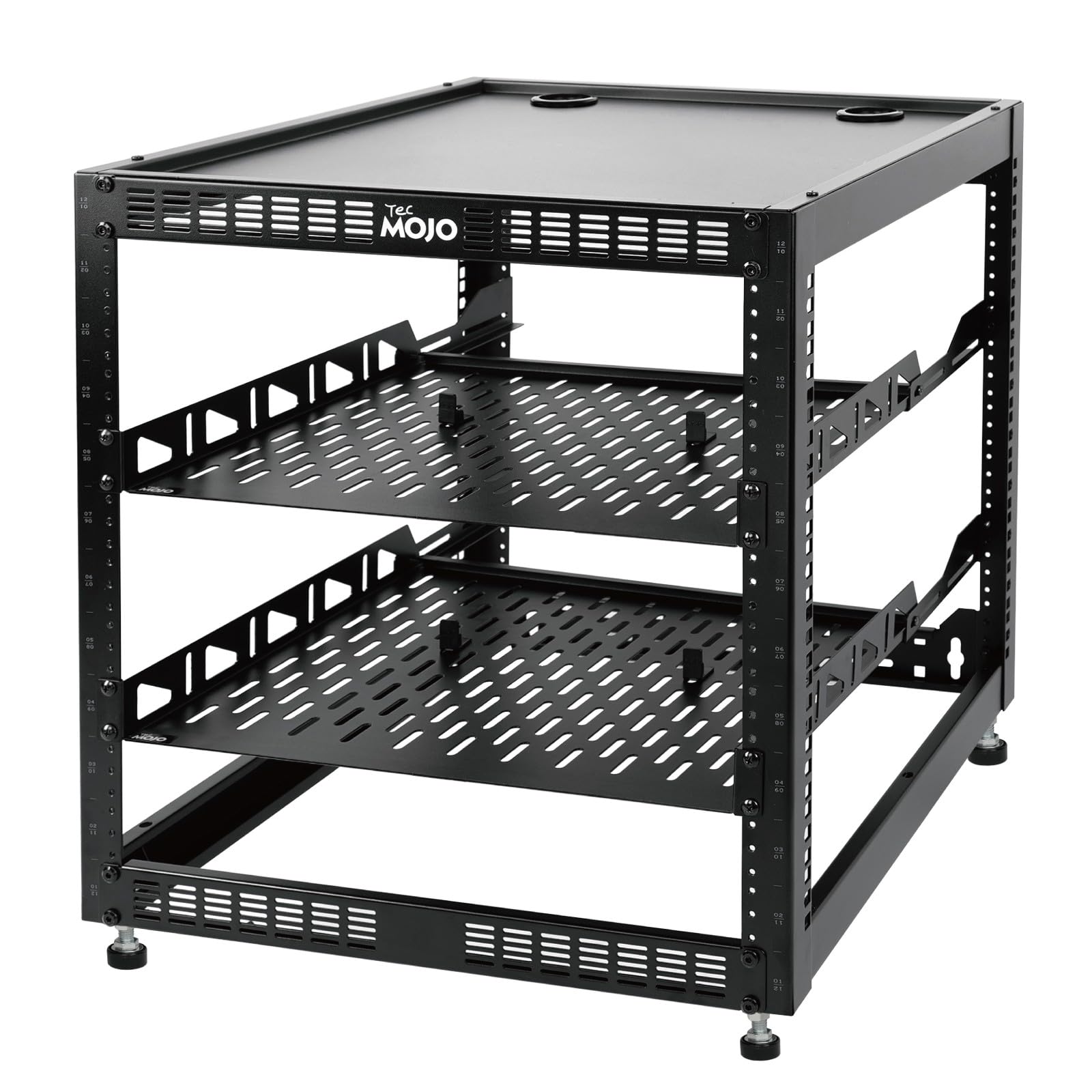
A 12U frame that carries 130 lbs on the wall and 260 lbs on the floor from the same steel.
This is the rack for a classroom, a retail back room or a warehouse corner where the install point might change. On the wall it holds 130 lbs. Standing on the floor it takes up to 260 lbs, and the rack shelf supports are what give it that extra ground-mounted headroom. Cold-rolled steel throughout, with a top panel that adds usable space and anti-slip shelf stops that keep devices from sliding forward.
The accessories are the part that saves an evening of shopping. In the box: the 12U frame, two ventilated shelves, four shelf stops, four velcro straps and a set of equipment mounting screws. You also get a printed manual, a mounting-hole drilling template and an online assembly video — the drilling template is the small extra that stops you from guessing where the holes should go. Fit and finish favor it toward AV racks and IT racks in multi-device setups rather than a single-router install.
Build quality and the straightforward assembly are what buyers praise. The area that draws complaints is installation — the wall-mounting step is where people hit friction, so have your anchors and a helper ready before you start. Size is also worth double-checking against your gear, since 12U of open frame is a lot of air if you only own three devices.
What is included that usually is not
- Two ventilated shelves, four shelf stops and velcro straps in the box
- Drilling template and online assembly video
- 130 lbs wall rating, 260 lbs floor rating
What to be ready for
- Wall-mount installation is the step that frustrates people most
- 12U is more frame than a simple router-and-modem setup needs
Worth it for: shared spaces and multi-device AV or IT installs where the frame may move.
Overkill for: a two-device home setup where a 4U or 6U frame does the job.
8. GeeekPi 8U Network Rack

A 10-inch-wide cabinet with translucent acrylic sides, built for a desk corner rather than a wall.
This one is a different animal. It is 10 inches wide, not the 19-inch standard, which makes it markedly smaller than the frames above — the Tecmojo 4U measures 13.8″D x 19.3″W x 7.2″H while this cabinet comes in at 11″W and a 7.87-inch depth. It is meant for small offices, home environments and enterprises trying to reclaim floor space, not for full-size switches. The 8U height is standard, with the brand noting 1U equals 1.75 inches and 8U implies roughly 14 inches of vertical room.
The shell is aluminum with translucent acrylic panels on both sides. Those panels cut weight and keep dust off your gear, and you can see every status light without opening anything. Some owners add ambient lights inside for looks. The open design means you still get airflow and easy reach-in for maintenance. Assembly is flat-packed with all necessary hardware included, and the fit in tight office spaces is what buyers praise — it is also the neatest-looking rack in this list by a wide margin.
Two things to weigh. The value question is mixed: it reads as a fair buy to some and overpriced to others, so decide whether the acrylic-and-aluminum look is worth paying for. And the 10-inch width means standard 19-inch rack-mount equipment will not fit — check your device width before ordering.
The honest read: this is a display-grade cabinet for small gear, not a load-bearing wall frame. It carries a 6-month warranty.
Tie-breaker: it fits where a 19-inch rack physically cannot, and looks like furniture while doing it.
Choose it when: your gear is small, your space is tight and you want it visible and tidy.
Rule it out when: you own 19-inch equipment or need a stated weight rating.
9. ECHOGEAR 10U Open Frame Rack with Optimal Air Flow

Ten units with 20.40 inches of depth, so the deep AV gear actually sits inside the frame.
Depth is the whole point of this rack. At 20.40 inches it swallows networking, AV and rack-mount components up to 19 inches deep — far more room than the 13.78-inch StarTech or the 11.06-inch Mofangtech, both of which will leave a deep component hanging out the back. If you own a full-size AV receiver or a long server chassis, this is the frame that contains it.
You get the open frame structure, two 1U vented shelves at 12.12-inch depth and 25 rack mounting screws. The open design plus the vented shelves keeps airflow moving across hot gear, which is the practical reason to choose a frame over a closed cabinet. Wall mounting is rated to 150 lbs and all the wall hardware is in the box. Assembly is required but simple — the brand says the included instructions get you to a finished rack in under 20 minutes, and a Minnesota-based support crew answers install questions 7 days a week. The lineup is modular, so you can stack up to 2 racks together and add accessories like swing arms.
Build quality and the generous spare screws are what owners talk about most, and the transformation from a tangle of cables to an organized network is the payoff people describe. The fit is where opinions split — a few setups found the spacing tighter than expected — so measure your deepest component before you commit.
Why it is the deep-gear answer: the 20.40-inch depth is the spec that decides it. Everything else — the 150 lb wall rating, the vented shelves, the modular stacking — is a bonus on top.
One caveat: modular stacking means buying a second rack later, not expanding this one.
Made for: AV receivers and long server chassis that need real depth behind the front panel.
Not needed for: a shallow switch and a patch panel, where a 4U or 6U frame does the same job for less frame.
Know the Specs
Rack Units (U)
A rack unit is a standardized measurement of vertical space, with 1U equaling roughly 1.75 inches — the GeeekPi listing makes the math explicit: 8U implies about 14 inches of height. A 4U frame holds a small stack; a 12U frame holds a full home lab. Count your devices as shelves or units before you pick, because a 6U frame fills up faster than most people expect once a UPS and a shelf are in the mix.
Mounting Depth
Depth is how far the rack reaches out from the wall, and it must at least match your deepest piece of equipment or the gear will stick out the back. Shallow frames around 7 to 11 inches suit routers, modems and patch panels. Deep frames at 18 to 20 inches suit AV receivers and long server chassis. This is the spec that most often catches buyers out, so measure first.
Weight Capacity
Load ratings on these frames run from 20 lbs on a fold-out shelf to 150 lbs on a 12U open frame, with floor-mounted ratings climbing higher still. Match the rating to your gear plus the shelves, and then think about the wall itself — a frame rated to 150 lbs still needs anchors suited to your wall material. Capacity on paper and capacity in your wall cavity are two different numbers.
Open Frame vs Cabinet
An open frame gives you airflow and easy reach for swapping a switch. A cabinet like the acrylic-sided DeskPi keeps dust off and looks tidier, but limits what you can see without opening it. Open frames accept standard 19-inch equipment; the 10-inch mini cabinet does not.
Common Questions
Will a 19-inch rack hold my home router and modem?
Do I need a deep rack or a shallow one?
Can I mount a rack under a desk instead of on the wall?
What is the difference between a 4U and a 12U rack?
Will a wall rack hold my equipment without pulling out of drywall?
Is an open frame rack better than a closed cabinet for cooling?
Does the GeeekPi 10-inch rack fit standard 19-inch equipment?
How long does assembly take on these racks?
Can I stack two racks together later if I run out of space?
Do these racks come with the screws and cage nuts I need?
The Bottom Line
For most people setting up a wireless router rack, the StarTech 6U is the one to get — it shows up assembled, takes 44.2 lbs on the wall and leaves you a 13.78-inch depth to work with, so the router, modem and switch all have a home without a single turn of a screwdriver on the frame itself. If the job is one router and one modem against an outlet plate, the SKIKEN two-tier shelf gets the gear off the counter and folds away when you need it gone. And if a deep AV receiver or long server chassis is part of your pile, the ECHOGEAR 10U with its 20.40-inch depth is the frame that closes the back of the unit. The one nudge worth adding: the top pick holds a 4.5+ star score across thousands of owners, and that consistency is the strongest signal in this whole roundup.
How we choose
We do not accept paid placement. Every pick is matched to a real buyer and a real use-case; we do not hands-on test units.
Sources
Specifications: manufacturer listings and product documentation. Review insights: verified customer reviews, as of November 2026. Pricing: not shown on this page (it changes often); check the current price via the retailer link.
As an Amazon Associate, Tactical Gear Guy earns from qualifying purchases. This does not affect which products we feature.