Specs are compiled from manufacturer listings and verified buyer reviews and can change over time — please confirm the key details on the product page before buying.
If your CPU is throttling mid-game or your fans sound like a hairdryer, the fix is almost never more fans — it’s a bigger radiator with a slower-spinning fan. A 360mm AIO (an all-in-one sealed liquid cooler, meaning the pump, tubes and radiator arrive pre-filled and pre-connected) spreads heat across three 120mm fans, so each one spins slower to move the same air. That is the whole reason these coolers run quieter than the tower cooler you have now.
This guide is built by comparing the manufacturers’ published specifications and the patterns across verified customer reviews, so you get each pick’s real strengths and trade-offs instead of marketing spin.
Radiator length, socket bracket and pump speed decide whether a cooler fits your case and your chip — not the logo on the box. Below you’ll find the nine units worth shortlisting, ranked by what they actually do under load.
Top Picks


How To Choose The Best Water Cooling AIO
Check your case before anything else. A 360mm radiator (the metal fin block that sheds the heat) is about as long as three 120mm fans stood side by side. Your case panel must take that length plus the tube run back to the CPU block (the metal plate that sits on your processor). Measure your case’s radiator support before you read a single spec sheet, because nothing else matters if the unit will not bolt in.
Match the radiator length to your case, not your ego
A 240mm AIO uses two 120mm fans and a shorter radiator; a 360mm uses three; a 420mm uses three 140mm fans and is the longest of the group. Bigger surface area generally lets the fans spin slower for the same cooling, which is how you get a quieter build. If your case only lists 240mm support at the top, a 360mm pick here is a non-starter no matter how good its numbers look.
Check the socket list before you fall for the lighting
Every cooler here publishes its supported sockets in the spec block, and that list is the only thing that guarantees your bracket will bolt down. Intel’s LGA 1851 and LGA 1700 and AMD’s AM5 and AM4 are the ones that matter on current builds. If your board is not named, assume you will need a separate bracket — and check that before ordering.
Read fan airflow and pressure together, never one alone
Airflow (cfm, cubic feet per minute) tells you how much air a fan can shift; static pressure (mmH2O) tells you how hard it can push that air through the tight fin stack of a radiator. A fan with high cfm but weak pressure can stall against dense fins. Radiator fans need both numbers to be respectable, which is why the spec tables in this category list them side by side.
Side-by-Side Comparison
| Model | Best For | Radiator | Max Fan Speed | Rated Noise | Amazon |
|---|---|---|---|---|---|
| be quiet! Light Loop 360mm Black★ Best Overall | Quiet-focused builds | 360mm | 2100 rpm | 36.8 db | Amazon |
| ID-COOLING FX360 PROBest Value | Value 360mm cooling | 360mm | 2900 rpm | 35.2 db | Amazon |
| Cooler Master 360L CoreMost Popular | Easy mainstream install | 360mm | 1800 rpm | 27.2 db | Amazon |
| MSI MAG Coreliquid A13 360 | High-rpm headroom | 360mm | 3800 rpm | 14.4 db | Amazon |
| Thermalright Frozen Warframe 360 SE V2 | On-pump LCD display | 360mm | 2000 rpm | 28.2 db | Amazon |
| ARCTIC Liquid Freezer III Pro 420 | Biggest radiator surface | 420mm | 2500 rpm | — | Amazon |
| NZXT Kraken Plus 240 RGB | Compact case builds | 240mm | — | 30 db | Amazon |
| NZXT Kraken Core 360 RGB | Clean 360mm simplicity | 360mm | 3100 rpm | 31.9 db | Amazon |
| ASUS TUF Gaming LC III ARGB 360 | TUF-matched show builds | 360mm | 2600 rpm | 37.4 db | Amazon |
Detailed Reviews
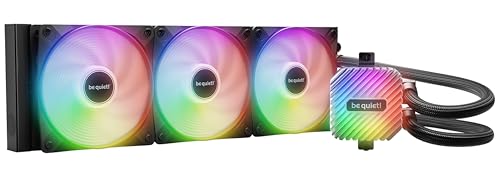
1. be quiet! Light Loop 360mm Black CPU Liquid Cooler
Our pick — 4.5+★ from 400+ verified ratings; the strongest balance of quality and price.
The build that tames a noisy rig by spinning three fans slower instead of louder.
If your current cooler is the loudest part of your PC, this is the one to look at first. Three Light Wings LX 120mm fans push 61.8 cfm of air across the radiator at a maximum of 2100 rpm — a modest ceiling that keeps the whole assembly in the background instead of in your ears. The pump uses a progressive IC in the motor, a small controller that softens the electrical switching noise the pump makes, so the whine you get from cheaper pumps is largely designed out.
This earns the top spot on the sum of its parts, not one big number. The cold plate (the copper face that touches your CPU) packs a high-density fin stack built for flagship and high-end CPUs. A metal jet plate speeds liquid flow across it. The whole loop weighs 1.5 kg — heavier than the Cooler Master 360L Core at 1 kg, which tells you there is real metal in the radiator. That weight is the trade-off too: do not hang this from a thin top panel without checking your case’s load rating.
Got a lot of gear to wire up? The ARGB-PWM-Hub (a small splitter board for fan power and lighting) keeps that tidy. One PWM header (the fan power plug) and one ARGB header (the lighting plug) on your motherboard can drive up to 6 PWM fans and 6 ARGB components. It mounts anywhere in the case with adhesive tape or screw holes that line up with a 2.5″ SSD mount. There is also a refill port, which is unusual at this level — you can top the loop up instead of throwing it away when coolant slowly evaporates.
Where it earns the top slot
- Three 120mm fans cap at 2100 rpm, so load noise stays a hum rather than a roar
- Hub runs 6 PWM fans and 6 ARGB parts off one header each
- Refill port lets you top up the loop instead of replacing it
- Cold plate fin stack built for flagship and high-end CPUs
The honest counterweight
- At 1.5 kg it is heavier than the Cooler Master 360L Core’s 1 kg
- Rated 36.8 db — higher on paper than several cheaper units here
- Refilling is a maintenance step most buyers will never bother with
Made for: builds where silence matters more than a spec-sheet decibel number, especially rigs with several fans and light strips to wrangle.
Think twice: if your case top panel is thin or weight-limited — the 1.5 kg radiator wants solid mounting.
2. ID-COOLING FX360 PRO 360mm AIO CPU Cooler
Entry-level money, but the airflow numbers belong to a much pricier cooler.
Here is the number that matters: 82.5 cfm. Light Loop 360 manages at 61.8 cfm. You feel that in a hot room or a small case where air gets stale — the extra throughput keeps the fin stack fed instead of letting heat pool behind it. The pump runs at 2900RPM±10% and the whole loop is rated for 350W of heat, which covers mainstream gaming chips with room left over.
Cooling performance is what wins people over here — it is the single most-praised thing about this cooler, and it is not hard to see why. Buyers report it handles a 5900X without drama, and one puts a figure on it: one buyer reports the chip staying “under 65°C” under load. The build feels substantial for the tier, with a pump cover carrying a CD-style pattern and all-black fans that disappear into a dark case.
The catch is sound. Noise is the mixed note in the feedback — fine at idle and mid-load, noticeable when the fans ramp to their 2900 rpm ceiling. The other thing to know is fit: the fans daisy-chain to each other, which genuinely tidies your cable runs, but the bracket list covers Intel LGA1851/1700/1200/1151/1150/1155/1156 and AMD AM4/AM5 only. If your board is older than that, this is not your cooler.
Airflow-per-cost leader: 82.5 cfm from three 120mm fans and a 350W rating puts serious heat-moving capacity in the budget tier — the honest compromise is fan noise at full tilt.
Reach for this if: you want maximum air shifted for the least outlay and you run a case with restricted airflow.
Look elsewhere if: you want a silent system at full load — the fans make themselves known.
3. Cooler Master 360L Core AIO CPU Liquid Cooler
The crowd favourite for a reason: it drops your temperatures and barely whispers doing it.
This is the most-reviewed 360mm unit on this list, and buyers have pushed its rating to 4.7. Keeping temperatures down under sustained load is what reviewers praise most. The numbers back it: three 120mm ARGB fans rated to 71.93 cfm (cubic feet of air moved per minute), a 1800 rpm ceiling, and a rated noise figure of 27.2 db. A fan rated that quiet at full speed is genuinely unusual at this level, so you can leave the PWM curve (the fan speed curve) aggressive without the build turning into a wind tunnel.
The Gen S dual-chamber pump splits the liquid path and targets hot spots with a redesigned copper base, which raises both flow and pressure through the loop. Cooler Master even bundles CryoFuze thermal paste with a rated conductivity of 14W/mK, so you are not hunting for a tube on build day. The frosted fan blades scatter the ARGB rather than throwing sharp dots of light, which reads better through a mesh front panel.
Know one fit note up front. The bracket list covers AMD AM5/AM4 and Intel LGA 1851/1700 sockets (the CPU mounting standards), but some owners mention trouble with AM4 mounting — treat the supplied hardware carefully and follow the printed instructions in order. It is also the tallest-ish radiator of the group next to the Light Loop, at 1.1 in versus 1.06 in, so give it clearance by a hair in tight builds.
Your pick when: you want proven cooling with a genuinely low noise ceiling and do not require a display or hub features.
Check first: if you are on AM4, budget time for the bracket fit — some installs need extra care.
4. MSI MAG Coreliquid A13 360 AIO ARGB CPU Liquid Cooler

A pump that out-spins every rival here, wrapped in tubing built to keep the liquid inside.
The headroom figure is the story. This cooler is rated to 3800 rpm — versus the 1800 rpm ceiling of the Cooler Master 360L Core above. That ceiling is not something you will run daily, but it buys you a deep reserve for the handful of minutes a benchmark or a long compile pegs every core. The pump is a three-phase unit integrated into the radiator, running ceramic bearings to keep that spin from turning into a buzz.
Build quality is the aspect buyers single out most here, and the spec supports the impression. The liquid travels through 390mm tubes made of triple-layered netted plastic under reinforced mesh sheathing, an arrangement designed to keep water inside the closed loop over years of use. Reviews note stable temperatures under long sessions, and one buyer puts a figure on it: one buyer reports the CPU holding 35°C during heavy gaming. The aluminium radiator uses a split-flow design, sending coolant along more than one path so the heat spreads before it reaches the fans.
Fitment is broad and simple — the bracket covers AMD AM5 and AM4 plus Intel LGA 1700, with thermal paste in the box. Note the declared weight of 5.4 pounds; this is a dense assembly, so plan the mounting angle before you start. The listed low noise figure of 14.4 db sits well under the be quiet! Light Loop’s 36.8 db rating, and while box figures never tell the whole story, a pump designed around low resonance is the right place to start.
The reserve argument: 3800 rpm of pump speed and mesh-sheathed tubing make this the pick if you want a cooler with margin for extreme loads rather than a perfectly tuned daily hum.
One caution: at 5.4 pounds it is by far the heaviest unit in this group — mount it on a panel that can take the load.
5. Thermalright Frozen Warframe 360 SE ARGB V2
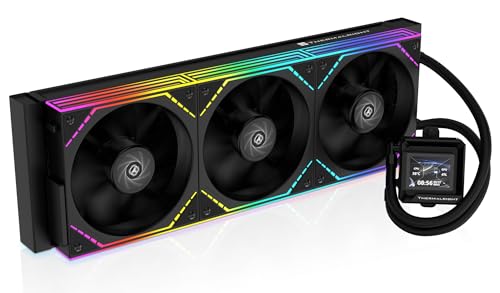
A 2-inch screen on the pump, so your temperatures climb out of the BIOS and into your build.
Most coolers here light up; this one talks. The 2″ LCD on the pump head can show live system status, load a custom image, or play an animated GIF, all pushed through Thermalright’s own software. That is the case for it if you are building something you actually look at — the pump becomes the focal point instead of a glow you stop noticing after a week.
Underneath the screen, the loop is properly sized: a 397×120×27mm aluminium radiator, a 3000RPM pump, and three TL-M12Q 120mm PWM fans that top out at 2000 rpm while moving 68.9 cfm at 2.21mmH2O of pressure. Those fans daisy-chain together, which trims the number of cables running back to the board. Customers note it keeps a 14700K within temperature specs while staying quiet.
It fits current-generation builds — AMD AM5/AM4 and Intel LGA1851/1700/1200/115X all appear on the bracket list, and it carries a 5-year warranty. Weigh what the screen costs you in attention: you will spend time in the Thermalright software to get a GIF looking right. The 2000 rpm fan ceiling also makes this a moderate-pressure setup, not an all-out airflow monster. For a display-first build, that is a fair trade.
Go for it if: your PC is on the desk and the pump head is the showpiece — the 2″ LCD is a real differentiator.
Maybe not if: you want airflow above all else and will never open the display software.
6. ARCTIC Liquid Freezer III Pro 420

Three 140mm fans and 110 cfm — the most air moved by anything on this list.
Surface area wins here. This cooler uses three 140mm P14 PRO fans on a 420mm radiator to move 110 cfm, and the gap to the rest of the field is stark: the be quiet! Light Loop manages 61.8 cfm and the ID-COOLING 82.5 cfm. If you are cooling a high-core-count chip that dumps heat the moment you open a render queue, that extra volume is the difference between a fan curve that stays polite and one that ramps hard.
The design choices are all pointed at real-world heat. The cold plate is offset toward the CPU hotspot on both Intel and AMD mounts, so more of the plate sits over the part of the chip that actually gets hottest. There is an integrated PWM-controlled fan that cools the voltage converters around the socket, a part of the board most AIOs ignore entirely. And the fan cables are routed inside the hose sheathing, so only one cable shows at the motherboard.
Two things to plan around, both flagged in the feedback. Installation splits buyers down the middle — straightforward for some, fiddly for others — so read the bracket instructions twice before you start. And at 420mm, case fit is the real gate: this is the longest radiator in the group by a clear margin, and your chassis either lists 420mm support or it does not. Noise is similarly loved-and-loathed, so set a custom fan curve rather than trusting the default.
Why the big-radiator crowd picks it
- 110 cfm from three 140mm fans — the highest airflow figure in this group
- Offset cold plate aims heat transfer at the CPU hotspot
- Dedicated VRM fan cools the voltage converters beside the socket
- Fan cables hidden inside the hose sleeve leave one clean connection
What to plan around
- A 420mm radiator only fits cases that explicitly support that length
- Mounting steps trip up some buyers — take the bracket slowly
- Default fan behaviour needs tuning to hit the quiet it is capable of
Built for: big cases and hot chips — if your chassis takes a 420mm and you want maximum surface area, this is the one.
Skip the queue if: your case tops out at 360mm support; you will not get this bolted in.
7. NZXT Kraken Plus 240 RGB
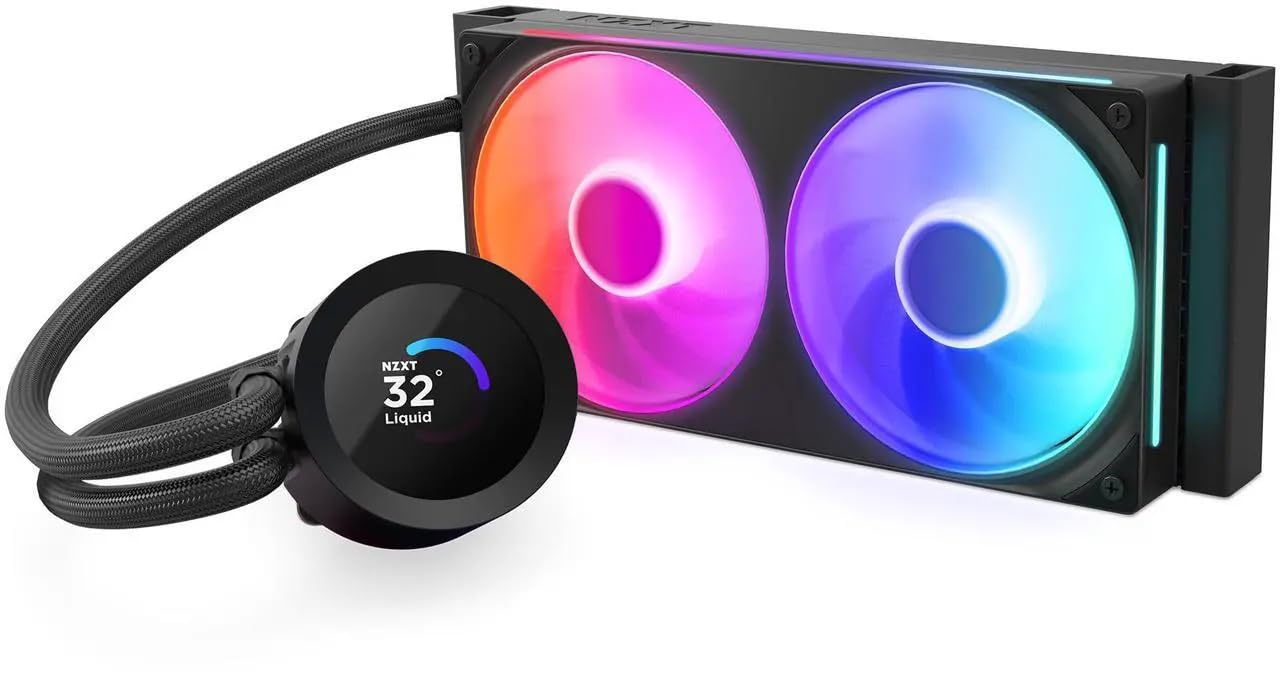
The screen-and-silence pick for builds that have no room for a three-fan radiator.
A 240mm radiator is the answer when your case will not swallow a 360mm, and this is the shortlist entry for that situation. It uses a single-frame RGB Core fan rather than two separate fans, which means four screws and one cable instead of a tangle — a real difference on a first build. The 1.54″ square LCD on the pump head displays live system temps, custom images, GIFs, or even web integrations like Spotify and YouTube, all through NZXT’s CAM software.
Cooling is what buyers praise most, and the Turbine pump is built for high flow and head pressure rather than raw rpm, so temperatures stay low without the fans having to shout. NZXT rates it at 30 db, and the fans themselves are consistently called out as very quiet. Reliability is the other recurring theme: this is the kind of block people leave in a build for years.
Two honest notes. At 0.5 kg it is the lightest unit here by a wide margin — great for a compact case, but it means less metal in the radiator than the 360mm picks. You are trading surface area for size, and that is exactly what a 240mm is. Value also gets mixed reactions: the screen is a big part of what you are paying for, so if you would never touch CAM (the NZXT control software), the appeal thins. Pre-applied thermal paste and a single breakout cable do make the install quick, and the brackets cover AM5 and LGA 1851 tool-free.
Small-case verdict: a 240mm radiator with a genuinely useful LCD and a pump tuned for quiet — the compromise is surface area, not build quality.
Right choice for: small-form-factor and mid-tower owners who want a display and low noise but cannot fit three fans.
Pass if: you have 360mm clearance and want maximum radiator area instead.
8. NZXT Kraken Core 360 RGB

Full 360mm cooling with the cabling of a much smaller cooler.
What sells this one is the wiring. The fans sit in a single solid frame, so you use fewer screws and run fewer cables, and the whole thing connects straight to your motherboard with no separate RGB controller in the chain. The 3100 rpm pump keeps the CPU cool through gaming and multitasking while the PWM fans spin to a curve you set.
The fan blades are shaped for high static pressure — the quality that lets a fan push air through a radiator’s dense fins rather than bouncing off them. Airflow is rated at 75.05 cfm, which sits between the Cooler Master’s 71.93 cfm and the ID-COOLING’s 82.5 cfm. Reviews put load temperatures in the low-50s Celsius and note it keeps pace with NZXT’s pricier models.
The noise story is split: plenty of builds run this without complaint, while a few encounter rattling from the fans at certain speeds. That is the sort of thing a fan curve or a quick check of the mounting screws usually settles. At 1.78 kg it is a real radiator with real mass, and the rated 31.9 db is competitive with the rest of the 360mm group without being the quietest. If you want CAM-ready lighting and a tidy interior, this delivers both.
Pick it if: cable management is your priority and you want a 360mm loop that plugs straight into the board with nothing extra.
Hesitate if: you are chasing the absolute lowest noise figure — a couple of builds report fan rattle.
9. ASUS TUF Gaming LC III ARGB 360
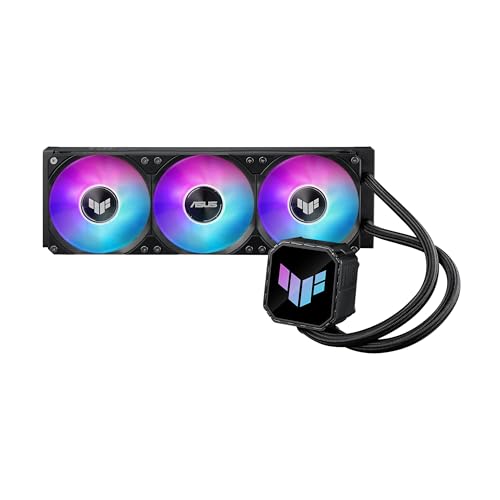
The cooler for a TUF board, from a build where every part matches on purpose.
Two specs carry this one. First, the fans: TUF Gaming MF-12 units rated to 90.78 cfm with 3.82 mmH2O of static pressure, running from 650 up to 2600 ± 10% RPM. That pressure figure is the highest in this group, and pressure is what pushes air through a radiator when the fin stack is tight. Second, the tubing: reinforced, sleeved rubber at 400mm, which is longer than most here and gives you slack to route around a big graphics card.
The rest is built for easy assembly. The pump uses a three-phase, six-slot, four-pole motor (a smoother-running pump design). The fans arrive pre-installed on the radiator, so you are not screwing twelve holes on build day. The water block is copper with an 80.9 x 77 x 67.1 mm housing. AURA Sync ties the lighting into the rest of an ASUS ecosystem, and the TUF Gaming software shows real-time hardware status. Reviewers point out load temperatures around 50°C.
The caveat: this is the least-tested unit here — the rating count is small, so the track record is thinner than the other picks. It is also the loudest on paper, rated 37.4 dB(A), and the most expensive of the group. None of that makes it a bad cooler. It suits someone building a TUF-themed rig who wants the matched look and the reinforced tubing, and who is happy to run a custom fan curve to keep the noise down.
The pressure argument: 3.82 mmH2O of static pressure (the push that forces air through a radiator’s fins) and 90.78 cfm put this at the top of the group for pushing air through a radiator. The 400mm sleeved tubing also gives it the reach for a large graphics card.
Worth knowing: it is the loudest-rated unit on this list at 37.4 dB(A), and its review history is the shortest — a fitting-first buy, not a value play.
For the matched build: a TUF motherboard, TUF case, and this cooler — the AURA Sync lighting and reinforced tubing are the point.
Consider the alternatives if: you want more of a real-world track record or a lower rated noise figure.
Know the Specs
Radiator size: 240mm, 360mm or 420mm
Radiator length is set by how many fans it carries: a 240mm takes two 120mm fans, a 360mm takes three 120mm, and a 420mm takes three 140mm. More surface area usually means each fan can spin slower for the same heat removal, which is how you get a quieter system. It is also the first thing your case will veto, so check the chassis support list before anything else. A 420mm radiator like the ARCTIC’s will not go into a case built around 360mm mounts.
Fan airflow and static pressure
Airflow, measured in cfm (cubic feet per minute), is the volume of air a fan can move in free space. Static pressure, measured in mmH2O, is how hard it can push air through a restriction — and a radiator’s dense fins are exactly that kind of restriction. A high-cfm fan with weak pressure can stall on a radiator, so serious buyers read both numbers. The ASUS unit here pairs 90.78 cfm with 3.82 mmH2O; the ID-COOLING pairs 82.5 cfm with 2.55 mmH2O.
Common Questions
Will a 360mm AIO fit in my mid-tower case?
Is a 420mm radiator worth it over a 360mm?
What does static pressure in mmH2O actually mean for a radiator fan?
Do these coolers work with Intel LGA 1851 and AMD AM5?
How long should an AIO cooler last before it needs replacing?
Is a 240mm AIO enough for gaming, or do I need a 360mm?
Can I swap the fans on these AIO coolers for my own?
What is the difference between an AIO and a custom water loop?
How much noise does pump speed add compared with the fans?
Where should the radiator go in the case?
The Bottom Line
The winner of this water cooling aio roundup is the be quiet! Light Loop 360mm Black. It pairs three 120mm fans capped at 2100 rpm with an ARGB-PWM hub that runs six fans and six ARGB components off one header each — a genuinely tidy, quiet build for anyone with a lot of gear to connect. If you would rather have the most airflow for the least outlay, the ID-COOLING FX360 PRO moves 82.5 cfm and is the value play here. And for a big case that can take a 420mm radiator, the ARCTIC Liquid Freezer III Pro 420 is the one to reach for.
How we choose
We do not accept paid placement. Every pick is matched to a real buyer and a real use-case; we do not hands-on test units.
Sources
Specifications: manufacturer listings and product documentation. Review insights: verified customer reviews, as of November 2026. Pricing: not shown on this page (it changes often); check the current price via the retailer link.
As an Amazon Associate, Tactical Gear Guy earns from qualifying purchases. This does not affect which products we feature.