Specs are compiled from manufacturer listings and verified buyer reviews and can change over time — please confirm the key details on the product page before buying.
You want free live TV on the phone already in your pocket, without paying for a stream or hunting for Wi-Fi. A USB tuner stick does exactly that: you plug it into your Android phone, attach a small antenna, and the phone pulls in free over-the-air stations. This guide gives you the four sticks worth considering, what each one really does well, and the honest catch you need to know before you buy.
This guide is built by comparing the manufacturers’ published specifications and the patterns across verified customer reviews, so you get each pick’s real strengths and trade-offs instead of marketing spin.
A quick honesty note first: these are matched by what they do — feed a phone over the air — not every one is the exact model number you searched. Here is what actually matters in a tv antenna for phone.
Top Picks

How To Choose The Best TV Antenna for Phone
Free TV on your phone depends on three things: the plug your phone uses, the app that runs the tuner (the part that picks up broadcast channels), and whether the antenna can pull in a signal where you sit. Get all three right and a USB tuner stick turns your Android phone into a portable television. Miss one and you get a blank screen with no clue why.
Match the connector to your phone first
This is the step most people skip, and it is the one that decides whether the stick works at all. Newer Android phones use a USB Type-C port — an oval plug that fits either way up — so a Type-C stick drops straight in. Older phones use Micro USB, which needs either a Micro USB stick or a Type-C adapter in the box. Check your charging port before anything else.
Know which Android phones will refuse to run it
Some sticks will not drive certain brands, and that is a hard limit, not a setup error. If your phone is on the excluded list for a given stick, the free app simply will not see the tuner no matter how carefully you install it. Confirm your exact phone model is supported before you order.
The tuner type is ATSC — that is the free broadcast standard
Every stick here is built around an ATSC tuner. That is the free over-the-air broadcast standard used in the United States, Canada, and Mexico, meaning the TV travels through the air on broadcast signals rather than your data plan. No internet, no 4G, no Wi-Fi, and no monthly bill.
Expect to install an app and sometimes a driver
A stick is not always ready the moment it leaves the box. The Android models here lean on a free player app from the app store. The PC-focused models need a driver and playback software installed first, and that setup step is where most frustration lives. Budget a few minutes with the instructions.
Side-by-Side Comparison
All four are USB tuner sticks that feed free ATSC broadcast TV into your device. The three columns that decide your purchase are the connector, the tuner standard, and what the device is built to run on.
| Model | Best For | Connector | Tuner | Works With | Amazon |
|---|---|---|---|---|---|
| MyGica Mirco USB TV Tuner (PT681)★ Best Overall | Most people with an older Android phone | Micro USB / wireless antenna | ATSC | Android phones and tablets | Amazon |
| Micro USB TV Tuner with Type C Adapter | Type-C owners who want an adapter included | Micro USB + USB Type-C adapter | ATSC | Android phones and tablets | Amazon |
| MyGica PT682C USB TV Tuner | Plug-and-go Type-C viewing | USB Type-C | ATSC | Mainstream Android phones and tablets | Amazon |
Detailed Reviews
1. MyGica Mirco USB TV Tuner Card (PT681)
The Micro USB stick that turns an older Android phone into a live TV set with recording built in.
This is the pick that lines up with the widest spread of Android phones and tablets, because it lives on Micro USB and pairs with a wireless antenna you set beside you. The tuner is a full ATSC unit, so the free broadcast stations come straight out of the air. Watch them live, pause and rewind with time-shift recording, and pull up the EPG to see what is on next.
The part that earns it the top slot is the recording side. You can capture Free-To-Air shows and save the files right onto your phone or tablet, so a game you caught on the bus is still there later. The included free app handles all of it: changing channels, checking the program guide, and managing recordings. Setup is quick, and some buyers report pulling in up to 65 stations where the signal is strong.
Here is the catch, and it is a big one for some buyers. This stick cannot be used with Samsung phones and tablets, full stop. Everyone else on Android should be fine. Treat it as an Android-first device for non-Samsung handsets, and the experience lands where you want it.
What earns its top billing
- Full ATSC tuner pulls free broadcast stations with no internet or data plan
- Time-shift recording lets you pause, rewind, and fast-forward live TV
- Save recorded Free-To-Air shows straight onto your phone or tablet
- EPG program guide and free app make channel surfing simple
Where it will not help you
- Does not work with Samsung phones or tablets
- Success depends on how strong the over-the-air signal is where you sit
Reach for this if: you own a non-Samsung Android phone or tablet and want live TV plus recording in one stick.
Look elsewhere if: your phone says Samsung on the back — this one simply will not drive it.
2. Micro USB TV Tuner Card with Type C Adapter
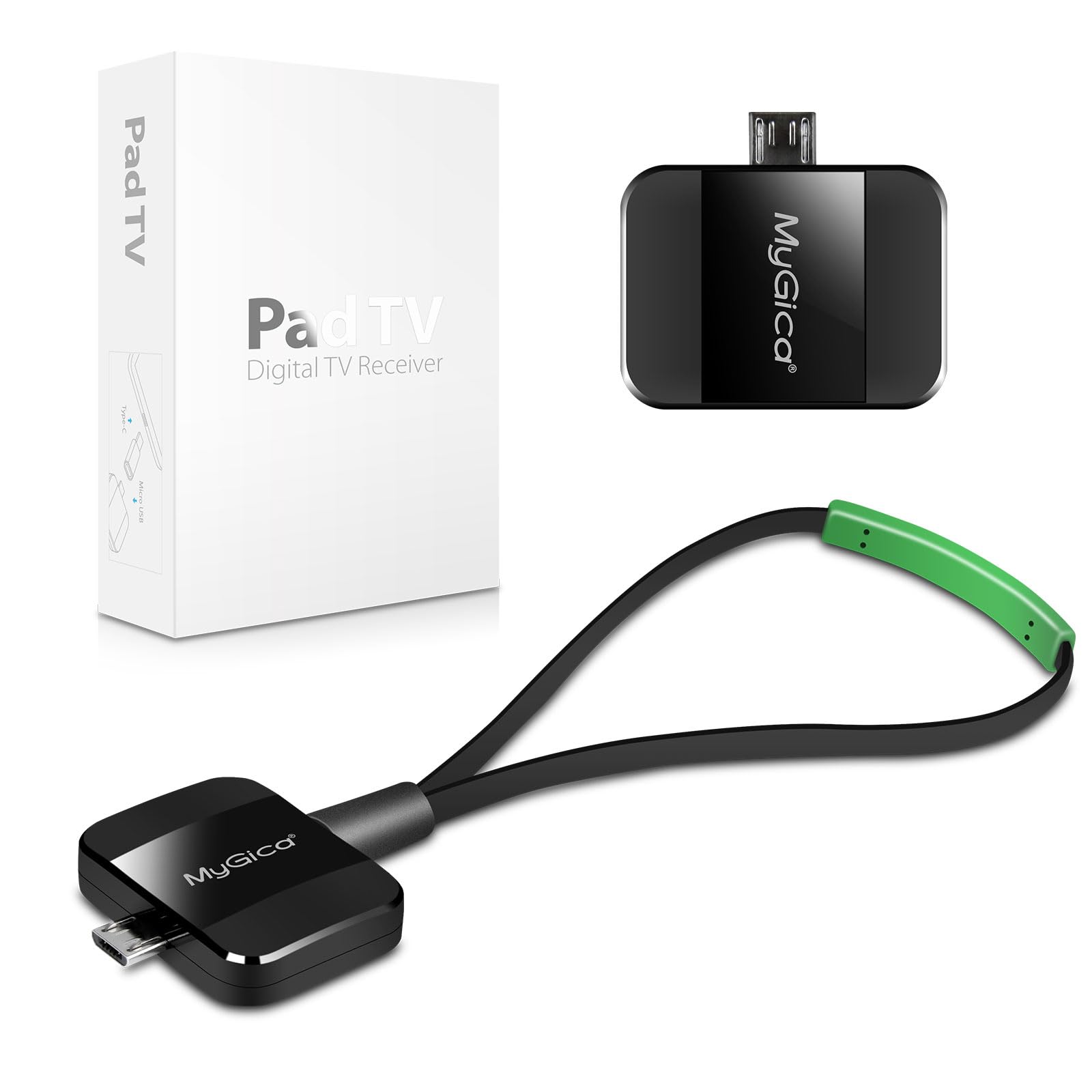
A Micro USB tuner with a Type-C adapter in the box, so one stick fits both Android ports.
If you have bounced between an older Micro USB handset and a newer Type-C one, this is the stick that follows you. It ships as a Micro USB tuner with a USB Type-C adapter in the box, so the same device fits both ports. The tuner is ATSC, meaning free over-the-air stations with no 3G, 4G, or Wi-Fi connection and no data burned from your plan.
The design leans on a small rope antenna and a genuinely tiny body, and there is no driver to install — you plug it into the phone and go. You will still need to download the PAD TV HD player app to your phone to watch, which is the one setup step. The maker also frames it for live sports on the move, from football games to public transport and subway rides, since it runs purely off the air signal.
The honest caveat is compatibility. It is built for Android phones and tablets and does not claim to cover every model, so confirm your handset works before you commit. And since the base tuner is Micro USB with an adapter on top, a Type-C phone is running through that extra connection rather than a native port.
The connector trick: one box covers both a Micro USB phone and a Type-C phone, so you are not locked out when you upgrade handsets.
Set your expectation: the PAD TV HD app is required, and the adapter is the path to Type-C rather than a native plug.
Who it beats the others for: anyone who wants a single stick that fits a household of mixed Android ports.
The trade-off to accept: it runs through an adapter on Type-C phones and leans on one specific player app.
3. MyGica USB TV Tuner PT682C (USB Type-C)

The Type-C stick that skips the adapter and goes straight into a modern Android phone.
This is the one to look at if your phone charges over a USB Type-C port and you want the cleanest possible connection. The connector is native Type-C — no adapter in the chain — and the tuner is ATSC, so the free stations arrive over the air without a data plan. Point the antenna, plug it in, and the phone becomes the screen.
What many owners experience is a quick setup and a healthy channel haul. Owners commonly report a wide range of stations, with some pulling up to 65 channels where the air signal is strong. That wide coverage plus the official Type-C fit is exactly why it sits near the top of this list for modern Android handsets.
Now the honest limit, and it is the same one that dogs this entire category: Samsung phones are a compatibility question mark here. Owners describe it running well on some devices, like the Galaxy S9, while failing on Samsung models more broadly. Confirm your exact handset against the listing before you buy, because the tuner will not talk to a phone it does not recognize.
Reasons it stands near the top
- Native USB Type-C connector with no adapter needed
- ATSC tuner for free over-the-air stations, no internet required
- Owners mention up to 65 stations in strong signal areas
- Fast setup once the free player app is installed
The fine print on your phone
- Samsung compatibility is genuinely hit-or-miss across models
- Channel count rises and falls with how strong the local signal is
The straight answer: a modern Android phone with a Type-C port gets the simplest plug-in path of the bunch.
Check before clicking buy: if your phone is a Samsung, verify the model works with this tuner first.
Know the Specs
ATSC Tuner — Your Free TV Signal
ATSC is the free over-the-air broadcast standard used across the United States, Canada, and Mexico. A stick with an ATSC tuner turns broadcast signals into channels your device can display, with no data plan or Wi-Fi involved. All four picks here are ATSC tuners, which is why they promise live TV without a subscription.
Micro USB vs USB Type-C — Matching Your Port
Micro USB is the older, narrower Android plug; USB Type-C is the newer oval plug that fits either way up. A native Type-C stick (like the PT682C) drops straight into a modern Android phone. A Micro USB stick needs either a Micro USB phone or a Type-C adapter in the box to connect. Match this before anything else — it decides whether the stick connects at all.
Plug and Play vs Driver Install
Some sticks are ready once you install a free player app from the app store. Others, especially the PC-focused ones, first need a driver and playback software installed before anything shows on screen. That install step is where most “it does not work” stories begin. Read the instructions and finish setup before judging the signal.
Signal and Channel Count
These sticks pull in stations from the air, so how many you get depends on signal strength where you sit — not on your phone. Channel reception can be strong in one spot and weak in another. Pick a stick known for a wide channel haul in good conditions, then expect the count to shift with location and antenna placement.
Common Questions
Will these tuners work with my Samsung phone?
Do I need internet or a data plan to watch?
What is the difference between Micro USB and USB Type-C here?
Which free app do I need to install?
Can I record live TV with these sticks?
How many channels should I expect to get?
Will the A681B work on a Mac?
Which pick is easiest to set up on a phone?
Can I use one of these on a tablet or a car screen too?
Do these work if I move to another country?
The Bottom Line
For a non-Samsung Android phone or tablet, the MyGica PT681 is the strongest all-rounder — it pulls free ATSC stations, records shows to your device, and adds time-shift so you can pause live TV. It is the one to grab if you want recording built in. If your phone is a modern Type-C handset, the MyGica PT682C wins on a clean native connection with no adapter in the chain. And for the mixed-port household, the Micro USB tuner with the Type-C adapter fits both phones with one box. Whatever you choose, verify your exact phone model first — connector and brand compatibility decide the whole experience.
How we choose
We do not accept paid placement. Every pick is matched to a real buyer and a real use-case; we do not hands-on test units.
Sources
Specifications: manufacturer listings and product documentation. Review insights: verified customer reviews, as of November 2026. Pricing: not shown on this page (it changes often); check the current price via the retailer link.
As an Amazon Associate, Tactical Gear Guy earns from qualifying purchases. This does not affect which products we feature.