Specs are compiled from manufacturer listings and verified buyer reviews and can change over time — please confirm the key details on the product page before buying.
If your PC sounds like a hairdryer on a bad day, the fix is usually one of two things: not enough airflow, or the wrong fans pushing it. Every pick below moves real air at 120mm, the size that fits the front, top, and rear mounts on almost every current case. The differences that matter are airflow in CFM (cubic feet per minute — how much air a fan shifts), static pressure in mmH₂O (how hard it pushes through a radiator or mesh), noise in decibels, and how the cables connect. Match those four specs to your case and radiator, and the build runs cool and quiet.
This guide is built by comparing the manufacturers’ published specifications and the patterns across verified customer reviews, so you get each pick’s real strengths and trade-offs instead of marketing spin.
The list below is split by what each fan actually does best, so you can match one to your case instead of guessing. From reverse-blade showpieces to a whisper-quiet 80,000-hour workhorse, this is the shortlist of 120mm pc fans.
Top Picks
How To Choose The Best 120mm PC Fans
A 120mm fan is the safest bet in PC building because nearly every case is drilled for it. The mistake most first-time builders make is assuming a bigger RPM number means a better fan. It doesn’t. A fan spinning at 3000RPM can be louder than three fans at 1500RPM while pushing less usable air through a radiator. You want the fan that moves the air your case actually needs, at a noise level you can live with.
Airflow first, then static pressure
Airflow, measured in CFM, is how much air the fan moves when nothing is in its way — perfect for open case intake and exhaust. Static pressure, measured in mmH₂O, is how hard it pushes when something blocks the path, like a dense radiator or a mesh front panel. Case fans leaning on airflow are usually fine; anything bolted to a liquid-cooler radiator needs pressure. A fan with high CFM but weak pressure will starve a radiator.
PWM control and connector type
PWM stands for pulse-width modulation — a 4-pin connector that lets the motherboard slow the fan down when the PC is idle and spin it up under load. If your fan only has a 3-pin connector and no PWM, it tends to run at one fixed speed and you lose that quiet-at-idle benefit. Check your motherboard headers before you buy. ARGB lighting adds a separate 5V 3-pin cable on most of these fans, so plan for two connections per fan unless the pack daisy-chains.
Noise, bearings, and how many you need
Decibels are logarithmic, so a jump of a few dB is more noticeable than it sounds. Most of the fans here sit in the mid-20s to low-30s range at full tilt, which is quiet-to-tolerable in a closed case. Bearing type matters too: fluid dynamic (FDB) and rifle bearings use a fluid film instead of metal-on-metal contact, which quiets the fan and usually stretches its lifespan. Buy a 3-pack or 5-pack if you’re filling a whole case — three intake and two exhaust is a common setup for an ATX tower.
Side-by-Side Comparison
| Model | Best For | Max Speed | Airflow | Noise Level | Amazon |
|---|---|---|---|---|---|
| AsiaHorse COSMIQ★ Best Overall | Showpiece lighting | 2000 rpm | 68.5 cfm | 29.2 db | Amazon |
| ARCTIC P12 Pro ReverseTop Performer | Glass-front builds | 3000 rpm | — | 0.08 sones | Amazon |
| Thermalright TL-M12Q X3Best Value | Best airflow per dollar | 2000 rpm | 68.9 cfm | 28.2 db | Amazon |
| Thermalright TL-C12C-S X5 | 5-pack clearance | 1550 rpm | 66.17 cfm | 25.6 db | Amazon |
| NZXT F120Q | Quiet case airflow | 1700 rpm | — | 25.1 db | Amazon |
| Thermaltake CT120 EX | Magnetic daisy-chain | 2000 rpm | 57.05 cfm | 28.5 db | Amazon |
| Cooler Master MF120 Lite | Budget ARGB 3-pack | 1750 rpm | — | 30 db | Amazon |
| be quiet! Pure Wings 3 | Silent radiator duty | 1600 rpm | 49.9 cfm | 25.5 db | Amazon |
| Noctua NF-A12x25 G2 | Premium all-rounder | 1800 rpm | 107.3 m³/h | 22.5 db | Amazon |
Detailed Reviews
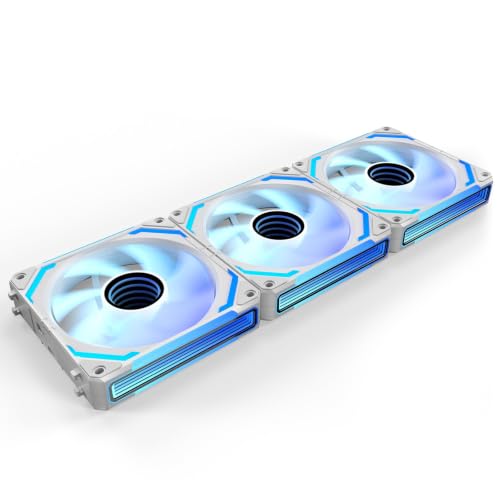
1. AsiaHorse COSMIQ 120mm PC Case Fan, Infinity Mirror FDB
Our pick — 4.5+★ from 500+ verified ratings; the strongest balance of quality and price.
An infinity-mirror ARGB fan that makes a glass side panel the focal point of the build.
Three fans at 68.5 CFM and 2.05mmH₂O static pressure each cover a whole ATX tower’s intake. That pressure figure is what lets them push through a mesh filter without choking, so the air actually reaches your GPU instead of pooling behind the front panel. Speed runs from 800 to 2000RPM, so you get near-silent idle and a real gust under load. Each fan draws 12V and 6.24 watt-hours, and the 4-pin PWM header lets the motherboard manage the curve automatically.
The infinity mirror is the headline, and it’s a genuinely different look from a single glowing ring — light bounces between layers so the effect reads deep instead of flat. Built-in sound pickup drives 8 music rhythm modes, and 5V 3-pin ARGB sync means your motherboard can control all three at once. The interlocking daisy chain is the practical win: three fans share one run of cable, which keeps the back of your case from turning into spaghetti. A dedicated controller ships in the box so you can set lighting without hunting for a spare header.
What wins people over is the build quality, which is the thing most discussed in the review pages by a wide margin. The recurring gripe is the controller and its short cable reach — plan to mount it somewhere you can actually see when you want to change modes. The daisy-chain connectors also expose their pins, so guide the connectors straight on rather than forcing them at an angle.
What earns its place up top
- 68.5 CFM with 2.05mmH₂O gives real push through a mesh front panel
- 800–2000RPM PWM range keeps idle near-silent and load strong
- Interlocking daisy chain cuts three cables down to one run
- Infinity mirror ARGB with 8 music-sync modes and a bundled controller
The honest trade-offs
- Controller cable is short and needs a reachable mounting spot
- Exposed daisy-chain pins demand careful alignment
- Runs at its loudest near full 2000RPM — set a sensible fan curve
Made for: glass-panel builds where the fans are on display and you still want 68.5 CFM of real cooling.
Think twice if: you have no free 5V 3-pin ARGB header and no patience for a controller — the lighting side needs a plan.
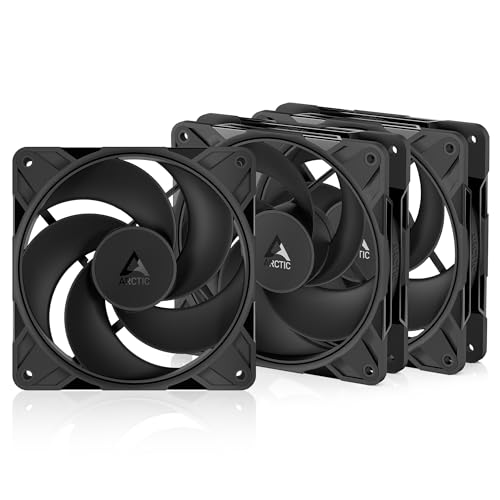
2. ARCTIC P12 Pro Reverse – 3 Pack – 120 mm Premium Fan
Reverse blades that keep your glass panel clean while still shoving air through a radiator.
Here’s the trick: these fans pull air in from the back side, so the pretty face of the fan points outward and the rear-intake look stays tidy. That’s why they suit glass-fronted cases and any build where a normal fan’s bracket would spoil the view. At full tilt they hit 3000 rpm, which is the highest ceiling on this list — 1.9x the speed of the Thermalright TL-C12C-S X5’s 1550 rpm ceiling. You won’t run them there in a quiet build, but that top end plus high static pressure means dense radiator fins get air they’d otherwise miss.
PWM control is progressive, and the fan stops entirely below 5% PWM for a semi-passive idle. Precise manufacturing with automatic balancing keeps vibration down, and the self-lubricating fluid dynamic bearing is built to run long and quiet. The Y-cable splitter lets two fans share one motherboard header, which matters when your board has more fans than headers. At 167 g each, they feel denser in hand than the price suggests.
The honest catch is the reverse design itself: it’s purpose-built for a look, so if you don’t need rear intake, a standard fan gives you more arrangement freedom. Also note the fans reach their peak near the top of the RPM range, and a 3000 rpm fan is not a whisper machine up there — set a curve. Mounting screws aren’t called out in the bundle, so check you have a set. For a client build where clean wiring and quiet operation both count, these land well.
Fit for the job: Reverse airflow plus 3000 rpm gives you the rare combo of a tidy glass-front look and enough pressure for a dense radiator.
Buy it if you don’t mind: Tuning your fan curve — the top end is a tool, not a default.
Best matched to: reverse-intake layouts and radiator builds where the fan face is visible.
Look elsewhere if: you need a standard orientation fan for a conventional front intake.
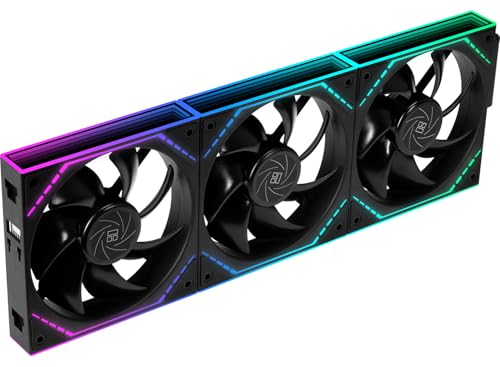
3. Thermalright TL-M12Q X3 120mm PC Case Fans, 3-Pack
Three 68.9 CFM fans with mirrored lighting for the price of one premium fan.
The airflow number is the story. Three fans each rated at 68.9 CFM and 2.21mmH₂O of pressure cover a whole tower without breaking a sweat. That airflow edges the 66.17 CFM of the Thermalright TL-C12C-S X5, and topping it off with 2000 rpm of PWM headroom means you can push a mesh intake hard or settle into a quiet curve. The dual-side infinity mirror lights the blades from both faces, so the look reads full even in bottom or side fan positions.
For cable management, the pack is built to daisy-chain: one cable for power and one for ARGB across the run, which is the sort of thing that normally takes an afternoon of zip ties. Compatibility is straightforward with 4-pin PWM and 5V 3-pin ARGB motherboard headers, and the fans show up running with no software fiddle. Fans weighing 0.18 kg each sit in the frame with a solid, uniform feel.
One thing to plan for: the fan noise creeps up slightly over the first few weeks as they bed in, so a gentle curve keeps things civil. The Infinity Mirror styling is a taste call — if you want dark and understated, this isn’t that fan. For most builders chasing airflow per dollar with lighting on top, this is the pack that punches above its tier.
Why it’s the value leader
- 68.9 CFM and 2.21mmH₂O outpace several pricier single fans
- 3-pack price lands well below the premium picks for the same mounting size
- One-cable daisy chain for power and ARGB keeps builds clean
- Dual-side infinity mirror lights up bottom and side positions
Worth knowing before you buy
- Noise can tick up slightly as the fans wear in — a set curve helps
- The bright mirrored look is bold, not subtle
- Requires a 5V 3-pin ARGB header for full lighting control
Pick this if: you want maximum airflow per dollar with mirrored RGB on top.
Pass if: your build is a quiet, no-lights sleeper.
4. Thermalright TL-C12C-S X5 120mm ARGB Fan, 5 Pack

Five fans, twenty screws, and enough airflow to fill a case with RGB.
This is the pack you buy when the whole case needs dressing. You get five fans at 66.17 CFM and 1.53mmH₂O, with 20 mounting screws and a manual in the box. The speed tops out at 1550 rpm, well short of the ARCTIC’s 3000 rpm ceiling, but that lower ceiling is exactly why it stays quiet: 25.6 dBA at full speed and soft silicone corner pads that soak up vibration. The S-FDB bearing is a fluid-dynamic design for long, smooth operation.
Lighting isn’t an afterthought — the atomizing ARGB blades spread light softly across the frame, with up to 17 modes and 5V 3-pin sync. The 55cm cable run is long enough to reach front-panel headers on most mid-towers. Five fans covers three intake plus two exhaust with a spare, or fills a radiator push-pull if you’re running a thick one.
The pressure figure is the one place this fan sits behind the pack — 1.53mmH₂O is on the lighter side, so it’s happiest as a case fan rather than bolted to a dense radiator. If you’re cooling a big open case and want the best value by count, this is the one. Five fans at 66.17 CFM each is the single biggest volume of airflow you’ll buy in one box here.
Where the value lands: Five 66.17 CFM fans plus screws and manual means a full case dressed at once.
The light-pressure caveat: 1.53mmH₂O is modest, so treat these as case fans, not radiator champions.
Who it suits: builders filling a full tower or running a multi-fan RGB layout on a budget.
Who should skip: anyone cramming a high-density radiator that starves a low-pressure fan.
5. NZXT F120Q 120mm Quiet Airflow PC Case Fan

A single case fan that stays at 25.1 db while keeping the whole box breathing.
NZXT built this one for airflow over raw pressure. Nine sickle-style blades with a minimal gap to the frame boost the spinning area, and the chamfered frame shapes the air into a concentrated stream that reaches deep into the case. PWM control lets the speed move with system temperature, and the fluid dynamic bearing is rated for a 60,000-hour lifespan. Speed runs to 1700 rpm.
The single-fan packaging makes this an easy repair or add-on: drop it in a bottom intake or a top exhaust without buying a whole pack. Owners who’ve put it in NZXT’s own H9 Flow and H5 cases report it doing exactly that job. One caution from those builds: mind the CPU power cables when you’re threading a top mount.
It’s one fan at one speed ceiling, and 1700 rpm won’t win a radiator comparison against a 2000 rpm or 3000 rpm fan. The square frame is exact — helpful for lining up cleanly, occasionally fussy in a bay that isn’t perfectly squared. Where it earns its keep is quiet, steady case airflow with zero lighting fuss. No lighting, no controller, no fuss — just steady 25.1 db case airflow.
Reach for this: a quiet, single 120mm for bottom intake or top exhaust duty.
Keep looking if: you need several fans at once or high static pressure for a radiator.
6. Thermaltake CT120 EX ARGB Sync, 3-Fan Pack
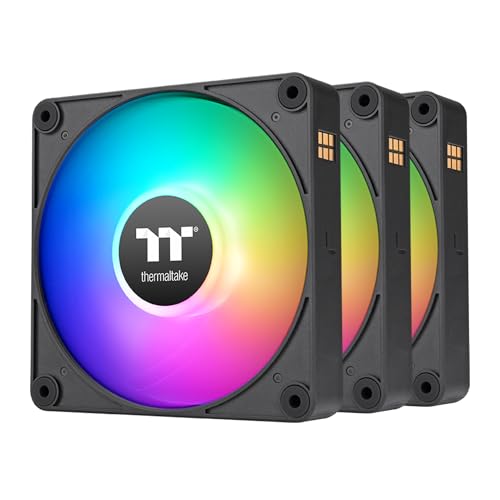
Fans that snap together by magnet and share one cable — cable management, solved.
The MagForce 2.0 magnetic connection is the reason to care about this pack. Fans link face to face with no wire between them, so a three-fan run becomes one cable to the motherboard and one ARGB line. For anyone who’s fought a bundle of fan wires behind a PSU shroud, that’s the whole pitch. Airflow comes in at 57.05 CFM at up to 2000 rpm, comfortably enough for intake or exhaust in a mid-tower, and the anti-vibration mounting is built into the frame.
Lighting is 9 addressable LEDs per fan, controlled through 5V motherboard sync across 16.8 million colors. The tune hydraulic bearing keeps operation quiet at 28.5 db, and 4-pin PWM gives the standard automatic curve. It’s a strong option for a first-time builder who wants the polish of a clean interior without a rat’s nest of wires.
Two fair cautions. First, the magnets are strong enough to hold the chain but a little weak if you grab all three and move them together — lift them one at a time. Second, this is not the highest-airflow pack on the list at 57.05 CFM, so if outright cooling volume tops your list, a 68.9 CFM set like the TL-M12Q X3 moves more air. You’re paying partly for the wiring magic.
The magnetic advantage
- MagForce 2.0 links fans with no interconnecting wires, one cable per run
- 9 addressable LEDs per fan with 5V motherboard sync
- Hydraulic bearing keeps noise at 28.5 db
- Anti-vibration mounting built into the frame
Where it asks for care
- Magnetic links can separate if you carry all three fans as one piece
- 57.05 CFM trails the highest-airflow packs on this list
- Value is a matter of taste — the wiring is what you’re paying for
Best for: a clean-glass build where tidy wiring matters as much as the 57.05 CFM airflow.
Skip if: you want the maximum CFM per fan and don’t care about cable count.
7. Cooler Master MF120 Lite ARGB 120mm PWM, 3-Pack

Three ARGB fans with a wide 650–1750 rpm PWM band for tight case budgets.
The hybrid PBT frame and revised curved blades are the functional core — a redesigned frame for stability with the airflow focused through the blade sweep. The PWM range is the widest here at 650 to 1750 rpm, so you get a low floor for quiet idle and reasonable headroom for load. The frosted blades do a good job spreading light, and the ARGB header extender lets you daisy-chain to the motherboard or a splitter.
At 30 db it’s the loudest on this list, but that’s a full-tilt figure — the frosted-light look and plug-and-play behavior with MSI RGB controllers and SignalRGB get frequent mention in the reviews, and the pack ships with a splitter cable. If you’re already using a Cooler Master 240mm radiator, these fit the aesthetic and install easily.
The honest limitation is static pressure: these fans favor airflow over pressure, so a dense radiator may not be their best home. They’re a strong case-fan pack for the money, and a fair pick if you want three lit fans and don’t mind the higher peak noise. Just set a moderate curve.
Wide-range value: A 650–1750 rpm PWM band plus ARGB splitter makes three fans go a long way.
The pressure note: Airflow-first blades mean case duty, not radiator duty.
Best for: budget ARGB builds that need three fans and a splitter cable.
Avoid if: you’re mounting to a dense radiator or need sub-25 db at full speed.
8. be quiet! Pure Wings 3 120mm PWM Triple Pack
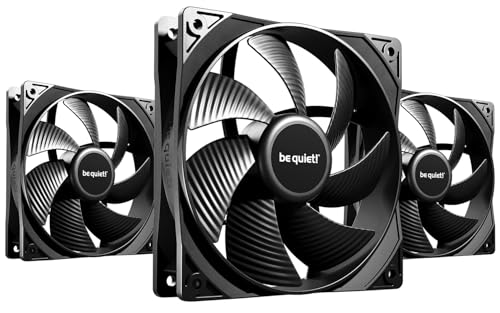
Three fans rated to a scale only a rifle bearing can claim — quiet for the long haul.
Three fans with seven airflow-tune blades, a redesigned frame outlet that cuts air leaks, and a blade angle tuned for more pressure. That combination is aimed squarely at radiator duty and demanding case configurations. Speed runs to 1600 rpm at 25.5 db, and the rifle bearing is rated for a lifespan of 80,000 hours. Rubber corners dampen vibration, and the build feels solid in hand.
What owners notice is the quiet — at moderate settings these are close to inaudible, and they play well with fan tuning software so you can dial them exactly where you want. The 4-pin PWM header handles automatic speed. For a workstation, media PC, or any build where the room needs to stay silent, this is the pack to buy.
Two things you should know. The airflow figure of 49.9 cfm is lower than the high-CFM packs here, so it’s a quiet-first choice rather than a blast-furnace one. And while these are aimed at radiators, the box doesn’t include radiator bolts or a multi-fan hub — you’ll need your own mounting hardware for a radiator install. Neither is a fault, just part of the territory.
What sells it: An 80,000-hour rifle bearing and 25.5 db operation make this the tranquilizer of the group.
The missing bits: No radiator bolts or multi-fan hub in the box — gather hardware before the install.
Right for: silent-first builds, radiators, and long-run workstations.
Not right for: anyone chasing maximum CFM or wanting everything in the box.
9. Noctua NF-A12x25 G2 PWM 120mm Fan

A 22.5 db Sterrox LCP fan with an SSO2 bearing rated past 150,000 hours MTTF.
Sterrox LCP construction and a progressive-bend impeller with winglets deliver high airflow and high pressure from one fan. Sterrox LCP construction, progressive-bend impeller with winglets, a centrifugal turbulator, flow acceleration channels and an AAO frame all combine to make this single fan both high-airflow and high-pressure. It has a 360–1800 rpm PWM range, stops fully at 0% PWM, and runs at 22.5 db — the quietest number on this list. The SSO2 bearing carries an MTTF above 150,000 hours and the fan is certified by UL and TÜV with protection against reverse polarity, over-voltage and over-current.
The accessory kit is serious: anti-vibration mounts, a 12cm anti-vibration gasket for a tight radiator seal, screws, a Low-Noise Adaptor, an extension cable, and a Y-splitter for running two fans off one header. In mini-ITX builds where every millimetre and decibel counts, this is the fan that makes the difference. One owner’s swap from a noisy AIO to these on a workstation took the machine from rattling to whisper quiet.
Two honest notes. One, the airflow spec is listed in cubic meters per hour (107.3 m³/h) rather than CFM, so comparing it head-to-head with a CFM fan means you’re reading different units — know what you’re matching. Two, the price is the highest here and the value question is real; this is a long-term investment fan, not a budget fill-the-case fan. The brown and beige scheme is unmistakable — some love it, some don’t.
Why the engineering earns the crown
- 22.5 db quietest on the list with 360–1800 rpm PWM control
- High airflow and high static pressure from one fan via Sterrox LCP construction
- SSO2 bearing rated MTTF over 150,000 hours
- Rich accessory kit including gasket, Y-splitter, and Low-Noise Adaptor
What the premium costs you
- Highest price of the group and only one fan per box
- Airflow listed in m³/h, not CFM, complicating easy comparison
- Brown/beige color scheme won’t suit every build’s aesthetic
Choose it when: silence and long-term reliability on a radiator or mini-ITX build matter most.
Think twice if: you’re dressing a whole case on a tight budget — this is a single-fan buy.
Know the Specs
Airflow (CFM) vs Static Pressure (mmH₂O)
Airflow in CFM tells you how much air a fan moves when nothing blocks it — the number that matters for open case intake and exhaust. Static pressure in mmH₂O tells you how hard it pushes when the path is obstructed, like a dense radiator or fine mesh filter. A high-CFM fan with weak pressure starves a radiator; a high-pressure fan can move less air in open space. Match the number to the job: case fans lean on CFM, radiator fans lean on mmH₂O.
RPM, PWM, and Noise
RPM is how fast the fan spins; PWM is the 4-pin control that lets the motherboard change that speed automatically. A wide PWM range (like 650–1750 rpm or 360–1800 rpm) lets a fan idle quietly and ramp under load. Decibels measure noise on a logarithmic scale, so a few dB is a bigger jump than it sounds — a fan at 22.5 db is meaningfully quieter than one at 30 db in a closed room. Set a sensible fan curve and you’ll rarely hear any of these fans at full tilt.
Common Questions
Will a 120mm fan fit my case and CPU cooler?
What’s the difference between a case fan and a radiator fan?
Do I need a 4-pin PWM fan?
How many fans should I put in my PC case?
Why would I want a reverse-airflow fan?
How long do these fans last?
Will the RGB sync with my motherboard?
Can I daisy-chain multiple fans off one header?
Is a higher RPM fan always better?
What’s the quietest 120mm fan on this list?
The Bottom Line
For most people building a 120mm fan setup, the AsiaHorse COSMIQ is the pick — 68.5 CFM of airflow, 2.05mmH₂O of pressure, and an infinity-mirror ARGB look that pulls double duty as a showpiece. If maximum airflow per dollar is the goal, the Thermalright TL-M12Q X3 delivers 68.9 CFM across a 3-pack, and the Noctua NF-A12x25 G2 is the straight answer when you want silence, pressure, and a bearing rated to outlast the build. Match the CFM, mmH₂O, and noise figures to your case and radiator, and you’ll end up with a PC you want to leave running.
How we choose
We do not accept paid placement. Every pick is matched to a real buyer and a real use-case; we do not hands-on test units.
Sources
Specifications: manufacturer listings and product documentation. Review insights: verified customer reviews, as of November 2026. Pricing: not shown on this page (it changes often); check the current price via the retailer link.
As an Amazon Associate, Tactical Gear Guy earns from qualifying purchases. This does not affect which products we feature.