Specs are compiled from manufacturer listings and verified buyer reviews and can change over time — please confirm the key details on the product page before buying.
If you are tired of fishing a key out of your pocket with an arm full of groceries, a smart lock on your front door solves that in one move: you walk up, touch or hover, and the door opens. The trick is picking the right one. Some read a palm vein without any contact at all, others lean on a fingerprint sensor that open up in a fraction of a second, and a few still do things the old way with a keypad and a backup key. The picks below cover every one of those approaches, so you can match the lock to how you actually come and go.
This guide is built by comparing the manufacturers’ published specifications and the patterns across verified customer reviews, so you get each pick’s real strengths and trade-offs instead of marketing spin.
Below you will find the access method, the battery story, and the weather rating for each lock spelled out in plain words, plus the honest catch that matters before you drill a single hole. My goal is simple: help you choose the right smart key system on front doors for your entryway.
Top Picks
How To Choose The Best Smart Key System on Front Doors
Buying a smart lock for a front door depends on three things: how you want to open the door, how the lock stays powered, and whether it survives your weather. Get those right and the rest is convenience. Get them wrong and you will be the person standing on the porch resetting a dead keypad in the rain.
Pick your open up method first
Every lock here offers at least a fingerprint, a keypad code, an app, or a physical key, and most offer several. Palm vein recognition reads the vein pattern beneath your hand with no contact, which helps when your fingers are wet or covered. Fingerprint sensors are faster to touch but less forgiving if your hands are damp or dirty. Keypad codes and fobs are the simplest way to hand out access to guests and contractors without copying a key.
Understand the battery plan
Some locks run on AA batteries that last months, others use a rechargeable pack you top up over USB-C. A dual-battery design with a short backup keeps the lock alive while you recharge the main pack. Look for a low-battery alert and a USB-C emergency port so a dead battery never means a locked-out night.
Check the weather rating and door fit
An IP rating tells you how well the lock keeps out water and dust — an IP54 or IP53 lock tolerates rain better than an unrated one. A BHMA or ANSI grade reflects how the lock is built to hold up over time. Before you buy, measure your door thickness and the existing lock holes, since most models install on standard pre-drilled doors with just a screwdriver.
Side-by-Side Comparison
| Model | Best For | Primary open up | Battery | Weather / Grade | Amazon |
|---|---|---|---|---|---|
| WYZE Palm Lock★ Best Overall | Touch-free entry | Palm vein recognition | 6-month main + 2-week backup | IP53 / BHMA3 | Amazon |
| Sifely Fingerprint DeadboltBudget Champion | Budget multi-method entry | Fingerprint / keypad / fob | AA batteries | — | Amazon |
| Veise VE06-LMost Versatile | Rentals and shared entry | App / code / IC card / key | — | IP54 / BHMA Grade 3 | Amazon |
| Veise VE017-L | Fast fingerprint + long battery | Fingerprint / code / fob | 4 AA, up to 12 months | IP55 / ANSI Grade 3 | Amazon |
| WYZE Auto-Lock Bolt v2 | Wi-Fi + AI fingerprint | Fingerprint / code / key | 8 AA, up to 8 months | IP53 / BHMA Grade 2 | Amazon |
| Tapo DL105 | Rechargeable, no AA waste | Fingerprint / keypad / app | Rechargeable, up to 1 year | IP54 / BHMA Certified | Amazon |
| Schlage Camelot | Simplest keypad deadbolt | Keypad + key | Battery (no motor) | — | Amazon |
| Philips 4200 Series | Built-in Wi-Fi + fingerprint | Fingerprint / keypad / app | Up to 6 months | — | Amazon |
| Philips Handle Set | Full front-door hardware swap | Fingerprint / PIN / app | Battery | — | Amazon |
Detailed Reviews
1. WYZE Palm Lock, Smart Door Lock with Palm Vein Recognition
Our pick — 4.5+★ from 850+ verified ratings; the strongest balance of quality and price.
The lock you open by hovering a hand — no key, no touch, no fumbling in the rain.
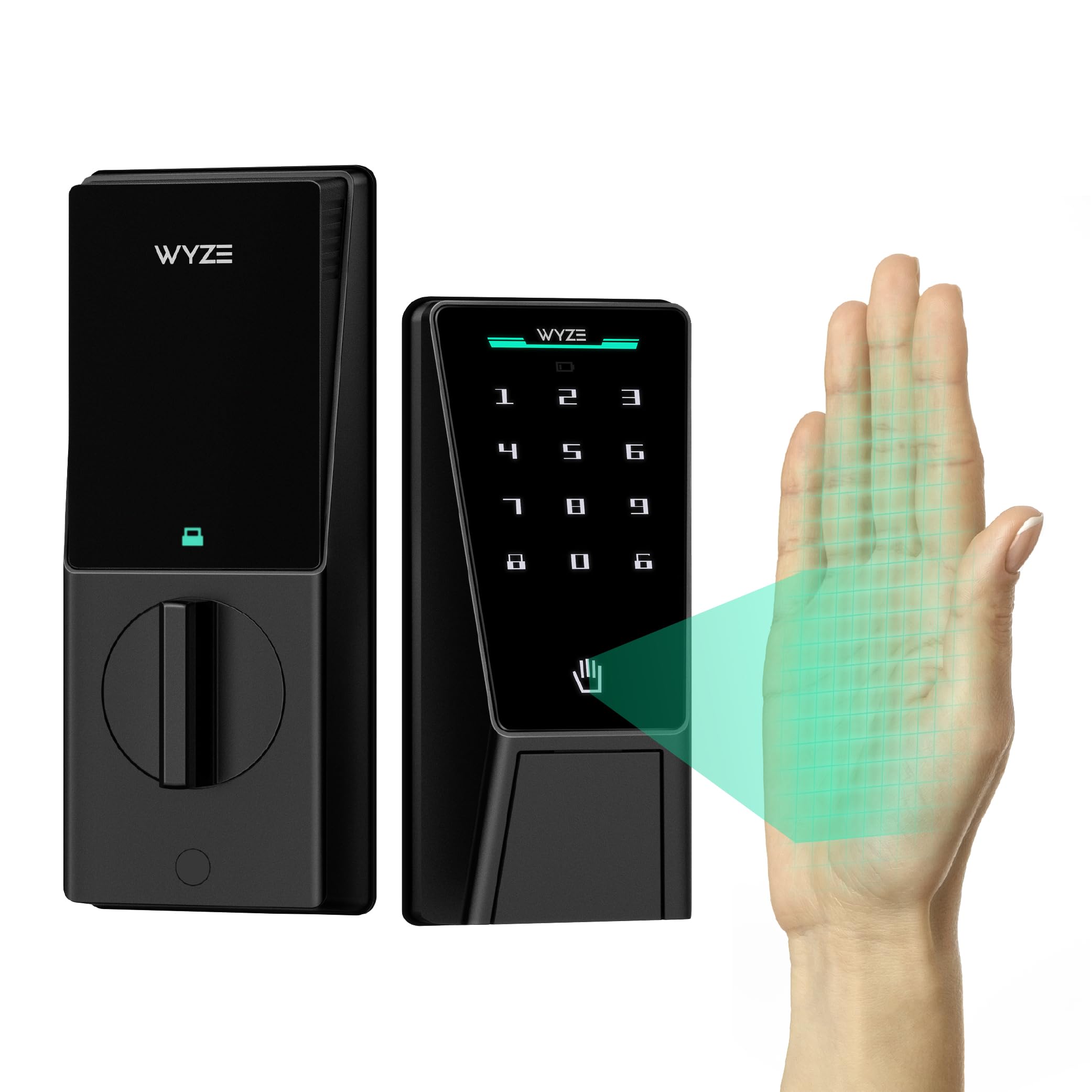
This is the pick for the household that wants the door open before a finger even lands. Instead of a fingerprint pad, the Palm Lock reads the vein pattern beneath your hand, so you hold your palm near the sensor and it open up with no contact at all. That matters when your fingers are wet from the garden hose or stuffed in gloves on a cold morning. It sits at 4.5+ stars across 800+ ratings, and owners credit the palm reader’s day-to-day reliability more than any single feature.
The battery setup is the standout here. A 6-month main battery runs alongside a 2-week secondary battery, and if both ever drain you charge it through the built-in USB-C port with any power bank. A built-in gyroscope reads the door’s angle and movement, so it auto-locks the moment the door actually closes instead of firing on a timer. For guests, you can set up to 50 unique or one-time codes on the lit keypad, and Anti-Peep Technology lets you add extra digits around your real PIN so nobody can read your code over your shoulder.
The engineering touches keep going. Millimeter wave radar — the same sensor type used in self-driving cars — detects a person rather than mere motion, so the lock only wakes when someone is actually standing there. That saves battery and makes the approach feel instant. It is rated IP53 for weather resistance and BHMA3 certified, it works with Alexa and Google Assistant, and you can even open up it straight from a Wyze Video Doorbell feed. There is still a mechanical key under a sliding cover if you want the old-fashioned reassurance.
Where it pulls ahead
- Palm vein entry needs no contact, so wet or gloved hands still open the door
- Dual-battery design with a 2-week backup and USB-C emergency charging
- Auto-lock driven by a gyroscope that reads the door’s actual movement
- Up to 50 codes with anti-peep digit padding on the keypad
Worth knowing before you buy
- It is the largest lock here — a notably bigger footprint than the compact Sifely unit
- Palm reading is a newer habit; some people take a week to stop reaching for the keypad
Best for: anyone who wants to walk up hands-full and have the door already open.
Think twice if: you want the smallest hardware on the door — this one has real presence.
2. Fingerprint Smart Deadbolt Lock
Five different ways through one door, and it slips onto a standard hole with nothing more than a screwdriver.
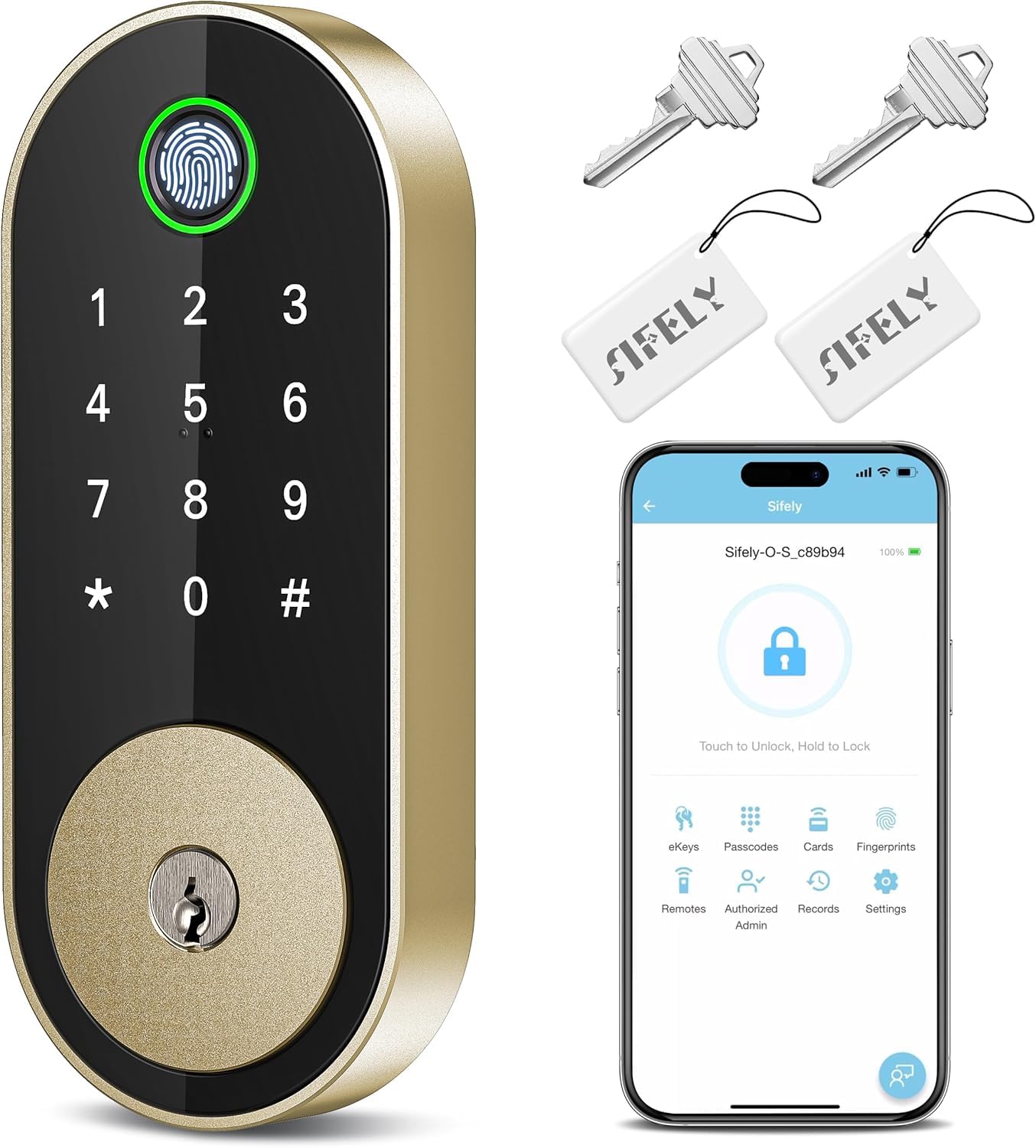
If you run a rental or a busy house where everyone comes and goes on their own schedule, this Sifely unit is built around handing out access. It offers fingerprint, keypad passcode, app, key fob, and mechanical backup key — five routes in. It supports over 100 fingerprints and over 100 access codes, which is enough for a whole extended family plus guests and tenants. Buyers report the install takes under 30 minutes with a screwdriver, and owners rate the zinc build highly for overall quality.
What sets this apart physically is how compact it is. It measures 6.3 x 2.6 x 1.9 inches and weighs 2 pounds, against the 12.71 x 8 x 3.62 inches of the Wyze Palm Lock — so it sits far less chunky on the door. The lock body is zinc. You get auto-lock after entry, Privacy Mode for when you want the door sealed, and Passage Mode for the moving-day traffic where the door stays open. Anti-peep passcodes and low-battery alerts round out the everyday convenience.
The honest caveat is real-world consistency. The fingerprint sensor and the locking performance draw mixed feedback — some owners find the reader works fine, others find it finicky, and the app-connected auto-lock can jam now and then. That is the trade-off at the entry-level end. If you want a lock you can trust with rough daily use and no wireless add-ons, this is a capable value pick; if you want flawless biometric reads, spend up to a step with a stronger sensor.
The value case: a five-way entry lock with room for 100+ fingerprints and 100+ codes for a fraction of the premium picks.
The catch: the fingerprint reader and app-driven locking are the parts buyers are least confident in, so set expectations accordingly.
Reach for this if: you need lots of codes and fobs for tenants and guests without spending much.
Look elsewhere if: your household relies on fingerprint speed every single day.
3. Veise VE06-L Smart Deadbolt Lock
A whole access-control system for the front door, with a card reader that holds 1,000+ cards.
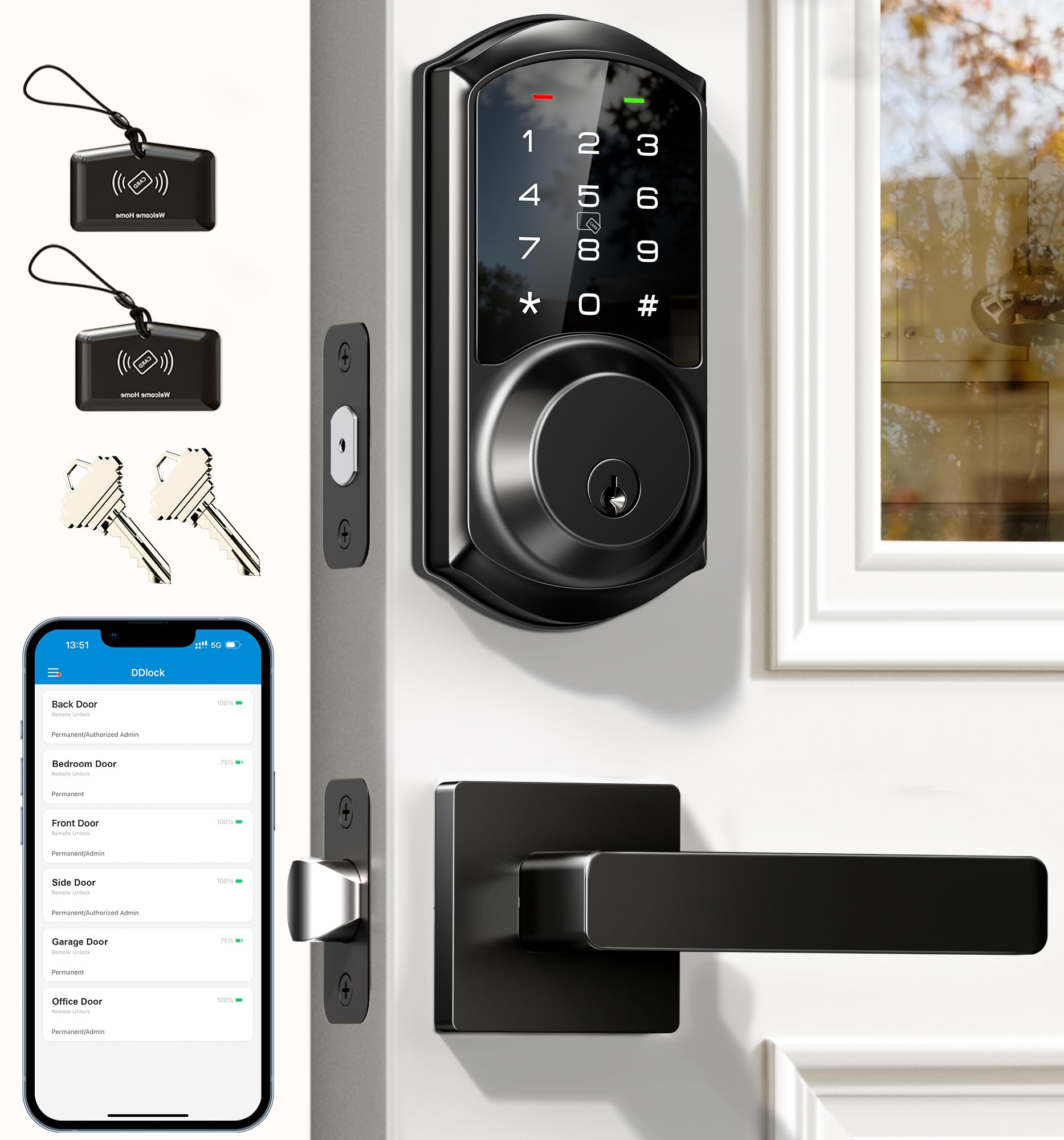
Landlords and property managers, this one was built for you. The VE06-L opens by app, code, web portal, IC card, e-key, authorized admin, key, or Apple Watch. The IC card capacity tops 1,000, and you can store 250+ passcodes — permanent, scheduled, recurring, or one-time that deletes itself after use. Auto-lock adjusts anywhere from 5 to 900 seconds, and holding the “#” key for 2 seconds locks it with one touch. The matte black finish and the included pair of lever handles make it look like a deliberate hardware upgrade, not an add-on.
Durability is spelled out plainly here. The body is solid zinc alloy, it is IP54 weatherproof, and it carries BHMA/ANSI Grade 3 certification with a stated lifespan exceeding 10 years. Security data — access records, user info, codes — is encrypted locally with AES and stored on the lock’s chip, so records never leave the device. You get Privacy Mode, Silent Mode, and Passage Mode in the app, plus a 1-year warranty that extends to 2 years with registration and US phone support on weekdays and Saturdays.
The thing to weigh honestly is the remote side and the climate. Remote lock and open up plus Alexa and Google voice require the G2 gateway, which is sold separately. And the weather rating, while real, has limits in a humid climate — humid and southern-area owners mention moisture eventually getting into the unit. For dry, moderate climates and for managing a stable of rentals, the card-and-code machine here earns its keep.
Standout strengths
- Eight entry methods including a 1,000+ capacity IC card reader
- Auto-lock adjustable from 5 to 900 seconds with one-touch lock
- IP54 rated, BHMA/ANSI Grade 3, stated lifespan over 10 years
- AES local encryption keeps access records on the lock’s own chip
Honest limitations
- Remote access and Alexa/Google voice need the G2 gateway, sold separately
- In humid, southern climates moisture can work its way into the unit
Suits: landlords, property managers, and hosts who hand out cards and codes to many people.
Skip for: a humid coastal front door where condensation is a constant.
4. Veise VE017-L Fingerprint Smart Lock
A 0.2-second fingerprint tap and a battery that runs a full year on four AAs.
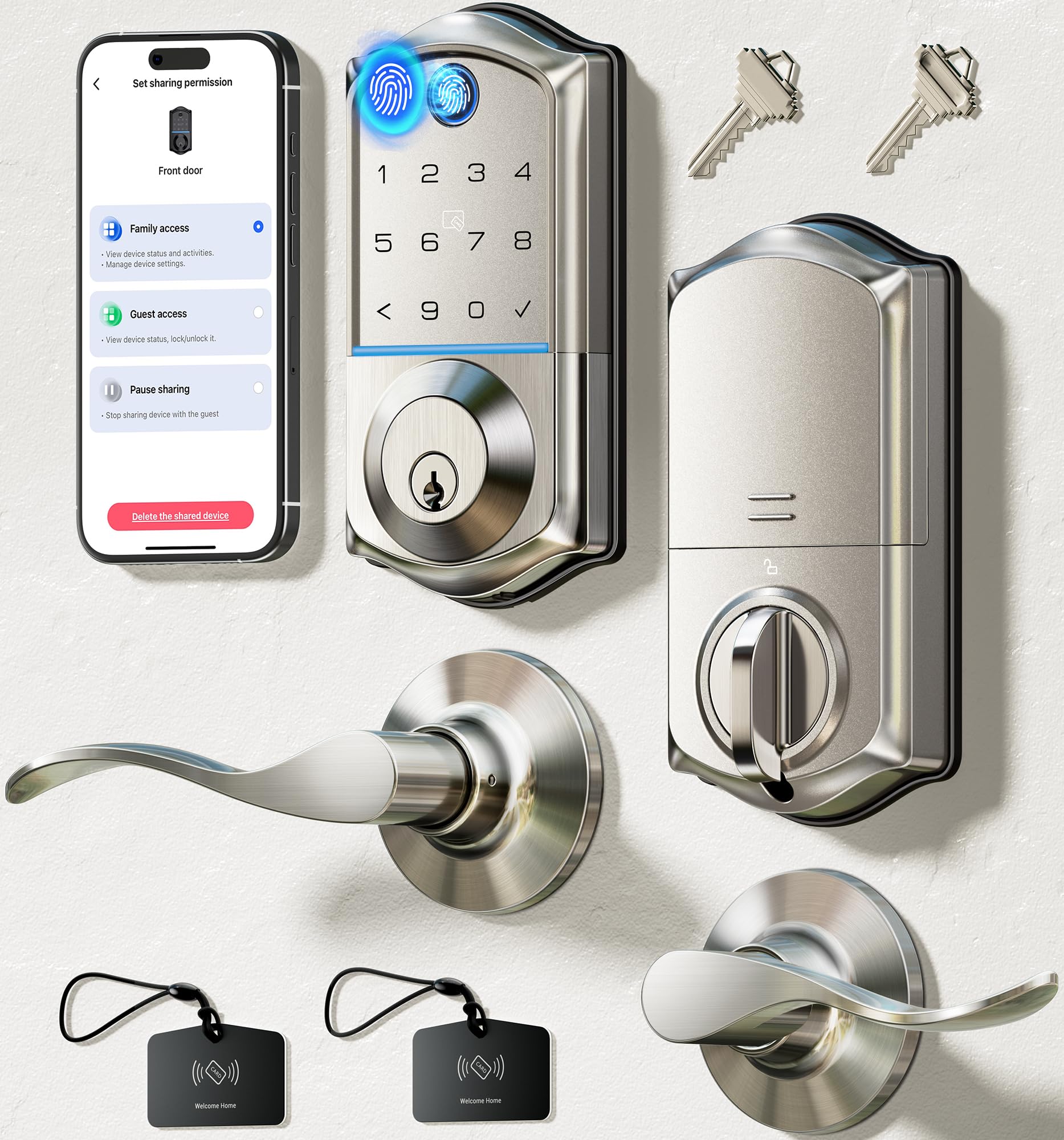
Speed and endurance are the two things this lock does well, and it does both without a monthly fee. The FPC sensor reads at 500DPI from any angle in 0.2 seconds, and AI self-learning sharpens its accuracy with every touch. You can name and manage a fingerprint for each person in the app. If you hate changing batteries, the four AAs (not included) last up to a full year of daily use, with low-battery alerts and a Type-C emergency charging port so you are never shut out.
Eight entry methods cover the household: app, fingerprint, 100+ codes, key fobs, a spare key, user authorization, code sharing, and auto-lock you can set between 10 and 180 seconds. You get 100 permanent or recurring passwords plus unlimited one-time and temporary codes shared straight from the app. The build is hold-up-first: IP55 waterproof, ANSI Grade 3 and BHMA standard, running fine from -35°F to 160°F, with AES-128 encryption, anti-peep passwords, and a solid zinc-alloy handle. It installs with a screwdriver in about 10 minutes on standard US doors 1-3/8″ to 2″ thick, and it reads the door’s swing itself.
The one thing to plan around is remote access — that depends on the Veise G1 Gateway, sold separately. Without it, the app talks over Bluetooth, so you need to be near the door. Range and the 3-minute auto-lock ceiling are the limits to know going in. For a household that just wants fast, keyless entry and a battery that barely needs a thought, this is a tidy fit.
One-year power plan: four AA batteries run up to 12 months, with low-battery alerts and a Type-C emergency port as your safety net.
The gateway catch: remote open up from anywhere needs the G1 Gateway sold separately, and auto-lock maxes out at 180 seconds.
Ideal for: families adding fingerprints for each kid and leaving the keys behind.
Not for: anyone who needs to open up the door from across town without a separate gateway.
5. WYZE Auto-Lock Bolt v2, Wi-Fi Fingerprint Smart Deadbolt
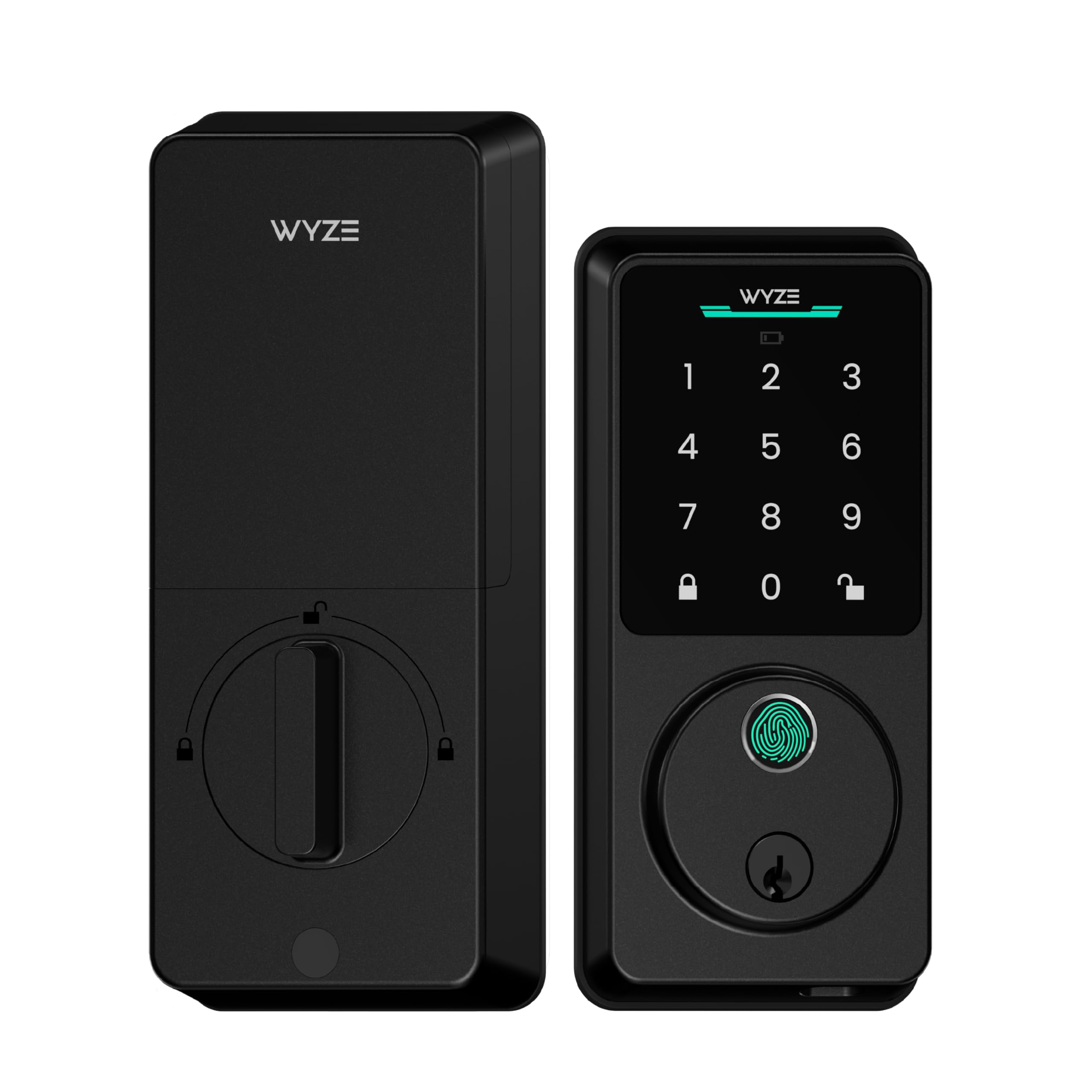
A scanner that learns your touch, a glass face that shrugs off smudges, and Wi-Fi already inside.
Where the Palm Lock trades on touch-free access, the Bolt v2 is the fingerprint specialist with Wi-Fi baked in — no gateway to buy. It open up in 0.5 seconds, and its tempered glass face is scratch- and smudge-resistant so the sensor stays clean and reads reliably. The AI learns from every touch, sharpening recognition over time so you stop getting re-scan moments at the door. That combination of a 0.5-second read and built-in Wi-Fi is what drives its 4.5+ star standing.
Power is straightforward and generous: 8 AA batteries are included and last up to 8 months. If they do die, the USB-C port lets you hold a power bank to the lock and get back inside. The app is where this really shines — built-in Wi-Fi means you check and manage the lock remotely from anywhere, and if you pair it with a Wyze Video Doorbell you can open up from the live feed after seeing who is standing there. You get fingerprint, app, code, and a physical key as the guaranteed backup.
Two things to sort out up front. The lock has to sit in a well-aligned mortise hole to throw cleanly, so measure and prep carefully. And it weighs 2.2 pounds in an aluminum-and-glass body that reads a touch bulky in the box before it disappears onto the door. Set it up right and this is a fast, remotely manageable lock with a scanner that gets better the more you use it.
What earns it a spot
- 0.5-second fingerprint read on scratch- and smudge-resistant tempered glass
- Wi-Fi built in, so remote check-in needs no separate gateway
- 8 AA batteries included, up to 8 months, USB-C emergency backup
- IP53 rating and BHMA Grade 2 build
The trade-offs
- Needs a well-aligned hole to lock cleanly, so prep the mortise
- At 2.2 pounds it feels bulky before installation
Pick it when: you want built-in Wi-Fi and a fast-learning fingerprint reader without an add-on hub.
Pass if: your door’s existing bolt hole is out of alignment and you would rather not rework it.
6. Tapo DL105 Smart Wi-Fi Deadbolt
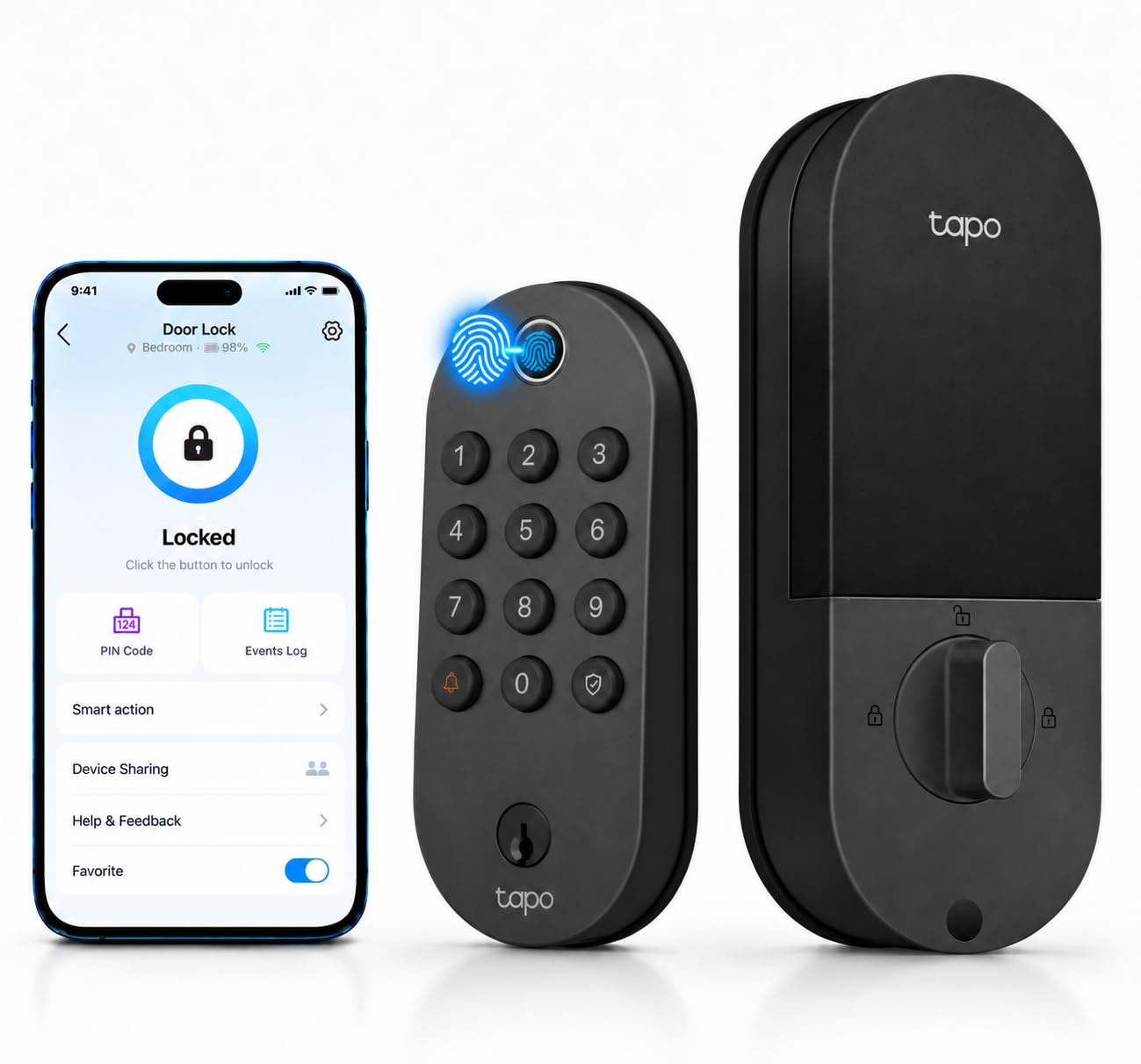
The rechargeable pick that runs up to a year a charge and never asks for a single AA.
If you are burned out on feeding locks disposable batteries, the Tapo DL105 is the answer. It delivers up to one year of operation per charge, and the built-in USB-C port lets you top it up without buying a pack of AAs. That makes it the most eco-minded option here, and the math is simple: charge it once and mostly forget it. The fingerprint sensor recognizes and open up in 0.5 seconds and stores up to 100 fingerprints.
Six ways in keeps everyone covered: fingerprint, custom keypad passcodes, the Tapo app, close-range Bluetooth, your smart home assistant, or the included backup keys. It works with Alexa, Google Home, and Samsung SmartThings. Guest access is flexible — custom permanent resident codes, or one-time and scheduled access for babysitters, cleaners, contractors, and delivery drivers. A detailed activity log with timestamps shows who came and went, and the auto-lock can be tied to other Tapo or Kasa devices so the door locks itself after your smart lights switch off.
On security and fit, TP-Link states it is a signatory of CISA’s Secure-by-Design pledge, and the lock is IP54 waterproof with a -22°F to 158°F operating range. It installs on standard 2-1/8″ and 1-1/2″ lock holes with no drilling in under 15 minutes. The honest fit note is reliability under hard use — the keypad and fingerprint reader can occasionally go unresponsive and need a battery reseat to come back. For most households that is an occasional nuisance, but it is worth knowing.
The rechargeable win: up to a year per charge over USB-C with a 100-fingerprint sensor and six open up methods.
Small caveat: when something glitches, a battery reseat is the usual fix — rare, but it happens.
Works for: the household that wants zero AA waste and a smart-home-linked door.
Think again if: you want a lock that never needs the occasional reset.
7. Schlage Electronic Keypad Deadbolt

No app, no Wi-Fi, no motor — just a keypad, a code, and a key when you need it.
Not everyone wants a connected lock. If your priority is a code instead of a hidden spare key, this Schlage is the stripped-back pick. It is a push-button keypad deadbolt with a key backup, and there is no wiring and no app involved. It installs on existing standard pre-drilled doors with a Phillips screwdriver. The Camelot trim in matte black gives the front door a clean, traditional look, and it carries a limited lifetime mechanical and finish warranty with a 3-year limited electronics warranty.
What keeps people coming back to this style is the battery life — since there is no motor to drive, it barely uses power, so a fresh battery stretches further. Owners also note it runs very quietly when it locks and open up. You can create unique codes for a housekeeper, contractors, or a pet sitter, then remove them when the job is done, without ever hiding a key under the mat. Its 4.0+ star standing reflects solid build quality and a screwdriver-only install most owners handle themselves.
The trade-off is what you give up. There is no fingerprint reader, no app, and no remote access, so it is a keypad-only door — a deliberate choice. And reliability draws mixed feedback: some owners run for years without trouble, while others hit a keypad that stops responding or a deadbolt that will not open from outside. If you want the simplest possible electric entry with no smart-home strings, this is a dependable, straightforward option.
Why the simplicity pays: no motor means minimal power draw and no app to fiddle with — just punch the code and go.
What you give up: no fingerprint, no app, no remote entry, and a small number of units develop keypad or bolt issues.
Right for: a renter-friendly or low-tech front door where a code beats hiding a key.
Wrong for: anyone who wants biometric or app access from their phone.
8. Philips WiFi Keypad Deadbolt
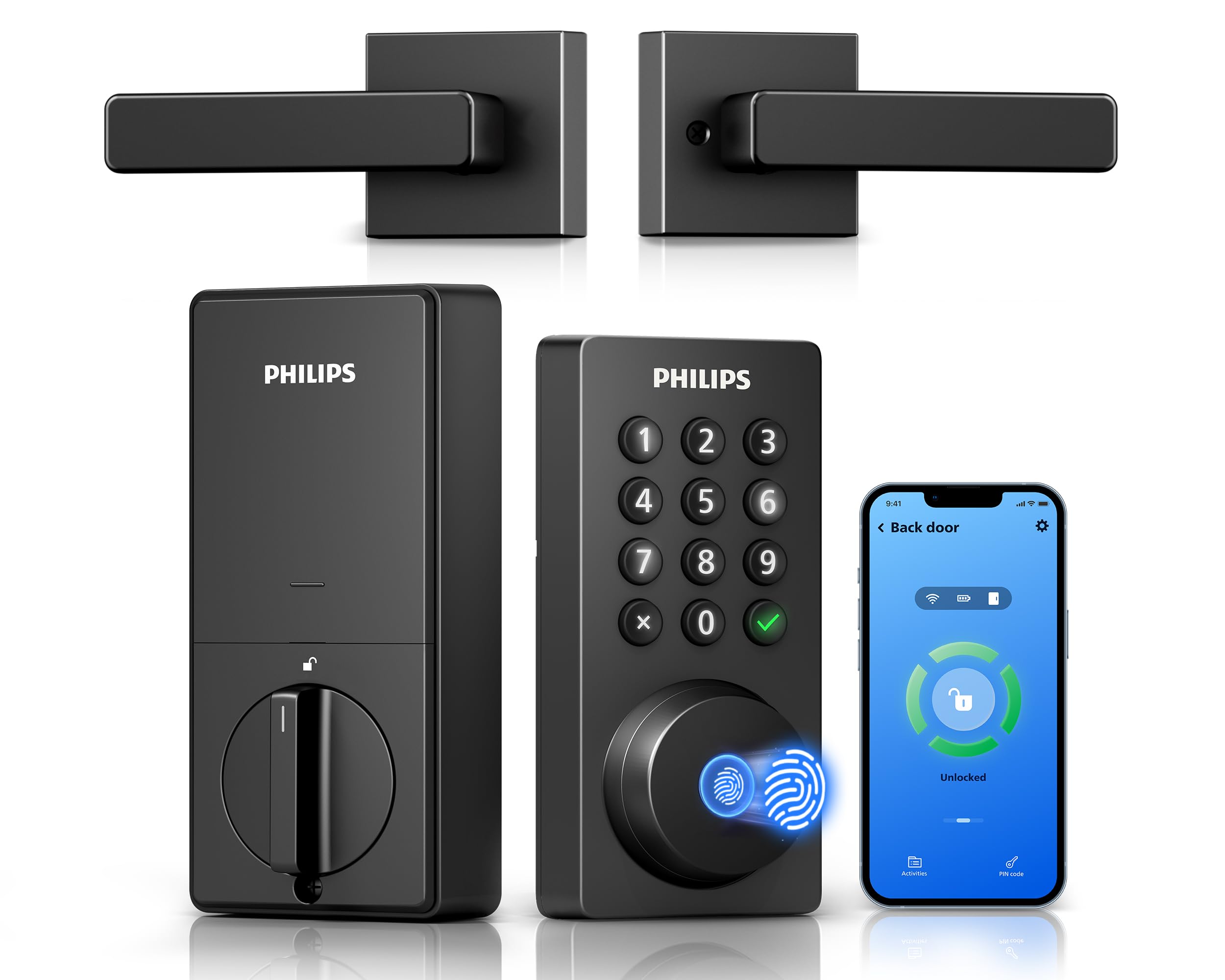
Built-in Wi-Fi and a handle set in one box — no extra hub, no extra hardware to buy.
The 4200 Series skips the add-on gateway entirely. It connects straight to your home’s 2.4GHz Wi-Fi, no hub or bridge needed, and you manage it through the Philips Home Access App from anywhere — lock, open up, manage codes and fingerprints, check status, and review access history. The fingerprint reader open up in 0.3 seconds and holds multiple prints for family and trusted visitors. It is the connected pick for a door that needs to be checked from the office or the airport.
The convenience features are thorough. A matching handle set is included, so you upgrade the whole front-door look in one go instead of buying hardware separately. You get permanent, one-time, periodic, and recurring PIN codes for guests, cleaners, and Airbnb guests, all shareable through the app. Auto-lock can be set anywhere from 0 to 180 seconds so you never wonder if you locked up. Voice control works with Alexa and Google Assistant to lock or check status hands-free, and it runs up to 6 months on standard 1.5V alkaline batteries with a low-battery alert.
The one thing to set up right is the Wi-Fi itself. Keep the lock within 33 ft (10 m) of your router with minimal walls and metal in between, and the connection stays strong. Wi-Fi is the mixed spot in owner feedback, so a router close by makes the difference. Note that auto-lock is off by default and has to be turned on in the app. Get the placement right and this is a very complete, all-in-one front-door package.
Why it connects so well
- Built-in 2.4GHz Wi-Fi needs no hub or bridge
- 0.3-second fingerprint plus an included handle set in one box
- Permanent, one-time, periodic, and recurring codes managed in the app
- Voice control with Alexa and Google Assistant
Setup notes
- Wi-Fi is the part owners are least confident in — keep it within 33 ft of the router
- Auto-lock is off by default and must be switched on in the app
- Standard 1.5V alkaline batteries only, not included
Go for it if: you want remote management and a fingerprint lock with no gateway add-on.
Hold off if: your router sits far from the front door with metal in the way.
9. Philips Smart Deadbolt Lock
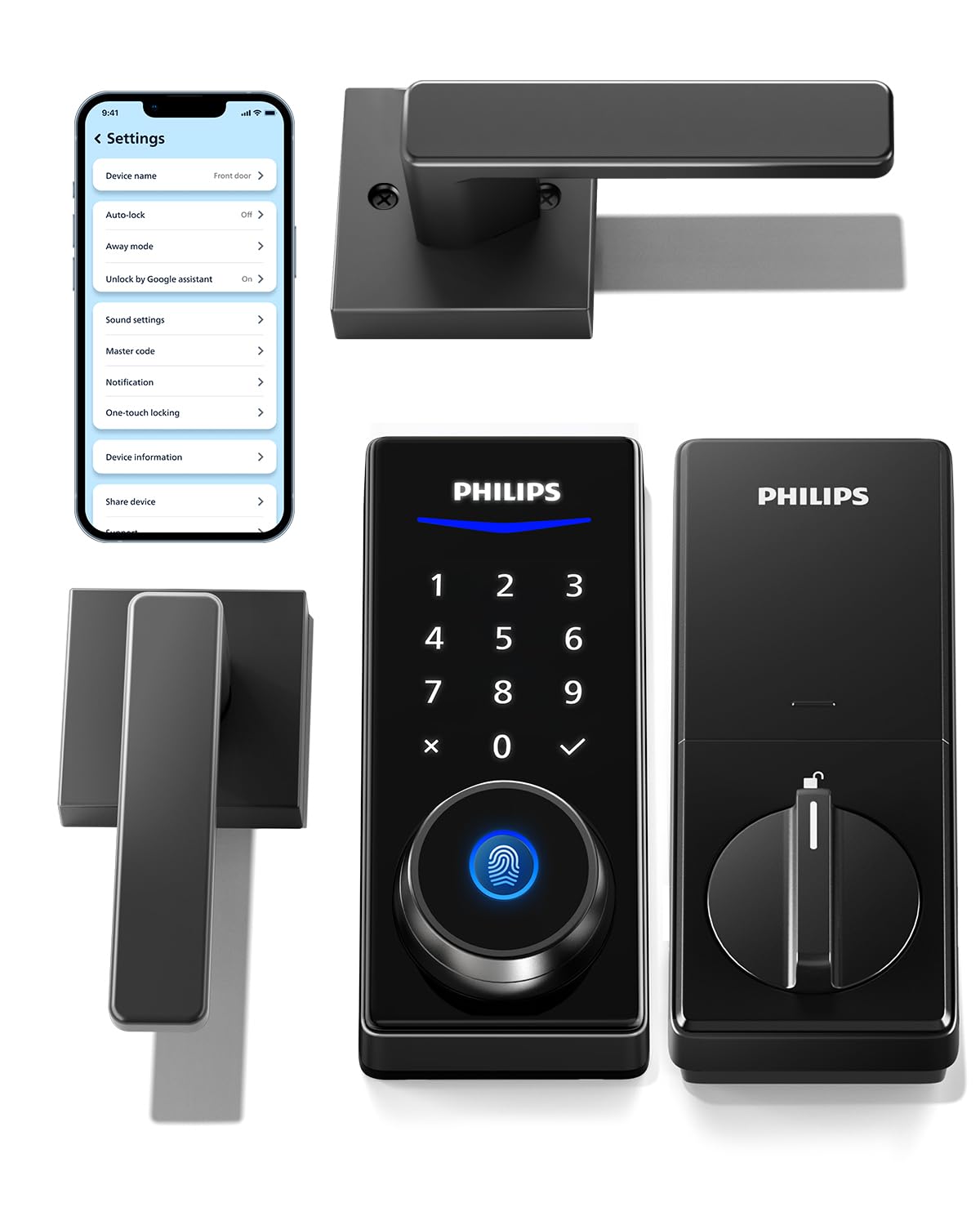
A full front-door makeover in one box — two lever handles and the smart lock together.
This is the pick when you want to replace the entire front-door hardware, not just the deadbolt. The box includes a Philips lock plus 2 lever handles, so you upgrade the lock and the handles in one job. It open up four ways: fingerprints, PIN codes, keys, and the app. It stores up to fifty fingerprints and up to 100 user PINs plus unlimited one-time PINs that auto-delete after a single use. The backlit touchscreen keypad also accepts anti-peeping padded codes.
Bluetooth is built in for phone access within 8 to 10 meters, and if you add a Philips Wi-Fi gateway (sold separately) you can control it remotely, share permissions, and review open up records. It fits most standard doors 1-3/8″ to 1-3/4″ thick and installs with just a screwdriver. Voice control with Alexa and Google works once you add that Philips Wi-Fi bridge. Auto-lock secures the door for you, though there is no sensor — the lock only engages once the door is fully closed, so close it firmly.
Two things to know going in. This set does not work directly with Alexa — you need the Philips Wi-Fi bridge sold separately, so budget for that add-on if voice and remote are must-haves. The Bluetooth connection is the other quirk; some owners find it drops and needs re-pairing. For a homeowner doing a full hardware refresh who mostly uses fingerprint or code at the door, the extra lockset and two handles make this a complete, cohesive kit rather than a parts-bin add-on.
The all-in-one appeal: two lever handles plus the smart lock in one box, with fifty fingerprints and 100 user PINs.
The bridge caveat: Alexa and remote control need a separate Philips Wi-Fi bridge, and Bluetooth can be the fussy part.
Best when: you are refreshing the whole front-door hardware and want it to match.
Not ideal if: you expect Alexa to work without buying the Wi-Fi bridge as well.
Know the Specs
Palm Vein vs. Fingerprint Recognition
Palm vein recognition reads the vein pattern beneath your hand with no contact, so wet or gloved fingers still open the door — the Wyze Palm Lock uses this approach. A fingerprint sensor is a fast touch-based read, and the best of them open up in 0.2 to 0.5 seconds, as on the Veise VE017-L and the Wyze Bolt v2. Fingerprints are quicker and cheaper to build; palm veins suit anyone whose hands are often damp or dirty. Match the method to how you actually come home.
Battery Setup and Emergency Backup
Battery design varies a lot across locks. Some run on AA cells that stretch up to a year (the Veise VE017-L) or 8 months (the Wyze Bolt v2), while the Tapo DL105 uses a rechargeable pack you top up over USB-C for up to a year per charge. The Wyze Palm Lock pairs a 6-month main battery with a 2-week backup. Look for a low-battery alert and a USB-C emergency port so a dead battery never strands you outside.
IP Weather Ratings
An IP rating tells you how well the lock keeps out water and dust — the higher the second digit, the more it resists water. The Veise VE017-L carries IP55, the Veise VE06-L and Tapo DL105 carry IP54, and the Wyze locks carry IP53. A higher rating handles rain and splashes better, but none of these are meant for constant submersion. In humid climates, moisture can still work its way into a unit, so budget for that reality.
BHMA and ANSI Grades
A BHMA or ANSI grade tells you how the lock’s mechanical build has been rated for durability. The Veise VE06-L is Grade 3, the Veise VE017-L is ANSI Grade 3, the Wyze Palm Lock is BHMA3, and the Wyze Bolt v2 is BHMA Grade 2. These grades reflect how the hardware is built to hold up to daily use. They do not tell you how the electronics behave, so pair the grade with real owner feedback on the sensor and app.
Common Questions
Will a smart lock fit my existing front door holes?
Do I need a separate hub to open up my door remotely?
Does palm vein recognition work with wet or dirty hands?
How long do the batteries actually last on a smart lock?
What happens if the battery dies while I am out?
Is a fingerprint lock better than a keypad code?
Can these smart locks handle rain and cold weather?
Can I give a contractor or cleaner temporary access?
What is an anti-peep code and why does it matter?
Will these locks work with Alexa and Google Assistant?
The Bottom Line
For most people, the smart key system on front doors winner is the WYZE Palm Lock because its touch-free palm vein reader opens the door without a key or a clean finger, and its dual-battery system with USB-C emergency charging keeps you from ever being locked out. If a fast fingerprint tap and built-in Wi-Fi matter more, grab the WYZE Auto-Lock Bolt v2. And for a rental or shared entry where you hand out codes and cards to many people, the Veise VE06-L is the one to reach for.
The Palm Lock holds the top spot on its 4.5+ star standing, and it earns it: contact-free palm vein entry, tamper and ajar-door alarms, and millimeter wave radar that only wakes the lock when a person is actually there. If you want the most capable front-door key system with the least daily fuss, start here.
How we choose
We do not accept paid placement. Every pick is matched to a real buyer and a real use-case; we do not hands-on test units.
Sources
Specifications: manufacturer listings and product documentation. Review insights: verified customer reviews, as of November 2026. Pricing: not shown on this page (it changes often); check the current price via the retailer link.
As an Amazon Associate, Tactical Gear Guy earns from qualifying purchases. This does not affect which products we feature.