Specs are compiled from manufacturer listings and verified buyer reviews and can change over time — please confirm the key details on the product page before buying.
Replacing a dead XPS 13 keyboard is less about picking the fanciest part and more about picking the right part. Dell changed the key layout several times across the XPS 13 line, so the single question that decides your purchase is which model year your laptop actually is. Get that match right and the swap is a same-day job. Get it wrong and you are staring at a keyboard that physically will not seat.
This guide is built by comparing the manufacturers’ published specifications and the patterns across verified customer reviews, so you get each pick’s real strengths and trade-offs instead of marketing spin.
The three replacement keyboards below cover the most common XPS 13 generations, from the older 9343 chassis up through the 9380 series, and each one lists exactly which machines it fits. Read the compatibility line before anything else, then use this roundup of the xps 13 keyboard options to match your model to the right part.
Top Picks

How To Choose The Best XPS 13 Keyboard
A laptop keyboard is a fitted part, not an accessory. It has to match the screw holes, the ribbon cable length, and the key cutouts of one specific chassis. That is why the first thing you do is flip your XPS 13 over and read the model number printed on the bottom plate.
Match the model number, not the marketing name
The XPS 13 badge has been used on machines with genuinely different keyboard trays. A 9380 and a 7390 look similar from across a desk but take different parts. One tricky case: the 7390 2-in-1 uses a different keyboard than the standard 7390, so a listing that names the 7390 may still not fit your convertible.
Decide if you want the frame included
Some replacement keyboards ship as a bare key sheet with no plastic frame around it. That means you transplant the original frame from your broken keyboard onto the new one. A no-frame sheet adds a transplant step, so know which style you are buying before the laptop is in pieces on your table.
Check the Enter key for US layout
A true US layout has a rectangular Enter key shaped like the rest of the keys in its row. Many international layouts use an L-shaped or tall Enter instead, and the surrounding keys shift to accommodate it. Look at your current Enter key first, then confirm the replacement matches.
Side-by-Side Comparison
| Model | Best For | Fits XPS 13 Models | Button Count | Backlight | Amazon |
|---|---|---|---|---|---|
| KBRPARTS for XPS 13 9380 / 9370 / 9305 / 7390★ Best Overall | Newest XPS 13 chassis | 9380, 9370, 9305, 7390 (not 7390 2-in-1) | — | Yes, single color | Amazon |
| TLBTEK for Inspiron 13-7000 / XPS 13 9343 9350 9360 | Widest model coverage | 9343, 9350, 9360 (plus Inspiron 13/15 series) | 104 | Yes, single color | Amazon |
| AUTENS for XPS 13 9343 9350 9360 | Older XPS 13 shells | 9343, 9350, 9360 (plus Inspiron 13/15 series) | 78 | Yes, single color | Amazon |
Detailed Reviews
1. KBRPARTS Keyboard Dell XPS 13 9380
The pick for the new-generation XPS 13, where key legends are UV-processed so they outlast the typing.
If your XPS 13 is a 9380, 9370, 9305, or a standard 7390, this is the part that matches your chassis. The key detail is the wear treatment: each key is UV-processed so the printed symbol on the cap stays legible. That matters because replacement keyboards usually fail on worn lettering long before the key mechanism dies. Finger oils polish keys shiny and blank, and a UV-cured legend resists that wear.
The layout is US QWERTY in black with a backlit finish, so your existing backlight wiring stays useful instead of going dark. There is one sharp exclusion you must catch before you order: this keyboard is not for the Dell XPS 13 7390 2-in-1. The standard 7390 and the convertible share a name but not a keyboard, so a hinge-style machine needs a different part entirely. Check your hinge before you check the model badge.
The build material is ABS plastic (acrylonitrile butadiene styrene, the common rigid laptop-plastic blend), which is the same family of material the factory keyboard uses. Each unit is tested before shipping. Where this one beats the older AUTENS part is generation coverage — it is the only pick here that names the 9380 and 9305 chassis, while the AUTENS tops out at the 9360 generation.
The generation advantage: 9380, 9370, 9305, and 7390 coverage puts this on the newest machines in this roundup.
The caveat to weigh: that 7390 2-in-1 exclusion is the single easiest mistake to make here, so confirm your hinge type before ordering.
Reach for this if: your XPS 13 is a 9380, 9370, 9305, or a non-convertible 7390 and you want keys that stay printed.
Hold off if: you own the 7390 2-in-1 — this part is explicitly not built for it.
2. TLBTEK Backlight Keyboard Dell XPS 13 9343
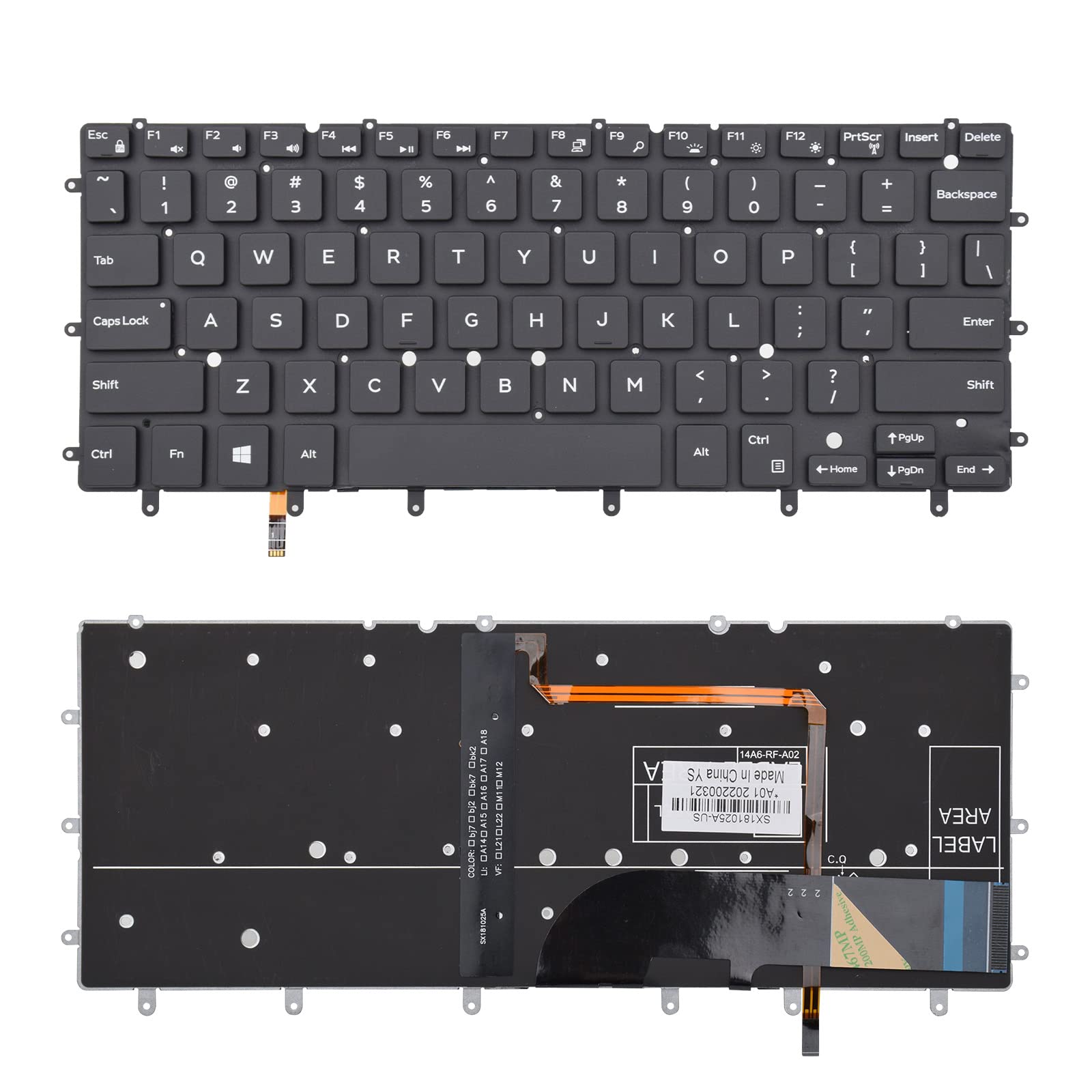
A 104-button key sheet that quietly casts a wider fit net than any other pick here.
Here is the number to hold onto: 104 buttons. That is the largest key count in this roundup, and it beats the AUTENS sheet at 78 buttons. More keys is not automatically better, but on a replacement part it tells you the sheet is a full-size layout rather than a trimmed one. The same listing also covers Inspiron 13-7000, 13-7347, 13-7348, 13-7352, 13-7353, 13-7359, 15-7547, 15-7548, and the XPS 13 9343, 9350, and 9360.
Your night typing stays exactly as it is, because the backlight is single color, the same as the factory XPS 13 backlight. The enclosure is ABS plastic (a hard, molded plastic). The sheet arrives packed in a bubble bag inside a box, and that matters: a replacement keyboard that ships loose can arrive with bent key stems before you ever touch it.
The seller’s own troubleshooting note is the most useful thing on the listing. If some keys stop working after install, the fix is usually the ribbon cable sitting badly rather than a bad keyboard — wipe the metal contacts with a dry cloth and reconnect it a few times. That five-minute reseat saves a return, and it applies to any laptop keyboard install, not just this one.
Where the TLBTEK pulls ahead
- 104 buttons — the highest key count of the three picks here
- Covers both XPS 13 9343/9350/9360 and a long list of Inspiron 13-7000 and 15-7547/7548 models
- Ships in a bubble bag inside a box, protecting the key stems in transit
- Single-color backlight matches the factory lighting setup
What to plan around
- You must verify your exact model yourself — the fit list is long but not universal
- Install can need the ribbon cable reseated more than once before every key registers
Suits you when: your XPS 13 sits in the 9343 to 9360 range, or you also own a compatible Inspiron 13-7000 or 15-7547/7548.
Look past it when: you are on a 9370, 9380, or 9305 — that generation needs the KBRPARTS part instead.
3. AUTENS US Keyboard Dell XPS 13 9343

The best-documented of the older-generation sheets, and the one that walks you through the install.
The AUTENS sheet’s typing feel lands close to the original, and its single-color backlight behaves like the factory one did. The key count sits at 78 and the backlight is single color. It weighs 350 g, so it has a little more heft than a bare key sheet, and the ABS plastic body is the same rigid laptop plastic as the others.
The fit list is XPS 13 9343, 9350, 9360, plus Inspiron 13 7347, 7348, 7352 and Inspiron 15 7547, 7548. That is a narrower net than the TLBTEK card — 78 keys against 104 — so if you also want coverage for additional Inspiron 13-3595 or 15-series variants, the TLBTEK listing is the wider buy. For a straight XPS 13 9343/9350/9360 swap, the narrower list is not a problem.
Two things on this listing earn their space. First, the seller states the sheet is warranty-backed and answers questions within 24 hours, which matters when you are mid-repair on your only laptop. Second, the Enter key check: a US layout has a rectangular Enter shaped like the other keys, and it is worth confirming against your old keyboard before ordering. The install advice is the same ribbon-cable story — if keys go dead, reconnect the cable first.
The hands-on reality: key feel tracks closely to the original, and the single-color backlight runs the same way the factory one did.
The thing to know: this ships with no frame, so you transplant the plastic surround from your original keyboard — budget for that extra step.
Pick this when: you want an older-generation XPS 13 keyboard with clear install guidance and a real warranty line behind it.
Skip this when: you want the frame pre-attached or you need coverage for a newer 9370/9380/9305 chassis.
Know the Specs
Compatible model list
This is the line that actually decides your purchase. The part has to match your exact chassis, because screw holes and ribbon cable routing differ between XPS 13 generations. Read the list, find your model number on the bottom of your laptop, and treat a near-miss as a no. Watch for the 7390 versus 7390 2-in-1 split — same name, different keyboard.
Button count
Button count tells you which sheet you are getting. A 104-button sheet is a fuller layout than a 78-button one, and the number is a shortcut to spotting a trimmed variant. It does not measure quality on its own — it measures how many keys are on the sheet you are bolting in.
Backlight and frame
Backlit means the keys glow so you can work in low light, and single color is what the factory XPS 13 uses. “No frame” is separate: it means the sheet arrives without the plastic surround, so you move your original frame over. A framed keyboard saves that step.
Layout and key material
US QWERTY means a standard American key arrangement, with a rectangular Enter key. The enclosure on all three picks is ABS plastic, the same rigid blend used for the factory keyboard tray, so the fit and feel stay familiar rather than feeling like an aftermarket shell.
Common Questions
How do I find my exact XPS 13 model number before ordering?
Will a 7390 keyboard fit the 7390 2-in-1?
My keys don’t work after I installed the new keyboard — is the part faulty?
What does “no frame” mean on a replacement keyboard?
Is 104 buttons better than 78 buttons on a laptop keyboard?
Will the backlight work after I replace the keyboard?
How do I know if my keyboard is a true US layout?
Do I need special tools to swap a laptop keyboard?
How long will the printed letters on the keys last?
The Bottom Line
For newer XPS 13 machines, the KBRPARTS keyboard is the one to order — it covers the 9380, 9370, 9305, and standard 7390, and its UV-processed legends are built to survive daily typing. If your laptop is a 9343, 9350, or 9360 and you want the widest model list, the TLBTEK sheet leads on key count at 104 and casts a wider net. And if you want the install spelled out clearly with a warranty line behind it, the AUTENS keyboard is the one to reach for. Whichever you pick, verify your model number against the listing first — that check is what separates a smooth repair from a return.
How we choose
We do not accept paid placement. Every pick is matched to a real buyer and a real use-case; we do not hands-on test units.
Sources
Specifications: manufacturer listings and product documentation. Review insights: verified customer reviews, as of November 2026. Pricing: not shown on this page (it changes often); check the current price via the retailer link.
As an Amazon Associate, Tactical Gear Guy earns from qualifying purchases. This does not affect which products we feature.