Specs are compiled from manufacturer listings and verified buyer reviews and can change over time — please confirm the key details on the product page before buying.
Will your thumbsticks still track straight six months from now? That is the question most controller shoppers never ask. Stick drift — the slow creep where your thumbstick sends movement even when you are not touching it — is the number one reason players buy a replacement pad. The picks below solve that problem, from pads with drift-resistant Hall Effect sticks (magnetic sticks that resist wear) to officially licensed options that feel right in the hand.
This guide is built by comparing the manufacturers’ published specifications and the patterns across verified customer reviews, so you get each pick’s real strengths and trade-offs instead of marketing spin.
Some pads here win on stick tech, some on grip and texture, and some on programmable buttons that save your thumbs. Whether you are chasing a limited-edition shell or a tournament-grade polling rate, this breakdown of the best xbox wireless controller helps you match a pad to how you actually play.
Top Picks


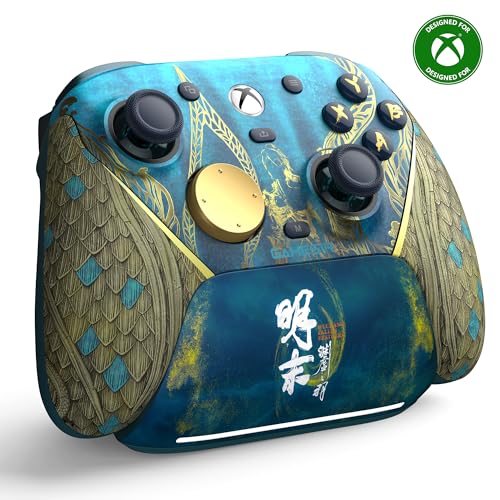
How To Choose The Best Xbox Wireless Controller
You are not really shopping for a controller — you are shopping for the one that still tracks straight in a year. Start with the stick tech, then work outward to connection type, grip and extra buttons.
Stick technology is the single biggest decision
Standard analog sticks use physical contacts that wear down, and worn contacts are what cause drift. Hall Effect sticks replace that contact with a magnetic sensor that never physically rubs, so the mechanism holds its accuracy far longer. TMR (tunnel magnetoresistance) sticks are a newer variant of the same idea — magnetic sensing with lower power draw. If you play shooters or racing games where a millimetre of stick travel matters, put this spec first.
The connection you pick changes your latency
A dedicated 2.4GHz USB adapter (a small dongle that creates its own wireless link with the controller) typically gives a steadier, lower-lag signal than Bluetooth. Bluetooth is fine for casual play, but it is the usual culprit behind random dropouts mid-match. Check that the pad you want includes its own adapter — some list 2.4GHz support only as an optional add-on.
Polling rate and back buttons separate competitive pads from casual ones
Polling rate is how many times per second the controller reports its position to your console, measured in Hz. Higher is smoother and more responsive, but it only matters if your display and reflexes are already tuned. Back buttons and macro keys let you keep your thumbs on the sticks instead of reaching for face buttons — a real advantage in fast games, though it takes time to learn new muscle memory.
Grip, weight and shell quality are not just looks
A textured or rubberized grip keeps the pad planted during long sessions, and shell material affects how the pad feels after a few hundred hours. Custom shells can look superb and still hide a standard controller underneath — which is fine, as long as you know that is what you are buying.
Side-by-Side Comparison
| Model | Best For | Stick Tech | Connectivity | Extra Buttons | Amazon |
|---|---|---|---|---|---|
| Xbox DOOM: The Dark Ages Limited Edition★ Best Overall | Collectors and DOOM fans | Standard analog | Bluetooth, USB-C | 9 | Amazon |
| Xbox Wireless Controller – BlackEveryday Standard | Everyday plug-and-play play | Standard analog | Wireless | 21 | Amazon |
| GameSir G7 Pro Wuchang EditionDrift Fighter | Drift-free competitive play | Mag-Res TMR | 2.4GHz, Bluetooth 5.3, USB-C | 12 | Amazon |
| ASUS ROG Raikiri II | Low-latency PC and Xbox hybrid | Anti-drift TMR | 2.4GHz, Bluetooth, USB-C | 10 | Amazon |
| Hand Crafted Custom ProControllers U.S Flag | One-of-a-kind looks | Standard analog | Wireless | 14 | Amazon |
| Nacon Revolution X Unlimited | Deep physical customization | Hall Effect | 2.4GHz, Bluetooth, USB-A | 14 | Amazon |
| Dinosoo RGB Wireless Controller | Budget RGB and macro play | Standard analog | 2.4GHz, wired | Macro PL/PR | Amazon |
| Moonag Wireless Controller | Cheap Hall Effect entry point | Hall Effect | 2.4GHz | — | Amazon |
| Stealth Controllers Elite Series 2 (Matte Red) | Premium custom Elite build | Standard analog | Wireless | 22 | Amazon |
Detailed Reviews
1. Xbox Wireless Controller DOOM: The Dark Ages Limited Edition
Our pick — 4.5+★ from 600+ verified ratings; the strongest balance of quality and price.
Matte green armor plating, silver helmet spikes, a red thumbstick — this one is a display piece you can actually play with.
If you want a pad that looks like nothing else on your shelf, the DOOM: The Dark Ages Limited Edition’s 3D helmet spikes and matte green armor are the pick. The top case carries 3D silver helmet spikes and plated sheathing over a matte green armor finish, and the right stick is colored a sinister red to echo the DOOM Slayer’s chest port. The green ABXY buttons are styled from the Sentinel alphabet. None of that is subtle, which is exactly the point.
Under the costume it is a normal Xbox pad with Xbox Wireless and Bluetooth on board, and it works across Xbox One, Series S, Series X, Windows, Android and iOS. It packs 9 buttons, and the grips are rubberized with a leather-like feel that keeps the pad planted. Owners consistently call the quality and the design the standout, and the leather texture on the grips draws more praise than anything else about the build. The shell is a talking point first and a grip surface second, and the rubberized leather-feel grips hold up on both counts.
Now the honest part. Build quality divides opinion: plenty find it very solid, and some question how it will hold up over years of play. This is a standard analog stick pad, so it is not the anti-drift choice — if competitive shooters with a drift-free stick are your goal, the GameSir or Nacon below is the better tool. And the Executioner Skin DLC for the game is a code in the box, with the game itself sold separately. Also, the button count is 9 here against 21 on the standard black Microsoft pad below — fewer discrete buttons, more decorative shell.
What earns the shelf spot
- 3D silver helmet spikes and plated sheathing give it a genuine collector look
- Rubberized, leather-feel grips that hold during long sessions
- Xbox Wireless plus Bluetooth across consoles, PC, Android and iOS
- Limited-edition DOOM Slayer Executioner Skin DLC included
Where it makes you think twice
- Standard analog sticks, not Hall Effect — drift risk stays
- Some find the shell’s long-term durability an open question
- The included DLC needs the game, which is sold separately
Buy it if: you want a legitimately rare-looking controller that still plays properly across every Xbox and PC setup you own.
Check first: it is a 9-button standard-stick pad, so hardcore aim players should look at a Hall Effect or TMR option in this list.
2. Xbox Wireless Controller – Black
The official pad that just works — 21 buttons, textured grip, and up to twice the wireless range of older Xbox One controllers.
Some buyers want zero surprises, and this is that controller. It is the standard Microsoft black pad, compatible with Xbox One X, One S, One, and Windows 10, with Bluetooth for PC and tablet play. Microsoft rates the wireless range at up to twice that of previous Xbox One controllers, tested on the Xbox One S console. In a room where your couch sits well back from the TV, that extra range is the difference between a clean connection and a dropped input.
At 6.89″D x 2.87″W x 3.54″H and 9.88 ounces it is the benchmark shape most Xbox player hands already know. Compare that to the Moonag below at 2.76″D x 6.5″W x 5.91″H — a noticeably different footprint — and the standard shell becomes the safe pick for anyone who has held an Xbox pad before. It carries 21 buttons, more than double the 9 on the DOOM edition above. What wins people over, though, is simply that it functions the way Xbox expects it to, every single time you pick it up.
The recurring gripe worth knowing: durability. A number of long-term players report these pads giving out within a year of heavy use, so treat it as a consumable rather than an heirloom. Connection is generally problem-free on the older Xbox One family, though some report disconnects. This also is not an anti-drift investment — it is the reference point, not the upgrade.
The default for a reason: 21 buttons, textured grip, Bluetooth for PC, and up to twice the wireless range of the previous generation — everything an Xbox household needs on day one, with 4.0+ stars behind it.
The fair warning: heavy players sometimes wear one out inside a year, so it suits buyers who want the known quantity rather than the longest-lived pad.
Reach for this if: you want the officially supported pad with the widest comfort zone and no learning curve.
Look elsewhere if: drift-proof sticks or a multi-year build are your priority.
3. GameSir G7 Pro Wireless Gaming Controller
Magnetic TMR sticks, a 1000Hz polling rate and a dock that charges the moment you set it down.
The spec that matters here is the Mag-Res TMR stick — a magnetic sensor design that merges the precision and low power use of traditional potentiometer sticks with the durability of Hall Effect. In plain terms: the stick senses position without physical contact wearing down, which is the whole anti-drift story. GameSir pairs that with Hall Effect analog triggers and a 1000Hz polling rate, so the pad reports your inputs very frequently. In a fast shooter, a higher polling rate is what smooths out the feel of the aim.
For a pad described as the first-ever wireless Xbox controller from GameSir, the connectivity is unusually broad. There is a 2.4G wireless dongle for console-like play on Xbox and PC, a USB-C cable for wired, and Bluetooth 5.3 for Android. One-press wake-up means your console is on and ready the moment you are. The 1200mAh battery comes with a smart charging station that starts charging the instant you set the controller down, and the station has a built-in compartment for the wireless receiver. Sticks and triggers are magnetic, so drift should not creep in over long sessions.
Buyers report this is the best controller they have used, and the same points keep coming up: four programmable buttons, no stick drift, and a grip texture that keeps the pad steady in your hands. The four back buttons take a session or two to learn — that is the trade-off, not a flaw. At 9.6 ounces it is not the lightest pad, but the balance feels deliberate.
What the spec sheet promises: TMR magnetic sticks, Hall Effect triggers, 1000Hz polling, a 1200mAh battery and a dock that charges on contact — the most complete drift-resistant package in this lineup.
The honest caveat: four programmable back buttons reward practice, and a 9.6-ounce pad is a real weight if you play handheld-style for hours.
The right call for: competitive players who want magnetic anti-drift sticks and a charging dock without giving up Xbox wireless.
Second thoughts if: you prefer the exact click feel of an official Microsoft pad.
4. ASUS ROG Raikiri II Xbox Wireless Gaming Controller
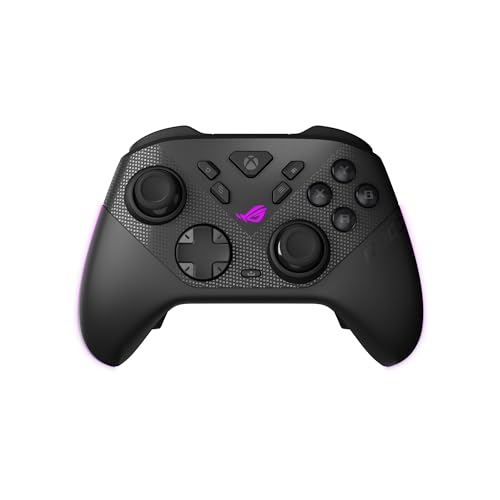
A 1000Hz polling rate over wireless, dual-mode triggers, and a case that charges the pad while it is inside.
If you split your time between an Xbox and a gaming PC, the Raikiri II was built with you in mind. It offers three connection routes — low-latency 2.4GHz RF, Bluetooth, or wired USB-C — and it is certified for Xbox over both USB-C and 2.4GHz RF. The 1000Hz polling rate holds in both PC wired and 2.4GHz wireless modes, and ROG SpeedNova wireless tech backs up the wireless side. That is a spec aimed squarely at players who notice a single frame of input lag.
The sticks are anti-drift TMR joysticks, which ASUS says are more accurate while consuming less power compared to Hall Effect joysticks. There are four fully programmable rear buttons, dual-mode triggers that switch between micro-switch triggers with short travel and TMR sensor triggers with full travel, and micro-switch D-pad, ABXY, bumpers and rear buttons for instant actuation. The grip is skin-friendly with an anti-slip surface. It comes with a portable protective case that supports charging while the controller sits inside, a charging stand, and two detachable joystick caps.
What buyers like is how it feels to play — responsive buttons and smooth stick movement come up repeatedly. The split opinions land on the shell, where some find it well built and others find it flimsy, and on connectivity, where dropouts are a real talking point for a portion of owners. At 9.6 ounces it matches the GameSir’s weight exactly, so neither is the light option.
Standout strengths
- 1000Hz polling over both wired and 2.4GHz wireless
- Tri-mode: 2.4GHz RF, Bluetooth or USB-C
- Four programmable rear buttons with dual-mode triggers
- Protective case that charges the controller inside
Reasons to pause
- Mixed feedback on shell rigidity
- Connection dropouts reported by a share of owners
- No LCD or on-pad profile screen like the Nacon below
Pick it for: a PC-first player who also wants a certified Xbox pad with a fast wireless polling rate.
Reconsider if: rock-solid connection stability is your top priority above all else.
5. Hand Crafted Custom Controller (U.S Flag)

Every shell handcrafted and one of a kind — the star-spangled pad that turns heads before you even hit start.
This is the controller for the player who treats their setup as a display. Each U.S Flag shell is handcrafted and one-of-a-kind, built on brand-new controllers and available only through ProControllers. It works with PC, Xbox One, Xbox Series S and Xbox Series X, and carries 14 buttons. The photos match the delivered product, which is the single biggest worry with any custom shell — and it lands.
What people rave about is the quality and the look: crisp graphics, a genuine flag design, and a finish that feels crafted rather than printed. There is a 90-day warranty covering manufacturing defects, which is note since custom shells fall outside most standard coverage. If your goal is a pad that gets a reaction when friends come over, the handcrafted flag shell delivers.
The trade-offs are honest ones. Reliability and durability come back mixed, with some owners reporting the pad quitting entirely or failing inside three months of use. Value divides too — some feel the craft justifies the spend, others think a standard pad would serve just as well. And at 14 buttons it sits between the DOOM edition’s 9 and the standard black pad’s 21, so it is not built around extra macro keys.
The visual payoff: a hand-finished, one-of-a-kind U.S Flag shell with 14 buttons and broad Xbox plus PC compatibility — the rare custom pad whose photos match the box.
The trade to weigh: a 90-day warranty is your safety net, so treat durability as a real consideration rather than an assumption.
Best for: collectors who want a conversation-piece controller and are comfortable with a limited warranty window.
Skip if: you need a pad you plan to hammer for years without a second thought.
6. Nacon Revolution X Unlimited Precision Wireless Controller

Over 60 customization combinations, a built-in LCD screen, and magnetic Hall Effect sticks and triggers.
Nobody else in this lineup hands you three sets of weights, three sets of joystick heads, two sets of joystick rings, a 4-way and a 6-way D-pad, a storage case, and more than 60 customization combinations. That is the Nacon’s pitch in one breath: more swappable parts in the box than anything else here. Hall Effect magnetic tech covers both sticks and triggers, using a magnetic field instead of physical contact to sense movement — the durability argument against drift, applied across the whole input chain.
The extras go deep. There is an LCD screen on the controller for mapping, programming and audio source mixing, six mappable shortcut buttons, and PC keyboard keys can be mapped onto buttons through the Revolution X Unlimited app. A high-performance PC mode claims latency reduced to 1ms wired and 2ms wireless, plus a gyroscope that can simulate a joystick or the D-pad. Four vibration motors sit in the handles and triggers. A charging station is included, and the battery is rated up to 10 hours of play. It weighs 230 g and takes 14 buttons.
Owners consistently praise the ergonomics — comfortable grip, dead zones dialed in well — and the depth of customization is the other big draw. The recurring friction is connectivity, where some report flawless wireless and others hit connection trouble, and reliability and value both land mixed. The LCD screen and the weight tuning are genuinely useful if you like to tinker; if you just want to plug in and play, they are optional depth.
Why tinkerers love it
- Hall Effect sticks and triggers for drift resistance
- 60+ customization combinations across weights, sticks, rings and D-pads
- LCD screen for on-pad mapping and audio mixing
- Up to 10 hours battery with charging station included
What to weigh up
- Connectivity feedback is split between flawless and troublesome
- Reliability and value both come back mixed
- A heavier 230 g pad with a busy feature set to learn
Made for: the player who enjoys tuning weight, stick tops and dead zones to their exact taste.
Wrong pick if: you want the simplest possible setup with the fewest moving parts.
7. Dinosoo RGB Wireless Controller

Eight RGB light modes, macro buttons, and a 30-foot wireless reach for players who want flash without spending much.
This one leads with the light show: 8 RGB modes you cycle through for a cool, styled look. Beyond that it is a feature-rich entry-level pad. The TURBO button toggles between combos, and the PL/PR mappable advanced buttons let you program combos on the fly — press Set for 3 seconds, then hit PL/PR to clear the mapping. An internal battery and USB adapter both come in the box, so there is no hunting for a separate dongle.
Compatibility is broad: Xbox One, Series X, Series S, One S, One X, plus Android and Windows 11/10/8/7. The 2.4GHz wireless link gives you a range of over 30 feet, which comfortably covers a couch across a decent-size room. What wins buyers over is exactly that versatility — it works across console and PC without fuss, and the build feels close to the original pads in hand. The cord length draws praise too, for the times you want the wired option.
The thing to go in with your eyes open about is the sticks. Stick movement and responsiveness come back mixed, with drift and input lag reported by a share of players, and button responsiveness draws more criticism than praise. That does not sink it as a budget pick — it just means this is a pad for casual sessions and RGB flair, not for players chasing a drift-proof competitive stick.
Where it shines: 8 RGB modes, programmable PL/PR macro buttons, a bundled adapter and internal battery, and over 30 feet of wireless range across Xbox, Android and Windows.
Where it gives ground: the sticks are the weak point, so competitive players should look at the magnetic-stick picks above.
A good match for: a second controller, a bedroom or dorm setup, or anyone who wants macro buttons and RGB on a tight budget.
Not the one for: ranked shooters where stick precision decides the match.
8. Moonag Wireless Controller

The least you can pay for Hall Effect sticks — plus RGB lighting and pulse triggers.
Hall Effect joysticks on a budget pad are the headline. These sticks sense position magnetically, which is the design built to minimize drift and keep input response accurate during long sessions. If drift is what ended your last controller, this is the cheapest route into the fix, and it comes with two silicone thumb caps to improve grip comfort and ease finger fatigue.
The rest of the package is sensible: a 3.5mm headphone jack for private audio and chat, dual vibration motors in the side grips, and pulse trigger buttons for tactile feedback. Connection runs over 2.4GHz with the included USB receiver, aimed at low-latency play on Xbox consoles and PC. Custom button mapping lets you remap the layout per game genre, and the pad plays across Xbox Series X|S, Xbox One and Windows PC. It measures 2.76″D x 6.5″W x 5.91″H, a footprint that differs noticeably from the 6.89″D x 2.87″W x 3.54″H standard Xbox shell reviewed above.
The catch is the wireless link. Connectivity is the split point here — plenty of owners mention no trouble at all, while others hit frequent disconnections. That is the single thing to accept going in: the stick tech is strong, the connection is the wildcard. It is also the lowest-rated pad in this list, so match expectations to the price tier.
What you get for the money
- Hall Effect joysticks built to minimize drift
- 2.4GHz USB receiver included
- 3.5mm headphone jack and dual vibration motors
- Two silicone thumb caps in the box
What you accept
- Frequent disconnections reported by a portion of owners
- Custom button mapping needs a little time to set up
- No hall-effect triggers listed — sticks only
Consider it if: drift-proof sticks at the lowest outlay are your whole reason for buying.
Think twice if: a bulletproof wireless connection matters more than stick technology.
9. Stealth Controllers Elite Series 2 Controller (Matte Red)

A custom matte-red Elite Series 2 with 22 buttons, a full accessory kit, and a year of warranty cover.
This is the premium custom build in the list. It starts from an Elite Series 2 and adds a matte-red custom shell. The box is packed: a carrying case, six thumbsticks (two standard, two classic, one tall, one wide dome), four paddles (two medium, two mini), two D-pads (standard and faceted), a thumbstick-adjustment tool, a charging dock, a USB-C cable, and even the original box.
Custom button mapping is done in the accessories app, and it is compatible with Xbox Series X, Series S, all Xbox One consoles and Windows PC. A full one-year, 365-day warranty backs it, which is a meaningful safety net on a customized controller. Appearance and value both land as clear wins, and the material gets specific praise for a semi-rubberized coating and the high-end metal construction of the attachments.
What a buyer should know: the customization is cosmetic and ergonomic rather than a different stick technology, so this is not a Hall Effect drift solution. It is also a niche custom shop build, so the core you are dressing up is an Elite Series 2. If you want six thumbsticks, four paddles and two D-pads in one box with a 365-day warranty behind them, no other pad here bundles that much.
What you are buying: a custom-shelled Elite Series 2 with 22 buttons, six thumbsticks, four paddles, two D-pads, a charging dock and a 365-day warranty in one box.
What it is not: a magnetic-stick pad — the appeal is finish, accessories and coverage, not drift-proof hardware.
Worth it for: players who want an Elite-style pad with an exclusive shell and the full paddle and stick kit included.
Look past it if: you would rather put your money into TMR or Hall Effect stick tech than finish and accessories.
Know the Specs
Hall Effect vs TMR Sticks
Both use magnets instead of physical contact to sense where your thumbstick is pointing, which is why neither wears out the way standard sticks do. Hall Effect is the more established design. TMR (tunnel magnetoresistance) is a newer variant that a few pads here use — GameSir’s Mag-Res TMR and ASUS’s anti-drift TMR — and the makers position it as more accurate with lower power use. Either way, the practical payoff is the same: no contact wear means drift stays away.
Polling Rate in Hz
Polling rate is how many times per second the controller sends its position to your console, measured in Hertz. A 1000Hz rate means it reports position a thousand times a second — that is what the GameSir G7 Pro and ASUS Raikiri II specify. Higher rates make fast aim feel smoother, but the benefit only shows if your console, display and reflexes are already in tune. For most casual play, a standard polling rate is perfectly fine.
2.4GHz vs Bluetooth
A 2.4GHz adapter creates a dedicated wireless link between controller and console, which usually means steadier latency than Bluetooth. Several pads here include the dongle in the box — the Moonag and Dinosoo both ship with one. Bluetooth is great for convenience and for devices like Android phones, but it is the more common source of random dropouts. If connection stability is your priority, favour the 2.4GHz route.
Button Count and Back Buttons
Button count numbers the total inputs on a pad, from the standard face and shoulder buttons up to paddles and macro keys. The Stealth Elite Series 2 tops this list at 22, while the DOOM limited edition lists 9. More buttons only help if you actually use them — paddles and macro keys let you keep your thumbs on the sticks instead of reaching for the face buttons, but they take practice to feel natural.
Common Questions
Will a third-party wireless controller work on Xbox Series X and Series S?
What actually causes stick drift on a controller?
Is a 1000Hz polling rate worth it for Xbox play?
Do I need the controller’s own USB adapter to go wireless?
How long does a wireless controller battery last between charges?
Should I buy a custom-shell controller or a plain official one?
Can I use these controllers on a Windows PC as well as an Xbox?
Do back paddles and macro buttons really help in games?
Are custom controllers as durable as standard Xbox pads?
Which controller here is best for racing games with triggers?
The Bottom Line
For most players, the xbox wireless controller that balances looks with everyday play is the DOOM: The Dark Ages Limited Edition. It has leather-like rubberized grips and a matte armor shell that give it real presence, and it works across every Xbox and PC setup you own. If drift prevention is your real goal, choose the GameSir G7 Pro. Its Mag-Res TMR sticks (magnetic sticks that resist drift) and 1000Hz polling rate (it reports your inputs 1,000 times a second) beat the DOOM edition’s standard analog sticks on exactly that front. If you just want the no-surprises official pad with 21 buttons and textured grip, the Xbox Wireless Controller – Black remains the safest call. One nudge worth acting on: the DOOM edition holds the top spot here with 4.5+ stars behind it, so if the shell appeals, that is the pick that earns its place.
How we choose
We do not accept paid placement. Every pick is matched to a real buyer and a real use-case; we do not hands-on test units.
Sources
Specifications: manufacturer listings and product documentation. Review insights: verified customer reviews, as of November 2026. Pricing: not shown on this page (it changes often); check the current price via the retailer link.
As an Amazon Associate, Tactical Gear Guy earns from qualifying purchases. This does not affect which products we feature.