Specs are compiled from manufacturer listings and verified buyer reviews and can change over time — please confirm the key details on the product page before buying.
Rear paddles exist for one reason: so your thumbs never leave the sticks. On an Xbox One pad, that extra set of back buttons is the difference between aiming and jumping at the same time or giving up one to do the other. The catch is that paddle quality varies wildly — some pads give you crisp, remappable triggers, and others give you mush that fires by accident mid-game.
This guide is built by comparing the manufacturers’ published specifications and the patterns across verified customer reviews, so you get each pick’s real strengths and trade-offs instead of marketing spin.
The picks below range from value wired pads to fully loaded wireless models, so you can match a paddle layout to how you actually play. Here is the shortlist of the best Xbox One controller with paddles for your setup.
Top Picks

How To Choose The Best Xbox One Controller with Paddles
Buying a paddle controller is really two decisions stacked on top of each other: how many extra buttons you want, and how much you trust the sticks underneath them. Buy more paddles than your grip can reach and the extras sit unused. Get the stick technology wrong and the pad drifts on you inside a year.
Two Paddles Or Four
Two rear buttons cover the essentials — usually jump and crouch or reload — and they are easier to learn because your middle and ring fingers only have one job each. Four paddles give you more commands without lifting a thumb, but they take real practice and can cause accidental presses early on. If you mostly play shooters and want a fast adjustment period, start with two.
Hall Effect And TMR Sticks
Standard analog sticks use physical contact that wears down, and that wear is what produces stick drift — the cursor creeping when you are not touching anything. Hall Effect sticks replace that contact with magnetic sensing, so there is nothing to grind away. TMR sticks are a related magnetic design that adds stability and precision. Both are the single biggest long-term reliability upgrade you can buy in this category.
Trigger Stops And Remapping
A trigger stop shortens how far the trigger travels before it registers, which speeds up your input in shooters. Remappable paddles let you assign any face button or stick click to the back, so you can build a layout around your own hands instead of the default. Look for on-controller remapping if you swap games often — software-only remapping means a trip to a PC every time you change your mind.
Wired Versus Wireless
A wired pad removes battery anxiety and connection dropouts entirely, and it is lighter in the hand. Wireless pads free you from the cable but introduce charging habits and, on some models, connection reliability questions. If you play at a desk or close to the console, wired is the lower-risk choice.
Side-by-Side Comparison
| Model | Best For | Rear Buttons | Stick Tech | Connection | Amazon |
|---|---|---|---|---|---|
| GameSir G7 Pro★ Best Overall | All-round pick | 4 (L5/R5 + lockable back) | TMR / Hall Effect | Wired, 2.4G, Bluetooth | Amazon |
| GameSir T7 ProBest Value | Budget wired value | 2 remappable back buttons | Hall Effect | Wired | Amazon |
| Hyperkin The CompetitorLightest Pick | Lightweight symmetrical layout | 2 programmable rear buttons | Hall Effect | Wired USB | Amazon |
| SCUF VALOR PRO (Wired) | Serious competitive play | 4 embedded paddles | Hall Effect | Wired USB-C | Amazon |
| 8BitDo Ultimate 3E | Wireless dock setup | 2 back buttons + 2 fast bumpers | TMR | 2.4G via dock, Bluetooth (mobile) | Amazon |
| SCUF VALOR PRO (Wireless) | Cable-free paddles | 4 rear paddles | TMR | Wireless, Bluetooth, USB-C | Amazon |
| Xbox Elite Series 2 Custom | Soft-touch custom shell | — | — | Bluetooth | Amazon |
Detailed Reviews
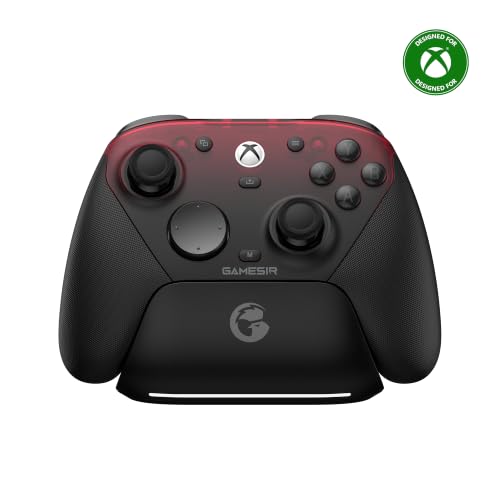
1. GameSir G7 Pro Wired Controller
Our pick — 4.0+★ from 5,500+ verified ratings; the strongest balance of quality and price.
Four extra buttons and a charging dock that actually makes you want to take it off the stand.
The G7 Pro gives you more ways to fire than anything else on this list — and gets there without a cable tether you have to fight. Its four customizable buttons break down into L5 and R5 bumpers plus lockable back buttons, so you can map a macro to the shoulder and a jump to the underside in the same session. That is a layout serious players build over months on other pads, arriving on day one.
Under your thumbs sit GameSir’s Mag-Res TMR sticks, a magnetic design that pairs Hall Effect durability with the feel people expect from a standard analog stick. It delivers a stable polling rate (the rate at which the pad reports your stick position to the console) for drift-free control. On PC you can push the connection to a 1000Hz polling rate, meaning your input is checked a thousand times per second over both wired and 2.4G wireless. That number does not carry over to the Xbox connection, so treat it as a PC perk.
Weight is where the trade-off lives: at 272 g it is noticeably heavier than the Hyperkin The Competitor at 200 g, and that mass sits in your hands for a whole session. The connectivity is the second thing to weigh — the pad runs wired on Xbox, 2.4G and wired on PC, and Bluetooth on Android, and the mode switch is physical rather than buried in a menu. The built-in 1200mAh battery plus an auto start-stop charging station means you set it down and it tops up, then pick it up and it is ready.
Where it pulls ahead
- Four programmable buttons (L5/R5 plus lockable back buttons) cover far more commands than a two-paddle pad
- TMR sticks and Hall Effect analog triggers with clicky Micro Switch trigger stops
- 1000Hz polling rate on PC over wired or 2.4G, for faster input registration
- 1200mAh battery with a smart auto start-stop charging station
- GameSir Nexus app adds gyro settings, stick curve adjustment, and button-to-mouse mapping
The honest heel
- At 272 g it is the heaviest pad measured here against the Hyperkin’s 200 g
- Connection stability is the split opinion — some setups run clean, some hit dropouts
- Most of the deep tuning lives in the Nexus app, not on the controller
Buy this if: you want the most mappable buttons per dollar and you play across Xbox, PC, and Android.
Think twice if: a light pad matters to you — the Hyperkin sheds real grams for long sessions.
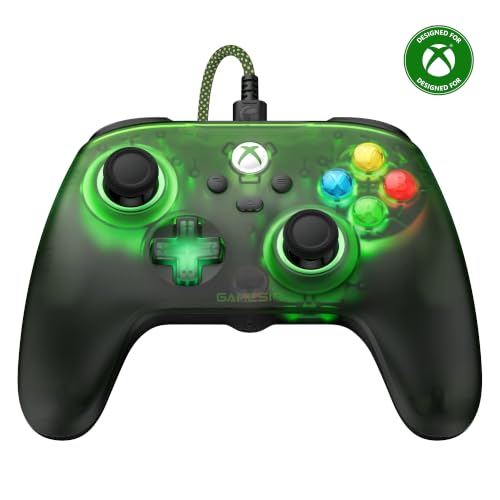
2. GameSir T7 Pro Wired Controller
Two back buttons, magnetic sticks, and a see-through green shell that throws RGB light.
If you are stepping into paddles for the first time, the T7 Pro is the least risky way in. Two remappable back buttons are enough for jump and crouch, and they save you from the accidental-press problem that trips up people learning a four-paddle layout. It is wired only, so there is no battery to think about and no pairing dance — plug it in and it is live on Xbox Series X|S, Xbox One, Windows 10/11, and Steam.
The sticks are magnetic Hall Effect, the kind with no physical contact to wear, and GameSir rates the stick modules for 5 million rotation cycles. The triggers match — smooth analog travel for racing and action games, with short-pull trigger stops you switch in for shooters. What owners keep returning to is simply how good the controller feels for the money; value and build quality dominate the conversation. Four rumble motors spread across the grips and triggers add feedback you feel in your palms, not just the shell.
The one thing to know before buying is the power-off quirk: some units cut out on their own mid-session. It does not land on every pad, but it is the reason reliability reads as a mixed bag rather than a clean sweep. Customization runs through the GameSir Nexus software for button remapping, stick sensitivity, trigger range, and vibration intensity, with multiple profiles you can save per game.
The value call: Hall Effect sticks and triggers, two remappable back buttons, four rumble motors, a 3.5mm headset jack, and dynamic RGB on a gradient translucent green shell — this is the feature list of a pad that costs noticeably more.
The one to watch: wiring in is still the fix if yours ever shuts off unexpectedly, and that is a fair reason to prefer a dock-charged wireless pad instead.
Your pick if: you want drift-resistant sticks and two paddles without paying premium money.
Leave it on the shelf if: you need four back buttons or you refuse to be tethered by a cable.
3. Hyperkin The Competitor Wired Controller
Two hundred grams, symmetrical sticks, and an officially licensed badge on the box.
Here is a comparison that matters if your hands tire: the Hyperkin weighs 200 g, and the GameSir G7 Pro is 272 g. That gap is the kind of thing you notice in hour three of a session, not the first ten minutes. It is the lightest pad in this lineup, and it carries the official Xbox license, so there is no doubt about compatibility with Xbox Series X|S, Xbox One, or PC.
The layout is symmetrical, meaning both sticks sit low and in line, which suits players who came up on that arrangement and find offset sticks awkward. Magnetic Hall Effect joysticks handle the drift problem, and impulse triggers keep throttle and aim feeling analog rather than on/off. Two programmable rear buttons handle the paddle duty, and the translucent D-pad plus four precision action buttons give you a high-tech look rather than a plain matte face.
Runtime setup is simple — USB into the console and you are done. The recurring theme among owners is that it does the job of a far pricier pad without asking you to pay for one, and the ergonomics get called out specifically as comfortable. It will not give you four paddles or a wireless connection, and the button count stops at 15, but nothing here feels stripped for the sake of it.
Why hands like it: at 200 g with a symmetrical stick layout, it stays comfortable across long sessions in a way heavier offset-stick pads do not. Hall Effect joysticks and impulse triggers are the two features that keep the internals from cheapening the feel.
Go here when: symmetrical sticks and a featherweight shell are non-negotiable for you.
Skip the swap if: you have already built muscle memory around a four-paddle, offset-stick layout.
4. SCUF VALOR PRO Wired Performance Xbox Controller

Four embedded paddles that map to sixteen functions, with instant triggers that cut the pull.
Competitive players tend to judge a pad by how many inputs it can carry without a thumb leaving the stick — and the Valor PRO answers that with four embedded rear paddles that can be configured to 16 functions in total. Its instant triggers fire on a hair-trigger tap instead of a full pull, cutting the milliseconds between your finger moving and the shot registering. If you play shooters where a fraction of a second decides the fight, that is the entire pitch.
The button count tells the story of how much control sits in your hands: 24 buttons here against the Hyperkin The Competitor’s 15. The wraps are considered too — a performance grip built from 13 years of SCUF’s design work delivers non-slip comfort, and the new wraparound bumpers put more surface area where your fingers land for faster movements.
Audio controls let you change volume on the fly without opening a menu, and a physical switch flips between up to three saved remapping configurations. Quality is what people fixate on most about this pad, with ergonomics a close second — the thing feels dense and well-built in the palms. Two things to know: it is wired by USB-C, so no cable-free sessions here, and hooking it up over a PC occasionally trips a connection drop.
What earns the price tag
- Four embedded paddles configurable to 16 functions in total
- Instant triggers fire on a short tap instead of a full pull for faster shots
- Three remapping profiles switchable with a physical toggle
- On-the-fly audio volume controls
- Swappable faceplate and thumbsticks for a fresh look or feel
What to factor in
- Wired USB-C only — you give up wireless freedom
- Drops have been reported on some PC connections
- The premium positioning means you are paying for the paddle engineering
Worth it for: the shooter player who wants every command reachable without a thumb leaving the stick.
The catch to accept: that cable ties you to the console — if wireless matters, look at the wireless Valor instead.
5. 8Bitdo Ultimate 3E Wireless Controller

A magnetic dock that reconnects the moment you lift the pad, with parts you can swap.
The 3E is for the player who wants the pad to live on a stand and never think about charging again. It sits on an integrated wireless charging dock with zero contact points and magnetic alignment — lift it and it auto-reconnects; set it down and it charges. The 2.4G adapter tucks inside the dock, and connecting the dock to your Xbox or PC through USB extends the wireless signal to reduce latency.
On the input side, the joysticks are TMR paired with a 12-bit ADC sampling chip for precision and stability, with RGB Fire Rings providing real-time visual feedback. Two back buttons join two fast bumpers for the extra inputs, and the triggers are Hall Effect impulse triggers with two trigger-stop levels so you can adapt between shooters and racing games in a second. On PC you also get 6-axis motion control and up to a 1000Hz polling rate, plus three custom profiles.
Owners compare it to the Xbox Elite controller and call the build heavy-duty, which says a lot about how solid it feels in hand. The honest counterweight is that ergonomics, connectivity, and value spark debate — it is a divisive pad rather than a universally loved one. Parts swapping is genuinely deep, with swappable ABXY modules, standard or circular D-pad options, and multiple joystick styles to match how you play.
The dock advantage: magnetic, contactless charging with auto-reconnect when you lift it is the feature that makes this setup feel expensive in daily use.
The dividing line: it costs more than most pads in this list and earns that with swappable modules and TMR sticks — but the comfort and connection debate means it is not a blind buy for every hand.
Reach for this if: you want a wireless-competitive pad that charges itself on a stand between matches.
Pass if: you would rather have a simple wired pad with no dock to think about and no swappable parts to keep track of.
6. SCUF VALOR PRO Controller

The Valor paddle setup without the cable — and with a PC polling rate to go with it.
Everything the wired Valor does, this version does without a tether. That means four rear paddles for faster in-game reactions, instant triggers that fire on a tap instead of a full pull to shave milliseconds off your shot, and multiple ways to connect: switch between low-latency wireless, Bluetooth, or ultra-fast wired. On PC you can activate a 1k Hz polling rate for rapid input registration.
The control layer is deep in the way SCUF pads are known for — the audio control system changes volume on the fly, and a flip switch saves up to three remapping configurations so you can move between game types without a settings crawl. The performance grip and wraparound bumpers are both there, and swappable faceplates and thumbsticks let you change the look without buying a new pad.
The real caveat is connection behavior. Random disconnections are the recurring complaint on this model, and pairing to iOS devices is a known sticking point — worth knowing if you plan to swap between devices. For Xbox and PC play on a stable wireless connection, the ergonomics land well; the pad feels smooth and responsive in hand. It is the heaviest in this lineup at 0.36 kg, so factor in the weight alongside the wireless freedom.
Why the cable goes away
- Four rear paddles with instant triggers, no wire required
- Low-latency wireless, Bluetooth, and wired USB-C all on one pad
- 1k Hz polling rate on PC for quicker input registration
- Three saved remapping profiles switchable on the controller
- Swappable faceplate and thumbsticks
Where it wobbles
- Random disconnections are the most-discussed issue with this model
- iOS pairing is a known pain point
- At 0.36 kg it is the heaviest pad in this whole lineup
Right for you if: wireless paddles are the point and you want a second connection option for PC.
Wrong for you if: you cannot tolerate a dropped connection mid-match — the wired Valor side of the family avoids that risk.
7. Xbox Elite Series 2 Custom Soft Touch Controller

A genuine Microsoft Elite Series 2, rebuilt by a custom shop with a velvet-feel red faceplate.
This is a different buying logic from everything else here. It starts as a brand new official Microsoft Xbox Elite Series 2 controller pulled from its original packaging, then Crazy Controllerz swaps the front shell for its own soft touch version, runs a testing process, and puts it back in the original box. You keep every feature and function of the original Elite, and it stays fully compatible with Xbox Series X/S and Xbox One consoles plus the Xbox software update.
What you are actually buying is the coating. The soft touch front shell adds a velvet-like feel, additional grip for long sessions, and a metallic red color you will not find anywhere else. It is a 16-button pad with Bluetooth connectivity, and quality and the look of the shell are what people consistently value about it.
The trade-off is the risk profile. Reliability and value are debated, and the trigger and stick performance carry harder notes than any other pad here — for a custom, high-positioned pad, that is something to weigh honestly. Buy it for the feel and the finish, not because it promises a more reliable Elite than Microsoft’s own. Being a Bluetooth pad rather than a wired one, it also carries the usual battery habit.
The real product: the custom soft touch coating on a genuine Elite Series 2 — velvet-like grip and a red metallic finish nobody else sells.
Stated plainly: the trigger and stick feedback are the weakest part of the package, so this is the pick for the player who prioritizes how the controller feels and looks over raw durability confidence.
This is for you if: the custom soft touch red shell is the whole reason you are looking and Elite compatibility matters.
Consider otherwise if: you want paddles with a safety net — this custom unit’s trigger and stick feedback is the unproven part.
Know the Specs
Rear Paddle Count
How many extra inputs sit on the back of the pad. Two is the easy starting point and covers jump and crouch. Four maps more commands without a thumb leaving the stick, but takes practice to avoid accidental presses. Boards here range from two back buttons up to four paddles configurable to 16 functions.
Stick Technology (Hall Effect vs TMR)
Standard analog sticks wear on contact, and that wear produces drift — the camera creeping when you are not touching anything. Hall Effect sticks replace contact with magnetic sensing. TMR sticks are a related magnetic design that adds precision and stability. Both remove the wear that causes drift, which is the single biggest long-term reliability upgrade in this category.
Trigger Stops
A trigger stop shortens how far the trigger travels before it registers, which speeds up shots in shooters. Pads here offer Micro Switch trigger stops or switchable stop levels, so you can shorten the pull for competition and restore full travel for racing games.
Polling Rate
How often the controller reports your input to the device, measured in Hz. A 1000Hz rate means the pad is checked a thousand times a second, and it shows up on PC connections. It does not carry over to the Xbox connection, so treat it as a PC perk when comparing pads.
Connection Type
Wired USB or USB-C removes battery anxiety and cable-free dropouts and keeps the pad light. 2.4G wireless is the low-latency option for PC. Bluetooth trades some latency for convenience and device flexibility. Many pads here stack multiple modes with a physical switch.
Weight
Weight shapes how the pad feels over a long session. The range here runs from 200 g on the Hyperkin to 272 g on the GameSir G7 Pro and 0.36 kg on the wireless SCUF Valor. Lighter pads tire your hands less; heavier pads often carry more internals and a denser feel.
Common Questions
Will a paddle controller work on my standard Xbox One console?
Do I need four paddles or are two enough?
What is stick drift and do these controllers prevent it?
Do I have to use software to remap the back paddles?
Does a wired controller have an advantage over wireless for paddles?
What do trigger stops actually change in gameplay?
Can I use these paddle controllers with an Xbox Series X or S?
How much does controller weight matter over a long session?
Are the paddles easy to press by accident?
Do these controllers support a headset?
The Bottom Line
For most players, the xbox one controller with paddles winner is the GameSir G7 Pro because it hands you four programmable buttons, TMR sticks, and a charging dock in one package that works across Xbox, PC, and Android. If a lighter shell and a symmetrical stick layout suit your hands better, grab the Hyperkin The Competitor. And for shooter players who want four paddles without a cable, the SCUF Valor Pro wireless is the one to reach for.
One last note before you click buy: the four-paddle pads reward patience. Give yourself a week with two paddles mapped before you activate the rest, and the four-paddle layout stops feeling foreign and starts paying off in matches.
How we choose
We do not accept paid placement. Every pick is matched to a real buyer and a real use-case; we do not hands-on test units.
Sources
Specifications: manufacturer listings and product documentation. Review insights: verified customer reviews, as of November 2026. Pricing: not shown on this page (it changes often); check the current price via the retailer link.
As an Amazon Associate, Tactical Gear Guy earns from qualifying purchases. This does not affect which products we feature.