Specs are compiled from manufacturer listings and verified buyer reviews and can change over time — please confirm the key details on the product page before buying.
A white Xbox controller is one of the easiest things to buy badly. The shell looks great in photos, then the sticks start drifting three months in, or you find out on delivery day that it only half-works with your Xbox One. The fix is simple: buy a pad whose sticks and wireless connection are built to survive, not just to photograph well. This guide covers nine white pads that genuinely run on Xbox One, Xbox One S and Xbox One X, and tells you plainly which one suits your hands, your budget and your play style.
This guide is built by comparing the manufacturers’ published specifications and the patterns across verified customer reviews, so you get each pick’s real strengths and trade-offs instead of marketing spin.
You will see the difference between a proprietary wireless pad and a USB-C wired one, what Hall Effect sticks actually do for drift, and which white shells yellow fastest. Every pick here is a genuine Xbox One-compatible controller, and this breakdown of the best xbox one controller white options keeps the focus on sticks, feel and staying connected.
Top Picks


How To Choose The Best Xbox One Controller White
A white controller has two jobs. It has to feel right in your hands for a three-hour session, and it has to keep talking to your console without dropouts. Miss either one and the white finish stops mattering. Here is what actually decides whether a pad earns its place on your shelf.
Sticks first, everything else second
Stick drift is the failure that kills most controllers — the stick starts reporting movement even when your thumb is off it. Hall Effect sticks (magnetic sensors that read position without any parts rubbing together) are the fix, because there is no carbon track to wear down. If drift is what burned you last time, pay for Hall Effect sticks and skip the rest of the feature list.
Wired or wireless — decide before you shop
A wired pad plugs in over USB and never needs batteries, but you are tethered to the console or PC. A wireless pad runs on AA batteries or an internal pack, and lets you sit back on the couch. Several pads in this list are wired-only despite looking identical to wireless models, so check the connectivity line before you commit.
The white shell question
White plastic shows hand oil, dust and sun yellowing faster than black. Textured grips hide smudges better than smooth shells, and a quick wipe with a dry microfibre cloth keeps the finish clean. Treat the white as a finish you wipe down weekly, not one you set and forget.
Extra buttons: useful or clutter
Back buttons, trigger locks and macro keys let you remap actions mid-game without menu diving. They are genuinely handy in shooters and racing games. For a casual player running platformers and sports titles, back buttons and macro keys add complexity you will never touch.
Side-by-Side Comparison
| Model | Best For | Connection | Buttons | Weight | Amazon |
|---|---|---|---|---|---|
| Xbox Wireless Controller – White★ Best Overall | All-round default pad | Wireless / Bluetooth | 20 | 1.2 lb | Amazon |
| PowerA Advantage with LumectraBest for RGB | RGB fans who want back buttons | USB wired | 17 | 12.96 oz | Amazon |
| 8BitDo Controller WhiteBest Drift Defence | Small hands and drift-proof sticks | USB wired | 12 | 340 g | Amazon |
| Gamrombo Wireless Controller | Macro users on a mid-range budget | Wireless / Bluetooth | — | — | Amazon |
| Hyperkin DuchesS | Retro feel with modern sticks | USB-C wired | 18 | 243 g | Amazon |
| Xbox Wireless Controller — Robot White | USB-C and Bluetooth flexibility | Wireless / Bluetooth / USB-C | 12 | 12.8 oz | Amazon |
| Nonbliep LED Wireless | RGB lighting on a tighter budget | Wireless | — | 9.6 oz | Amazon |
| Xbox Series Wireless Controller + VGSION Battery | Bundle value with a rechargeable pack | Wireless / Bluetooth | 14 | 14.4 oz | Amazon |
| Microsoft QAS-00007 Robot White 2 Pack | Two-player households | Wireless / Bluetooth | 11 | 1.8 lb | Amazon |
Detailed Reviews
1. Xbox Wireless Controller – White
Our pick — 4.5+★ from 90,000+ verified ratings; the strongest balance of quality and price.
The default pad most Xbox One owners should just buy and stop worrying about.
This is the controller that sets the baseline every other white pad on this list is measured against. It carries 20 buttons — more inputs than any other pick here — and pairs over Bluetooth so it works on your Xbox One, Xbox One S, Xbox One X, a Windows 10 PC and a tablet without a dongle. Microsoft claims up to twice the wireless range of the previous Xbox One controller, which in practice means you can sit back on the far couch and the signal still lands.
What wins people over is sheer build quality; that is the trait owners bring up more than anything else, by several thousand mentions. The textured grip is the quieter hero — it stops your palms sliding during a tense match and hides fingerprints better than a smooth white shell. Appearance draws strong praise too, and the white finish is the version people ask for by name.
The honest catch shows up over months of use. A portion of buyers report the pad stops responding over time, and connectivity gripes come up more than once, so treat the wireless pairing as something to redo if it acts up. It is also the heaviest pad here at 1.2 pounds, and its footprint — 6.89 x 2.87 x 6.97 inches — makes it the big-body option versus the 8BitDo’s 2.91 x 4.37 x 5.39 inches. Weigh that against its 20 buttons — the most on this list — and the trade-off is clear.
What earns its keep
- 20 buttons — the most inputs of any pad on this list
- Bluetooth plus Xbox Wireless covers console, PC and tablet
- Textured grip keeps your hands planted in long sessions
- Maker claims up to twice the wireless range of the previous Xbox One pad
Where it asks for patience
- At 1.2 lb it is the heaviest controller here
- Some units lose responsiveness over time
- Wireless pairing occasionally needs redoing
Go with it if: you want one pad that handles Xbox One, PC and tablet without extra kit — this is the safest all-round buy.
Think twice if: you have already been burned by a pad dying mid-game and want Hall Effect sticks instead.
2. PowerA Advantage Wired Controller with Lumectra – White
Four lighting zones on a white shell, plus two back buttons you can set mid-match.
Plug this one in and the white plastic lights up from inside. You get four individually controlled lighting zones and three lighting modes — thousands of colour combinations, by the maker’s count. A built-in IR transmitter lets the pad control compatible Lumectra Zone lighting accessories, so your room lighting can follow your controller. Quality is the trait people single out most, with RGB colours running second in the praise.
The gaming side is more than decoration. Two mappable buttons program on the fly, mid-game, with no system settings to dig through. Three-position trigger locks shrink the pull distance when you want a faster shot in an FPS, or go full travel for a racing game. Dual rumble motors and impulse triggers feed the action back into your palms, and the analog sticks sit behind anti-friction rings for smoother movement.
Here is the trade-off you pay for the show: this is a USB wired pad, so you are tethered to the console. A slice of owners also hit reliability and stick drift issues within the first year, which is worth knowing if you play hard every night. It holds 17 buttons, sits at 12.96 ounces, and pairs with a 3.5 mm headset through the stereo jack.
Where the money goes: lighting, back buttons and trigger locks — not stick technology. If drift proofing matters more than glow, the 8BitDo above is the smarter buy.
Made for the lit-up setup: pair it with a PC or Xbox One rig where the aesthetic is half the fun, and the four zones earn their keep.
Skip the cable life if: you sit far from the console — wired only means the couch distance is decided for you.
3. 8BitDo Controller White
Magnetic sticks that cannot grind out a dead zone, in a shell built for smaller hands.
If stick drift is the reason you are shopping, start here. Hall Effect joysticks read position magnetically, so there is no carbon strip wearing down every time you swing the stick — the failure that kills most pads simply has no wear point to attack. You get impulse triggers with vibration built in, and a Fire Ring of RGB lighting around the joysticks with several modes for the glow fans.
The size is the other headline. This pad is 20% smaller and 10% lighter than the standard 8BitDo Ultimate C, and the compact shell is what owners praise most after overall quality — it stops hand cramps in long sessions and suits smaller hands far better than a full-size Xbox pad. The translucent white shell has a retro vibe that people call out by name, and the bumpers and D-pad are clicky but smooth.
Set expectations honestly: it is wired only over USB, and it lands at 340 g — noticeably heavier than the 243 g Hyperkin DuchesS, though that extra heft is partly the reinforced frame. Connectivity is the one mixed note, with a handful of pairing grumbles. Twelve buttons total, and a 3.5 mm audio jack for your headset.
Sticks that fight back: Hall Effect plus a 20%-smaller body makes this the pick for drift-weary players with compact hands.
The weight fact: at 340 g it is heftier than you would guess from the small shell — fine on a desk, noticeable on the lap.
Reach for this if: drift has cost you two controllers already and your hands are on the smaller side.
Look elsewhere if: you need to game from the couch — the USB cable decides where you sit.
4. Gamrombo Wireless Controller for Xbox

Macro programming and a 6-axis gyro in one wireless pad, if you want to tinker.
Two back buttons map up to 16 buttons onto the PR/PL keys, so one press can fire off a full combo — that is the macro feature that sets this pad apart from the plain wireless options. A 6-axis gyro adds motion input, and a turbo function lets you hold a button down for repeat fire. It reaches over 30 feet of wireless range, which covers a normal living room with room to spare.
Connection is flexible: Bluetooth, Wi-Fi or wired, working with Xbox One, Xbox Series X, Xbox Series S, Xbox One S, Xbox One X, Android, iOS and Windows 11/10/8/7. The shape is sculpted to your palm with anti-slip strips on both sides, so it stays put through a long session. Dual vibration and a precision 3D joystick round out the feel.
The catch is batteries. It runs on 2 x AA cells that are not included, so budget for those on day one or you are stuck hunting for spares. The product data is thin on verified buyer experience here, which is another reason to weigh it as a tinkerer’s pick rather than the safe default.
The macro payoff: 16-button mapping onto two back keys is real utility for fighting games and combo-heavy play.
Buy batteries on day one: AA cells are not in the box — an easy-to-miss extra cost.
The tinkerer’s choice: ideal if you enjoy programming combos and want motion input alongside standard Xbox controls.
Not the plug-and-play pick: if you want zero setup, the standard Xbox pad is the smoother start.
5. Hyperkin DuchesS Wired Controller – White

The old Controller S shape, rebuilt with drift-free sticks and a share button.
Hyperkin built this as an officially licensed replica of the classic Xbox Controller S, modernised for today’s consoles. The drift protection is genuine: Hall Effect sticks promise precision with zero drift, because the sensing is magnetic rather than friction-based. It works with Xbox Series X|S, Xbox One and Windows 10|11 over USB-C, and it is the lightest full-featured pad here — 243 g against the 340 g 8BitDo, a real difference on a long session.
Comfort is the story. Owners rate the ergonomics highly, saying it does not dig into fingers, and nostalgia runs strong — people buy it for the shape they grew up with and stay for how it feels. Dynamic impulse triggers add tactile rumble, and there is a proper share button for clips and screenshots on Series X|S. Eighteen buttons in all.
The mixed note is button layout: the Back and Start placement feels odd to some hands, and a few find the compatibility setup fussy. It is USB-C wired, so no battery worries but also no couch freedom.
Selling points that hold up
- Hall Effect sticks built for zero drift
- 243 g — lighter than most rivals here
- Classic Controller S shape with modern ergonomics
- Share button and USB-C connection
Where you might pause
- Back and Start buttons sit in an unusual spot
- Wired only, so you stay near the console
Nostalgia plus modern sticks: the pick for anyone who misses the Controller S and wants drift protection at the same time.
Hold off if: you already dislike remapped Start and Back positions on retro shells.
6. Xbox Wireless Controller — Robot White
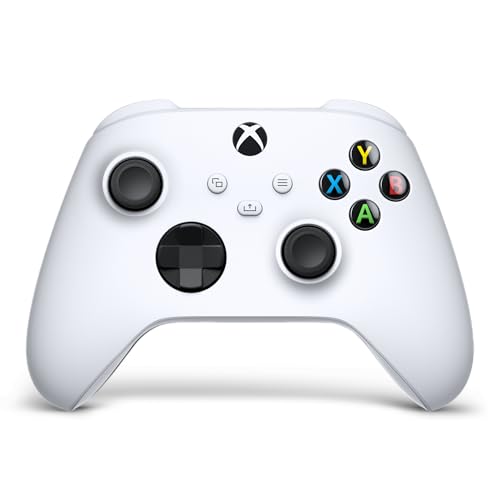
Plug in over USB-C or go wireless — this Robot White pad switches without a dongle.
This is the newer-generation Xbox pad, and the headline is flexibility. It connects over USB-C for plug-and-play on console or PC, or wirelessly over Xbox Wireless and Bluetooth, and it can switch between paired devices quickly. The modernised shell has sculpted surfaces and updated geometry for comfort across long sessions. It holds 12 buttons and weighs 12.8 ounces.
Handling is where the details show: a hybrid D-pad mixes disc and cross feel, and textured grips on the triggers, bumpers and back case keep your fingers from slipping. A dedicated share button captures screenshots and clips without breaking flow. Built-in audio support runs through a 3.5 mm jack for headset chat and game sound, and the Xbox Accessories app lets you remap buttons and save profiles per game.
The recurring gripe is stick drift over time, and a share of owners note durability slipping. That is worth factoring in if you play nightly — no pad at this level is immune, but the Hall Effect options above sidestep the wear entirely. Battery life notes are mixed, since it depends on your AA choice.
Connectivity is the win: USB-C and Bluetooth on one pad means you can plug in on the road and pair at home — few rivals cover both.
The drift caveat: it is not a Hall Effect pad, so long-term stick health is the thing to watch.
Right for the multi-device player: console at home, laptop on the road — the USB-C and Bluetooth combo handles both.
Lean elsewhere if: drift insurance is your top priority and you would rather skip the standard stick design.
7. Nonbliep LED Wireless Controller – White

Eight lighting modes and a fast-return stick — the flashiest pad in this white lineup.
If you want a white controller that lights up, this one has eight adjustable RGB modes you flip through with a single key press. Inside, the maker claims the latest chip core with zero-offset motion signal — the promise being no button delay. An 8-way D-pad and two pressure-point triggers handle the input side, and a dual vibration motor with a 360° omnidirectional stick pumps feel back into your hands. It weighs 9.6 ounces.
The honest picture is more cautious. Reliability is the most-discussed theme and it lands as mixed rather than glowingly positive, and connectivity gripes are the loudest concern — a real number of controllers failing to connect properly is worth knowing before you buy. Quality draws a split response too.
So treat this as a look-first pick for a casual setup, not a tournament pad. At 8 lighting modes and 9.6 ounces it is fun to hold, but if your console time is serious, the drift protection of a Hall Effect pad or the reliability of the standard Xbox controller is the safer spend.
Set your expectations: buy it for the light show and light play, not for a nightly competitive grind.
Pick it for the glow: a good fit for a casual secondary pad where eight lighting modes are the fun part.
Pass if connection stability is non-negotiable: connectivity is the recurring concern here.
8. Xbox Series Wireless Controller

The modern Xbox pad, a rechargeable pack and a two-week Game Pass code in one box.
This bundle pairs the newest-generation Xbox Series S/X controller in Robot White with a VGSION rechargeable lithium battery, so you skip the AA scramble. You also get a 14-day Game Pass code opening access to over 100 games — useful if you are new to the console. The pad itself carries the modernised sculpted shell, textured grip on the triggers, bumpers and back case, and the hybrid D-pad.
Wireless and Bluetooth both come standard, working on supported consoles, Windows 10 PCs, Android phones and tablets. It holds 14 buttons and weighs 14.4 ounces. The VGSION packaging is designed to open easily, and this listing is the authorized version.
What you give up compared with the non-bundle Robot White is flexibility in how you power it — the rechargeable pack is the point, but it is a fixed solution rather than swapping in fresh AAs. The VGSION battery is third-party rather than Microsoft’s own pack, which is the detail to be comfortable with before ordering.
Good first-console kit: reach for it if you want the pad, power and a Game Pass starting point in one purchase.
Consider the plain pad if: you prefer to control your own battery setup with familiar AA cells.
9. Microsoft QAS-00007 Wireless Controller Robot White 2 Pack

Two genuine Microsoft Robot White pads, boxed together for split-screen nights.
The case for this one is simple: two Microsoft Wireless Controllers in Robot White, in a single box. Each carries the hybrid D-pad, textured grip on the triggers, bumpers and back-case, and the dedicated share button for clips and screenshots. Wireless and Bluetooth work across Xbox Series X, Xbox Series S, Xbox One, Windows PC, Android and iOS, so the pair covers a console plus a couple of other devices.
Spec-wise, the pack lists 11 buttons per pad and 1.8 pounds across the two — a genuinely light setup for a duplicate pair. There is no rechargeable pack here, so plan on AAs or your own battery solution for each controller.
This is the double-up option, so it makes most sense when a second player is a regular at your place. Buying two separately costs more effort and often more money, while a single box keeps the finishes matched. The small trade is that you commit to two at once rather than one.
The split-screen maths: two official Microsoft pads, one box, matched Robot White finish — the cleanest way to add a player two.
Power it yourself: no batteries included, so factor in AAs or a charging setup for both.
Built for two: grab it if a second player is in your house often and you want official pads without shopping twice.
Not for a solo player: if you only ever game alone, one pad is all you are paying for.
Know the Specs
Hall Effect Joysticks
Hall Effect sticks measure position with a magnetic field instead of a physical carbon track rubbing against a wiper. With no rubbing parts, there is nothing to wear out and drift typically cannot set in the same way. If the stick drift on your last pad is the reason you are buying, this is the single spec to hunt for — the 8BitDo and Hyperkin both carry it.
Wired vs Wireless Connectivity
A wired pad connects over USB or USB-C and takes power from the cable, so it never needs batteries but keeps you near the console. A wireless pad runs on AA cells or an internal pack and pairs over Xbox Wireless or Bluetooth, letting you sit back. Several white pads look identical in both versions, so always check the connectivity line — wired, wireless or both — before you order.
Trigger Locks and Impulse Triggers
Trigger locks change how far the trigger travels before it bottoms out; a shorter pull fires faster in shooters, while full travel suits racing games. Impulse triggers add small motors inside the trigger itself, so you feel recoil and engine rumble in your fingertips. Both are quality-of-feel features rather than must-haves for casual play.
Button Count and Back Buttons
The button count tells you how many inputs the pad exposes, from 11 on the Robot White 2-pack to 20 on the standard Xbox Wireless Controller. Mappable back buttons and macro keys go further, letting you assign actions to extra paddles you can reach without leaving the sticks. For platformers and sports games, the basic layout is plenty; for competitive shooters and fighters, the extra inputs earn their place.
Common Questions
Will a white Xbox Series controller work on my older Xbox One?
Do Hall Effect sticks really stop stick drift?
Is a wired controller better than a wireless one for Xbox One?
Why does my white controller look grubby after a few weeks?
Can I use these controllers on a Windows PC as well as the console?
Do I need AA batteries or does the controller charge?
What do trigger locks and back buttons actually do in game?
Is the 2-pack a good way to get a second controller?
Does the share button work on an Xbox One?
Can I plug a headset into these white controllers?
The Bottom Line
For most Xbox One owners, the safest pick in this search for the xbox one controller white is the Xbox Wireless Controller – White because it threads Bluetooth, Xbox Wireless and the biggest 20-button layout on the list into one pad that suits console and PC alike. If drift is exactly what sent you shopping, grab the 8BitDo Controller White for its Hall Effect sticks and compact shell. And if a second player is regularly in the room, the Microsoft QAS-00007 2 Pack is the cleanest way to keep two white pads matched on the shelf.
How we choose
We do not accept paid placement. Every pick is matched to a real buyer and a real use-case; we do not hands-on test units.
Sources
Specifications: manufacturer listings and product documentation. Review insights: verified customer reviews, as of November 2026. Pricing: not shown on this page (it changes often); check the current price via the retailer link.
As an Amazon Associate, Tactical Gear Guy earns from qualifying purchases. This does not affect which products we feature.