Specs are compiled from manufacturer listings and verified buyer reviews and can change over time — please confirm the key details on the product page before buying.
Buy the controller that matches your console first, then worry about the extras. A PlayStation pad will not wake your Xbox, and an Xbox pad will not trigger the haptics built into a PS5 game. Get that one match right and you avoid the single most common return reason in this category. Everything below is sorted by console, by how the sticks hold up over months, and by whether the trigger feel is worth living with.
This guide is built by comparing the manufacturers’ published specifications and the patterns across verified customer reviews, so you get each pick’s real strengths and trade-offs instead of marketing spin.
Stick drift is the slow killer here — the thumbstick slowly starts steering on its own and ruins aim in a ranked match. Hall Effect sticks (magnetic sensors with no physical contact to wear out) are the fix worth paying for. Here is the honest read on the best Xbox and PlayStation controller for your setup.
Top Picks


How To Choose The Best Xbox and PlayStation Controller
The first decision is not a feature, it is a handshake. Your pad has to be able to wake and pair with the console you actually own, or nothing else on the box matters. From there, you are choosing between three trade-offs: stick durability, trigger control, and how many buttons you can reach without moving your thumbs off the sticks.
Start With The Console Handshake
A PlayStation-branded controller pairs with a PS5 and also runs on PC, Mac, Android and iOS over USB-C or Bluetooth. An Xbox-branded pad speaks Xbox Wireless natively and adds Bluetooth for PC and cloud play. Third-party Xbox pads can be built for Xbox One and Series X|S together, so check the compatibility list before you assume it covers both generations. If you split your time between a console and a gaming PC, a pad with a 2.4GHz dongle plus a USB-C cable gives you a wired option when you want zero dropouts.
Sticks: The Part That Fails First
Standard thumbsticks use potentiometers, physical wipers that rub against a track as you move. They wear. Over months of hard play you get drift, where the stick reports input you never gave. Hall Effect sticks replace that contact with a magnetic sensor, and because nothing physically scrapes, there is far less to wear down. TMR sticks take a related approach and aim for the precision of a potentiometer with the longevity of Hall Effect. If you play competitive shooters for hours, pay for one of these two, not for a prettier shell.
Triggers, Back Buttons And Reach
Trigger locks change how far the trigger pulls before it registers. A short pull fires faster in a shooter, while a long pull gives you fine throttle control in a racing game. Mappable back buttons let you reload or jump without lifting your thumb off the right stick. Two mappable buttons are the entry ticket, and four is the esports layout. More buttons also means more to learn, so a casual player rarely needs the top count.
Side-by-Side Comparison
| Model | Best For | Console Fit | Connectivity | Key Control Feature | Amazon |
|---|---|---|---|---|---|
| PlayStation DualSense Wireless Controller★ Best Overall | PS5 players who want the full native feature set | PS5, PC, Mac, Android, iOS | Bluetooth, USB Type-C | Haptic feedback and adaptive triggers, 14 buttons | Amazon |
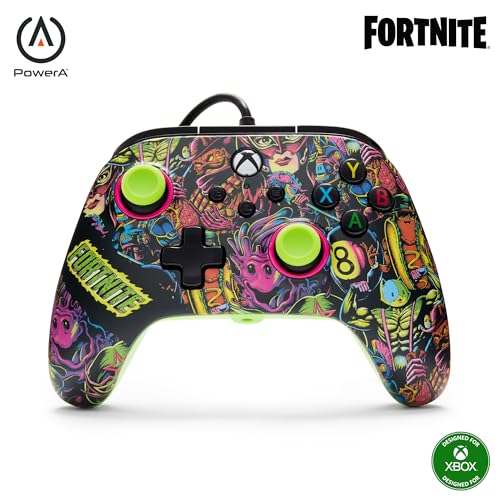
| PowerA Advantage Wired Controller – Fortnite GlowBudget Champion | Budget Xbox players who fear stick drift | Xbox Series X|S, Xbox One, Windows 10/11 | USB-C wired | Hall Effect sticks, 2 mappable buttons, 3-way trigger locks | Amazon |
| DualSense 007 First Light Limited EditionShowpiece Pick | PS5 owners who want a showpiece shell | PS5, PC | Wireless | Adaptive triggers, 17 buttons | Amazon |
| Xbox Wireless Controller – DOOM: The Dark Ages Limited Edition | Xbox players who want grip texture over flash | Xbox Series X|S, Xbox One, PC, cloud | Xbox Wireless, Bluetooth, USB-C | Rubberized leather-feel grips, 9 buttons | Amazon |
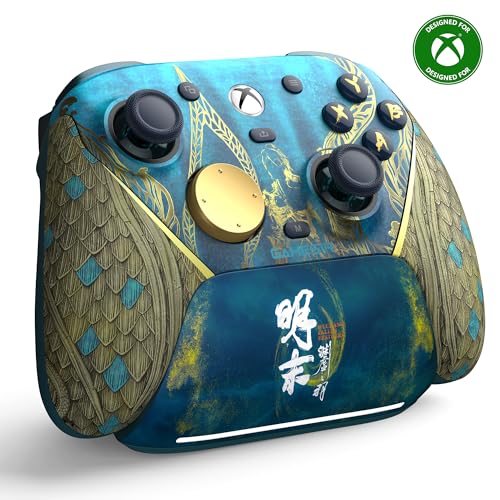
| GameSir G7 Pro Wuchang Edition | Cross-platform players chasing low input lag | Xbox Series X|S, Xbox One, PC, Android | 2.4GHz dongle, USB-C, Bluetooth 5.3 | TMR sticks, Hall Effect triggers, 1200mAh battery | Amazon |
| Turtle Beach Victrix Pro BFG Reloaded | Fighting-game and shooter players who swap modules | Xbox Series X|S, Xbox One, PC | Wired and wireless, Bluetooth | 3 Hall Effect modules, 4 mappable buttons, 5-stop triggers | Amazon |
| Xbox Elite Series 2 Core – Soft Melon | Players who tune stick tension match by match | Xbox Series X|S, Xbox One, PC, cloud | Xbox Wireless, Bluetooth, USB-C | Adjustable-tension sticks, 3-step hair trigger locks | Amazon |
| PlayStation DualSense Edge – Midnight Black | PS5 players who want console-legal back buttons | PS5, PC, Mac | Wireless | Mappable back buttons, replaceable stick modules, 21 buttons | Amazon |
Detailed Reviews
1. PlayStation DualSense Wireless Controller
Our pick — 4.5+★ from 51,000+ verified ratings; the strongest balance of quality and price.
The PS5 pad that turns a trigger squeeze into real tension under your finger.
If you own a PS5, this is the controller the console was designed around. It delivers adaptive triggers, where the trigger physically resists your pull differently depending on what is happening in the game — a bowstring tightens, a jammed gun fights back. Haptic feedback does the same job through the grips, so footsteps and explosions land as distinct vibrations rather than one generic rumble. That one-two of trigger tension and grip haptics is why this pad takes the top spot.
The rest of the kit is practical. You get 14 buttons, a built-in microphone, a 3.5mm jack for a headset, and a dedicated mute button so you can kill voice capture with one press instead of hunting through a menu. Pairing is straightforward: plug it into the PS5 with the console’s USB cable, press the PS button, and the player indicator lights up after the light bar blinks. On the PC side, USB Type-C or Bluetooth gets you into Windows, Mac, Android and iOS.
Here is the number most buyers skip over: 15.2 ounces is the heft you are holding for a whole session. It’s lighter than the DualSense Edge at 21 buttons but heavier than the wired PowerA at 10.24 ounces, which is the trade-off for the built-in haptics and battery. The other honest note is value. A portion of buyers think the price sits high for a pad that ships without a charging dock, so this is the pick for someone who values the trigger feel over the extras in the box.
The case for it: Adaptive triggers and haptics give PS5 games a physical layer that no third-party pad replicates, and the mute button plus built-in mic make voice chat a one-press affair.
Where it stings: 15.2 ounces is a real weight in the hands, and the value question lingers for buyers who wanted a dock or a spare cable in the box.
Reach for it if: you run a PS5 and want the pad the exclusives were tuned around, from the trigger resistance to the mic button.
Think twice if: you split most of your time on Xbox or want the lightest pad for long handheld sessions on PC.
2. PowerA Advantage Wired Controller
Drift-proof sticks for the price of a night out, no battery anxiety included.
This pad solves two problems at once: it plugs in for wired Xbox play, and it fights stick drift. The Hall Effect modules are contact-free magnetic sensors in the thumbsticks, so no wiper rubs a track as you play. That is the drift that slowly creeps into standard sticks, and this design targets it directly. It connects over USB-C (the oval, reversible connector) and works across Xbox Series X|S, Xbox One and Windows 10/11.
You get a lot of control for a budget board: 18 buttons, and the extras show it. Two mappable buttons can be programmed mid-game without diving into system settings. The 3-way trigger locks let you shorten the pull for faster shots in a shooter, or run the full travel for a racing game. Dual rumble motors and rich impulse triggers carry the vibration, and there’s a 3.5mm jack (the standard small headphone plug) for your headset. The PowerA Gamer HQ app lets you test and calibrate it. For a direct contrast, this pad carries 18 buttons versus just 4 on the budget BUERTT below — this one is built for players who want control at the fingertip.
The honest catch is durability. A few buyers report the controller breaking after a few weeks of use, and reliability comes through as mixed rather than settled. That makes this the right pick for a player who wants a spare wired pad or a low-cost way into Hall Effect sticks, not for someone who needs one controller to survive years of tournament abuse. At 10.24 ounces and sized 6.14 x 4.21 x 2.56 inches, it’s compact next to the DualSense’s 7.87 x 7.48 x 2.87-inch frame, so smaller hands get on with it well.
What earns its place
- Hall Effect thumbsticks fight drift at an entry price
- 2 mappable buttons you can set on the fly
- 3-way trigger locks for shooters and racers
- Works on Xbox Series X|S, Xbox One and Windows 10/11
What to weigh up
- Wired USB-C only — no wireless play
- Long-term durability comes through as mixed
- Glow-in-the-dark shell won’t suit everyone’s taste
Go for it when: you want magnetic sticks and remappable buttons without paying premium money.
Look elsewhere if: you need one pad to last through years of daily competitive play — the reliability record here is not the strongest part.
3. DualSense Wireless Controller 007 First Light
A gold-barrel Bond tribute that still does every trick the standard DualSense does.
Some pads you buy for the spec sheet, and this one you buy for the look on the shelf. The golden sheen and radiant barrel design frame Bond’s codename and weapon, and the appearance is exactly what people bring up in the reviews — it earns its place as a display piece as much as a tool. Underneath the finish sits the same adaptive trigger system that lets you feel a trigger stiffen or a lighter flick register with precision, and the 17-button layout gives you room for everything a PS5 game throws at you.
Compatibility is what you’d expect from the PlayStation family: PS5 and PC, wireless, no cable in the box. Reviewers single out the fit and finish, and the adaptive triggers’ haptic resistance gets called out by name. It’s a genuine DualSense in the hand, with the barrel theme picked out across the shell.
The caveat is simple and honest: this is a collector’s edition for players who already value the look. If you want a plain working pad, the standard DualSense covers the same functions for less, and you’re paying a premium for the limited shell here. It also stays a PS5-and-PC pad — there’s no Xbox or Android path on this one, so cross-console players should look at the GameSir further down.
Why it stands out
- Distinctive gold 007 barrel design across the body
- Full adaptive trigger feel under the fingers
- 17 buttons for PS5’s full control set
- Built for PS5 and PC, wireless
Worth knowing
- Paying for the limited shell, not new hardware
- No Xbox or mobile pairing support
Buy it because: you want a DualSense that looks like nothing else on your shelf and still plays every PS5 title properly.
Pass on it if: the shell means nothing to you — the standard DualSense above delivers the same trigger tech for less outlay.
4. Xbox Wireless Controller DOOM: The Dark Ages

Leather-feel grips and matte green armor that keep your hands planted through a firefight.
Grip is the feature here, and it’s a real one. The rubberized grips carry a leather-like feel, so your palms stay anchored in a long session instead of sliding as your hands warm up. The matte green armor case is dressed with 3D silver helmet spikes and plated sheathing across the top. The ABXY buttons spell out the Sentinel alphabet in green, and a sinister red thumbstick nods to the Doom Slayer’s chest port. The left orange trigger locks in your intent — and it’s all officially Xbox hardware.
Functionally this is a standard Xbox Series X|S pad, which is a compliment. It uses Xbox Wireless and Bluetooth to reach supported consoles, PCs and cloud-enabled devices, and the 9-button layout is the layout your thumbs already know. There’s a downloadable DOOM Slayer Executioner skin for DOOM: The Dark Ages included, with the game itself sold separately. At 0.21 kg the weight stays in normal controller territory, so the texture is the upgrade, not a heavier build.
Owners praise the leather-like surface and the tactile grip directly in their reviews. The split in the reviews comes on build quality and value: some owners find the construction very solid, others wonder whether the extra shell money is justified. That’s a fair question for any collector pad. If you don’t care about DOOM armor, a plain Xbox pad does the same work without the premium tag.
Where it wins: leather-feel rubberized grips that keep your hands from sliding, plus a design that carries real personality without adding odd geometry.
Where it’s honest: build quality and value both come in mixed — the shell is what you’re paying for over a stock pad.
Made for: the Xbox player who wants a pad that looks like DOOM armor and stays glued to their palms through hour four.
Skip the premium if: you have no attachment to the theme — value is the weakest point in this pad’s record.
5. GameSir G7 Pro Wireless Gaming Controller
A 1000Hz polling rate, TMR sticks and a charging dock — the tech-forward Xbox pick.
GameSir’s first wireless Xbox pad goes after the one thing grinders fear: the moment a stick starts drifting. Its Mag-Res TMR sticks (tunnel magnetoresistance sensors, a magnetic stick design) blend the precision of a traditional potentiometer with the long life of a Hall Effect sensor. They hold a 1000Hz polling rate — the pad reports your stick position a thousand times a second, so small aim adjustments land without a mushy delay. Hall Effect analog triggers add zero-drift actuation, and a Hair Trigger Mode you can fire off by holding M plus LT/RT shortens the pull for quicker shots.
Connectivity is where it earns its keep across a desk full of devices. You get a 2.4G wireless dongle or USB-C cable for Xbox and PC, plus Bluetooth 5.3 for Android. A one-press wake-up turns the console on and pairs it, so you’re not hunting for a button every boot. The 1200mAh battery is backed by a smart start-stop charging station that charges the moment you set the pad down, and that station also stores the wireless receiver so it doesn’t wander off.
The catch is a little setup homework. This is a third-party pad with a mode switch for jumping between 2.4G, Bluetooth and wired, and you’ll want to learn that switch before your first session. It’s also a special edition with its four programmable buttons and no-drift sticks front and center — for players who want fewer moving parts, the standard DualSense above is simpler. At 9.6 ounces it’s lighter than the DualSense’s 15.2 ounces, which makes long sessions easier on the wrists.
The competitive edge
- 1000Hz polling rate for near-instant stick input
- TMR sticks and Hall Effect triggers resist drift
- 4 programmable buttons
- Charging station also stores the dongle
Before you commit
- Mode switch takes some learning on day one
- Special-edition price sits above the value tier
Pick this one when: you hop between Xbox, PC and Android and want one low-lag pad plus a dock that lives beside the console.
Choose simpler if: you only ever play PS5 and want the buttons the console’s own games were written for.
6. Turtle Beach Victrix Pro BFG Reloaded

Swappable modules so your pad changes shape between a shooter and a fightpad.
Modularity is the whole pitch, and it runs deep. You get 3 customizable modules with built-in Hall-Effect technology, 11 interchangeable components, and an ergonomically enhanced 6-button fightpad module built with Kailh microswitches. That means one controller body can take on a street-fighter layout, swap in a different stick arrangement, or run a standard gamepad setup depending on what you’re playing. The 5-stop Hall-Effect clutch triggers with hair-trigger mode give you that same travel control the other competitive pads offer.
Day-to-day it’s a full-featured wireless pad. Four mappable quick-action buttons sit where your fingers can reach them, a built-in 3.5mm jack includes a lifetime Dolby Atmos subscription, and it’s officially licensed by Xbox. Connectivity runs wired and wireless over Bluetooth, USB-A and USB-C, and the rechargeable battery is rated up to 20 hours. A carrying case and module tool come in the box, and the free Victrix Control Hub companion app on Xbox and PC lets you fine-tune your setup.
The weigh-up is that all those moving parts bring a learning curve. Trigger and button responsiveness come through mixed, with some finding the trigger locks a win and others finding buttons get in the way of regular use. Reliability also lands mixed, and value is a question at this tier. It’s the pick for a player who will actually use the modules, not for someone who wants to buy once and never touch a setting. At 9.28 ounces and 2.4 x 6.3 x 4.1 inches, it stays compact despite the modular internals.
The draw: 3 Hall Effect modules and 11 interchangeable parts let one pad play like several, with a fightpad layout built on Kailh microswitches for the genre that needs it.
The reality check: reliability and trigger feel are mixed, so this rewards the tinkerer who will learn the modules over the buyer who wants plug-and-play.
Worth it for: fighting-game regulars and tweakers who will actually swap modules and remap the four quick-action buttons.
Second-guess it if: you want a pad that behaves identically out of the case every time with no setup.
7. Xbox Elite Series 2 Core

Tune your stick resistance match by match and fire on a three-step hair trigger.
Adjustable-tension thumbsticks are the headline, and they mean exactly what they sound like — you dial the resistance of each stick to your thumb, so aim can feel stiff for precision or loose for quick flicks. Three-step hair trigger locks shorten the pull distance so shots register sooner, and a wrap-around rubberized grip holds your hands in place through long sessions. The Soft Melon color comes from Xbox Design Lab and runs across the top case, bumpers, triggers and ABXY buttons.
Endurance is where this pad separates from the pack. It’s rated for up to 40 hours of rechargeable battery life, so a week of evening sessions on one charge is realistic. It plays across Xbox Series X|S, Xbox One, Windows PC and cloud over Xbox Wireless, Bluetooth or USB-C. A 3.5mm audio jack takes any compatible headset, and the Xbox Accessories app lets you map buttons, adjust dead zones, remap to keyboard keys for supported games and even choose the color of the Xbox button light.
The honest read is that quality and reliability land mixed rather than settled, and value divides buyers too. The Core edition ships with just the essentials, so the extra paddles, thumbsticks, D-pad, case and dock come in the Complete Component Pack, sold separately. That’s the reality of a build-your-own elite pad — this is the chassis, not the full kit. If you want the lightest possible toggles, the Edge and the Victrix above will feel more direct to hand.
Strengths to note
- Adjustable-tension sticks let you fine-tune aim
- Up to 40 hours of rechargeable battery
- Three-step hair trigger locks
- Deep remapping through the Xbox Accessories app
Points to consider
- Quality and reliability feedback is mixed
- Complete Component Pack is sold separately
- Custom color raises the premium
Right for: Xbox players who want to shape stick tension and trigger travel to their own hand and get a week of play per charge.
Wrong for: anyone expecting a full kit in the box, since the paddles and dock are a separate purchase.
8. PlayStation DualSense Edge Wireless Controller

Back buttons and swappable sticks built straight into the PS5’s premium pad.
This is the DualSense with the pro controls bolted on. Mappable back buttons solve the thumb-off-the-stick problem, and replaceable stick modules plus caps let you swap out a worn stick instead of replacing the whole pad — that’s a direct answer to drift, done the PS5 way. All the DualSense wireless features are built in, so adaptive triggers and haptics carry over. The 21-button count is the highest on this list, and the Midnight Black colorway keeps it subtle on a shelf.
It runs on PS5, PC and Mac, wireless, in the same family as the standard DualSense but heavier in the hand and built for players who want control remapped onto paddles. The finish is what reviewers point to first, and it’s why this pad sits at the top of the PlayStation line. If you’re upgrading from a base DualSense, the back buttons are the actual change you’ll feel in your gameplay.
The catch is value. The value debate runs genuinely mixed, with some PS5 owners finding it worth the top-tier money and others saying it isn’t. At 21 buttons it’s the most capable PlayStation pad here, but it doesn’t add extra trigger or haptic tech over the standard DualSense — the money goes to the paddles and the replaceable sticks. For players who won’t use back buttons, the standard DualSense covers the same PS5 features without the premium.
The selling point: mappable back paddles and replaceable stick modules on a real DualSense — the two upgrades most PS5 competitive players actually ask for.
The honest catch: value is the fight in this pad’s reviews, since it adds control rather than new trigger or haptic hardware.
For the player who: wants back paddles on PS5 and likes the idea of swapping a worn stick rather than scrapping the whole controller.
Not worth it if: you never use extra buttons — the standard DualSense above does the same job without the premium.
Know the Specs
Hall Effect and TMR Sticks
Standard thumbsticks use potentiometers — physical wipers that rub a track as you move. That friction is why sticks eventually drift. Hall Effect sticks replace the wiper with a magnetic sensor, so nothing touches and there’s far less to wear. TMR sticks work on a related principle and aim to keep potentiometer-style precision while adding durability. What it means for you: if you play ranked shooters and can’t afford your aim drifting on its own, pay for one of these over a prettier shell.
Trigger Locks and Travel
Trigger locks let you shorten how far the trigger pulls before it registers. A short pull fires sooner in a shooter, while full travel gives you fine throttle control in a racer. Look for three-step locks on the Xbox pads and five-stop clutch triggers on the Victrix. The plain benefit: you can set the trigger to match the game in front of you instead of settling for one feel everywhere.
Polling Rate and Connection Type
Polling rate is how often the controller reports your input to the console. A 1000Hz rate on the GameSir means it reports a thousand times a second, which tightens up small aim adjustments. A 2.4GHz wireless dongle gives you a low-latency link without Bluetooth pairing, while Bluetooth is the flexible option for PC, Mac and mobile. Wired USB-C is the safest route for competitive play because there’s no dropouts to worry about.
Battery and Weight
Battery life counts in hours of play, and it varies widely here — the Elite Series 2 Core is rated up to 40 hours, the Victrix up to 20. Weight matters for long sessions: the DualSense sits at 15.2 ounces, the GameSir at 9.6 ounces, the Victrix at 9.28 ounces. Heavier pads can feel planted, lighter pads tire your hands less. Decide which you prefer before you buy, because you can’t change it later.
Common Questions
Will a PlayStation controller work on an Xbox console?
What is stick drift and do Hall Effect sticks stop it?
Can I use the DualSense Edge back buttons in PS5 games?
Is a wired controller better than wireless for competitive play?
How long does the battery last on a wireless Xbox controller?
What does a 1000Hz polling rate actually change?
Do I need back buttons for shooters?
What is the difference between the DualSense and the DualSense Edge?
Will a third-party Xbox controller work on Xbox Series X and Xbox One?
Can I use a controller for PC gaming instead of keyboard and mouse?
The Bottom Line
For most PS5 players, the xbox and playstation controller winner is the PlayStation DualSense Wireless Controller. It’s the pad PS5 games were tuned around, with adaptive triggers (they push back with tension in-game), haptic feedback and a built-in mic. It also holds 4.5+ stars across 51,000+ ratings. Xbox owners should start with the PowerA Advantage if they fear drift, since Hall Effect sticks at an entry price are hard to argue with. And for anyone hopping between console, PC and Android, the GameSir G7 Pro packs TMR sticks, a 1000Hz polling rate and a charging dock into one pad. Whichever you pick, one rule holds: match the pad to your console first, then pay for the sticks and triggers you’ll actually feel.
How we choose
We do not accept paid placement. Every pick is matched to a real buyer and a real use-case; we do not hands-on test units.
Sources
Specifications: manufacturer listings and product documentation. Review insights: verified customer reviews, as of November 2026. Pricing: not shown on this page (it changes often); check the current price via the retailer link.
As an Amazon Associate, Tactical Gear Guy earns from qualifying purchases. This does not affect which products we feature.