Specs are compiled from manufacturer listings and verified buyer reviews and can change over time — please confirm the key details on the product page before buying.
Buying a wood front PC case is mostly a battle against one quiet disappointment: the photo shows warm grain, the box shows up with plastic printed to look like grain. Check that the front panel is genuinely walnut, oak, or beech, then check the space behind it for air. Every pick below clears both checks.
This guide is built by comparing the manufacturers’ published specifications and the patterns across verified customer reviews, so you get each pick’s real strengths and trade-offs instead of marketing spin.
You will see how much graphics card room each chassis gives up, whether a radiator fits with a long card, and which ones ship with fans already bolted in. Read on for a shortlist that covers every budget tier of wood front pc case.
Top Picks


How To Choose The Best Wood Front PC Case
Start with the wood itself, then work backwards to your parts. A case sits in view every day, so the wood finish matters more here than on any other component. Work through these three checks in order so you don’t buy a pretty box that won’t hold your graphics card.
Is the wood real, or printed plastic?
Genuine wood has grain that varies from unit to unit, and the listing will usually say walnut, oak, or beech by name. Several cases here use front bars cut from real wood, and one uses wood slats certified by the Forest Stewardship Council (an independent body that audits sustainably sourced timber). A printed wood-look front copies the colour but none of the texture, so run a finger across the grain in a store if you can.
Wood behind glass is not the same as wood with air behind it
A solid wood slab starves the front intakes. Look for wood slats, a mesh layer behind the wood, or an open front frame. Some cases here push 138cfm of airflow (cubic feet per minute, the volume of air moved each minute) through a wood front, while others run five fans through theirs. Both work, but only if the panel lets air past.
Measure your GPU before you fall for the finish
Graphics cards have stretched past 400mm on high-end models. A case that allows a 355mm card may not fit yours. A front-mounted radiator eats into that space further — one case on this list drops from 355mm to 300mm once you hang a 360mm radiator up front. Note your card’s exact length before you shop.
Side-by-Side Comparison
| Model | Best For | Form Factor | Max GPU Length | Fans Included | Amazon |
|---|---|---|---|---|---|
| Fractal Design North Charcoal Black TG★ Best Overall | Most builds, most desks | ATX Mid Tower | 355 mm (300 mm with front 360 radiator) | Two 140 mm Aspect PWM | Amazon |
| Lian Li LANCOOL 217Top Performer | Airflow-first wood builds | ATX Mid Tower | — | Five (2×170 mm, 2×120 mm, 1×140 mm) | Amazon |
| Corsair Frame 4000D Wood RSMost Versatile | Upgrading the case over time | ATX Mid Tower | — | Four RS120 PWM | Amazon |
| Antec C8 Wood | Big builds and triple radiators | Full Tower E-ATX | 440 mm | None | Amazon |
| ASUS ProArt PA401 Wood Edition | Quiet, clean workstation builds | ATX Mid Tower | 315 mm | Two 160 × 32 mm ring fans | Amazon |
| FOIFKIN F600 | Glass-forward show builds | ATX Mid Tower | 400 mm | Seven no-LED fans | Amazon |
| Lian Li A3-mATX | Small footprint, big card | Mini Tower (mATX/ITX) | 415 mm | None | Amazon |
| Okinos Cypress 7 | Storage and top-radiator builds | ATX Mid Tower | 415 mm (front fan) | Four 120 mm PWM | Amazon |
| MONTECH XRWood | First real wood build | ATX Mid Tower | 410 mm | Four ARGB PWM | Amazon |
Detailed Reviews
1. Fractal Design North Charcoal Black Tempered Glass Dark
Our pick — 4.5+★ from 3,500+ verified ratings; the strongest balance of quality and price.
Walnut bars on the front, two 140mm fans already inside, and a layout that swallows most builds without drama.
This is the case that made wood fronts mainstream, and the reason is practical rather than decorative. The front bars are cut from real walnut or oak, they sit over an open front with integrated mesh, and air still moves through. Two 140 mm Aspect PWM fans ship pre-installed, so your first power-on is already circulating air rather than waiting on a fan order.
Room is the quiet selling point. You get two combined 3.5″/2.5″ drive mounts and two dedicated 2.5″ drive mounts from the start, plus seven bridgeless expansion slots for add-in cards. Graphics support reaches 355 mm, and drops to 300 mm if you mount a 360 mm radiator up front. That 55 mm loss is real, so decide on the radiator before the card.
Buyers who own this one praise the looks first and the build quality almost as often. The walnut reads as furniture on a desk rather than a gamer box, so it fits offices and studios as easily as bedrooms. What wins people over is how little fuss the assembly takes: the side panels come off, the front unclips, and the top pops off on an integrated tab, so a full teardown is a two-minute job rather than a screwdriver hunt. Heft is the flip side — at 9.5 kg it stays put and feels solid, but you will not want to carry it up stairs often. That is noticeably heavier than the 6.45 kg Okinos Cypress 7 below.
What earns its keep
- Real walnut or oak front bars over an open, mesh-backed intake, so the wood never smothers airflow.
- 355 mm of graphics card room, dropping to 300 mm with a 360 mm front radiator.
- Two 140 mm Aspect PWM fans and four drive mounts included — nothing extra to buy on day one.
- Tempered glass side panel resists scratches and shows the build off clearly.
Worth knowing first
- A front-mounted 360 radiator costs you 55 mm of GPU length — measure both before ordering.
- At 9.5 kg it is a desk fixture, not a lan-party regular.
Buy this one: a first or second build where the case will sit in view and you want the wood to be real.
Check the numbers: if your graphics card is longer than 355 mm, or you insist on a front radiator with a very long card, this one runs out of room.
2. Lian Li LANCOOL 217 ATX Mid-Tower, Black Walnut Wood
Five fans from the start, two of them 170mm, pushing air past real walnut instead of forcing you to buy cooling later.
Most cases hand you two fans and a shopping list. This one arrives with five: two 170 × 30 mm front fans, two 120 mm reversed-blade fans, and a 140 mm rear fan. That is a complete airflow path on unboxing day, and the 170 mm front pair moves more air at lower speed than the 140 mm units in the Fractal North above.
The clever part is that the front pair can be raised into what Lian Li calls CPU mode, which aims the airflow squarely at the processor instead of splitting it across the whole case. Fan mounting is toolless, so changing that layout takes no screwdriver. Wood accents run across the front in real walnut or light beech, giving you two finishes to match a desk rather than one.
Owners come back to two things: how well the wood and metal sit together, and how easy the cable routing is. It also supports back-connect motherboards, the kind with their power plugs on the rear of the board, which keeps the visible side tidy. Two power buttons cover whichever side of the desk you park it on. At 10.5 kg it is a full kilogram heavier than the Fractal North’s 9.5 kg, so treat it as a stay-put case. Dual PSU mounting lets you face the power supply forward or rotate it to open up cable room, and PSUs up to 220 mm fit.
The honest read: this is the pick for someone who wants cooling solved on arrival and does not want to shop for fans in the same week. The 170 mm front fans are the headline, and the toolless mounting means you can move them later without a rebuild.
The catch: a heavier chassis and five fans mean you are paying for airflow capacity you may not need if your parts run cool.
Reach for this if: you are building a high-heat system and want the fan count handled up front.
Look elsewhere if: you move your tower around — 10.5 kg is a two-hands job.
3. Corsair Frame 4000D Wood RS Modular Mid-Tower
A case built to be taken apart and rebuilt — the wood front swaps, the rails slide, the fan layout is yours.
The front is walnut or oak slats certified by the Forest Stewardship Council, and the slat spacing keeps airflow high instead of turning the panel into a wall. Four RS120 PWM fans are pre-installed front and rear, use daisy-chainable 4-pin connectors, and support a Zero RPM mode that stops the blades entirely under light load. Zero RPM mode is the detail you notice daily: silence at idle.
What separates this from every other case here is the Frame system. The motherboard tray, the front panel, and the PSU shroud come apart and swap, so the case can change a year down the line rather than being replaced. The InfiniRail mount is a steel rail you slide along rather than fixed screw holes, so you can place front fans up to 200 mm and roof fans up to 140 mm wherever you want them. Three separate 360 mm radiator locations — front, roof, and side — give you room to grow.
It also lists support for the rear-connector motherboard standards from ASUS, Gigabyte, and MSI, so a tidy build with hidden cables is on the table. Owners describe the build quality as excellent and the panel work as easy to handle. On the honest side, the case is a big presence and it draws comments about being large — worth checking the desk space before you commit. It also carries 9.7 kg, so plan where it lives.
Why it stands out: no other case on this list lets you replace the front panel and tray later. That modularity is worth paying a premium for if you upgrade often rather than building once.
Size note: the footprint is generous and buyers mention the scale, so measure your desk before ordering.
For the tinkerer: you upgrade your case, not the other way around — this one grows with the build.
Skip the gamble: if you want a single-build-and-done box, the modularity is money you will never spend.
4. Antec C8 Wood Full-Tower E-ATX

A full tower with a wooden front and a smooth glass corner, built to hold three thick radiators at once.
If your graphics card is 440 mm long or your build runs three radiators, most of this list stops being an option. This one does not flinch. The wooden front panel meets tempered glass front and side panels at a smooth edge, so the wood and glass read as one surface rather than two materials bolted together. The dual-chamber layout puts the power supply and storage behind the motherboard instead of underneath it, which keeps the main bay clear for your parts.
Cooling is the reason to choose a case this size. You can fit three 140 mm fans or two 160 mm fans on the top and bottom, and mount thick 360 mm radiators on the top, bottom, and side simultaneously. The bottom cut-out uses interchangeable 120 mm/140 mm brackets, so a bottom radiator is not a guess. Six internal drive bays cover a storage-heavy machine.
Buyers describe the construction as the standout, with spaciousness running a close second — components drop in without squeezing and the panels come off easily. This case ships without fans, which is normal for this size and means you budget for your own. It also weighs 10.39 kg and stands tall, so it wants a floor or a deep desk rather than a small shelf. Unlike the compact Lian Li A3 below, this is a case you place once and rarely move.
Where it earns the footprint
- 440 mm of graphics card room — the longest clearance on this list.
- Simultaneous thick 360 mm radiators top, bottom, and side.
- Dual-chamber design keeps the power supply and drives out of the main bay.
- smooth wood-to-glass edge gives it a furniture look.
Plan around this
- No fans included — add your own set on day one.
- 10.39 kg and a tall stance mean it suits a floor or large desk.
The fit: oversized cards, E-ATX boards, and water-cooling layouts with no compromises.
The limit: it hands you an empty fan tray, so budget for cooling before you build.
5. ASUS ProArt PA401 Wood Edition

Twin 160 mm ring fans driving 138cfm through a wood panel — a workstation case that stays quiet and cool.
Two oversized 160 × 32 mm ring-blade fans sit up front and move up to 138cfm of air, which is the kind of figure you would expect from a much noisier case. The front panel itself is wood certified by the Forest Stewardship Council for sustainable sourcing, so the finish is not just a colour choice. Ports are generous for a workstation: a USB Type-C port that runs at 20Gbps (fast enough for external drives that would choke on a slower port), with locks on the power and reset buttons and two-section PWM control.
Buyers call it a premium option with lovely design and airflow to match, and the assembly is described as straightforward. Where it draws mixed notes is size — several find it smaller than expected. The numbers explain why: this case supports graphics cards to 315 mm and radiators to 240 mm, which is the tightest card limit on this list apart from nothing at all. If you run a compact professional card for rendering or editing, that is plenty. If you run an oversized gaming card, look elsewhere.
The build leans toward tidy rather than flashy. A left-side panel lock, a detachable PSU bracket, and integrated rear cable clips mean the clean look survives the second build. The tempered glass side shows the internals through a clear pane. Owners describe it as a professional studio piece rather than a gamer box, and the wood plus glass combination is why.
The defining trade: 138cfm from two 160 mm fans is serious airflow, but the 315 mm card limit is the tightest here. A compact creator card fits; a long gaming card does not.
Build feel: the panel lock and detachable PSU bracket shave real time off maintenance.
Pick this for: a creative workstation where the case is heard less and seen more.
Look past it if: your card is longer than 315 mm — the fit will stop you cold.
6. FOIFKIN F600 Wood Front ATX Mid-Tower
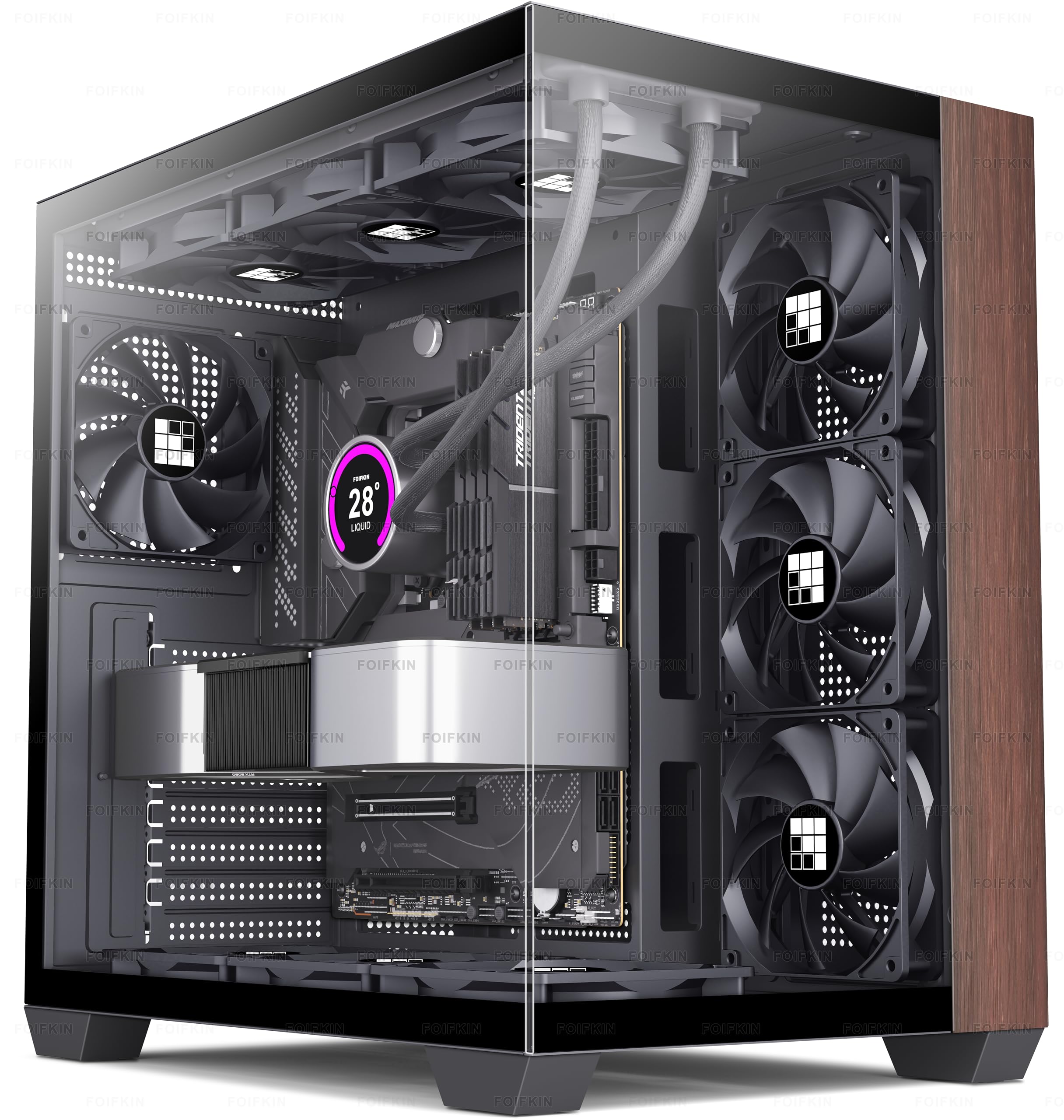
Wood on the front, glass on two sides, and seven fans already spinning — a case that wants an audience.
The design brief here is clear: pair wood elements with metal for a natural look, then wrap the whole thing in a 270° double-cabin glass curtain so the build is visible from two angles. Seven no-LED fans come pre-installed, and the glass side panel is hinged so it lifts off without tools. If you have ever fumbled a side panel back onto a tower, that hinge is a small but real luxury.
Sizing is generous for a mid tower. It supports ATX, M-ATX, and ITX boards, a 360 mm cooler, a CPU cooler up to 170 mm tall, and a graphics card up to 400 mm long. The power supply can be an ATX unit up to 220 mm. Storage runs either one HDD plus two SSDs, or two HDDs. The front I/O covers a Type-C 3.0 port, USB 3.0 and USB 2.0, audio, power, reset, and an LED switch.
What owners consistently enjoy is the look and how much space the long card gets. Where opinion splits is cable management — that interior is a job you want to plan before you start screwing things down, and the glass makes any untidiness visible from both sides. The pre-installed fans are no-LED, so you get airflow without a light show unless you add your own. It weighs nothing like the Antec full tower, so moving it around is manageable.
The showpiece angle: a hinged glass wall on two sides plus seven fans makes this the most display-driven case here. If you want to see your parts, this delivers.
Be honest with yourself: cable management is the piece owners split on. Route the back before the panels go on.
Made for: builds meant to be looked at, with a long card and a 360 mm cooler inside.
Not for you if: you would rather never think about cable routing again.
7. Lian Li A3-mATX Wood Black Mesh

A 26.3L cube that still swallows a 415 mm card — the wood front without the desk-hogging tower.
Compact cases usually force a shorter card. This one fits a 415 mm graphics card into a 26.3L body, which is why it appears on so many small-build wish lists. The mATX and ITX board support means four expansion slots, and the steel mesh side and top panels keep high-TDP cards and radiators fed with air rather than starved. It also holds a 360 mm radiator and up to ten 120 mm fans.
The front panel is walnut, and the case is modular in a way that makes compact builds less punishing. It accepts ATX, SFX, and SFX-L power supplies, and Lian Li’s own EDGE units, with front or side mounting so you can win back clearance for long cards and thick cables. The board runs on the small side and buyers describe the size as impressively small — it fits on a desk shelf instead of claiming a whole surface.
One honest note: cable management is the one area where opinion goes negative. In a small cube, every cable shows, so plan the routing early. It also ships without fans and weighs 11 pounds. Compare that with the MONTECH XRWood at 14.3 pounds: this is the lighter, smaller box. Its 415 mm card limit also edges past the Fractal North’s 355 mm, which matters if your card has grown since you bought it.
Why it earns the spot: the space-to-hardware ratio is the whole pitch. You give up desk area, not card length.
The friction point: cable management is a known weak spot in a case this compact, so plan it before the build.
For small rooms: a desk shelf, a studio corner, or anywhere a full tower will not fit but a long card will.
Weigh the clearance: 415 mm of card room is generous, but cable routing takes patience.
8. Okinos Cypress 7 Genuine Walnut Wood

Four fans moving 200cfm, five SSD bays, and a radiator mount that sits on top instead of in front of your card.
Putting the 360 mm radiator on the roof is the smart choice in a wood-front case, because a front radiator is what eats your card length. This case takes the radiators where they hurt least. Four pre-installed 120 mm PWM fans (pulse-width modulation fans, which let the board dial their speed up and down) push airflow to an intake volume of 200cfm (cubic feet per minute, a measure of how much air moves through per minute). The Type-C port runs 3.2 Gen 2 at 10Gbps (fast enough for external drive transfers that would drag on an older port), alongside two USB 3.0 ports and audio jacks.
Storage is the standout number: up to five SSDs. The side holds two SSDs, though mounting there limits extra fan installation, which is the trade-off to know. Graphics support runs to 415 mm with a front fan, 390 mm with a rear fan, and side-mounted AIO support to 280 mm. A 240 mm water cooler on the right side may interfere with cards wider than 280 mm, so keep that spec in mind before committing. Vertical GPU mounting is not supported — this is a horizontal-install case only.
Buyers praise the walnut grain first and the overall case quality a close second, with the room for fans and radiators following. It weighs 6.45 kg, meaning it is a full 3 kg lighter than the Fractal North’s 9.5 kg, so it is easier to reposition. It also carries five internal bays against the Fractal’s two, which matters if you keep a media library on SSDs.
What makes it smart
- 360 mm radiator on top, so your front card space stays free.
- Four 120 mm PWM fans and 200cfm of intake volume included.
- Up to five SSDs — the most storage room on this list.
- 6.45 kg, which is 3 kg lighter than the Fractal North.
Know before you build
- No vertical GPU mounting.
- Side SSD mounting limits extra fan installs; a right-side 240 mm cooler can foul cards wider than 280 mm.
Suits you if: you run a top radiator, a big card, and a stack of SSDs.
Check this first: no vertical GPU mount and tighter side-clearance rules for wide cards.
9. MONTECH XRWood ATX Case, Genuine Walnut

Genuine walnut on a first-build budget, with four ARGB fans and room for a 410 mm card.
The specs on this one read like a much pricier case. The internal capacity is enlarged to fit graphics cards up to 410 mm, which covers the latest RTX 50 Series cards and most high-end models. An adjustable GPU support stand is included to hold up cards of different thicknesses, which matters once a three-slot card starts sagging. Genuine walnut sits on the front, with carbon-print accents on the front frame to round off the finish.
Cooling arrives pre-installed: three 140 mm front ARGB fans and one 120 mm rear ARGB fan, all PWM. That is a lit front and a full airflow path without adding a fan order. An extra-large PSU shroud and expanded routing space make the back of the build less of a puzzle. The case supports ATX, Micro-ATX, and Mini-ITX boards, 360 mm AIO coolers, and both 3.5″ and 2.5″ drives, with four internal bays.
Weight is the honest number. This case comes in at 14.3 pounds, which is 3.3 pounds heavier than the Lian Li A3-mATX at 11 pounds, so it suits a floor spot. It is also taller in footprint than the compact Lian Li, and that extra size is what lets it take a 410 mm card with a 360 mm cooler. For a first wood-front build, the room and the included fans do most of the work, and the GPU stand is a detail you usually only see on pricier cases.
The value read: a genuine walnut front, four ARGB fans, and a GPU support stand, with 410 mm of card room. That is a lot of build already handled on day one.
The trade: at 14.3 pounds it is the heaviest mid tower here, so pick its spot before you build.
Best entry point: a first wood-front build where you want the fans and the card support already handled.
Consider the weight: 14.3 pounds is a committed desk or floor placement, not a portable case.
Know the Specs
GPU Length Clearance
This is the figure that decides whether your graphics card fits. Cases here range from 315 mm up to 440 mm. A front-mounted radiator cuts into that space — the Fractal North drops from 355 mm to 300 mm with a 360 mm radiator up front. Measure your card’s length and add a little breathing room before you buy.
Radiator Placement
A top-mounted radiator keeps the front clear for a long card, while a front radiator costs you card length. Some cases here fit thick 360 mm radiators on the top, bottom, and side at once, and one lists three 360 mm locations. Decide where the radiator goes first, then confirm the card still fits.
Airflow and Fan Count
Airflow is measured in cfm, cubic feet per minute — how much air the fans move each minute. Cases here ship with anywhere from none to seven fans, and some move 138cfm or 200cfm through a wood front. Fewer pre-installed fans means a case is quieter on the invoice and busier on your shopping list.
Form Factor and Weight
Mini towers save desk space but limit boards to mATX and ITX. Full towers take E-ATX and three radiators but weigh more and take a bigger footprint. A weight figure tells you whether a case stays on a desk or lives on the floor — check it before you plan the move.
Common Questions
How can I tell a real wood front panel from a wood-look plastic one?
Will a wood front panel block airflow to my graphics card?
Does mounting a front radiator shorten the graphics card space?
What is the largest graphics card these wood cases will hold?
Do these wood front cases include fans in the box?
Is a full tower worth the extra size for a wood front build?
Can I build in a compact wood case without a cable nightmare?
What form factor of motherboard fits these wood cases?
Does a tempered glass side panel matter for a wood front case?
Is genuine walnut on a PC case hard to maintain?
The Bottom Line
For most people building with a wood front pc case, the Fractal Design North is the safest buy: genuine walnut bars, mesh behind them, two 140 mm fans in the box, and 355 mm of card room that most builds will never exhaust. If you want cooling fully solved on arrival, the Lian Li LANCOOL 217 ships with five fans. And if desk space is the constraint, the Lian Li A3-mATX puts 415 mm of card support in a 26.3L cube (26.3 liters of internal volume) — just plan the cable routing.
How we choose
We do not accept paid placement. Every pick is matched to a real buyer and a real use-case; we do not hands-on test units.
Sources
Specifications: manufacturer listings and product documentation. Review insights: verified customer reviews, as of November 2026. Pricing: not shown on this page (it changes often); check the current price via the retailer link.
As an Amazon Associate, Tactical Gear Guy earns from qualifying purchases. This does not affect which products we feature.