Specs are compiled from manufacturer listings and verified buyer reviews and can change over time — please confirm the key details on the product page before buying.
You want a mouse that glides without a cord snagging on your desk, and that glows so you can find it in a dark room. The catch most buyers miss is that a bright RGB shell and a genuinely fast wireless connection rarely cost the same. Some picks here are built for twitchy FPS flicks, others for long MMO sessions with a thumb full of buttons. This guide sorts them by what each one is actually good at, so you match the mouse to your game instead of guessing.
This guide is built by comparing the manufacturers’ published specifications and the patterns across verified customer reviews, so you get each pick’s real strengths and trade-offs instead of marketing spin.
Every pick below is verified wireless and carries real LED lighting, from budget-friendly shells to premium alloy frames. Read on for the details that actually change how each one feels in your hand, so you can pick the right wireless LED gaming mouse the first time.
Top Picks

How To Choose The Best Wireless LED Gaming Mouse
The fastest way to buy wrong is to chase the biggest DPI number on the box. Sensitivity past a few thousand DPI rarely helps in a real game, and it never fixes a shell that fights your grip. What actually decides whether you aim well is the sensor’s tracking, the weight in your hand, and how quickly the mouse reports your movement.
Sensor and DPI: pick tracking quality over big numbers
DPI (dots per inch) is how far the cursor travels per inch you move the mouse. A 12,000 DPI setting lets you cross the screen with a tiny wrist flick, which suits high-sensitivity players. But a well-tuned sensor at a lower setting beats a noisy one at a higher number, so look at the sensor model named in the specs before you look at the top figure.
Polling rate: how often the mouse talks to your PC
Polling rate is how many times per second the mouse reports its position to your computer, measured in Hz. At 1000Hz it reports every millisecond; at 8000Hz it reports far more often, which some competitive players feel as smoother micro-adjustments. If you play casually, 1000Hz is already responsive, and a higher rate can drain battery faster.
Weight and shell shape: what your hand notices first
Weight is quoted in grams, and it changes how fast you can stop a flick. A 60 g shell flicks easily but can feel floaty for fine aim; an 82 g body feels planted but tires your wrist over a long session. Match the weight to your grip — claw and fingertip players usually prefer lighter, palm grippers often like a bit more mass.
Connectivity and battery: dongle, Bluetooth, or cable
Tri-mode means the mouse connects three ways: a 2.4GHz USB dongle (the low-latency link for gaming), Bluetooth (for a laptop or tablet), and a USB cable for charging while you play. Battery life is quoted in hours both with RGB on and off, so check the RGB-on figure if you plan to keep the lights glowing.
Side-by-Side Comparison
| Model | Best For | Max DPI | Weight | Buttons | Amazon |
|---|---|---|---|---|---|
| Redragon Wireless Gaming Mouse★ Best Overall | All-round value and long battery | 8000 | — | 7 | Amazon |
| Aula SC620Most Versatile | Multi-device switching | 12000 | 67 g | 7 | Amazon |
| AOC GM401Best for FPS | FPS fire-button fans | 12000 | 82 g | 7 | Amazon |
| ATTACK SHARK X11 | Charging dock and grip tape | 22000 | 62 g | 5 | Amazon |
| INPHIC IN10 | High-DPI and high polling | 26000 | 60 g | 5 | Amazon |
| Lenovo Legion M410 | Palm-grip comfort | 16000 | — | 6 | Amazon |
| Razer Cobra Pro | RGB zones and battery life | 30000 | 2.72 oz | 10 | Amazon |
| Corsair Scimitar Elite Wireless SE | MMO thumb-button loadouts | 33000 | 0.11 kg | 16 | Amazon |
| GravaStar Mercury X Pro | Ultralight competition | 32000 | 49 g | 5 | Amazon |
Detailed Reviews
1. Redragon Gaming Mouse, Wireless with 8000 DPI
Our pick — 4.5+★ from 5,500+ verified ratings; the strongest balance of quality and price.
The crowd favorite that nails the basics — 70 hours of battery with RGB off, nine lighting effects, and a fire button that turns one click into three.
The first thing to know is the battery math: this mouse runs 35 hours with the RGB lighting on and 70 hours with it off, from a single charge. That means a week of evening sessions between top-ups if you leave the lights glowing, or roughly twice as long if you are willing to run dark. It also sleeps after 1 minute of inactivity to save power, and you can keep playing while it charges over the cable.
Adjustable DPI spans 250 to 8000 across four polling rates (125Hz, 250Hz, 500Hz, and 1000Hz), so you can dial speed to your screen and game rather than accept one fixed setting. The fire button is the party piece for shooter fans: one click registers as three, which takes pressure off your index finger during rapid-fire stretches. Nine RGB light effects and 16.8 million color combinations via the driver let you match the glow to your desk. Right-handed players get an ergonomic shell with skin-friendly material; the 5.12″ length and 2.76″ width suit most adult hands.
What wins people over most is the build quality at this price — it feels solid in hand rather than like a knock-off. Where it gets shakier is the long haul: battery life and reliability draw a more divided verdict, so treat the charge cycle as something to manage, not forget. It also carries the most owner feedback here — 4.5+ stars across thousands of ratings — which is why it takes the top spot over newer, flashier shells. See the current price on Amazon.
What earns it the crown
- 70 hours of play with RGB off, 35 with it on — a week of sessions per charge
- Fire button turns one click into three for rapid follow-up shots
- Fully programmable 7 buttons with macro editing in the driver
- Nine RGB effects and 16.8 million colors to match your setup
What to weigh first
- Battery and reliability draw mixed feedback — plan your charge routine
- Right-hand-only shape, so lefties should look elsewhere
- Tops out at 8000 DPI, far below the high-sensitivity picks above
Go for this if: you want one mouse that handles FPS firefights and desk work without fuss — the fire button and programmable buttons do the heavy lifting.
Look elsewhere if: you need ultra-high DPI or a left-handed shell, since this one tops out at 8000 DPI and is built right-hand only.
2. Aula SC620 Wireless Gaming Mouse
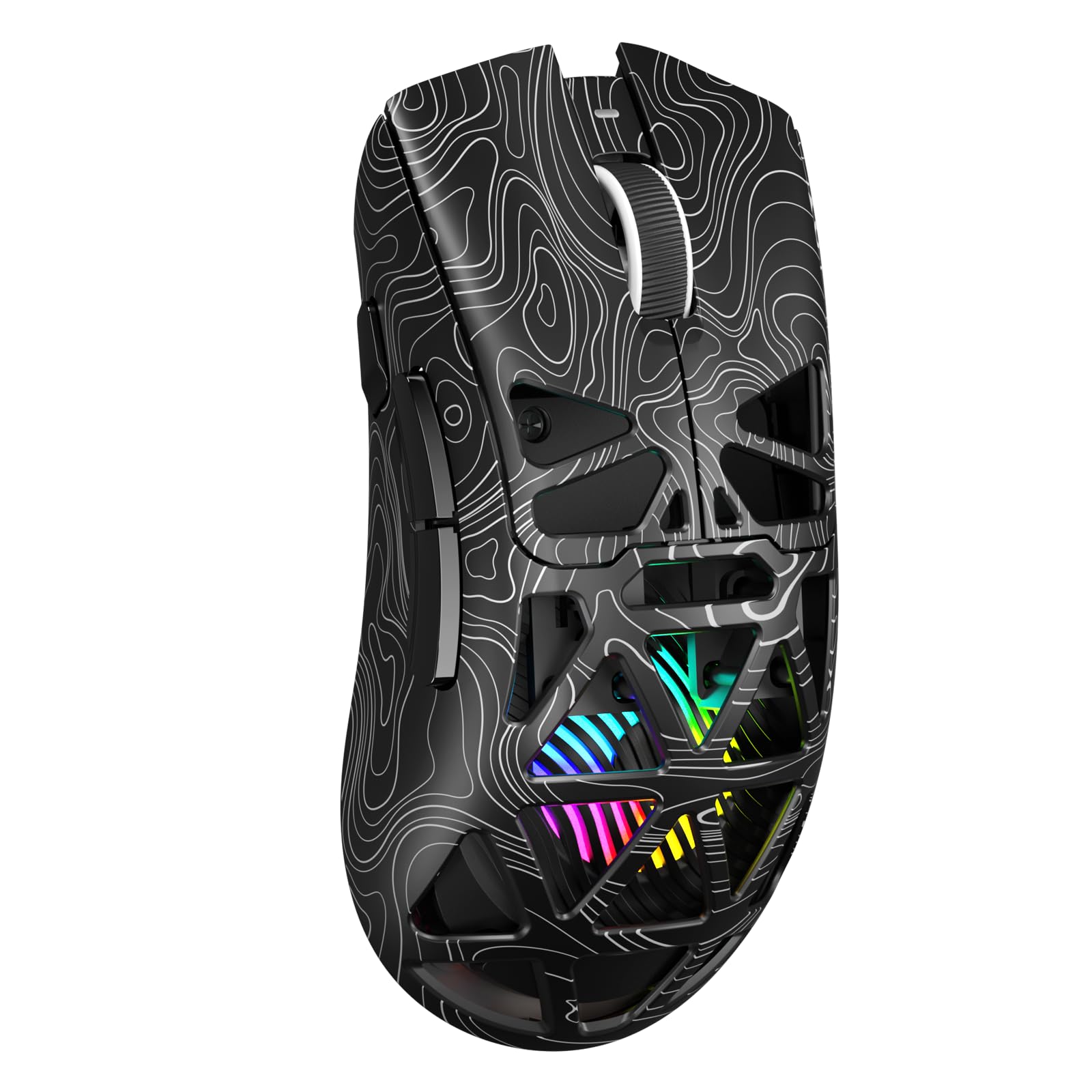
One mouse, four devices, and a hollow skeleton that makes the RGB look like it’s floating inside the shell.
If you bounce between a gaming rig, a work laptop, and a tablet, the SC620’s tri-mode setup is the reason to look here. It connects over 2.4GHz wireless, Bluetooth 5.3, or a wired USB link, and it stores up to 4 devices you can switch between. That means you can move from a Fortnite match to a spreadsheet without a second mouse cluttering your desk. It runs on Windows, Mac OS, Linux, and Android.
Sensitivity runs across six steps — 800, 1600, 3200, 4800, 8000, and 12000 DPI — paired with a 1000Hz polling rate for a low-latency feel. The hollowed-out structure is what makes the RGB pop, and you can tune brightness and speed through the AULA driver. At 67 g it suits claw, palm, or fingertip grips, and the streamlined black body is shaped to follow your palm.
The strength owners talk about most is raw in-game performance — it keeps up in fast-paced games without stutter, and the 1000Hz polling keeps the buttons responding crisply. The catch is scale: this is a newer model with a much smaller owner base than the Redragon above, so you are trusting a lighter track record. It is the smart pick for a multi-device desk, not necessarily the proven long-haul champ.
The switching edge: four stored devices across 2.4GHz, Bluetooth 5.3, and wired is the most flexible connection setup on this list at its tier.
Size it up honestly: the hollowed shell that shows off the RGB also means there is less solid body under your palm — some grippers prefer a closed shell.
The one for a shared desk: pick this if one mouse has to serve your PC, laptop, and tablet without re-pairing.
Skip the gamble if: you want a decade-proven track record — this one is too new to have one.
3. AOC GM401 Wireless Gaming Mouse
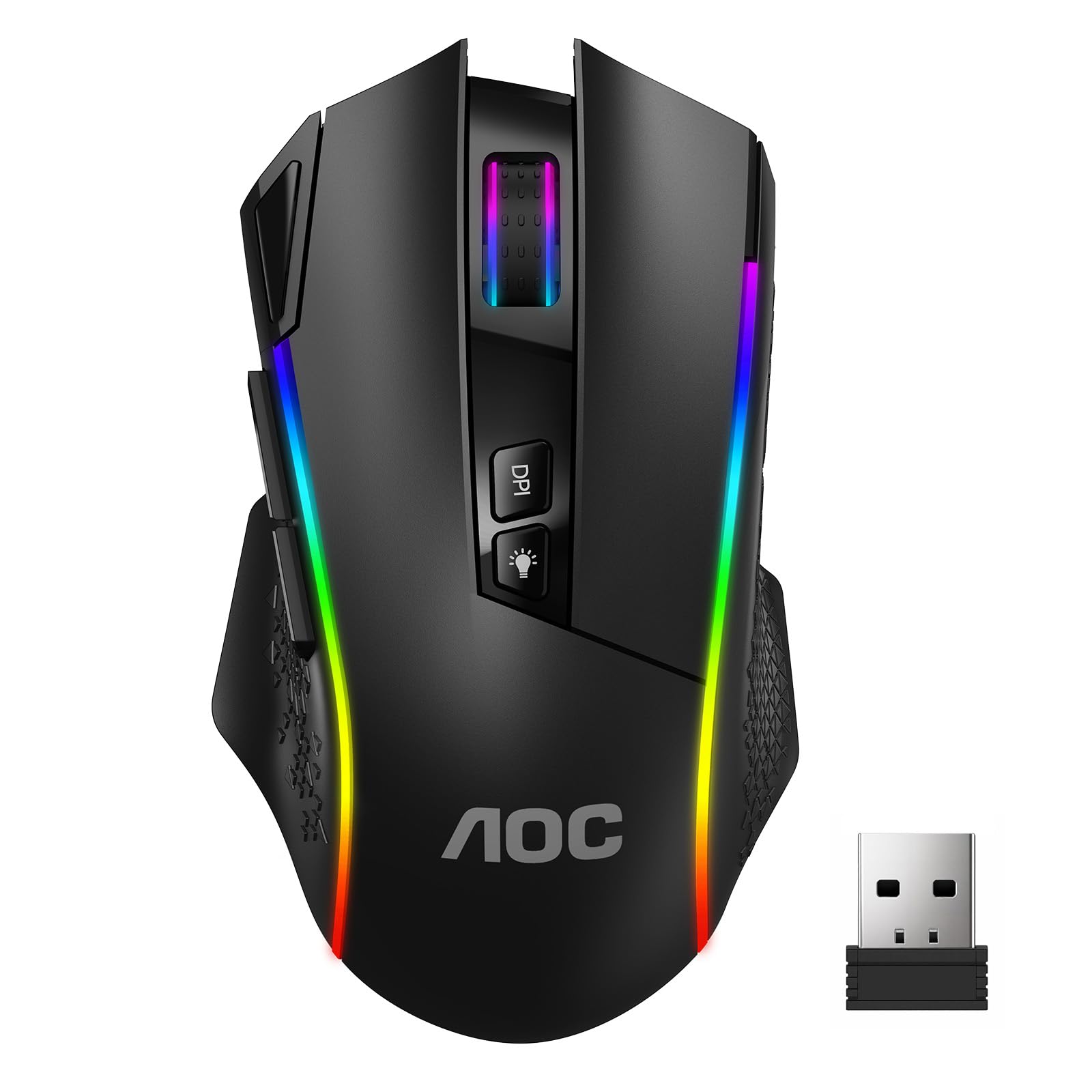
A dedicated fire button and 82 g of planted weight — built for players who want their shots to feel anchored.
Where the ATTACK SHARK below trims every gram, the GM401 goes the other way: at 82 g it sits heavier than the X11’s 62 g, and that extra mass is the point. A heavier body steadies fine aim and resists the twitchy over-correction that light shells can cause. It carries a 700mAh rechargeable battery rated for up to 70 hours with RGB off or 45 hours with the lights on, so the glow costs you a chunk of runtime.
The fire button is the headline for shooter fans — a single press fires a rapid follow-up without hammering your primary click. Six DPI steps span 800 to 12000, and the 1000Hz polling rate keeps tracking smooth. Switches are rated for 50 million clicks, and the web-based driver means no software install just to remap a button.
The trade-off is straightforward: this is the heaviest wired-feel option among the value picks, and if you are a low-sensitivity flick player the extra grams may feel sluggish compared with a 49 g shell. For tactical shooters where you hold an angle and place precise clicks, the weight works in your favor.
Reach for this if: you want a fire button, seven programmable keys, and a stable hand for tactical shooters.
Think twice if: you play low-sensitivity flick styles where 82 g starts to feel like dragging.
4. ATTACK SHARK X11 Wireless Gaming Mouse

Two accessories most mice make you buy separately — an RGB charging dock and anti-slip grip tape — come in the box here.
The charging dock is the standout: you drop the mouse on an RGB-lit base to top it up, and the USB receiver can sit in the dock for a clean 2.4GHz link. Prefer to charge by cable? It supports USB-C wired mode too, alongside Bluetooth 5.2 and 2.4GHz wireless. That tri-mode flexibility covers desktops, laptops, tablets, and Macs, and you can jump between work and play setups without re-pairing.
On sensitivity, the PAW3311 sensor reaches 22,000 DPI — a big step above the Redragon’s 8000 DPI ceiling, for players who want very high sensitivity or a small pad. At 62 g it undercuts the AOC’s 82 g, so flicks start and stop quicker. Durable HUYU switches and a TTC encoder are rated for up to 20 million clicks, and you get five programmable buttons plus grip tape for extra control on sweaty sessions.
Owners consistently rate the build and value highly — it holds its own against pricier name-brand mice in feel. The honest caveat is the wireless link itself, which draws a more divided reaction, so keep the receiver in a clear line of sight. A dedicated dock also means one more thing living on your desk, though it doubles as a stand.
Why it earns a spot
- 22,000 DPI PAW3311 sensor — a big jump over the 8000 DPI budget pick
- RGB charging dock doubles as a receiver station and a stand
- 62 g shell is lighter than the AOC’s 82 g for quicker flicks
- Grip tape included in the box for a locked-in hold
Where it asks patience
- Wireless connectivity draws mixed feedback — keep the receiver clear
- Only 5 programmable buttons, fewer than the fire-button picks
- The dock adds clutter if you prefer a bare desk
Made for dock-droppers: ideal if you want a charging cradle and grip tape bundled without hunting for extras.
But know this: if your desk is crowded with metal or glass between mouse and receiver, the mixed wireless reports may bite.
5. INPHIC IN10 Wireless Gaming Mouse
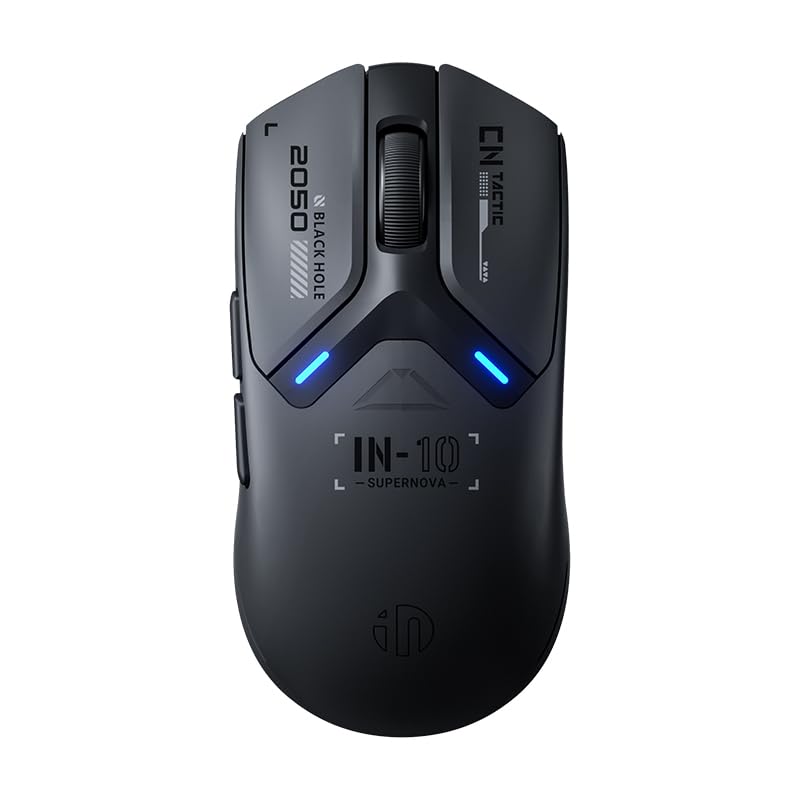
The spec sheet reads like a pro mouse: a 26,000 DPI PixArt sensor and an 8000Hz polling rate in a 60 g solid shell.
The PixArt PAW3395 sensor here is the serious one — it tracks at up to 650 IPS (inches per second) with a programmable 50 to 26,000 DPI range across six levels. For players who run very high sensitivity in Valorant, Apex Legends, or CS2, that headroom means small movements still register accurately. The 8000Hz polling rate in 2.4GHz mode, with the 8K receiver included, drops the response interval to 0.125ms, which some competitive players feel as extra smoothness on micro-flicks.
At 60 g it is light but not hollow — the solid-shell design resists the dust buildup that perforated shells collect. Huano switches are rated for 100 million clicks, and the rechargeable 400mAh battery is rated for over 120 hours of continuous use, with the onboard RGB acting as a low-power warning and a DPI color indicator. The custom Kunpeng KP950B chip handles DPI, macros, and polling-rate tuning through the driver.
The honest limit: that 8000Hz rate and full driver tuning are meant for wired and 2.4GHz modes on Windows, so Mac users get a more basic experience. And the tiny receiver is easy to lose if you pull it from the base — keep the extension adapter handy.
The spec standout: a PAW3395 sensor at 26,000 DPI with 8000Hz polling is the most capable tracking package on this list by the numbers.
Check your platform: the advanced tuning lives in the Windows driver, so plan around a PC for the deepest customization.
For the spec-chaser: the pick if you want the highest DPI and polling rate available here and play high-sensitivity shooters on PC.
Not for Mac-first users: you lose the deepest driver tuning on macOS and get the core experience only.
6. Lenovo Legion M410 Wireless RGB Gaming Mouse

A symmetrical palm-grip shape with two-zone RGB and a battery rated for 53 hours of play.
The M410 is the comfort pick for people who lay their whole hand over the mouse. Its symmetrical medium-large shape is built for palm grip, and the ambidextrous design means left-handed players can use it too — a rarity among the right-hand-only shells here. A PixArt PAW3335 sensor handles up to 16,000 DPI, 400 IPS tracking, 40G acceleration, and a 1000Hz polling rate, so it is quick enough for most competitive play.
Two-zone programmable RGB and six programmable buttons give you room to set up on-the-fly DPI changes during a match. The built-in 800mAh rechargeable battery is rated for up to 53 hours, with a full charge taking about four hours over USB-C. Left and right switches are rated for 30 million clicks. You can connect over 2.4GHz wireless or run it wired through the included USB-C to USB-A cable, which also charges as you play.
The recurring note from owners is that it just works — comfortable for palm grip, reliable in play, with two-zone RGB that adds a clean touch to a desk. The catch is the 53-hour battery, which trails the Razer’s much longer-rated runtime, so heavy RGB users will plug in more often.
Best for palm-grippers: especially lefties, since the ambidextrous shape works in either hand.
Weigh the runtime: if you game for marathon stretches with the lights on, the 53-hour battery means more frequent charging.
7. Razer Cobra Pro Wireless Gaming Mouse

Eleven independent lighting zones and a sensor that tracks on glass — this is the RGB centerpiece of the list.
If the glow matters as much as the aim, the Cobra Pro is in a different league. It carries 11 Chroma RGB lighting zones, each customizable across 16.8 million colors, and the lights react dynamically with Chroma-integrated games. The FOCUS PRO 30K optical sensor is rated for tracking on a wide range of surfaces — including glass — which is a genuine edge if you game on an unusual desk. Ten customizable controls and five onboard memory profiles let you swap loadouts by pressing a button on the base.
Battery is where it pulls ahead: the maker rates it for up to 100 hours on HyperSpeed wireless or 170 hours over Bluetooth, charged via USB-C. Gen-3 optical switches are rated for a 90-million click lifecycle with a 0.2ms actuation time, and they are designed to avoid the double-click issue that plagues mechanical switches over time. At 2.72 ounces it stays light in hand, and the ambidextrous shape works for either hand.
The build and weight are what owners praise most — it feels solid at 2.72 ounces, and the 11 lighting zones look spectacular on a desk. Two things to size up honestly: the responsiveness and battery draw more divided reactions than the raw quality does, and Bluetooth mode trades some of HyperSpeed’s snap for longevity. For a wired-first gamer who wants cable-free freedom plus serious lighting, it delivers.
Lighting that earns the name: 11 individually addressable zones reacting to supported games is the richest RGB setup here.
The honest trade: Bluetooth stretches runtime to 170 hours but gives up some of the low-latency snappiness of HyperSpeed mode.
For the desk-as-showpiece gamer: the pick if you want the best RGB and the longest-rated battery on the list.
Consider if you game on glass: few sensors here are rated for it — this one is.
8. Corsair Scimitar Elite Wireless SE MMO Gaming Mouse

Sixteen programmable buttons — this is the mouse for players who juggle a full hotbar with one thumb.
For MMO and MOBA players, the Scimitar’s defining feature is sheer control count: 16 programmable buttons mean a dedicated key for every ability, potion, and macro. It also ties into Elgato Stream Deck integration, so you can map Stream Deck functions straight to the mouse and even build virtual profiles for productivity or streaming. The MARKSMAN S optical sensor reaches 33,000 DPI with improved tracking and lower power draw than the previous version.
Connection is flexible through SLIPSTREAM wireless (a low-latency link at 1,000Hz polling), Bluetooth, or USB to charge while you play, and the battery is rated for 150 hours. The thumb area is where it shines — the ergonomics for the thumb buttons are widely liked, and the click and scroll feel tactile and smooth. Physically it stays manageable despite the button stack.
Here is the honest part: with a 4.0+ star average, this is the most divisive pick on the list, and build quality and reliability are the recurring concerns. That is not a reason to walk away if you need 16 buttons — no other mouse here comes close on control count — but it is a reason to buy with realistic expectations and treat it as a specialist tool rather than a daily-driver for every game.
The thumb-loadout edge
- 16 programmable buttons — the most control count on this list
- Stream Deck integration maps streaming and macro functions to the mouse
- 33,000 DPI MARKSMAN S sensor with 150-hour rated battery
Where it asks faith
- Build quality and reliability draw mixed feedback — the most divided pick here
- Connectivity is the weakest-reported aspect among owners
- A niche tool tuned for MMO hotbars, not a generalist
The MMO answer: reach for it if your game demands a full 16-key loadout under your thumb.
Go in clear-eyed: treat it as a specialist and expect to lean on the return policy if reliability surprises you.
9. GravaStar Mercury X Pro Wireless Gaming Mouse

A 49 g magnesium-alloy skeleton that looks like it landed from the future — and flicks like it, too.
Weight is the whole story here: a magnesium-alloy frame brings the Mercury X Pro down to just 49 g, the lightest shell on this list. An open, ventilated skeleton gives it that distinctive metallic look, and the low mass means flicks start and stop almost instantly. The included 8K dongle open up up to 8000Hz wireless polling at a 0.125ms interval, so you get frequent input updates without buying a separate receiver.
The PAW3950 sensor reaches up to 32,000 DPI for fine-tuned aim in competitive FPS play. Tri-mode connectivity covers 2.4GHz wireless, Bluetooth 5.1, and USB-C wired, and the rechargeable battery is rated for up to 110 hours depending on lighting and polling rate. Five programmable buttons and onboard memory profiles, configured through a browser-based tool, mean you can tune without installing separate software.
Owners praise the build, responsiveness, and that feather-like feel — the 49 g alloy frame tracks fast and looks striking on a desk. The catch is the openness: an open-frame metal shell and very low weight suit aggressive flicks, but players who like a planted palm grip may find it too airy, and the premium alloy construction is a different value story than the budget picks.
The competitive flicky pick: choose it if a 49 g alloy shell and 8000Hz polling suit your twitchy, high-sensitivity style.
Pass if you like heft: palm-grippers who want a planted, solid body will find this shell too airy.
Know the Specs
DPI (dots per inch)
DPI is how far the cursor travels for each inch you move the mouse. Higher DPI means less hand movement covers more screen, which suits high-sensitivity players and small mousepads. Past your screen’s needs, more DPI mostly just adds sensitivity you can dial back down, so a well-tuned sensor at a lower setting beats a noisy one at a higher number.
Polling rate (Hz)
Polling rate is how many times per second the mouse reports its position to your PC. At 1000Hz it reports every millisecond; some picks here reach 8000Hz for more frequent updates. Competitive players can feel the difference in micro-adjustments, but a higher rate also draws more battery, so it is a trade-off between snappiness and runtime.
Weight (grams)
Weight changes how fast a flick starts and stops. Light shells (49 g to 62 g) move quickly but can feel floaty for fine aim, while heavier bodies (around 82 g) feel planted but tire the wrist over long sessions. Match the number to your grip and play style rather than assuming lighter is always better.
Connectivity and battery
Tri-mode means three ways to connect: a 2.4GHz dongle for low-latency gaming, Bluetooth for laptops and tablets, and a USB cable for charging while you play. Battery is quoted in hours both with RGB on and off, so check the RGB-on figure if you plan to keep the lights glowing through a long session.
Common Questions
Will a wireless LED gaming mouse lag compared to a wired one?
How much does DPI actually matter for gaming?
Do I need to buy a separate dongle for high polling rates?
How long does the battery last with the RGB lighting on?
Can these wireless gaming mice work with a Mac or laptop?
Is a lighter mouse always better for competitive FPS?
What buttons should I program on a gaming mouse?
How long do gaming mouse switches last?
Can I use a wireless gaming mouse for everyday work too?
The Bottom Line
For most people, the wireless led gaming mouse winner is the Redragon Wireless Gaming Mouse — it pairs a 70-hour battery, real RGB, and a fire button with the biggest proven track record here. If you want the highest DPI and polling rate, grab the INPHIC IN10 with its 26,000 DPI sensor and 8000Hz polling. And for MMO hotbars, the Corsair Scimitar Elite Wireless SE is the one to reach for with 16 programmable buttons.
One honest nudge: the top pick earns its spot on the strength of thousands of owners agreeing it does the basics well — the safest bet if you want to buy once and get on with your game.
How we choose
We do not accept paid placement. Every pick is matched to a real buyer and a real use-case; we do not hands-on test units.
Sources
Specifications: manufacturer listings and product documentation. Review insights: verified customer reviews, as of November 2026. Pricing: not shown on this page (it changes often); check the current price via the retailer link.
As an Amazon Associate, Tactical Gear Guy earns from qualifying purchases. This does not affect which products we feature.