Specs are compiled from manufacturer listings and verified buyer reviews and can change over time — please confirm the key details on the product page before buying.
Buying an ultrawide Mini LED monitor is really a decision about one thing: how many dimming zones you are willing to pay for. The zones are the small patches of backlight that switch on and off independently behind the screen, and more of them means darker blacks next to bright highlights instead of a grey wash. Get the zone count right and the rest of the spec sheet — refresh rate, curve, ports — matters far less. Get it wrong and you will spend years watching bright objects bloom into grey halos.
This guide is built by comparing the manufacturers’ published specifications and the patterns across verified customer reviews, so you get each pick’s real strengths and trade-offs instead of marketing spin.
Below you will find four panels ranked by what each one is actually built to do, from a dual-4K monster to a flat 49-inch work screen. Every figure quoted is straight from the maker’s sheet so you can line up an ultrawide mini led monitor against the desk you actually own right now.
Top Picks

How To Choose The Best Ultrawide Mini LED Monitor
Most first-time buyers assume a Mini LED panel is automatically better than a regular LED one. It is only better if it has a real zone count behind it. A Mini LED backlight (a grid of tiny LEDs behind the panel, grouped into dimmable zones) is the whole reason these screens can show a streetlamp glowing against a black sky without the whole corner turning grey. Zone count is the number to hunt for first.
Zones first, brightness second
Ask how many local dimming zones the panel splits its backlight into. A 2,392-zone panel and a 1,152-zone panel both claim Mini LED, but the denser grid gives you tighter control around small bright objects. Brightness is the partner figure — 1,000-nit peak output is what lets a highlight actually punch. A panel with 1,000-nit peaks but only a few hundred zones still looks flat in dark scenes.
Decide 21:9 or 32:9 before anything else
A 32:9 panel is literally two 16:9 screens fused, which is why the Samsung models run 7680 x 2160 — the pixel space of two 4K displays side by side. A 21:9 panel at 3440 x 1440 is the more manageable middle ground and still wide enough to replace a dual-screen setup. Measure your desk depth before you commit; a 57-inch 1000R curve sits close to your face at the edges.
Curve or flat, matching the job
Curved panels pull the outer edges toward your eyes, which helps in racing and open-world games. Flat panels keep every straight line genuinely straight, which is what a designer, video editor or architect needs when aligning a horizon or a building edge. If your day is spreadsheets and timelines, curve is a comfort choice. If it is print design or CAD, flat is the requirement.
Ports decide how hard you can push it
DisplayPort 2.1 is the input that carries the full 7680 x 2160 image at high refresh with variable refresh active. HDMI 2.1 is what consoles and laptops typically output. A USB-C port with power delivery lets a single cable run a laptop and charge it. Count the inputs you actually need before you buy, because a wide panel is painful to unplug and re-cable every day.
Side-by-Side Comparison
| Model | Best For | Resolution | Dimming Zones | Refresh Rate | Amazon |
|---|---|---|---|---|---|
| Samsung 57″ Odyssey Neo G9 (G95NC)★ Best Overall | Dual-4K gaming and one-screen multitasking | 7680 x 2160 | 2,392 | 240Hz | Amazon |
| Acer Predator X34 X0 | Compact curved Mini LED gaming | 3440 x 1440 | 1,152 | 200Hz | Amazon |
| INNOCN 49″ Flat DQHD | Straight-line precision work and trading desks | 5120 x 1440 | 1,760 | 165Hz | Amazon |
| Samsung 57″ Odyssey Neo G9 (240Hz) | Full dual-4K HDR gaming plus KVM convenience | 7680 x 2160 | 2,392 | 240Hz | Amazon |
Detailed Reviews
1. Samsung Odyssey Neo G9 G95NC
Our pick — 4.0+★ from 550+ verified ratings; the strongest balance of quality and price.
Two 4K screens welded into one 57-inch curve, with a 2,392-zone backlight pulling the strings.
Start with the number that separates this panel from every other pick here: 2,392 local dimming zones. That is roughly double the 1,152 zones in the Acer Predator X34 X0, and it is the reason a 1,000,000:1 contrast ratio sits behind the G95NC’s spec sheet while the Acer lists 1000:1. In plain terms, small bright things — a muzzle flash, a lamp in a dark corridor — stay crisp instead of blooming into a grey halo. Samsung pairs that grid with Quantum Matrix Technology and 12-bit black level control to keep the light where it belongs.
The 7680 x 2160 resolution is the second headline. It is the pixel count of two 4K UHD displays standing side by side, wrapped into a single 32:9 panel with a 1000R curve that bends the outer edges toward your face. For a racing sim or a flight rig that curve is the point — the peripheral edges stop being off-screen and start being in-vision. For work it means a timeline, a preview window and a browser all open at once with no bezel cutting through the middle. The matte finish keeps reflections down in a bright room, and the picture-by-picture and picture-in-picture modes let two sources share the glass.
Fast games stay smooth on this screen: a 240Hz refresh rate (the screen redraws 240 times a second) and a 1ms GTG response time (grey-to-grey, how fast a pixel changes colour) keep motion crisp. DisplayPort 2.1 (a video cable standard with enough bandwidth for huge resolutions) carries the full dual-4K image at variable refresh, so AMD FreeSync Premium Pro (a sync feature that matches the screen to your graphics card) keeps tearing and stutter out of fast scenes. Then there is the honest part. The crowd favorite here sits at 4.0+ stars across 500+ owners, and the love lands squarely on the sheer size and the matte panel — but picture quality draws genuinely mixed reactions, and some buyers find the out-of-box image needs work before it satisfies. Budget time to calibrate, and check that your graphics card and desk can feed and hold a 57-inch 32:9 panel.
What earns the top slot
- 2,392 Mini LED zones — more than double the Acer’s 1,152 — for tighter control around bright details
- 7680 x 2160 dual-4K panel with a 32:9 ratio, effectively two 4K screens with no bezel between them
- 240Hz refresh with 1ms (GTG) and DisplayPort 2.1 for full-resolution variable refresh
- Picture-by-picture, picture-in-picture and a USB hub for genuine one-screen multitasking
Where it asks more of you
- Picture quality splits opinion — several owners want calibration before it looks right
- A 57-inch 32:9 curve is a serious desk commitment and needs a strong GPU to drive it
Built for: the sim racer or multi-window worker who wants two 4K screens in one continuous curve and will tune the picture to taste.
Think twice if: your desk depth or graphics card cannot carry a 57-inch dual-4K image comfortably.
2. Acer Predator X34 X0
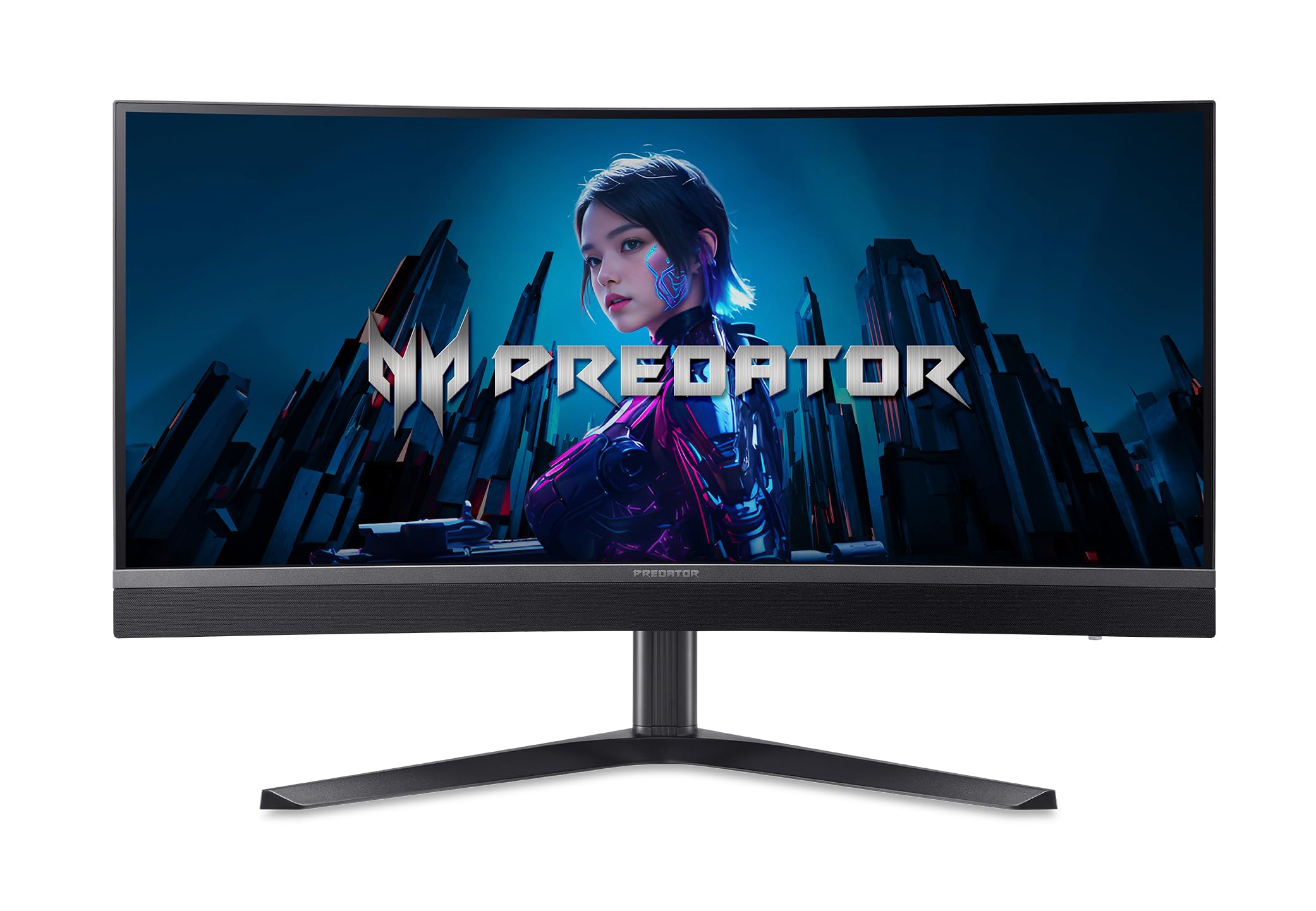
The 34-inch curve for a normal desk, with 1,152 zones doing far more than its size suggests.
If the 57-inch Samsung above sounds like a second job to house, this is the panel that fits a standard desk without swallowing the room. Acer builds it around 1,152 Mini LED local dimming zones — half the Samsung’s grid but still a genuinely dense one for a 34-inch screen. Add the 1500R curve and the 21:9 aspect ratio and the edges of the display curl toward you at a tighter bend than the Samsung’s 1000R, which suits closer seating. As owners describe it, the picture is at its best viewed straight-on, which is exactly how a curved 34-inch panel positions you.
Speed leans hard: a 200Hz refresh rate over DisplayPort, USB Type-C or 100Hz over HDMI, paired with a 1ms (G to G) response time that the spec sheet lists as up to 0.5ms (G to G). AMD FreeSync Premium handles the variable refresh so fast pans do not tear. Colour is aimed at creators as much as players — 99% DCI-P3 coverage, Delta E<2 and VESA DisplayHDR 1000 with a 1,000-nit peak in HDR mode, against 450 nits typical in everyday use.
The connectivity is quietly the smartest part for a streamer. Two HDMI 2.1 ports, a DisplayPort 1.4 and one USB 3.2 Type-C port that carries data, 65W of power and DisplayPort over USB-C — so a laptop runs the screen and charges off one cable. An ErgoStand gives tilt, swivel, pivot and height adjustment, and the panel is VESA 100 x 100mm compatible for an arm. Two 5W speakers save you a soundbar. The trade-off is simply scale: a 34-inch 21:9 panel is a smaller, more manageable window than the 57-inch dual-4K, so you get less simultaneous screen real estate for your money in width terms.
Desk-realistic pick: 1,152 zones, a 1500R curve and 200Hz make this the one that fits a normal room while still delivering true Mini LED contrast.
Worth knowing: the 65W USB-C port on a single cable is the feature that turns it into a laptop dock as much as a gaming panel.
Reach for this if: you want real Mini LED dimming on a 34-inch curve that sits comfortably on a regular desk and doubles as a USB-C laptop dock.
Look elsewhere if: you need the sheer width of a 32:9 dual-4K panel for a timeline-heavy or trading workflow.
3. INNOCN 49″ Ultrawide DQHD
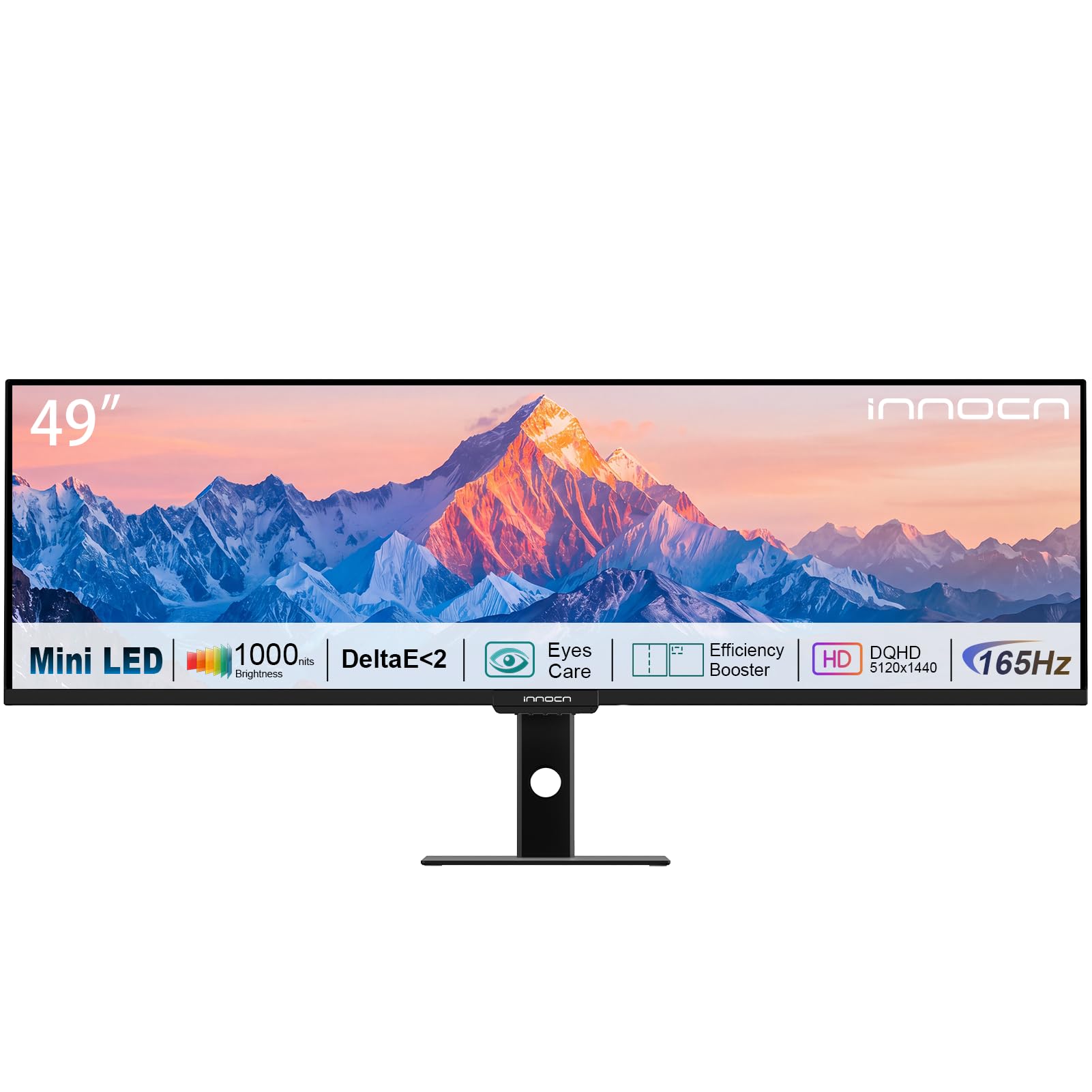
No curve, no distortion — a 49-inch flat slab built for lines that must stay straight.
Every other pick on this list bends. This one does not, and that is the entire pitch. Curved glass makes a beautiful gaming cockpit, but it also gently bows a vertical line near the edge of the screen — a real problem if you align horizons in video, draw architectural elevations or retouch a photo across the full width. INNOCN builds this as a flat 49-inch 32:9 panel at 5120 x 1440 (DQHD, roughly two 1440p screens side by side), so a ruler-straight edge stays straight from corner to corner. It replaces two 27-inch QHD monitors with one smooth surface and no bezel slicing through your timeline.
The backlight is no slouch either: 1,760 local dimming zones with a Mini LED backlight and 1,000-nit peak HDR brightness, which puts it between the Acer’s 1,152 and the Samsung’s 2,392 on zone density. Colour is the strongest spec here for creative work — 100% sRGB, 95% DCI-P3 and 96% Adobe RGB with a factory-tested Delta E under 2, so what leaves your screen should match what lands in print. A 165Hz refresh rate with AMD FreeSync keeps motion smooth, and the anti-glare screen tames overhead lights.
Here is the caveat to plan around. The display quality wins people over, but the refresh rate is a split story — several buyers report it topping out at 120Hz rather than the 165Hz on the sheet, usually a cable or port question worth checking on day one. Pair that with a 3000:1 contrast ratio (the brightest white divided by the darkest black) that, while strong for this panel type, does not match the light control of the Samsung’s 1,000,000:1 figure. Ship the right cable and set your expectations on refresh, and this is the most accurate flat canvas of the four for the money.
The case for flat glass
- A genuinely flat 49-inch 32:9 panel — no edge distortion for design, CAD or colour grading
- 1,760 Mini LED zones and 1,000-nit peak HDR brightness for dark-scene detail
- 100% sRGB, 95% DCI-P3 and 96% Adobe RGB with factory-tested Delta E under 2
- Replaces two 27-inch QHD monitors with no bezel in the middle
The honest catch
- Refresh rate is mixed — some buyers see 120Hz rather than the listed 165Hz, often a cable or port issue
- 3000:1 contrast, though good here, cannot match the Samsung’s 1,000,000:1 light control
Suits: the designer, editor or architect who needs straight lines across a huge single canvas and values colour accuracy over curve.
Not for: the buyer chasing maximum dark-room contrast or the full 165Hz promised from the start without checking cables.
4. Samsung Odyssey Neo G9 G95NC 240Hz
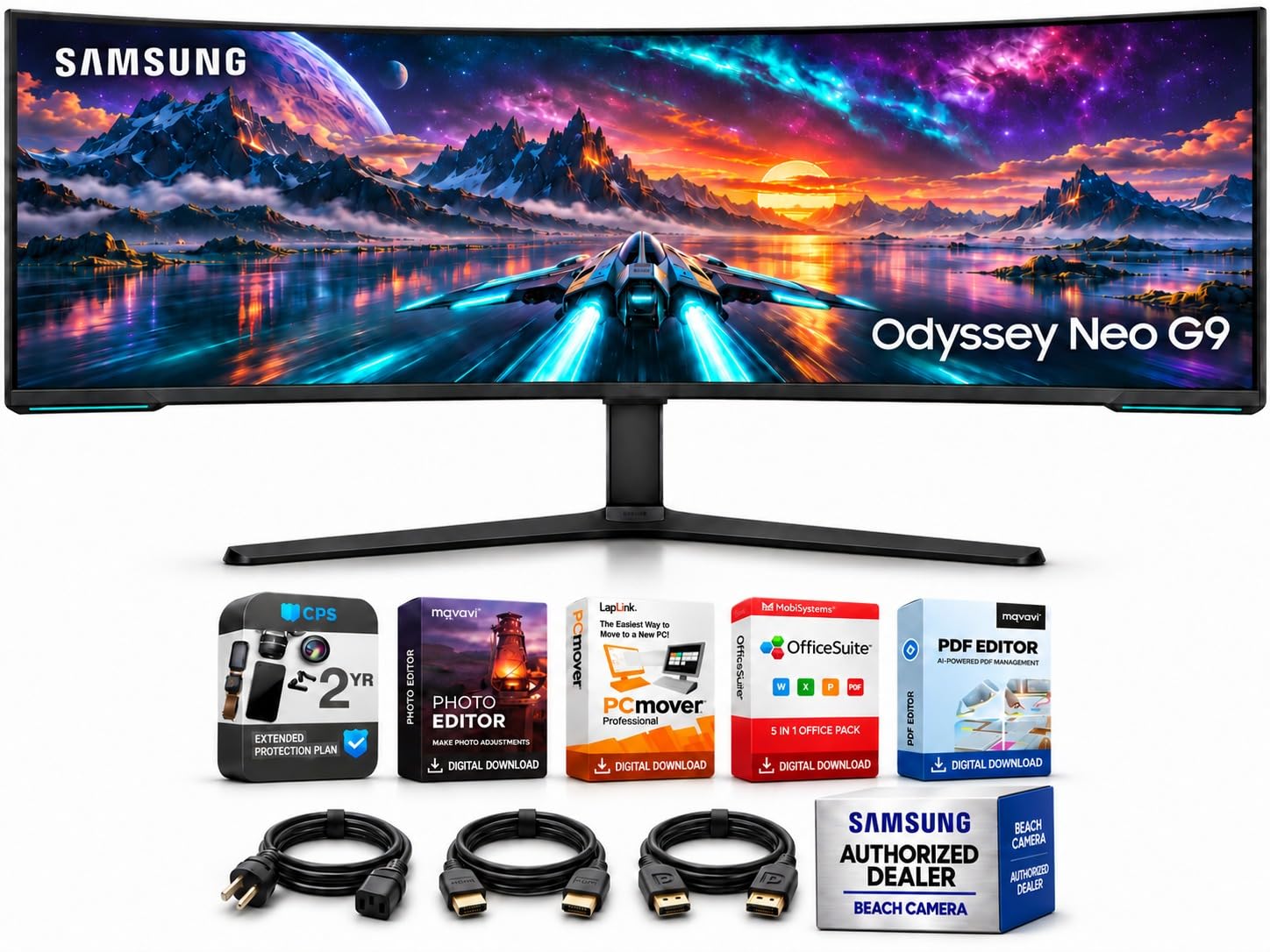
Same dual-4K canvas as the top pick, dressed with the port count and KVM a two-machine desk needs.
This is the full-fat version of the dual-4K idea: a 57-inch 7680 x 2160 panel at 32:9 with a 1000R curve (a tight bend that wraps the screen around you), 2,392 Mini LED dimming zones (small patches of backlight that dim independently for deeper blacks) and VESA DisplayHDR 1000 (a brightness certification for high dynamic range). If you already respect what the top pick does with light, this carries the same raw toolkit — 1,000,000:1 contrast, up to 1,000-nit HDR highlights against 420 nits typical, and roughly 95% DCI colour coverage (a wide colour range for film and photo work) over up to a billion colours. The 140 pixels per inch is the quiet hero for work: fine interface text and detailed documents stay legible rather than fuzzy across that enormous desktop.
Where it pulls away is the desk plumbing. One DisplayPort 2.1 and three HDMI 2.1 inputs mean a gaming PC, a console and a laptop can all stay plugged in, and Auto Source Switch+ jumps to whichever device you just powered on. The built-in KVM switch lets two computers share one keyboard and mouse — one press between the work machine and the gaming rig, no crawl under the desk. Two USB 3.0 downstream ports and a headphone output finish the hub. CoreSync matches rear lighting to on-screen colour, and the included software bundle plus extended protection rounds out the package.
The honest scale of it: a 41.9-pound panel on a stand that runs 52.3 inches wide. That is a wall of screen, and it wants a deep desk and a graphics card that can actually feed 7680 x 2160 at high refresh. Picture-by-picture and picture-in-picture help justify the footprint by keeping two sources live at once. If you run one machine and never touch the KVM, the top pick does the same picture for less of your budget.
The two-computer argument: a KVM switch, four video inputs and Auto Source Switch+ turn this from a display into the hub of a work-and-play desk.
The footprint reality: 41.9 pounds across a 52.3-inch width is a permanent architectural decision, not a monitor you move for a LAN night.
Choose this when: you keep two computers on one desk and want the dual-4K Mini LED picture with a KVM doing the switching for you.
Pass if: one machine and a standard desk already cover your needs — the extra inputs and weight buy you nothing extra.
Know the Specs
Local dimming zones
Local dimming zones are the separately switchable patches of backlight behind the panel. More zones means tighter control, so a bright object sits against a genuinely dark background instead of spilling a glow around its edge. The Samsung’s 2,392 zones versus the Acer’s 1,152 is the clearest example — the denser grid holds small highlights cleaner. When you compare panels, that zone count is the first figure worth reading.
Contrast ratio
Contrast ratio is the gap between the brightest white and the darkest black the panel can show at once. A figure like the Samsung’s 1,000,000:1 tells you the blacks get genuinely dark next to a full-bright highlight, which is what makes HDR scenes feel deep. A 1000:1 or 3000:1 figure is respectable for its class but shows a narrower range. Higher contrast is better for dark-room viewing, but only as good as the zone count behind it.
Peak brightness and HDR certification
Peak brightness is how hard the backlight can push a small bright area, measured in nits. VESA DisplayHDR 1000 means the panel can hit 1,000 nits in HDR highlights, so a sun or an explosion lands with real punch. Typical brightness for everyday work is lower — 420 to 450 nits on these panels — because you do not want full glare on a spreadsheet. Think of peak nits as the burst and typical nits as the steady cruise.
Refresh rate and response time
Refresh rate is how many times per second the screen redraws, in Hz — 240Hz redraws 240 times a second, so fast pans look continuous rather than stepped. Response time is how fast a pixel changes colour, in milliseconds, which is what keeps a fast-moving object from leaving a ghost trail. Lower milliseconds and higher hertz together give you the cleanest motion. For desk work, 120Hz is already smooth; for competitive play, 200Hz and 240Hz earn their keep.
Common Questions
Does a Mini LED ultrawide actually look different from a regular LED ultrawide?
Will a 32:9 ultrawide monitor fit on my desk?
Can I run a 7680 x 2160 monitor at 240Hz over HDMI?
Is a curved Mini LED monitor bad for design work?
How many dimming zones should I look for?
Why does my ultrawide top out at 120Hz instead of the listed refresh rate?
What is a KVM switch and do I need one on a monitor?
Do I need DisplayPort 2.1 or is HDMI 2.1 enough?
Can a single USB-C cable power a laptop and run an ultrawide?
The Bottom Line
The winner for most people chasing an ultrawide mini led monitor is the Samsung 57″ Odyssey Neo G9 (G95NC), because its 2,392 dimming zones and 7680 x 2160 dual-4K panel give you two 4K screens of space in one continuous curve with the densest light control here. If you keep two computers on one desk and want the KVM (a switch that shares one keyboard and mouse between machines) and four inputs to prove it, reach for the Samsung 57″ Odyssey Neo G9 240Hz. And for straight-line design work on a huge flat canvas, the INNOCN 49″ Flat DQHD is the one built for the job. Across this category, size and zone count decide the experience — pick the width your desk and graphics card can drive, then buy the most zones that width allows.
How we choose
We do not accept paid placement. Every pick is matched to a real buyer and a real use-case; we do not hands-on test units.
Sources
Specifications: manufacturer listings and product documentation. Review insights: verified customer reviews, as of November 2026. Pricing: not shown on this page (it changes often); check the current price via the retailer link.
As an Amazon Associate, Tactical Gear Guy earns from qualifying purchases. This does not affect which products we feature.