Specs are compiled from manufacturer listings and verified buyer reviews and can change over time — please confirm the key details on the product page before buying.
You want a gaming keyboard and mouse that respond the instant you press, without a cable dragging across your desk or yanking your mouse off target. That is the whole job of a wireless gaming set, and the good news is that a handful of combos now do it well. This guide cuts straight to the ones worth your money, explains the battery and connection specs in plain English, and tells you which set fits your desk.
This guide is built by comparing the manufacturers’ published specifications and the patterns across verified customer reviews, so you get each pick’s real strengths and trade-offs instead of marketing spin.
The trick to a wireless set that keeps up is knowing which numbers matter and which are noise, so here is the honest breakdown of the best wireless keyboard and mouse for gaming.
Top Picks


How To Choose The Best Wireless Keyboard and Mouse for Gaming
Most people buy a wireless combo on looks, then get annoyed by lag or a dead battery mid-match. The fixes live in three specs: the connection type, the two battery numbers, and the mouse sensitivity. Get those right and the rest is comfort.
Connection type decides your lag
A 2.4GHz dongle (a tiny USB plug that talks to the set on its own channel) gives you the most reliable, low-lag link for gaming. Bluetooth is handy for laptops and tablets but can feel slightly laggier under fast input. A set that offers all three modes — 2.4GHz, Bluetooth, and wired — lets you switch to a cable when you want zero wireless worry.
Two batteries, two numbers
The keyboard and mouse carry separate batteries, so check both figures. A big keyboard battery in the thousands of mAh (milliamp-hours, a measure of stored charge) means fewer top-ups. The mouse battery is smaller and drains faster, so a set with a roomier mouse cell saves you charging it often.
DPI and polling rate on the mouse
DPI (dots per inch) sets how far the cursor travels per inch of mouse movement. A 4800 DPI mouse or higher gives you headroom, but most players settle in the middle. Polling rate, measured in Hz, is how often the mouse reports its position — 1000Hz means a report every millisecond, which feels quicker than a lower rate.
Side-by-Side Comparison
| Model | Best For | Mouse DPI | Keyboard Battery | Connection | Amazon |
|---|---|---|---|---|---|
| Redragon S101M-KS★ Best Overall | Long-session gamers | 4800 | Up to 300 hrs (RGB off) | 2.4G / BT / Wired | Amazon |
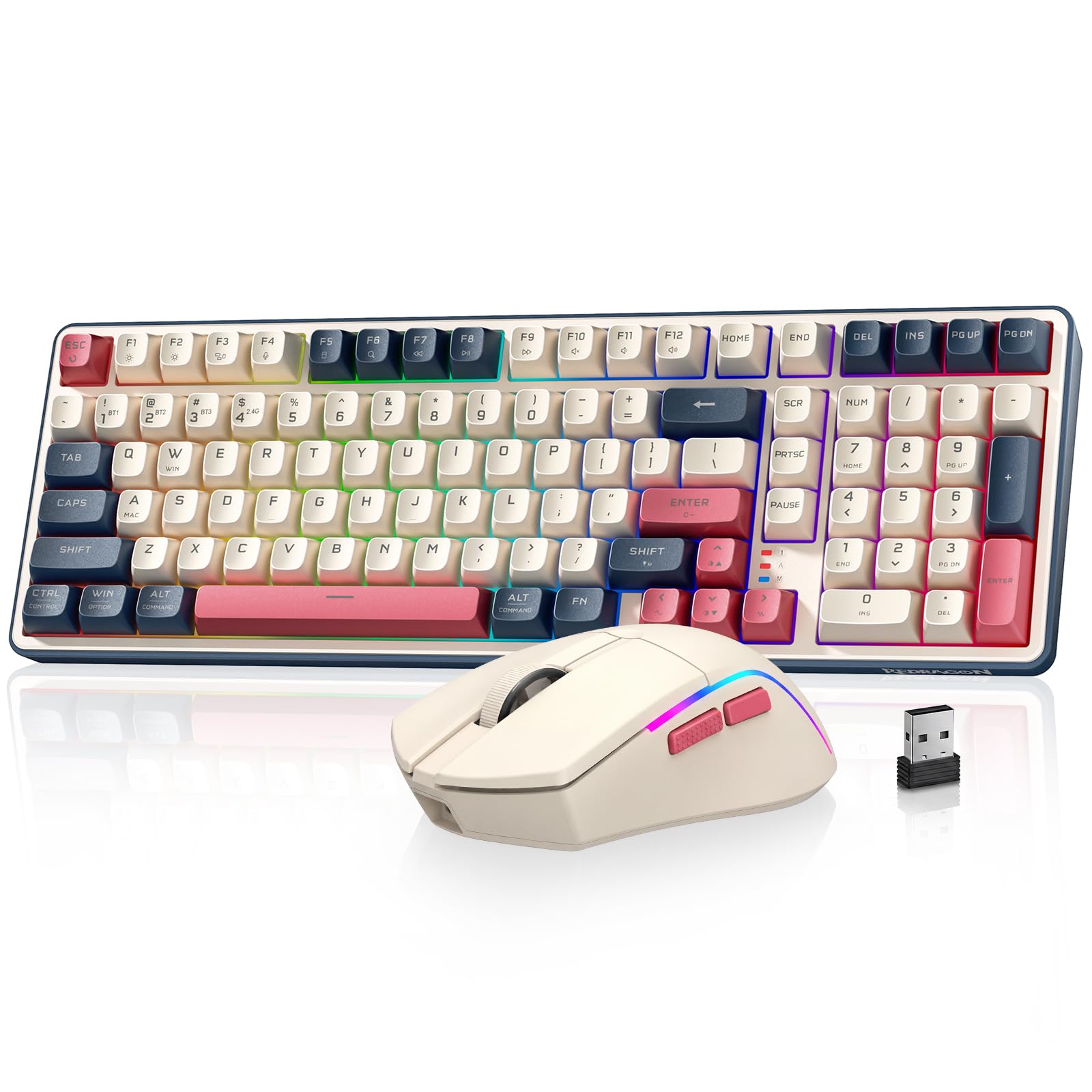
| Redragon S174 (Beige)Also Great | All-day comfort with number pad | 5000 | — | 2.4G / BT / USB-C | Amazon |
| MSI FRIEREN EditionTop Performer | Precision play, mechanical feel | 26000 | — | 2.4GHz | Amazon |
| RedThunder 60% K62 | Tight desks and travel | — | 1850mAh | 2.4GHz | Amazon |
| Wireless RGB (Cakce) | Budget desk starter | 2400 | — | 2.4GHz | Amazon |
Detailed Reviews
1. Redragon S101M-KS Wireless Keyboard and Mouse
Our pick — 4.5+★ from 51,500+ verified ratings; the strongest balance of quality and price.
The board that runs up to 300 hours with the lights off — charge it and forget it.
Battery anxiety is the quiet killer of wireless gaming sets, and this one answers it. The rechargeable keyboard is rated up to 300 hours with RGB off, and its battery indicator tells you where the charge stands — versus the 8 hours of lit runtime the RedThunder 60% below quotes. You are not hunting for a cable every other night.
The tri-mode link covers 2.4GHz, Bluetooth, and wired, and a single 2-in-1 receiver runs both the keyboard and mouse from one plug, so you free up a USB port and stop losing dongles. The mouse steps through 5 DPI levels from 800 up to 4800, and both devices are programmable — remap keys, set the mouse polling rate between 125Hz and 1000Hz, and reassign its 7 buttons.
Around the board you get 10 independent multimedia keys plus 12 combination keys for quick control, splash resistance for the odd spill, and a WIN lock so you do not drop out of a match mid-fight. Buyers praise the soft keys and tactile feedback, and the RGB lighting lands well. The one thing to keep in mind: durability draws mixed reports, with some units described as built to last and others failing inside a couple of months — as customers note, “The durability receives mixed feedback.”
Suits you when: marathon sessions and a desk you hate cluttering are your reality.
The caveat: treat it with a little care — some sets do not hold up as long as others.
2. Redragon S174 Gaming Keyboard and Mouse
A 102-key board that keeps its number pad, paired with a 61g mouse that lasts up to 200 hours.
Here is the pick that makes the least sense to complain about. The S174 pairs a full 102-key keyboard — number pad included — with a 61g ultra-light mouse, so your aim stays quick and your wrist does not drag a heavy puck around. The mouse runs up to 200 hours on a charge, which means most players top it up roughly once a week or less.
You get all three ways to connect: a 2.4GHz dongle for the lowest-lag gaming link, Bluetooth for a laptop or tablet, and USB-C wired when you want to charge and play at once. The keyboard is fully programmable with macros you can record and assign to any key, and the mouse tops out at 5000 DPI with RGB you can set through software. It also works on both Windows and Mac straight away.
Buyers rate it the crowd favorite by a wide margin, praising the build quality, the value, and the colorful backlight that stays easy on the eyes. The honest catches are two. A few buyers report keys sticking over time, and the backlight splits opinion — great for some, a bit much for others. Neither changes the fact that this is the safest all-round buy on the list, especially if you want the number pad for work as well as play.
What earns the top spot
- Full 102-key layout keeps the number pad most 60% and 75% boards drop.
- 61g mouse with up to 200 hours of battery — light in the hand and rarely on the charger.
- 2.4GHz, Bluetooth, and USB-C wired all in one set for gaming and desk work.
- Fully programmable macros and multiple built-in RGB modes.
Where it asks for care
- A handful of owners mention keys sticking after extended use.
- The backlight is bright enough that some find it too much in a dark room.
Made for: gamers who want one set that handles matches and spreadsheet work without swapping the board.
Think twice if: you need a tiny footprint — this keeps the full number pad, so it takes real desk width.
3. MSI Gaming Gear Bundle FRIEREN Edition
A PixArt sensor at up to 26,000 DPI and a 1000Hz polling rate, in a 65g mouse.
If precision is the whole point for you, this is the set that carries the most headroom. The mouse runs a PixArt PAW3395DM optical sensor rated up to 26,000 DPI with a 1000Hz polling rate — a report every millisecond, so your crosshair tracks your hand almost instantly. Compare that to the 5000 DPI on the top pick: this one gives you far more sensitivity range to tune down to your own feel.
The keyboard goes mechanical, with linear switches that press straight down without a bump, and a TKL (tenkeyless) layout that drops the number pad for more room to swing the mouse. MSI also shapes the chassis for a supportive hand position across hand sizes, which matters over a long session.
Two honest notes. The mouse weighs just 65g, so it is built for speed rather than a heavy, planted feel. And this set runs 2.4GHz wireless — it skips the Bluetooth and wired modes that the Redragon tri-mode sets offer, so it is a gaming-first buy, not a do-everything one.
The precision story: that 26,000 DPI sensor and 1000Hz polling are the reasons to pay up here — you get accuracy you can feel in fast tracking.
What you trade: no Bluetooth or wired fallback, and no number pad on the TKL board.
Reach for this if: you play competitive shooters and want mechanical key feel plus a high-spec sensor.
Look elsewhere if: you need Bluetooth pairing or a number pad for everyday work.
4. Redragon S136 Combo

Side-lit key legends and a metal volume knob, in a gradient-gray shell that stands out on a desk.
Appearance is the reason people reach for this one, and it earns it. The 80-key board wears side-engraved keycaps that stay legible in a dark room because the legends glow sideways instead of up, and the characters are built to resist wearing off. Its premium CNC metal knob is the standout touch: long-press FN plus the knob for three seconds to toggle between volume and lighting, twist to change either, and press to mute or cycle the RGB effects.
You get BT5.0, 2.4GHz, and wired modes, with one-key Windows-to-macOS switching confirmed by a blue or yellow backlight flash. The 75% layout saves about a quarter of your desktop versus a full-size board, and the batteries are roomy — a 4000mAh keyboard cell and an 800mAh mouse cell. The mouse runs 13 RGB effects and 5 DPI levels from 800 to 4800.
One pairing limit to know up front: this set is not compatible with PlayStation. Compatibility and battery life both show mixed experiences across buyers, so it fits best as a PC and Mac daily driver rather than a console kit. For a setup where how it looks matters as much as how it types, the side-glow and the knob do the heavy lifting.
Worth it for: desk setups where the look of the board is part of the build.
Skip it for: console play — it does not pair with PlayStation.
5. RedThunder 60% Wireless Combo

A 60% board that clears your desk, plus a perforated honeycomb mouse that weighs only 65 grams.
When your desk is short on space, the 60% layout is the fix — it drops the number pad and trims the frame, freeing room to swing the mouse. The mouse that ships with it wears a perforated honeycomb shell and tips in at about 65g (give or take 5g), which keeps it light and quick in hand. Both run off one shared 2.4GHz receiver tucked in the bottom of the mouse.
The battery story is honest and needs planning. The keyboard carries a 1850mAh cell and the mouse a 500mAh cell, and with the lights on you get about 8 hours of continuous use — so this is a charge-it-overnight set, not a charge-it-weekly one. Both go to sleep after 2 minutes idle and wake on a key press. Lighting runs 4 RGB modes with 4 brightness levels plus 7 single-color modes, and the keys are rated for 10,000,000 keystrokes with two-color injected legends that do not fade.
Buyers like the compact 60% size and the RGB lighting most. The recurring wart is connectivity: the receiver setup is plug-and-play, but a few owners hit keys not responding and need to re-pair. Set it up once and it settles in fine; it just wants a steady hand on that first pairing.
Why it fits a tight desk
- 60% layout frees real desk space for mouse movement.
- 65g (±5g) honeycomb mouse stays light and agile.
- 10,000,000-keystroke key rating with non-fading injected legends.
- Auto-sleep after 2 minutes idle saves charge.
Plan around this
- About 8 hours of lit runtime means a nightly charge.
- A few units need the receiver re-paired if keys stop responding.
Best fit for: small desks and players who want a light mouse and a minimalist board.
Keep in mind: the short lit battery life means charging should be part of your routine.
6. Redragon Wireless Combo, 60% Portable, Tri-Mode, 4000mAh

An entry-level set that throws in a mouse pad and a metal-panel keyboard at the lowest tier.
A starter bundle rather than a gaming weapon. The metal panel gives the board some heft, the keycap legends are built not to fade, and it handles 26-key no-conflict typing with 12 multimedia keys. The set includes a mouse pad with a smooth cloth top and a rubber base that grips the desk, plus a phone bracket on the keyboard so your handset sits within reach while you game or work.
A single nano receiver runs both devices across 2.4GHz at up to 8 meters, and the keyboard sleeps after a few idle minutes, waking on a key press. The mouse offers 6 buttons and 4 DPI steps — 800, 1200, 1600, and 2400 — which is modest, so this is a casual-gaming set, not a precision-aim one. An automatic sleep mode also stretches the battery when the lights are dimmed or off.
Be clear on what this is: the review pages turn up reliability, battery life, and connectivity among the recurring concerns, so it fits a light-use desk or a first setup rather than a serious rig. The look is the bright spot: buyers enjoy the colors and the backlight. As a starting bundle that includes a mat and a metal-panel board, it does the basic job.
Where it shines: the included mouse pad and colorful backlight make it a friendly first wireless set.
The realistic limit: 2400 DPI and light-duty reliability suit casual play, not competitive aim.
Right for: a first wireless gaming setup or a light-use desk on a lean tier.
Not for: fast competitive shooters that need high DPI and a rock-solid link.
Know the Specs
DPI (Dots Per Inch)
DPI sets how far the cursor moves for each inch you slide the mouse. A higher figure like the MSI’s 26,000 DPI gives you room to tune sensitivity way down for precision headshots, while a 2400 DPI budget mouse is fine for casual play and desktop work. You rarely use the top number — you use the range to find your own feel.
Polling Rate in Hz
Polling rate is how often the mouse reports its position to your PC, measured in hertz (reports per second). A 1000Hz rate means a report every millisecond, which feels snappier than a lower rate for fast tracking; 125Hz is the slower end and suits desk work more than quick flicks.
Keyboard and Mouse Battery (mAh)
mAh (milliamp-hours) measures stored charge, so a bigger number means more use between top-ups. Check both devices separately — a roomy keyboard cell in the thousands keeps the board going, and a roomier mouse cell saves you the frequent charging the small cells demand.
Layouts: 60%, 75%, and TKL
A 60% board cuts most keys and the numpad for the smallest footprint, a 75% keeps a fuller key set in a compact frame, and TKL (tenkeyless) drops just the number pad. Smaller layouts free desk room for mouse movement but lose keys you may want for work.
Common Questions
Is a 2.4GHz dongle better than Bluetooth for gaming?
Do I need a high DPI mouse to play well?
How long does the battery last on these wireless sets?
Can a wireless gaming keyboard connect to a PlayStation or Xbox?
What does hot-swappable mean on a gaming keyboard?
Is a 60% keyboard worth it over a full-size one?
Will these sets work with a Mac?
Why do my keyboard keys sometimes need re-pairing?
Does RGB lighting drain the battery faster?
The Bottom Line
For most players, the strongest all-round buy is the Redragon S174 — it keeps the number pad, pairs it with a 61g mouse rated up to 200 hours, and covers 2.4GHz, Bluetooth, and wired in one set. If raw precision is what you chase, the MSI FRIEREN Edition leads on sensor and mechanical feel with its 26,000 DPI mouse. And for a small desk with a tight budget, the RedThunder 60% clears the space and throws in a light honeycomb mouse. The S174 is the crowd favorite of the group, and with that combination of battery, layout, and connection modes, it is the one to start with unless your priorities clearly point elsewhere.
How we choose
We do not accept paid placement. Every pick is matched to a real buyer and a real use-case; we do not hands-on test units.
Sources
Specifications: manufacturer listings and product documentation. Review insights: verified customer reviews, as of November 2026. Pricing: not shown on this page (it changes often); check the current price via the retailer link.
As an Amazon Associate, Tactical Gear Guy earns from qualifying purchases. This does not affect which products we feature.