Specs are compiled from manufacturer listings and verified buyer reviews and can change over time — please confirm the key details on the product page before buying.
A video doorbell has two jobs: show you who is at the door and whether a package is sitting there. The problem is that most of them bury the useful part behind a monthly fee, a weak Wi-Fi chip, or a battery that dies in a week. This guide sorts the doorbells that hold up in daily use from the ones that only look good on the spec sheet.
This guide is built by comparing the manufacturers’ published specifications and the patterns across verified customer reviews, so you get each pick’s real strengths and trade-offs instead of marketing spin.
One honest note before you scroll: this list uses flexible, human-like matching for Wi-Fi connectivity, so not every pick is the exact model you typed into the search bar — the nearest same-type camera that does the same job is included instead. Below you will find the resolution, storage, and power details that decide whether a doorbell earns its spot on your wall, all laid out so you can pick with confidence from the best WiFi video doorbell options available.
Top Picks


How To Choose The Best WiFi Video Doorbell
The doorbell you regret is rarely the one with the lowest resolution. It is the one that misses the package at your feet, drops off your Wi-Fi at the worst moment, or asks for a subscription before it will save a single clip. Answer those three questions first and the shortlist narrows fast.
Look at the shape of the view, not just the megapixels
A 16:9 widescreen image is wide but short — great for the street, poor for the doormat. A doorbell with a taller 4:3 or 1:1 frame shows a visitor head-to-toe and the box they set down. The aosu lists a 166° field of view in 4:3, the Aqara G400 pairs 2K with a 165° view in 3:4, and the Reolink goes square with a 1:1 view. Any of those shapes beats a wide letterbox if porch piracy is your worry.
Decide now whether you will pay a subscription
Several doorbells here record to a microSD card with no monthly fee at all — the aosu takes up to 256GB, the Tapo and the Wyze Duo Cam take up to 512GB, and the ZUMIMALL and ieGeek take 128GB. Others lean on cloud plans for the full feature set. If you hate recurring charges, filter for local storage first and check the card slot is actually included or sold separately.
Match the power source to your patience
Battery doorbells install anywhere but need recharging. Wired and PoE doorbells, like the Aqara G400, never need a ladder but want existing doorbell wiring or a network cable. The eufy E340 and Reolink 2nd Gen split the difference: they run on a battery but accept a wired top-up. Choose based on how often you are willing to climb a step stool with a charging cable.
Side-by-Side Comparison
| Model | Best For | Resolution | Storage | Power | Amazon |
|---|---|---|---|---|---|
| aosu 2K Wireless Doorbell with aosuBase★ Best Overall | Best overall for subscription-free recording | 2K / 5MP | microSD up to 256GB | Battery (5200 mAh) | Amazon |
| ZUMIMALL 2K Wireless DoorbellBest Value | Budget-friendly no-fee pick | 2K / 3MP | microSD up to 128GB | Battery | Amazon |
| ieGeek Video Doorbell CameraWidest View | Widest head-to-toe view | 2K / 3MP | microSD up to 128GB | Battery | Amazon |
| Tapo 2K Wireless Smart Video Doorbell D210 | Best for Alexa and Google homes | 2K | microSD up to 512GB | Battery (6400 mAh) | Amazon |
| WYZE Wireless Duo Cam Doorbell | Dual-camera package watch | 2K Full HD | microSD up to 512GB | Battery (6200 mAh) | Amazon |
| Aqara Doorbell Camera G400 | Best for Apple HomeKit users | 2K (165°) | microSD up to 512GB | Wired / PoE | Amazon |
| eufy Security Video Doorbell E340 | Best for dual-view package detail | 2K FHD | 8GB built-in | Battery or wired | Amazon |
| REOLINK Battery Video Doorbell (2nd Gen) | Best long battery between charges | 2K / 4MP | microSD up to 512GB | Battery or wired | Amazon |
| Google Nest Doorbell (Battery) | Best for Google Home households | HD with HDR | 3 hours free event history | Battery or wired | Amazon |
Detailed Reviews
1. aosu 2K Wireless Doorbell Camera with aosuBase
Our pick — 4.0+★ from 6,500+ verified ratings; the strongest balance of quality and price.
The doorbell that records locally, watches head-to-toe, and never asks for a monthly fee.
If you want one doorbell that handles the whole job without a subscription, this is the one to beat. It captures a 166° field of view (how much of the porch the lens can see at once) in a 4:3 aspect ratio — a squarer frame than widescreen, so you see a visitor’s shoes and the box they left, not just their shoulders. The image is 2K resolution with a 5MP sensor (the light-gathering chip inside the camera).
Storage is the real draw. The included aosuBase Mini takes a microSD card up to 256GB (sold separately), so every recording lives on your own card with no monthly fee. While the ZUMIMALL below supports up to 128GB, this aosu takes 256GB — twice the local storage for the same subscription-free approach. The base also does double duty as a 2.4GHz Wi-Fi extender and an indoor chime, which means your phone is not the only thing that rings when someone presses the button.
What wins people over most here is build and image quality — the picture holds up and the unit feels like it will last. Setup is genuinely quick for most buyers, and person-only AI detection keeps the phone from buzzing every time a car passes. The catch is battery life: the 5200 mAh pack (milliamp-hours, a measure of how much charge it holds) is decent, but heavy motion zones drain it, and some buyers report it only lasting about a week under constant triggers. Note this is a 2.4GHz-only doorbell — it will not join a 5GHz network.
What earns the top spot
- 256GB microSD local recording with no monthly plan required
- 166° view in 4:3 catches packages at your feet, not just faces
- aosuBase Mini adds Wi-Fi range and a real indoor chime
- Person-only AI detection cuts false alerts
- Quick replies and a voice changer for talking to strangers safely
Where it asks more of you
- 2.4GHz Wi-Fi only — no 5GHz band
- Battery drains fast with frequent motion triggers
- microSD card is sold separately
Reach for this if: you want one camera that watches the whole doorway and saves clips locally without a subscription.
Look elsewhere if: your router runs 5GHz-only or you refuse to touch a battery more than a couple times a year.
2. ZUMIMALL 2K Wireless Doorbell Camera No Subscription
A no-fee doorbell that punches above its bracket on night vision and motion reach.
The ZUMIMALL is the pick for a renter or a first-time buyer who wants real 2K footage and an IP66 rating (an enclosure sealed well enough to shrug off rain and dust) without a cloud plan. It records to a microSD card up to 128GB, sold separately, and there is a 6-second cloud option that also costs nothing. The 3MP sensor keeps day and night footage sharp, and anti-theft plus sound-masking features are unusual at this tier.
Motion detection is the standout — it is spot-on and adjusts sensitivity on its own, and owners mention it can catch movement 30-40 feet away, which is a long reach for a battery doorbell. Night vision is genuinely good, not just advertised, and it pairs with Alexa through the CloudEdge app. You get up to three pre-recorded voice messages for quick replies when you cannot talk.
Here is the honest trade-off: it runs on 2.4GHz Wi-Fi only, so if your phone is on a 5GHz node you may need to switch bands during setup. And while the picture and motion are the big wins, build materials are ABS plastic (a common, durable plastic) rather than metal. For a no-fee camera that does the basics well, that is a fair ask.
Who it beats: pricier doorbells that hide basic recording behind a subscription.
The one trade-off: 2.4GHz-only Wi-Fi and a plastic shell.
3. ieGeek Video Doorbell Camera Wireless, 180° Ultra View
The panoramic lens that catches tall visitors and floor-level parcels in the same frame.
Of every doorbell here, this one sees the widest — a full 180° field of view versus the 160° on the Tapo D210, so it covers more of the corridor and steps in one glance. That 2K 3MP image can be set to a normal 1:1 frame or a fisheye look, and it catches tall visitors head-to-toe as well as packages sitting flat on the mat. Reviewers put it plainly: it can see packages left on the floor clearly.
Alerts arrive fast (around 3 seconds to flag a stranger) and the motion sensor detects up to 20 feet, with specific zones so roads and driveways do not trigger false alarms. Storage is subscription-free on a microSD card up to 128GB (not included), plus a basic free cloud tier for 6-second clips on a 7-day loop. A 2-year warranty and 24/7 service team back it up.
The connection runs on 2.4GHz only with a recommended distance of 50ft to the router — so if your front door is far from your modem, mount closer or add a mesh node. It also leans on Alexa as its main smart-home partner rather than a full ecosystem. Neither is a flaw exactly, just a fit note for certain homes.
The view sells it: nothing in this group matches the 180° coverage, and the fisheye option flattens the porch into one readable frame.
Plan the router: 2.4GHz-only with a 50ft recommended range means the doorbell and modem need a reasonably short path between them.
Pick this if: your porch has blind spots or you want every parcel in frame.
skip it if: your router sits at the far end of the house on 5GHz.
4. Tapo 2K Wireless Smart Video Doorbell D210

A 6400 mAh battery and 160° view tuned for people who live inside Alexa or Google.
The number that makes this one easy to live with is the 6400 mAh rechargeable battery — noticeably bigger than the 5200 mAh pack in the aosu, and it simply means fewer charging trips if you keep the motion zones tight. The 160° head-to-toe field of view covers the doorway properly, and 2K footage is sharp enough to read a face when you zoom. Free person detection and custom activity zones keep the alerts relevant.
The party piece is the ring call: the doorbell places a phone call to you, so you can answer a visitor without digging into the Tapo app. That plus clean two-way audio and preset quick responses makes doorstep conversation easy. A built-in spotlight triggers on motion and enables full-color night vision, which makes after-dark footage far easier to interpret. Storage handles a microSD card up to 512GB (not included), and there is Tapo Care if you prefer cloud.
There is a 15° angled wedge in the box (a small wedge mount that tilts the camera sideways), handy if your doorbell spot faces a wall. The recurring note is that heavy live-view use drains the battery faster than expected, and a few homes fight connection drop-outs — usually a router-distance issue rather than the camera itself.
Why it earns a place
- 6400 mAh battery stretches time between charges
- Phone-call answering skips the app entirely
- Spotlight gives full-color night vision
- 512GB microSD support with no required plan
- Alexa and Google both supported
What to weigh first
- Live viewing drains the battery quicker than expected
- Some setups see Wi-Fi connection drop-outs
- MicroSD card not included
Best for: Alexa or Google homes that want call-in answering and bright night footage.
Think twice if: your router sits far from the door and your walls are thick.
5. WYZE Wireless Duo Cam Video Doorbell (Chime Included)
Two lenses split the job — one eye on faces, one on the parcel at your feet.
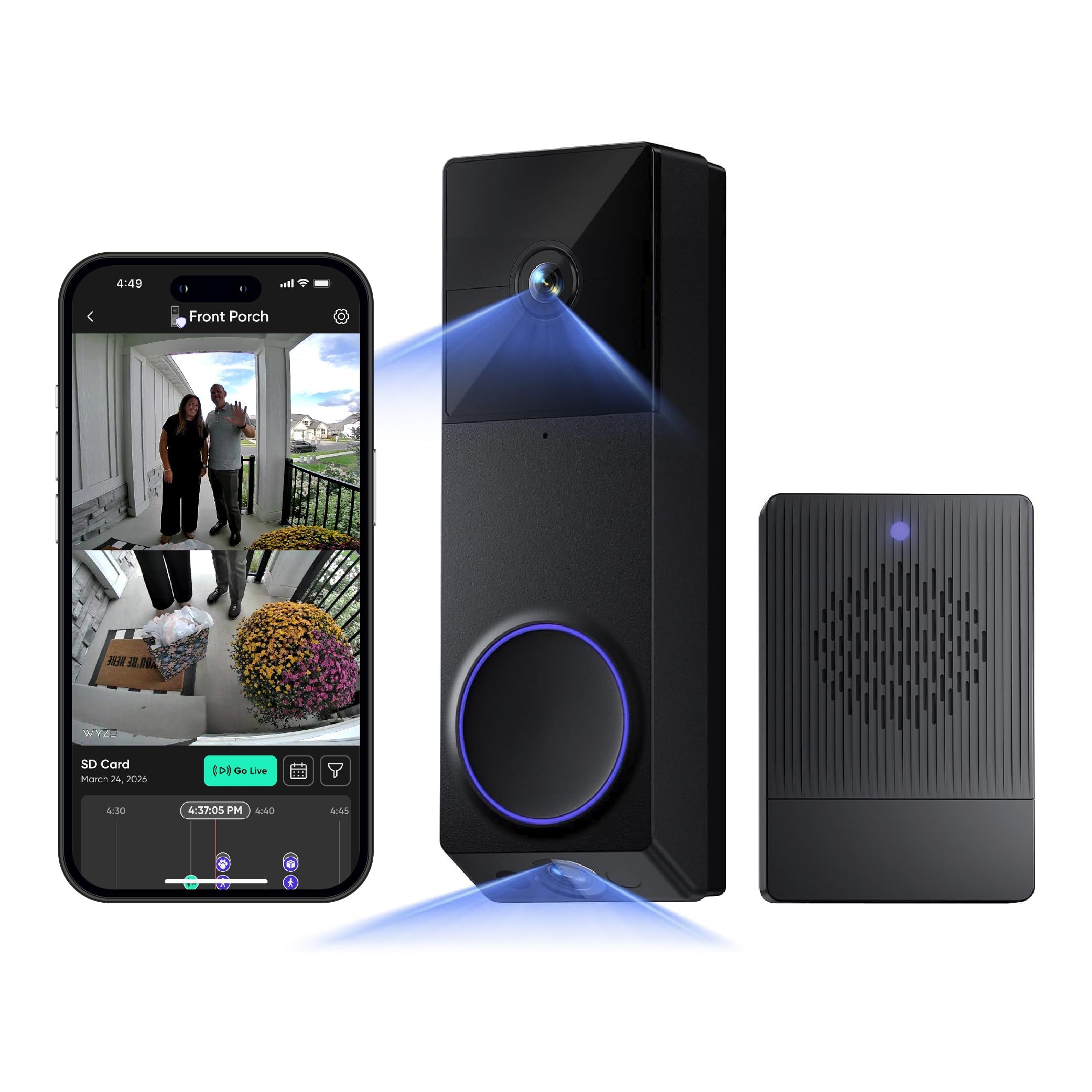
Here is the clever bit: a second downward-facing camera. One lens watches the person, the other stares over the doorstep for packages, so you get a split view with zero fisheye distortion instead of one wide frame doing both jobs poorly. The split view is the feature buyers call out most, and it does make a package sitting flat on the mat instantly readable. Both cameras shoot 2K, and a starlight sensor (a low-light sensor tuned for color) keeps color in the frame after dark rather than dropping to grainy black and white.
Power is a removable rechargeable pack, and with a microSD card (up to 512GB, not included) you can record locally with no monthly fee — the maker lists up to six months per charge. It connects to either 2.4GHz or 5GHz Wi-Fi, which is a step up on the 2.4GHz-only options above. A Wi-Fi chime is included, so the whole house hears the bell, and installation is usually a one-minute adhesive job.
Battery is the honest note here — real-world runtime lands closer to a couple of months once the dual cameras and motion alerts are working hard. And this is a factory-renewed unit, so it carries a limited warranty rather than a full new-device term. If the dual view is what you want, neither point is a deal-stopper, but plan a charging cycle into your routine.
The split view earns its keep: no other pick here watches the doorstep with a dedicated second lens, and the distortion-free frame is why.
Set the recharge rhythm: dual cameras cost battery — count on plugging in more than twice a year.
Best fit for: homes that lose packages and want a dedicated door-mat camera.
Know before buying: renewed stock, and a shorter real-world charge interval than advertised.
6. Aqara Doorbell Camera G400 with Chime

A hardwired doorbell built for Apple homes that never want to recharge a battery.
If you already live in the Apple ecosystem, this is the doorbell that fits cleanly — it works with HomeKit Secure Video (Apple’s private, encrypted recording service) for storage and alerts on your Apple devices, and it also plays with Alexa, Google Assistant, and SmartThings. Just know that to use HomeKit Secure Video you need an iCloud+ plan and an Apple home hub. Power is the other big difference: it is wired, running on either PoE (power over a single network cable) or your existing 8–24V AC/DC doorbell wiring, so there is no charging to think about — ever.
The view is a 2K 165° head-to-toe field in a tall 3:4 aspect, with nearly invisible 940nm infrared LEDs (light outside the visible range) that light up the scene in total darkness without a red glow tipping off an intruder or bothering neighbors. Local AI person and zone detection run on the device, so false alarms fall without sending clips to a server. There is a wedge kit for tricky mounting angles and a plug-in chime included.
Two honest notes. First, the resolution is capped at 1200p when you connect it to Apple HomeKit (it also applies when Aqara Home and HomeKit run together), so you do not get full 2K inside Apple’s ecosystem. Second, night footage can wash out bright areas like a lit porch light. A few buyers also feel it sits at the pricier end for what the footage shows. If you want an SD-card-recorded, wire-free doorbell instead, the aosu above is the cleaner match.
Ideal for: Apple HomeKit homes wired to the door and tired of battery swaps.
Also worth knowing: HomeKit caps it at 1200p, and bright light can blow out night footage.
7. eufy Security Video Doorbell E340

Twin cameras and built-in storage — no card to buy, no plan to sign.
The E340 solves your storage question before it starts: 8GB of eMMC memory (a fixed chip built into the doorbell) records locally with no subscription and no separate card to buy. Two cameras work together — the front lens films a visitor head-to-toe, while a downward camera points straight at the doorstep for whatever a courier sets down. Both shoot 2K, so the parcel detail is crisp.
Power is flexible in a way that suits most homes: run it on the quick-release rechargeable battery, or wire it to a 16–24V source and let the battery top up continuously. Color night vision reaches a clear 16ft (5m) in the dark thanks to a dual-light system. When it rings, you can connect it to an existing mechanical chime or pair it with a eufy HomeBase, Minibase, or an Alexa or Google device. Note that it only supports 2.4GHz Wi-Fi.
The honest caveat is battery life. Once both cameras and human/package alerts are running, a recharge lands roughly every two and a half months for many setups — which is why the wired-in option is worth considering. On the plus side, doorbell-specific tricks like package and human alerts mean the notifications you get are the ones that matter.
Why it stands out
- 8GB built-in storage — no card or plan needed
- Downward camera clearly shows doorstep packages
- Battery or wired power, your choice
- Color night vision to 16ft (5m)
The fine print
- 2.4GHz Wi-Fi only
- Battery lasts roughly 2.5 months between charges with both cameras and alerts running
- Local storage is fixed at 8GB, not expandable by card
Go for this if: you want zero storage admin — the doorbell remembers on its own.
Consider wiring it if: you would rather top up power than swap a battery every few months.
8. REOLINK Battery Video Doorbell (2nd Gen)

A wire-free doorbell that skips the seasonal recharge grind entirely — or nearly.
The headline here is patience: one charge lasts up to 10 months, based on 5 minutes of recording per day. That is a very different rhythm from the monthly-or-so charging on many battery doorbells here, and it is the reason to look at this one first if a ladder makes you groan. Pair it with a Reolink Doorbell Solar Changer or 8–24VAC wiring and it tops up on its own. The picture is 2K 4MP detail in a square 1:1 view (150°×150°×180°) — wide and tall enough to catch both a visitor and a package in one frame.
Local storage is generous and free: an SD card up to 512GB, a Reolink Home Hub, NVR, or FTP, all encrypted. Smart detection of people, vehicles, animals, and packages needs no subscription, and you get up to 25 rich notifications a day on the free plan. Dual-band 2.4/5GHz Wi-Fi keeps the connection stable. There is voice changing and preset or custom replies, plus compatibility with Google Assistant, IFTTT, and Home Assistant.
Straight honesty: the camera quality and connectivity are the split verdict here — some setups report a good image in direct sun and at night, while others find the connection finicky. It also wants the Reolink Chime Plus specifically (not the older Reolink Chime) if you want a full chime setup. Update the firmware before you mount, as Reolink recommends, and set expectations for a slightly fiddly first install.
Runtime leaders: up to 10 months a charge, or top up with solar or existing doorbell wiring, makes this the set-and-forget pick.
The fit note: connectivity and camera verdicts split across homes, so buy the Chime Plus and plan a careful setup.
Made for: hard-to-reach doors where charging the battery is a chore.
Not for: anyone who wants the simplest possible pairing session — expect a firmware update and a fiddly first setup.
9. Google Nest Doorbell (Battery) – Ivy

The Google-native doorbell that already knows a person from a package.
If your home runs on the Google Home app, the Nest Doorbell slots in without a fight. It has built-in intelligence that tells the difference between a person, package, animal, and vehicle, then fires the right alert — no subscription needed for that. Live HD video with HDR (high dynamic range, which keeps bright sky and shaded porch both readable) plays in the Google Home app, and there is night vision for after dark. You also get 3 hours of free event video history.
Install is flexible: run it wire-free on the built-in battery, or connect it to your existing doorbell wires with the included wire connector. The best hidden trick is resilience — if your Wi-Fi or power drops, it stores up to 1 hour of recorded events so you can see what you missed when things come back. Add a Nest Aware subscription for up to 60 days of event history.
The honest caveats are real. Video quality is the most-praised thing about it, but battery life and durability do not share that warmth — a battery Nest Doorbell cannot record 24/7 even with Nest Aware, so this is not the pick for continuous recording. Some homes also fight connectivity. If you want 24/7 local recording instead, look to the wired Aqara G400 or a microSD model like the Tapo.
Pick it when: Google Home is already your hub and you want smart alerts without a plan.
pass on it if: you want 24/7 continuous recording or the longest battery between charges.
Know the Specs
Resolution and megapixels
Resolution is the number of pixels in the image — more of them means finer detail when you zoom into a face. A 2K label usually pairs with a 3MP or 5MP sensor, and a 4MP camera like the Reolink shows even more detail. Higher does not always win: the shape of the frame matters as much as the pixel count for reading a package label.
Field of view and aspect ratio
Field of view is how much of the porch the lens captures at once. A 180° view (ieGeek) sees the widest; 160° (Tapo) is a close second. Aspect ratio is the shape of that image — a tall 4:3 or 3:4 frame shows a visitor head-to-toe and the box at your feet, while a wide 16:9 frame misses the doorstep.
Local vs cloud storage
Local storage means recordings sit on a microSD card or built-in chip inside the device, so you own the footage and pay no monthly fee. Cloud storage puts clips on a server for a subscription. Models here range from 128GB cards (ZUMIMALL, ieGeek) to 256GB (aosu) and 512GB (Tapo, Wyze Duo Cam, Aqara, Reolink), plus fixed built-in memory like the eufy E340’s 8GB.
Battery capacity and power options
Battery capacity in mAh is how much charge the pack holds — a 6400 mAh cell (Tapo) generally outlasts a 5200 mAh one (aosu) under the same load, though motion settings change the math. Wired and PoE doorbells (Aqara G400) skip recharging entirely. Some models do both: run on battery or wire them in for a continuous top-up (eufy E340, Reolink 2nd Gen).
Common Questions
Do I need a subscription to record video on a WiFi video doorbell?
Will a 2.4GHz-only doorbell work with my 5GHz router?
Why does my doorbell see the visitor but miss the package on the ground?
How often will I need to recharge a battery doorbell?
Can a WiFi doorbell work during a power or internet outage?
What is the difference between a wired and a wire-free doorbell?
Do these doorbells work with Alexa, Google, and Apple HomeKit?
How does night vision work on these doorbells?
Can I install a WiFi video doorbell myself if I have no existing wiring?
Is a higher megapixel count always better on a doorbell?
The Bottom Line
For most homes, the wifi video doorbell that covers the most ground is the aosu 2K Wireless Doorbell with aosuBase, because its 166° head-to-toe view and 256GB subscription-free recording handle packages and visitors without a monthly bill. If Apple HomeKit and a wired door are your setup, reach for the Aqara G400 instead. And for a porch where climbing a ladder to recharge is a genuine hassle, the Reolink 2nd Gen with its up-to-10-month runtime is the one to put up.
How we choose
We do not accept paid placement. Every pick is matched to a real buyer and a real use-case; we do not hands-on test units.
Sources
Specifications: manufacturer listings and product documentation. Review insights: verified customer reviews, as of November 2026. Pricing: not shown on this page (it changes often); check the current price via the retailer link.
As an Amazon Associate, Tactical Gear Guy earns from qualifying purchases. This does not affect which products we feature.