Specs are compiled from manufacturer listings and verified buyer reviews and can change over time — please confirm the key details on the product page before buying.
If you are tired of paying your cable company every month for a box you do not own, a cable modem router with Wi-Fi 6 built in is the fix. One device replaces both the modem and the router, and you stop renting. The catch most buyers hit is compatibility: the wrong box simply will not activate on your plan, no matter how good its specs look on paper. This guide sorts the genuinely strong units from the ones that fight you, and tells you which fits your provider, your square footage, and your speed tier.
This guide is built by comparing the manufacturers’ published specifications and the patterns across verified customer reviews, so you get each pick’s real strengths and trade-offs instead of marketing spin.
We will walk through DOCSIS versions, channel bonding, and real-world coverage so you can pick a gateway that activates cleanly on day one and holds a signal across the whole house. Every pick below is a genuine modem-and-router combo, and this breakdown of the wi-fi 6 cable modem router options keeps the trade-offs front and center.
Top Picks


How To Choose The Best Wi-Fi 6 Cable Modem Router
The first thing to check is not the Wi-Fi spec — it is whether the box talks to your cable company. A gateway that is not certified for your provider will not activate, and no amount of Wi-Fi 6 speed fixes that. Match the device to your provider first, then to your plan speed, then to your house size.
Check the DOCSIS version against your plan
DOCSIS is the cable standard that sets how much speed your modem can pull down and push up. DOCSIS 3.1 is the current generation and supports the faster multi-gigabit plans. A DOCSIS 3.1 modem like the units here is what you want if your provider offers a plan above 1 Gbps. Older DOCSIS 3.0 modems cap out lower and can bottleneck a fast plan.
Understand channel bonding
Channel bonding is the number of lanes the modem uses at once — listed as something like 32×8, meaning 32 downstream and 8 upstream channels. More channels generally means steadier performance when the neighborhood is busy. If you stream, game, and work from home at the same time, a modem with 32×8 bonding gives you more room to share the pipe.
Match coverage to your home
Coverage claims come in square feet and concurrent device counts. A gateway rated for 2,500 sq. ft. and 25 devices suits a typical single-family home. If you have thick walls, a long floor plan, or a big yard, a mesh system with a satellite gives you a second point of coverage. Square footage is a rough guide — real-world range depends on wall material, floor count, and where you place the box.
Plan for activation and app setup
Every gateway here pairs with a manufacturer app that walks you through setup and lets you rename the network and check speeds. You still need to call your provider or use their portal to activate the modem, so have your account number ready. Reading the compatibility list before you buy saves the hassle of a return.
Side-by-Side Comparison
| Model | Best For | Wi-Fi Speed | Coverage | DOCSIS | Amazon |
|---|---|---|---|---|---|
| NETGEAR Nighthawk CAX30-100NAR★ Best Overall | Most homes, best all-rounder | 2.7 Gbps (AX2700) | 2,500 sq. ft. | 3.1 | Amazon |
| Netgear Orbi AX4200 (CBK752)Best Value | Whole-home mesh coverage | 4.2 Gbps (AX4200) | 5,000 sq. ft. | 3.1 | Amazon |
| ARRIS Surfboard G20 | Compact single-box setup | 3 Gbps (AX3000) | 2,500 sq. ft. | 3.1 | Amazon |
| ARRIS Surfboard G34 | Fast multi-gig plans | 3 Gbps (AX3000) | 2,500 sq. ft. | 3.1 | Amazon |
| NETGEAR Nighthawk CAX80 | Top-tier speed and devices | 6 Gbps (AX6000) | 2,500 sq. ft. | 3.1 | Amazon |
Detailed Reviews
1. NETGEAR Nighthawk CAX30-100NAR Cable Modem Router
Our pick — 4.0+★ from 850+ verified ratings; the strongest balance of quality and price.
The dependable all-rounder for a busy home with 25 devices.
For most people, this is the gateway to buy. It covers up to 2,500 sq. ft. and 25 concurrent devices with dual-band Wi-Fi 6 (AX2700) running to 2.7 Gbps — enough to stream on several TVs, game, and take video calls at once without the whole house stuttering. That combination of coverage, device count, and speed is why it anchors this list.
Hang-ups are rare here, and reliability is what wins people over — it is the standout strength of this unit. Setup follows the Nighthawk app, which lets you rename the network, test internet speed, and watch data usage from your phone. You get four 1 Gig Ethernet ports that support port aggregation (pairing two ports for a faster wired link) plus a USB 3.0 port for a storage drive or wired console. DOCSIS 3.1 with 32×8 channel bonding means it locks onto plenty of channels at once, which keeps the connection steady when the neighborhood gets busy.
The real catch is compatibility, and it is a big one if you are not on cable. This box is certified with Spectrum and Cox at up to 1Gbps and Xfinity up to 800Mbps, and it is not compatible with Verizon, AT&T, CenturyLink, DSL, DirecTV, DISH, or bundled voice service. Owning it means no more monthly modem rental fee on your bill. If your plan runs above those certified ceilings, step up to a multi-gig model instead.
What holds up well
- Reliability is the most-praised trait — the thing buyers notice first.
- 2,500 sq. ft. and 25 devices with AX2700 speed up to 2.7 Gbps.
- Four 1 Gig LAN ports with aggregation, plus a USB 3.0 port.
- WPA/WPA2/WPA3 security support and app-based setup.
Where it asks you to check first
- Not certified for Verizon, AT&T, DSL, or bundled voice service.
- Certified ceilings top out at 1Gbps on Spectrum/Cox and 800Mbps on Xfinity.
Go for it if: you are on Spectrum, Cox, or Xfinity and want one dependable box for a normal-size home.
Look elsewhere if: your cable plan is faster than the certified ceilings above, or you are on fiber or DSL.
2. NETGEAR Nighthawk CAX30 Modem Router Combo
A router-plus-satellite mesh with one network name and 5,000 sq. ft. of coverage.
Big homes with far-flung rooms are where this system earns its place. The integrated DOCSIS 3.1 modem plus Satellite covers up to 5,000 sq. ft. and 40+ devices — that is 2.5 times the 2,000 sq. ft. of the trimmed Nighthawk CAX30, and the biggest footprint here. The Wi-Fi 6 speed reaches 4.2 Gbps, outpacing the AX2700 models at 2.7 Gbps. A dedicated tri-band backhaul (a separate lane that the router and satellite use to talk to each other) is what lets you roam the house on a single network name with no dead zones.
You get four 1 Gig LAN ports and a modem that supports cable plans up to 6Gbps. The Orbi app handles setup, speed tests, speed history, and data monitoring. If you need more reach later, each optional Orbi Mesh Wi-Fi 6 satellite adds another 2,500 sq. ft. — a clean way to grow into an addition.
Where this one asks for care is the reliability side and the upstream figure. Its maximum upstream rate is listed at 100 Mbps, which is lower than the 500 Mbps upstream of the ARRIS G20, so heavy uploaders should weigh that. Reliability feedback is genuinely split — some owners say it works very well, while others hit connection trouble with certain providers. It is the right tool for a sprawling house, provided you confirm your provider is on friendly terms with it.
Where it shines: 5,000 sq. ft. of mesh coverage and 4.2 Gbps Wi-Fi 6 speed with a dedicated tri-band backhaul — the pick for covering every corner.
What to verify: upstream tops out at 100 Mbps and provider compatibility should be confirmed before you buy.
Best matched to: large, multi-room homes that need a single network name across a wide footprint.
Think twice if: you do a lot of uploading or you are not sure your provider supports this model.
3. ARRIS Surfboard G20 Cable Modem & Wi-Fi 6 Router

A 2.2-pound ARRIS gateway with 500 Mbps upstream — if it plays nice with your provider.
The G20 pairs DOCSIS 3.1 with dual-band Wi-Fi 6 (AX3000) for up to 3 Gbps and 2,500 sq. ft. of coverage across two 1 GbE ports. It works with Xfinity, Cox, and Spectrum, and its maximum upstream rate of 500 Mbps beats the 100 Mbps of the Orbi CBK752 — a real edge if you upload large files or stream out. ARRIS modems are used in millions of homes, so the modem heritage is solid.
Setup is the split point on this one: some describe it as easy, others find it a struggle that eats an afternoon. The connected experience is where you need to set expectations — numerous affected owners describe the modem dropping out after a short run and constant disconnections from Xfinity Wi-Fi. That pattern puts the G20 in a spot where you should go in with eyes open, or buy it only where returns are simple.
Specs on paper look strong: 2.2 pounds, dual 1 GbE ports, DOCSIS 3.1 down. Confirm your provider and your comfort with setup before committing.
What the specs deliver: AX3000 up to 3 Gbps and 500 Mbps upstream in a 2.2-pound box that covers 2,500 sq. ft.
What the feedback flags: setup divides opinion, and connection dropouts are a recurring theme — check your provider fit first.
Consider it when: you want a compact ARRIS gateway with strong upstream headroom and are ready to handle setup yourself.
Hold off when: you want a set-and-forget install or you have seen dropout complaints on your provider.
4. ARRIS Surfboard G34 Cable Modem & Wi-Fi 6 Router
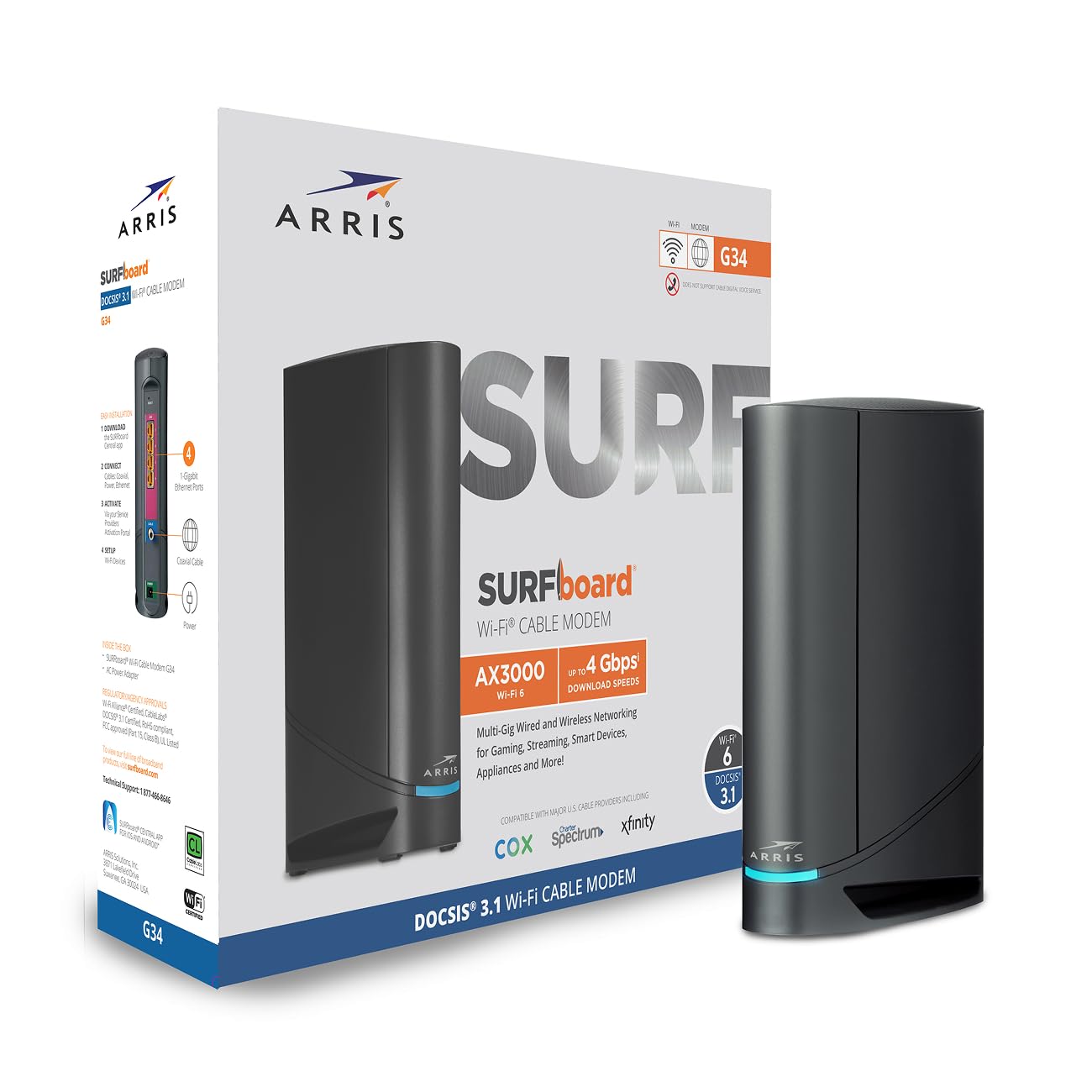
Built for cable plans up to 2.5 Gbps, with four 1 Gigabit Ethernet ports.
If your cable plan is in the multi-gig range, the G34 is aimed straight at you. Its DOCSIS 3.1 performance supports plans up to 2.5 Gbps, and dual-band Wi-Fi 6 (AX3000) delivers up to 3 Gbps across your home. Coverage runs to 2,500 sq. ft., and four 1 Gigabit Ethernet ports let you hardwire several devices at once. The inside scoop from owners is that signal strength is genuinely strong — the kind that reaches rooms you had written off.
Setup is a straightforward loop: connect the cable, power on, activate with your provider, then join the default Wi-Fi or rename it. The G34 is CableLabs certified (the industry stamp that a modem meets cable standards) and tested for Cox, Xfinity, and Spectrum. It is also not compatible with fiber, DSL, or satellite service, so check your service type before you buy. The compact design with simple LED indicators for power, upstream/downstream, and online status keeps troubleshooting readable.
Speed and quality feedback lands mixed — plenty find it reliable, while others hit uneven Wi-Fi performance. That is a fit note, not a reason to avoid it: on the right multi-gig cable plan with the right provider, it is a capable gateway. If you have a fiber line or are on DSL, look elsewhere.
Why it stands out
- DOCSIS 3.1 supports cable plans up to 2.5 Gbps.
- AX3000 Wi-Fi 6 up to 3 Gbps over 2,500 sq. ft.
- Four 1 Gigabit Ethernet ports for multiple wired devices.
- CableLabs certified and tested for Cox, Xfinity, and Spectrum.
What to keep in mind
- Not compatible with fiber, DSL, or satellite service.
- Wi-Fi performance draws mixed notes on stability.
Right for: multi-gig cable homes on Cox, Xfinity, or Spectrum with several devices to hardwire.
Not for: fiber, DSL, or satellite connections, which it cannot activate on.
5. NETGEAR Nighthawk CAX80 Cable Modem with Built-in WiFi 6 Router

The heavyweight: top-tier AX6000 speed for the fastest cable plans around.
When you want the most throughput on the page, this is the one. Dual-band Wi-Fi 6 (AX6000) reaches up to 6 Gbps, and the DOCSIS 3.1 modem is built for cable plans up to 6Gbps — headroom for people who stream, game, and download at the same time. Coverage runs to 2,500 sq. ft. across 30 concurrent devices. Its maximum upstream rate is 300 Mbps, well ahead of the 100 Mbps of the Orbi CBK752, so uploads have real breathing room too.
The wired side is where it flexes: four 1 Gig Ethernet ports plus a 2.5 Multi-gig LAN/internet port, and a USB 3.0 port. Two-port aggregation can combine lanes for up to 2Gbps on a wired connection — practical if you move big files between machines or run a networked console. Setup goes through the Nighthawk app, and the box ships with automatic firmware updates and its security features enabled from the start.
The honest catch is reliability over time. Buyer feedback splits, with some reporting faster movie downloads and others noting a unit that stopped working after eight months. That is worth knowing, and it is exactly why buying a renewed unit from a seller with a clear return policy matters here. It also is not compatible with Verizon, AT&T, CenturyLink, DSL, DirecTV, DISH, or bundled voice service, and it is made for use in the US only.
What makes it the top performer: 6 Gbps Wi-Fi 6, 6Gbps plan support, a 2.5 Multi-gig port, and 2Gbps aggregation headroom for wired power users.
The honest caveat: long-run reliability divides owners, so weigh the return policy and keep the boxed unit handy until it proves itself.
Pick this if: you have the fastest cable plan your provider sells and want the most speed and wired flexibility on the page.
skip it if: you want the most proven long-term reliability or you are on fiber, DSL, or a bundled voice plan.
Know the Specs
Wi-Fi Speed and Band Class
Wi-Fi speed is quoted like AX2700, AX3000, or AX6000 — a rough total of what the radios can push. The “AX” prefix signals Wi-Fi 6, the newer standard that handles many devices more smoothly than older Wi-Fi 5. Dual-band means 2.4 GHz and 5 GHz; the 5 GHz band is faster over shorter distances, while 2.4 GHz reaches further through walls. Several units here are dual-band, while the Orbi CBK752 is tri-band — the third band acts as a private lane between router and satellite so your devices keep their full speed.
DOCSIS and Channel Bonding
DOCSIS is the cable standard your modem uses. Version 3.1 is the current generation and supports faster multi-gigabit plans. Channel bonding — seen as 32×8 — means the modem locks onto 32 downstream and 8 upstream channels at once. More channels means steadier performance when neighbors are hammering the same cable lines. Pair your modem with the plan speed your provider sells, or you will either leave speed on the table or pay for a plan the modem can’t fully use.
Coverage in Square Feet
Coverage figures like 2,000 or 5,000 sq. ft. are a rough map of reach, measured in open-ish conditions. Thick walls, brick, metal studs, and multiple floors all shrink that number. If your home is on the large side, a mesh setup with a satellite spreads coverage more evenly than one central box. Place the gateway high and central where you can, away from metal and appliances, for the best real result.
Upstream vs Downstream Rate
Downstream is how fast data flows to you — streaming, browsing, downloads. Upstream is how fast it flows back out — video calls, large backups, cloud uploads. Some gateways here list a maximum upstream rate, and those figures vary. If you work with big files or host video calls all day, pay attention to the upstream number. The figure you see is the ceiling under perfect conditions, not a guarantee on every plan.
Common Questions
Will this modem router work with Xfinity, Spectrum, or Cox?
Can I use a cable modem router with fiber or DSL internet?
What does DOCSIS 3.1 actually get me over an older modem?
How many square feet will one of these really cover?
What is channel bonding and why does 32×8 matter?
Do these replace my cable company’s rental modem?
Is a renewed unit safe to buy?
How do I set one of these up after it arrives?
Which should I pick if I want the fastest wired connection?
Why does upstream speed matter if I mostly download?
The Bottom Line
For most cable homes, the wi-fi 6 cable modem router winner is the NETGEAR Nighthawk CAX30-100NAR because it balances 2,500 sq. ft. of coverage, 25 devices, and AX2700 speed with the dependability owners praise most — rated 4.0+ stars by a large base of verified owners. If covering a sprawling house is your priority, the Netgear Orbi CBK752 spreads a single network name across 5,000 sq. ft. And if you own the fastest cable plan your provider sells, the NETGEAR Nighthawk CAX80 is the one to reach for, with its AX6000 speed and multi-gig wired port.
How we choose
We do not accept paid placement. Every pick is matched to a real buyer and a real use-case; we do not hands-on test units.
Sources
Specifications: manufacturer listings and product documentation. Review insights: verified customer reviews, as of November 2026. Pricing: not shown on this page (it changes often); check the current price via the retailer link.
As an Amazon Associate, Tactical Gear Guy earns from qualifying purchases. This does not affect which products we feature.