Specs are compiled from manufacturer listings and verified buyer reviews and can change over time — please confirm the key details on the product page before buying.
Here is the short answer: if you mostly sit at a desk for Zoom and Teams, buy the UGREEN 4K webcam. If your room is dim, the Anker PowerConf C200 is the low-light pick on this list — it is the crowd favorite with 4.0+ stars across 9,000+ owners. The rest of this list breaks down exactly which camera fits which kind of workspace.
This guide is built by comparing the manufacturers’ published specifications and the patterns across verified customer reviews, so you get each pick’s real strengths and trade-offs instead of marketing spin.
Most buyers assume a higher megapixel number always wins, but sensor quality and autofocus usually matter more than raw resolution. Every pick below was chosen for how it holds up on an actual Zoom or Teams call, not on a spec sheet. This breakdown of the best video call camera covers resolution, autofocus speed, microphone clarity, and low-light performance so you pick the right one the first time.
Top Picks

How To Choose The Best Video Call Camera
Buying a webcam is really about fixing a specific problem: your laptop’s built-in camera makes you look washed out, soft, or tiny in the frame. A good webcam fixes all three: brighter exposure, sharper focus, and a wider frame. Here is what to weigh before you pick one.
Resolution and Frame Rate
A 1080p sensor is the baseline — that means 1920×1080 pixels, which is full HD. If you want detail for presentations or whiteboards, step up to 2K or 4K. But frame rate matters too: 30fps (frames per second) is smooth enough for meetings, while 60fps helps if you move a lot. Some cams cap 4K at 30fps and bump to 1080p at 60fps for motion.
Autofocus and Light Handling
Fixed focus means the lens stays put and you must sit at the right distance. Autofocus tracks you as you lean in or out. Phase detection autofocus (PDAF) locks on faster than contrast-based systems, which matters if you gesture or move papers around. Auto light correction adjusts exposure when your room goes from bright to dim, so you do not vanish into shadow.
Side-by-Side Comparison
| Model | Best For | Max Resolution | Field of View | Focus Type | Amazon |
|---|---|---|---|---|---|
| UGREEN 4K@30fps Webcam★ Best Overall | Best Overall | 4K@30fps / 1080p@60fps | — | PDAF Auto-Focus | Amazon |
| EMEET C60E Dual-CameraPremium Pick | Streaming & Presentations | 4K UHD | Wide + Telephoto | PDAF Auto-Focus | Amazon |
| Acer A610 1080p | Budget Pick | 1080p Full HD | 83° | Fixed Focus | Amazon |
| Dell 2K QHD WB3023 | Office Standard | 2K QHD | — | — | Amazon |
| Anker PowerConf C200 | Low-Light Rooms | 2K | 65°, 78°, or 95° | — | Amazon |
| Logitech Brio 301 | MacBook & Meetings | 1080p (1920×1080) | — | — | Amazon |
Detailed Reviews
1. UGREEN 4K Webcam
Our pick — 4.5+★ from 2,500+ verified ratings; the strongest balance of quality and price.
The do-everything desk cam that jumps from crisp 4K detail to smooth 60fps motion.
You get genuinely useful resolution here: an 8MP CMOS sensor (a light-capturing chip that turns the image into pixels) pushes 4K@30fps video for detail-heavy work like whiteboard sharing or product demos. When you need smooth motion instead — gaming, fitness demos, or fast gestures — it drops to 1080P@60fps. Bear in mind both your hardware and your software have to support 4K@30fps, or the cam automatically switches down to 1080P@60fps.
Focus is the part that keeps you sharp. Phase detection autofocus tracks subjects anywhere from 0.33 to 16.4 ft, so you can lean back in your chair and stay sharp. Auto exposure then corrects color temperature in dim rooms, which means you look studio-clear instead of orange and muddy. The two built-in mics pick up your voice from up to 16.4 feet away, so a whole conference table gets heard on one cam.
A single slide closes the built-in privacy cover, so you are not caught on screen after a call ends. It installs driver-free and sits on any monitor, laptop, TV, or tripod, and the included USB A-to-C adapter covers both port types. Video quality is the standout strength across buyer feedback, and the plug-and-play experience gets consistent praise. If there is a trade-off, it is that the 4K mode asks more of older computers — expect the auto-drop to 1080p on a weak machine. Otherwise this is the best value on the list for a work-from-desk setup, covering 4K detail, 60fps motion, dual mics, and a privacy shutter in one cam.
What earns the top spot
- 4K@30fps detail plus 1080P@60fps for smooth motion
- PDAF autofocus tracks you from 0.33 to 16.4 ft
- Dual mics capture audio up to 16.4 feet away
- Built-in privacy shutter and USB A-to-C adapter included
What to keep in mind
- 4K requires both your hardware and software to support it
- Older machines may auto-switch down to 1080p
Go for it: remote workers and streamers who want one camera that handles both detailed work and fast motion.
The catch: if your laptop is older, plan on the automatic 1080p fallback in 4K mode.
2. EMEET C60E Webcam
Two eyes on one camera: a wide shot and a close-up, switchable without touching the frame.
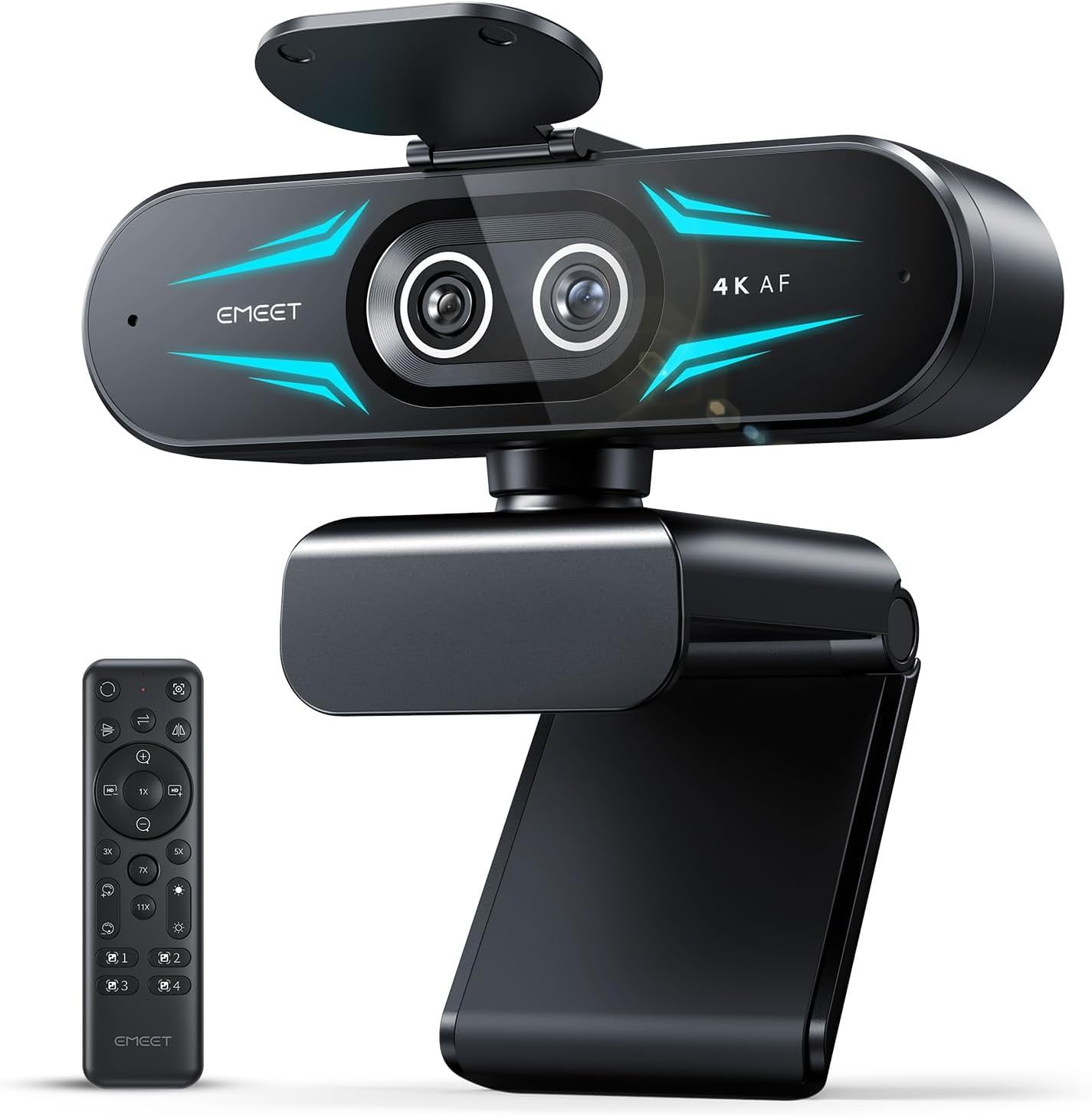
This is the one that does something no other pick here can. Two cameras share a 1/2.8″ CMOS 4K sensor: the left gray wide-angle camera catches the whole scene and your background, while the right blue telephoto camera gives detailed close-ups at a recommended distance of 13.8 in. That means you can flip between full-room and face-filling views in a presentation or product demo. It is a genuine resolution step up over the Dell 2K QHD WB3023 — the EMEET runs 4K against the Dell’s 2K.
Zoom runs from 1X all the way to 11X, with landmarks at 3X, 5X, 7X, and Max 11X, and PDAF autofocus holds it steady through every step. You can drive it from the included remote or the EMEET STUDIO software to adjust brightness, focus, and RGB lighting without interrupting a stream. Note that zoom is not supported in 4K, 60FPS, or YUY2 modes — that is the limitation to plan around. The RGB lighting in red, green, and blue doubles as a status glow and a personality touch.
Two omnidirectional mics (ones that pick up sound evenly from all directions) capture audio within a 9.8ft radius. It connects via USB 2.0 Type-A with plug-and-play and supports 1/4″ tripod mounting. Quality is the thing that wins people over, followed closely by picture quality, and the remote control gets regular praise as a real convenience. The recurring complaint is the customization menu — it takes some digging to master the EMEET STUDIO settings. For teaching, streaming, or anyone who needs close detail on screen, the wide-plus-telephoto switch makes this the most versatile tool on the list.
Worth the step up: if you present products, teach, or stream, the dual-camera setup lets you swap between a wide scene and a tight close-up you cannot get from any single-lens cam here.
Plan for this: the software layer adds a learning curve, and 11X zoom is off the table once you switch to 4K or 60FPS.
Reach for this if: you demo products or teach and want two angles from one mount.
Look elsewhere if: you want zero setup fuss — the studio software takes time to dial in.
3. Dell 2K QHD Webcam WB3023, Sony Sensor, Noise Reduction Mic
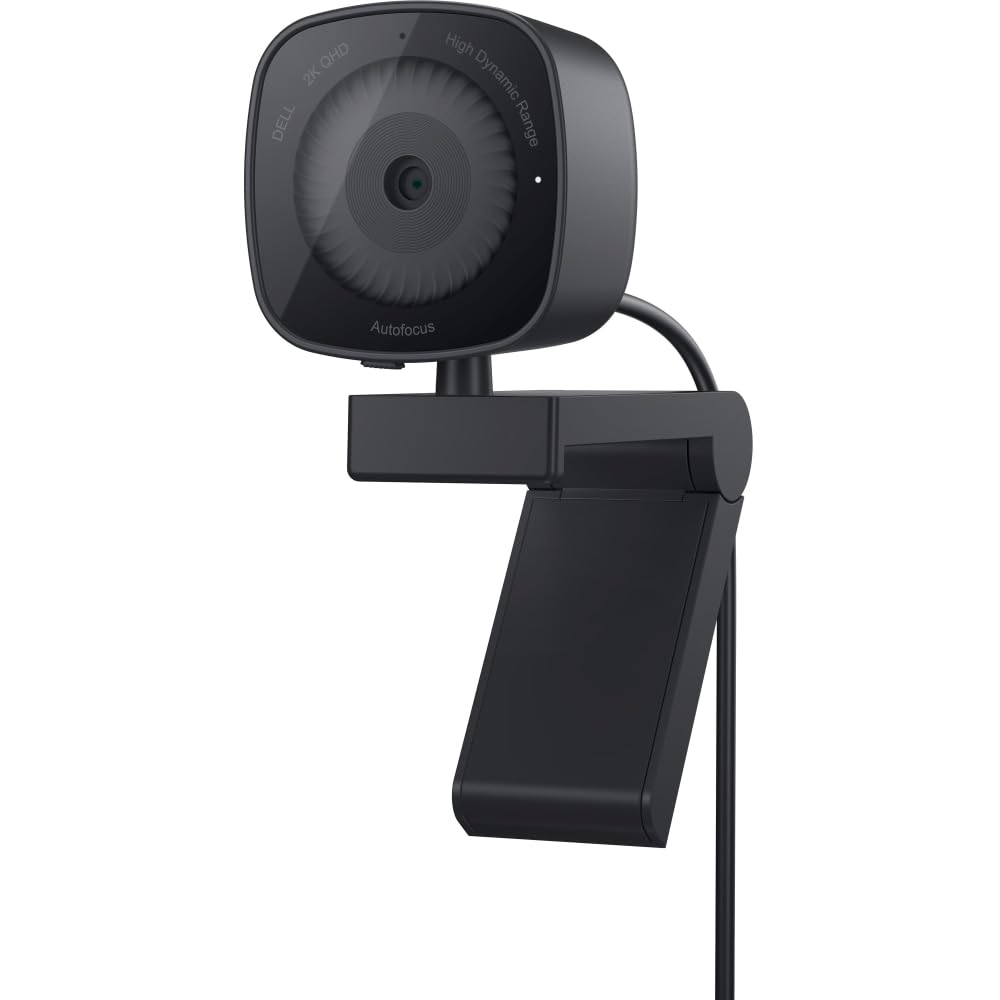
A Sony sensor in a corporate shell, tuned for teams that run on Microsoft Teams and Zoom.
The headliner is the sensor: a Sony image sensor feeding a 2K QHD (that is 2560-pixel-wide video) picture tuned for vivid, clean color. It is certified for Microsoft Teams and Zoom, so it just works inside the apps your company already runs. A 2x digital zoom lets you tighten the frame without moving the clip, and tilt-and-swivel means you can angle it at your face instead of at your ceiling.
The built-in noise reduction mic keeps voices clear on calls, and a sliding shutter covers the lens when you step away. The integrated clip mounts on a monitor, notebook, or tripod. You can fine-tune settings through the Dell Peripheral Manager software if you want to go past the defaults. The one thing to know is that its 2K sensor gives up ground to the EMEET C60E’s 4K — the EMEET runs 4K versus this Dell’s 2K.
Setup is where this cam earns its keep; owners consistently call installation easy and the picture quality strong. Camera quality draws more divided feelings, so treat this as an office tool rather than a content-creation rig. It is a sane fit for a corporate desk where Teams and Zoom certification matters more than manual image controls. The trade-off is that it is outgunned on raw resolution by the streaming-focused picks above.
The practical read: Teams and Zoom certification plus a Sony sensor make this a safe, predictable workhorse for company laptops.
Sized honestly: this is 2K, not 4K — if pixel detail for demos is your goal, the EMEET or UGREEN pull ahead.
Best for: office workers who live in Teams and want a certified, no-drama camera.
Think twice if: you need maximum resolution for streaming or recording.
4. Anker PowerConf C200 Webcam

The camera built for people whose office is a dim corner and whose calls start at night.
Dim rooms are where the C200 pulls ahead. It captures crisp 2K video (1440-pixel resolution) without extra lighting, so a late-night call looks as clear as a midday one. You can also set the field of view (the slice of the world the lens takes in) to 65°, 78°, or 95° through the software. That means you control how much of your messy background makes the frame — the wider the angle, the more room you show.
Audio gets AI noise cancellation across dual mics. That means your voice lands clear even when a fan hums or a street runs outside the window. An integrated cover slides over the lens between calls for privacy, and it works with Windows 7 or later and macOS 10.11 or later. Setup stays simple: one USB-C cable and it is running.
What wins people over is the image quality in poor light — this is a camera that rescues a badly lit room. Autofocus and adjustability draw more mixed reactions, so expect to spend a little time dialing in your framing via the software. It also has huge appeal on value, since it often costs less than some 4K cameras while holding its own on a call. The trade-off is that manual tuning some users want for autofocus is not as hands-off as they hoped.
Why it stands out
- 2K resolution holds up in dim light without extra lamps
- Selectable 65°, 78°, or 95° field of view
- AI noise cancellation on dual mics
- Integrated privacy cover and one-cable setup
Where it asks patience
- Autofocus behavior divides opinion — expect setup time
- Adjustability settings need software tuning
Pick this if: your workspace is short on light and you want the best-looking picture in a dim room.
Skip the surprise: be ready to tweak the software for focus and framing before your first important call.
5. Logitech Brio 301 Webcam

The MacBook upgrade that spins a shutter shut and fixes your lighting on the fly.
Full HD 1080p is the spec here — 1920×1080 pixels of natural-looking video that kicks your built-in laptop cam to the curb. The mono noise reduction mic (a single mic that filters background sound) suppresses room noise so the other side hears only you. A spin of the privacy shutter blocks the lens the instant you are off camera. RightLight 2 auto light correction then rebalances poor lighting so you stay visible when the sun drops.
This cam is certified for Zoom, Microsoft Teams, and Google Meet, so it drops into meeting apps with no fuss. If you use a MacBook Pro, that is the balance — buyers report it beating the built-in camera outright and working smoothly with the laptop. Picture and sound quality hold up, and the mono mic (a single microphone that picks up your voice) gets steady praise. Compatibility and field of view draw slightly more mixed notes, so check your app list before you commit.
Where it falls short against the resolution-heavy picks is exactly where you would expect: at 1920×1080 it is out-resolved by the 2K Anker and the 4K UGREEN. The Brio 301 makes up for it with reliability and certified meeting-app support. This is a camera for video interviews and client calls, where natural skin tones and steady exposure beat extra pixels. Expect clean, dependable 1080p video rather than a spec-sheet showstopper.
The honest verdict: a low-drama 1080p cam that fixes the worst part of laptop calls — bad light and a weak built-in mic.
Where it caps out: 1920×1080 sits below the 2K and 4K options, so detail-seekers should look up the list.
Go here for: MacBook owners and anyone who needs certified Zoom, Teams, and Google Meet support.
Not for you if: you want maximum pixel detail for recordings or streaming.
6. Acer A610 Webcam
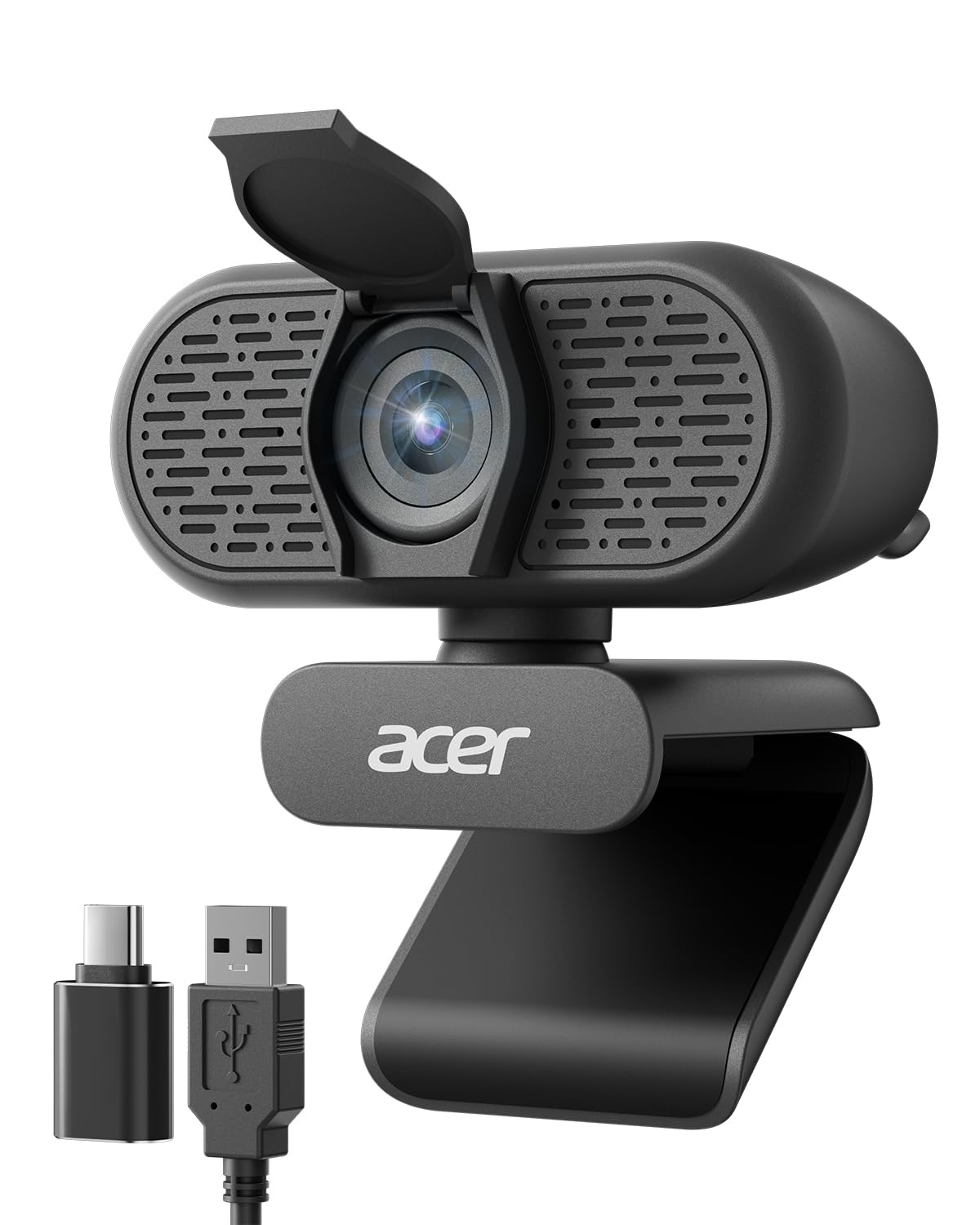
An 83-degree frame and a 360-degree swivel for the buyer who just needs the call to look fine.
Start with the angle, because that is the whole pitch. An 83° field of view (the width of the scene the lens captures) keeps you and your desk comfortably in frame, and 360° rotation lets you point the camera exactly where you sit. A new CMOS sensor drives the 1080p Full HD picture, so faces look clear in meetings and online classes. Automatic low-light correction and exposure adjustment keep you looking sharp when the room is dim or the light is harsh.
Two noise-reduction mics help your voice cut through on calls — just remember to pick the A610 as the default mic input in both your system settings and your apps. The built-in privacy cover slides over the lens when you are done. Plug-and-play means no drivers, and the included Type-A to Type-C adapter covers laptops with either port. It works with Windows 7/8/10/11 and Mac OS, and with Zoom, Skype, Twitch, and Google Meet.
Two limitations are worth knowing before you buy. This is a fixed-focus camera — the lens does not chase you, so keep your distance steady. And there are no built-in speakers, so you still need your laptop or a headset for audio out. Overall quality and video quality are the strengths owners lean on, with setup ease right behind. At the lowest price on this list, it is a smart entry point for a second workspace or a student desk.
Best value play: full 1080p, an 83° frame, and 360° rotation without spending much at all.
Set expectations: fixed focus means you stay put, and there are no built-in speakers.
Worth it if: you need a dependable 1080p cam for a spare desk, a student setup, or a tight budget.
Look up the list if: you want autofocus or built-in audio output.
Know the Specs
Resolution: 1080p, 2K, and 4K
Resolution is the pixel count of the video — more pixels means more fine detail. 1080p (1920×1080) is full HD and fine for meetings. 2K (2560 pixels wide) sharpens faces and text. 4K is the top tier for whiteboards and demos. Bigger is not always smoother, though: some cams trade frame rate for resolution, like the UGREEN’s 4K@30fps versus 1080P@60fps for motion.
Field of View and Focus
Field of view is how much of your room the lens takes in. A tighter angle like 65° frames your face closely, while a wider 83° or 95° pulls in more of your background. Focus matters just as much: fixed focus keeps the lens at one distance, while autofocus tracks you as you move. Phase detection autofocus (PDAF) locks on faster than simpler systems, so you stay sharp during gestures.
Common Questions
Will a 4K webcam work with my older laptop for video calls?
Do I need a separate microphone if the webcam has dual mics?
Is a 2K webcam good enough, or should I get 4K?
What does autofocus actually change during a call?
How do privacy shutters work on these cameras?
Will these webcams work with Zoom, Teams, and Google Meet?
Can I mount a webcam on a monitor or a tripod?
Why does my webcam look worse in a dim room, and which one fixes it?
Do any of these webcams have built-in speakers?
What is the difference between the EMEET dual-camera and a single-lens webcam?
The Bottom Line
For most desks, the best video call camera is the UGREEN 4K@30fps because it gives you 4K detail for work and 60fps motion for streaming in one cam, plus dual mics and a privacy shutter. If your room is dim, reach for the Anker PowerConf C200 — its 2K low-light handling is the pick to grab for a badly lit corner. And for product demos or teaching where you need to zoom from a wide room shot to a tight close-up, the EMEET C60E dual-camera is the one to reach for. Whichever you grab, match it to your room’s lighting and your meeting apps rather than the biggest resolution number on the box.
How we choose
We do not accept paid placement. Every pick is matched to a real buyer and a real use-case; we do not hands-on test units.
Sources
Specifications: manufacturer listings and product documentation. Review insights: verified customer reviews, as of July 2026. Pricing: not shown on this page (it changes often); check the current price via the retailer link.
As an Amazon Associate, Tactical Gear Guy earns from qualifying purchases. This does not affect which products we feature.