Specs are compiled from manufacturer listings and verified buyer reviews and can change over time — please confirm the key details on the product page before buying.
You have a work laptop and a personal desktop on the same desk, and you are tired of yanking the keyboard cable out and jamming it into the other machine. A USB switch for 2 PCs fixes exactly that: one button swaps your keyboard, mouse, printer and flash drive from computer A to computer B. The catch most buyers miss is that not every box is powered, not every port runs at the same speed, and a hub-style switch cannot carry your monitor signal. This guide separates the ones that simply work from the ones that need a power adapter and a little patience.
This guide is built by comparing the manufacturers’ published specifications and the patterns across verified customer reviews, so you get each pick’s real strengths and trade-offs instead of marketing spin.
The differences come down to USB generation, port count and whether the box needs external power. Below you will find the practical breakdown of the best USB Switch for 2 PCs for your desk setup.
Top Picks


How To Choose The Best USB Switch for 2 PCs
Start with the devices you actually want to share. A keyboard and mouse draw almost nothing, so a basic bus-powered box handles them. Add a portable hard drive or an SSD and the power question becomes the whole ballgame.
USB 2.0 or USB 3.0 — pick by what you plug in
USB 2.0 tops out at 480 megabits per second, which is fine for a keyboard, a mouse or a printer. USB 3.0 boxes advertise 5Gbps, and the RSHTECH goes further with a 10Gbps rating. If you plan to shuttle big files between the two machines on a flash drive, a 5Gbps or 10Gbps port cuts the wait to a fraction of USB 2.0’s.
The power question most buyers skip
Every switch here except the IOGEAR GUB231 lists an optional power input. That is not a gimmick. A high-draw device like an external HDD or a USB camera can brown out on bus power alone, so buy a switch with a power port if your setup includes one.
How you switch matters more than you think
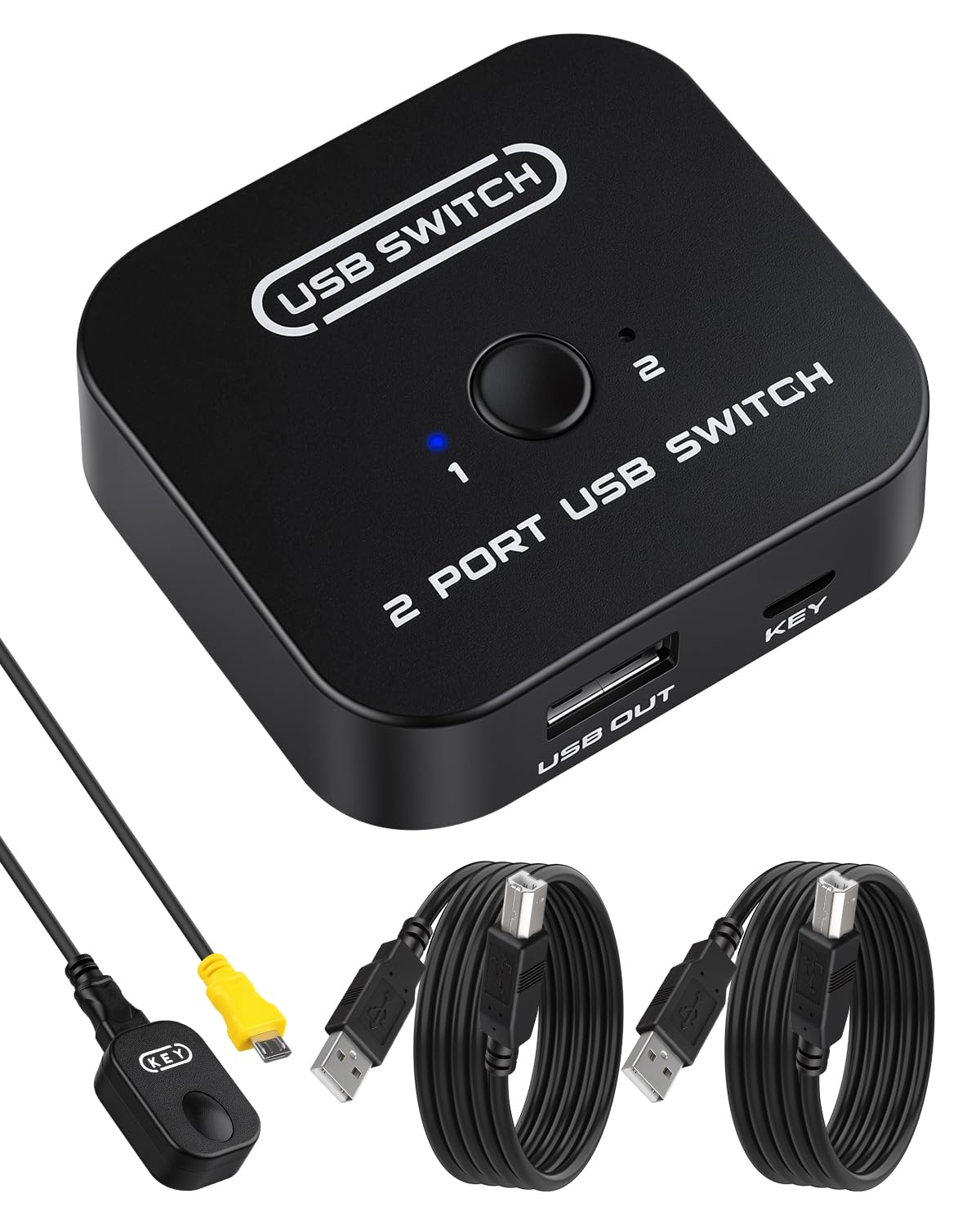
A button on the box means reaching behind your desk. A wired remote or desktop controller keeps the button where your hand already lives. The ATEN, RIIEYOCA, BENFEI and RSHTECH all ship some form of remote selection.
It is not a KVM
None of these carry video. If you also need your monitor to follow the keyboard, you want a full KVM switch instead. These boxes move USB peripherals only.
Side-by-Side Comparison
| Model | Best For | USB Generation | Shared Ports | Switching Method | Amazon |
|---|---|---|---|---|---|
| ATEN US224★ Best Overall | Clean desk, low-draw peripherals | USB 2.0 (480 Mbps) | 4 | Remote port selector | Amazon |
| RIIEYOCA USB Sharing SwitchBest for Printers | Printer and scanner sharing | USB 2.0 (480 Mbps) | 2 | Desktop controller + panel button | Amazon |
| BENFEI USB 3.0 SwitchTop Performer | Fast file transfer, mixed A and C devices | USB 3.0 (5Gbps) | 3x USB-A 1x USB-C | Button + remote control | Amazon |
| ZIYUETEK USB 3.0 Switcher | Two-PC gaming and work rigs | USB 3.0 (up to 500MB/S) | 4 | Push button | Amazon |
| UGREEN USB 2.0 Switch | Simple keyboard and mouse sharing | USB 2.0 | 4 | One-button swap | Amazon |
| IOGEAR GUB231 | One shared printer, auto or manual | USB 2.0 (480 Mbps) | 1 | Push button or auto software | Amazon |
| UGREEN USB 3.0 Switch | Speed plus high-draw devices | USB 3.0 (5Gbps) | 4 | One-button + LED | Amazon |
| RSHTECH RSH-A201C | Fastest transfers, USB-C laptops | USB 3.2 (10Gbps) | 2x USB-A 2x USB-C | Push button + wired controller | Amazon |
| IOGEAR GUS432 | Small office, four USB 3.0 devices | USB 3.0 (5000 Mbps) | 4 | Push button | Amazon |
Detailed Reviews
1. ATEN US224 2 x 4 USB 2.0 Peripheral Sharing Switch
Our pick — 4.5+★ from 550+ verified ratings; the strongest balance of quality and price.
The tidy-desk answer: four USB 2.0 ports, one cable per computer, and a wired remote puck within arm’s reach.
ATEN’s US224 is the rare switch that solves the clutter problem at the same time as the switching problem. You run a single USB cable from each computer into the box instead of two separate cables per machine, so the back of your desk stops looking like a nest. Four built-in USB ports then share a keyboard, a mouse and up to two more peripherals across both computers.
The remote port selector is the feature that earns this the top slot. It is a small wired puck you place on the desk, so you tap to move control between machines without leaning behind the tower. Everything runs at USB 2.0 speed — 480 megabits per second — which is plenty for a keyboard and mouse and fine for a printer. It is non-powered, though ATEN supports an optional USB power adapter if your devices get greedy.
What wins people over is how completely the clutter disappears; the all-in-one design means one cable per computer, not two, and that single detail is why this small box keeps showing up in tidy dual-PC setups. The honest limit is the USB 2.0 ceiling: plug in a fast external SSD and you will feel the older standard. It ships with the hub, adapters and cables in the box, and at 145 g it sits quietly on the desk without sliding around.
What earns the top spot
- One cable per computer, so desk wiring stays genuinely neat
- Wired remote puck keeps switching within arm’s reach
- Four ports cover keyboard, mouse and two extras
- Optional power adapter support for hungrier devices
Where it tops out
- USB 2.0 at 480 Mbps, so large file transfers crawl
- No USB-C port for modern laptops without an adapter
- Bus-powered by default, which limits power-hungry peripherals
Reach for this if: you want a clean desk, a keyboard and mouse that jump between two machines, and a button that lives where your hand is.
Look elsewhere if: you plan to shuttle big files through the switch — the USB 2.0 ports will hold you back.
2. RIIEYOCA USB Printer Sharing KVM Switch
One printer, two workstations, and no more emailing files to yourself.
If the shared device is a printer or a scanner rather than a keyboard, this little RIIEYOCA box is the shape of the answer. It gives you two switching modes: a desktop controller on a roughly 1.5-meter cable that lets you switch remotely, plus a panel button on the box itself for a quick tap. Two USB ports mean you are sharing one peripheral at a time, which suits a printer or a plotter perfectly.
The switching works without drivers, and the built-in signal chip is rated for input cable runs of 1 to 5 meters and output runs of 0.3 to 2 meters. In plain terms, you have room to route cables around a desk or a small office without the signal falling apart. An LED indicator shows which computer currently owns the device, so you are never guessing. A metal and plastic shell and a one-hand-sized footprint keep it out of the way.
Compatibility is broad on paper — DOS, Win95 through Windows 10, Unix, Linux, Netware and Mac — which is why it turns up in conference rooms and multimedia teaching setups as often as home offices. The honest trade-off is the port count: with only two USB ports, this is a printer-sharing tool, not a full desk switcher. If you want your keyboard, mouse and printer all on one button, look at a four-port box instead.
What it does well: remote plus panel switching in one small metal-and-plastic box, driver-free across a long list of operating systems.
The real catch: two ports only, so it handles a printer and one more device, not a whole desk.
Right call when: one shared printer or scanner is the entire job and you want a remote button on the desk.
Wrong call when: you need keyboard, mouse and multiple peripherals swapped together.
3. BENFEI USB 3.0 Switch with USB-C Port and Remote
Four ports, one of them USB-C, and 5Gbps when your flash drive needs to move.
The BENFEI packs an unusual port mix: three USB 3.0 Type-A ports and one USB-C port, all shared between two computers. That single USB-C slot matters if your newer peripherals have moved to the smaller connector. Data moves at up to 5Gbps, and the switch stays backward compatible with USB 2.0 devices, so an old mouse still works in a fast port.
Compatibility is genuinely wide — Windows 7 through 10 plus 8/8.1 and Vista/XP, Mac OS, Linux and Chrome OS. You switch with either the button on the unit or the remote control, and an LED tells you which computer is live. One detail worth flagging: it only works with the BENFEI USB-A to USB-A cable supplied, so do not swap in a random cable and expect it to behave.
The power design is the thoughtful part — BENFEI uses a USB-C slot for optional power rather than the legacy micro-USB most boxes still use, so you can feed it a modern cable. The recurring gripe across the review pages is reliability over the long haul, so treat this as a solid daily driver rather than an industrial-grade box. An 18-month warranty backs it up, which takes some of the sting out of that risk.
Best-in-list flexibility: mixing USB-A and USB-C peripherals on the same switch is rare at this level, and the 5Gbps rating keeps big transfers from dragging.
Worth knowing: it wants the supplied BENFEI USB-A to USB-A cable specifically, and long-term dependability is the thing to watch.
Pick this for: a dual-PC desk with modern USB-C gear that still needs a fast file handoff.
Think twice if: you want a set-and-forget box for years — the reliability record here is the question mark.
4. ZIYUETEK USB 3.0 Switcher, 2 Computers Share 4 USB

Built for the desk with a work laptop on one side and a game rig on the other, with four front USB 3.0 ports and a one-press swap.
ZIYUETEK’s box is aimed squarely at the two-computer gaming-and-work crowd. Two independent USB 3.0 transmission circuits let it switch multiple devices at once with a single button press — no unplugging, no re-pairing. The four front ports take your keyboard, mouse, printer, controller, Bluetooth adapter or a wireless dongle, and the two rear ports accept the supplied USB cables from each computer.
Speed is the headline: it fully supports the USB 3.0 protocol and the maker rates the transfer at up to 500MB/S at theoretical full speed, with realistic runs generally landing at 100 to 200MB/S depending on the device. There is no driver to install for the switch itself, and it works across Windows, OSX and Linux. An indicator light shows the active channel, and the default output is channel 2.
Switching takes one to two seconds once you press the button. That is fine for a keyboard and mouse swap, though it is not instant the way a plain hardware relay can feel. The other practical note: a large-capacity mobile hard disk, a digital video camera or an SSD on the far side may need an external 5V adapter to stay stable, which the maker states plainly. Six months of warranty and lifetime technical support round out the package, along with two 59-inch USB 3.0 cables in the box.
Why gamers like it: four front-facing ports and a one-press swap make moving a controller or wireless dongle between rigs painless.
Set expectations: switching takes about a second or two, so it is not instant, and power-hungry drives want an external 5V adapter.
Fits the desk where: two machines share a keyboard, mouse and gaming peripherals and you want fast USB 3.0 ports up front.
Not the one if: you need lightning-fast switching or plan to run a big external SSD without extra power.
5. UGREEN USB Switch Selector, 2 Computers Share 4 USB Devices

The one to buy when you want a keyboard and mouse to follow you between two machines with one click.
UGREEN’s USB 2.0 selector has become the default pick for budget-minded dual-PC desks, and the numbers back up why: 4.0+ stars across 10,000+ ratings. It puts four USB 2.0 ports on one button, letting two computers share a keyboard, mouse, printer, scanner, card reader or flash drive without swapping cables or setting up network sharing software. One click moves everything, and an LED shows which computer has control.
What wins people over is the reliability. Owners consistently describe a box that keeps a keyboard and mouse talking to the right machine day after day, which is exactly what you want from a piece of desk plumbing. Setup is driver-free and plug and play across Windows, Mac OS X, Linux and Chrome OS. It ships with two USB A-to-A cables, so you have both computer-side runs in the box.
Two honest notes. First, this is USB 2.0 — do not expect fast file shuttling through it. Second, it is not a KVM and does not pass video, and if your PC only has USB-C, you need a USB-C to A adapter rather than a cable. The micro-USB port on the side accepts optional 5V power for hungrier devices like an HDD or SSD, though the charger and cable are not included. A few buyers report an occasional dropped connection under heavy multi-device loads, which the power port is there to head off.
The case for the UGREEN
- Proven reliability for keyboard and mouse swapping
- Driver-free across Windows, Mac, Linux and Chrome OS
- Two A-to-A cables included
- Optional 5V power port for demanding devices
The fine print
- USB 2.0 only, so slow for big transfers
- No video passthrough — peripherals only
- USB-C-only PCs need an adapter, not a cable
Best fit for: anyone who just wants a keyboard and mouse to follow them between two machines with one click.
skip it if: your priority is moving large files fast — USB 2.0 will frustrate.
6. IOGEAR 2 Port USB 2.0 Switch GUB231
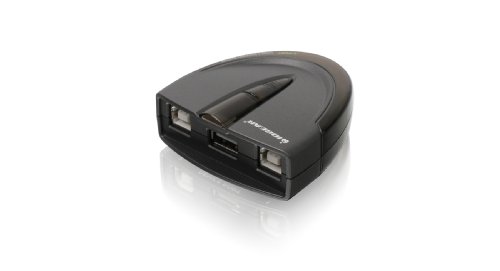
The printer-switch specialist: one USB printer, two workstations, and auto-switching software that hands it to whoever hit print.
This one is cut out for a very specific job: one USB printer, two workstations, and a way to route print jobs automatically. Install IOGEAR’s automatic switching software and the switch hands the printer to whichever computer is submitting a task. That removes the “which machine owns the printer today” guessing game. Prefer to do it by hand? A push button on the unit takes over.
You get USB 2.0 speed at up to 480Mbps with USB 1.1 backward compatibility, and no external power supply is needed. The switch-lock function is the thoughtful detail — it stops another user from stealing the device mid-session and keeps data access consistent. Manual switching reaches beyond printers too, so scanners and external drives can share the same button.
Where it gets complicated is exactly that auto-switching software, which needs admin rights to install and does not behave the same way on every machine. The manual button handles the job fine, so treat auto-switching as a bonus rather than a promise. Functionality and build quality are what the review pages keep circling back to, which suits a box that lives quietly behind a printer and rarely gets touched.
Standout detail: the switch-lock function keeps a print or scan session from being yanked away by the other computer.
The catch: automatic switching depends on admin-level software and does not work identically everywhere, so lean on the manual button.
Go for it if: a single USB printer needs to serve two workstations without you touching a cable.
Move on if: you want four shared peripherals — this one is built around a single shared device.
7. UGREEN USB 3.0 Switch Selector

The same one-button idea as the UGREEN 2.0, upgraded to four 5Gbps USB 3.0 ports and a 5V 2A power input for high-draw gear.
If the USB 2.0 UGREEN above is the sensible daily driver, this is the version for people who move real files. Four USB 3.0 ports run at up to 5Gbps and stay backward compatible with USB 2.0 devices. You still get the one-button swap and the LED showing which computer is live, so the workflow is identical — the difference is what happens when you drag a large file across.
The high-power support is the reason this costs more. UGREEN adds an extra USB-C (5V 2A) power supply port for devices like an HDD, a USB camera, headphones, a docking station or a microphone. The power adapter is not included, so budget for one if your desk is heavy on drives. Two 1.5-meter USB 3.0 data cables come in the box, which is one less thing to buy.
Here is the honest comparison against the cheaper UGREEN above: the 2.0 version is the calmer choice for a keyboard and mouse, while this 3.0 model leads on throughput and power headroom. It also inherits the same one-button design the brand is known for, which owners describe as pressing once and getting on with the day. The trade-offs are real, though — compatibility with Macbook Pro is mixed in the reviews, and button responsiveness and latency each get a small share of complaints. Treat the fast ports as a workhorse, not a magic wand.
Worth it when: you move big files between a work PC and a home PC and want one-button switching with a power port for a drive.
Second-guess it if: you are on a Macbook Pro, where compatibility is inconsistent, or you just want keyboard and mouse.
8. RSHTECH USB 3.2/USB C Switch 10Gbps

Two USB-A and two USB-C 3.2 data ports, rated for 10Gbps — the fastest transfer of the whole list.
The RSHTECH is for the desk where speed is the whole point. Its four shared ports split into two USB-A and two USB-C 3.2 data ports, and the box is rated for 10Gbps transfers — the highest number in this lineup, versus 5Gbps on the UGREEN 3.0 and BENFEI above. That rating only pays off with a fast drive on the other end, but when it does, large files move in a fraction of the time.
The hybrid 2-in-1 host connector is the clever bit. It plugs into laptops, desktops and game consoles through USB-A, USB-C or Thunderbolt ports without a separate adapter, so you can mix an older tower and a modern laptop without buying more cables. Switching has two routes — a push button on the box or a wired controller — and red (PC1) and blue (PC2) LEDs make it obvious which machine is active.
Two clarifications save you a return. The USB-C ports are for data only, not PD charging or video output, so do not plan to power a laptop through them. And the optional USB-C power input takes a 5V charger to deliver up to 15W for demanding devices like an HDD or SSD, though the charger itself is not in the box. Owners describe instant, strong connections and responsive button control, which is exactly the behavior a 10Gbps box should show.
The speed story: 10Gbps and a mix of A and C ports makes this the throughput leader here, with a 5V input rated to 15W for power-hungry drives.
Clear it up first: the C ports carry data only — no charging, no video — so a laptop-PD expectation needs adjusting.
Choose this when: you have fast drives, a modern USB-C laptop, and you want the quickest switch on the list.
Rule it out if: you expected the USB-C ports to charge a laptop or carry video.
9. IOGEAR 4×2 USB 3.0 Peripheral Sharing Switch GUS432

Four USB 3.0 ports at 5000 Mbps, all moving between two machines with one firm button press.
The GUS432 is built for the small office or home office with two computers and a shared pile of peripherals — keyboard, mouse, printer and a portable hard drive. Four USB 3.0 ports run at 5000 megabits per second, and one button press moves all of them from one computer to the other. LED indicators on the unit light up to confirm which machine currently owns the devices, so there is no second-guessing.
The design details are tuned for a workspace that changes. Hot-plugging support means you can add or remove a connected computer without powering down the switch, which is handy when a laptop comes and goes from a home office. Over-current protection adds a layer of safety for the devices on the far side. The cables and remote are included, so it is a complete kit on arrival.
On the spec sheet it is a neat fit for a small office: a space-saving footprint, a portable design that travels well between desks, and Chrome-finished housing that looks at home in a professional setup. The one honest caution is that the maximum supported operating system is listed as Mac OS X 10.6 Snow Leopard and Windows 7 at minimum, so a very new machine may need a little more setup than plugging in. The data transfer cap at 5000 Mbps keeps it comfortably in the USB 3.0 class.
Office-ready: hot-plugging and over-current protection make it the more forgiving choice when machines come and go.
Worth verifying: the listed supported OS range skews older, so check yours before you commit.
The sensible pick for: a two-computer office sharing four USB 3.0 devices, where hot-swapping laptops happens often.
Check your OS first if: you run a very new operating system and need zero-fuss setup.
Know the Specs
USB 2.0 vs USB 3.0 vs USB 3.2
USB 2.0 runs at 480 megabits per second — plenty for a keyboard, mouse or printer. USB 3.0 boxes here are rated at 5Gbps, and the RSHTECH tops out at 10Gbps. The faster ports only earn their keep with fast drives; a mouse will not feel the difference, but a big file transfer absolutely will.
Bus power vs external power
Bus power means the switch draws current from the computer’s USB port. That is fine for low-draw devices like a keyboard and mouse. High-draw peripherals such as an HDD, SSD or USB camera can brown out without an optional 5V adapter, so look for a box with a power input if your setup includes one.
Port count and layout
Two ports suit a printer or scanner. Four ports cover keyboard, mouse and a couple more. Rear ports take the cables from each computer, while front ports hold your shared peripherals — check that the layout matches how you want to route cables before buying.
Switching method
A push button on the box is the simplest option, but it means reaching behind the desk. A wired remote or desktop controller keeps the button close to your hand. Some boxes also offer automatic software switching that hands the device to the computer submitting a task, if you have admin rights to install it.
Common Questions
Will a USB switch work with both my Windows laptop and my Mac?
Do I need to plug in the optional power adapter?
Can a USB switch pass my monitor signal too?
What is the difference between a USB switch and a KVM switch?
Will my keyboard and mouse keep working through the switch?
How fast can I move files through one of these switches?
What if my PC only has a USB-C port?
Can I share a printer between two computers automatically?
Do these switches need drivers installed?
The Bottom Line
For most desks, the usb switch for 2 pcs worth starting with is the ATEN US224 because the wired remote and one-cable-per-computer design turn a messy desk into a clean one. If speed and modern connectors matter, the RSHTECH RSH-A201C leads the list at 10Gbps with USB-A and USB-C ports in one box. And for the simple keyboard-and-mouse job where reliability is everything, the UGREEN USB 2.0 selector is the crowd favorite at 4.0+ stars across 10,000+ ratings — a genuinely safe place to put your trust.
How we choose
We do not accept paid placement. Every pick is matched to a real buyer and a real use-case; we do not hands-on test units.
Sources
Specifications: manufacturer listings and product documentation. Review insights: verified customer reviews, as of November 2026. Pricing: not shown on this page (it changes often); check the current price via the retailer link.
As an Amazon Associate, Tactical Gear Guy earns from qualifying purchases. This does not affect which products we feature.