Specs are compiled from manufacturer listings and verified buyer reviews and can change over time — please confirm the key details on the product page before buying.
You plug in a capture card, hit record, and the stream looks softer than the game on your TV. That is the real problem with most cheap HDMI-to-USB boxes: they promise 1080p and quietly hand you a mushy, delayed picture. The picks below are the ones that actually hold a clean 1080p 60FPS feed, so your gameplay, camera, or Zoom call looks the way it does on the source screen.
This guide is built by comparing the manufacturers’ published specifications and the patterns across verified customer reviews, so you get each pick’s real strengths and trade-offs instead of marketing spin.
A capture card is a bridge from HDMI to USB, and the spec sheet hides which bridges drop frames under pressure. This breakdown of the usb hdmi capture field shows you exactly where each one earns its place.
Top Picks

How To Choose The Best USB HDMI Capture Card
Your buying decision depends on three questions. What resolution do you need to record? What does your monitor need to see while you play? Do you need to plug a microphone straight into the card? Get those three right and almost everything else sorts itself out.
Capture resolution versus pass-through resolution
Capture resolution is what lands in your recording — the file you upload or edit. Pass-through is the signal that continues to your TV or monitor so you can keep playing while you record.
These two numbers often differ. A card that captures at 1080p 60FPS can still pass through a 4K signal, which means your own screen stays sharp while the stream stays light enough for your PC to handle. Cards that pass through 4K@60Hz are the ones that let you keep your full monitor quality during a session.
The compression format matters more than the box
MJPEG compresses each frame, so it is easier on your computer but can soften fine detail like text or thin UI lines. YUY2 sends less-compressed color data, so the picture stays crisper — but it eats more USB bandwidth. If you are recording fast motion or reading on-screen text, lean toward a card that lists YUY2 support.
Audio inputs and the 3.5mm jack
A 3.5mm microphone input lets you plug a headset or standalone mic directly into the card instead of routing audio through your computer. That saves a mixing step in OBS and keeps commentary locked to the video. Cards without it are fine — you just do your voice capture in software instead.
Side-by-Side Comparison
| Model | Best For | Max Capture | Pass-Through | Audio Port | Amazon |
|---|---|---|---|---|---|
| UGREEN 2K@30Hz 1080P 60FPS★ Best Overall | Most buyers | 2K@30Hz / 1080p 60FPS | 4K@30Hz input | — | Amazon |
| CENMATE Aluminum 1080P 60FPSCompact Pick | Tight desk space | 1080p 60FPS | 4K@30Hz | 3.5mm in/out | Amazon |
| OREI VC-1080Live Commentary Pick | Live commentary | 1080p 60FPS | HDMI loop-out | 3.5mm mic in | Amazon |
| XIIXMASK 4K60FPS | High frame rate | 4K@60FPS / 1080p 120FPS | 4K HDMI | 3.5mm mic out | Amazon |
| SUDTREEV C7 | Switch 2 and Steam Deck | 1080p 60FPS | 4K@30Hz | 3.5mm mic in | Amazon |
| Swudloe C7-01 | Uncompressed recording | YUY2 1080p 60FPS | 4K@30Hz | 3.5mm in/out | Amazon |
| Guermok GM-72A | 2K at high refresh | 4K@60FPS / 2K@120FPS | 4K@60Hz | 3.5mm mic out | Amazon |
| OREI VC-4K60 | HDR and VRR setups | 4K@60Hz | 4K@60Hz HDR10 | — | Amazon |
| AVerMedia GC551G2 | HDR pass-through gaming | 4Kp30 | 4Kp60 HDR / 1080p240 | 3.5mm in/out | Amazon |
Detailed Reviews
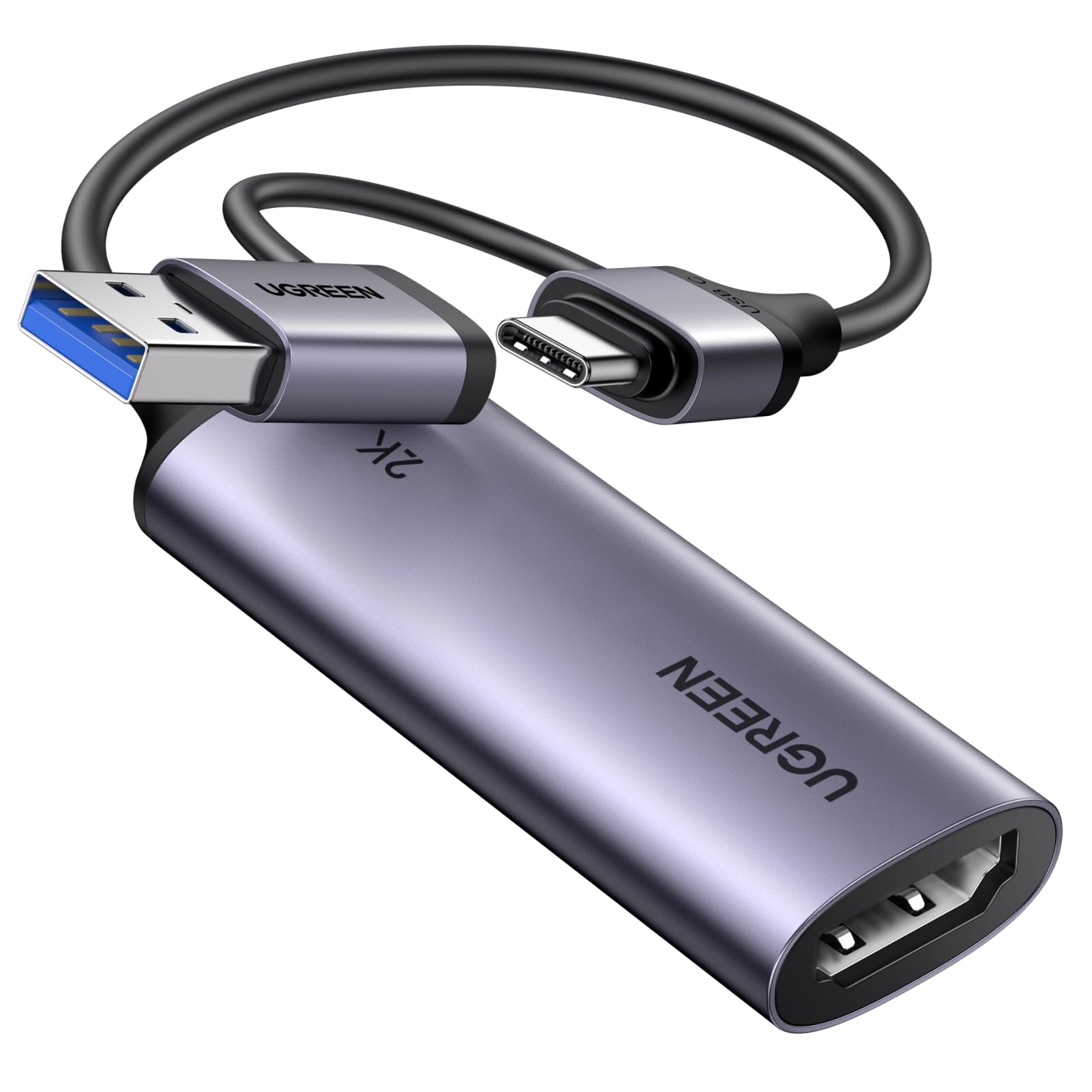
1. UGREEN 2K@30Hz Video Capture Card
Our pick — 4.5+★ from 900+ verified ratings; the strongest balance of quality and price.
One card for phones, laptops, and consoles — no dongle swap
If your recordings have come out soft and smeared, this card fixes that. It records at 2K at 30Hz or 1080p at 60FPS (60 frames per second, so fast motion stays smooth), and it accepts a 4K@30Hz signal on the input. That means a clean capture without asking your computer for more bandwidth than it needs. The 4K input is the part that matters: it keeps the source footage sharp enough to edit later, even though the file you record is lighter.
The detail that separates it from the CENMATE below is the port selection. There is a full USB-A plug and a USB-C end, so the same card goes from a desk PC to a tablet to a phone without an adapter in the bag. It moves data at 5 Gbps over USB 3.0, which is the fast pipe that keeps the feed steady, and it falls back to USB 2.0 when your computer only has an older port. It is driver-free across Windows 11, 10, 8.1, and 7, macOS, and Linux, plus iPadOS 17 or later on the tablet side.
What wins people over is plug-and-play function: connect a console and the picture appears in OBS. Build quality is the second thing buyers single out, and the aluminum casing does more than look tidy: it pulls heat off the chip and shields the signal from electrical noise, so long sessions stay stable. The tinned copper conductors inside the cable do the same job, cutting signal loss between card and computer. Two honest caveats sit in the review pages. Compatibility draws mixed notes — some consoles need HDCP switched off before the card sees anything, and 2K only works if your source device supports it too. And while plenty of buyers notice no delay at all, some do pick up latency in the feed, so competitive shooters may feel it in tight moments.
Where it pulls ahead
- Both USB-A and USB-C on one cable, so one card covers a desktop, laptop, and tablet
- 4K@30Hz input preserves source detail for editing, while 1080p 60FPS output stays light enough to stream
- 5 Gbps USB 3.0 transfer keeps the video feed steady and takes USB 2.0 as a fallback
What the review pages add
- Some consoles need HDCP turned off before it will capture
- Not every buyer gets zero delay — a few feel the lag in fast games
- 2K output only works when both the source and the capture device support it
Reach for this if: you want one card that works across a console, a laptop, and a phone without buying adapters.
Know before you buy: a 2K feed is only possible when the device feeding it can output 2K in the first place.
2. CENMATE Aluminum HDMI Capture Card, USB 3.0 1080P 60FPS
A 3.5 x 2 x 0.45-inch aluminum card that fits behind a monitor
Measuring 3.5 x 2 x 0.45 inches, this one is small enough to sit behind a monitor or in a camera bag without eating desk space. It captures 1080p at 60FPS and passes a 4K@30Hz signal through, so your own screen stays sharp while you record.
The box comes with more in it than most cards at this size. You get a 5FT HDMI cable and a 3.3FT 2-in-1 USB A/C cable in the box, so the whole chain is covered without a trip to the cable drawer. That 3.5mm microphone and audio input/output port is the underrated part: plug a headset in and your commentary rides along with the game audio instead of being patched together in software later. The aluminum shell matters too — it is built for extended sessions, and buyers specifically report it running long without overheating or needing a break.
Compatibility is where this card is at its most flexible, covering PS4, PS5, Xbox One, Switch, and PC across macOS, Windows, and Linux. Setup is genuinely plug-and-play, with no driver to hunt down, which is why ease of use shows up as a recurring strength in the feedback. If there is one thing to check before you commit, it is that you are happy at 1080p 60FPS for recording — nobody buying this should expect a 4K file. The 4K figure here describes the pass-through loop, not the capture, so your stream tops out at 1080p 60FPS.
The real story: this is a small, aluminum card with a complete cable set and a mic port — the practical package for someone who wants a working stream without a shopping list of extras.
Pick this one when: your desk is tight and you want HDMI and USB cables already in the box.
Skip the upgrade anxiety: it records 1080p 60FPS, and the 4K number is pass-through only — if you need 4K files, look further up this list.
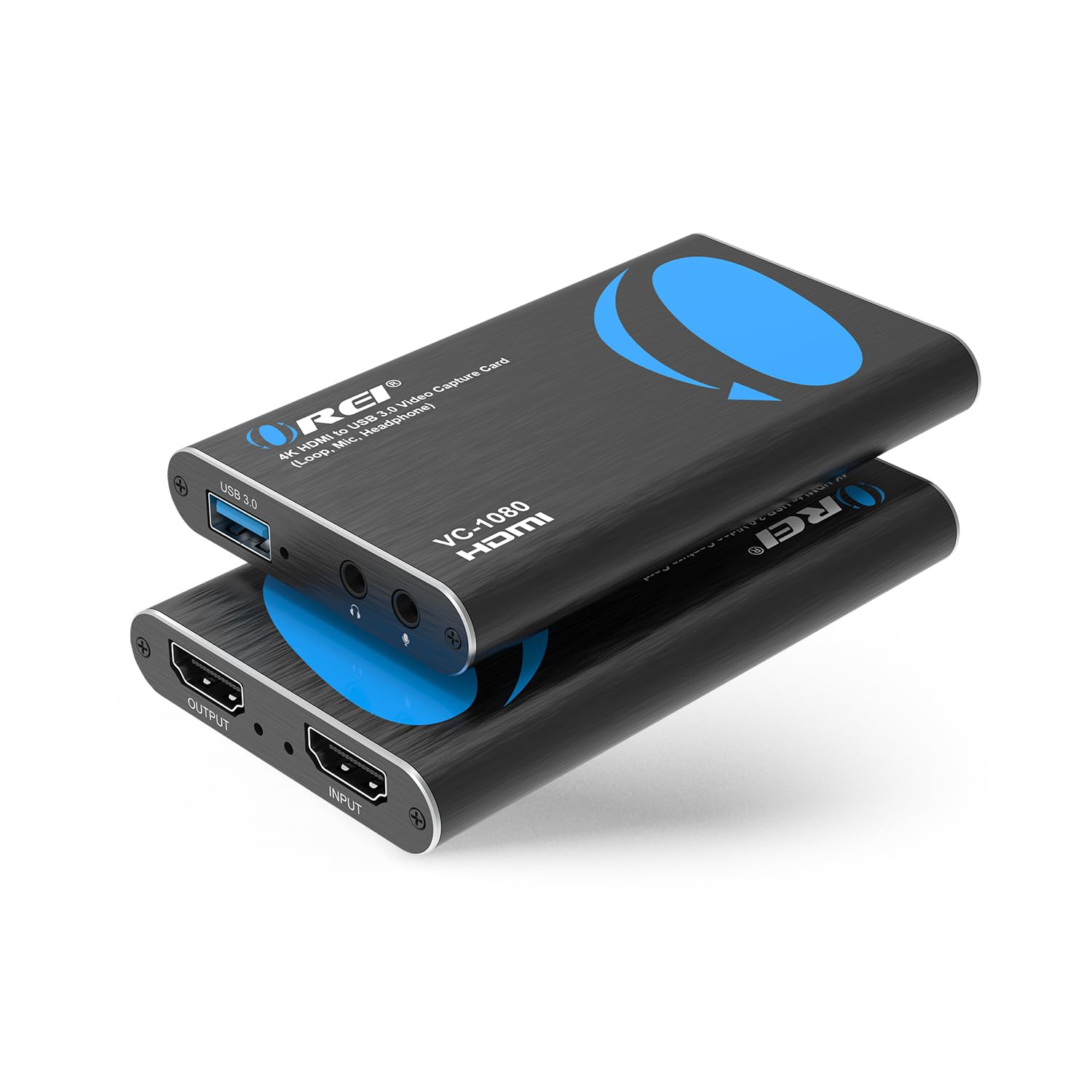
3. OREI 4K@30Hz HDMI Video Capture Card
A capture card built around the loop-out port and the mic jack, not the marketing sheet
If you stream competitive matches, the HDMI loop-out (a passthrough port that sends the picture to a second screen) is the feature that matters most. It sends the game to your TV or monitor with no lag while the card records the same feed on your computer, so what you see is what you play. It captures 1080p at 60Hz over USB-A from HDMI sources: PS5, PS4, Xbox One and 360, Wii U, Switch, DSLR cameras, security cameras, set-top boxes, and DVD players. On the input side it accepts 4K 60Hz (4:2:0, a compressed color format that trims bandwidth) or 4K@30Hz.
A 3.5mm TRS microphone input lets you mix your voice with game audio right at the card, which is useful for podcasts, online classes, and video presentations as much as gameplay. There is also a 3.5mm stereo headphone output for monitoring. OREI rates it for 48 KHz PCM audio and UVC/UAC protocol support, which is the standard that lets OBS treat the card as a webcam the moment you plug it in. No external power is needed, and it works across Windows, macOS, and Linux.
Capture quality is the strongest thing buyers report here, and the picture it delivers holds up. Performance is more evenly split — some buyers find it smooth and reliable, others hit issues, so this one rewards a little setup care. OREI publishes clear machine requirements: an Intel i5-3400 or better with an NVIDIA GT630 or above and at least 4GB of RAM for desktops, or an i7-3537U with a GT735M and 4GB for laptops. If your machine is older than that, expect to fight the software before the card.
Why it earns its spot: the loop-out plus mic-in combo makes it a true recording and commentary tool rather than a bare capture dongle.
Check your machine first: the listed CPU and graphics requirements are specific, and a machine below them will struggle no matter how good the card is.
Best fit: streamers who want zero-delay loop-out to their own screen and a mic jack on the card.
Look elsewhere if: your computer falls below the i5-3400 and GT630 baseline — this card will not carry an underpowered build.
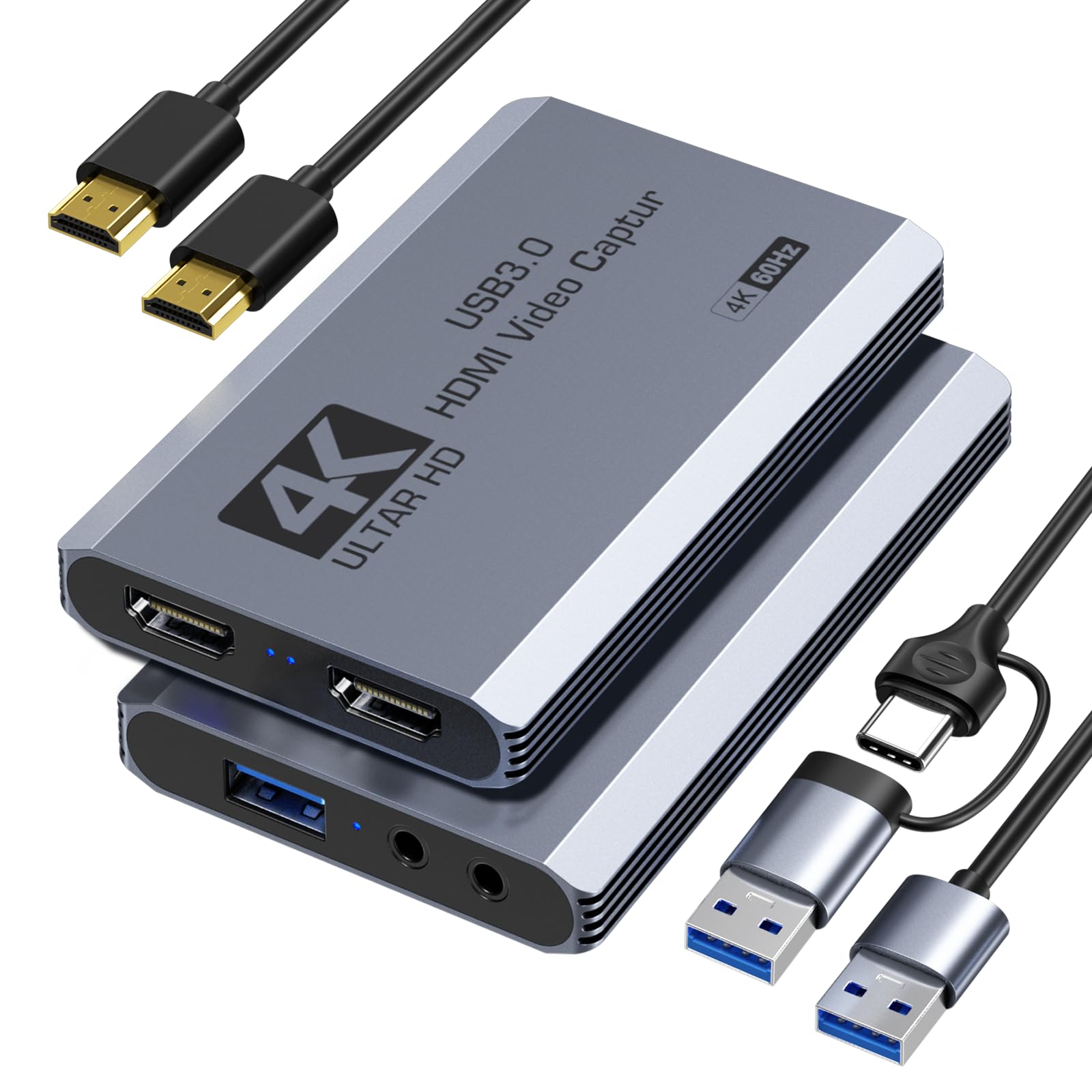
4. XIIXMASK USB 3.0 HDMI Capture Card
The frame-rate ceiling here sits well above every other card on this page
Most cards on this list top out at 60FPS. This one handles high-frame-rate input and recording up to 1920×1080@120FPS, and captures up to 4K60FPS over USB 3.0 with 4K HDMI pass-through. If you record fast-motion games or need slow-motion review footage, that extra headroom is the reason to pick it over the SUSTEM above. It supports MJPEG, YUY2, NV12, and XRGB formats, which gives you room to trade file size against picture sharpness depending on what you are editing.
Setup is driver-free with no external power, and the cable has both USB A and USB-C ends so it connects to a Windows 7/8/10/11 PC, macOS, Linux, Android 5.0+, or iPadOS 17+ without an adapter. It also carries 3.5mm audio input and microphone output ports, so you can connect a headset or mic and embed commentary into the stream without extra gear. Console coverage runs across Switch, Switch 2, PS5, PS4, Xbox Series X/S, Quest 3/3s, DSLR, webcams, TV boxes, and DVDs, and it works with OBS Studio, Streamlabs, VLC, PotPlayer, Zoom, YouTube, and Twitch.
Buyers praise its reliability most, which is why it ranks this high despite a mixed 4.0+ rating. The one thing to weigh is latency: some owners mention essentially no lag, while others find it puts them at a real disadvantage in fast competitive play. If you are recording for content, you likely never notice it. If you are playing ranked shooters and reacting to what you see on the capture preview, the delay matters, which is why the loop-out cards above may suit you better.
The fair read: a high-frame-rate capture card with a broad device list and a mic port, built for content creators who record first and react later.
The honest catch: latency is genuinely mixed in the feedback, so competitive players should not expect the preview to feel instant.
Go here for: 1080p at 120FPS capture and a card that connects to phones, tablets, and consoles alike.
Think twice if: your stream depends on reacting to the capture window in real time — the delay is a coin flip.
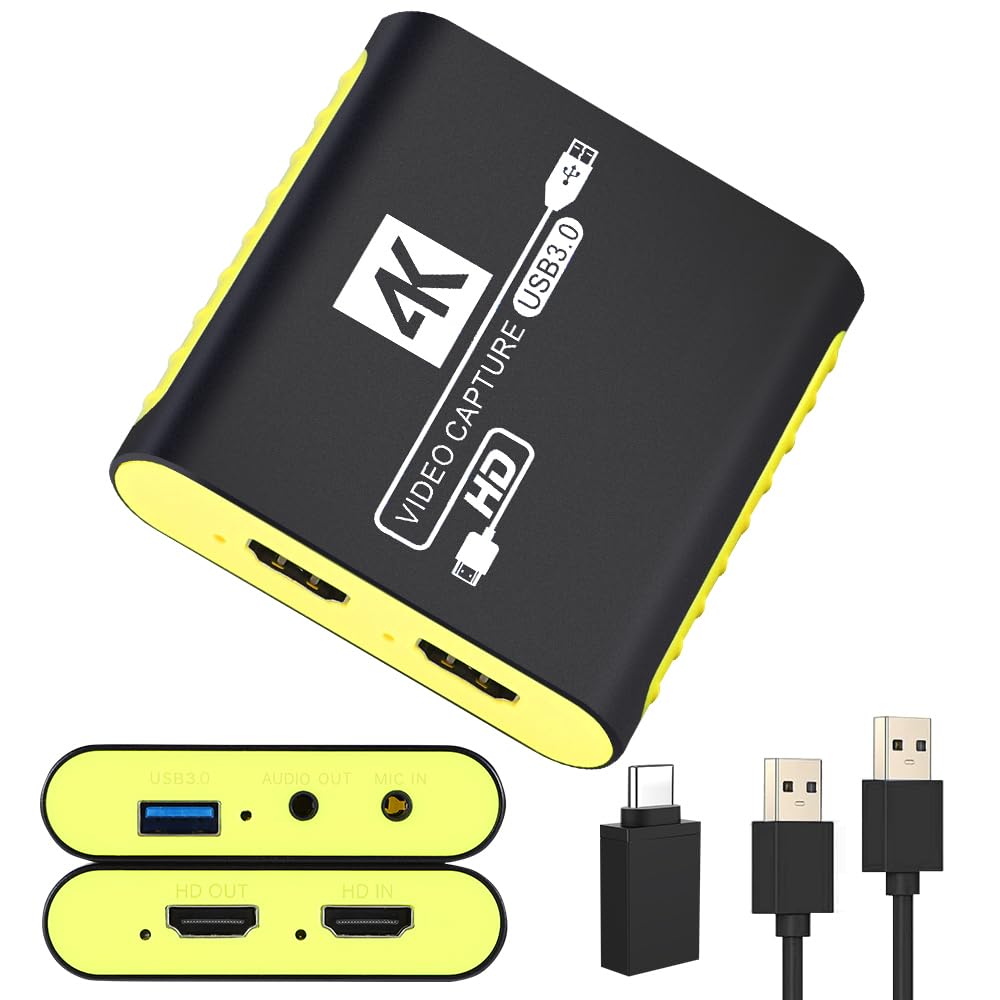
5. SUDTREEV C7 USB 3.0 HDMI Video Capture Card
Built to kill the black screen that cheap cards drop mid-stream
The promise on this card is stability, and SUDTREEV says it directly: it is designed to eliminate the black screen and signal drop that budget cards show. It records crisp 1080P at 60FPS to your PC while passing a full 4K@30Hz signal to your monitor, so you can play in high resolution without interrupting the stream. It supports MJPEG and YUY2 in 1080P 60FPS, so you get the crisper color path as well as the easier compressed one.
The device list is unusually wide: Switch 2, Switch 1, Switch OLED, PS5, PS4, PS3, Xbox Series X/S, Steam Deck, DSLR cameras, camcorders, Windows PCs, Macs, and Linux machines. A USB-A to USB-C adapter comes in the box, so a MacBook, iPad, or Android phone connects directly without a separate dongle. The full aluminum alloy housing draws heat off the chipset on purpose, which matters during long recording blocks where a plastic card would throttle and drop frames. A 3.5mm audio port handles mic input and audio monitoring.
Buyers single out reliability most, and it is why this card holds a 4.0+ rating at a lower price than most rivals here. The 18-month warranty and 24-hour support line back that up. What to watch for: the HDMI cable is not included, so plan on one from your own kit, and latency is mixed — plenty of customers note no meaningful delay, others notice slight delays. If you are sensitive to input delay, a loop-out card gives you a safer path.
What it does well
- Design aimed at eliminating black-screen and signal drops mid-stream
- USB-A to USB-C adapter in the box covers MacBook, iPad, and Android phones
- Full aluminum housing manages heat for long recording sessions
Loosen the wallet for
- HDMI cable is not included — budget one from your own kit
- Latency is mixed in the feedback, so competitive players should test it early
Suits you if: you stream to a laptop or tablet and want the USB-C adapter and warranty in the box.
The trade-off: no HDMI cable included and latency that varies — fine for recorded content, less ideal for twitch-reaction play.
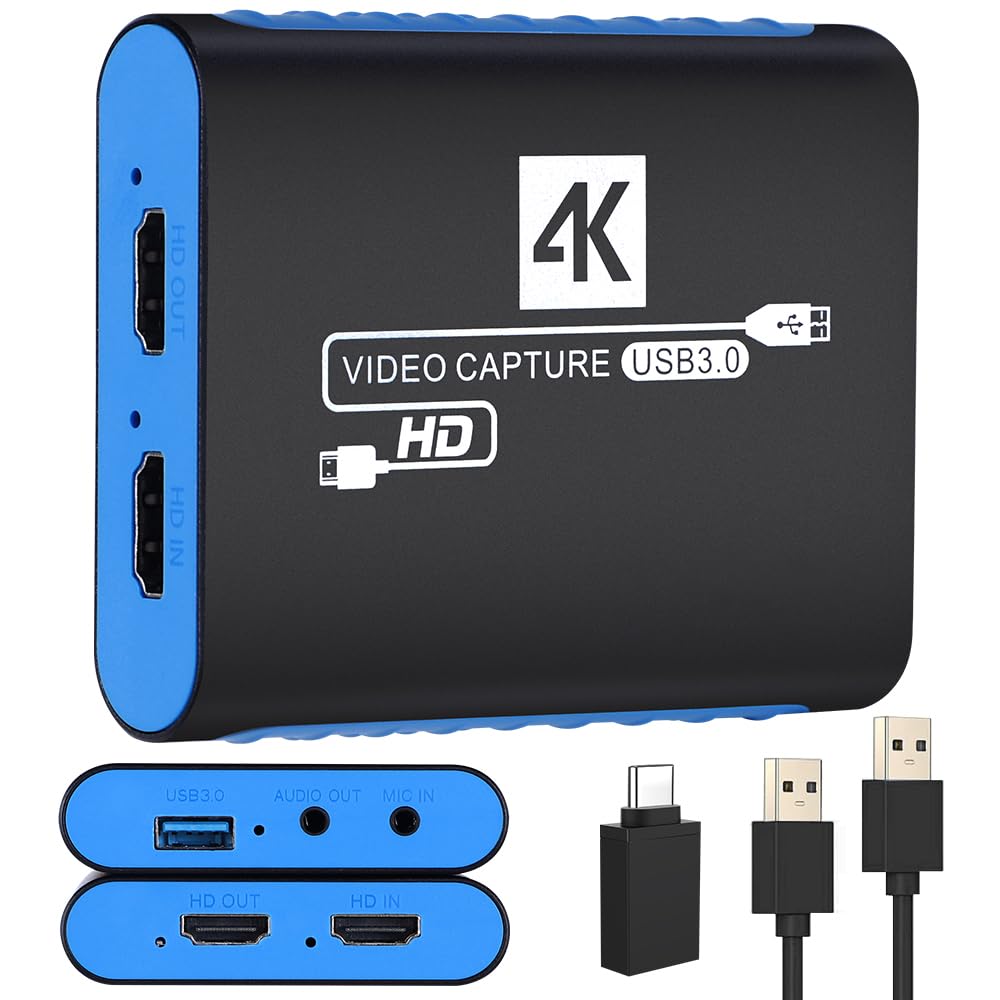
6. Swudloe USB3.0 Capture Card for Streaming, YUY2 1080P 60FPS
The card that keeps your footage uncompressed instead of squeezing it down
This is a YUY2 recorder first: it captures uncompressed 1080P at 60FPS, which means no compression artifacts chewing up fine detail in your recording. If you have ever paused a clip and seen blocky smearing around text or thin lines, that is the compression talking, and YUY2 sidesteps it. Input and pass-through both reach 4K@30Hz, so you can preview your game in real time without losing detail while the card records the uncompressed feed.
Setup is plug-and-play with no power supply needed, and the ultra-low latency pass-through keeps the signal moving without a fight. A built-in 3.5mm audio input/output port lets you capture audio directly from microphones, headphones, or musical instruments without extra converters — a real convenience if you record voiceovers or instrument audio alongside gameplay. The card carries a USB-A 3.0 connection into a USB 3.0 data cable, plus a USB-A to USB-C adapter in the box for laptops, tablets, and phones that support external video capture apps. Console coverage runs across Switch 2, Switch OLED, Switch, PS5, PS4, Xbox Series X/S, Xbox One, and Steam Deck.
Buyers praise picture quality first and reliability second, which is why it sits at 4.0+ across a large review base. The one caveat worth naming is that video quality and audio quality both draw mixed notes. Some buyers get the crisp YUY2 result they expect, others find the output softer than the spec suggests. If a pristine uncompressed recording is the whole reason you are buying, it is worth testing within the return window to confirm your setup gets the result.
What you are paying for: uncompressed YUY2 recording plus a 3.5mm port that takes mic, headphone, or instrument audio without a converter.
The part to check: video and audio quality are the mixed aspects here, so verify the output matches your expectation early.
Choose this if: you record voiceovers or instrument audio and want the mic port and uncompressed YUY2 path in one card.
Look at the OREI VC-1080 instead if: you also need a loop-out port for lag-free monitoring on a separate screen.
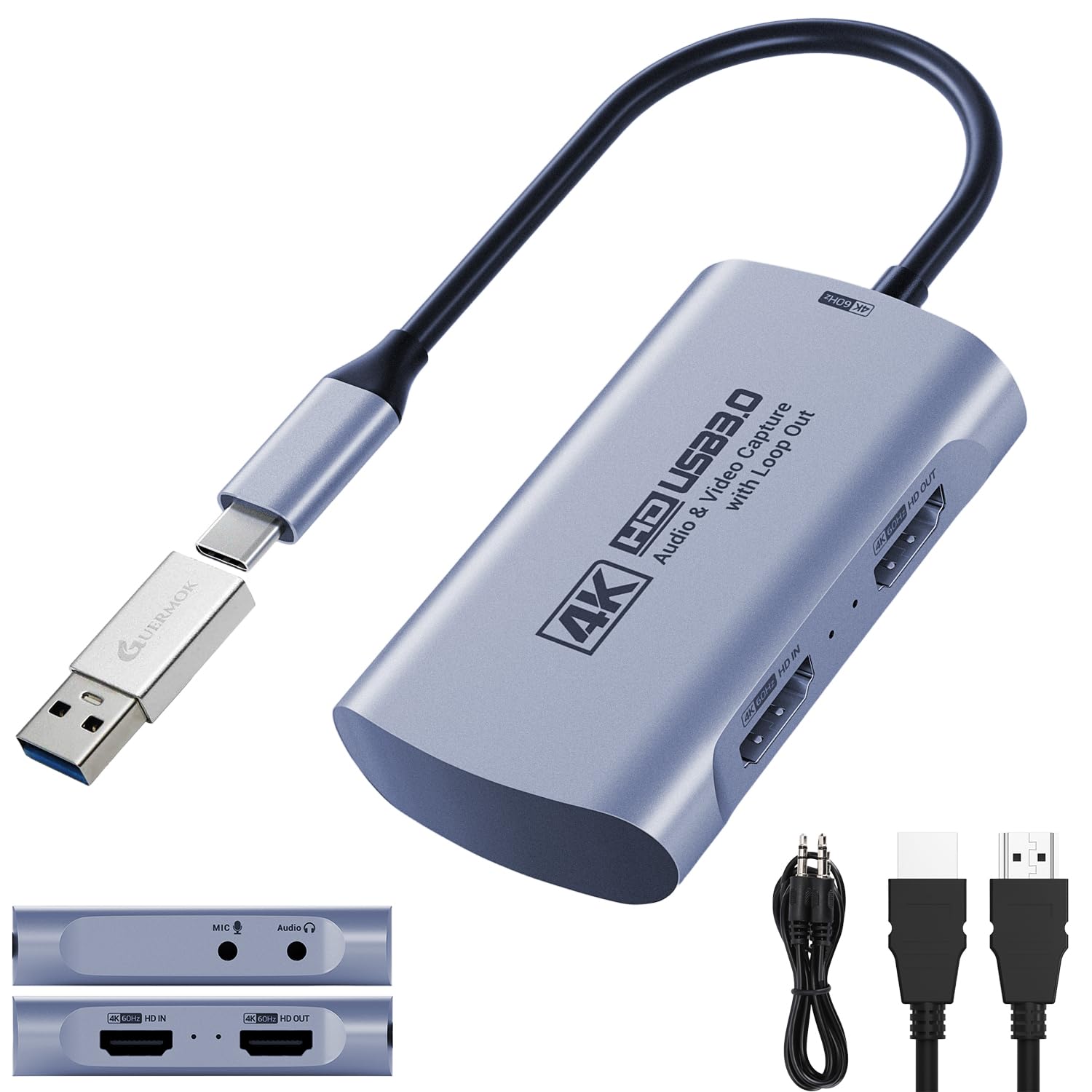
7. Guermok 4K@60FPS Capture Card
Higher resolution, higher refresh, and a frame-rate ceiling that outruns most cards here
Where most of this list tops out at 1080p, this card captures up to 4K@60FPS over USB 3.0 and passes 4K@60Hz through, so your monitor keeps its full sharpness while the card records. High-refresh support reaches 2560×1440@120FPS and 1920×1080@120FPS — useful if you play on a high-refresh monitor and want the capture to keep up. Capture formats run MJPEG 4K@60Hz, YUY2 4K@25Hz, and XRGB 1080p@60Hz, with YUY2, NV12, MJPEG, and XRGB all supported.
It also supports EDID and lists a max loop-out resolution of 4096 x 2160@60Hz YUV420 and 4096 x 2160@30Hz YUV444. The one hardware rule to follow: use a USB 3.0 port or better. On a USB 2.0 port the card caps at 1080P resolution, so plug into the fast port even if the slow one is closer. The 3.5mm audio input and mic-out ports let you embed commentary without extra gear, and a USB-A male to USB-C female adapter in the box covers either port type. Setup is driver-free across Windows 7/8/10/11, macOS, Linux, Android 5.0+, and iPadOS 17+.
Compatibility is broad — Switch, Switch 2, PS5, PS4, Xbox Series X/S, Quest 3/3s, DSLR, webcams, TV boxes, and DVDs all work, alongside OBS Studio, Streamlabs, VLC, PotPlayer, Zoom, YouTube, Twitch, Vmix, HDMI Link, MoniCon, and QuickTime. Reviewers point out it plays nicely with the Switch 2 and is straightforward to run. The mixed part is video output — it handles 1080p 60FPS fine on a Mac, but some buyers do not get 60fps recording. If smooth 60FPS is your whole reason for buying, test your setup right away.
What stands out: 4K@60FPS capture, 4K@60Hz pass-through, and 2K@120FPS support in one card — a lot of headroom for a mid-range price.
One rule to obey: the card must sit on a USB 3.0 port or better; on USB 2.0 the resolution is capped at 1080P.
Best for: high-refresh gamers who want a 2K@120FPS ceiling and 4K pass-through on their own monitor.
Not for: anyone who needs guaranteed 60fps recording on a Mac — some shoppers say it falling short there.
8. OREI 4K HDMI Video Capture Card

HDR color and tear-free frames where the cheaper cards just pass a plain signal
This is the card for a PS5 or Xbox Series X owner who does not want to lose HDR color on the way to the stream. It supports HDR10 pass-through for richer color and contrast, and Variable Refresh Rate at 1080p@120/240Hz for tear-free gameplay. VRR is the part that keeps the frame rate and the display in step so you do not see horizontal tearing in fast pans. Capture runs 4K@60Hz over USB 3.0.
OREI builds in automatic input detection, so the card reads the incoming format and sets output resolution and frame rate on its own. It supports 48kHz PCM audio and the UVC/UAC protocol set, and the design keeps CPU load low so audio and video stay in sync inside OBS and other streaming software. It draws its power straight from the USB 3.0 port — no external power brick, no driver install — and works across Windows, macOS, and Linux, with compatibility for both USB 3.0 and USB 2.0 ports. The package includes the VC-4K60 capture card, a USB cable, and a user manual, backed by a 1-year manufacturer warranty.
The obvious thing to know with this one is that it is the newest and least-proven card on the list. There is not yet a body of buyer feedback to lean on, so what you have is OREI’s published spec sheet and a warranty. That is a fair trade if HDR10 (a wider color range) and VRR (variable refresh rate, which stops screen tearing) at 1080p@120/240Hz are the features you actually need. It is a reason to pause if you would rather buy on a track record. For camera and camcorder workflows, UVC/UAC compliance (it follows the standard plug-and-play video and audio formats) keeps it working like a standard video device across all three desktop systems.
The clear case: HDR10 pass-through plus VRR at 1080p@120/240Hz is a real advantage for modern console owners who care about color and tear-free motion.
The honest hesitation: it is the least-reviewed card here, so you are buying on spec sheet and warranty rather than on owner feedback.
Made for: PS5 and Xbox Series X owners who want HDR color and VRR intact on the way to their stream.
Hold off if: you want to buy on a long track record — this card has not built one yet.
9. AVerMedia GC551G2 Live Gamer Extreme 3, 4K Capture Card

The premium card built around pass-through headroom, with the wide compatibility list to match
Where the budget cards hand off a plain signal, this one is built around the pass-through chain. It records 4K at 30FPS while passing a high-refresh signal up to 1080p240 to your monitor, and it supports VRR pass-through at 1440p120 or 1080p120 for smooth gameplay on a high-refresh screen. For a general recorder, that means you capture the game while seeing it at full speed.
Audio is handled on the card: a 3.5mm in and out lets you connect a headset or mic directly to capture game chat and commentary without extra software. Setup is driver-free with no external power, and it works with OBS and Twitch from the start. The compatibility list covers PS5 and PS5 Pro, Nintendo Switch, and Xbox Series X/S, and the operating systems are Windows 10/11, Mac 13/14, and iPadOS 17 or later. The package includes an HDMI 2.0 cable, a Type-C to Type-A cable, and a quick start guide, and the card is NDAA and TAA compliant, which matters for government and organizational procurement.
What buyers report most is reliability — it holds a steady feed, including from a Switch into a MacBook Pro on OBS — and the 4K HDR pass-through quality gets called out specifically. The honest friction is setup: some buyers find it user-friendly while others say it is not easy to set up, and latency is mixed in the same way. It also requires a computer with a USB 3.2 (Gen 1) Type-C port, so check your machine’s port before you commit.
Why it costs more: 1080p240 and 1440p120 VRR pass-through, 4K30 capture, a 3.5mm audio in/out, and NDAA/TAA compliance in one package.
The setup reality: it wants a USB 3.2 Gen 1 Type-C port, and setup feedback is mixed — plan a little patience on first install.
Worth the step up if: you need 1080p240 VRR pass-through and a headset port, and your machine has a USB 3.2 Gen 1 Type-C port.
Stay with the SUDTREEV if: you stream at 1080p 60FPS and want to spend far less for the same working result.
Know the Specs
Capture resolution vs. pass-through resolution
Capture resolution is the file you record — the one that goes into your edit or onto YouTube. Pass-through resolution is the signal that continues to your TV or monitor while you play. A card that records 1080p 60FPS can still pass through a 4K@30Hz or 4K@60Hz signal, which keeps your own screen sharp without forcing your computer to swallow a 4K stream. Read both numbers before you buy.
USB 3.0 bandwidth and why the port matters
USB 3.0 is the fast pipe that carries the video feed from the card to your computer at 5 Gbps. A card on a USB 3.0 port keeps a steady 1080P 60FPS feed; drop the same card onto a USB 2.0 port and it caps out lower. Plug into the fast port even if the slow one is closer, and check the port on your laptop before you settle on a card.
YUY2, MJPEG, and NV12
These are compression formats. YUY2 sends less-compressed color data, so the picture stays crisp but eats more bandwidth. MJPEG compresses each frame, which is easier on your computer but can soften fine detail. NV12 is another compressed option that mixes well with common streaming setups. A card that supports several formats gives you room to trade file size against sharpness.
HDCP and why a console shows a black screen
HDCP is the copy-protection handshake a console uses before it sends a picture. Some capture cards refuse to display the signal until HDCP is switched off on the console. If you plug in and get a black screen, that is usually the cause — check the card’s notes for the specific console before you assume the card is broken.
Common Questions
Will a USB HDMI capture card work with my PS5 or Xbox Series X?
Do I need a driver to use an HDMI capture card?
What is the difference between capture resolution and pass-through resolution?
Will a capture card add input lag when I play games?
Can I plug a microphone or headset into a capture card?
Does a capture card work with a Mac or an iPad?
Why is my capture card showing a black screen?
Do I need a USB 3.0 port, or will USB 2.0 work?
Does a capture card work with a Nintendo Switch 2 or Steam Deck?
What does YUY2 mean and does it make my recording look better?
The Bottom Line
For most people chasing the best usb hdmi capture setup, the UGREEN 2K@30Hz 1080P 60FPS Video Capture Card is the one to grab. It carries both USB-A and USB-C on one cable, takes a 4K@30Hz input, and holds 4.5+ stars across 900+ ratings — the largest owner base on this list. If you stream competitive matches and need zero-delay loop-out to your own screen, the OREI VC-1080 gives you the loop-out port and a 3.5mm mic input. And if you want HDR color and VRR intact on the way to your PS5 or Xbox stream, the OREI VC-4K60 is the one you are looking for.
How we choose
We do not accept paid placement. Every pick is matched to a real buyer and a real use-case; we do not hands-on test units.
Sources
Specifications: manufacturer listings and product documentation. Review insights: verified customer reviews, as of November 2026. Pricing: not shown on this page (it changes often); check the current price via the retailer link.
As an Amazon Associate, Tactical Gear Guy earns from qualifying purchases. This does not affect which products we feature.