Specs are compiled from manufacturer listings and verified buyer reviews and can change over time — please confirm the key details on the product page before buying.
You want a pad that talks to your gaming PC properly, wakes your Switch 2 from sleep, and does not develop stick drift three months in. The problem is that “works with PC” on a listing can mean anything from a real 2.4G dongle to a Bluetooth pairing that half-works, so this guide separates the pads that genuinely pair to Windows and Switch 2 from the ones that just claim it. One note before you read: this list uses flexible, human-like matching for PC and Windows compatibility, so not every pick is the exact model number you searched — the nearest same-type controller that serves the same purpose made the cut.
This guide is built by comparing the manufacturers’ published specifications and the patterns across verified customer reviews, so you get each pick’s real strengths and trade-offs instead of marketing spin.
Every pad below pairs to a PC and a Switch 2, but they split hard on stick technology, trigger feel, and latency. Read on for the picks worth your desk space in this hunt for the switch 2 pro controller for pc.
Top Picks

How To Choose The Best Switch 2 Pro Controller for PC
Looks matter less than a steady PC connection and sticks that stay accurate. It is whether the connection to your PC holds steady and whether the sticks stay accurate after months of play. Nail those two and the rest is preference.
Connection: dongle, cable, or Bluetooth
A 2.4G dongle (a tiny USB receiver that creates its own wireless link) gives you the most stable PC connection because it skips your computer’s crowded Bluetooth stack. Wired USB is the fallback when you want zero interference. Plain Bluetooth is the easiest but tends to stutter if you already have a headset and mouse on the same radio.
On the Switch 2 side, several pads here need a firmware update or a one-time pairing step before the console recognizes them. Check that before you judge a pad dead on arrival.
Sticks: why TMR and Hall Effect matter
Standard sticks use physical contact pads that wear down and cause drift (the cursor creeping when you are not touching it). TMR and Hall Effect sticks use magnetic sensing with no rubbing parts, so drift is designed out rather than patched later. TMR is the newer of the two and reads movement with higher precision.
Triggers and back buttons
Dual-mode triggers let you flip between a long smooth pull for racing games and a short clicky stop for shooters and fighting games. Back paddles and extra bumpers let you map inputs your thumbs normally have to leave the sticks to reach.
Side-by-Side Comparison
| Model | Best For | Sticks | Polling / Connection | Extra Inputs | Amazon |
|---|---|---|---|---|---|
| 8BitDo Pro 3★ Best Overall | All-round PC and Switch 2 pad | TMR, 12-bit ADC | Bluetooth / 2.4G adapter | 2 back buttons + R4/L4 | Amazon |
| 8BitDo Ultimate 2 (White)Budget Cross-Platform | Budget cross-platform pick | TMR | USB / Bluetooth | 12 buttons | Amazon |
| FUNLAB x Dave the DiverCollector’s Choice | Collector look with a charging dock | Hall Effect | USB-C / Bluetooth | 2 back paddles | Amazon |
| EasySMX D10 | Low-latency competitive play | TMR | 1000Hz (2.4G / wired) | 16 buttons, 2 back buttons | Amazon |
| GuliKit TT PRO | Tunable sticks and haptics | Tension-adjustable TMR | Hyperlink 2, 2.62ms | 4 metal back paddles | Amazon |
| ELISWEEN 2-Pack | Two players, one box | Not listed | Bluetooth | 2 back buttons each | Amazon |
| 8Bitdo Ultimate 2 (Black) | Dock-and-go daily driver | TMR | Bluetooth / 2.4G / wired | 16 buttons, R4/L4 | Amazon |
| 8Bitdo Ultimate 2 (Yellow) | Standout color for Switch 2 | TMR | 2.4G / wired | 2 back paddles + R4/L4 | Amazon |
Detailed Reviews
1. 8BitDo Pro 3 Bluetooth Controller for Switch/Switch 2
Our pick — 4.5+★ from 250+ verified ratings; the strongest balance of quality and price.
A PC-first pad with console manners, and the sharpest stick hardware on this list.
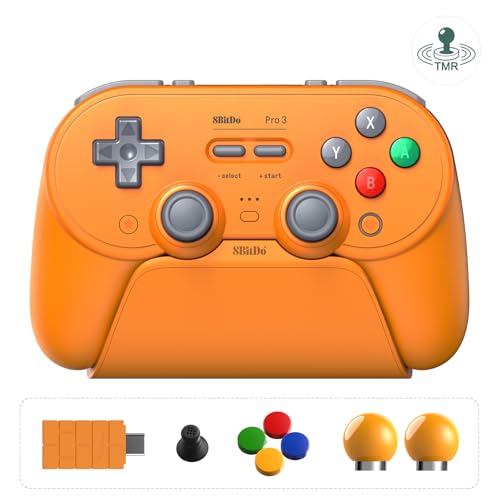
The Pro 3 is the pick for the player who splits time between a Windows desktop and a Switch 2 dock. Its TMR joysticks use a 12-bit ADC sampling chip (a converter that reads stick position in fine steps), so fine aiming stays smooth instead of stair-stepping. A tension-free magnetic design means drift is built out, not repaired later.
Its party piece is the swappable layout: magnetic ABXY buttons plus a puller tool let you flip between Switch and Xbox button positions without opening the shell. Two programmable back buttons and extra R4/L4 bumpers cover inputs your thumbs would otherwise reach for. The included dock stores the spare buttons, the puller, and the 2.4G adapter in one compartment, so nothing goes missing between sessions.
What wins people over is the D-pad — the controller quality feedback is the single biggest praise category, with dozens of owners circling the D-pad specifically, and the ergonomics and textured grips draw steady compliments too. The honest catch shows up in the button feedback, which is mixed: some shoulder buttons feel mushy to a segment of players. Between this and the White Ultimate 2 below, the Pro 3 carries the higher score — 4.5+ against 4.0+ — and the Pro 3’s 250+ ratings sit well under the Ultimate 2’s 2,162, so the White pick has far more voices behind it.
Why it holds the top spot
- TMR sticks with 12-bit ADC sampling for precise, drift-free aiming
- Magnetic ABXY swap between Switch and Xbox layouts with no disassembly
- Dock stores spare buttons, puller tool, and 2.4G adapter in one place
- Linear Hall Effect or tactile trigger modes, switchable per game
Where it asks patience
- Shoulder buttons feel soft to some players
- No wake-on-shake on Switch 2
Land it if: you want one pad that handles PC shooters and Switch 2 couch sessions without swapping hardware, and you care about a crisp D-pad.
Pass if: you need every button to click hard and crisp, because the shoulder feel here is softer than some players want.
2. 8Bitdo Ultimate 2 Bluetooth Controller White
The most-talked-about pad here, and the one that asks you to update firmware first.
With 2,000+ ratings, it has the deepest owner feedback pool on this list. The White Ultimate 2 is a fully upgraded flagship with TMR joysticks, an RGB Fire Ring, and wear-resistant joystick rings, and it pairs to Switch, Switch 2, and Windows. Switch 2 support requires both the controller and the adapter to be on the latest firmware, so budget a few minutes for that before you blame the pad.
The integrated charging dock keeps it topped up and reconnects automatically the moment you lift it out. You also get linear Hall Effect or tactile trigger modes, turbo, wake-on-shake, and support for 8BitDo Ultimate Software V2. At 3.94 x 3.94 x 0.79 inches, it is a notably compact body — the FUNLAB below spans 5.74 x 7.2 x 3.69 inches, so this one takes far less shelf or bag space.
The crowd read is not unanimous, and it is worth knowing before you buy. Controller quality is the loudest praise by a wide margin, but functionality, connectivity, and ergonomics all land as mixed, with a slice of buyers reporting hand cramping or a unit that would not connect to their Switch 2 at all. That is a minority against a large body of happy owners, but a firmware check on day one is the smart move.
The value read: you get flagship TMR sticks, a charging dock, and dual trigger modes for entry-level money, which is why this pad ends up in so many cross-platform setups.
The follow-up question: is it plug-and-play? Not always — several owners had to update firmware before Switch 2 would see it, so set that expectation up front.
Reach for this if: you want TMR sticks and a dock without stretching your budget, and you are comfortable running a firmware update.
Look elsewhere if: you want a pad that works the instant it leaves the box with zero setup steps.
3. FUNLAB x Dave the Diver Switch 2 Pro Controller
Deep-sea artwork, a glowing shell, and drift-free sticks — a pad you buy partly for the look.
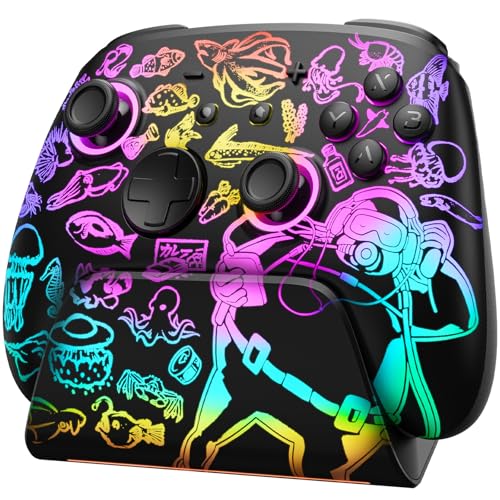
This one leads with its license: it is an authentic Mintrocket-licensed controller with a hologram authenticity seal, deep-sea artwork, and a unique Ocean Card in every box. Drop it in the matching dock and it charges wirelessly while syncing its lighting to the same aesthetic. Seven LED colors, eight glow modes, and four key lighting effects react to your inputs, so the pad reads as a display piece between sessions.
Under the shell it is no toy. Hall Effect joysticks keep drift out, two custom back paddles and a Turbo rapid-fire mode cover advanced inputs, and one-click wake takes you from couch to game without re-syncing. Bluetooth carries it across Switch 2, Switch, OLED, PC, iOS, and Android, so the same feel travels between your desk and the dock.
The appearance is what people rave about — it is the single most positive category in the feedback, with the glowing look drawing near-universal praise, and quality and value close behind. What is not settled: connectivity and functionality read mixed, with a group noting the dock base can stop working, and battery life splits opinions. Think of this as a beautiful pad for a Dave the Diver fan first, and a serious competitive tool second.
The collector angle: a licensed Ocean Card and hologram seal make this the one pad here with genuine display value, and the dock doubles as a stand.
Set your expectations: the dock base is the weak link for a minority, so keep the cable handy as a backup charge path.
The right owner: a Dave the Diver fan who wants a themed setup that still plays properly on PC and Switch 2.
Second thoughts if: you want the most bulletproof everyday workhorse and do not care about artwork.
4. EasySMX D10 PC Controller
The competitive shooter pick, built around a wired-grade response time.
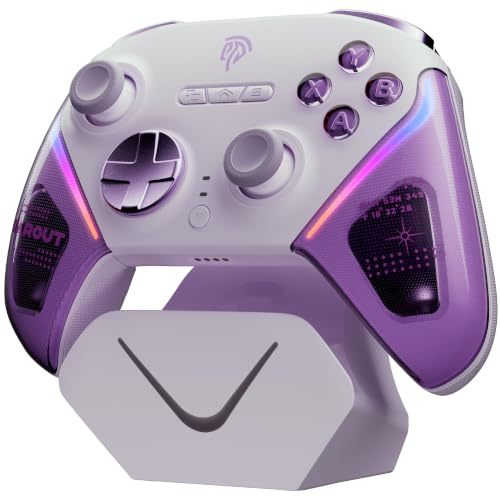
Here is the number that decides it: 1000Hz polling rate in 2.4G wireless and wired mode. That is how often the pad reports its position to your PC per second, and a higher rate means your aim tracks your thumb with less delay. For FPS and racing players who feel input lag, that is the spec to chase.
The stick hardware is TMR, rated for 5M+ cycles of anti-drift durability, and the ABXY buttons are mechanical with a 1.0mm actuation point (how far you press before the input registers) for a fast, positive click. Dual triggers switch between linear Hall for racing and micro-switch tactile for fighting games. You also get an intelligent USB-C charging dock that lets you charge while you play, custom RGB, and a 6-axis gyroscope that works on Switch only.
The build quality and overall performance draw strong praise, and value lands well because it undercuts standard Xbox pads. Two things temper it: the mechanical button feel splits opinion — some players love the click, others find the combinations fiddly — and connectivity is mixed, with a group reporting occasional disconnects. One more line worth reading twice: it is not compatible with Xbox, PlayStation, Luna, or GeForce Now, so check your platform before ordering.
Why competitive players look here
- 1000Hz polling in 2.4G and wired modes for low-latency input
- TMR sticks rated for 5M+ cycles of anti-drift use
- Mechanical ABXY with a 1.0mm actuation point
- Charging dock lets you play while it tops up
Its real boundaries
- No support for Xbox, PlayStation, Luna, or GeForce Now
- Some players find the button combinations complicated
Pick it for: PC shooters and racers where every millisecond of stick response counts, backed by a charging dock and mechanical buttons.
Think twice if: your library lives on PlayStation or Xbox, because this pad will not talk to them.
5. GuliKit TT PRO Bluetooth Controller
Sticks you can dial in by hand, paired with GuliKit’s low-latency Hyperlink 2.
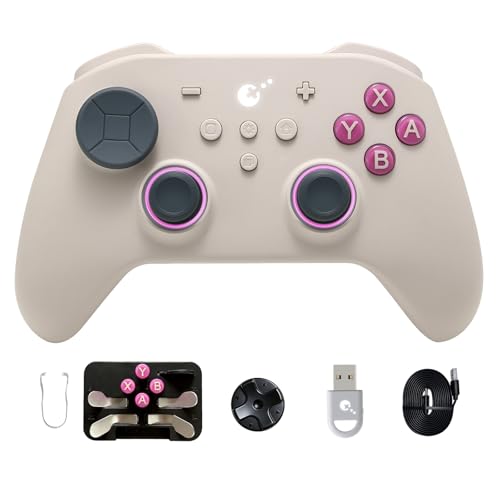
You can adjust the magnetic TMR sticks through 720° of stepless tension via a hidden mechanism that resists accidental changes mid-play. That gives 4000 levels of precision — you set how firm the throw feels instead of accepting whatever the factory shipped. On the wireless side, GuliKit’s Hyperlink 2 Bluetooth rates at 2.62ms latency on PC, a figure the maker positions as faster than other 2.4G and Bluetooth controllers.
The kit is unusually complete: four removable metal back paddles, two sets of Switch and PC layout keycaps, two interchangeable D-pads, a protection case, a data cable, and a Hyperlink 2 adapter that also accepts Xbox, PS4/PS5, and Switch Pro controllers across Switch, Windows, SteamOS, and Android. Magnetic levitation motors let you switch between HD, Super Haptic, and Rotor vibration modes. A 950mAh battery keeps it going, and you get gyro on Switch plus a 10-second APG record-and-playback macro.
Two setup notes will save you a headache. Getting the PC button layout means physically swapping in the included PC-layout keycaps — moving the ABXY buttons will not do it. And the firmware update to V7.6 needs the Bluetooth firmware updated to V02 as well. The premium feel and ergonomics are the strongest points in the feedback, while functionality and stick responsiveness are the areas where experience varies.
For the tinkerer: if you have ever wanted to change how heavy your stick feels, the 720° stepless tension is the feature no other pad here offers.
The trade-off: setup is more involved than the rest of this list, and you will swap keycaps by hand to get the PC layout you want.
Made for: players who like to tune hardware themselves and want the adapter kit to cover extra consoles.
Probably not for: anyone who wants a pad to be perfectly configured the moment it comes from the start.
6. ELISWEEN Switch Controller 2-Pack
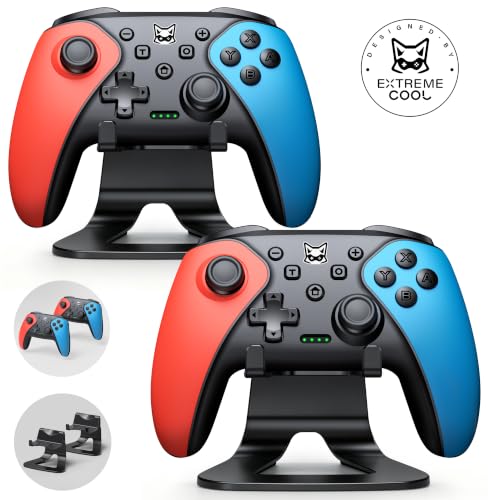
Two full pads and two stands in one box — built for two people in the same room.
If your PC setup is the shared one and a friend or family member is always hovering, this is the practical answer: two complete Pro controllers plus two display stands, rather than buying twice. Each pad runs on a 1000mAh battery rated at 15 hours per 3-hour charge, so a long session does not end early.
Per controller you get two programmable back buttons with single or multi-input mapping, a Turbo function at three speeds (5/s, 12/s, or 20/s), and dual vibration motors with weak, medium, and strong levels. A 6-axis gyro sensor handles motion play on Switch only. The non-slip ergonomic shell was made heavier on purpose to feel more stable in the hands. One-key wake works from the start on Switch, Switch Lite, and OLED; Switch 2 needs a one-time USB-C activation, after which the HOME button wakes it every time.
The honest limit: this is a value two-pack, not a pro pad. It has no NFC, and the feedback base is small so far, landing on reliability and easy connection. You get two controllers and two stands for roughly the price of one pro pad.
The multiplayer math: two pads and two stands for the outlay of a single pro controller elsewhere, with 15-hour battery life on each.
Where it stands: no NFC, and Switch 2 needs a one-time activation step the others do not.
Bring it home if: you regularly play with a second person and want both pads in one purchase.
Skip the upgrade if: you are a solo competitive player chasing the lowest latency and the sharpest sticks.
7. 8Bitdo Ultimate 2 Bluetooth Controller Charging Dock Black

The dock-and-go daily driver, with three ways to connect so one often works when another fights you.
This is the black version of the Ultimate 2, and it gives you the widest connection menu here: Bluetooth, 2.4G, or wired USB for Switch, and 2.4G or wired USB for Windows. If your PC’s Bluetooth is flaky, you drop to a 2.4G dongle or a cable and keep playing. As with its siblings, Switch 2 support needs the controller and adapter updated to the latest firmware.
You get market-leading TMR joysticks, switchable linear Hall Effect or tactile triggers, and remappable R4/L4 fast bumpers you can configure with no software. The RGB Fire Ring has multiple light modes including an interactive light-tracing effect during play. The 8BitDo Ultimate Software V2 lets you remap buttons, tune stick and trigger sensitivity, adjust vibration, and set macros, then switch profiles at the push of the profile button — connected over wired USB or 2.4G on Windows or macOS.
The feel in the hands is the headline, with several owners calling it the best controller they have bought and value landing positively too. The caveat to plan around is connectivity, which reads mixed here: a share of buyers found theirs would not work from the start, and charging reports split, with the dock flawless for some and a charging drop-off after a few months for others. Buy it knowing that a firmware and pairing check on day one is wise.
The daily-driver case
- Three connection paths — Bluetooth, 2.4G, or wired USB
- TMR sticks plus switchable Hall and tactile triggers
- R4/L4 bumpers remappable with no software at all
- Ultimate Software V2 covers button, sensitivity, and macro tuning
What to keep in mind
- Some units need firmware work before they connect
- A minority find the dock stops charging after months of use
Go with this if: you want one reliable docked pad and value having a wired fallback when wireless misbehaves.
Not the one for: you if you want zero setup risk — a plug-and-play day one is not guaranteed here.
8. 8Bitdo Ultimate 2 Bluetooth Controller Yellow
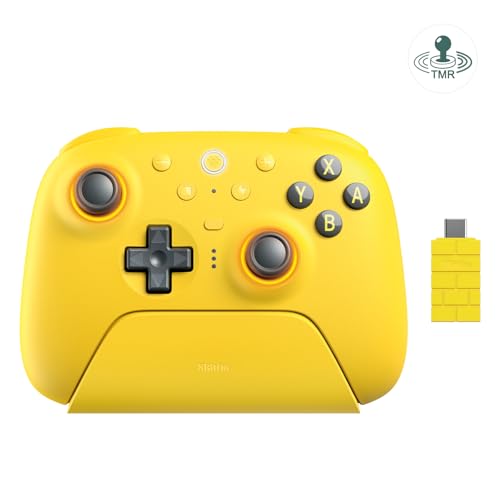
Same Ultimate 2 hardware, in a yellow that will not get lost on a busy desk.
It runs the same Ultimate 2 internals as the black and white versions, in yellow. TMR joysticks with higher sensitivity, greater precision, enhanced durability, and reduced energy consumption sit at the core. Dual trigger modes flip between linear Hall Effect and non-linear tactile, so one controller covers racing and fighting games alike.
Extra R4/L4 bumpers and two Pro back paddles are here, along with 6-axis motion control (Switch only), Turbo, and an adjustable RGB Fire Ring. Full customization runs through 8BitDo Ultimate Software V2. Connection is Switch 2 (update firmware first), Switch by Bluetooth or wired, and Windows PC by 2.4G or wired.
Owner feedback on this exact yellow listing is still thin, so treat the sibling Ultimate 2 reviews as your guide: strong on build and comfort, with pairing and firmware setup the recurring thing to get right. If you want the safest documented version, the white and black versions above have far deeper feedback trails. If you simply want the yellow one, the hardware underneath is the same.
The short version: buy this for the color, not for different internals — the TMR sticks, dual triggers, and back paddles are the Ultimate 2 formula unchanged.
Be aware: feedback on this specific listing is light, so lean on the sibling versions for setup guidance.
Suits you if: you want Ultimate 2 performance and a color that stands out on a desk full of black peripherals.
Hold off if: you would rather choose a version with a long, well-established owner track record behind it.
Know the Specs
TMR vs Hall Effect sticks
Both use magnetic sensing with no rubbing contact, so drift is designed out instead of patched. TMR (tunnel magnetoresistance) is the newer of the two and reads stick position with higher precision. Normal potentiometer sticks wear down over time and start drifting — that creeping cursor mid-game. If drift has burned you before, buy a pad with either magnetic type.
Polling rate and latency
Polling rate is how many times per second the controller reports its position to your PC. A 1000Hz rate means 1000 reports a second, which keeps aim tracking tight for shooters and racers. Latency is the delay in that chain — lower is better, and a 2.62ms figure on PC is a strong number. Bluetooth and 2.4G dongles behave differently, so match the connection to your play style.
Dual-mode triggers
Linear Hall Effect triggers give a long smooth pull for racing games where throttle feel matters. Micro-switch tactile triggers give a short clicky stop for fighters and shooters where speed matters. Pads that switch between the two cover more genres.
Back buttons and bumpers
Programmable back buttons and extra R4/L4 bumpers let you duplicate face-button inputs to fingers that would otherwise sit idle. In games with a lot of simultaneous inputs, that means fewer thumb trips off the stick. Some pads configure these with no software at all.
Common Questions
Will a Switch 2 Pro Controller work with my Windows PC?
Do I need to update firmware before the controller works on Switch 2?
What is the difference between TMR and Hall Effect joysticks?
What does 1000Hz polling rate actually do for my aim?
Can I wake my Switch 2 from sleep with these controllers?
Is the EasySMX D10 compatible with Xbox or PlayStation?
How long does the battery last on the ELISWEEN 2-Pack controllers?
Do these controllers support motion controls and gyro aiming?
What is the difference between the three 8BitDo Ultimate 2 versions here?
Can I use a controller with the charging dock while it charges?
The Bottom Line
For most players chasing the switch 2 pro controller for pc, the 8BitDo Pro 3 is the one to grab — TMR sticks with 12-bit sampling, a D-pad that owners single out, and a dock that keeps the spare buttons and adapter together. If raw latency is what you feel most in shooters, the EasySMX D10 and its 1000Hz polling rate is the sharper tool. And for splitting a session with a second player, the ELISWEEN 2-Pack puts two pads and two stands in one box. One honest nudge: the 8BitDo Pro 3 is the crowd favorite, and its 4.5+ score plus steady demand is the reason to move on it rather than keep circling the options.
How we choose
We do not accept paid placement. Every pick is matched to a real buyer and a real use-case; we do not hands-on test units.
Sources
Specifications: manufacturer listings and product documentation. Review insights: verified customer reviews, as of November 2026. Pricing: not shown on this page (it changes often); check the current price via the retailer link.
As an Amazon Associate, Tactical Gear Guy earns from qualifying purchases. This does not affect which products we feature.