Specs are compiled from manufacturer listings and verified buyer reviews and can change over time — please confirm the key details on the product page before buying.
You want a smart lock, but you do not want to hand a locksmith a drill and a weekend. Retrofit smart locks sit over the thumb turn on the inside of your door, so your existing deadbolt, your keys, and your rental deposit all stay exactly as they are. The catch most buyers hit is fit: a retrofit unit only works if your thumb turn shape, screw spacing, and frame clearance match the maker’s spec sheet. This guide walks through four real retrofit options and tells you plainly which one suits which door.
This guide is built by comparing the manufacturers’ published specifications and the patterns across verified customer reviews, so you get each pick’s real strengths and trade-offs instead of marketing spin.
Fitment, battery habits, and hub requirements decide whether a retrofit install feels like a ten-minute upgrade or a weekend of fuss. Read on for the retrofit smart lock picks that hold up on a real front door.
Top Picks

How To Choose The Best Retrofit Smart Lock
A retrofit smart lock is a motorised unit that clamps over the thumb turn on the inside of your door and twists it for you. Nothing replaces your deadbolt cylinder, so your keys still work as a backup. Because nothing replaces your cylinder, renters can install one without changing the lock — but only if the thumb turn and screw spacing match the maker’s spec.
Measure before you buy anything
Check the thumb turn shape first — a round knob and a T-bar turn need different adapters. Then measure screw spacing; SwitchBot lists 24, 25.6 or 28.2 mm with a ±1 mm tolerance, which tells you how precise this gets. Confirm your cylinder sticks out over 5 mm and that you have frame clearance of at least 30 mm on an inward-opening door or 40 mm on an outward-opening one. Jimmy Proof and mortise locks are out entirely.
Decide if you want a hub or not
A hub is the little box that bridges your lock to Wi-Fi so you can control it from anywhere. Without one you get Bluetooth only, which means remote access generally goes away. Some locks build Wi-Fi straight into the unit, and Matter support is worth checking because it lets the lock talk to Apple Home, Alexa, and Google Home without extra plugins.
Match the open up method to your household
Auto-open up opens the door as your phone arrives, which feels clever until it lags or misfires. A fingerprint keypad is faster but adds a separate piece of hardware. Passcode sharing is what you want if cleaners, dog walkers, or family come and go. Pick the open up method your household will use every day, not the one with the longest feature list.
Side-by-Side Comparison
| Model | Best For | Connectivity | open up Methods | Battery Source | Amazon |
|---|---|---|---|---|---|
| SwitchBot WiFi Smart Lock Pro + Hub Mini Matter★ Best Overall | Renters who want Matter on a budget | Wi-Fi via included Hub Mini | App, voice, remote, Apple Watch | 4 x AA batteries | Amazon |
| Yale August Wi-Fi Smart Lock with Keypad Touch | Fingerprint entry with no hub needed | Built-in Wi-Fi and Bluetooth | Fingerprint, code, app, auto-open up | Required batteries included | Amazon |
| Nuki Smart Lock (Deadbolt) | Quiet, sleek retrofit with rechargeable power | Bluetooth, Wi-Fi, Matter over Thread | App, auto-open up, digital keys | Rechargeable, charges in 2 hours | Amazon |
| Level Bolt (Wi-Fi) | Hiding the smart tech inside the deadbolt | Wi-Fi via Level Connect bridge | App, voice (Alexa, HomeKit) | CR2 battery | Amazon |
Detailed Reviews
1. SwitchBot WiFi Smart Lock Pro + Hub Mini Matter
The renter’s retrofit that ships with the hub already in the box.
Most retrofit locks make you buy a bridge separately to get remote access. This one doesn’t — the Hub Mini Matter comes bundled, and that hub is what turns the lock into a Wi-Fi device you can reach from anywhere. It also open up Apple Home, Siri, Alexa, Google Home, and IFTTT, so the lock lands in whichever app your house already runs. The lock itself is a 435 g unit that mounts inside your door and twists your existing thumb turn, so your keys and cylinder stay untouched.
What wins people over is how genuinely simple the install gets: it mounts over the existing thumb turn with no drilling and no damage to the original deadbolt. Renters who cannot change a lock legally are the obvious audience here, and the retrofit design is built exactly for them. It runs on 4 x AA cells that come included, quoted at about 6–9 months of typical use, and AA swaps cost far less than replacement rechargeable packs.
Be honest about the fitment math before you order. Your deadbolt has to be a North American single-cylinder type, your thumb turn has to match, and your screw spacing has to fall near 24, 25.6 or 28.2 mm within ±1 mm. You also need over 5 mm of cylinder protrusion and at least 30 mm of frame clearance on an inward door or 40 mm outward. Jimmy Proof and mortise locks won’t work, and no US or Canadian accessory kit fixes that. Auto-open up is the second honest caveat: it can lag on proximity, so treat auto-lock as your default and auto-open up as a bonus.
What earns its keep
- Hub Mini Matter included — remote access and voice control with no extra purchase
- Installs over the existing thumb turn with no drilling and no damage
- 4 x AA batteries included, quoted at about 6–9 months of typical use
- Works with Apple Home, Siri, Alexa, Google Home, and IFTTT
Where it will not fit
- Single-cylinder North American deadbolts only — Jimmy Proof and mortise locks are out
- Auto-open up proximity response can lag, so it is not a hands-free guarantee
- Fingerprint and keypad entry need the SwitchBot Keypad Touch, sold separately
Reach for this if: you rent, your deadbolt is a standard single-cylinder type, and you want Matter plus remote access without buying a bridge.
Take a pass if: your door has a mortise or Jimmy Proof lock, or you expect auto-open up to open the door for you every single time.
2. Yale August Wi-Fi Smart Lock with Keypad Touch in Silver
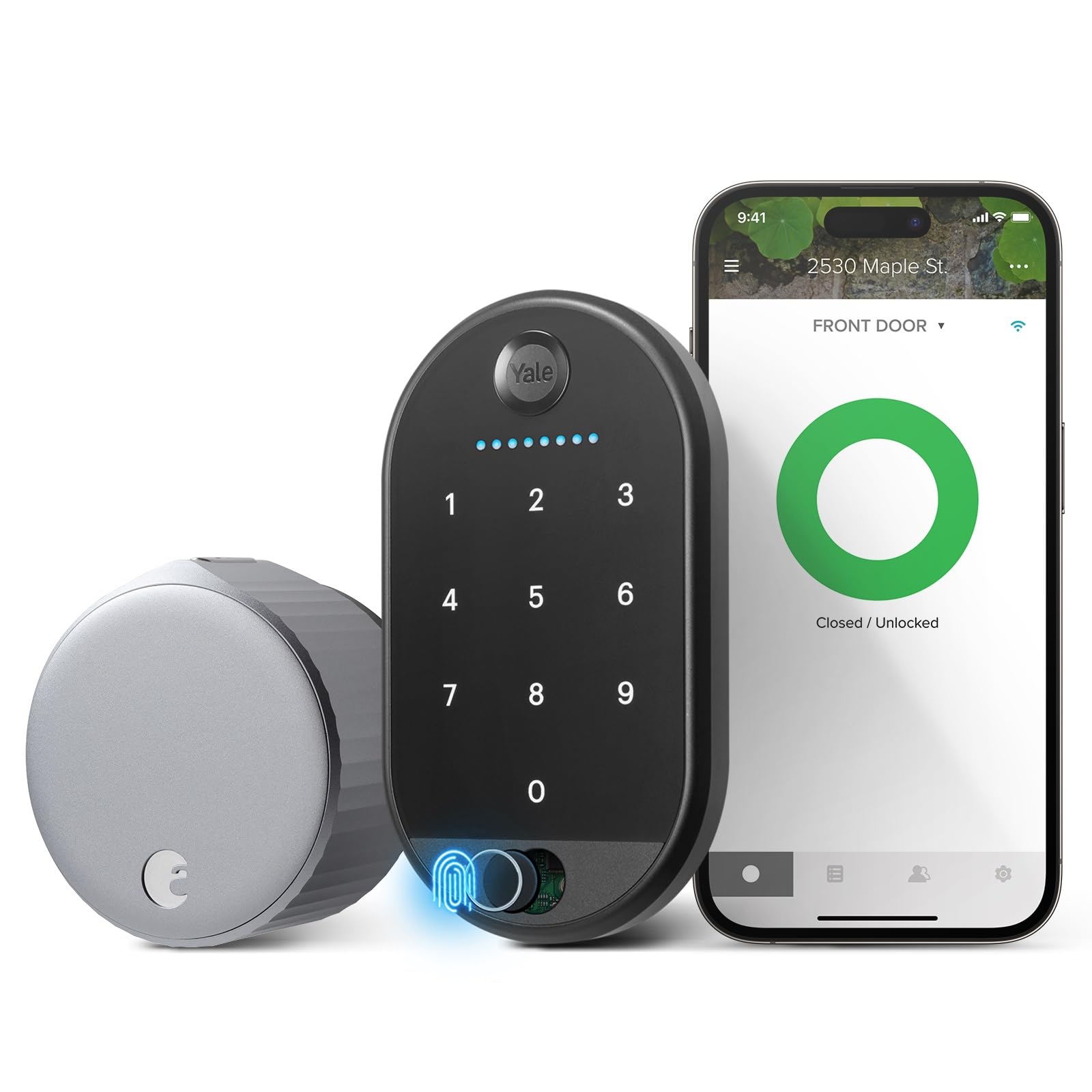
Fingerprint entry with Wi-Fi built in, no hub to plug in.
You can open up with a finger instead of fumbling for a phone in the rain with groceries in both arms. Yale rates the fingerprint scanner at 99% read accuracy. The Keypad Touch mounts anywhere inside Bluetooth range of the lock. Auto-lock, auto-open up, custom entry codes, and the Yale Access app all come together from the start. Built-in Wi-Fi means no separate bridge — unlike the SwitchBot above, which needs its bundled Hub to reach your network.
The August unit measures 0.8 x 2.72 x 4.84 inches, against the SwitchBot’s 2.32 x 3.31 x 4.72 inches. That slimmer body is the difference between the lock sitting flush against your door and sitting proud of it. It still installs on the inside without replacing your deadbolt, so your keys stay valid. 2.2 pounds of hardware and a painted silver finish round out a lock that looks like a normal latch from the street.
The thing to know before you commit is power. The batteries are included, but buyers report they run out faster than expected, and the fingerprint sensor has a reputation for being finicky on some fingers. Neither kills the product — the lock itself is solid and the Wi-Fi connectivity holds well — but if you hate battery swaps, weigh that honestly. The Keypad Touch delivers finger-based entry and built-in Wi-Fi without a hub.
The honest trade-off: you get finger-based entry and built-in Wi-Fi in one purchase, but the recharge cadence will annoy anyone who set-and-forgot their last lock.
Who loves it: households with kids, guests, and delivery drop-offs — custom codes handle all three without a phone being involved.
This one deserves a look if: fingerprint open up is your reason for buying and you want zero hub wiring.
Look elsewhere if: you are unwilling to stay on top of battery replacements or need a sensor that reads every print first try.
3. Nuki Smart Lock (Deadbolt)

Brushed stainless outside, invisible from the street, rechargeable inside.
The Nuki is the pick for anyone who cares what the thing looks like on the door. It is a 2.24 x 2.24 x 2.28 inch stainless steel cylinder with a brushed finish, compact enough that the whole unit hides behind the door from outside. It clamps on the inside over your deadbolt in under 15 minutes with no drilling, and the Nuki app walks you through it step by step. The manufacturer is Nuki Home Solutions, the part number is 221146, and there is a 2 year manufacturer warranty behind it.
The rechargeable battery is where Nuki pulls ahead of the battery-swappers. A full charge takes 2 hours, and owners mention going over two months between charges. That kills the AA-to-landfill cycle the other picks still run on. Connectivity is the most complete of the four: Bluetooth, Wi-Fi, and Matter over Thread all built in, with Apple Home, Alexa, Google Home, and SmartThings support straight from the start. Remote status, digital key sharing, and a real-time activity feed all come through the free app.
Build quality wins the most praise of any aspect here, and the install is genuinely quick. But a handful of owners have had adapters snap or units stop working early — the kind of failure every retrofit mechanism can hit, not something unique to Nuki. Auto-open up opens as you arrive and works well when it works, though no proximity system is perfect. Treat the 2-year warranty as your safety net and register the lock the day you install it.
Build and finish: stainless steel with a brushed surface, a 2 year manufacturer warranty, and a footprint compact enough to disappear on the door.
The one caution: the retrofit mechanism is the part to watch — rare reports of a snapping internal adapter are the reminder to keep your key as backup, which Nuki itself recommends.
Worth choosing when: you want the cleanest look on the door, recharge rather than replace batteries, and need Matter over Thread alongside Wi-Fi.
Think twice if: a rare early failure would leave you without a working backup plan — keep the physical key on your ring regardless.
4. Level Bolt (Wi-Fi) – Previous Model

The smart lock that hides entirely inside your existing deadbolt.
Every other pick on this list clamps onto the inside of your door where somebody can see it. The Level Bolt takes a completely different approach — the electronics live inside the deadbolt body itself, so from either side of the door it reads as a normal satin chrome deadbolt. The kit includes the Bolt, a Level Connect Wi-Fi bridge, two strike plates, a CR2 battery, three tailpiece adapters, and four screws. It talks to your phone over 2.4 GHz Wi-Fi and controls through Alexa or Apple HomeKit.
Installation is the standout here, and it is not close: the instructions are concise and owners regularly describe getting it working within 15 minutes. The tailpiece adapters are what make that possible, letting the Bolt drop into your existing deadbolt hardware without a locksmith. The Level Connect bridge handles the Wi-Fi side, so remote control works without a separate purchase. It is the least visually intrusive retrofit on this list by a wide margin.
The honest caveats matter more here than on the others. This is the previous model, and Level has since released a newer version — worth knowing if you want the longest support runway. Customers note the connection occasionally drops, sometimes with a critical battery warning that fresh batteries do not clear. Response has a small delay, and voice control asks for patience. The invisible design is genuinely clever, but some owners find the daily connection drops finicky, so weigh that against the look.
Why it earns a spot
- Electronics sit inside the deadbolt — looks like a plain satin chrome lock from both sides
- Level Connect Wi-Fi bridge included for remote access
- Three tailpiece adapters let it drop into existing hardware
What to weigh first
- Previous model — a newer version exists, so support runway is shorter
- Connection drops and persistent battery warnings surface in owner reports
- Voice and app response carries a noticeable delay
The right fit for: design purists who refuse to see a gadget bolted to their door and are happy to troubleshoot occasionally.
Not for you if: you want the newest revision with the longest support path, or you cannot tolerate the odd dropped connection.
Know the Specs
Thumb turn and screw spacing
The thumb turn is the little knob on the inside of your door that you twist to throw the bolt. A retrofit lock clamps onto it, so its shape has to match the adapter the maker supplies. Screw spacing is the distance between the mounting screws on your deadbolt — SwitchBot publishes 24, 25.6, or 28.2 mm with a ±1 mm tolerance, which tells you how exact the fit needs to be. Measure both before ordering and you avoid the most common return reason in this category.
Frame clearance and cylinder protrusion
Frame clearance is the gap between the door and the frame where the lock body has to sit as it turns. SwitchBot asks for at least 30 mm on an inward-opening door and 40 mm on an outward-opening one. Cylinder protrusion is how far the lock cylinder sticks out past the door face — over 5 mm is the threshold. A retrofit unit needs that room to grab the thumb turn without rubbing the frame.
Hub versus built-in Wi-Fi
A hub is a small bridge box that connects your lock to your home network so you can control it from anywhere. Some locks ship with one — the SwitchBot includes a Hub Mini Matter, and the Level Bolt includes its Connect bridge. Others build Wi-Fi straight into the lock, like the Yale August and the Nuki. No hub means one less thing to plug in; a hub means one more device to set up but often more protocol flexibility.
Auto-open up, auto-lock, and battery
Auto-open up triggers the lock when your phone arrives in range — clever, but proximity timing varies. Auto-lock secures the door when it closes, and that is the more reliable feature to lean on. Battery options split cleanly: the SwitchBot takes 4 x AA cells quoted at 6–9 months, the Yale August uses included batteries, the Level Bolt runs a single CR2, and the Nuki uses a rechargeable pack that charges in 2 hours.
Common Questions
Will a retrofit smart lock work with my existing deadbolt?
Do I need a hub to use a retrofit smart lock remotely?
Can I keep my existing keys after installing one?
How long does the battery actually last?
Is auto-open up reliable enough to depend on?
Which retrofit lock works with Apple Home and Matter?
Will a retrofit lock damage my door or my rental?
Do these locks work with voice assistants?
What is the difference between a retrofit lock and a full replacement?
Should I buy the newest model or an older one at a lower tier?
The Bottom Line
The retrofit lock that earns the top spot is the SwitchBot WiFi Smart Lock Pro + Hub Mini Matter, because it bundles the hub most rivals charge extra for and open up Apple Home, Siri, Alexa, Google Home, and IFTTT without another purchase. If fingerprint entry is the feature you will use, the Yale August Wi-Fi Smart Lock gets you there with no hub at all. For the cleanest look on the door and a rechargeable battery that charges in 2 hours, the Nuki Smart Lock is the one to reach for. And if you want the smart hardware hidden completely inside the deadbolt, the Level Bolt is the quiet choice. Whatever you pick, measure your thumb turn and screw spacing first — that ten-minute check is what makes the install live up to the promise.
How we choose
We do not accept paid placement. Every pick is matched to a real buyer and a real use-case; we do not hands-on test units.
Sources
Specifications: manufacturer listings and product documentation. Review insights: verified customer reviews, as of November 2026. Pricing: not shown on this page (it changes often); check the current price via the retailer link.
As an Amazon Associate, Tactical Gear Guy earns from qualifying purchases. This does not affect which products we feature.