Specs are compiled from manufacturer listings and verified buyer reviews and can change over time — please confirm the key details on the product page before buying.
Buying a business printer is really a bet on the next three years of your office. The machine that looks affordable on day one can quietly drain you through toner, paper jams, and a scanner that quits mid-contract. What you actually want is simple: a printer that feeds a full ream without babysitting, scans a stack without you standing there, and doesn’t demand a new cartridge every few weeks. That is what this list is built around — real business workloads, not brochure claims.
This guide is built by comparing the manufacturers’ published specifications and the patterns across verified customer reviews, so you get each pick’s real strengths and trade-offs instead of marketing spin.
Some machines here are monochrome workhorses that hammer out black-and-white pages all day, while others handle full color and wide-format jobs. The trick is matching the machine to your actual monthly volume, and the picks below cover that spread — this is a working shortlist of printers and copiers for business.
Top Picks


How To Choose The Best Printers and Copiers for Business
Start with the number you already know: how many pages your office prints in a month. That single figure rules out half this list immediately. A team printing a few hundred pages a month doesn’t need a 35 ppm workhorse, and a team printing thousands shouldn’t be refilling a tiny ink tank every week.
Laser or inkjet, and why it changes your monthly bill
Laser machines melt toner powder onto the page, so the output is dry the moment it lands in the tray. Inkjet printers spray liquid ink, which is why wide-format and photo work usually lands there. For plain black-and-white contracts and invoices, laser toner typically stretches much further per cartridge before you have to swap it. For color marketing material at 13×19, inkjet is the only way to get that size at this level.
Print speed versus first-page-out
Pages per minute tells you how fast the machine runs once it has warmed up. First-page-out time tells you how long you wait when you walk up and hit print on a single sheet. In a real office, that second number shapes your day more than the first. A machine that spits out the first page in about 5 seconds feels instant even if its top speed is modest.
The scanner is half the machine
Most business printers get bought for the scanner as much as the print engine. Look at the automatic document feeder — the tray that pulls a whole stack of pages through the glass — and whether it flips them for two-sided scanning in a single pass. A 50-sheet feeder with single-pass duplex scanning turns a 40-page contract into one button press instead of 40 separate lifts of the lid.
Paper capacity and reload interruptions
A 250-sheet tray holds half a ream. That is fine for a small team but means constant refills in a busy one. A 500-sheet main tray plus a rear feed for specialty stock keeps a heavy-print office running through the day without anyone stopping to reload. Bigger capacity isn’t about luxury — it’s about not walking to the machine mid-task.
Side-by-Side Comparison
| Model | Best For | B&W Speed | Color Speed | First Page Out | Amazon |
|---|---|---|---|---|---|
| HP LaserJet Pro 3101sdw★ Best Overall | Monochrome office workhorse | 35 ppm | — | 7 seconds | Amazon |
| Epson WorkForce Pro WF-7840Wide-Format Pick | Wide-format color | 25 ppm | 12 ppm | — | Amazon |
| Canon imageCLASS MF273dwQuickest First Page | Fast first page, low volume | 30 ppm | — | 5.3 seconds | Amazon |
| Brother HL-L2480DW | Compact monochrome all-rounder | 36 ppm | — | 8.5 seconds | Amazon |
| Canon Color imageCLASS MF665Cdw | Color laser with ADF | 26 ppm | 26 ppm | 10.3 seconds | Amazon |
| HP Color LaserJet Pro MFP 4301fdw | Small-team color + security | 35 ppm | 33 ppm | — | Amazon |
| Brother MFC-L3780CDW | Fast single-pass duplex scans | 31 ppm | 31 ppm | — | Amazon |
| Xerox C325dni | High-volume color office | 35 ppm | 35 ppm | — | Amazon |
| Epson EcoTank Pro ET-5800 | Lowest ink cost per page | 23 ppm | 12 ppm | — | Amazon |
Detailed Reviews
1. HP LaserJet Pro 3101sdw
Our pick — 4.5+★ from 650+ verified ratings; the strongest balance of quality and price.
The black-and-white workhorse that just keeps feeding paper and documents without drama.
If your office runs on contracts, invoices, and reports in black ink, this is the machine to beat. It prints up to 35 pages per minute in black and white, which means a 35-page contract lands in the tray in roughly a minute. The first page comes out in about 7 seconds — fast enough that you can walk up, hit print, and still be standing there when it starts.
The paper handling is what earns it first place. A 250-sheet input tray holds half a ream, and a 50-sheet automatic document feeder pulls a stack of pages through the scanner for you. Auto duplex printing flips pages automatically, so two-sided handouts come out without anyone re-feeding paper by hand. Reviewers most often praise its day-to-day reliability — it simply does its job. Reliability is a close second in how it’s summed up across the review pages, and that’s the whole point of a business printer.
Setup is genuinely straightforward, especially the wireless connection, though a handful of buyers have hit Wi-Fi snags and had to sort out the connection manually. That’s the honest caveat: the wireless link works well when it works, but setting it up over Ethernet first is the safer route in a busy office. One more thing worth knowing — it only accepts HP chipped cartridges, so third-party toner is blocked by design. Plan your supply costs around genuine HP toner.
Where this machine earns its keep
- 35 ppm black-and-white speed handles heavy document runs
- 250-sheet input tray plus a 50-sheet auto document feeder
- Automatic two-sided printing saves paper on every handout
- First page out in about 7 seconds keeps short jobs snappy
The honest fine print
- Locks out non-HP cartridges, so you’re tied to genuine toner
- Some buyers report Wi-Fi setup takes a couple of attempts
- Monochrome only — no color for marketing material
Suits you if: your month is mostly black-and-white paperwork and you want a dependable all-in-one that scans, copies, and prints two-sided without fuss.
Not this one if: your work needs color logos or graphics — this engine prints black only.
2. Epson WorkForce Pro WF-7840
The one that turns a poster or 13×19 proof into an in-house job instead of a print-shop errand.
Here’s the deciding number: this machine prints up to 13×19 inches, which is double the width of a standard letter sheet. That opens up presentations, marketing boards, and detailed graphics that a normal office printer just can’t handle. If your team regularly orders oversized prints from an outside shop, this machine folds that spend back into your office. Pages come out at up to 4800 x 2400 dpi (dots per inch — the ink density that decides how sharp the detail looks), fine enough for frame-ready photo prints up to 8×10 inches alongside your usual business documents. The scanner, copier, and fax all live in the same box, so one machine covers the workflow.
Speed is where the trade-off shows. Black-and-white output runs up to 25 ppm while color pages drop to 12 ppm per minute. Compare that to the Canon color laser reviewed further down, which puts out 26 color pages per minute against this machine’s 12 — a wide gap if your office prints color in volume. Paper capacity helps offset the pace: a 500-sheet main tray plus a 50-sheet rear feed means you can load up and walk away for long stretches.
Wireless connectivity runs on 802.11a/b/g/n/ac Wi-Fi (the current standard for office networks), with Apple AirPrint and Mopria support so staff can print straight from phones and tablets without installing software. If color volume is occasional and wide-format ability is the reason you’re shopping, this earns its place. If you print hundreds of color pages a week, the slower color speed will start to show.
Positioning in the lineup: the only wide-format machine here, and the most direct answer for presentation boards and oversized graphics that standard printers can’t reach.
Buy it when: wide-format color is a real business need and you’d rather print 13×19 in-house than outsource it.
Look elsewhere for: high-volume color runs — the 12 ppm color speed trails the laser picks by a wide margin.
3. Canon imageCLASS MF273dw
For the office that prints in short bursts and hates waiting on the first sheet.
Walk up, hit print, and the page is in the tray in about 5.3 seconds. That’s the fastest first-page-out time on this list by a clear margin — the HP 3101sdw takes 7 seconds by comparison, and the color Canon imageCLASS MF665Cdw takes 10.3 seconds. If your team prints single sheets all day rather than long batches, that lead matters more than top-line speed.
Background throughput is solid anyway, at up to 30 pages per minute in black and white, with automatic two-sided printing to keep paper use down. It’s a three-in-one too — print, copy, and scan — and the scanner runs on a standard document feeder. Print quality is what the machine is known for, and the toner situation is friendly: it takes Canon’s 071 standard or high-capacity cartridges, and owners routinely mention that replacements are affordable and easy to source. That combination of cheap consumables and quick output makes it a sensible fit for a solo operator or a two-desk office.
The catch is that this is black-and-white only, so it’s the wrong tool if you produce color collateral. It also sits at the compact end of the range, with a footprint of about 14.6 inches deep, 15.4 inches wide, and 14.4 inches high — small enough for a credenza rather than demanding its own room. It’s one of the better choices here if speed-to-print is your priority and the work is text.
Why the 5.3 seconds matters: the wait before that first page is the number you feel daily; a 5.3-second first print turns one-off jobs into a quick walk-by.
Where it fits: a compact three-in-one for a small team, with reasonably priced Canon 071 toner.
My pick for: a busy small office that prints in frequent short bursts and wants a snappy, low-maintenance black-and-white all-in-one.
Think again if: you need color — this machine is mono only.
4. Brother HL-L2480DW

A flatbed scanner, a touchscreen, and 36 pages a minute in a footprint that fits a home office corner.
What makes this one different from other compact monochrome machines is the flatbed scan glass. Most budget laser printers only scan through the document feeder, which means anything bound or irregular gets awkward. This one lets you lay a passport, a book page, or a single page flat and scan it directly. That’s a genuinely useful feature for a small office that handles mixed paperwork.
Speed is the standout number: up to 36 pages per minute in black and white, making it the fastest black-and-white machine on this list — the Epson WorkForce Pro WF-7840 comes in at 25 ppm for comparison. The 2.7-inch touchscreen handles print-from and scan-to Cloud apps like Google Drive, Dropbox, and OneNote without needing a computer in between. Paper capacity runs to a 250-sheet tray, with a manual feed slot for envelopes and specialty stock. Print quality is what owners praise most across the review pages, and fast, easy setup follows close behind.
The wireless is dual-band 2.4GHz and 5GHz, with Ethernet and USB as backup — so if the 5GHz link gives you trouble, you can wire it in and skip the headache. That’s worth knowing, because wireless connectivity draws a few gripes in the write-ups. One more practical note: it pairs with Brother’s TN830 or TN830XL toner, and the optional Refresh subscription is there if you’d rather not think about reordering. Quiet running is the other recurring compliment, which matters in a shared room where the printer sits near desks.
The flatbed difference: a flat scan glass on a compact laser is rare at this size, and it’s what turns this from a dedicated document feeder into a do-anything all-in-one.
Exactly right for: a home office or small team that needs both flatbed and feeder scanning plus fast black-and-white output in a tight footprint.
Know before you commit: dual-band wireless helps, but Ethernet is your safety net if Wi-Fi proves stubborn — and mono output rules out color work.
5. Canon Color imageCLASS MF665Cdw

A four-in-one color laser that scans, copies, faxes, and prints at the same speed in both color and mono.
Here’s the number that steers the decision: this machine hits 26 pages per minute in color and the same 26 pages per minute in black and white. That even split matters because many color machines drop sharply on color jobs. Put it next to the Epson WF-7840 and the gap opens up — 26 color pages per minute here versus 12 there, more than double the color pace. The first page takes about 10.3 seconds, so give it a moment before the sheet lands, but once it’s running it holds speed.
The scanner side is properly built. A 50-sheet automatic document feeder handles single-pass two-sided scanning, so a double-sided stack gets captured without flipping pages by hand. Paper capacity sits at a 250-sheet cassette plus a one-sheet multipurpose tray, and auto two-sided printing is included. A 5-inch color touchscreen handles the application library and the features you use most, which keeps staff navigation quick. The toner path is Canon Genuine 075 standard or high-capacity — starter yields are 700 pages for black and 500 pages for color, so plan a refill fairly early in heavy use.
The 3-year limited warranty is a real point in its favor for a business purchase. The honest side: reliability draws mixed feedback in the write-ups, and setup isn’t always one-step. Treat the warranty as the safety net it is, and buy from a source with easy returns. For color output on a moderate volume, this balances speed, build, and price well.
The color-speed case: output that stays at 26 ppm whether you print black or color — rare, and exactly what a marketing-aware office needs.
What to plan around: the starter cartridges yield 700 black and 500 color pages, so budget early replacement toner.
If color documents are routine: this is the balanced color all-in-one, with equal-speed output, a 50-sheet ADF, and a 3-year warranty behind it.
The trade-off you accept: reliability reviews are mixed, so buy where returns are simple.
6. HP Color LaserJet Pro MFP 4301fdw
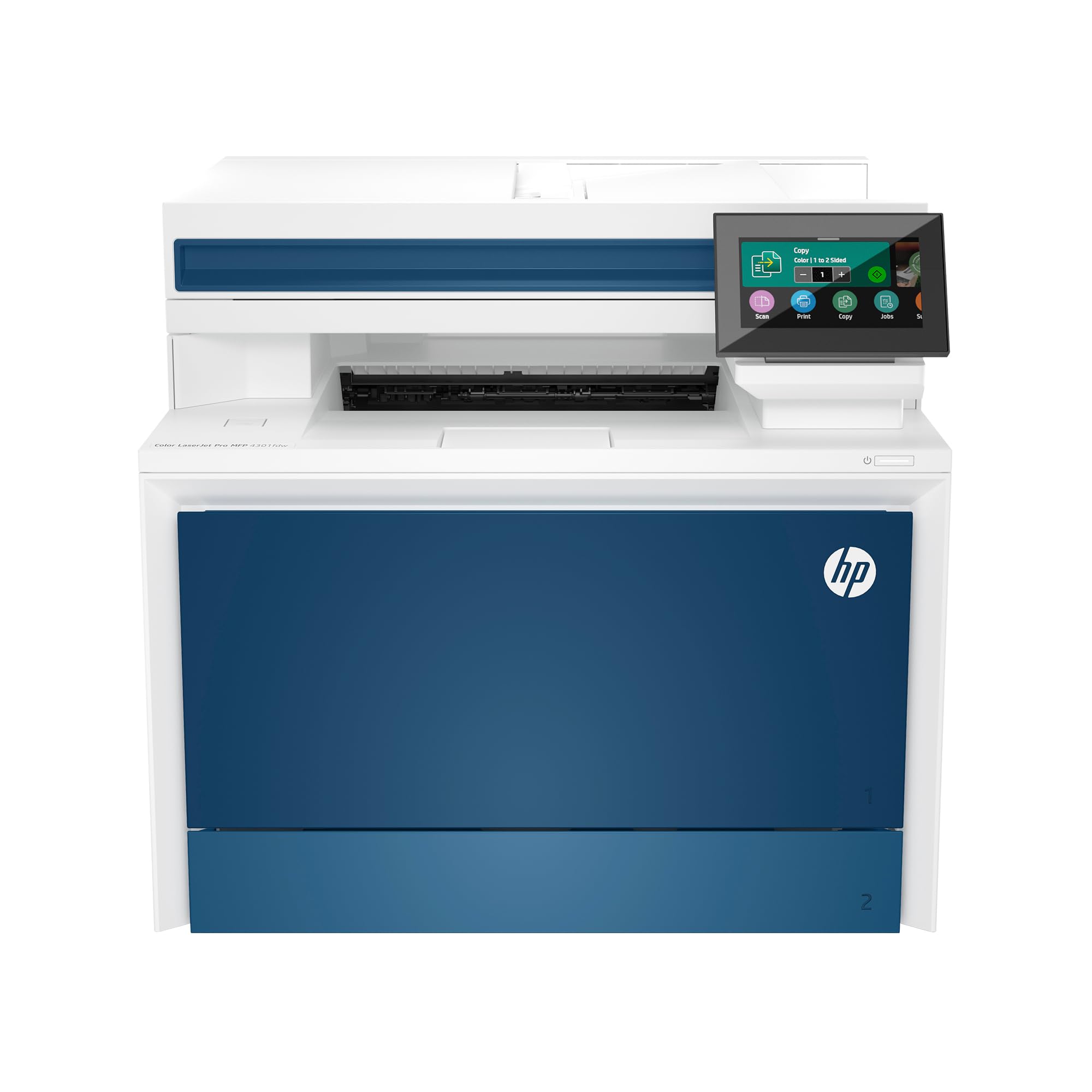
Built for a ten-person workgroup that needs color, fax, and data security in a single unit.
This is the office color machine for a team, not a desk. It’s built for up to 10 people, doing print, scan, copy, and fax with automatic two-sided printing and an auto document feeder for fast scan and copy. The pace is genuine: 35 pages per minute in black and white and 33 pages per minute in color. That’s meaningfully quicker on color than the Canon MF665Cdw at 26 pages per minute, so if two people are racing color jobs at once, this keeps the queue moving.
The cartridge math is more generous than most here. The starter set yields 1,200 pages black and 1,000 pages per color, and replacements go up to 7,500 pages black and 5,500 pages color. That’s a serious reduction in how often someone has to swap toner. Wireless runs on HP’s intelligent Wi-Fi that hunts for the strongest connection, and Ethernet and Bluetooth are both included, so the link has multiple paths.
The security angle is why a lot of offices choose it — HP Wolf Pro Security is built in with customizable settings, which matters if the printer sits on a shared network. The catch is reliability: the write-ups split between units that run fine and some that have stopped working after two to three weeks. That’s worth weighing, and buying with a solid return window is sensible. When it works, it’s a fast, secure color all-in-one for a team of up to 10.
Security as a spec, not an add-on: HP Wolf Pro Security is on board from day one, which very few competitors in this bracket offer.
Choose this for: a workgroup of up to 10 people that needs fast color plus built-in security and generous cartridge yields.
The risk to weigh: some units have reportedly failed within weeks — buy where returns are easy and test the machine hard in the first month.
7. Brother MFC-L3780CDW

Scan speeds up to 29 ipm in black with single-pass duplex — the office document engine.
Scan speeds are where an office machine really reveals itself, and this one is unusual: up to 29 ipm (images per minute) in black and 22 ipm in color, with single-pass duplex copy and scan. That means a two-sided stack goes through the feeder once and comes out captured — no flipping, no re-scanning. For a business that digitizes contracts and invoices, that single-pass duplex is the whole feature, and it saves hours a month.
Printing keeps pace at 31 pages per minute in black and white and 31 pages per minute in color — an even split that a lot of color machines don’t manage. The thing that wins people over most is overall quality, with setup following close behind, and staff tend to get it running well enough to print quickly. Connection options are broad: dual-band 2.4GHz and 5GHz wireless, Gigabit Ethernet, Wi-Fi Direct, and USB for a single computer. That redundancy is handy when one path has an off day.
The honest read: print quality and reliability draw mixed comments, so this is not the machine for someone who prints color marketing on tight deadlines and can’t tolerate an occasional reprint. Where it shines is document throughput and scanning. If the workflow is contracts, correspondence, and archive scanning, this is a strong fit. If the output is client-facing color work, the mixed reports deserve weight.
Single-pass duplex explained: the scanner flips both sides of a double-sided page in one pass, so a 40-page scanning job becomes one button press instead of forty separate movements.
Pick it if: scanning and document processing outweigh color print quality in your workflow, and single-pass duplex is the feature you keep wishing for.
Pass it over if: flawless color output on every page is non-negotiable — some owners mention mixed print results.
8. Xerox C325dni
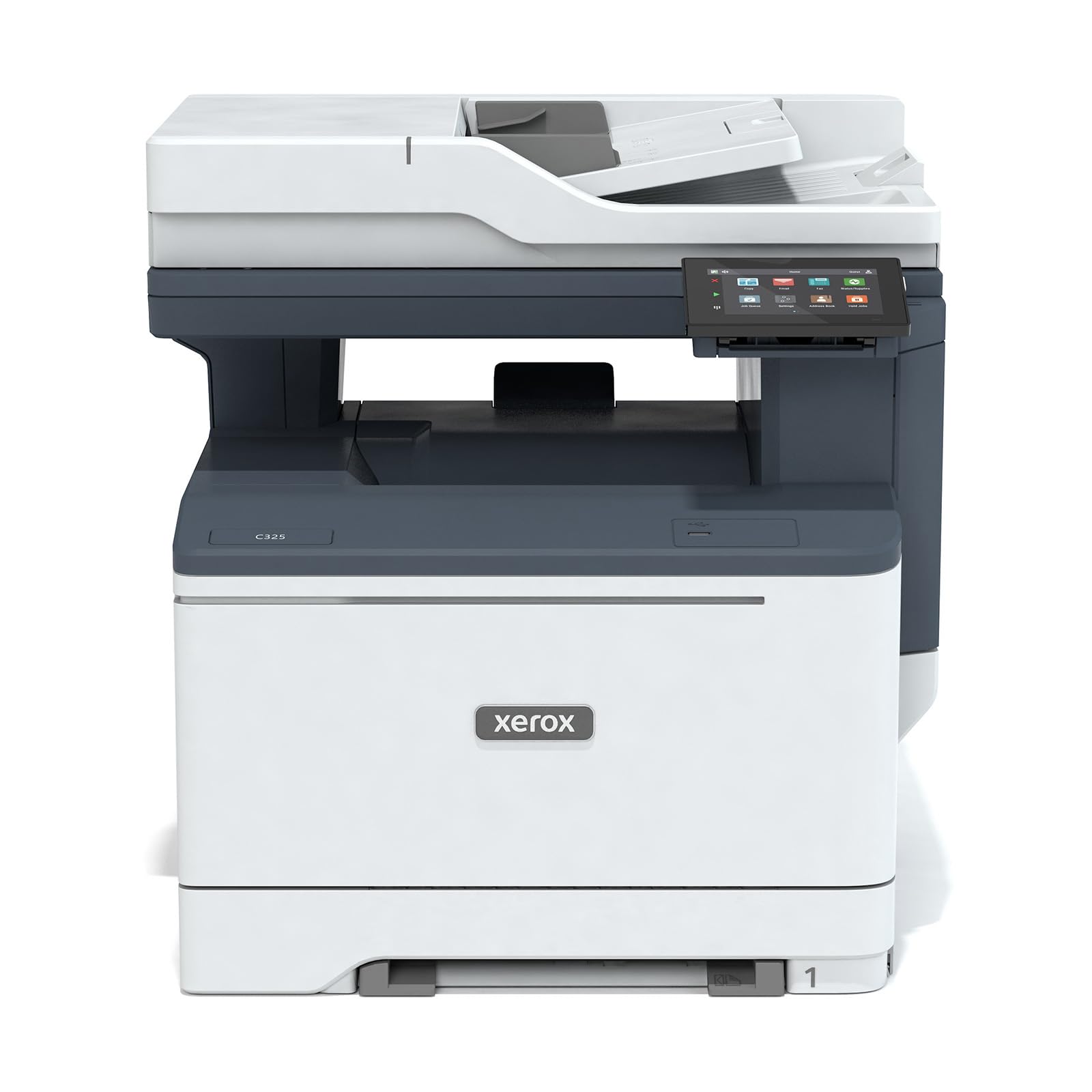
A genuinely heavy color machine, rated for the pages most offices only dream of printing.
The monthly rating is the number that separates this from everything above: it’s built to handle up to 2,500 pages per month, which puts it in the class of an actual busy office rather than a lightly used desk. Speed is high at 35 pages per minute in black and 35 pages per minute in color, meaning a big color run clears in reasonable time. High-yield cartridges are supported to keep running costs down, and the starter set covers 1,500 black pages and 1,000 pages per color.
The interface is a 4.3-inch touchscreen, and setup goes through the Xerox Easy Assist App — a guided installation that skips the manual and driver hurdles that trip up the less technical. Wireless printing includes Apple AirPrint and Mopria, with cloud scan and print from phone or tablet. Connectivity runs over Ethernet and USB 2.0 as wired options, so you can anchor it to the network where it can’t be moved.
Two caveats size the machine before you commit. It weighs 59.5 pounds and measures about 18.7 inches deep by 18.9 inches wide by 19.3 inches high, so it needs a proper stand or table, not a shelf. And the review write-ups split on quality and reliability — some buyers find it delivers professional results, others less so. On a heavier workload that middle uncertainty is worth taking seriously, and buying where you can return easily is a prudent move.
The volume story: a 2,500-page monthly rating and 35 ppm color speed position this as the machine for an office that actually prints at scale.
The physical reality: at 59.5 pounds, this printer earns a dedicated stand — plan the spot before it arrives.
It’s the right call when: your monthly volume heads toward the thousands of pages and color speed is a daily requirement.
Consider the shorter list first if: you print modestly, since the weight and footprint demand real floor space.
9. Epson EcoTank Pro ET-5800

The one that trades cartridges for bottles and cuts the ink habit out of your month.
No cartridges at all — you fill it from bottles. That is the entire value proposition, and it’s a big one for a high-volume office. A replacement set of bottles holds enough ink for up to 7,500 black pages and 6,000 color pages, so nobody is swapping carts mid-project. Epson claims up to 80 percent savings with replacement ink bottles versus standard-capacity color laser toner, or about 2 cents per color ISO page versus 14 cents. That’s a manufacturer figure, but it points to the reason people buy this machine.
Print quality is what wins people over most across the review pages, and speed follows close behind. Output runs up to 25 ISO ppm black and 12 pages per minute color. Epson’s PrecisionCore Heat-Free Technology means no warmup before the first page. A 500-sheet paper capacity — two front trays plus a rear feed for specialty stock — keeps reloading rare. The machine prints on DURABrite pigment-based inks for crisp, instant-dry results up to 8.5 x 14 inches.
The honest trade-off is that you’re buying into a bottle system, and a few customers note error messages and occasional reliability issues. One warning worth knowing: the printer is designed for pigment inks only, and dye inks can cause damage that isn’t covered. Stick to genuine Epson 542 bottles. If running cost per page is your top concern, this is the lowest-cost pick on this list.
The cost-per-page case: a bottle refill set covers up to 7,500 black and 6,000 color pages, so the ink budget becomes a rare event instead of a monthly line item.
The rule to follow: pigment inks only and genuine Epson bottles — the printer is built around them.
The fit: a color-heavy office that prints enough to make ink cost per page the deciding number and wants to stop buying cartridges.
Watch out for: the bottle system and pigment-only requirement — using the wrong ink risks damage the warranty won’t cover.
Know the Specs
Pages per minute (ppm)
This is how many sheets the engine can push out in one minute after it’s warmed up. A 35 ppm machine clears a 35-page document in about a minute. It is not the same as first-page-out time, which is how long you wait for that very first page from a cold start. If your office prints in short bursts, the first-page-out number shapes your day more than the top speed.
First-page-out time
This counts the seconds from hitting print to holding the first sheet. A 5.3-second machine feels instant, while a 10.3-second machine asks you to wait a beat. For a team printing single pages all day, this figure matters most of all.
Automatic document feeder (ADF)
An ADF is the tray that pulls a whole stack of pages through the scanner for you. Sheet-count tells you how big a stack it handles — a 50-sheet feeder takes most contracts in one go. Single-pass duplex scanning means it flips both sides in one pass, so a two-sided stack scans without you re-feeding it.
Toner versus ink bottles
Laser toner melts powder onto paper for dry output that stretches far per cartridge. Inkjet sprays liquid ink and costs more per page, but it opens up wide-format color and photo work. Bottle-fed systems like the Epson EcoTank replace cartridges with refillable bottles, which cuts cost per page dramatically in heavy use.
Duplex printing
Duplex means the machine flips the page and prints both sides automatically. It halves your paper use on any two-sided handout and takes no effort from staff. Most of the machines on this list include it as standard, which is why it’s worth checking rather than assuming.
Paper capacity
The tray count tells you how long the machine runs between reloads. A 250-sheet tray holds half a ream, which is fine for a light office but means constant walk-backs in a busy one. A 500-sheet main tray plus a rear feed lets a heavier workload run through the day without interruption.
Common Questions
Is a laser printer better than an inkjet for a small business office?
How long does a business printer usually last before it needs replacing?
Can I use third-party toner cartridges in these printers?
What does single-pass duplex scanning actually save me?
How many pages can a starter toner cartridge actually print?
Do these office printers support printing from phones and tablets?
Can these printers scan directly to Google Drive or Dropbox?
Do I need Ethernet or is Wi-Fi enough for an office printer?
Which is cheaper to run over a year — cartridges or ink bottles?
The Bottom Line
For most offices working in black and white, the winner is the HP LaserJet Pro 3101sdw. It prints up to 35 pages per minute, scans and copies with a 50-sheet feeder, and handles two-sided printing without staff lifting a finger — a full-featured all-in-one that stays simple to operate. If you need color at speed, the Canon Color imageCLASS MF665Cdw holds 26 pages per minute in both color and black, with a 3-year limited warranty behind it. And for an office where ink cost per page is the number that keeps you up at night, the Epson EcoTank Pro ET-5800 swaps cartridges for bottles and runs up to 7,500 black pages per refill set.
Whichever one you choose, pick it for the work your office actually does — the volume, the color, and the scanning that fills your week. That’s how a business printer earns its keep over years of steady use.
How we choose
We do not accept paid placement. Every pick is matched to a real buyer and a real use-case; we do not hands-on test units.
Sources
Specifications: manufacturer listings and product documentation. Review insights: verified customer reviews, as of November 2026. Pricing: not shown on this page (it changes often); check the current price via the retailer link.
As an Amazon Associate, Tactical Gear Guy earns from qualifying purchases. This does not affect which products we feature.