Specs are compiled from manufacturer listings and verified buyer reviews and can change over time — please confirm the key details on the product page before buying.
Replacing a dead or lost remote for your Onn Roku TV is not a real problem — buying the wrong one is. Some of these remotes work with Roku TVs only, some work with Roku players only, and almost none of them work with a Roku Stick. If you just want the answer: get the model-matched Onn OEM replacement if you have an Onn set, and get the MOKEMAKE two-pack with the glow case if you want a spare and you keep losing the remote in the couch.
This guide is built by comparing the manufacturers’ published specifications and the patterns across verified customer reviews, so you get each pick’s real strengths and trade-offs instead of marketing spin.
Below you get the infrared-versus-pairing reality explained in plain words, one comparison table, seven real replacement remotes, and an honest call on which one fits your TV. These are the picks I would put in my own living room for an onn roku tv remote.
Top Picks

How To Choose The Best Onn Roku TV Remote
The first thing to settle is not the brand or the button count. It is what you are replacing. A built-in Roku TV has the streaming brain inside the television, so an infrared remote pointed at the screen does everything. A Roku Stick hides behind the TV and listens over wireless — and none of the remotes below talk to it. Read the compatibility line before you read anything else.
Infrared versus pairing — the one thing that trips everyone up
An infrared remote sends a beam of invisible light at the TV, the same way a flashlight beam works. You have to aim it, and something between you and the screen can block it. The upside is that there is nothing to pair: you drop in two AAA batteries and the TV answers immediately. Every pick on this list works this way, which is why the instructions from the makers all say “no programming required.”
Batteries, sleeves, and the spare that saves your evening
All seven remotes run on AAA batteries, and not one of them ships with batteries in the box. Order the AAA batteries in the same trip, or the remote sits unused on arrival. A silicone sleeve and a glow case are not decoration either. A glow sleeve is what saves you from patting down a dark sofa at midnight.
Check your model number before you buy
Onn sells several Roku TV sizes under different model numbers, and the OEM pick here lists a long run of them in its own documentation. If you want the closest match to the remote that came in the box, look at the sticker on the back of your TV. If you just want buttons that work, a universal infrared replacement covers the Onn range and a dozen other Roku TV brands besides.
Side-by-Side Comparison
| Model | Best For | Connection | Buttons | Range | Amazon |
|---|---|---|---|---|---|
| MOKEMAKE 2 Pack with Glow Cover★ Best Overall | Two remotes, one glow sleeve | Infrared | 24 | 32 feet | Amazon |
| Young Electronics Universal Roku RemoteMost Buttons | Big buttons and many devices | Infrared | 40 | 8 meters | Amazon |
| Gotellx 4 Pack Replacement | Whole-house spares | Infrared | — | 34 feet | Amazon |
| 1-clicktech RT-U07 Big Button | Playing TV and Roku on one remote | Infrared | 24 | 10 meters | Amazon |
| Maozhren 2 Pack with Wrist Strap | Families with kids | Infrared | — | — | Amazon |
| Amtone OEM for Onn Roku TV | Closest to the original | Infrared | 15 | 40 feet | Amazon |
Detailed Reviews
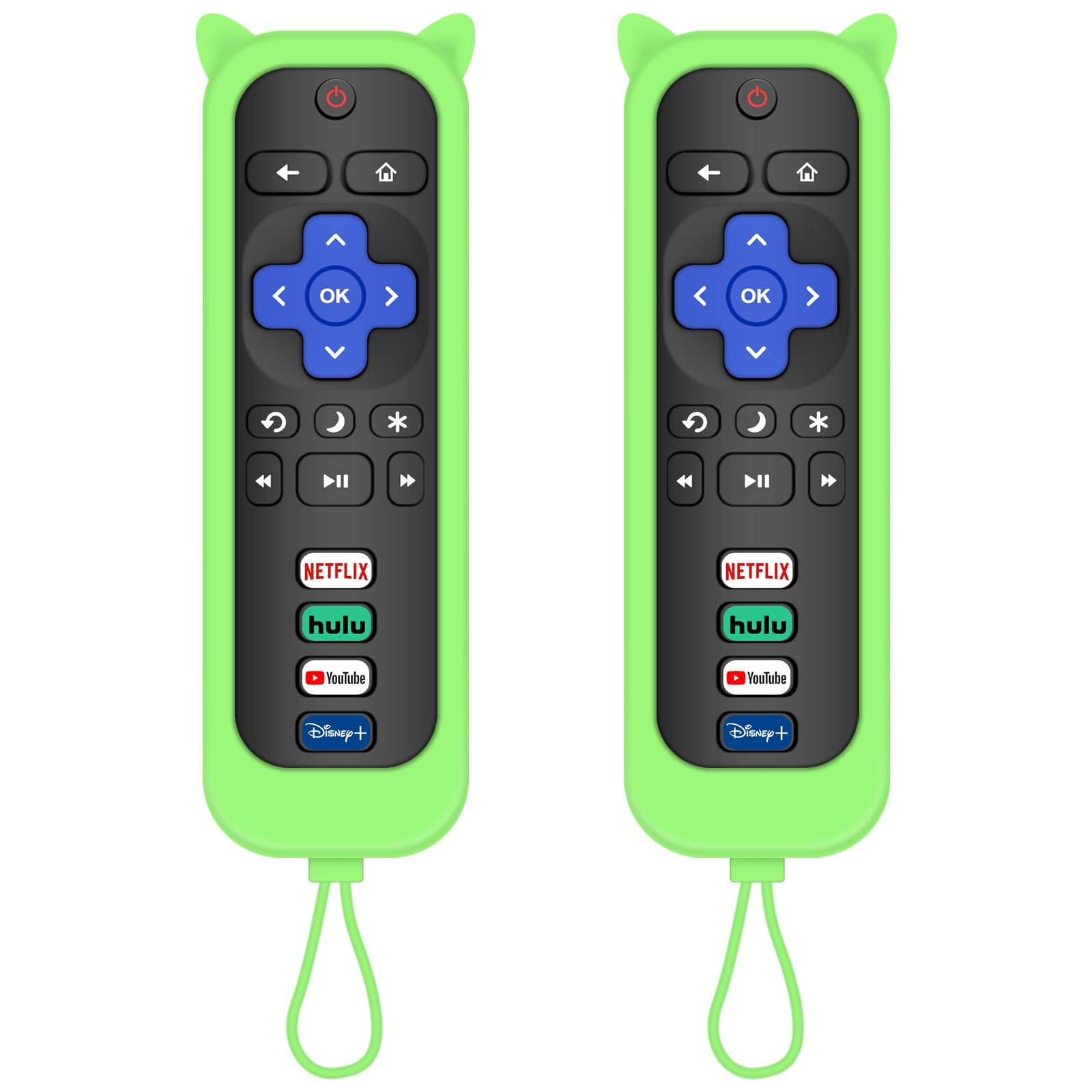
1. MOKEMAKE 2 Pack Remote for Roku TV & Cover (Green)
Our pick — 4.5+★ from 3,500+ verified ratings; the strongest balance of quality and price.
Two remotes and two sleeves that give off a soft glow when the lights go down.
What lands in the box is the answer to the most ordinary problem in television: you lose the remote. You get two replacement infrared remotes and two matching silicone covers that store daylight and emit a gentle glow after dark. Because the sleeve glows, a remote dropped between cushions still shows up in a dim room instead of vanishing until morning.
Setup is the part people fear and should not. There is no programming and no pairing screen — you add two AAA batteries (not included) and the TV responds. That is why functionality is what buyers talk about most; the remote simply works the moment the batteries go in. The same pack covers the Onn range alongside TCL, Hisense, Sharp, Element, Westinghouse, Philips, Insignia, JVC, RCA, Hitachi and Sanyo Roku TVs, so one purchase can serve more than one set in the house. Four shortcut keys put Netflix, Hulu, YouTube and Disney+ one press away.
Here is the trade-off worth knowing before you order. This is an infrared remote, so it needs to see the TV — a blanket draped over the sensor or a very wide room will cost you a clean press. It also has no voice search and no headphone jack, unlike the remote that shipped with some premium Roku models. The button feel is the one area buyers split on; most find the press responsive, a few find it mushy. And one green-only note: a handful of buyers received a single cover for two remotes, so count the contents when the parcel lands.
Where this pair genuinely earns its place
- Two remotes plus two glow covers — a spare already in the drawer when one goes missing
- Works immediately with two AAA batteries, no pairing step at all
- Four shortcut keys for Netflix, Hulu, YouTube and Disney+
- 32 feet of infrared range reaches the sofa at the far end of most living rooms
The honest fine print
- No voice function and no headphone jack
- Batteries and manual are not in the box
- Button feel is the one point buyers disagree on
Buy it if: you want a spare and your house has at least one person who sets a remote down somewhere strange.
One caveat: it will not talk to a Roku Stick, Streaming Stick or Roku Ultra — this is a built-in-Roku-TV remote.
2. Universal Remote for Roku TV
Forty buttons, and enough of them to run a Bose Wave as well as the TV.
If your living room has a sound system sitting under the screen, this one goes further than the rest of the list. It carries 40 buttons — against just 12 on the 1-clicktech 2-in-1 above — and those extra keys are aimed at Roku TV/STB, Bose Wave generations I through IV and Apple generations 1 through 3. In plain terms it is a universal remote wearing Roku clothes, so one slab on the armrest can replace a small pile.
Setup is genuinely the easy part here: install batteries and use it. It works across the Onn, TCL, Hisense, LG, RCA, Philips, Sharp, Hitachi, Haier, Insignia, JVC and Sanyo Roku TV line-up. It also weighs 2.54 ounces, making it a chunkier remote than the Gotellx four-pack at 1.76 ounces — a difference you feel, though a heavier handset is also harder to lose down the side of a cushion.
The thing to be clear-eyed about is programming beyond the TV. Compatibility reports split cleanly: some sets answer perfectly and some never do, and the instruction sheet is thin on detail for the extra devices. That is the honest limit of a universal design — it does more, and doing more means more that can go sideways.
The case for it: a single handset that handles the TV, a Bose Wave and an Apple set-top, with no setup step for the TV itself.
The catch: extra-device programming is the weak spot, and the manual gives you little help if your first attempt fails.
Reach for this if: you are trying to thin out three remotes into one and the TV is the simple part.
Look elsewhere if: you only need TV buttons and want the shortest possible setup path.
3. Gotellx 4 Pack Replacement Remote Controls for Roku TV
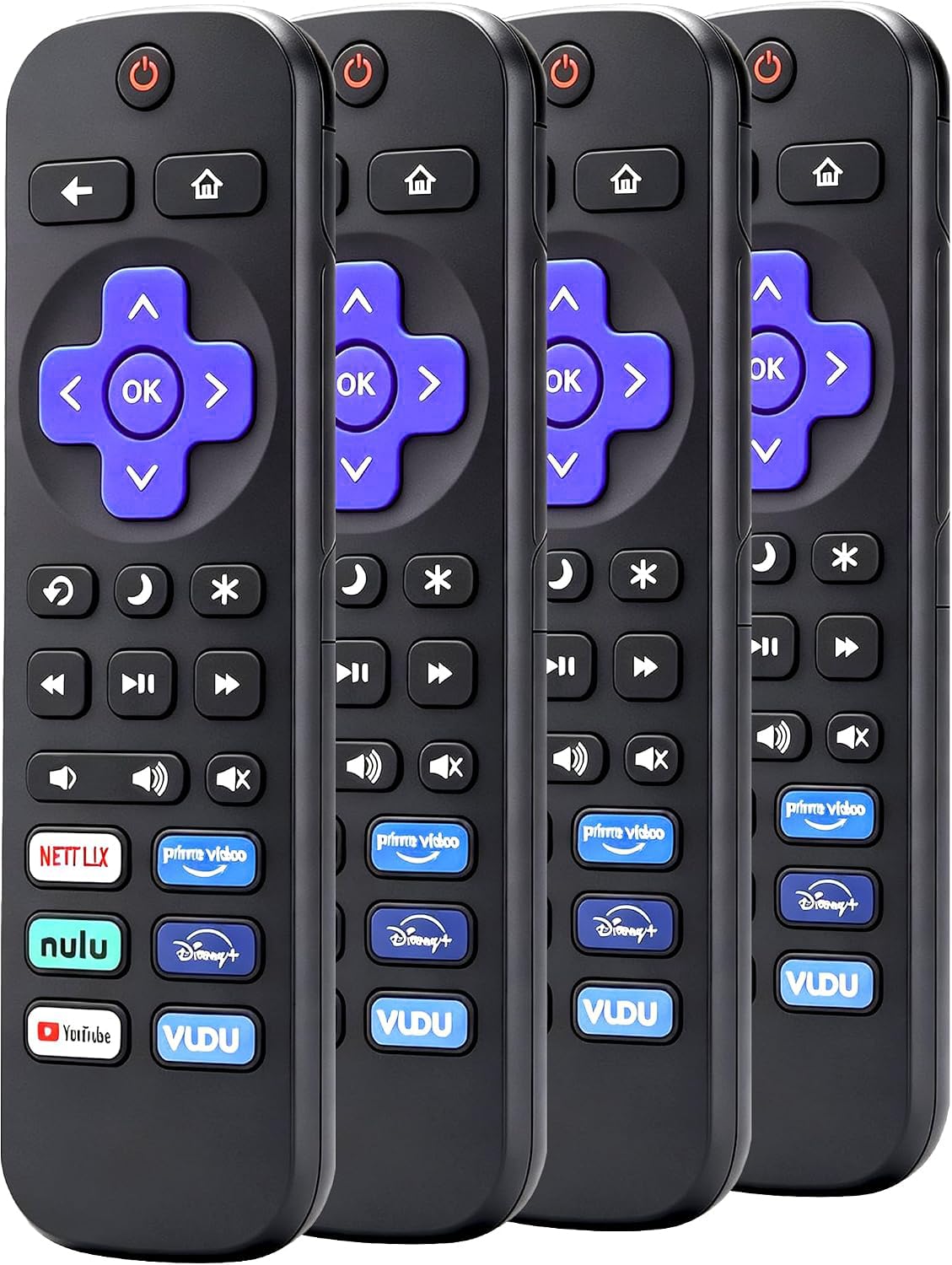
Four infrared remotes for roughly the price of one, so a lost remote never stalls movie night.
Four remotes in one box suits a busy house or a rental property where handsets migrate. Each one is an infrared remote for Roku smart TVs, covering TCL, Hisense, Onn, Sharp, Element, Westinghouse, Philips, Insignia, JVC, RCA, Hitachi and Sanyo sets. You add two AAA batteries and it is live — no programming, no pairing screen, no manual to lose.
At 1.76 ounces this is the lightest handset on the list, and it reaches 34 feet, so the far side of a big room is not a problem. The buttons people actually notice are the extra Prime and Vudu keys, which drop you straight into those apps. Four working remotes cost about what buyers expect to pay for one, which is where the value sits.
What you should know going in: several buyers find the volume keys are not where their thumb expects them. The layout is different from the original Roku remote, so the first week is muscle memory fighting back. One buyer also replaced failing volume-down buttons and found these did not control volume at all — worth checking your TV’s own volume setup before you commit.
Why a four-pack makes sense
- Four working remotes for one purchase, spread across every Roku TV in the house
- Runs on two AAA batteries with zero programming
- 34 feet of infrared range and 1.76 ounces in the hand
Before you commit
- Volume button placement sits away from the original Roku layout
- No voice, no headphone jack, and a Roku Stick will not respond to it
Worth grabbing when: you have multiple Roku TVs or a family that treats remotes as consumables.
Think again if: you are replacing one remote on one TV and want the layout to feel identical to the original.
4. 1-clicktech RT-U07 Remote for Roku TVs and Players

Big buttons, five TV controls on the top row, and the ability to run a Roku box and an older TV together.
This one exists for the person who is tired of holding two remotes. It is an infrared replacement built for Roku Express and the other box players, but it also carries the power and volume controls for the television itself. Pre-coded TV brands include Samsung as the default, plus Vizio, LG, Sony, Sharp, Philips, Toshiba, Panasonic, Insignia and Dynex. One handset, both jobs.
The ergonomics get specific attention: big buttons, 24 of them, five TV controls up top rather than on the side, and the volume keys where a thumb naturally falls. It runs all built-in Roku TVs too, including Onn, TCL, Hisense, Sharp, Insignia, Sanyo, RCA, Westinghouse, Magnavox, Hitachi, LG, Philips, JVC, Element and Haier. Ease of use is a theme across owner experience, right back to the batteries-in-and-go moment.
Be straightforward about the limits. It is infrared with a 10-meter range and it needs a clear line of sight, so it will not fire through a cabinet door. No voice search either. And responsiveness is the one spot where experiences vary — plenty of smooth use, but a few buyers found the presses stopped registering over time.
The practical win: five TV buttons plus volume on one infrared handset means the TV remote can stay in the drawer.
The honest catch: direct aim is mandatory, and 24 buttons will feel crowded next to the slim 12-button 2-in-1 above.
Best matched to: a slightly older television paired with a Roku box, where two remotes have always felt like one too many.
Skip if: your TV is on a shelf with the sensor partly covered — infrared needs a clean sightline.
5. Maozhren 2 Pack Remote with Anti-Lost Glow Case

Two remotes wearing bright silicone sleeves and a strap so they never wander far.
When small children are involved, a remote is a toy whether you like it or not. This pack leans into that reality: two infrared remotes, a pink sleeve, a yellow sleeve, a glow finish for night-time retrieval, and a wrist strap you can adjust or hang on a hook. Two separate ways to keep it off the floor and findable after dark.
The coverage is broad — Roku Box generations 1 through 4, Express and Express+, Premiere and Premiere+, Ultra, Ultra LT and the Roku Soundbar, plus every built-in Roku TV including Onn, TCL, Hisense, Sharp, Haier, Insignia, Sanyo, Hitachi, RCA, Philips, Element, LG, JVC, Magnavox and Westinghouse. Eight shortcuts cover Netflix, Hulu, Vudu and Disney+, with TV power, volume and mute on the body. Read both sides of the little manual before you start; that step is what gets people through setup cleanly.
Fair warning on the glow: the sleeves need time in a lit room before they give anything back, so a sleeve kept in a dark drawer will not glow for you. And this is the pick where reports split most — some sets pick up the signal the moment the batteries go in, while others needed a second run at the setup and a few never got there.
What makes it the family choice
- Colour sleeves that are genuinely easy to spot across a room
- Wrist strap plus glow finish — two separate anti-loss tricks
- Eight shortcuts including Netflix, Hulu, Vudu and Disney+
- Silicone sleeve adds grip so the remote is less likely to slip off an armrest
Where the plan can wobble
- Setup is not automatic on every set — the manual matters here
- Glow only works after the sleeve has charged in daylight
- No pairing button, so a Roku Stick is out of scope
Reach for it if: the remote in your house is regularly carried off by someone under four feet tall.
Consider the simpler option if: you want the least-fussy setup and the sleeve is not the point.
6. Amtone OEM Replacement Remote for All Onn Roku TV
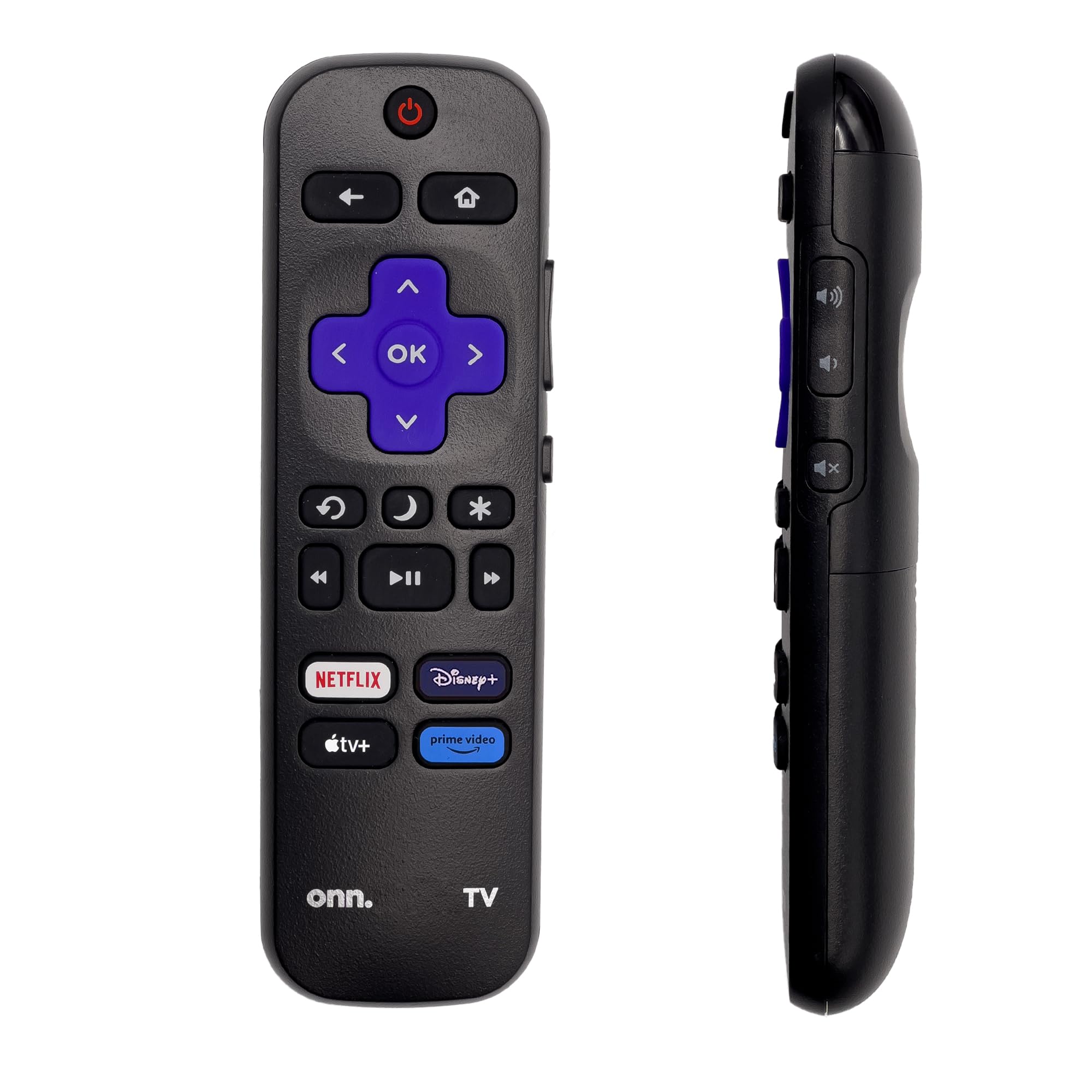
The remote built to sit in your hand exactly where the original Onn one did.
If your television has an Onn badge on it, this is the one aimed straight at you. It is a 15-button infrared remote built only for Onn Roku TV Smart 4K Ultra HDTVs, and the listing carries a long run of matching model numbers — 100005395, 100005396 and 100005397 among a much longer list. Fifteen buttons sits between the 12-button 2-in-1 and the 24-button MOKEMAKE, and that restraint is the point: it is the original layout, not a redesigned one.
Its 40-foot infrared range is the longest here, eight feet beyond the MOKEMAKE pair. No programming and no pairing — two fresh AAA alkaline batteries and it answers. The listing describes an upgraded chip for stable performance, and the shortcut row covers Netflix, Disney+, Apple TV+ and Prime. Compatibility is what the buyer experience centres on, with plenty of owners reporting it matches the original closely.
Two limits deserve a straight mention. This is Onn only: it will not run a Roku Stick, Roku Box, player, game console, Express or another brand’s TV, and it carries no voice search, no headphone jack and no pairing button. Second, the smaller pool of feedback on this one includes at least one unit that arrived dead, so test it the day it lands rather than at the start of a movie night.
The reason to pick it: an exact Onn Roku TV match with 40 feet of range and a recognised model-number list to check against the sticker on your set.
The caveat that matters: it is a single-purpose remote — great on an Onn set, useless on anything else.
Buy it if: your TV says Onn and you want the closest thing to the remote that came with it.
Wrong pick if: you need one remote to run more than one television or a Roku box as well.
Know the Specs
Infrared and line of sight
Infrared is the light-beam style of remote control — it fires a signal the TV’s sensor has to catch, which is why you aim these remotes at the screen. The ranges listed here run from 32 feet on the MOKEMAKE pair up to 40 feet on the Onn OEM unit, and 8 to 10 meters on the two 1-clicktech models. In practice, those numbers describe a clean line of sight in a normal room; a covered sensor or a cabinet door will defeat them regardless of range.
Button counts and shortcut keys
Button count tells you how much of a menu you can reach without digging. The 1-clicktech 2-in-1 keeps it to 12 with six shortcuts that unpack into 12 channels; the Amtone Onn OEM sits at 15; the MOKEMAKE pair has 24; the universal Young Electronics model goes to 40. More buttons means more TV functions within reach and a busier face to learn — fewer buttons means a quicker, cleaner handset for everyday watching.
Batteries and sleeves
Every remote here runs on AAA batteries, and the MOKEMAKE, Gotellx and Amtone listings all state plainly that batteries are not included. A silicone sleeve does two jobs: it adds grip so the remote stops sliding off an armrest, and the glow versions store light so they are easier to spot in a dark room. A strap, as on the Maozhren pack, is the third trick — it lets you hang the remote somewhere visible.
What no remote on this list does
None of these is a voice or headphone remote, and not one of them will pair with a Roku Stick, Streaming Stick or the travel-sized streaming hardware. They are infrared button remotes for Roku TVs and, on several models, Roku box players. If your actual device is a stick, none of these is your replacement — check that before adding anything to a cart.
Common Questions
Will any of these remotes work with a Roku Stick?
Does a replacement Onn Roku TV remote need programming?
What batteries do these remotes take?
Why does my new remote only work when I point it straight at the TV?
How do I know which Onn model number my TV is?
Is a glow-in-the-dark sleeve actually useful?
Can one remote control both my Roku TV and a sound system?
Are shortcut buttons worth having on a replacement remote?
Can I use one of these remotes on a non-Onn Roku TV?
What happens if the replacement remote arrives and does not work?
The Bottom Line
For most people replacing a dead remote, the onn roku tv remote answer is the MOKEMAKE 2 Pack with Glow Cover, because two remotes and two glow sleeves handle both the failure and the loss that follows it. If your set is an Onn and you want the closest match to what came in the box, the Amtone OEM Remote carries the longest infrared reach here and a model-number list you can check against your own TV. And if you are running a Roku box under an older television, the 1-clicktech RT-U07 puts TV power and volume on the same handset. Any of the three works from the start once you add AAA batteries — order them in the same trip.
How we choose
We do not accept paid placement. Every pick is matched to a real buyer and a real use-case; we do not hands-on test units.
Sources
Specifications: manufacturer listings and product documentation. Review insights: verified customer reviews, as of November 2026. Pricing: not shown on this page (it changes often); check the current price via the retailer link.
As an Amazon Associate, Tactical Gear Guy earns from qualifying purchases. This does not affect which products we feature.