Specs are compiled from manufacturer listings and verified buyer reviews and can change over time — please confirm the key details on the product page before buying.
The quick answer: if you want one mouse that gets the thumb-rest shape right and is easy to live with, the Razer Basilisk V3 is the safest buy of the nine below. It puts a dedicated thumb rest under your hand, adds a full set of side controls, and it is the model buyers keep coming back to. What follows is a straight comparison of the rest, sorted by what your hand and your workday actually need.
This guide is built by comparing the manufacturers’ published specifications and the patterns across verified customer reviews, so you get each pick’s real strengths and trade-offs instead of marketing spin.
A thumb rest only helps if the shell fits your palm, so this guide sorts the field by hand size, grip angle and how much control you want. Each entry below is a hands-on-ready shortlist for a mouse with thumb rest, chosen for shape first and features second.
Top Picks


How To Choose The Best Mouse with Thumb Rest
The thumb rest is the one part of a mouse you feel every single second, because your thumb sits there doing nothing until you need a side button. A shallow shelf lets your thumb hang; a deep, angled one lets it lie flat. Get that wrong and every other spec on the box stops mattering.
Match the shell to your hand before anything else
The DELUX Seeker, for instance, is shaped for medium to large hands. Small hands on a big vertical shell end up reaching instead of resting, which defeats the whole point. Read the maker’s stated hand fit where they give one, and treat “one size fits all” as a warning sign.
Angle: flat, tilted or fully vertical
A standard ergonomic mouse keeps your palm roughly flat and nudges the thumb outward. A vertical mouse rolls your hand onto its side. The Contour Unimouse lets you set that roll anywhere from 35° to 70°, while the Keychron M5 fixes it at 47°. Adjustable means you can hunt for the angle that stops the ache; fixed means less to fiddle with.
Buttons and wheels on the thumb side
Side controls live right under your resting thumb, so this is where a good shell pays off twice. A thumb wheel handles horizontal scrolling in wide spreadsheets, and forward/back buttons cover browsing. Count them honestly: a two-button mouse is a comfort tool, not a productivity tool.
Wired, 2.4 GHz or Bluetooth
Wired means no charging and no pairing, which suits a locked-down work machine. A 2.4 GHz dongle is the low-lag wireless choice. Bluetooth skips the dongle but can drop on busy desks. If your desk already has three receivers fighting for space, think about which one you can live without.
Side-by-Side Comparison
| Model | Best For | Buttons | Connection | Hand | Amazon |
|---|---|---|---|---|---|
| Razer Basilisk V3★ Best Overall | All-round gaming and desk work | 11 | USB wired | Right | Amazon |
| Keychron M7Best for Travel | Light wireless travel mouse | 4 | 2.4 GHz / Bluetooth 5.1 / wired | Right | Amazon |
| Microsoft Ergonomic MouseSimplest Setup | Simple plug-in comfort | 2 | USB wired | Right | Amazon |
| Keychron M5 | Vertical tilt plus thumb wheel | 6 | 2.4 GHz / Bluetooth 5.3 / wired | Right | Amazon |
| DELUX Seeker M618XSD | Big hands, screen-on-top feedback | 6 | 2.4 GHz / Bluetooth 5.0 / wired | Right | Amazon |
| Logitech MX Master 3S | Multi-device productivity | 7 | Bluetooth | Right | Amazon |
| Contour Unimouse | Adjustable angle and thumb support | 6 | Wireless USB receiver | Right | Amazon |
| Evoluent VM4L | Left-handed vertical use | 6 | USB wired | Left | Amazon |
| Glorious Model I 2 | Light gaming with swappable sides | 9 | USB wired | Right | Amazon |
Detailed Reviews
1. Razer Basilisk V3 Gaming Mouse
Our pick — 4.5+★ from 10,500+ verified ratings; the strongest balance of quality and price.
A sculpted thumb shelf with eleven programmable buttons within thumb reach.
Eleven programmable buttons is the number that decides this one. That is the highest count in this lineup, and five and a half times the two buttons on the Microsoft Ergonomic Mouse. Every one of them can carry a macro, so push-to-talk, ping and your most-used shortcut all sit within thumb reach instead of on the keyboard.
The thumb rest itself is the reason so many people stay on this shell. The rubberized side grips hold your palm steady during fast swipes. Underneath sits a Focus+ 26K DPI optical sensor (a tracker that reads movement at high resolution), so slow, careful work and fast swipes both land where you point.
Two features earn their place in daily use. The Hyperscroll tilt wheel free-spins until you stop it, then switches to a notched tactile mode for precise steps — great for long web pages, and just as good for cycling weapons. The Gen 2 optical switches are rated to 0.2ms actuation and up to 70 million clicks, which is a long service life on paper.
What earns the top slot
- 11 programmable buttons — the widest control set here
- 26K DPI Focus+ sensor tracks cleanly with no smoothing
- Hyperscroll wheel flips between free-spin and tactile
- 11 RGB lighting zones with 16.8 million colors per zone
Where it asks for care
- The scroll wheel is the recurring gripe — a few units start scrolling on their own over time
- Wired only, so no cable-free desk
- A handful of buyers hit a sticky right click
Best fit: anyone who wants the thumb rest plus the deepest button set available, whether for gaming or heavy desktop shortcuts.
Think twice: if you need a cable-free desk — this one is USB wired with no battery.
2. Keychron M7 Wireless Mouse
A 63 g thumb-rest mouse that runs three to four weeks between charges.
Sixty-three grams is the figure to hold onto. The Microsoft Ergonomic Mouse weighs 104 g, so this one is the lighter of the two on a wrist that moves all day. Toss it in a laptop bag and you will not feel it, which is exactly what a travel mouse needs to be.
It runs on three fronts: a 2.4 GHz dongle for low-lag work, Bluetooth 5.1 for laptops without a free port, and a wired Type-C cable when the battery runs dry. One charge lasts a claimed 70 hours of continuous use, and owners stretch that into three to four weeks between charges in mixed desktop use.
The sensor is the PixArt 3395 chip (a high-grade optical tracker) rated to 26,000 DPI and 650 IPS, with a 1000 Hz polling rate. In plain terms: it refreshes its position with the computer a thousand times a second, so cursor motion stays tight rather than laggy. The thumb rest sits on the side of a smooth top curve that follows your palm.
Small caveat, real one: the ABS shell is functional rather than plush, and the plastic feel is the thing a few owners notice first. That is a materials trade for the low weight, not a fault.
What wins people over: the battery freedom and the weight together — this is the pick that never interrupts a workday to find a cable.
Reach for this if: you split time between a desk, a train and a coffee shop and want one mouse that covers all three.
Look elsewhere if: you want a heavy, planted feel or a rubberized grip surface.
3. Microsoft Ergonomic Mouse
A USB wired thumb-rest mouse with no driver, receiver or battery to manage.
Two buttons and a 104 g body might read as bare next to the Basilisk, and it is — but that is the pitch. There is no driver to install, no receiver to lose and no battery indicator to watch. It is a USB mouse that works the instant it touches the port, on a PC, laptop or desktop.
The shape is where the money went. The shell has a genuine thumb rest cut into the side, and the scroll wheel is tuned for precise web and document navigation. Owners describe the hand fit warmly, and the comfort is the thing that keeps coming up — the same comfort that made this kind of shape a desk staple.
Keep expectations sized on the buttons. Reports on the main clicks split, with the left click occasionally failing to register over time. The scroll wheel gets mixed notes too. Neither is universal, but if you lean on side buttons for shortcuts all day, this is not the tool for that job.
Why it earns its place
For anyone whose priority is simply a comfortable, right-shaped palm rest with zero setup friction, this is the least fussy mouse in the lineup.
The honest limit
Two programmable buttons is the lowest count here outside nothing at all. Productivity power users will run out of assignments fast.
Who it suits: the office worker who wants their hand to stop aching and does not want to think about a mouse again.
Who should pass: shortcut-heavy users who need a bank of side buttons.
4. Keychron M5 Vertical Mouse
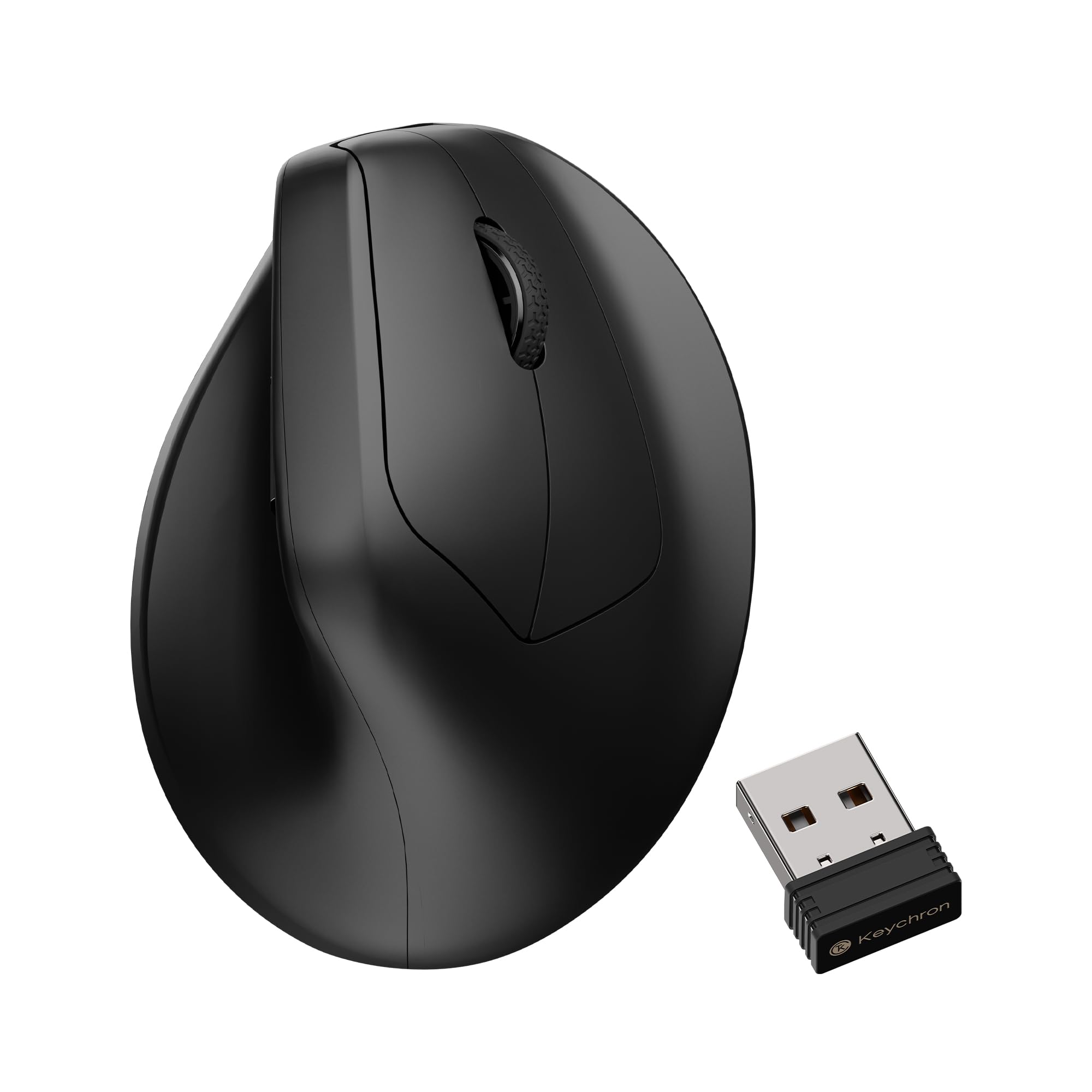
A 47° vertical shell that puts a horizontal scroll wheel under your thumb.
Forty-seven degrees is the angle this mouse is built around. Instead of lying flat, your hand tips onto its side into a handshake position, and the sculpted curve plus a thumb rest on the flank supports the palm. If a flat mouse leaves your forearm twisted by mid-afternoon, this is the shape that changes the pose.
The PixArt 3950 sensor is the sharpest tracker in this lineup at up to 30,000 DPI. Against the Keychron M7’s 26,000 DPI, the M5 has the higher ceiling on paper — though for spreadsheets and browsing, both sit well past the point where you would notice. The 8K polling rate matters more to fast-motion gaming.
Thumb-side control is the practical win. A thumb wheel handles horizontal scrolling in wide documents, and forward/back buttons cover page navigation. The Keychron Launcher web app lets you set DPI, polling rate and macros, with five on-board memory profiles for switching between apps or computers.
The angle cuts both ways: a fixed vertical shape fits some hands beautifully and not others. If you have never used a vertical mouse, give it a week before judging — the switch is a real adjustment.
Under your hand: six buttons, a thumb wheel that doubles as a horizontal scroller, and a light body that makes the angled shape easier to steer.
Pick this one if: you want a true vertical tilt with a thumb wheel and serious sensor headroom.
Leave it if: you want a flat-palm ergonomic shape — the 47° tilt is the whole point here.
5. DELUX Seeker M618XSD Mouse

A vertical shell with a detachable magnetic wrist pad and an OLED status screen.
An OLED display on a mouse sounds like a gimmick until you use it. This one reads out the live DPI value, remaining battery, connection mode and charging status — so you never guess whether Bluetooth or the 2.4 GHz dongle is live. The magnetic detachable wrist pad is the other standout: it lifts your wrist off the desk, and you can pull it off when it gets in the way.
It is shaped for medium to large hands, with a 1000 mAh battery inside. DELUX rates that at up to two weeks of use per charge with the energy-saving mode on, and it supports pass-through charging over the 1.6m braided USB-C cable so you can keep working while it tops up.
Around the thumb rest you get real 4-way scrolling: a main wheel for vertical movement and a thumb wheel for horizontal. Five physical DPI levels (800, 1200, 1600, 2400 and 4000) cover office and design work, and the maximum can go to 4800 through the driver. Six buttons are programmable, though the driver is Windows-only.
The features you’ll actually notice
- OLED screen shows DPI, battery and connection at a glance
- Thumb wheel adds horizontal scrolling to the rest
- Detachable wrist pad lifts the wrist during long sessions
- 1000 mAh battery with pass-through charging
Friction points to know
- Vertical shapes take a few days of adaptation coming from a flat mouse
- The thumb wheel is not supported on Mac OS or some office software
- Some units have reported scroll wheel trouble over time
Strongest for: larger hands and anyone who wants status readouts and a wrist pad built in.
Weaker for: Mac users who want full side-wheel support — check your software first.
6. Logitech MX Master 3S Mouse
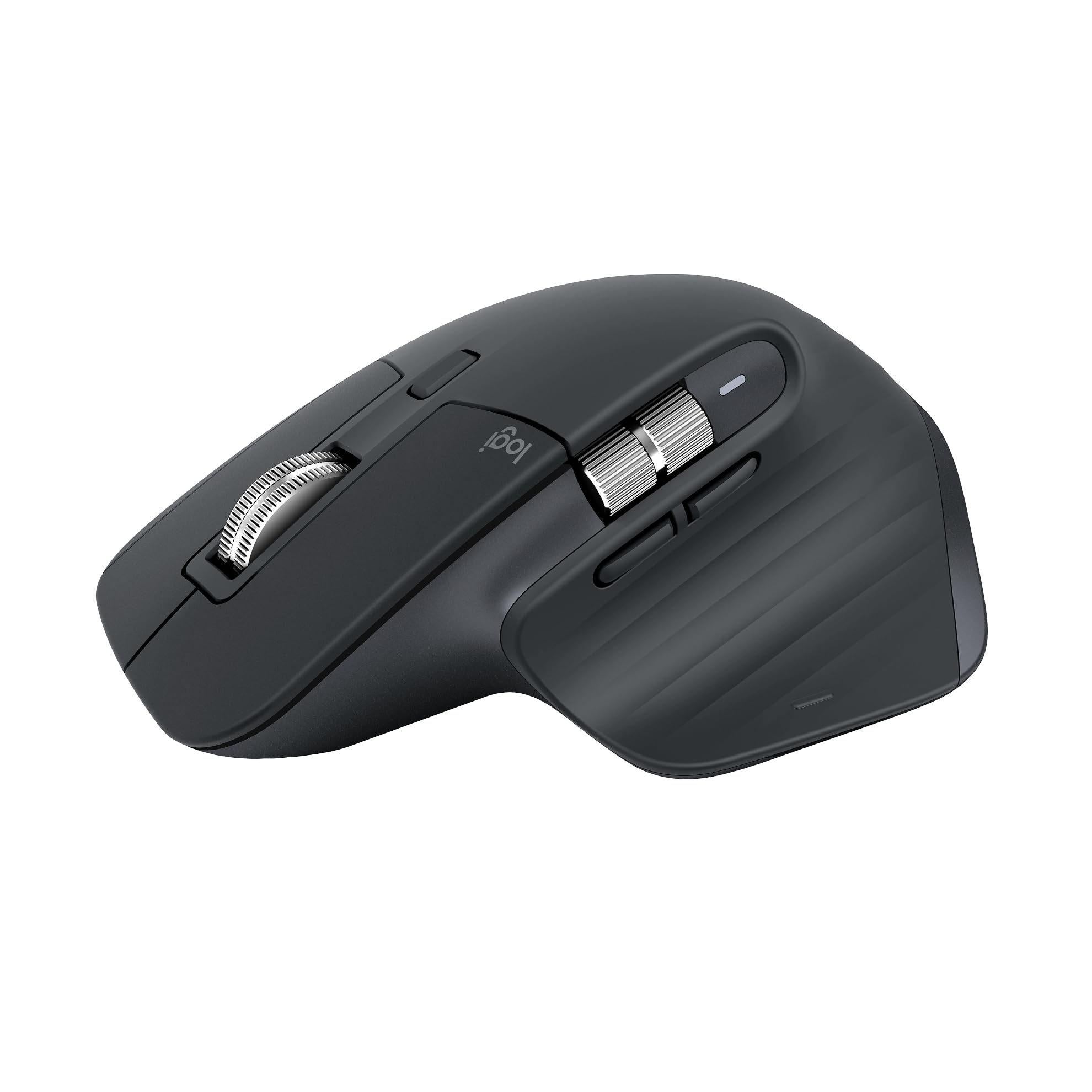
A seven-button productivity mouse with a thumb wheel and gesture button.
Seven buttons, an 8000 DPI sensor that tracks on glass, and a thumb cluster positioned for a natural wrist posture — that combination is why this is the premium pick. The silhouette is sculpted to keep your wrist at a more natural angle, and the thumb controls sit exactly where your resting thumb wants them.
Two numbers carry the daily experience. Quiet Clicks cut click noise by a claimed 90% while keeping the same tactile feel — genuinely useful on an open-plan floor. MagSpeed scrolling runs a claimed 90% faster and 87% more precise than a standard wheel, and it is near silent in free-spin mode.
This is the Bluetooth Edition, so there is no USB receiver or charging cable in the box. You pair it to up to three devices across Windows, macOS, Chrome OS or Linux, and Logi Options+ gives you app-specific button profiles and FLOW cross-computer control so text and files move between machines.
The multi-machine angle: hopping between a work laptop and a personal desktop without touching a dongle is the feature people stay for. Pairing is quick once it holds.
Budget the setup: Bluetooth-only means a dongle-free desk, but a few units drop the link and need re-pairing. If your machine has a flaky Bluetooth stack, this asks for patience.
Buy it for: quiet clicks, glass-surface tracking and three-device swapping across a full workday.
skip it if: you need a dongle in the box or a wired fallback — neither is included here.
7. Contour Unimouse Vertical Mouse

The only mouse here with a thumb rest that slides and rotates to fit your grip.
Most mice give you one fixed thumb position and hope your hand agrees. The Unimouse flips that: a sturdy friction hinge sets the tilt anywhere from 35° to 70°, and the thumb support slides up and down, in and out, and forward and back, plus it rotates. You hunt for the grip instead of adapting to the shell.
For a right hand that has never quite fit a fixed vertical shape, that flexibility is the reason to look here. The adjustable support is designed to take pressure off the base of the thumb, and the right-hand-only shell has six programmable buttons plus a smooth scroll wheel for design, writing and multitasking work.
The rechargeable battery is rated at up to 12 weeks per charge, which is the longest stretch in this lineup, and it connects through a cordless USB plug-and-play receiver for Windows and macOS. Build is post-consumer recycled plastic with a matte finish.
Where the adjustment pays: the ergonomics get consistently strong marks from owners — the ability to change angle through the day is the standout feature of the whole lineup.
One size note: the body runs large, so smaller hands may find it a stretch. Try the thumb support in its lowest inward position first.
Made for: right-handed users who want to dial in tilt and thumb position rather than accept a fixed shell.
Not for: left hands, small grips, or anyone who wants a set-and-forget shape.
8. Evoluent VM4L Vertical Mouse

The left hand finally gets a thumb rest sculpted for it, not flipped over.
Mirrored, not reversed — that is the distinction that matters here. The thumb rest, button layout and lower lip are all built for a left hand, so the thumb sits where it should instead of hanging off the opposite flank. Every other mouse in this lineup is right-handed, which makes this the lone real option for a leftie.
It also has a broad lower lip that gives your pinky somewhere to rest instead of dragging along the desk, and the hand sits on its side in a handshake posture rather than rotated flat. Four pointer speeds are changeable with a speed button on the mouse, and indicator lights show the current setting without opening a settings panel.
Wired USB means no charging and no pairing. Basic buttons and the wheel need no driver on any system that supports USB, which makes it a match for a locked-down work machine. Install the free Evoluent Mouse Manager on Windows and the six buttons each take a job, per application if you want.
What a left hand gets
- Fully mirrored left-hand shell with a true thumb rest
- Six buttons, configurable per app on Windows
- Wired USB works with no driver for basic use
- Lower lip keeps the pinky off the desk
Trade-offs to weigh
- The body runs large — a poor fit for smaller hands
- Buttons are firm and clicky, which can cause accidental double clicks
- Coming off a flat mouse takes a few days of adjustment
The obvious match: left-handed users who want a vertical shell built for their grip, with no charging to manage.
Second look needed: if your hands are on the small side — size is the most consistent knock on this shell.
9. GLORIOUS Model I 2 Wired Gaming Mouse (Black)

A dedicated thumb rest on a 66 g shell that swaps its side buttons to suit you.
Two of the nine buttons are swappable with alternate shapes in the box, so you can change the side profile under your thumb to match how you grip. Combined with a dedicated thumb rest and a 66 g body, this is the light gaming mouse that still gives your thumb a place to sit.
The BAMF 2.0 26K optical sensor (a tracker rated to 26,000 DPI) pairs with Motion Sync technology to line up sensor reads with your movement, and the Ascended Cable uses a weightless paracord material for a near-wireless feel on a wired connection.
DPI Shift and Layer Shift are the two features that separate it from a basic gaming mouse. DPI Shift drops sensitivity instantly for a precise moment, and Layer Shift open up a second programmable layer on the same buttons. That is a lot of control from nine buttons.
The main trade: the ergonomic shape splits opinion — some hands settle in immediately and some find it flat. The swappable side shapes are your adjustment tool.
Heads-up on fit: size runs small for some buyers, so check the shell dimensions against your current mouse if you have larger hands.
For the player: gamers who want thumb support plus swappable side shapes and layer-shift control.
Steer clear if: you want a plush or strongly contoured palm cradle — this shell leans lean and light.
Know the Specs
Thumb Rest and Thumb Support
A thumb rest is a raised ledge or contoured shelf on the side of the mouse that gives your thumb a place to lie instead of hovering. A deeper, angled rest is more comfortable over long sessions, and a movable one (like the Unimouse) lets you change position through the day. Buttons and wheels sit under that rest, so a well-shaped support makes the side controls easier to reach too.
Vertical Angle and Tilt
A vertical mouse rolls your hand onto its side, often described as a handshake position, instead of lying flat. The Keychron M5 fixes its angle at 47°, while the Contour Unimouse lets you set anywhere from 35° to 70°. More tilt is not automatically better — it is about which angle your forearm relaxes into, and most people need a few days to adjust to any change.
DPI, Polling Rate and Sensor
DPI (dots per inch) measures how far the cursor travels per inch of mouse movement — higher values mean a faster cursor for the same hand motion. Polling rate measures how often the mouse reports to the computer, in hertz. A 1000 Hz polling rate refreshes the position many times a second for tighter tracking. For paperwork and browsing, mid-range DPI and a steady polling rate are all you need.
Connection and Battery
Wired USB needs no charging or pairing and works on locked-down machines. A 2.4 GHz dongle gives you low-lag wireless, while Bluetooth skips the dongle but can drop now and then. Battery life is quoted in hours or weeks depending on use, so treat those numbers as an upper bound and charge over a USB-C cable when needed.
Common Questions
Will a thumb rest mouse fix my wrist pain?
How long does a wireless thumb rest mouse run on a charge?
Is a vertical mouse better than a flat ergonomic mouse?
Will the Logitech MX Master 3S work without the USB receiver?
Can left-handed users get a thumb rest mouse?
What does a thumb wheel do on an ergonomic mouse?
Do I need software to program the side buttons?
Will a thumb rest mouse fit a large hand?
Can I use these mice on a Mac?
Should I go wired or wireless for a thumb rest mouse?
The Bottom Line
For most people, the mouse with thumb rest winner is the Razer Basilisk V3 because its eleven programmable buttons and sculpted thumb shelf give you the widest control set without sacrificing comfort. If you want to travel light with a battery that lasts weeks, grab the Keychron M7. And for a left hand that has never had a proper thumb rest, the Evoluent VM4L is the one to reach for. The practical nudge: sort by hand size and shape first, because every one of these nine is only as good as the fit against your palm.
How we choose
We do not accept paid placement. Every pick is matched to a real buyer and a real use-case; we do not hands-on test units.
Sources
Specifications: manufacturer listings and product documentation. Review insights: verified customer reviews, as of November 2026. Pricing: not shown on this page (it changes often); check the current price via the retailer link.
As an Amazon Associate, Tactical Gear Guy earns from qualifying purchases. This does not affect which products we feature.