Specs are compiled from manufacturer listings and verified buyer reviews and can change over time — please confirm the key details on the product page before buying.
Buying server memory is not like buying a stick for a gaming desktop. The wrong module can leave a rack refusing to POST, so buy the ECC Registered DIMM whose part number your motherboard’s manual lists. This guide walks you through nine DDR4 server RAM modules that suit real server and workstation boards, explains what ECC and Registered actually mean in plain words, and shows you which one fits your build.
This guide is built by comparing the manufacturers’ published specifications and the patterns across verified customer reviews, so you get each pick’s real strengths and trade-offs instead of marketing spin.
A server stick is only as good as its fit to your board, so start with the part number rather than the badge on the box. Below you get the specs that decide whether a module boots, the capacity that decides whether it earns its slot, and the honest fit notes that save you a return.
Top Picks


How To Choose The Best DDR4 Server RAM
Server memory fails on compatibility far more often than on quality. A module can be perfectly built and still sit dead in the slot because your board expects Registered memory and you bought Unbuffered, or because the density sits outside what the chipset supports. Read your system’s manual first, then match the module’s own label to it.
Registered versus Unbuffered is the first fork in the road
Registered DIMMs (RDIMMs) carry a small register chip that lets a server address far more memory across many slots, which is why almost every rack server uses them. Unbuffered DIMMs (UDIMMs) do not, and the two cannot be mixed on one board. If your machine already holds RDIMMs, buy RDIMMs — a UDIMM will not boot alongside them.
Read the part number for speed and density
The PC4 label on the module tells you the transfer speed in a shorthand form: PC4-2133P lines up with 2133 MHz, PC4-2400T with 2400 MHz, and PC4-2666V with 2666 MHz. Higher speed matters when your workloads push bandwidth, but a board that only runs at a lower speed will simply clock the stick down, so paying extra for speed your system ignores buys nothing.
CAS latency shapes response timing, not just paper speed
The CAS latency is the delay the memory takes before it answers a request, measured in clock cycles. A module at CL15 answers more quickly than one at CL19 when both run at the same frequency, which is why some buyers trade a little top-end speed for a tighter latency figure. The A-Tech 64GB kit sits at CL15 while the Supermicro module lists a CAS latency of 30.
Side-by-Side Comparison
| Model | Best For | Capacity | Speed | CAS Latency | Amazon |
|---|---|---|---|---|---|
| Samsung M393A4K40BB1-CRC★ Best Overall | Overall rack workhorse | 32GB | 2400 MHz | 17 | Amazon |
| Supermicro Certified MEM-DR432L-CL03-ER26Top Performer | Top-tier validation | 32GB | 2666 MHz | 30 | Amazon |
| SK HYNIX HMA81GR7AFR8N-VKBudget Champion | Small-form budget filling | 8GB | 2666 MHz | 19 | Amazon |
| SK Hynix HMA84GR7CJR4N-VK | High-speed rebuilds | 32GB | 2666 MHz | — | Amazon |
| A-Tech 32GB Kit (2x16GB) | Best value dual-stick kit | 32GB (2x16GB) | 2400 MHz | CL17 | Amazon |
| Crucial 32GB Kit (16GBx2) | Bang-for-buck upgrade | 32GB (16GBx2) | 2133 MHz | 15 | Amazon |
| Hynix HMA82GR7AFR8N-UH | Modest single-stick top-up | 16GB | 2400 MHz | — | Amazon |
| Kingston ValueRAM KVR21R15D4/16 | Entry-level single module | 16GB | 2133 MHz | 15 | Amazon |
| A-Tech 64GB Kit (4x16GB) | Big-capacity dense builds | 64GB (4x16GB) | 2133 MHz | CL15 | Amazon |
Detailed Reviews
1. Samsung M393A4K40BB1-CRC 32GB DDR4-2400 ECC Reg Server Memory
Our pick — 4.0+★ from 100+ verified ratings; the strongest balance of quality and price.
A Supermicro-certified 32GB RDIMM at 2400 MHz in a low-profile PCB that clears tight chassis airflow.
A 32GB module running at 2400 MHz — that is the headline, and it is exactly the density most virtualization hosts want in a single slot. Samsung ships it as a 2Rx4 module, meaning two ranks of memory chips arranged across the module, which is a common configuration for boards that expect dual-rank Registered DIMMs. The module is also Supermicro Certified, meaning it carries Supermicro’s sign-off for a specific hardware family, which takes the guesswork out of part-number matching.
What tends to keep people loyal here is long-term stability in virtualization and database hosts, where a stable stick can run years without a hiccup. The low-profile design also means it will not foul the airflow in tight chassis. At 1.6 ounces the module is light enough to handle without worry, and the low-profile PCB gives memory slots room for better airflow clearance.
The honest catch is the price point and the certification scope. This is a premium-tier module, so if your board is a consumer workstation rather than a certified server, you may be paying for validation that does not apply to your chassis. And as with any RDIMM, it cannot be mixed with Unbuffered or Load Reduced memory — the board will not complete POST. Buy the stick your manual names, and this one earns its slot.
What holds up over the long haul
- 32GB of 2400 MHz capacity that suits virtualization hosts and database servers
- Supermicro Certified, so the part number is already matched to Supermicro hardware families
- Low-profile form factor keeps airflow clear in dense server chassis
- 2Rx4 dual-rank arrangement matches the common Registered server build
What to weigh before you order
- Premium-tier pricing for a single module
- RDIMM only — cannot mix with Unbuffered or Load Reduced memory
- Certification only helps if your board is on the qualified list
Reach for this if: you want a certified 32GB RDIMM for a Supermicro or compatible rack server and you would rather match a known part number than gamble on a generic stick.
Look elsewhere if: your board is a consumer workstation or a memory slot already holds Unbuffered memory — this module will not boot alongside it.
2. Supermicro MEM-DR432L-CL03-ER26 32GB DDR4-2666 ECC RDIMM
Micron-built 32GB RDIMM at 2666 MHz, validated by Supermicro for its own chassis.
This module moves data at 2666 MHz — 25% more bandwidth than the Kingston ValueRAM at 2133 MHz. Both modules hold 32GB, so on paper the difference is purely a speed question: the Micron answers more requests per clock cycle, which shows up in workloads sensitive to throughput. The CAS latency is listed at 30.
The Supermicro Certification comes via the brand — Micron’s silicon inside a Supermicro-branded package, which means the part number is validated for Supermicro hardware. If you are running a Supermicro chassis, that means the qualification is already done for you. The 2Rx4 arrangement and ECC RDIMM format fit the standard Registered server layout, and the module is compatible with server devices.
Two things to note. The CAS latency figure is high compared to modules at the slower speed — the Supermicro Certified lists a CAS latency of 30 versus the Kingston’s 15 — a higher number means more clock cycles of delay before the module responds. Second, the validation tag is worth exactly as much as your board’s presence on the Supermicro qualified list. Outside that, the pricing premium buys you nothing extra.
The verified edge: 2666 MHz at 25% more bandwidth than the Kingston ValueRAM’s 2133 MHz, with Micron silicon already on Supermicro’s qualified list.
The trade-off: CAS latency of 30 means a longer wait per request than a CL15 module at a lower speed; the speed advantage over latency-sensitive workloads is a real consideration.
Best for Supermicro owners: grab this if your chassis is on the qualified list and you want the highest validated speed in the lineup.
Think twice if: you are on a non-Supermicro board — the certification premium does nothing for you there.
3. SK HYNIX HMA81GR7AFR8N-VK 8GB DDR4-2666 ECC RDIMM
A single 8GB 1Rx8 RDIMM at 2666 MHz for topping off an open DIMM slot on a budget.
A single 8GB RDIMM data at 2666 MHz — that is the whole pitch, and it holds up. Where this one earns its keep is as a slot-filler: a 1Rx8 module, meaning one rank of eight-bit chips arranged across the stick, which is a common density for low-capacity Registered memory. If you have an open DIMM slot and 8GB is the gap you need to plug, this fits the bill.
At 2666 MHz it runs at the speed end of the DDR4 spectrum. An 8GB stick at that speed is unusual in a budget module. The ECC RDIMM build and the 288-pin DIMM format match the standard server layout. For populating multiple channels with maximum slots, 8GB modules are the low-density choice most boards accept without fuss.
The honest trade-off is capacity: 8GB is small for modern workloads. Spreading many of these across slots works, but the total memory you can reach is limited by how many slots the board exposes. A single 32GB stick moves the same data in far fewer slots. Buy this when slots are plentiful and capacity per stick is not the constraint.
The 8GB fit: one 8GB RDIMM at 2666 MHz in a 1Rx8 arrangement is a convenient slot-filler for boards that accept low-density Registered memory.
The honest limit: 8GB is modest for modern virtualization — plan for multiple sticks if you need real headroom.
Grab it for a slot-filler: a spare DIMM slot and a budget, this is a clean 8GB RDIMM top-up.
Pass on it if: you need a single stick that carries real capacity — go for a 32GB module instead.
4. A-Tech 32GB Kit (2x16GB) DDR4 2400MHz ECC RDIMM
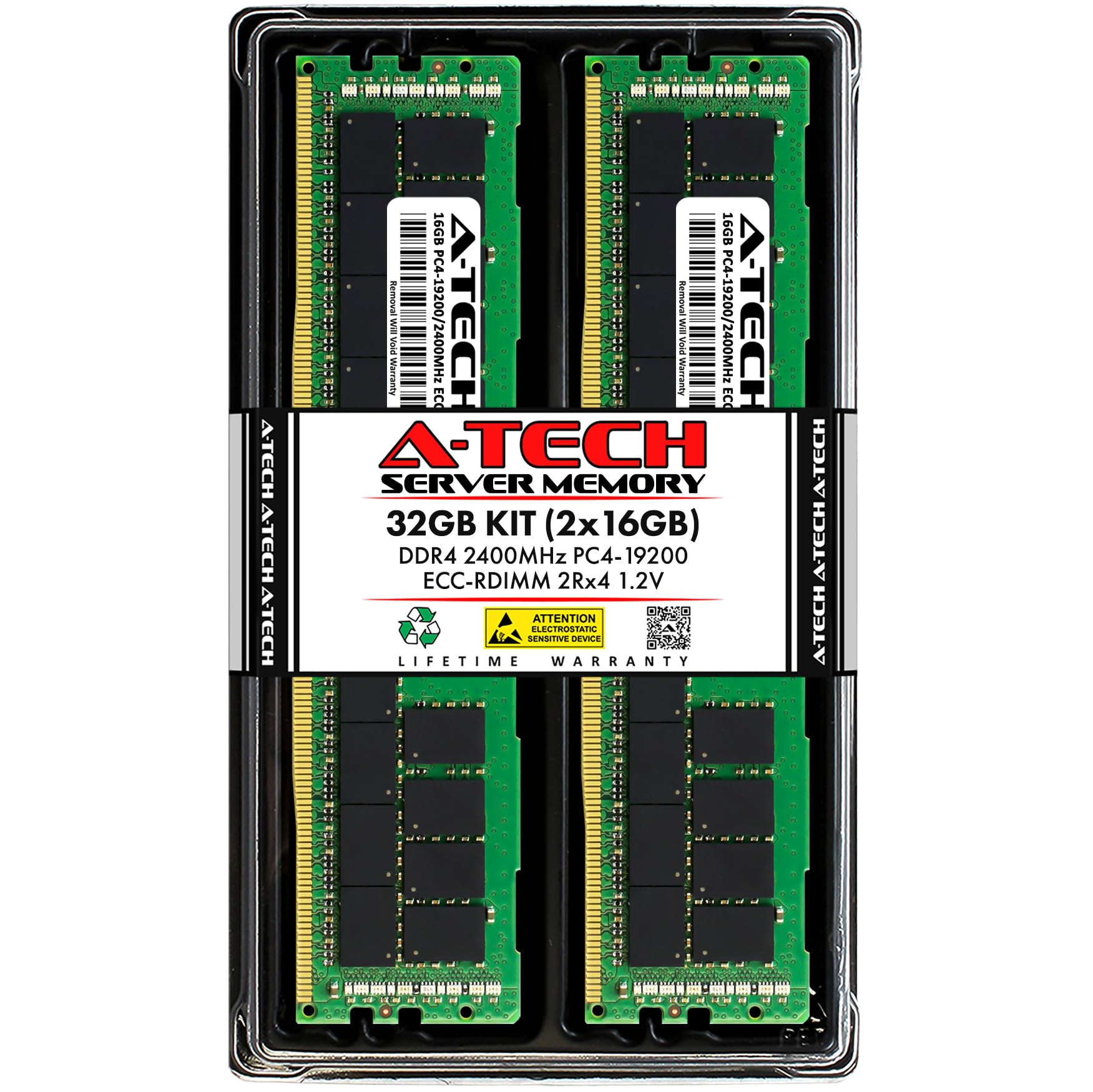
Two factory-matched 16GB 2Rx4 RDIMMs at 2400 MHz, sized to populate a dual-channel pair.
The number that matters here is 32GB split across two modules — 2x16GB — so you populate two slots with factory-matched sticks instead of mixing brands and praying. That matters on dual-channel server boards, where mismatched pairs can trigger training failures at boot. The kit runs at 2400 MHz under the JEDEC DDR4 standard at 1.2V, with a CAS latency of CL17 and a 2Rx4 dual-rank arrangement.
A-Tech builds in a Limited Lifetime Warranty and states that this module is designed for select DDR4 servers and workstations only. The listing carries a large warning that it will not work with desktop or laptop computers of any kind. That matters because the physical shape of the slot is the same but the register circuitry is different — a desktop board will reject it. It also cannot be mixed with ECC Unbuffered, ECC Load Reduced, or Non-ECC Unbuffered memory on the same board.
The A-Tech 32GB kit and the Crucial 32GB kit are close on capacity, but the A-Tech runs at 2400 MHz versus the Crucial’s 2133 MHz — and the A-Tech splits it across two sticks while the Crucial delivers the pair as well. The A-Tech’s CL17 sits between the Crucial’s CL15 and the Samsung’s 17. If your manual lists 2400-speed Registered memory, this is a matched pair at a mid-range position.
The case for the dual-stick kit
- 2x16GB matched pair simplifies dual-channel population
- 2400 MHz speed with a CL17 latency in a 2Rx4 arrangement
- Limited Lifetime Warranty from A-Tech
- JEDEC DDR4 standard 1.2V for lower power draw
The compatibility caveat
- Will not work in desktop, laptop, or any consumer PC — server and workstation only
- Cannot be mixed with ECC Unbuffered, ECC Load Reduced, or Non-ECC memory
- Compatibility varies by system model and installed components
Made for matched-pair builders: two factory-paired 16GB RDIMMs at 2400 MHz is the cleanest way to fill a dual-channel server board.
Skip this if: you are building a desktop — the register circuitry means this kit simply will not boot.
5. Crucial 32GB Kit (16GBx2) DDR4-2133 MT/S (PC4-2133) CL15 dual ranked x4based ECC Registered Server Memory CT2K16G4RFD4213

A 32GB 2x16GB RDIMM kit at 2133 MHz with CL15 latency, priced below the 2400 MHz options.
The headline figure here is 32GB in a 16GBx2 pair at 2133 MHz with a CL15 latency — the tightest CAS latency in this lineup alongside the Kingston. The specification notes a dual-rank, x4-based ECC Registered DIMM running at 1.2V. Crucial markets it for networking, cloud computing, HPC, and big data use, which is fair given the density and speed.
The verdict among owners is that it just works — the consensus is functionality and memory quality, with multiple notes that it boots clean in enterprise chassis. One specific case surfaces repeatedly: it works fine in an HP Proliant DL160 Gen9. It is also a popular Dell Precision T5810 upgrade for adding memory for virtual machines. The recurring complaint is that it will not work in every Dell model — a T130 is the example that pops up. That is a classic compatibility mismatch, and it means you need to check your manual before ordering.
On the comparison front, the A-Tech runs at 2400 MHz versus the Crucial’s 2133 MHz, but the Crucial answers faster per request with CL15 versus the A-Tech’s CL17. The Crucial is likely the better band-for-buck if your board runs at 2133 and you would rather have tighter latency than a higher speed ceiling.
What wins people over: 32GB in a 16GBx2 pair at CL15 with a reputation for booting clean in HP ProLiant and Dell Precision chassis.
The recurring gripe: it will not work in every Dell model — the T130 is the common example — so verify your exact model before ordering.
Best for board-matchers: grab this if your manual lists a 2133 MHz Registered DIMM, and you want the tighter CL15 timing in a matched pair.
Look elsewhere if: you are running a board with a known Crucial incompatibility — check the Dell model first.
6. Hynix HMA82GR7AFR8N-UH 16GB DDR4 PC4-19200 ECC REG DIMM

A single 16GB 2Rx8 Hynix RDIMM at 2400 MHz for NAS builds and X99 boards.
This one comes as a single 16GB RDIMM at 2400 MHz, or a PC4-19200 label in Hynix’s shorthand. The relevant spec is 2Rx8 — two ranks of eight-bit chips — which is a common dual-rank arrangement boards accept. It is ECC Registered memory and the form factor is a DIMM, meaning it fits the standard server slot.
What surfaces most in owner experience is a NAS build running ZFS and an X99 board paired with a Xeon E5-2580 V4 — both report clean, no-issue operation. The one incompatibility that appears is a swap from 4GB sticks to 16GB in the same brand and model where the computer would not recognize them. That is a density-jump issue rather than a defective stick, and it usually points to a BIOS or board limitation not supporting the higher-density module.
The honest fit note: this is a compatibility-sensitive module. If your board supports the 16GB density, it works. If your board’s manual lists a maximum module density below 16GB, it will not recognize the stick no matter what the label says. Check that density ceiling before you order.
Where it fits: a single 16GB RDIMM at 2400 MHz with a 2Rx8 arrangement, suited to NAS builds, X99 boards, and modest server chassis.
The fit note: one 16GB density jump from a 4GB setup failed to register — verify your board’s supported module density before buying.
Reach for this if: you are filling a NAS build or X99 board and need a single 16GB RDIMM.
Check your manual first if: you are stepping up from lower-density sticks — a 16GB module may exceed your board’s ceiling.
7. SK HYNIX HMA84GR7CJR4N-VK 32GB PC4-2666V-R ECC RDIMM

A full 32GB of Hynix at 2666 MHz in a 2Rx4 arrangement — the high-speed rebuild option.
That 32GB capacity at 2666 MHz is the useful combination for throughput-heavy rebuilds. The PC4-2666V-R label maps back to that speed, and the module is a 288-pin DDR4 RDIMM with ECC.
The 2Rx4 dual-rank arrangement is a standard Registered server build and matches boards that expect dual-rank memory. SK Hynix is a tier-one memory maker and the model has a dedicated part number, so replacement matching is straightforward. The module is compatible with server devices.
Where this sits versus the Supermicro Certified Micron is interesting. Both hit 2666 MHz and both hold 32GB. The Hynix skips the Supermicro certification but also skips the validation premium — you get the same speed and capacity without paying for a badge that only means something on Supermicro hardware. If your board is a Dell, HP, or custom build, this is the more honest match.
Why it earns a slot
- 32GB at 2666 MHz — 25% more bandwidth than the Kingston’s 2133 MHz
- 2Rx4 dual-rank arrangement fits standard Registered server boards
- Tier-one Hynix silicon with a dedicated, findable part number
- 288-pin DDR4 RDIMM with ECC for server-grade error checking
Where it falls short
- No Supermicro certification — you verify the fit yourself
- Registered only, so it cannot mix with Unbuffered or Load Reduced memory
The high-speed rebuild pick: grab this if your board runs at 2666 MHz and you want full 32GB capacity without the certification premium.
Think twice if: your board maxes out at a slower speed — paying for 2666 MHz your system clocks down to 2133 buys nothing.
8. Kingston ValueRAM KVR21R15D4/16 16GB DDR4 ECC Reg DIMM

A single 16GB Kingston module at a CL15 latency — the entry-level stick that boots without drama.
Kingston’s ValueRAM line comes in as a 16GB 2133 MHz DDR4 module with a CL15 CAS latency and a DR x 4 — double-rank, four-bit — arrangement across 288 pins. The listing notes it runs at a lower voltage for power savings, and the manufacturer claims DDR4 reduces power use while raising bandwidth. A lifetime warranty and free technical support back the module.
Reliability is what carries the Kingston name, and the pattern is a good one: it runs clean in a Dell PowerEdge T430, in an Asus Z10PE-D16WS with four of them running, and in a T430 alongside 2x16GB of original memory. Free technical support is a genuine plus for builders who need help with part-number matching. The single 16GB stick is a useful gap-filler when you have room in the slots.
Two things to note. The 2133 MHz speed is the slower end of DDR4, so if your board supports 2666 you are leaving bandwidth unused. And the CAS latency of 15 is tighter than the Supermicro’s CL30 — the Kingston answers more quickly per request even at the slower speed. One occasional arrival is a DOA stick, so install and test inside the return window. The DR x 4 arrangement is a fit note: verify your board accepts double-rank x4 modules.
What Kingston gets right: a CL15 latency in a 16GB RDIMM that boots in Dell PowerEdge T430 and Asus Z10PE-D16WS chassis with a lifetime warranty behind it.
The trade-off: 2133 MHz caps bandwidth at the slower end of DDR4 — pair it only with a board that runs at that speed.
Best for board-matchers: reach for this if your manual lists a 2133 MHz Registered DIMM and you want a single 16GB stick with a lifetime warranty.
Look elsewhere if: your board supports faster memory — you would be leaving bandwidth on the table.
9. A-Tech 64GB Kit (4x16GB) DDR4 2133MHz ECC RDIMM

Four matched 16GB sticks — 64GB of Registered memory in one box for virtual machine hosts.
A 64GB kit built from four matched 16GB modules — that is the defining number, and it is eight times the total capacity carried by the single 8GB Hynix stick. Each module is a DDR4 DIMM at 288 pins running at 2133 MHz under the JEDEC standard at 1.2V, with a CL15 CAS latency. The arrangement is 2Rx4 — dual-rank, four-bit — which is the standard Registered server build.
Where this earns its place is virtual machine hosting and memory-heavy workstations. Four matched sticks simplify populating every memory channel the board exposes, which matters because memory channel guidelines directly affect throughput. A-Tech builds in a Limited Lifetime Warranty, and the kit is validated for select DDR4 servers and workstations. As with the A-Tech 32GB kit, this one will not work in desktop or laptop computers of any kind, and it cannot be mixed with ECC Unbuffered, ECC Load Reduced, or Non-ECC Unbuffered memory.
The catch is the speed ceiling. At 2133 MHz this kit sits at the low-speed end, so a board that runs at 2666 will run the modules down-clocked. That is fine if you are prioritizing raw capacity — 64GB at 2133 beats 32GB at 2666 for holding virtual machines. But if throughput is your bottleneck and you have slots to spare, a faster 2666 module is the right pick.
Where 64GB pays off
- Four matched 16GB modules for 64GB total — high capacity in one box
- CL15 latency at 2133 MHz
- JEDEC DDR4 standard 1.2V for lower power draw
- Limited Lifetime Warranty from A-Tech
The honest limits
- 2133 MHz caps bandwidth at the entry end of DDR4
- Will not work in desktop, laptop, or any consumer PC
- Cannot mix with ECC Unbuffered, ECC Load Reduced, or Non-ECC memory
For capacity-first builders: grab this when virtual machine memory is your bottleneck and you want 64GB of matched Registered memory in one order.
skip it if: your bottleneck is throughput rather than total memory — a 2666 MHz module moves data faster.
Know the Specs
ECC and Registered — why server memory is different
ECC stands for error-correcting code, a check that catches and fixes single-bit errors in memory so a server can run for long stretches without a corrupted result. Registered memory adds a small register chip between the memory chips and the memory controller, which lets a server address many more modules across many slots. A Registered DIMM (RDIMM) and an Unbuffered DIMM (UDIMM) cannot be mixed on one board. If your manual lists RDIMMs, buy RDIMMs — a UDIMM will not boot alongside them.
Speed in MHz and CAS latency in cycles
Speed in MHz is how many million transfer cycles the module performs each second — 2400 MHz does more per clock than 2133 MHz. CAS latency is how many clock cycles the module waits before responding, so a CL15 module answers in fewer cycles than a CL19 one. The two numbers interact: a slower module at a tight latency can answer more quickly than a faster module at a loose latency. Paying for speed your board clocks down to is wasted, so match the speed to the manual, then choose the tighter latency at that speed.
Rank, density, and the PC4 label
Rank describes how the chips are organized on the stick — 1Rx8 is one rank of eight-bit chips, 2Rx4 is two ranks of four-bit chips. Boards accept certain rank counts per channel, and exceeding the limit can stop the system from booting. The PC4 label is the bandwidth shorthand: PC4-17000 maps to 2133 MHz, PC4-19200 to 2400 MHz, and PC4-21300V to 2666 MHz. Read it to confirm the speed before you match a part number.
Mixing rules you cannot break
Registered memory cannot mix with Unbuffered or Load Reduced memory on the same board, and the system will fail to POST if you try. When adding a module to an existing build, match the type (RDIMM to RDIMM), the speed, and ideally the rank, to what is already installed. Mixing brands at the same speed usually works; mixing types does not. Check your manual’s channel guidelines to install in the right slot order, and populate channels evenly for the best throughput.
Common Questions
Can I put ECC Registered server RAM into my desktop PC?
What is the difference between RDIMM and UDIMM server memory?
How do I know which speed of DDR4 server RAM my board supports?
Can I mix my existing server RAM with a new stick of a different brand?
Does a lower CAS latency number actually improve server performance?
What does the 2Rx4 or 1Rx8 on a server RAM module mean?
Will a 32GB module work in a board that currently holds 4GB sticks?
Why does my server show less memory than the total capacity I installed?
Does DDR4 server RAM use less power than older DDR3?
Can I install server RAM one stick at a time or must I fill every slot?
The Bottom Line
For most server builds, the ddr4 server ram winner is the Samsung M393A4K40BB1-CRC 32GB DDR4-2400 LP ECC Reg because it pairs a certified part number with 32GB at 2400 MHz — the density most virtualization hosts want in a single slot — and the low-profile board keeps airflow clear. If you want the fastest validated speed and your chassis is Supermicro, grab the Supermicro Certified Micron MEM-DR432L-CL03-ER26 at 2666 MHz. And for a matched dual-stick kit at a mid-range position, the A-Tech 32GB Kit (2x16GB) fills a channel pair cleanly.
The one quiet nudge worth making: if you are buying a single 32GB RDIMM for a rack server, the Samsung is the safest first stop — its part number is already validated for Supermicro hardware, so you are matching a known stick rather than gambling on a generic one.
How we choose
We do not accept paid placement. Every pick is matched to a real buyer and a real use-case; we do not hands-on test units.
Sources
Specifications: manufacturer listings and product documentation. Review insights: verified customer reviews, as of November 2026. Pricing: not shown on this page (it changes often); check the current price via the retailer link.
As an Amazon Associate, Tactical Gear Guy earns from qualifying purchases. This does not affect which products we feature.