Specs are compiled from manufacturer listings and verified buyer reviews and can change over time — please confirm the key details on the product page before buying.
A Thunderbolt hub exists to kill cable clutter without killing speed, and the one you want is the CalDigit Element 5 Hub. It gives you nine ports, four of them Thunderbolt 5 at 80Gb/s, and 90W of laptop charging over one cable. If you run a MacBook and a pair of displays all day, that combination is the closest thing to a do-everything box on this list.
This guide is built by comparing the manufacturers’ published specifications and the patterns across verified customer reviews, so you get each pick’s real strengths and trade-offs instead of marketing spin.
The nine hubs below split into two camps: small travel-friendly boxes with three or four Thunderbolt ports, and desk anchors that add Ethernet, card slots and four-display support. The trick is matching the port count and power wattage to the laptop you actually own before you spend a cent on a thunderbolt to thunderbolt hub.
Top Picks

How To Choose The Best Thunderbolt to Thunderbolt Hub
Most buyers treat a Thunderbolt hub as a USB-C hub with a fancier label, and that is the wrong read. They are not the same thing. A Thunderbolt hub passes through the full Thunderbolt pipe — 40Gb/s of data, and in the newest boxes up to 80Gb/s — so a fast external SSD runs at its rated speed instead of crawling. A plain USB-C hub shares a much narrower lane and often drops to USB 2.0 speeds on the extras.
Match the wattage to your laptop’s own charger
Every hub here lists a power delivery number: 60W, 85W, 90W, 100W, 130W. That number is how much electricity the hub pushes back into your laptop while it works. A 16-inch MacBook Pro ships with a much thirstier charger than the hub can supply, so it will charge slowly or hold steady instead of filling up. A MacBook Air sips far less, so even a 60W hub keeps it topped off. Read the wattage on your laptop’s own charger, then pick a hub rated at or above that number.
Count the ports you will actually plug in
A hub with three downstream Thunderbolt ports lets you chain a display, an external SSD and a second display off one cable. Add USB-A ports for keyboards and mice, and Ethernet if your Wi-Fi is unreliable. Desk-bound buyers usually want Ethernet and card slots; travellers want a box that fits a sleeve and does not need a wall outlet for every accessory.
Check the display limits before you buy
Every hub page carries a note about which chips drive how many screens. Base M1, M2 and M3 Macs generally top out at one external display. M-Pro and M-Max chips, plus most Windows Thunderbolt laptops, will run two or more. Thunderbolt 3 laptops on a Thunderbolt 4 hub often drop to a single display too. Display limits are the top reason these hubs get returned, so check your chip’s spec before buying.
Decide if you need Thunderbolt 5 or Thunderbolt 4
Thunderbolt 4 tops out at 40Gb/s. Thunderbolt 5 pushes to 80Gb/s, and can shift as much as 120Gb/s toward high-refresh displays when you connect them. Only one hub here is Thunderbolt 5. If your laptop is Thunderbolt 4, a Thunderbolt 4 hub is all you can use — buying the newer box does not open up the extra speed on an older port.
Side-by-Side Comparison
| Model | Best For | Thunderbolt Ports | Power Delivery | Max Display | Amazon |
|---|---|---|---|---|---|
| CalDigit E5★ Best Overall | Fastest overall hub | 4 x Thunderbolt 5 | 90W | Triple 4K on Windows | Amazon |
| Amazon Basics TBT4 DockBudget Entry | Budget dual-display desk | 3 downstream TBT4 | 85W | Dual 4K@60Hz | Amazon |
| Plugable 5-in-1Travel Ready | Compact travel hub | 3 x Thunderbolt 4 | 15W downstream | Single 8K or dual 4K | Amazon |
| OWC Thunderbolt Hub | Film-set data speed | 3 x Thunderbolt 4 | 60W | Single 8K or dual 4K | Amazon |
| Plugable TBT4-UD5 | 13-port full workstation | 1 downstream TBT4 | 100W | Dual 4K HDMI | Amazon |
| SABRENT HB-TBT4 | Light, tough travel | 3 x Thunderbolt 4 | 60W | Dual 4K or single 8K | Amazon |
| UGREEN Revodok Max 208 | Ethernet plus 85W | 3 downstream TBT4 | 85W | Dual 4K or single 8K | Amazon |
| Dell Pro SD25TB4 | Four displays | 2 x Thunderbolt 4 | 130W Dell / 96W others | Up to 4 x 4K | Amazon |
| Dell WD22TB4 Bundle | Modular Dell fleets | 2 x Thunderbolt 4 | 90W | 2 x DP 1.4 plus HDMI 2.0 | Amazon |
Detailed Reviews
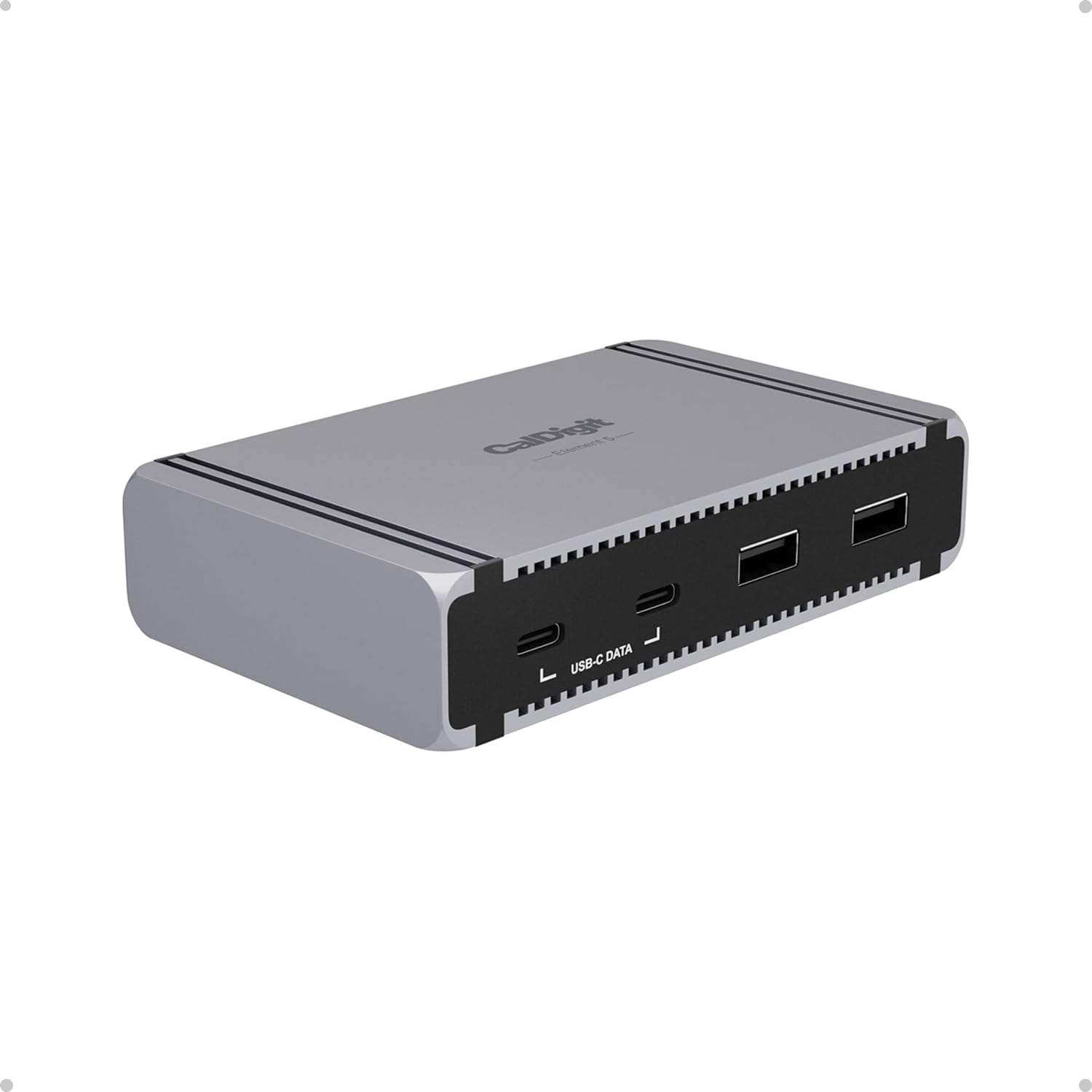
1. CalDigit E5 – Thunderbolt 5 Element 5 Hub
Our pick — 4.5+★ from 150+ verified ratings; the strongest balance of quality and price.
Four Thunderbolt 5 ports at 80Gb/s turn one cable into nine.
The headline here is bandwidth — 80Gb/s in both directions, and up to 120Gb/s pushed toward high-refresh displays. That is double what a Thunderbolt 4 hub can carry. It means an external Thunderbolt SSD moves files at up to 6,200MB/s through the 64Gb/s PCIe lanes on each of those four Thunderbolt 5 ports. If you shuttle 8K footage between drives for a living, the 80Gb/s pipe is what cuts the wait.
Nine devices hang off a single cable and all of them stay powered. The 180W power supply feeds a steady 90W into your laptop no matter how much is plugged in, so the battery does not sag when the hub is loaded. There is even Offline Charging, which tops up a phone or tablet while the hub is unplugged from the computer. On the display side, Windows Thunderbolt 5 machines can drive three 4K@144Hz screens, and Macs run two 6K@60Hz or 8K@60Hz panels, or dual 4K@240Hz. That beats the Amazon Basics dock’s dual 4K@60Hz ceiling outright.
What wins people over is the sheer solidity — build quality comes up repeatedly in positive terms, the enclosure is described as flawless, and the port spread earns praise as genuinely versatile. The catch is heat. The unit warms up under a full load of devices, and a share of owners find the warming uncomfortable even though it never interfered with performance. It is also a large outlay for a hub, so if you are on a Thunderbolt 4 laptop you gain almost none of the extra speed. Check your laptop’s Thunderbolt generation before paying for Thunderbolt 5 speed.
Why this wins the top slot
- Four Thunderbolt 5 ports at 80Gb/s, shifting up to 120Gb/s to displays
- Steady 90W laptop charging from a 180W supply, loaded or not
- Nine ports, all fully powered, with offline charging for phones
- Triple 4K@144Hz on Windows, dual 6K or 8K on Macs
Where it asks for patience
- Runs warm under a full device load
- Thunderbolt 5 or USB4 v2 host needed for the full speed
- The priciest box on this list, and base M1-M3 Macs stay at one display
Reach for this if: you own a Thunderbolt 5 laptop and move large files all day, or you want one box to feed three high-refresh screens.
Think twice if: your laptop is Thunderbolt 4, or you want a hub you can slip into a jacket pocket — this one wants a desk.
2. Amazon Basics Thunderbolt 4 Docking Station
The plainest path to two 4K screens and a charged laptop.
Four ports, dual 4K@60Hz video and 85W of charging — that is the whole pitch, and it is enough for a lot of desks. Three of those ports are downstream Thunderbolt 4, so you can hang two monitors and an SSD off one cable, plus a single USB-A 3.1 port for an older keyboard or mouse. Setup is genuinely plug-and-play: connect the included black Thunderbolt 4 cable to the front port, and Windows or macOS picks it up with no drivers to install.
Here is the number to watch. Dynamic power delivery tops out at 85W, and the dock activates overload protection if your laptop asks for more. That means a machine with a thirstier charger can get cut off rather than charged slowly. Check your laptop’s rated charger wattage before you buy, because 85W is the line between charging and overload cutoff here. It also will not work with Linux or Chrome OS laptops, and it caps out on base M1/M2 MacBooks at one display.
The desk presence is quiet and compact, and the value is strong for a certified Thunderbolt 4 box. Owners lean on the plug-and-play setup and the price, and the general feeling is that functionality is excellent when it works. The recurring gripe is long-term reliability — a portion of USB-C ports reportedly give up after a couple of months, and AMD laptops trip compatibility far more often than Intel or Apple ones. Buy it for a Windows or Mac desk where 85W covers your charger, and test the ports inside the return window.
The honest read: a narrow, honest hub that does dual 4K and 85W charging without drama — as long as your laptop’s charger does not out-ask it.
Who it fits: a home-office worker with a mid-power laptop and two 4K monitors, who wants Thunderbolt 4 for the least money here.
Suits you if: you run Windows 10 or a non-M1/M2 MacBook, need dual 4K, and your charger is 85W or lower.
Not for: Linux or Chrome OS machines, AMD laptops prone to handshake quirks, or anyone whose laptop charger runs well past 85W.
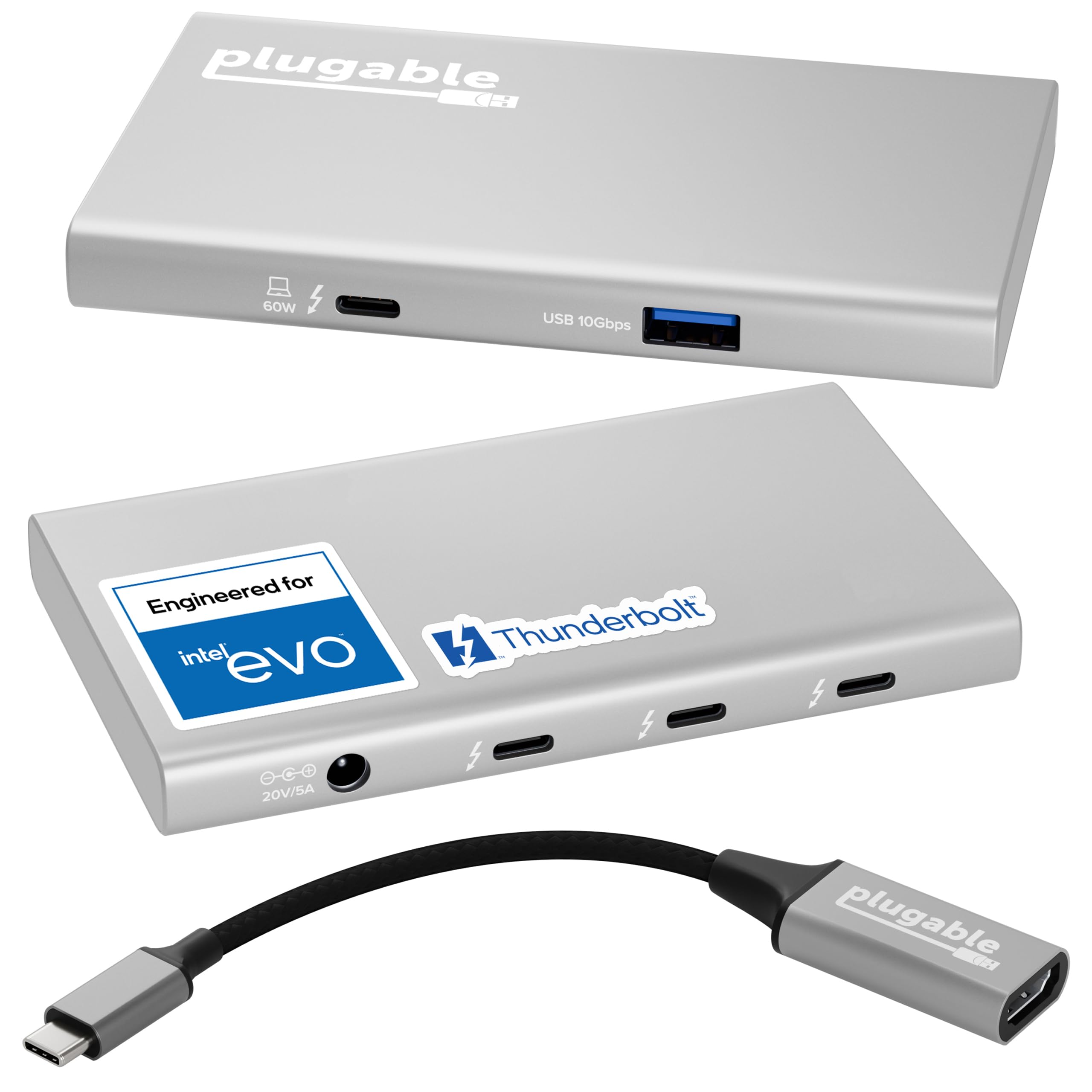
3. Plugable 5-in-1 Thunderbolt 4 Hub
The only hub here with Intel’s own EVO certification stamped on it.
Built on the Intel Goshen Ridge chipset and certified as Engineered for EVO by Intel, this is the most vetted silicon on the list. It runs 40Gbps and splits into three Thunderbolt 4 ports plus a 10Gbps USB-A port, and it comes with a USB-C to HDMI adapter in the box so you can hang a monitor without buying extra cables. Brings up to 2x 4K screens at 60Hz, one 8K screen, or a single 6K on Apple silicon Macs.
Where it loses ground is transit. At 0.87 kg and stepping out at 8.35″L x 5.59″W x 2.17″H, it is a fixed-desk box, and the power brick is described by plenty of owners as huge. The weight gap to the OWC below is real — 0.87 kg versus 0.96 kg — but the portability story is muddied by that brick, and several travellers say it is not really a bag item. Buy it as a small desk hub, not a commuter accessory.
The 3x Thunderbolt 4 downstream ports are the real draw for people who edit from external drives, and the standalone USB-C charging mode is handy when the laptop is elsewhere. Functionality is the thing everyone raves about, and the included HDMI adapter plus the USB-A port sit next to it as the second-most-praised note. The honest caveat is longevity: when it fails, it fails abruptly, with the occasional owner finding it dead one morning. The two-year coverage and lifetime support are genuine comfort there.
Keeps earning its spot
- Intel EVO-certified on the Goshen Ridge chipset
- 3x Thunderbolt 4 ports plus a 10Gbps USB-A port
- USB-C to HDMI adapter included in the box
- 2-year warranty with lifetime support
Worth knowing before you buy
- The power brick earns the “huge” label from owners
- 8.35″ x 5.59″ x 2.17″ footprint suits a desk, not a sleeve
- Abrupt failures get mentioned by a minority
Buy this one if: you want the most certified silicon here and a spare HDMI adapter thrown in for a small desk setup.
Skip the idea of: carrying it around — the brick and the footprint are built to stay put.
4. OWC Thunderbolt Hub 5-Port
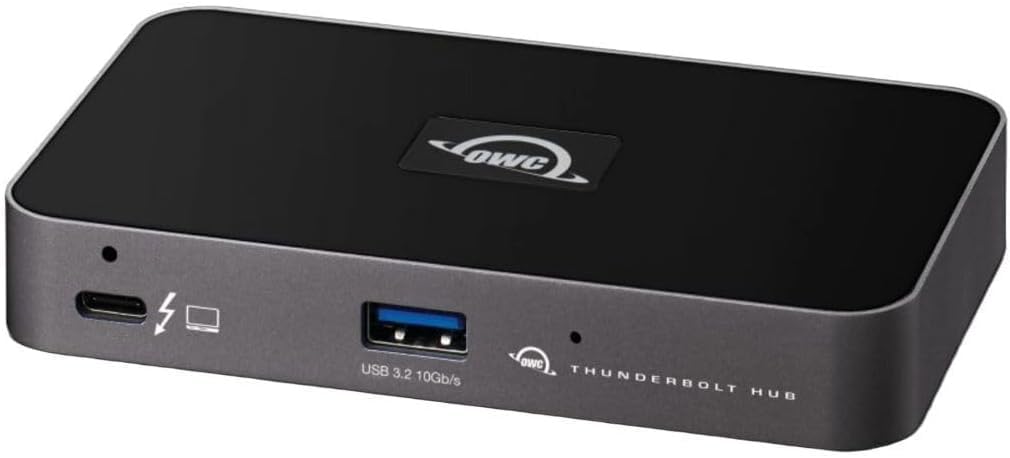
Film crews lean on this one for 4500 MB/s of read and write.
Real owners hit data speeds of around 4500 MB/s for reads and writes through this box, which is the kind of number that matters when you are dumping a card of footage on set. Three Thunderbolt 4 ports at 40Gb/s carry the load, with a single USB-A 3.2 Gen 2 port at 10Gb/s for a legacy drive. One 8K display or two 4K displays come out the other side, and the adjustable LED and Kensington Nano slot make it feel like working gear rather than consumer plastic.
It is heavier than the Plugable 5-in-1 above — 0.96 kg versus 0.87 kg in the same 2.95″L x 9.25″W x 5.71″H body — and it carries a 60W power budget. That 60W feeding the laptop is a step below the CalDigit’s 90W, so a large laptop will not charge at full speed here. If your machine is a MacBook Air or a mid-tier Windows laptop, 60W is fine; check your charger before assuming.
The metal build is the consensus win — buyers describe it as well-built, and the things people like about it are function and speed in that order. The recurring gripe is port count. Seven USB-C total is what you actually get, and several owners want more. Alongside that, some hubs arrive flaky or die partially over time, and cables feel loose at the port. It is working gear with a short spec sheet, not a do-everything desk anchor — pick it for fast storage and a clean display, and go elsewhere for Ethernet or card slots.
The one number that sells it: 4500 MB/s reads and writes, which is why it turns up on shoot days and editing bays.
The trade-off worth sizing: 60W of laptop charging and seven USB-C ports total make it a specialist, not a generalist.
For the storage-heavy user: photographers and editors who push large files and want real 40Gb/s throughout.
Look elsewhere if: you need Ethernet, card readers, or 90W-class laptop charging — this box does not chase those.
5. Plugable Thunderbolt 4 Dock with 100W Charging
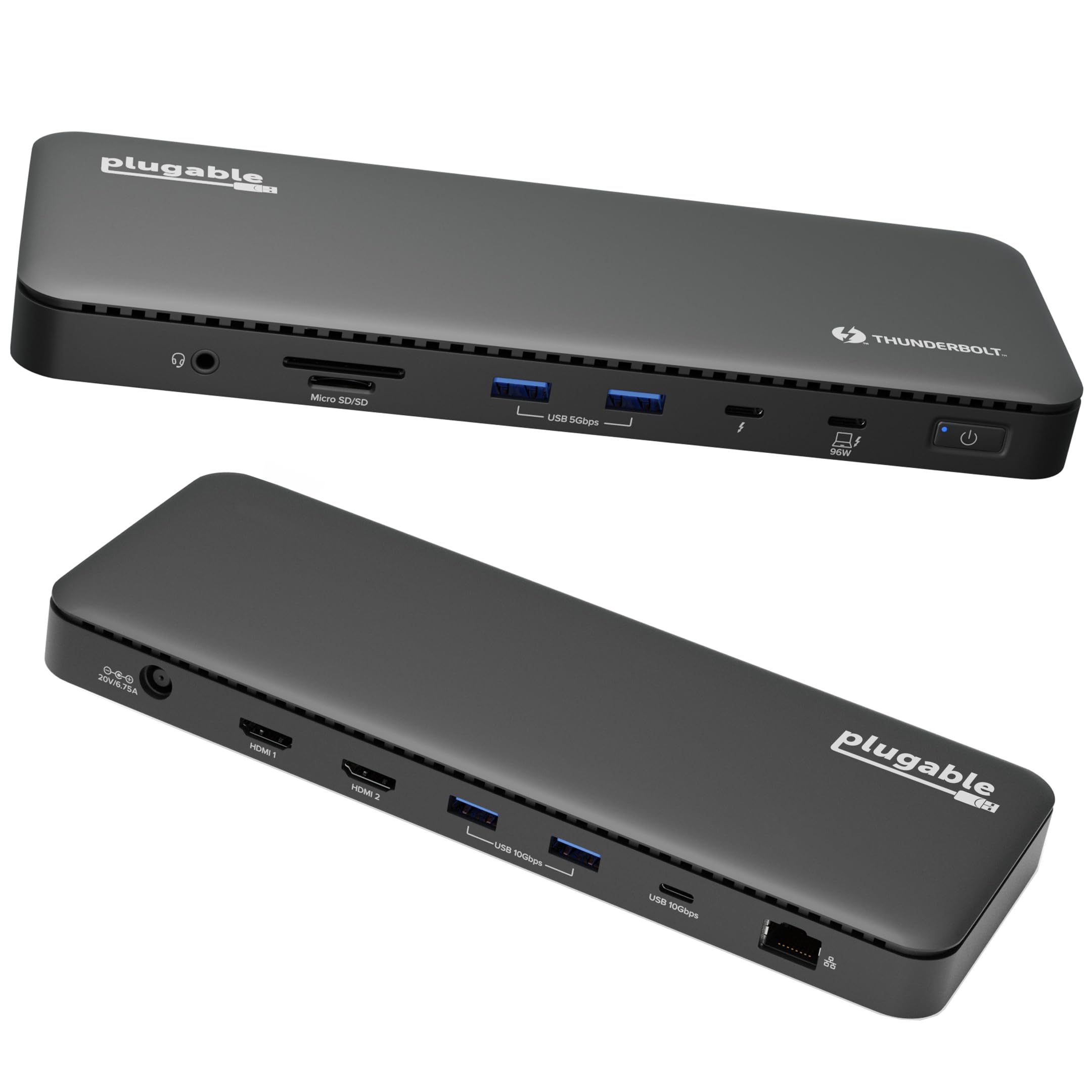
Thirteen ports and 100W, for a workstation that never unplugs.
Two HDMI ports, a downstream Thunderbolt 4 port at 40Gbps, four USB ports, a USB-C port, SD and microSD readers, a headphone jack, Gigabit Ethernet and a K-lock — thirteen in all. That is the spread of a proper desk dock. Power delivery hits up to 100W with 96W certified, which is enough to keep most 14-inch laptops topped up, and the Intel EVO certification means it has been run through Intel’s own compatibility gauntlet. Dual 4K@60Hz HDMI comes from the start, so you can hang two monitors without adapters.
Setup is the quiet hero. There is no software to install, and owners who plug it in the first time usually find their monitors wake up straight away. The catch is that it is a fixed-desk presence at 2.4 pounds and 8.9 inches long, and Thunderbolt 3 or USB-C laptops drop to a single display on it. Base M1 and M2 Macs do too, and base M3 chips need clamshell mode to reach two. Confirm your chip before counting on dual screens.
The everyday verdict is that this is a workhorse that usually just runs. Functionality is the note that carries it, and the port capacity — multiple ports front and back — sits right behind. The worry to keep in mind is long-term reliability, because some units quit after first use or a port gives out within the year, and a handful report intermittent disconnects. If the hub is driving mission-critical screens, that is the thing to stress-test in the return window, not a reason to walk away from a box that fits the desk this well.
The workstation case
- 13 ports including Ethernet, SD/microSD and audio
- Up to 100W charging (96W certified)
- Dual 4K@60Hz HDMI without adapters
- No drivers to install, and Intel EVO-certified
Where it asks questions
- 2.4 pounds and 8.9 inches — built to stay on a desk
- Thunderbolt 3 and USB-C laptops get one display
- Base M1, M2 and M3 Macs cap out at one or clamshell-only dual
Pick it for: a permanent dual-monitor desk where you want Ethernet, card readers and audio on one cable.
Keep in mind: older Thunderbolt 3 laptops and base M-chip Macs will not see two monitors from it.
6. SABRENT Thunderbolt 4 Hub (HB-TBT4)

198 grams of aluminum that still runs dual 4K out of a bag.
This is the lightest box on the list at 198g, and it does not pay for that in ports. Three Thunderbolt 4 ports at 40Gbps come out of the aluminum chassis, which doubles as a heat sink, and the package includes a 15.7″ certified Thunderbolt 4 cable and a 20V/6A power supply. Video support runs to dual 4K@60Hz, a single 4K@144Hz, or 5K/6K/8K@60Hz with DSC — as long as your host supports DisplayPort Alt Mode and DSC.
Charging is the compromise. 60W of power delivery through PD3.0 keeps a MacBook Air or a mid-range Windows laptop going, but a bigger machine will not fill at full speed. Owners are split on the size, with the little hub itself called compact while the power brick gets called disproportionately large. If you are backpacking a laptop anyway, the brick tag-along is the thing to weigh.
Compatibility is where it shines — Apple’s Mac Mini M4 and 2024 MacBook Pro both come up as working without fuss, and it plays nicely with Dell laptops too. Build quality earns solid notice. Where a few owners flinch is port versatility, with some setups finding the three downstream ports tight, and a couple of connectivity hiccups. It is not a KVM switch, so if you want to flip one keyboard and monitor between two machines, look elsewhere. For a light, tough, take-anywhere hub at 40Gbps, this one is a clean fit.
What lands well: 198g of aluminum with three Thunderbolt 4 ports and a certified cable in the box.
The honest hitch: 60W charging plus a brick that owners describe as large relative to the tiny hub itself.
Best for: a MacBook Air or mid-tier Windows laptop owner who wants real Thunderbolt 4 on the move.
Not the tool for: KVM switching between two PCs, big-laptop fast charging, or anyone needing Ethernet.
7. UGREEN 8-in-1 Thunderbolt 4 Docking Station

Ethernet, three USB-A ports and an 85W GaN charger in one box.
Eight ports is the count, but the useful detail is the mix. Three Thunderbolt 4 ports at 40Gbps each deliver 15W downstream, three USB-A 3.2 ports at 10Gbps handle drives and keyboards, and there is a gigabit Ethernet jack for network reliability that Wi-Fi cannot match. One upstream and three downstream Thunderbolt 4 ports carry 40Gbps of data and 8K video down the line. The included 140W GaN charger feeds 85W into your laptop while the dock runs — no second charger required.
Display support goes up to two 4K@60Hz screens or a single 8K@30Hz on Windows, plus two 4K@60Hz on MacBooks with Pro, Max or Intel chips. Base M-chip MacBooks see one 4K@60Hz display, and full-featured USB-C laptops only do a single screen. The dock only operates when connected to that included charger, so it is a desk unit, not a battery-powered travel companion. At 1.4 kg in a 9.5″ x 9.5″ x 2.5″ footprint, it also wants a permanent home.
Build quality is the thing everyone raves about — owners describe it as well-built and easy to use, with MacBook Pro plug-and-play noted repeatedly. Setup is intuitive, and the power output drawing from a dedicated GaN brick keeps the charging steady. Where it wobbles is reliability at the margins: some units lose the Ethernet port, and a share of owners struggle to run dual displays at the same time as other ports. Consider it a strong daily dock for a Mac or Windows laptop with a proper charger plugged in, as long as you confirm your Mac’s chip supports two displays.
The daily-driver argument
- 85W charging from an included 140W GaN charger
- Gigabit Ethernet plus three USB-A 3.2 ports at 10Gbps
- 3x Thunderbolt 4 downstream ports at 40Gbps
- Dual 4K@60Hz on Pro/Max Macs and Windows
The fine print
- Base M-chip Macs get one display only
- Requires its own charger connected to work
- 1.4 kg and a square footprint — desk-bound
Built for: a MacBook Pro or Windows desk where Ethernet, extra USB-A ports and 85W charging all matter.
Cross it off if: you own a base M-chip MacBook or a full-featured USB-C laptop and need two monitors.
8. Dell Pro Thunderbolt 4 Smart Dock SD25TB4
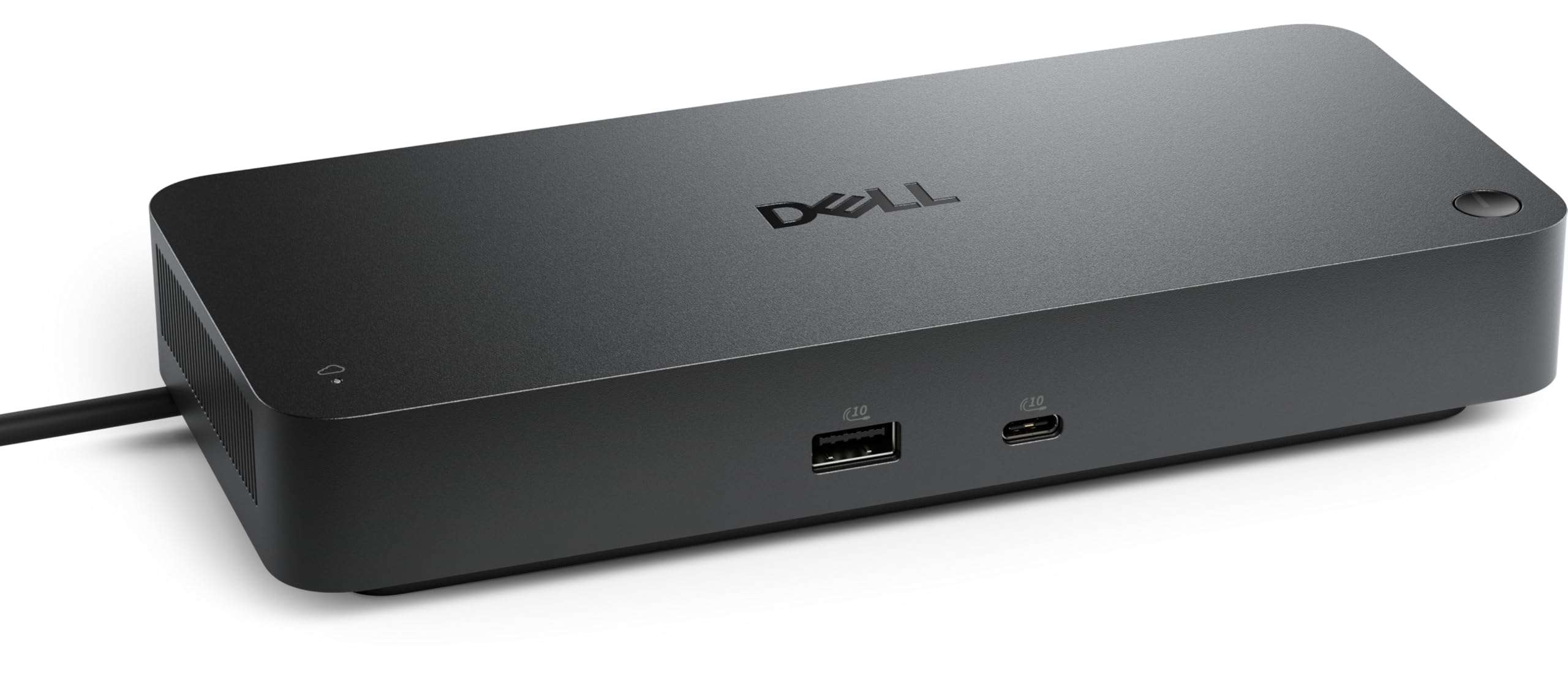
Four 4K monitors and 130W of charging, built for IT fleets.
No other hub here drives four 4K displays. It splits across HDMI 2.1, DisplayPort 1.4, USB-C and Thunderbolt 4, which is the kind of layout a trader’s desk or a video-editing bay demands. Twelve ports in all, with dual Thunderbolt 4 data ports and a chain for up to six devices. The 2.5GbE network port is the fastest wired connection on the list, so large file transfers over the office network stop being the slow part of the day.
Charging is where the business focus shows. Dell laptops pull up to 130W, while other machines get 96W — still the highest non-Dell figure here. Remote management works through Dell Console and Intel AMT over Wi-Fi, so IT can service the dock without sitting down at your PC, and WPA3 encryption, PXE boot, MAC filtering and DMA protection are built in. It is also 65% recycled plastic with 100% recycled packaging, and the ambidextrous design means the cable lands on whichever side you prefer.
The concern that keeps showing up is monitor dropouts. A share of buyers report screens cutting out several times a day, and for a multi-display setup that is a serious thing to test in the return window. Day-to-day it is well-reviewed for function, ease of use and the plug-and-play feel. If you are running a Dell fleet under IT management, this is a natural fit; if you are a solo user who only needs two screens, the four-display capacity is wasted muscle.
The standout figure: up to four 4K monitors plus 130W to a Dell laptop, with 2.5GbE on board.
The thing to check first: intermittent monitor dropouts worry a portion of owners — test all screens early.
Choose it if: you are deploying under IT management, need four screens, or want the fastest wired network here.
Leave it if: you are a solo user with two monitors and no need for remote management features.
9. Dell Thunderbolt Dock WD22TB4 Bundle

Eleven ports, a swappable module and every cable in the box.
Two Thunderbolt 4 ports, two DisplayPort 1.4, one HDMI 2.0, three USB-A 3.2 Gen 1, one USB-C 3.2 Gen 2, a multifunction USB-C DisplayPort port, Gigabit Ethernet and an audio line — eleven connections plus 90W of power delivery to your laptop. The modular design is the differentiator: the connector module can be swapped for a different laptop brand or a different cable end, which is why IT teams standardise on it. The bundle even ships with an HDMI, a DisplayPort and an Ethernet cable, so you can set up without a second order.
The practical upside of modular design is longevity. When a cable gets crushed in a bag, it is a single small module to replace, not the whole dock. It weighs 16 ounces and stays on the desk with a 90W power budget — again, plenty for a typical business laptop but not enough for a thirstier workstation machine.
Owners mention it works flawlessly straight from the start, and quality is the second thing buyers point to. Compatibility draws a split reaction, with some machines requiring no adapter at all and others needing one to line up. That makes it a poor choice for a mixed-brand home desk, and a strong choice for a Dell laptop fleet where the modular connector is the point. If your machine is a Dell, this is one of the cleanest matches here. If it is not, look at the Plugable or CalDigit for a more universal fit.
Why the modular body matters: a damaged cable is one small module to swap, not a whole dock to replace.
The compatibility question: it does not play equally with every brand, so a Dell laptop is the ideal pairing here.
One to grab if: you run a Dell laptop or manage a fleet where the swappable connector earns its keep.
One to pass if: you are mixing brands at home and need the broadest compatibility.
Know the Specs
These four specs decide whether a hub feels invisible or infuriating. Read them in this order before you pick.
Thunderbolt generation and bandwidth
Older Thunderbolt 3 and current Thunderbolt 4 both top out at 40Gb/s. Thunderbolt 5 pushes to 80Gb/s, and can shift up to 120Gb/s toward high-refresh displays when you plug them in. Higher bandwidth means an external SSD runs at its rated speed and high-refresh monitors do not stutter. It also decides how many screens you can hang off one cable — Thunderbolt 4 often reaches two 4K displays, while Thunderbolt 5 can reach three on Windows machines. If your laptop port is Thunderbolt 3 or 4, buying a Thunderbolt 5 hub does not add speed; the laptop has to match.
Power delivery in watts
Power delivery is how much electricity flows back into your laptop through the one cable. A hub rated 60W will trickle into a large workstation laptop but keep a MacBook Air full. A hub rated 100W or 130W handles bigger machines. The number on the box also matters for phones and tablets — 15W downstream is often enough to top up a phone. Match the hub’s figure to your own charger’s figure, and if the hub sits below it, expect slow or flat charging rather than a full battery at the end of the day.
Port count and port type
Not all ports on a hub are equal. Downstream Thunderbolt ports carry the full 40Gb/s or 80Gb/s and can feed displays and fast SSDs. USB-A 3.2 Gen 2 ports run at 10Gb/s, which is fine for drives and keyboards. USB-C 3.2 at 10Gb/s is the middle lane. Ethernet (often 1GbE, sometimes 2.5GbE) means a wired network, and card readers mean no dongle. Count how many of each you will plug in on your worst day, not your best, because hubs with too few downstream Thunderbolt ports are the ones returned most often.
Display support by chip
The hub provides the ports; your laptop’s chip decides how many screens actually light up. Base M1, M2 and M3 Macs typically stay at one external display. M-Pro and M-Max chips run two or more, and base M3 can reach two only in clamshell mode. Windows Thunderbolt 4 and Thunderbolt 5 laptops usually run two, and Thunderbolt 5 laptops can hit three. Thunderbolt 3 laptops often drop to one display on a Thunderbolt 4 hub. Check this spec against your exact machine, because it is the top reason a hub gets sent back.
Common Questions
Will a Thunderbolt 4 hub drive two monitors from a base M2 MacBook Air?
Is Thunderbolt 5 worth it if my laptop only has Thunderbolt 4 ports?
Why does my dock cut out when the laptop asks for more power than it can supply?
Do I need a Thunderbolt hub over a plain USB-C hub?
Can I chain two Thunderbolt hubs together?
Will an 8K monitor work on a Thunderbolt 4 hub?
Can I keep a hub on the desk and use it with a laptop and a desktop?
How much does the hub charge my laptop if I run two monitors and an SSD?
Does a Thunderbolt hub work with an AMD laptop or a Chrome OS machine?
Will one Thunderbolt cable really carry video, data and charging at once?
The Bottom Line
For most people, the thunderbolt to thunderbolt hub that earns the top slot is the CalDigit E5. Four Thunderbolt 5 ports at 80Gb/s, a steady 90W of charging, and the ability to run three high-refresh displays on Windows make it the most future-proof box on the list. If you want the full desk setup with Ethernet, card readers and dual HDMI, grab the Plugable TBT4-UD5. Its 13 ports and 100W charging cover a home office without adapters, and the 90W ceiling is the only reason to look elsewhere.
One last nudge before you click buy: match the hub’s power delivery to your laptop’s charger, and match the display spec to your chip. Those two numbers catch more returns than any other detail on these pages.
How we choose
We do not accept paid placement. Every pick is matched to a real buyer and a real use-case; we do not hands-on test units.
Sources
Specifications: manufacturer listings and product documentation. Review insights: verified customer reviews, as of November 2026. Pricing: not shown on this page (it changes often); check the current price via the retailer link.
As an Amazon Associate, Tactical Gear Guy earns from qualifying purchases. This does not affect which products we feature.