Specs are compiled from manufacturer listings and verified buyer reviews and can change over time — please confirm the key details on the product page before buying.
You want one thing from a personal alarm: when your parent presses the button, someone hears it and comes. The simplest devices here — plugin receivers that chime through the house — are also the ones owners trust most. They work when the Wi-Fi is down and the cell signal is weak. The catches are real too. Range shrinks through walls, and anything that calls an outside contact depends on a signal you may not have.
This guide is built by comparing the manufacturers’ published specifications and the patterns across verified customer reviews, so you get each pick’s real strengths and trade-offs instead of marketing spin.
Some alarms here chime on a kitchen receiver, some dial family, and one dials 911 directly — the choice hinges on who is close enough to respond. Below you get the full breakdown of the best personal alarms for the elderly, ranked by what genuinely gets help to the door.
Top Picks

How To Choose The Best Personal Alarms for the Elderly
Start with the question that decides everything else: who is supposed to respond when the button goes down? If a caregiver is in the same house, a plugin receiver that chimes at 110 dB will reach them faster and more reliably than any phone-based system. If nobody is home, you need a device that dials out — and that means relying on a cell or landline signal, which is a completely different purchase.
Receiver alarms versus calling alarms
A receiver alarm pairs a wearable button with a chime unit that plugs into a wall outlet. It costs nothing to run and never drops a call, because there is no call. A calling alarm uses a cellular or landline connection to ring a family member or dispatcher. It goes further, but it fails when the signal fails and some models carry a monthly subscription.
Range is measured in open air, not through walls
Manufacturers quote range with a clear line of sight. Walls, floors and appliances all eat into that number, so a two-story house needs more headroom than the box suggests. Look for a stated wall-penetration claim, and read how owners describe performance across floors rather than trusting the headline figure.
Volume, tones and silent modes
The top end on these units is 110 dB, which is loud enough to carry through a house and wake a heavy sleeper. Adjustable volume down to silent matters just as much, since a caregiver sleeping in the next room does not want a siren at 3 a.m. Look for vibration and LED flash options if the wearer is hard of hearing.
Water resistance and where the button lives
Falls happen in bathrooms, so check the rating before you mount a button near a shower. An IP55 or IPX4 button handles splashes but cannot be submerged. An IP67 device is rated for full water contact. None of these are swimming devices — read the manufacturer’s own limits on each listing.
Side-by-Side Comparison
| Model | Best For | Stated Range | Alert Type | Max Volume | Amazon |
|---|---|---|---|---|---|
| FullHouse Caregiver Pager★ Best Overall | Whole-house coverage with spare receivers | 1000 feet | Plugin receiver, 52 melodies | 110 dB | Amazon |
| MERLRR Pager with Digital DisplayBest for Multi-Room Homes | Knowing which room the call came from | 800 feet | Portable receiver with display | 110 dB | Amazon |
| MERLRR Portable Vibration AlertBest for Moving Caregivers | Caregivers who move room to room | 250 meters | Rechargeable portable receiver | 110 dB | Amazon |
| Daytech Wrist Pager | Wearers who dislike a neck pendant | 800 feet | Wrist button plus plugin receiver | 110 dB | Amazon |
| CallToU Caregiver Pager | One button plus one wristband in the box | 500 feet | Plugin receiver, 55 tones | 110 dB | Amazon |
| Silent Beacon Panic Button | GPS alerts to chosen contacts | Bluetooth to phone | App alerts, text and email | — | Amazon |
| Seculife Medical Alert Pendant | Fall detection with GPS tracking | 4G LTE cellular | Cellular call, auto fall alert | — | Amazon |
| Help Now 911 Communicator | Direct 911 dialing with no subscription | Cell signal dependent | Direct 911 two-way call | — | Amazon |
| Freedom Alert Landline Device | Homes that still have a landline | Landline dependent | Two-way pendant call to 4 numbers | — | Amazon |
Detailed Reviews
1. FullHouse Caregiver Pager
Our pick — 4.5+★ from 850+ verified ratings; the strongest balance of quality and price.
Three receivers, two buttons, and a chime that carries through a two-story house.
What makes this the pick for most families is the box itself: two call buttons and three plugin receivers. You put a receiver in the kitchen, one in the bedroom, and one upstairs, and the button gets heard wherever the caregiver happens to be. The stated range is 1000 feet in open air, and the maker is upfront that it drops to 500 feet once walls are in the way — a wall claim you can actually plan around.
Volume runs from 0 dB up to 110 dB, so it can be a silent LED flash on the nightstand or a full alarm at the far end of the house. There are 52 melodies to pick from, which sounds like overkill until you want one tone for the bathroom button and another for the bedside button. The call button is splash proof and rated IP55, so it can be mounted on a bathroom wall — just pull it off before a bath or shower, because it is not meant to be submerged.
The trade-off is a familiar one for this style of alarm: the receivers must stay plugged into a wall outlet, so there is no carrying one out to the mailbox. Functionality is what carries this system in owner feedback by a wide margin, with volume and ease of setup close behind. Owners describe setting it up in seconds, hearing it across a 2400 square foot house, and liking that the receiver runs on wall power instead of batteries, which removes the battery as a failure point. Against the MERLRR display pager, this one reaches further — 1000 feet to 800 feet — while that model gives you a screen and a wandering receiver instead.
Where it wins
- Two buttons and three receivers in one box, covering a whole house
- 110 dB top volume with a silent LED-flash mode
- 52 tones so each button can sound different
- IP55 splash-proof button for bathroom mounting
What to plan around
- Receivers need a wall outlet, so they are not portable
- Range falls to 500 feet through walls
- Button must come off the wall before a bath or shower
Made for: a caregiver in the same house who wants to hear a call from any room without carrying anything.
Think twice if: your caregiver is often outside or away — the receivers cannot follow them.
2. Caregiver Pager System
A screen that tells you which room the call came from, before you move.
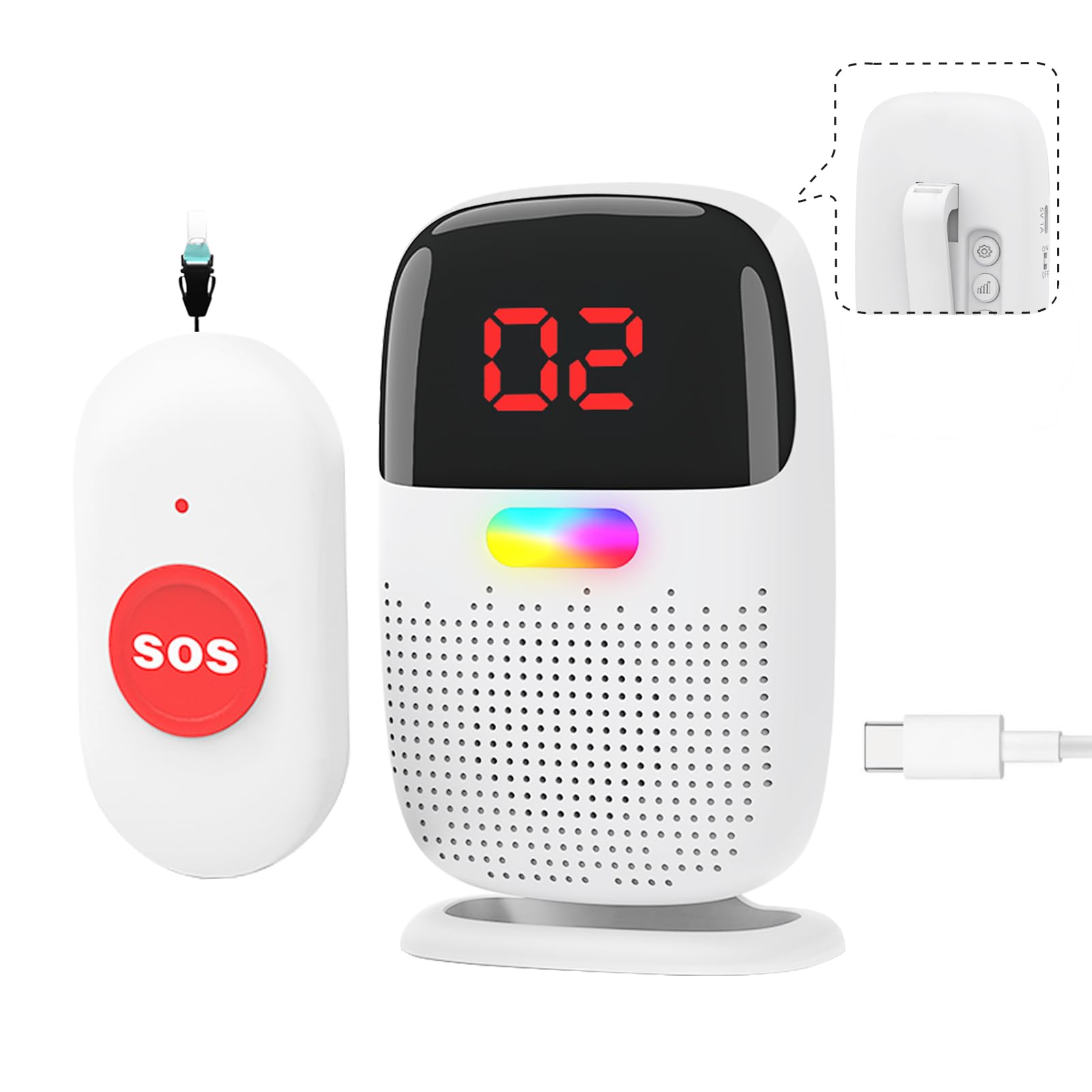
Nursing staff and busy family caregivers run into the same problem with a plain chime: you hear it, but you do not know where to go. This receiver shows pager numbers on a digital display, so the number on screen points you at the button that was pressed. Pair it with multiple buttons across the house and the display turns a vague chime into a location.
Both the call button and the receiver are waterproof and dustproof, which is unusual — most systems protect only the button. That means the receiver can sit in a steamy bathroom or go outside in the rain. The receiver is small at 4.3 inches long, 4.3 inches wide and 2.7 inches tall, and it can go in a pocket or hang from a neck strap. Compare that to the CallToU receiver at 2.75 by 2.3 by 0.59 inches, and the CallToU is the more pocketable of the two.
You get 38 ringing tones and four volume steps from 0 dB to 110 dB, each with a strong vibration. One point that shows up in owner feedback is a missing power indicator — there is no display telling you the receiver is switched on, so you check by pressing a button rather than glancing at it. Pairing is unlimited, so one receiver can answer as many buttons as you add.
What earns the spot: the numbered display solves the one thing a plain chime cannot — telling you where help is needed. Quality and the caring use case are what owners talk about most, and the tone selection gets consistent praise.
The honest gap: you cannot glance at the receiver and confirm it is powered on, so a quick test press is part of the routine.
Reach for this if: you have several rooms in play and want the screen to point you at the right one.
Look elsewhere if: you want a simple always-visible power light on the receiver.
3. Caregiver Pager
The receiver goes in your pocket, so the alert follows you into the garden.
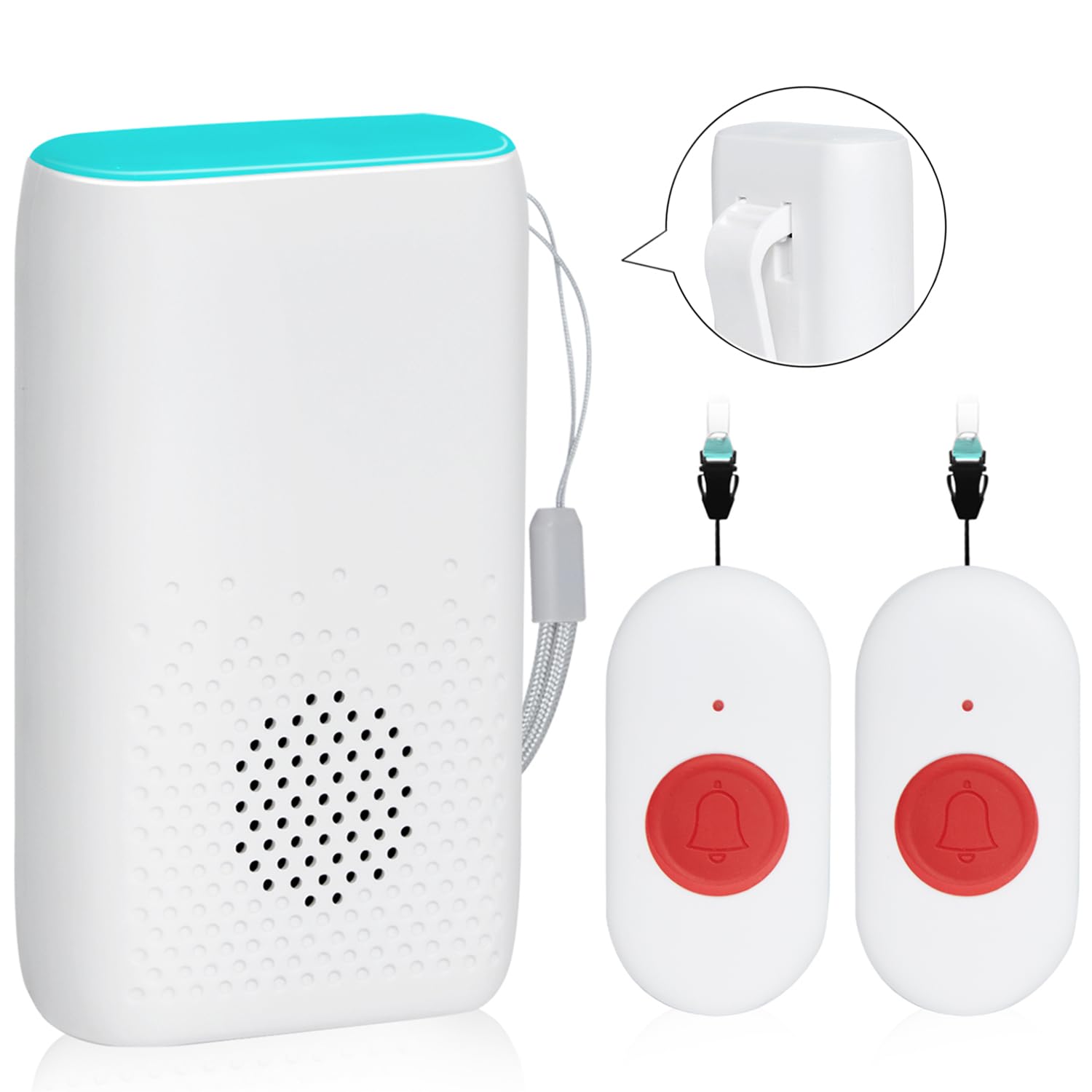
Most plugin alarms pin you to one room. This one does not — the receiver is rechargeable and clips on, and it delivers three kinds of alert: a ring, a vibration, or an LED flash. For a caregiver doing laundry in the basement or weeding the yard, that difference is the whole purchase. The stated range is 800 feet, or 250 meters, which covers a house and the yard around it.
Alerts are customizable across 58 melodies with volume up to 110 dB. The call button is splash resistant for beds, living rooms and other everyday spots. One behavior worth knowing: when a call comes in, the receiver sounds for about eight seconds and then stops, so the alert is a nudge rather than a siren that keeps going.
Functionality is the strongest theme in owner feedback, with sound quality next. Owners describe the doorbell tone cutting through the house in the middle of the night, one household used it after orthopedic surgery, and the unit has survived being dropped more than once. Battery life is rechargeable over a USB Type-C cord, and the included kit is two receivers and two buttons. What it will not do is dial out — this is an in-home system, so pair it with the FullHouse above if you need coverage across a larger property with fixed receivers too.
The case for it: a rechargeable receiver with vibration and LED means a deaf or sleeping caregiver still gets the alert without a house-shaking chime.
The catch: the eight-second cutoff can be missed if the receiver is in another room and you are not wearing it.
Best matched to: a single caregiver who moves around the home and yard all day.
Skip the idea of: using it to reach someone outside the house — there is no calling function here.
4. Daytech Wireless Wrist Pager

A rubber wrist strap instead of a swinging neck pendant, for people who notice the difference.
Neck pendants swing, snag and get in the way when someone bends over. This kit swaps that for a rubber wrist button that sits flat and stays put, plus two plugin receivers. The receiver covers up to 500 feet in open space, and the wrist button covers 164 feet. That split matters before you buy: the bracelet does not have the reach of the receiver.
Volume steps through five levels from silent up to 110 dB, so it can be a whisper or a full alarm. The call button runs on AAA batteries and flashes its LED five times when the battery is low, which heads off the worst failure mode for this kind of alarm — a dead button nobody noticed. It is rated IP55 for splash resistance and can be mounted in a shower area, as long as it is not immersed.
The kit includes a lanyard and 3M double-sided tape for wall mounting by the bed, the toilet or the shower. Owners lean on this one for fall-prone parents, and the setup-and-go simplicity gets consistent praise. The main structural note is that the receiver must stay plugged in, so it is a fixed base station rather than a carry-around device. Sound options per button are a nice touch — each transmitter can carry its own tone, so you can tell the bedroom from the bathroom by ear.
Why the wrist wins here: the button covers 164 feet while the receiver covers 500 feet, so you mount the receiver centrally and wear the strap everywhere else.
Small annoyance: the ring tones sound dated to some ears, though nobody disputes that they work.
Choose this one if: your parent will not keep a pendant on, but will wear a watch-style strap.
One honest limit: the receivers need an outlet, so this stays an at-home system.
5. CallToU Caregiver Pager
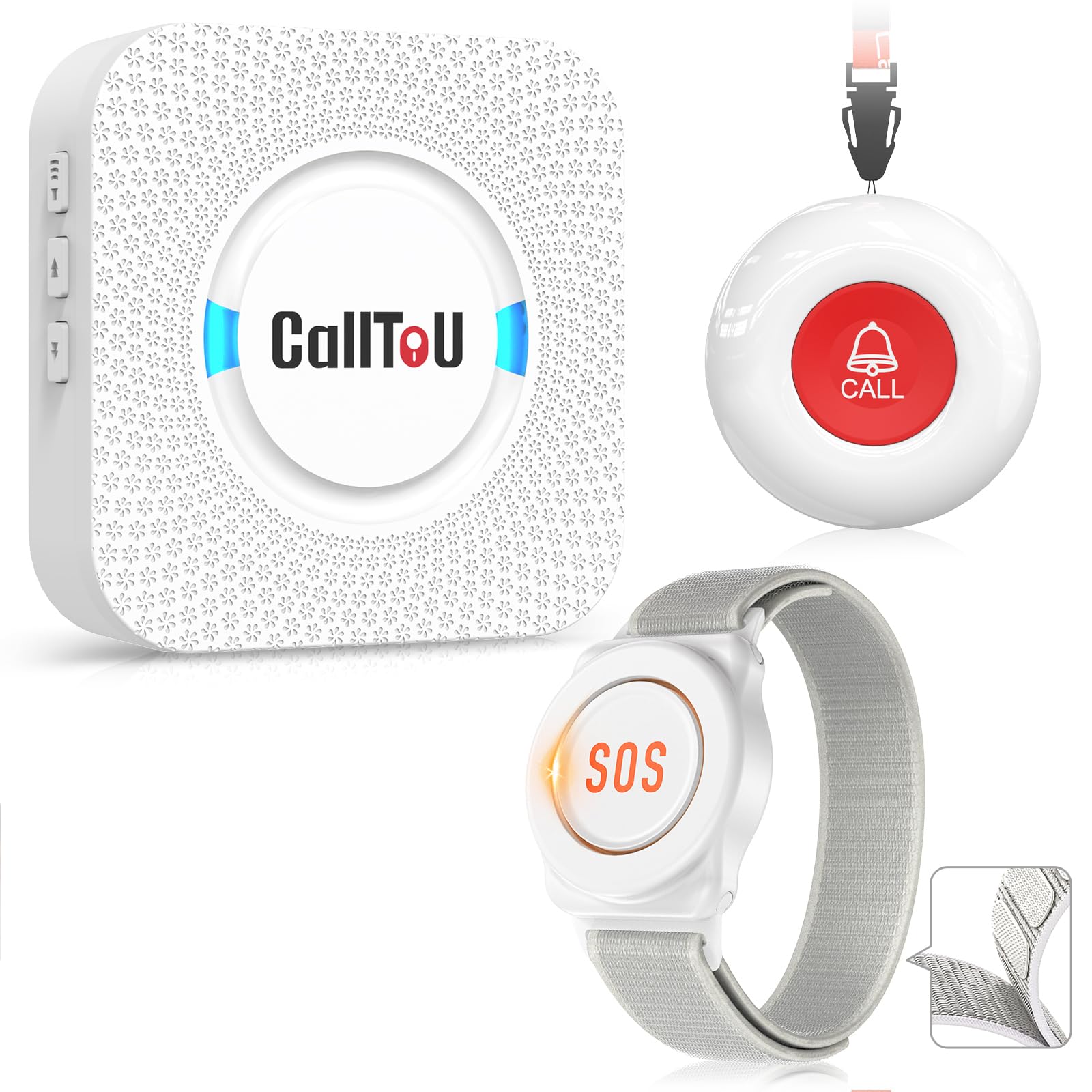
One round button and one wrist button, so the wearer picks the form that suits the day.
Some people press a flat button on a lanyard without trouble; others do better with a strap on the wrist. This kit ships with both — a round call button and a watch-style button — plus one receiver, all on 500+ feet of stated range. Both buttons and the receiver are waterproof and dustproof, so a bathroom install or a rainy day outside is covered.
The receiver runs on 55 ringing tones and five volume steps from 0 dB to 110 dB, and it plugs into an outlet. A neck strap, bracket and double-sided sticker come in the box, so you can hang the button, mount it, or stick it to a wall. One small item that shows up in feedback: the lanyard only comes in one colour, which is a cosmetic point, not a functional one.
Owners say it resists accidental button pushes, which matters more than most shoppers realize — a false alarm at 3 a.m. wears out a caregiver’s patience fast. Functionality is what comes up most, then utility and volume in roughly equal measure. The button design gets specific praise from a household where a mother wears it on her wrist day and night and presses it to bring help. Treat this as a simple, buy-and-done unit: it does the one job, and the resistance to accidental presses is the detail that keeps it in use.
Two wear options, one box: the round button hangs on the included strap while the wrist button stays put — the wearer decides each morning.
Worth knowing: the receiver is outlet-powered, so it is not a portable pager.
Good fit for: a household that wants both a pendant and a wristband without buying two systems.
Not the one for: anyone who needs the alarm to reach a phone outside the home.
6. Panic Button
It rings your chosen contacts and sends your GPS pin, straight from a pocket-sized button.
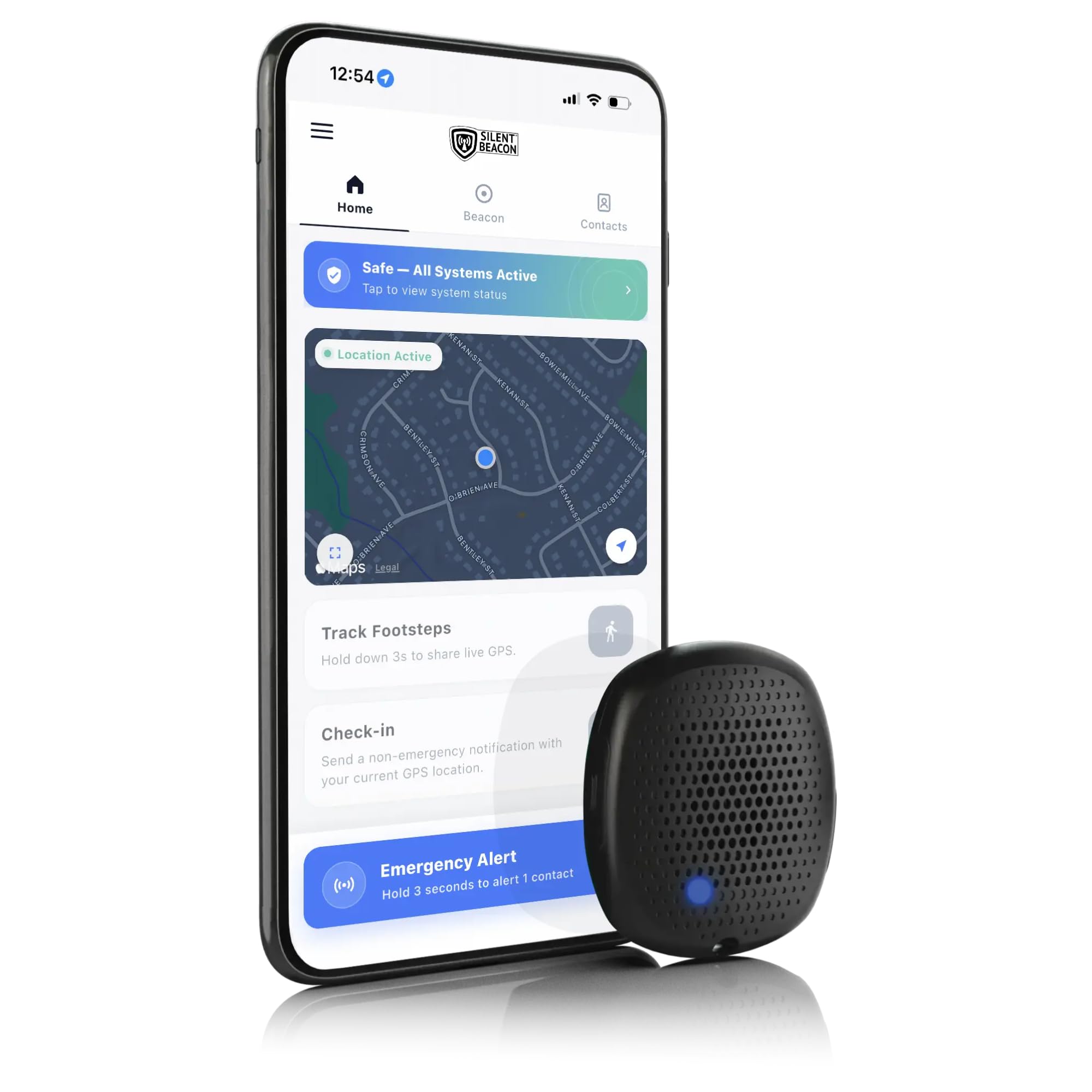
This is a different animal from the plugin receivers above. It pairs to a smartphone over Bluetooth and, when pressed, calls any phone number you set — including 911 — and texts or emails your live GPS location to your contacts. There is a speaker and microphone for two-way conversation, and the maker states a 42-day battery life on a 180 mAh cell. It weighs 19.01 grams and is rated IPX4 for water resistance.
Five alert modes cover more than emergency: a silent mode, a check-in alert, a low battery alert and a footstep-tracking alert, plus the standard alert. A wearable clip and an 18 mm wristband come in the box. One key condition: some features need a paid subscription, so read the listing carefully before you assume everything is included.
Here is the honest read. Functionality is the most-discussed aspect, and it comes back mixed, not glowing. The device is easy to set up, and some owners will not be without it. But button responsiveness and connectivity are the recurring gripes. The side button takes effort to press, and Bluetooth pairing failed on two Android phones for one buyer. That said, the button is small and hard to press partly so it does not trigger accidentally, which is a fair design trade. If your parent struggles with small buttons or a phone connection, this is the wrong tool.
What it does well
- Calls any number you choose, with 911 as an option
- Sends live GPS location by text, email and push
- 42-day stated battery life, rechargeable
- Speaker and mic for two-way talk
- No monthly fee on the base device
Where it can let you down
- Relies on Bluetooth pairing to a smartphone that must be nearby
- Small, dark button is hard for arthritic hands
- Some features need a paid subscription
- Pairing trouble on some Android phones
Fits the bill for: a relatively tech-comfortable wearer with a paired phone who wants location sent to family.
Wrong pick for: anyone with limited hand strength or a house with poor phone signal.
7. Medical Alert Pendant
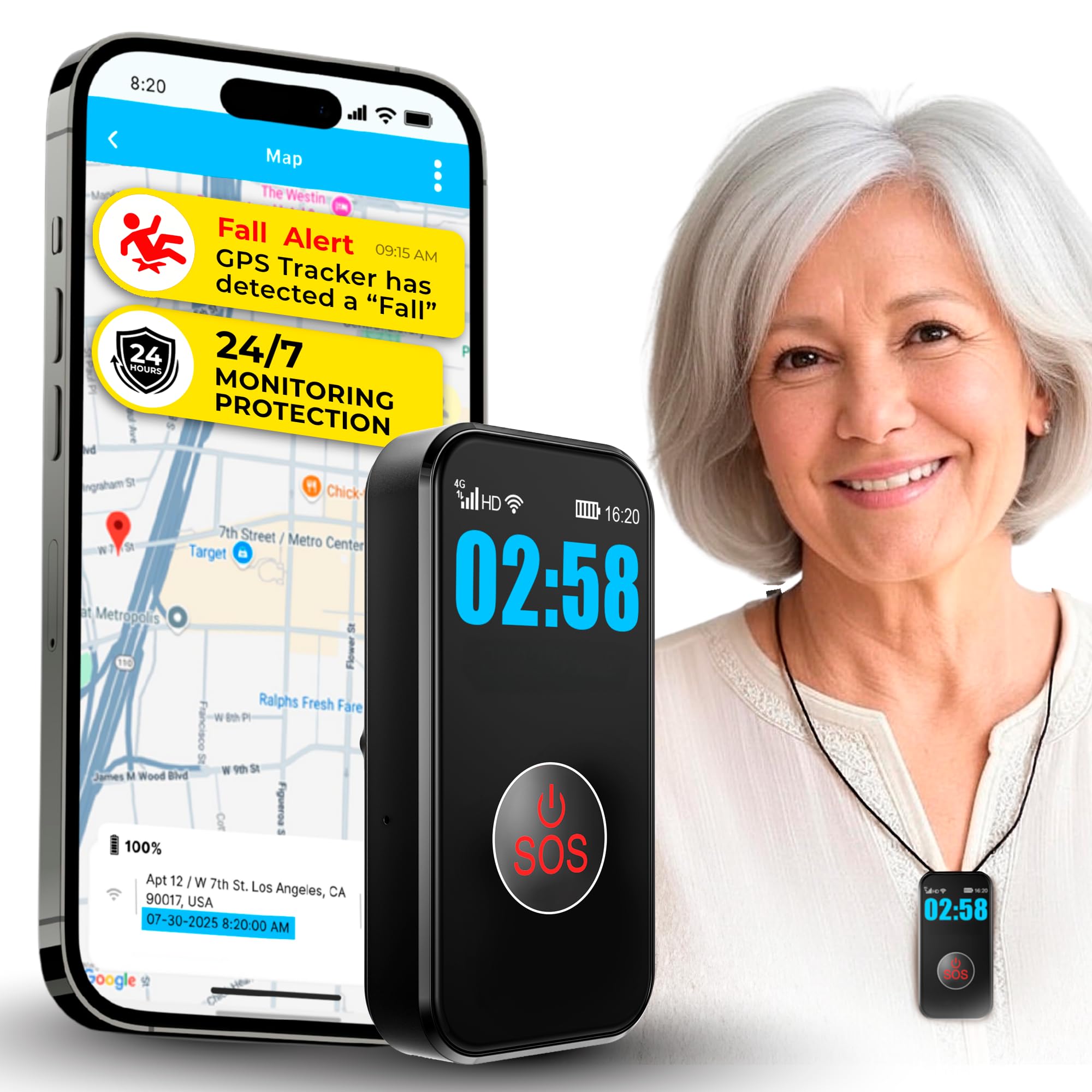
A pendant that calls on its own when it senses a fall — no button required.
This is the most capable device on the list, and the most conditional. It runs on 4G LTE cellular, which means it works away from home, and it adds automatic fall detection that calls and sends an SOS to your chosen contacts without anyone pressing anything. A large SOS button handles the manual case. The 1000 mAh battery is rated for up to 6 days, or 5 days by the spec sheet, with 24-hour-interval tracking.
Inside the box you get a charging cable and a SIM card, and setup runs through an app on Android or iOS. The display shows time, battery and signal, which is the one glance-and-go check that plugin systems cannot give you. It is rated IP67 for full water contact, so the shower is fine. GPS tracking and geofence zones let you set safe areas and get an alert when your parent leaves one, with a year of location history.
The catch is a subscription: the listing states a monthly fee for unlimited fall alerts, live tracking and voice minutes. Reliability is the most-discussed topic, and it comes back mixed. One household found it worked fine on weak cell service. Battery life is the split point, with charges reported lasting from around three days down to a few hours. If your parent is rough on routines and charging is likely to be forgotten, weigh that carefully against the fall detection.
The standout capability: auto fall detection over 4G with GPS is exactly the safety net that a home-bound chime cannot offer.
The condition: a monthly subscription is required, and charging habits matter more here than anywhere else on this list.
Pick this if: your parent leaves the house alone and you want fall alerts with location, wherever they are.
Pass if: you refuse a monthly fee or your parent will not keep a device charged.
8. Help Now Emergency Communicator

Hold the red button and you are talking to a 911 operator, with no call center in between.
Most cellular pendants route through a monitoring center or a family member. This one skips the middle entirely: press and hold the red button and you are connected directly to your local 911 operator, with two-way voice through the pendant. There are no monthly fees, no contract and no cancellation charge, and it runs on three AAA batteries with a lanyard and a removable button shield in the box.
It needs no landline, no cellphone and no home hub — just cell signal where the wearer happens to be. That makes it the simplest possible answer to “who will they reach,” because the answer is emergency services. The removable shield over the button cuts down on accidental dials, which is the right priority for a device pointed at 911.
The honest caveat is reliability, the most-discussed aspect and a mixed one. The device is easy to operate and reassuring, and one owner got a clear two-way conversation with an operator on the first press. Others report it failing to connect at all, and a battery that corroded inside the unit. This is a device to test on a schedule, not a set-and-forget. It is a strong choice if your parent is alone with no nearby helper; it is a risky pick if someone in the family can be reached by a home receiver instead.
The core appeal: direct 911 dialing with no subscription and no monitoring fee is a clean, understandable promise.
The recurring caveat: connection reliability is uneven, so a monthly test press is part of owning one.
Consider it for: a senior living alone where the family cannot be reached quickly and 911 is the right responder.
Second-guess it if: you want a guaranteed connection every single time.
9. Freedom Alert Landline

It dials four numbers you choose and lets you talk through the pendant itself.
For a house that still has a landline, this is the most dependable category of alarm there is — a copper line does not drop the way a cell signal does. It programs up to four numbers, and the two-way pendant lets you speak directly with whoever picks up. If nobody answers the list, it can be set to call 911. It is rechargeable with a 24-hour battery backup, so a power cut does not blind it.
Reliability carries this device in owner feedback more than any other single trait, with quality and ease of use behind it. The coverage suits a modest-sized house or apartment, including the porch, patio and nearby garden. One detail owners ask for: the main unit is plenty loud, but there is no volume control on the pendant itself, so the sound level is fixed from the base.
This is the premium pick, and it earns that position by doing one thing without compromise. There is no monthly fee, and it can be moved to another home — the listing notes it is easily transferable. What it cannot do is travel: the pendant works around the house, not across town. If your parent has a landline and stays home, that limitation costs them nothing.
Strong points
- Programs up to four contact numbers
- Two-way voice through the pendant
- 24-hour battery backup for power cuts
- No monthly fees, and transferable to another home
- Works outside on the porch and patio
Limits to accept
- Requires an active landline in the home
- No volume control on the pendant itself
- Not a mobile device — it stays at home
A natural match for: a landline household where connection certainty matters more than mobility.
Rule it out if: there is no landline, or your parent needs coverage away from home.
Know the Specs
Stated range versus real-world range
Range on the box is usually measured in open air, with nothing between the button and the receiver. Walls, floors and major appliances cut that down — the FullHouse listing, for example, states 1000 feet in open air but 500 feet once walls are involved. Plan for the wall figure, not the headline. A two-story home needs the receiver placed centrally so the signal has the shortest path through the fewest walls.
Decibels and volume steps
Most plugin receivers here top out at 110 dB, which is loud enough to carry through a house and wake a heavy sleeper. The low end matters just as much: a step down to silent lets a caregiver in the next room sleep without a siren. Vibration and LED-flash alerts cover households where the wearer or the caregiver is hard of hearing.
Water resistance ratings explained
IP55 means the button resists water spray from all directions but cannot be submerged, which is why splash-proof buttons are removed before a bath. IP67, on the Seculife pendant, is rated for full water contact. IPX4 on the Silent Beacon covers splashes only. Match the rating to where the button will actually sit — bathroom wall, shower, or bedside.
Subscription versus no-fee devices
A plugin receiver system needs no subscription, ever. Cellular pendants often do: the Seculife listing states a monthly fee for its full feature set, while the Help Now communicator and the Freedom Alert landline device both state no monthly fees. Work out the long-term cost before you buy, and check what each subscription actually includes.
Common Questions
Will a plugin receiver alarm work through floors in a two-story house?
What is the difference between a caregiver pager and a medical alert pendant?
Can a personal alarm call 911 directly without a monitoring company?
Is a wrist button or a neck pendant easier for someone with arthritis?
How long do the batteries last in a caregiver call button?
Can a call button be mounted in the shower?
Do any of these personal alarms require a monthly subscription?
What happens if the power goes out with a plugin receiver alarm?
Can one receiver work with more than one call button?
Will a Bluetooth panic button work if my parent does not carry a phone?
The Bottom Line
For most families, the personal alarms for the elderly winner is the FullHouse Caregiver Pager — two buttons and three receivers cover a whole house, and it holds 4.5+ stars across 800+ ratings, the highest-rated pick here. If your caregiver moves from room to room and needs the alert to follow, the MERLRR Portable Vibration Alert puts a rechargeable pager in their pocket. And for a parent who lives alone with nobody close by, the Help Now communicator strips the chain down to one press and one operator.
One last nudge: pick the device that matches who will actually respond. A receiver system only helps if someone is in earshot. A calling device only helps if the signal holds. Answer that one question first and the rest of the spec sheet sorts itself out.
How we choose
We do not accept paid placement. Every pick is matched to a real buyer and a real use-case; we do not hands-on test units.
Sources
Specifications: manufacturer listings and product documentation. Review insights: verified customer reviews, as of November 2026. Pricing: not shown on this page (it changes often); check the current price via the retailer link.
As an Amazon Associate, Tactical Gear Guy earns from qualifying purchases. This does not affect which products we feature.