Specs are compiled from manufacturer listings and verified buyer reviews and can change over time — please confirm the key details on the product page before buying.
A PCIe 4.0 motherboard is the part that decides whether your graphics card and your NVMe drive actually run at the speed you paid for. Get the pick right and your build boots first time, your Wi-Fi holds, and your drive transfers feel instant. Get it wrong and you spend a weekend chasing a white debug light. This guide sorts the nine boards worth your money by socket, chipset, memory type and form factor, so you can match one to the CPU you already own.
This guide is built by comparing the manufacturers’ published specifications and the patterns across verified customer reviews, so you get each pick’s real strengths and trade-offs instead of marketing spin.
Before you scroll, know this: the list uses flexible matching, so not every board is the exact model number you typed into the search bar. The nearest same-socket, same-chipset equivalent does the same job, and each pick states exactly which PCIe 4.0 lanes it gives you. Here is the honest shortlist of pcie 4.0 motherboard options that actually fit a real build.
Top Picks


How To Choose The Best PCIe 4.0 Motherboard
Start with your CPU. A motherboard only works with one socket family, and no amount of PCIe 4.0 bandwidth rescues a board that will not accept your processor. Everything else — memory type, slot count, Wi-Fi — comes after that match is confirmed.
Socket first, then chipset
Intel’s LGA 1700 socket takes 12th, 13th and 14th Gen Core chips, and the B760 chipset is the mainstream board around it. AMD splits into AM4 for Ryzen 3000, 4000 and 5000, and AM5 for Ryzen 7000, 8000 and 9000. Buying the wrong socket is the one mistake no BIOS update fixes.
The chipset decides how many PCIe 4.0 lanes the board can hand out. An AMD B550 board can run a PCIe 4.0 x16 graphics slot and a PCIe 4.0 M.2 drive at once, which is the whole point of shopping in this category.
DDR4 or DDR5 — pick your memory before the board
Some B760 boards take DDR4 only, and others take DDR5 only. They are not interchangeable, so choose your memory kit first and then buy the board variant that matches it. DDR4 keeps an older build cheap; DDR5 puts you on the newer platform.
Count the M.2 slots and the rear ports you will actually use
Two M.2 slots let you run a fast boot drive plus a second drive for games or footage. One slot is fine for a single-drive machine, but it leaves you pulling the drive to add storage later. On the back panel, check that the USB Type-C and Ethernet speeds match what you plug in daily.
Side-by-Side Comparison
| Model | Best For | Socket | Chipset | Memory | Amazon |
|---|---|---|---|---|---|
| ASUS TUF Gaming X870-PLUS WiFi | AM5 builds that want PCIe 5.0 headroom | AM5 | AMD X870 | DDR5 | Amazon |
| ASUS TUF Gaming B850-PLUS WiFi | Wi-Fi 7 and triple M.2 on AM5 | AM5 | AMD B850 | DDR5 | Amazon |
| MSI B760 Gaming Plus WiFi | DDR5 Intel gaming builds | LGA 1700 | Intel B760 | DDR5 | Amazon |
| GIGABYTE B550M AORUS Elite AX | Compact AM4 builds with Wi-Fi 6E | AM4 | AMD B550 | DDR4 | Amazon |
| MSI PRO B760M-P DDR4 | Budget Intel micro-ATX builds | LGA 1700 | Intel B760 | DDR4 | Amazon |
| GIGABYTE B550 Eagle WIFI6 | First-time AM4 builders on a tight budget | AM4 | AMD B550 | DDR4 | Amazon |
Detailed Reviews
1. ASUS TUF Gaming X870-PLUS WiFi AMD AM5 X870 ATX Motherboard
Four M.2 slots and Wi-Fi 7 on a board that will outlive your next two graphics cards.
The ASUS TUF Gaming X870-PLUS WiFi is the pick for an AM5 build that needs to stay current. It runs an AMD AM5 socket for Ryzen 9000, 8000 and 7000 Series processors, and the graphics slot is a PCIe 5.0 slot — the newer, faster version of the PCIe 4.0 slot you came looking for. That means a PCIe 4.0 card or drive plugs straight in and runs at full PCIe 4.0 speed, with a spare lane generation waiting for the next upgrade.
Power delivery is the part that keeps a high-core CPU from throttling under load. This board uses 16+2+1 power stages rated at 80A each, an 8-layer PCB and ProCool connectors. In plain terms, the board feeds steady voltage to every core even when you are rendering or gaming for hours. It carries four M.2 drive slots, so you can run a boot drive plus three more without unplugging anything. At 2 pounds it is also a light board to hold while you line up the standoffs.
The catch is the software side. Owners praise the build quality above anything else, and many single out how easy the BIOS update is. But a recurring gripe shows up around networking: some builds report trouble with the Wi-Fi and Bluetooth devices, and Linux users in particular flag weak Ethernet driver support. Plug in a wired connection and update your chipset drivers before you judge the wireless.
What earns its price
- 16+2+1 stages at 80A each keep power stable for high-core Ryzen chips
- Four M.2 slots — a boot drive plus three more, no drive swapping
- PCIe 5.0 graphics slot and Wi-Fi 7 give you a longer upgrade runway
- At 2 pounds it is half the weight of the 4-pound GIGABYTE B550 Eagle WIFI6
The honest caveats
- Wireless and Bluetooth draw mixed feedback; Ethernet driver support is thin on Linux
- You pay extra for PCIe 5.0 and Wi-Fi 7 you may not use yet
- DDR5 only — an existing DDR4 kit will not fit
Take this one: you are building fresh on AM5 with a Ryzen 7000/8000/9000 chip and want the board to last through two GPU swaps.
Look past it: you are keeping a DDR4 kit or you need bulletproof out-of-the-box wireless on day one without touching drivers.
2. GIGABYTE B650 Gaming X AX AMD AM5 ATX Motherboard
One PCIe 5.0 M.2 slot, two PCIe 4.0 M.2 slots, and every one of them heatsinked.
The B850-PLUS WiFi is the board to pick when your fast drive matters as much as your graphics card. It carries one onboard PCIe 5.0 M.2 slot and two PCIe 4.0 M.2 slots, each fitted with an M.2 heatsink — so a drive that runs hot under long transfers keeps its speed instead of dropping. The AMD B850 chipset sits on AM5 for Ryzen 9000, 8000 and 7000 Series processors.
Power is a 14+2+1 array of 80A DrMOS stages on an 8-layer PCB, with 8+8 pin ProCool connectors. It reads DDR5 at 8000 MHz and takes up to 192 GB across four slots, which matters if you run virtual machines or big editing projects. Add Wi-Fi 7, Realtek 2.5Gb Ethernet and both rear and front USB Type-C, and the connectivity is the reason this one leads the AM5 group on paper.
Where it stumbles is the network stack. The wireless is genuinely strong when it behaves, but the RTL8125D Ethernet chip (the chip that handles your wired network) draws reports of instability. There is also a pattern of Wi-Fi dropping after working fine for a while — one frustrated build ended up tearing the PC apart for a replacement card. Pair it with a wired connection where you can, and keep the BIOS current.
Standout hardware
- One PCIe 5.0 M.2 plus two PCIe 4.0 M.2, all with heatsinks
- 14+2+1 stages at 80A each on an 8-layer PCB
- DDR5 at 8000 MHz, up to 192 GB over four slots
- Wi-Fi 7 and 2.5Gb LAN for fast local transfers
Where it grumbles
- Ethernet instability reported on the RTL8125D chip
- Intermittent Wi-Fi drop-outs after long uptime
- You are paying for a PCIe 5.0 M.2 slot your current drive may not need
The fit: an AM5 workstation or gaming rig with three drives and a fast network, where you can hardwire the PC.
The mismatch: a wireless-only room, given the documented Ethernet and Wi-Fi drop-outs.
3. MSI B760 Gaming Plus WiFi Intel LGA 1700 ATX Motherboard
An Intel board that feeds DDR5 at 6800+ MHz and gives you a wall of USB ports.
For a 12th, 13th or 14th Gen Intel chip on the LGA 1700 socket, this MSI B760 Gaming Plus WiFi is the DDR5 route. It takes dual-channel DDR5 at 6800+ MHz with overclocking, across four slots. That is the faster memory generation, so it is the board to pair with a fresh DDR5 kit rather than an old DDR4 set — the two will not swap.
The graphics slot is PCIe 4.0, and there is a Lightning Gen 4 x4 M.2 slot for a fast NVMe drive. Thermal coverage comes from an extended heatsink with MOSFET thermal pads rated at 7W/mK and additional choke pads, which keeps the power section cool through a long gaming session. Networking is 2.5G LAN plus Wi-Fi 6E and Bluetooth 5.3.
It has the volume of USB ports that makes a desk setup easy — one build ran a full peripherals load without a hub. Most boards of this class leave you hunting for a port; this one does not. The honest caveat is the wireless and the occasional board that simply will not power on at all, plus audio ports that have died early on at least one build. Test everything within the return window.
The reason to pick it: DDR5 at 6800+ MHz and a serious count of USB ports — a fast, roomy platform for an LGA 1700 gaming build.
Test it early: Wi-Fi chip failures and early audio port deaths are real enough to check the board inside the return window rather than a month later.
Pick this if: you are building Intel with a DDR5 kit and have a lot of USB gear to plug in.
Steer clear if: you already own DDR4 memory — that kit needs the DDR4 B760 board instead.
4. MSI PRO B760-P WiFi DDR4 Intel LGA 1700 ATX Motherboard

A small AM4 board that fits a slim case and still runs a PCIe 4.0 x16 graphics card.
The B550M AORUS Elite AX is for a compact AM4 build. It runs the AMD B550 chipset on socket AM4 for Ryzen 5000, 4000 and 3000 Series processors, in a micro-ATX frame that fits smaller cases. You get one Ultra Durable PCIe 4.0 x16 slot and one PCIe 4.0 M.2 slot, plus a second PCIe 3.0 M.2 slot for extra storage.
Wi-Fi 6E is the standout here — it uses the 6 GHz band to reduce interference from the crowd of devices on 2.4 and 5 GHz, and Bluetooth 5.3 is onboard. GIGABYTE adds Q-Flash Plus, which lets you update the BIOS without a CPU, RAM or graphics card installed. If you are patching a board to take a newer Ryzen chip, that means no borrowed processor and no removed cooler — just a USB stick and a button.
Two things to plan for. There is no USB Type-C port on this board, and the headers cluster along the bottom edge, which gets tight in a small case. A few builds also report Wi-Fi drop-outs and XMP profiles that miss their rated speed, so set memory manually if the profile refuses. It is a good board when the footprint is the priority.
Best reason to buy: Q-Flash Plus, one PCIe 4.0 x16 slot and one PCIe 4.0 M.2 in a micro-ATX footprint with Wi-Fi 6E.
Plan around it: headers on the bottom edge and no USB Type-C, so a small case and a Type-C-only peripheral both need thought.
The right call for: a compact AM4 build around a Ryzen 5000 chip where case space is the first constraint.
Reconsider if: you need USB Type-C on the board itself or want XMP to set itself without a manual nudge.
5. MSI PRO B760M-P DDR4 Motherboard

The bare-bones Intel board that gets a 13th or 14th Gen build running for less.
This is the board for an LGA 1700 build where the CPU ate the budget. The MSI PRO B760M-P DDR4 uses the Intel B760 chipset for 12th, 13th and 14th Gen Core, Pentium Gold and Celeron processors, with four DDR4 slots handling dual-channel memory at 4800+ MHz with overclocking, up to 128 GB. The Gen4 x4 M.2 slot carries a Shield Frozr heatsink, and the graphics slot supports PCIe 4.0.
Core Boost gives the power delivery a layout designed to support more CPU cores, while Memory Boost tunes signal quality for stability. It is a micro-ATX board, so it drops into smaller cases. It does not come with Wi-Fi or Bluetooth, so plan a wired connection or add a network adapter.
Owners who pair it with a 12th or 13th Gen chip describe it as an easy board that just works, and it is one of the cheapest ways to stand up an LGA 1700 PCIe 4.0 platform. Two things to watch: there is no Wi-Fi and no USB Type-E header, and the M.2 slot sits under the graphics card, so a drive swap means pulling the GPU. Also confirm the CPU generation before you buy — 14th Gen support is not guaranteed from the start.
The value case
- Intel B760 with a PCIe 4.0 slot and Gen4 x4 M.2 plus Shield Frozr
- Four DDR4 slots, dual-channel up to 128 GB
- Micro-ATX size for smaller cases
- Runs an i5 or i7 with no complaint
What you give up
- No Wi-Fi, no Bluetooth, no USB Type-E header
- M.2 sits under the graphics card, so drive changes mean GPU removal
- Limited fan headers
It fits: a wired-desk Intel build where every dollar goes to the CPU, not the board.
Elsewhere, look: at a Wi-Fi-equipped B760 if you cannot run Ethernet to the PC.
6. GIGABYTE B550 Eagle WIFI6 AMD AM4 ATX Motherboard
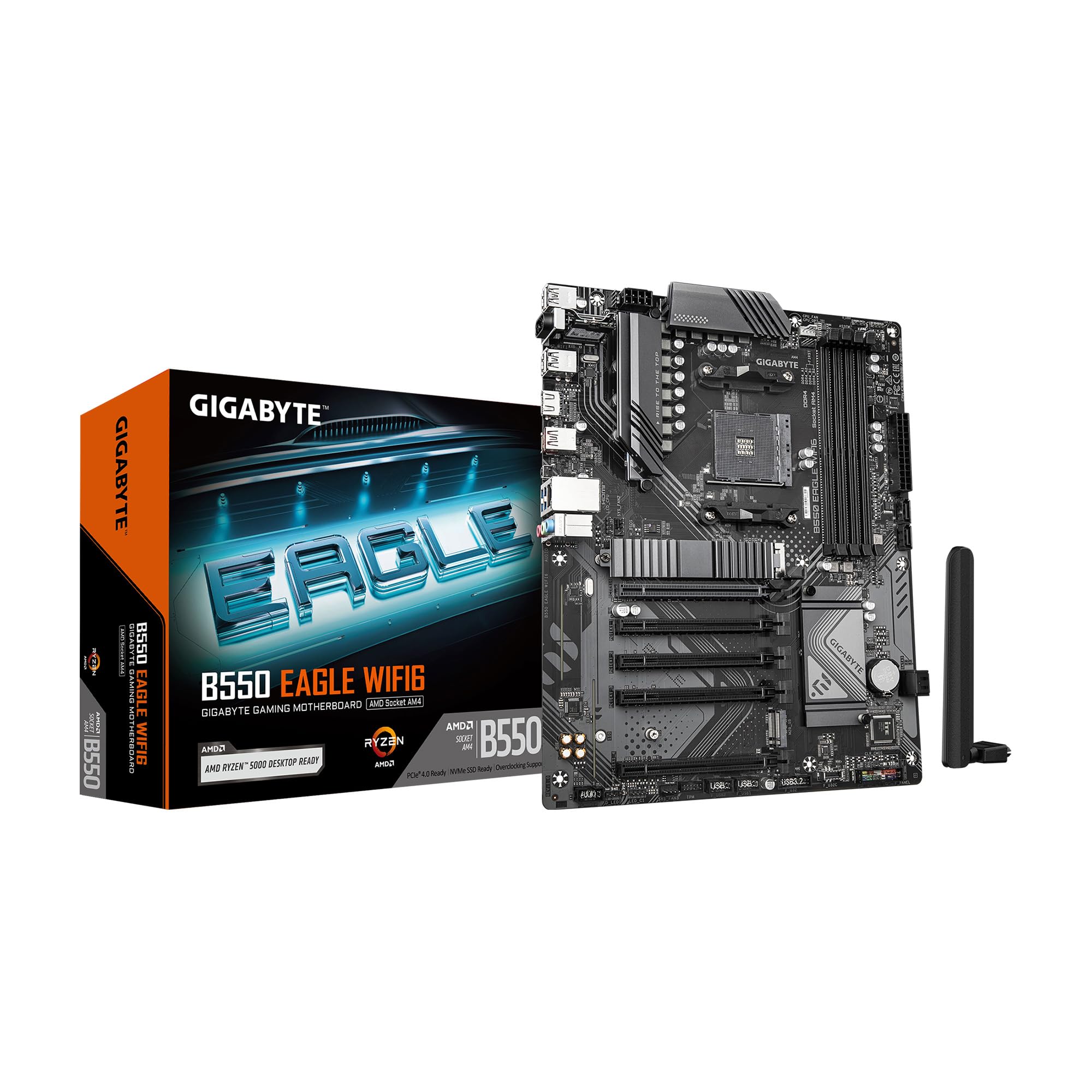
The beginner-friendly AM4 board that boots first time and forgives a first build.
For a first PC on a tight budget, this GIGABYTE B550 Eagle WIFI6 is the least intimidating path into a PCIe 4.0 AM4 machine. It runs the AMD B550 chipset on socket AM4 for Ryzen 5000, 4000 and 3000 Series processors and pairs that with a PCIe 4.0 x16 slot and two M.2 slots. Wi-Fi 6 is built in, so no separate network card and no guessing which slot it goes in.
Power comes from a digital twin 10+3 phase VRM with premium chokes and capacitors. The VRM heatsinks are enlarged and layered with 5 W/mK thermal pads, and GIGABYTE pre-installs the I/O armor so you are not fumbling with a backplate. USB 3.2 Gen 2 Type-C sits on the rear panel. At 4 pounds it is the heaviest board in this group — 2 pounds heavier than the ASUS X870-PLUS — and that heft gives it a solid feel on the bench.
What earns it a place is the value: it is one of the easiest AM4 boards to set up, and beginners get it running from the start. What owners praise most is the overall build quality, with reliability close behind. The recurring snag is the wireless — a few builds found Bluetooth unresponsive, and the fix is installing the Wi-Fi and Bluetooth drivers straight from the GIGABYTE website rather than relying on Windows to find them.
Built for: a first AM4 build that wants Wi-Fi 6, two M.2 slots and a straightforward install.
Mind this: there is no debug LED and no integrated I/O shield, so a failed POST takes more patience to trace.
Know the Specs
PCIe 4.0 versus PCIe 5.0 Slots
PCIe 4.0 is a lane standard for the graphics and M.2 slots on the board. A PCIe 5.0 slot is the newer, faster generation, and a PCIe 4.0 card runs in it at full PCIe 4.0 speed. Shopping for a PCIe 4.0 motherboard is about getting a board with PCIe 4.0 lanes you will actually use — on the graphics slot and at least one M.2 mount.
Socket and Memory Type
The socket decides which processors physically fit, and the memory type decides which RAM works. Intel’s LGA 1700 takes 12th, 13th and 14th Gen Core chips. AMD’s AM4 takes Ryzen 3000, 4000 and 5000, while AM5 takes Ryzen 7000, 8000 and 9000. Memory is DDR4 or DDR5 depending on the board variant, and the two do not interchange.
M.2 Slots and Heatsinks
An M.2 slot is where an NVMe solid-state drive mounts flat on the board. Two slots let you run a fast boot drive plus a second storage drive. A heatsink over the slot is a metal cover that spreads heat so the drive holds its speed during long transfers, which matters when you move large files.
Power Stages and VRM Heatsinks
A power stage is the component that converts the power supply’s voltage into what the CPU needs. A higher stage count with a higher amp rating per stage keeps voltage steady across more cores. The VRM heatsink is the metal block over those stages; larger heatsinks and thermal pads keep it cool under sustained load.
Common Questions
Will a PCIe 4.0 graphics card work in a PCIe 5.0 slot?
Do I need a PCIe 4.0 M.2 slot for a fast NVMe drive?
Can I put a DDR4 kit into a DDR5 motherboard?
What is the difference between AM4 and AM5?
Which B760 board supports 14th Gen Intel from the start?
Can I update the BIOS on an AM4 board without a CPU installed?
How many M.2 drives can these boards run at PCIe 4.0 speed?
Is an ATX board going to fit my case?
Do these boards include Wi-Fi or do I need a card?
Should I buy Wi-Fi 6E or Wi-Fi 7 on a motherboard?
The Bottom Line
For most builds, the pcie 4.0 motherboard winner is the ASUS TUF GAMING X870-PLUS WIFI because its four M.2 slots and PCIe 5.0 slot leave room for the next two upgrades, and 16+2+1 power stages at 80A each keep a high-core Ryzen chip steady. If you want to reuse DDR4 and still get Wi-Fi 6E, the MSI PRO B760-P WIFI DDR4 is the board that respects the memory you own. And for a compact AM4 case where space rules, the Gigabyte B550M AORUS ELITE AX fits where the ATX boards will not.
One honest nudge before you commit: the budget AM4 pick actually carries more owner reviews than the top board does, and it still gives you a real PCIe 4.0 x16 slot and two M.2 mounts. So if your CPU is a Ryzen 5000 chip and your case is a mid-tower, buying down is a smart move, not a compromise. Match the socket first, pick your memory second, and let the PCIe 4.0 lane count break the tie.
How we choose
We do not accept paid placement. Every pick is matched to a real buyer and a real use-case; we do not hands-on test units.
Sources
Specifications: manufacturer listings and product documentation. Review insights: verified customer reviews, as of November 2026. Pricing: not shown on this page (it changes often); check the current price via the retailer link.
As an Amazon Associate, Tactical Gear Guy earns from qualifying purchases. This does not affect which products we feature.