Specs are compiled from manufacturer listings and verified buyer reviews and can change over time — please confirm the key details on the product page before buying.
You want your graphics card to run at full speed, and that depends on the long metal slot on the board being wired to feed it properly. That wiring is what separates these nine motherboards. All of them carry a full-length PCIe x16 slot (the long connector your graphics card clicks into). They differ in which generation of that slot you get, how many M.2 drive slots sit beside it, and how much power hardware the board can feed. The top pick is the ASUS TUF Gaming X870-PLUS WiFi, a 4.6-star board backed by 600+ owners. It pairs a PCIe 5.0-ready layout with four M.2 slots and Wi-Fi 7, and it does that without jumping into flagship money.
This guide is built by comparing the manufacturers’ published specifications and the patterns across verified customer reviews, so you get each pick’s real strengths and trade-offs instead of marketing spin.
Whether you are building a fresh AM5 gaming rig or reusing an AM4 parts pile, the x16 slot’s PCIe generation and the M.2 count beside it decide what you can add later. Read on for the real differences between these pcie x16 slot motherboard options.
Top Picks


How To Choose The Best PCIe X16 Slot Motherboard
Every board on this list has the long x16 slot your graphics card needs. The real decision is what surrounds that slot — which processor socket it serves, which PCIe generation it runs at, and how much room you get for storage and networking. Start with the CPU you already own or plan to buy, because the socket decides everything else.
Match the socket to your CPU before anything else
An AM5 board (AMD’s current socket) takes Ryzen 7000, 8000, and 9000 series chips and DDR5 memory only. AM4 boards take Ryzen 3000, 4000, and 5000 series chips with DDR4 memory. Intel’s LGA 1700 socket handles 12th, 13th, and 14th Gen Core processors. Buy the wrong socket and the CPU will not seat, so the x16 slot never gets a signal.
Check the PCIe generation of the x16 slot
A PCIe 5.0 x16 slot moves data at roughly twice the ceiling of PCIe 4.0, which matters most for the newest graphics cards and Gen5 NVMe drives. PCIe 4.0 is still perfectly usable and costs less. If you plan to keep the board through two graphics card upgrades, PCIe 5.0 buys you headroom that PCIe 4.0 cannot.
Count your M.2 slots and their heatsinks
M.2 slots are where modern NVMe drives (the gum-stick-shaped SSDs) plug in. Two slots is the practical minimum; four gives you room for a fast boot drive plus game storage. Heatsinks over those slots keep the drives from slowing down under load, so look for boards that ship with covers on most or all of them.
Weigh the networking, not just the slot
Wi-Fi 6E adds a 6 GHz band for less crowded wireless, while Wi-Fi 7 is the newer standard on current boards. For wired, 2.5G LAN is common on mid-range boards and 5G LAN shows up on the premium picks. Owners repeatedly note that onboard Wi-Fi can need drivers installed manually after a fresh Windows install — plan for that.
Side-by-Side Comparison
| Model | Best For | CPU Socket | PCIe x16 Generation | M.2 Slots | Amazon |
|---|---|---|---|---|---|
| ASUS TUF Gaming X870-PLUS WiFi★ Best Overall | All-round AM5 build | AM5 | PCIe 5.0 ready | Four | Amazon |
| GIGABYTE B550 Eagle WIFI6Budget Champion | Budget AM4 builds | AM4 | PCIe 4.0 | Two | Amazon |
| MSI PRO B760-P WiFi DDR4Intel Value Pick | Intel DDR4 builds | LGA 1700 | PCIe 4.0 | M.2 (count not listed) | Amazon |
| GIGABYTE B550M AORUS Elite AX | Compact mATX AM4 | AM4 | PCIe 4.0 x16 | Two | Amazon |
| MSI B850 Gaming Plus WiFi | Dual x16 slots | AM5 | PCIe 5.0 x16 + 4.0 x16 | Three | Amazon |
| ASUS ROG Strix B850-A Gaming WiFi | Fast memory + four M.2 | AM5 | PCIe 5.0 | Four | Amazon |
| GIGABYTE X870 AORUS Elite WIFI7 | USB4 connectivity | AM5 | PCIe 5.0 | Four | Amazon |
| MSI MAG B850 Tomahawk MAX WiFi | Quad M.2 storage rigs | AM5 | PCIe 5.0 x16 | Four | Amazon |
Detailed Reviews
1. ASUS TUF Gaming X870-PLUS WiFi AMD AM5 X870 ATX Motherboard
Our pick — 4.5+★ from 650+ verified ratings; the strongest balance of quality and price.
Four M.2 slots and a PCIe 5.0-ready x16 lane on AMD’s newest X870 chipset.
Four M.2 slots and a PCIe 5.0-ready x16 slot are why this board earns its spot: your graphics card and your storage drives both get room to grow. It suits a Ryzen 9000-series build that should cover the most ground without flagship pricing. The X870 chipset sits at AMD’s enthusiast end. The 16+2+1 power stage design (the count of power delivery stages feeding the CPU) with 80A SPS stages means the board can hold steady voltage for a high-core Ryzen 7 or 9. The x16 slot is marked PCIe 5.0 ready, so a next-generation graphics card will not be lane-starved on arrival.
Storage is where it pulls ahead of most of this list. Four M.2 slots let you stack multiple NVMe drives without ever reaching for a SATA cable, and the layout leaves plenty of USB and ARGB headers for fan controllers and lighting kits. Build quality is what wins people over — the TUF line uses an 8-layer PCB (the board’s internal circuit layers) with ProCool connectors and durable capacitors, which is why long-time TUF builders tend to stay with the line. Installation is the second thing that gets talked up, especially the BIOS FlashBack-style easy update path that lets you refresh firmware before the board is even fully seated.
The honest trade-offs: the value and functionality side gets mixed reception, and the recurring gripe is wireless rather than the board itself — a handful of owners run into Wi-Fi or Bluetooth devices that need driver fussing. Linux users should know the Ethernet driver support is the weak point there, so plan a workaround if that is your daily OS. This board is the crowd favorite at 4.5+ stars across 600+ ratings, and in a field this crowded that score with that volume is the best signal you will get.
What it earns its place on
- PCIe 5.0-ready x16 slot gives your graphics card a full-speed lane for years of upgrades
- Four M.2 slots cover boot drive plus game and project storage without SATA cables
- 16+2+1 power stages at 80A hold steady voltage for high-core Ryzen chips
- Build quality is the top praise — 8-layer PCB and ProCool connectors are the reason
Where it asks for patience
- Wi-Fi and Bluetooth devices need driver attention on a fresh install
- Linux Ethernet driver support is weak — one clear owner caution worth planning around
Go for this if: you are building an AM5 Ryzen 9000 rig and want four M.2 slots plus a PCIe 5.0 x16 lane on a proven board.
Plan around this: if you run Linux as your daily driver, budget time for the Ethernet driver situation before you commit.
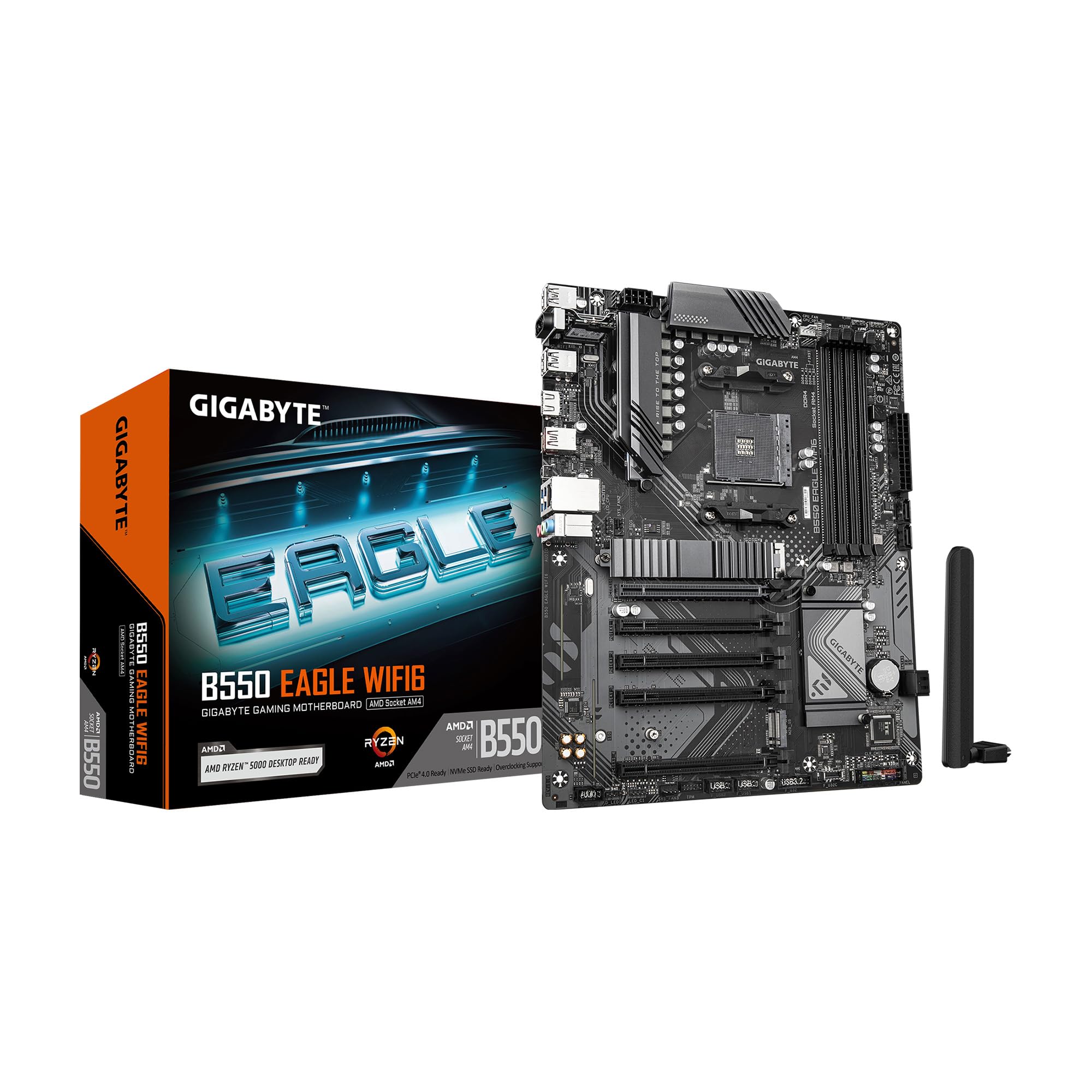
2. GIGABYTE B550 Eagle WIFI6 AMD AM4 ATX Motherboard
The sensible AM4 re-entry point with two M.2 slots and onboard Wi-Fi 6.
You keep your existing Ryzen 3000, 4000, or 5000 processor and your DDR4 memory, and this board lets you skip buying a new CPU, new RAM, and a new board all at once. The B550 chipset is an older standard, but its PCIe 4.0 x16 slot still feeds a current graphics card at full bandwidth. That is the point people forget: generation two of PCIe is not a bottleneck for most gaming cards. The digital twin 10+3 phase VRM (the power delivery stages feeding your CPU) with premium chokes and capacitors handles a mid-range Ryzen without breaking a sweat.
Quality is the loudest praise here by a wide margin — 100+ owners single it out as the reason they would buy it again, with reliability close behind, and the price-to-feature ratio the third consistent theme. The two M.2 slots are easy to reach and the EZ-Latch (a push-tab mechanism for graphics card removal) takes the knuckle-busting out of swapping a GPU. Wi-Fi 6 is built in, so no extra card is needed for wireless, and that alone saves a slot.
The catch is the wireless side: a few buyers report Bluetooth drop-outs, and the standard advice across the review pages is to install the Wi-Fi and Bluetooth drivers from GIGABYTE’s site before troubleshooting anything else. There is also no debug LED and no integrated I/O shield, two conveniences you give up at this tier. At 4.5+ stars across 800+ ratings, though, the consensus is that this board works and keeps working. For anyone sitting on an AM4 pile of parts, it is the smartest way back into a working build.
Best for a leftover AM4 parts bin: Ryzen 3000/4000/5000 chips and DDR4 memory drop straight in, with PCIe 4.0 on the x16 slot still feeding current graphics cards at full bandwidth.
The one habit to build in: grab the Wi-Fi and Bluetooth drivers from GIGABYTE’s support page first off — that single step heads off most of the wireless complaints.
This one wins on: value — it reuses your existing AM4 CPU and DDR4 RAM and still gives you a full-bandwidth x16 slot.
Know going in: no debug LED and no integrated I/O shield, so expect a little more first-build fiddling.
3. MSI PRO B760-P WiFi DDR4 ProSeries Motherboard
The Intel-side bargain that keeps your DDR4 sticks and still gives you Wi-Fi 6E.
You keep both your 12th, 13th, or 14th Gen Intel Core chip and your DDR4 memory, because the LGA 1700 socket spans three Intel generations. MSI lists DDR4 memory support up to 5333+ MHz in overclocked mode. That memory clock sits well above the 3200 MHz rating on the GIGABYTE B550 Eagle and near ASUS’s 6000 MHz figure on the TUF B650E. The x16 slot runs PCIe 4.0, which is the honest ceiling on this chipset and plenty for current graphics cards.
The board handles a mid-to-high Intel chip’s power draw without you thinking about it. That comes from a 12+1 Duet Rail system with P-PAK components and 8-pin plus 4-pin CPU power connectors, backed by a 6-layer PCB built from 2oz thickened copper. The thermal package adds an extended heatsink, MOSFET thermal pads rated for 7W/mK, extra choke thermal pads, and M.2 Shield Frozr covers over the drive slots. Reviewers specifically call out the M.2 slots for fast NVMe SSDs. Build quality and easy setup are the two most consistent themes across the review pages.
The x16 slot is the trade-off here too: PCIe 4.0 only, so a future Gen5 graphics card would throttle back to 4.0 speeds on it. At 1440p with a current card, PCIe 4.0 feeds the GPU at full lane speed, so you will not feel that difference. Wi-Fi 6E and Bluetooth 5.3 cover wireless and accessories from the start, so no add-in card needed. At 4.5+ stars across 700+ ratings, this is the pick for anyone staying on DDR4 and Intel and refusing to rebuild their memory kit just to upgrade the CPU.
What keeps it relevant
- LGA 1700 socket covers 12th, 13th, and 14th Gen Intel Core chips
- Runs DDR4 memory up to 5333+ MHz OC, so your existing sticks stay in service
- 2.5Gbps LAN plus Wi-Fi 6E and Bluetooth 5.3 for wireless and wired both covered
- M.2 Shield Frozr covers keep NVMe drive temps in check under load
What to accept
- x16 slot tops out at PCIe 4.0 — a future Gen5 card would run slower than the slot can support elsewhere
- Wi-Fi needs drivers on a clean Windows install
Fits well if: your CPU and RAM are Intel and DDR4 — this board saves both from the upgrade bin.
Look elsewhere if: a Gen5 graphics card is already on your roadmap, in which case you want a PCIe 5.0 x16 slot on an AM5 board above.
4. GIGABYTE B550M AORUS Elite AX AMD AM4 mATX Motherboard

A micro-ATX AM4 board that squeezes a PCIe 4.0 x16 slot into a small case.
Small-case builders who want an AM4 platform get the full-length PCIe 4.0 x16 slot here, plus 2.5G LAN and Wi-Fi 6E’s 6 GHz band for less congested wireless. The mATX (micro-ATX) board size is the defining spec — it fits cases that would never take a full ATX board, which is the whole reason to pick this over the GIGABYTE B550 Eagle ATX board above. The digital 5+3 power phase setup with premium chokes and capacitors handles a mid-range Ryzen around the 5600X or 5700X class.
Quality is the top praise and setup is the second most consistent positive theme. The onboard WIFI6E and Bluetooth 5.3 work well for some owners, and Q-Flash Plus (a BIOS update feature that works without a CPU, RAM, or GPU installed) is genuinely useful on a fresh build. The trade-offs land on the small form factor itself. The onboard wireless is the biggest complaint area — a chunk of owners mention Wi-Fi drop-outs or firmware quirks. There are no Type-C ports, and the headers cluster at the bottom edge of the board, which makes cable routing fussier in compact cases. There’s also no M.2 heatsink included, so plan to add one if your NVMe runs hot.
What the review pages agree on is that this board is reliable in use once you clear the setup hurdles. The best fit here is the mATX build where a full-size board will not fit and you need the x16 slot plus the storage and wireless all in one smaller footprint. If your case takes full ATX, the ATX boards on this list spread their headers out and are more forgiving of cable work.
Small-case thinking: micro-ATX size fits compact cases, PCIe 4.0 x16 keeps the graphics card fed, and Q-Flash Plus lets you flash BIOS without a CPU or RAM in place.
Fit-note, not a fault: no Type-C ports and no M.2 heatsink in the box — buy a heatsink cover and skip USB-C devices if those matter.
Built for: mATX cases where a full ATX board will not squeeze in but you still want the PCIe 4.0 x16 slot.
skip it if: you need USB-C on the board or a heatsink for your NVMe drive from the start — none of those are included here.
5. MSI B850 Gaming Plus WiFi AMD AM5 ATX Motherboard

Two x16 slots — a 5.0 primary for the GPU and a 4.0 secondary for a capture card.
Most boards on this list give you one full-length x16 slot and a few short slots. This MSI gives you two full-length ones: a PCIe 5.0 x16 with Steel Armor (a reinforced slot housing that keeps a heavy card from sagging) and a second PCIe 4.0 x16. That second slot is the whole reason to pick this board — it is where a capture card, a second graphics card, or a sound card lives without fighting the main GPU for space. The chipset is AMD B850 paired with AM5 and DDR5 memory that MSI lists at 6000 MHz.
Storage runs three M.2 connectors — one Gen5 x4 and two Gen4 slots — and the Gen5 slot has EZ M.2 Shield Frozr II to keep the drive from slowing down under load. Network hardware is a full-speed Wi-Fi 7 module with Bluetooth 5.4 and a 5Gbps LAN port, which puts this board above the 2.5G LAN boards on the list for wired throughput. Performance and quality are the two most praised aspects and both are solid. The -plus savings versus the flagship boards on paper amount to real differentiation on connectivity — you get Wi-Fi 7 and 5G LAN at a lower tier.
The recurring catch on this board is the wireless driver experience. Some owners find the Wi-Fi adapter not recognized on first install, and a couple of reports mention slow boot times after hardware changes or the board getting stuck during setup. Those are setup-window problems rather than day-to-day ones, and reviewers who get past them report strong results with a Ryzen 7 9700X and RX 9070XT pairing. If you want a second full-length x16 slot for a capture card plus Wi-Fi 7 and 5G LAN without flagship money, this is the pick.
What sets it above the rest
- Two full-length x16 slots — a 5.0 primary and a 4.0 secondary — for a GPU plus a capture or sound card
- Wi-Fi 7 and 5Gbps LAN put its networking a tier above the 2.5G LAN boards here
- Three M.2 connectors with a Gen5 slot under EZ M.2 Shield Frozr II
- Gen5 x16 slot gets Steel Armor to hold a heavy graphics card straight
What the review pages flag
- Wireless adapter sometimes needs driver attention on first boot
- Setup window can include slow boot times after hardware swaps
Made for you if: you run a graphics card plus a capture card or second expansion and need two full-length slots.
Not a fit if: you want zero setup friction on day one — the Wi-Fi driver step is a real one to plan for.
6. ASUS ROG Strix B850-A Gaming WiFi Motherboard

A memory-clock monster with four M.2 slots and a PCIe 5.0 x16 lane.
This board lists DDR5 memory at an 8000 MHz clock speed, well above the 6000 MHz figures on the TUF B650E and the MSI B850 Gaming Plus. If you run memory-sensitive workloads or just chase frame stability in CPU-limited games, that ceiling is the draw. Power delivery is a 14+2+2 solution rated for 80A per stage on an 8+8-pin ProCool connector. The thermal design bridges massive heatsinks to the VRMs with high-conductivity thermal pads.
Build quality is the thing buyers lead with, and appearance gets heavy praise too — the board’s finish is more silver than pure white, which is worth knowing before you match it to a white case build. Installation is genuinely plug-and-play; the BIOS arrives ready on many units without a flash. Four M.2 slots give you drive room to spare, and the x16 slot is PCIe 5.0 for a current or next-gen graphics card. Expect this board to sit in a large ATX case — it is 5 pounds with a 14.1-inch length, so it is not a compact board.
Reliability and value split owners. Plenty report zero issues, but the ones who had trouble describe it as a board that did not suit their build rather than a consistent flaw, and a few note the pricing is only justified on sale. Pairing an AM5 Ryzen chip like the 9800X3D here is what this board was designed for, and having four M.2 slots plus PCIe 5.0 on the x16 lane covers years of upgrades. The catch is you pay for the ROG badge and the memory speed — if you are not going to push memory, the TUF B650E above does the same core job for less.
The memory clock is the headline: DDR5 rated to 8000 MHz leaves the 6000 MHz boards on this list behind for tuning and frame stability.
What you pay for: the ROG badge and the fastest memory ceiling in this roundup — and a few owners say it only adds up on sale.
Built for: Ryzen builders who chase memory speed and want four M.2 slots plus a PCIe 5.0 x16 lane under the ROG name.
Reconsider if: you are not going to push memory past 6000 MHz — the TUF B650E above covers the same ground for less.
7. GIGABYTE X870 AORUS Elite WIFI7 AMD AM5 ATX Motherboard

Dual USB4 ports and a PCIe 5.0 x16 slot with a 5-year warranty behind it.
The differentiator here is the port set — dual USB4 connections (which move data at up to 40Gbps and can also carry displays) sit alongside front and rear USB-C. If you run an external SSD, a USB4 dock, or a high-refresh monitor over USB-C, this board is the one on the list that covers it. It also packs four M.2 slots and PCIe 5.0 on the x16 lane for the graphics card, with DDR5 memory rated up to 8200 MHz in the listing. Power design is a 16+2+2 layout with VRM and M.2 thermal guards. The 5-year warranty is the longest coverage on this list by a clear margin.
Quality and performance are the two dominant praise themes. Owners describe a board that works right from the start on both Windows 11 and Linux — an unusual positive note given how Linux support varies across this category. Ease of setup gets its own thread too; swapping NVMe drives is straightforward thanks to the EZ-Latch system. The storage-versus-expansion balance is the smart bit: four M.2 slots without starving the x16 graphics slot of lanes is a genuinely tricky split to pull off, and the review pages recognize it.
One catch worth naming is driver-era sensitivity. Windows 10 drivers for audio, Ethernet, Wi-Fi, and Bluetooth did not all work out of the gate on some units; upgrading to Windows 11 cleared that up. Wi-Fi 7 and USB4 land on the working side once drivers are current. At 4.0+ stars, this is a mature board for the builder who wants USB4 and a long warranty. A slightly higher-scored board is above it, but this one is the connectivity champion if USB4 is on your list.
Why it deserves a spot
- Dual USB4 ports with 40Gbps throughput and display support
- 5-year warranty, the longest on this list
- Four M.2 slots without starving the PCIe 5.0 x16 graphics slot of lanes
- Works on Windows 11 and Linux from the start in many builds
Where to mind the details
- Windows 10 drivers for audio, Ethernet, Wi-Fi, and Bluetooth need a clean install of Windows 11 on some units
- An occasional stall during boot reported on a few builds
Best fit: you use USB4 devices, run Linux, or want the longest warranty on this list — this is the board that covers all three.
Check before buying: you are still on Windows 10 — plan the Windows 11 upgrade path rather than assuming every driver will land on day one.
8. MSI MAG B850 Tomahawk MAX WiFi AMD AM5 ATX Motherboard

Two Gen5 M.2 slots behind a PCIe 5.0 x16 lane — storage headroom done right.
If storage is the whole reason you are buying a new board, this is the answer on this list. It carries two M.2 Gen5 x4 slots plus two Gen4 slots for four drives total across the full speed ladder. The PCIe 5.0 x16 slot has Steel Armor II (a reinforced metal jacket around the slot) to keep a heavy graphics card from sagging, and it lists 128GB/s of bandwidth. DDR5 memory runs up to 8400+ MT/s in overclocked mode. Power is a 14 Duet Rail Power System with 80A SPS stages (SPS = smart power stages that monitor their own current), which is serious hardware for a stock Ryzen 9000 build.
Reliability is the aspect people bring up first, with installation second, and both are heavily positive. The EZ DIY touches — EZ M.2 Shield Frozr II covers and EZ M.2 Clip II — mean drive swaps happen without a screwdriver, and the network stack is full-speed Wi-Fi 7 with Bluetooth 5.4 and 5Gbps LAN. A rear USB 20GB Type-C port is included for fast external transfers. The rear I/O on this board is a specific strength; plenty of ports, all mechanically clean.
Two honest fit-notes. A handful of buyers hit boot issues from the start, and occasionally the board is the culprit — worth flashing the BIOS and checking CPU and RAM seating early if the screen stays dark. And the onboard Wi-Fi is a Windows 11 or modern-OS affair; Windows 10 users are better served with a cable or a Wi-Fi 7 card. If neither of those applies and you want the storage king of this list — two Gen5 M.2 slots with the PCIe 5.0 x16 lane kept intact — this is the one.
The storage argument: two M.2 Gen5 x4 slots plus two Gen4 slots next to a PCIe 5.0 x16 that lists 128GB/s — most drives most lanes of any board here.
The setup caution: boot issues have been reported from the start, so flash BIOS and confirm CPU and RAM seating first if you see a blank screen.
Reach for this if: four M.2 drives across two Gen5 slots with the PCIe 5.0 x16 kept intact is exactly the storage setup you need.
pass on it if: you run Windows 10 or want zero first-boot troubleshooting risk — the Wi-Fi driver and boot quirks are real considerations here.
Know the Specs
PCIe x16 Slot and Its Generation
The x16 slot is the long reinforced connector where the graphics card lives. Its generation — PCIe 4.0 or PCIe 5.0 — is the maximum speed it can deliver to the card. PCIe 5.0 x16 slots on boards like the ASUS TUF X870-PLUS and MSI MAG B850 Tomahawk run at the newest standard, which matters for current top-end GPUs and Gen5 NVMe. A PCIe 4.0 slot is still a full-speed x16 lane for current graphics cards, just one generation behind.
CPU Socket: AM5, AM4, and LGA 1700
The socket is the grid of pins the CPU sits in — you cannot mix generations or brands. AM5 boards (the majority of this list) take Ryzen 7000, 8000, and 9000 chips with DDR5 memory only. AM4 boards take Ryzen 3000 to 5000 with DDR4. LGA 1700 boards take 12th, 13th, and 14th Gen Intel Core with DDR4 or DDR5 depending on the exact board. Check the socket first, then everything else falls into place.
M.2 Slots and Heatsinks
M.2 slots are the flat connectors where NVMe drives sit. Two is a functional minimum, three or four gives room to grow. Heatsinks over the slots are the cover plates that keep drives from slowing under load — boards like the ASUS TUF B650E ship with all M.2 slots covered, while the GIGABYTE B550M AORUS does not include one. If your drive gets hot, a simple aftermarket cover is enough.
Power Stages and VRM Cooling
The VRM (voltage regulator module) feeds clean power to the CPU through a number of stages. More stages — like the 16+2+1 on the ASUS TUF X870 or 14+2+2 on the ROG Strix B850-A — means the board can feed a high-core CPU without straining. Heatsinks over those stages keep them cool. None of this affects gaming FPS directly; it is about stability and long-term reliability under heavy load.
Common Questions
Will my graphics card work in the PCIe x16 slot on any of these boards?
What is the difference between a PCIe 4.0 x16 and a PCIe 5.0 x16 slot in real use?
Does a PCIe 5.0 x16 slot matter if I only game at 1440p?
Can I put a Ryzen 5000 CPU in an AM5 motherboard?
How many M.2 NVMe drives can I run without slowing the graphics card?
Do I need to install Wi-Fi drivers manually on a fresh Windows build?
Will an ATX board fit in a micro-ATX case?
Is DDR4 or DDR5 the right memory for these PCIe x16 boards?
Do I need a BIOS update before the board recognizes a newer CPU?
What power supply connector does a PCIe x16 board need?
Can I use an older PCIe 3.0 graphics card in a PCIe 5.0 x16 slot?
The Bottom Line
For most builders, the pcie x16 slot motherboard winner is the ASUS TUF Gaming X870-PLUS WiFi. It combines a PCIe 5.0-ready x16 slot, four M.2 slots, and Wi-Fi 7 on a board that 600+ owners rate 4.5+ stars. If you are staying on AM4 and want to reuse your RAM and CPU, reach for the GIGABYTE B550 Eagle WIFI6 — its two M.2 slots and onboard Wi-Fi 6 cover a budget build with real room to grow. And if a USB4 dock, external drive, or dual-monitor setup lives on your desk, the GIGABYTE X870 AORUS Elite WIFI7 gives you dual USB4 ports and a 5-year warranty to back them. Every board here gives you a working PCIe x16 slot — pick the one whose socket (AM5, AM4, or LGA 1700), memory type (DDR5 or DDR4), and M.2 count match the parts you already own.
How we choose
We do not accept paid placement. Every pick is matched to a real buyer and a real use-case; we do not hands-on test units.
Sources
Specifications: manufacturer listings and product documentation. Review insights: verified customer reviews, as of November 2026. Pricing: not shown on this page (it changes often); check the current price via the retailer link.
As an Amazon Associate, Tactical Gear Guy earns from qualifying purchases. This does not affect which products we feature.