Specs are compiled from manufacturer listings and verified buyer reviews and can change over time — please confirm the key details on the product page before buying.
Your old 3.5-inch hard drive still holds years of photos, work files, and game saves — and dropping it into a cheap plastic box is how people lose them. A good SATA 3.5-Inch HDD Enclosure does three jobs at once: it feeds the drive steady power, keeps it cool while it spins, and moves data fast enough that you are not staring at a progress bar all afternoon. The real differences come down to four things: the controller chipset, how many bays you need, how the drive is cooled, and which cables ship in the box. Get those four right and you buy once instead of returning a box that caps your drive or overheats it.
This guide is built by comparing the manufacturers’ published specifications and the patterns across verified customer reviews, so you get each pick’s real strengths and trade-offs instead of marketing spin.
Some enclosures are a single vertical dock for one rescued drive, others hold four bays and add HDMI. Here is how the sata 3.5-inch hdd enclosure picks shake out for real desks and real drives.
Top Picks

How To Choose The Best SATA 3.5-Inch HDD Enclosure
The biggest mistake first-time buyers make is assuming any enclosure will make their drive fast. It will not. A 3.5-inch spinning drive is a mechanical part that needs steady 12V power and a chipset that speaks the right language to your computer. Steady 12V power and a UASP-capable chipset are what keep a 3.5-inch drive spinning at full speed. Get them wrong and you get dropped connections, stalled copies, and a drive that spins up and down mid-transfer.
Start With The Drive, Not The Box
Confirm your drive is a 3.5-inch SATA unit — the wide desktop size with two flat connectors, not the small laptop-style drive. Every pick below takes that form factor. If you have a 2.5-inch laptop drive, several of these enclosures still accept it, though some multi-bay models need separate mounting brackets that are not included. Check the capacity ceiling too, since the controller board inside each enclosure has a maximum it can address, and older designs cap lower than newer ones.
The Chipset Decides Your Real Speed
Look for the words UASP and the actual USB generation, not just “fast.” UASP (USB Attached SCSI Protocol — a way for the enclosure to queue many commands at once instead of one at a time) makes a visible difference when you copy thousands of small files. A USB 3.0 enclosure tops out around 5Gbps (gigabits per second), while a USB 3.2 Gen 2 box can push 10Gbps. Your spinning drive will rarely saturate either, but the headroom matters if you ever swap in a SATA SSD.
Cooling And Power Are Not Optional
A 3.5-inch drive generates real heat while it spins, and heat is what shortens its life. Aluminum shells shed that heat better than plastic, and vents or a built-in fan help further. On the power side, every enclosure here uses a 12V adapter — you cannot run a desktop drive off a USB port alone. Look at what the box includes: a detachable USB-A/C cable saves you buying an adapter, and a 12V/2A supply is the standard for stable spinning.
How Many Bays Do You Actually Need
One bay suits a single rescued drive or an archive you plug in occasionally. Three or four bays turn the enclosure into a small storage shelf — handy for consolidating several drives onto one cable. Be honest about if you need simultaneous access, though. Multi-bay boxes that share one USB connection often present drives one at a time unless the host supports the right mode, and RAID (combining several drives into one volume) is a separate feature entirely. None of the picks below promise RAID unless the listing says so.
Side-by-Side Comparison
| Model | Best For | Max Capacity | Transfer Rate | Bays | Amazon |
|---|---|---|---|---|---|
| RSHTECH Upgraded 3.5″ Aluminum★ Best Overall | Single-drive daily dock | 24 TB | 6 Gbps (UASP) | 1 | Amazon |
| j5create JEE351Budget Pick | Budget single-drive backup | — | 5 Gbps | 1 | Amazon |
| ORICO USB 3.1 Type-CTool-Free Value | Tool-free value pick | 20 TB | 5 Gbps (UASP) | 1 | Amazon |
| ORICO DD35-C3 Aluminum | Fast single-drive transfers | 20 TB | 6 Gbps (USB 3.2 Gen 2) | 1 | Amazon |
| CENMATE 3 Bay | Consolidating three drives | 60 TB | 5 Gbps | 3 | Amazon |
| Vantec NST-371C31-BK | Long-running aluminum build | — | — | 1 | Amazon |
| StarTech S351BMU33ET | IT / eSATA workflows | — | 6 Gbps | 1 | Amazon |
| CENMATE 4 Bay + Fan | High-capacity storage shelf | 80 TB | 5 Gbps | 4 | Amazon |
| WAVLINK 4-Bay USB-C 3.2 | Fastest multi-bay with HDMI | 128 TB | 10 Gbps | 4 | Amazon |
Detailed Reviews
1. RSHTECH 3.5″ Aluminum USB C
Our pick — 4.0+★ from 2,000+ verified ratings; the strongest balance of quality and price.
A single-bay aluminum dock with a 24 TB ceiling and a detachable USB-A/C cable that fits old and new machines alike.
What earns this one the top spot is capacity and flexibility in one aluminum body. It reads 3.5-inch drives up to 24 TB (terabytes — each terabyte is roughly 1,000 gigabytes of storage), which beats the 20 TB ceiling on the ORICO Type-C model below by a meaningful margin. For anyone dragging a big media library out of a dead PC, that headroom means you are not shopping for a second box the moment you find a bigger drive.
You get one cable that fits almost anything. RSHTECH ships a 3.3 ft detachable USB cable with a dual connector — a USB-A plug and a USB-C plug on the same lead — so it fits older laptops, modern USB-C machines, and game consoles like the PS4 and Xbox One without an adapter hunt. Data moves at up to 5Gbps, and UASP support lifts that to a 6Gbps ceiling. For everyday file copy that is plenty, and the built-in ASM1153E chip (the controller that runs the connection) keeps it steady.
Setup is tool-free: slide the drive in, screw nothing, plug in. Two LEDs show power (red) and drive activity (blue), and a tap of the electronic power button wakes it. The automatic sleep kicks in after 10 minutes idle, which keeps the drive from spinning all night. It can lie flat or stand upright on the removable bracket, so it tucks beside a monitor without eating desk space.
What sells it
- 24 TB ceiling — the largest single-bay capacity here.
- 2-in-1 USB-A/C cable covers old and new laptops alike.
- Aluminum body with bottom vents sheds heat better than plastic.
- Automatic sleep after 10 minutes idle protects the drive motor.
Where it wobbles
- The housing mixes ABS plastic with the aluminum, and the plastic sections feel less solid than a full-metal shell.
- Only one bay, so you swap drives by hand if you have several.
Grab this if: you want one dependable dock for a rescued drive, with the widest capacity and the most forgiving cable.
Pass if: you need several drives online at once — the WAVLINK four-bay below is the shelf you want.
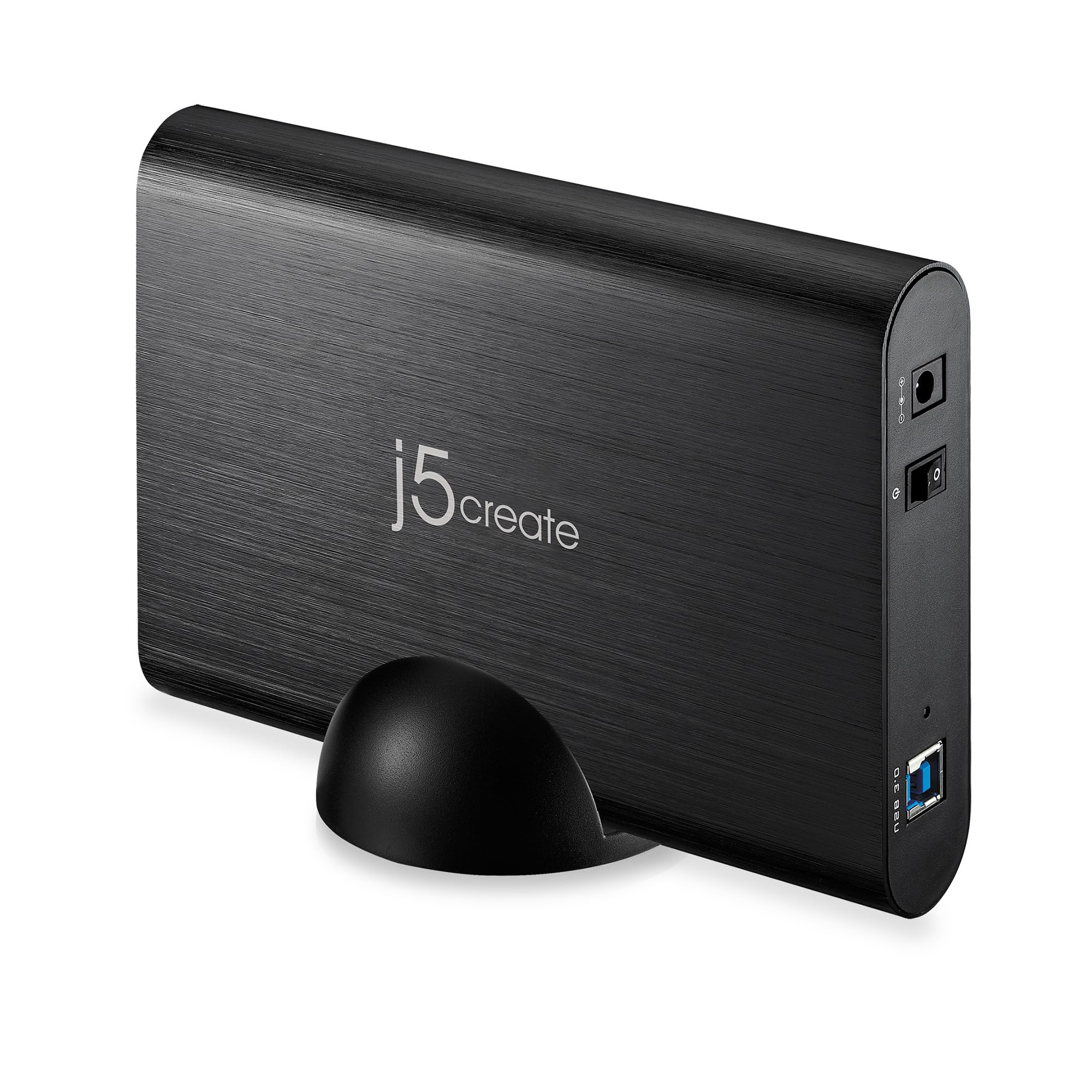
2. j5create JEE351 3.5 Inch SATA
An entry-level aluminum box that does the basic job for anyone on the tightest budget.
This is the simplest pick in the lineup, and it is honest about it. j5create’s JEE351 turns a 3.5-inch SATA drive into external storage over USB 3.0 at up to 5Gbps — which the listing describes as 10x faster than USB 2.0. If your drive sat in an old tower and you just want to pull files off it, that speed is more than sufficient.
The aluminum casing is the standout at this tier, since it helps move heat away and quiets the vibration a spinning drive produces. Its upright design stands the drive on end to save desk space, and a single blue LED shows power and activity so you know it is awake. Plug-and-play across Windows, macOS, and Linux means no drivers — you connect it and the drive appears.
The trade-off is reach. With a shallower review pool behind it than the RSHTECH or the ORICO models above, this is a pick for someone who wants a straightforward, low-cost converter rather than a long track record. It reads and writes SATA drives fine, but it is not the enclosure to buy if you plan to run a drive continuously for years.
Why it makes the list: a metal-shell single-bay enclosure at the lowest tier, with the plug-and-play simplicity a first-timer needs.
Reach for it if: you need to read one drive occasionally and want to spend as little as possible.
Look elsewhere if: you want a deep review history or a bigger capacity ceiling before committing.
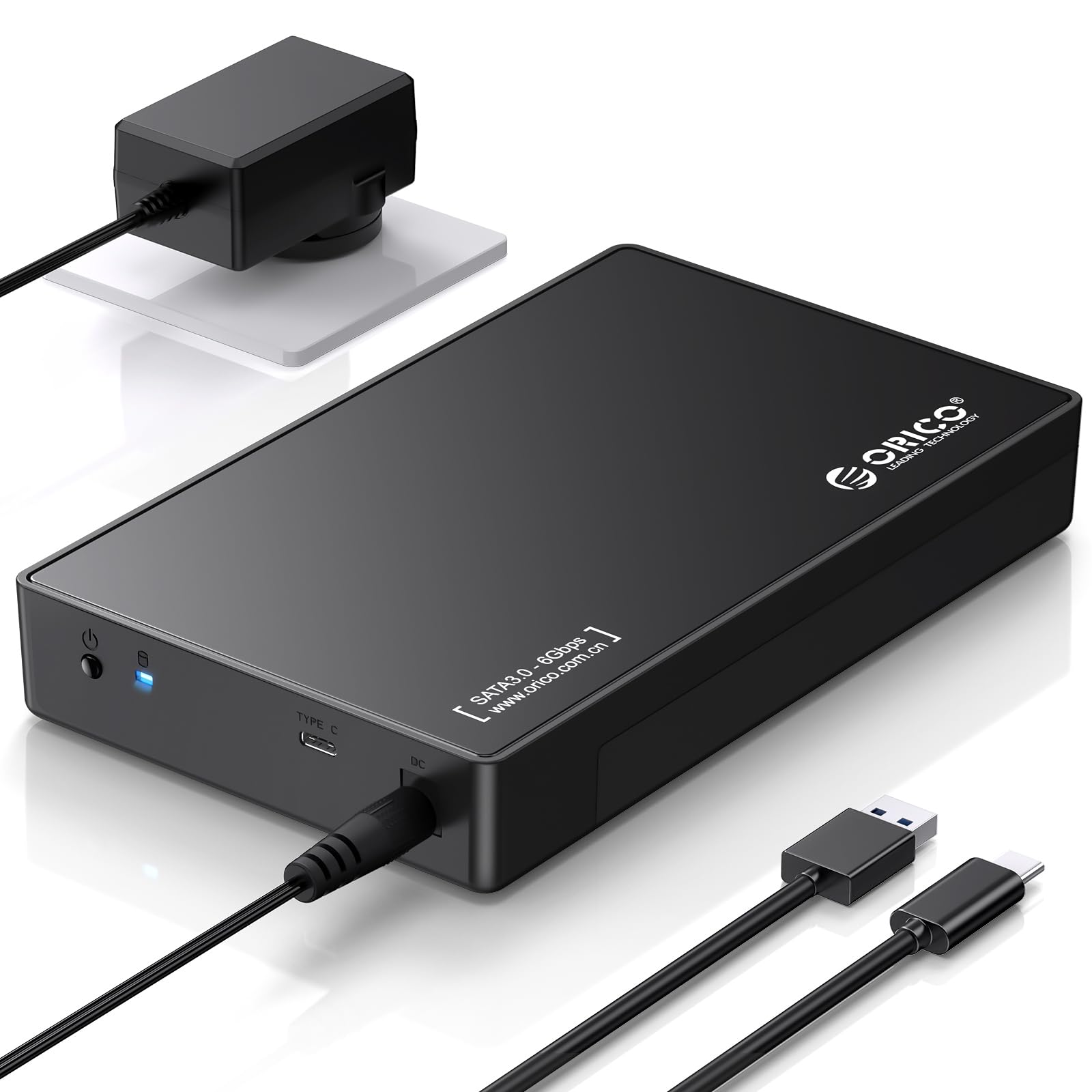
3. ORICO 3.5″ SATA III USB3.1 Type C
The no-tools box that pops a drive in bare-handed and ships a foam pad to cushion it.
For anyone who has fought a fiddly metal enclosure, the ORICO Type-C model is a relief. It slides open and the drive drops in without a screwdriver, then closes and connects. Owners consistently call out the tool-free setup as the reason they picked it, and the speed holds up too — real transfer figures land in the 190-230MB/sec range for large files.
The box handles 3.5-inch drives up to 20 TB over a USB 3.1 Type-C connection to SATA III. UASP support is on board, which the listing says increases speed by 20% over plain USB 3.0 — that is the boost you feel when copying a folder of thousands of small files. It ships with a 12V power adapter, a USB-A to USB-C cable, and two thermal pads, so the drive runs cool and steady.
A shock-proof foam pad inside cushions the drive against knocks, which matters if the enclosure rides in a bag. The honest catch is consistency: buyers report a genuinely mixed read on the functionality and size, with some finding it fantastic and others unhappy. That split usually depends on the specific drive and host pairing rather than the shell itself, so it suits a straightforward single-drive backup over a mission-critical archive.
Best move for most: if tool-free installation and a cushioned drive bay are your priorities, this is the easiest box to live with in the mid-tier.
Worth knowing: the cable is A-to-C — the C end goes into the enclosure, the A end into your computer — so USB-C-only laptops need their own adapter.
Owning one suits: the tinkerer who swaps drives often and hates hunting for screws.
Think twice if: you need a larger ceiling than 20 TB — the top pick goes to 24 TB.
4. ORICO DD35-C3 3.5 USB 3.2 Gen 2

A USB 3.2 Gen 2 aluminum enclosure rated to 6Gbps with UASP, built for large single-file copies.
Where the budget ORICO above settles for USB 3.1, this DD35-C3 steps up to a USB 3.2 Gen 2 chip. The listed ceiling is 6Gbps over SATA III, and the design supports UASP acceleration. ORICO’s own figures put that at up to 70% faster than conventional USB 3.0, which shows up most on huge single-file copies. Compared to the 5Gbps j5create, the extra headroom is the reason to spend more here.
The aluminum alloy shell with heat-dissipation vents keeps a spinning drive cooler during long jobs, and the built-in chipset adds over-voltage, short-circuit, overload, and over-temperature protection. That last one is worth noting: multiple owners tie it to a drive that keeps working. What people mention most is the build and the reliability — the enclosure reads as sturdy in the hand rather than hollow plastic.
The catch is cooling under a real load, where several owners mention it runs warmer than expected, and a few report compatibility trouble with specific mini-PC hosts rather than the drive itself. It also takes a bit of effort to open the first time. For a desk setup moving large files regularly, it earns its place; just be sure your host is a standard USB port and not an unusual one.
Gets the fast lane
- 6Gbps over USB 3.2 Gen 2 with UASP — the quickest single-bay here by the numbers.
- Over-voltage, short-circuit, overload, and over-temperature protection built in.
- 10Gbps 2-in-1 USB-C to A/C cable included for flexible host hookup.
- Handles 3.5-inch drives up to 20 TB and 2.5-inch SSDs in all sizes.
Slows you slightly
- Warms up more than some expect under sustained transfer, so give the vents breathing room.
- First-time opening takes a little patience.
Pick it for: big-file work where every minute of transfer counts.
skip it if: you want a set-and-forget archive cooler — the WAVLINK’s auto fans below run harder.
5. CENMATE 3 Bay Hard Drive Enclosure
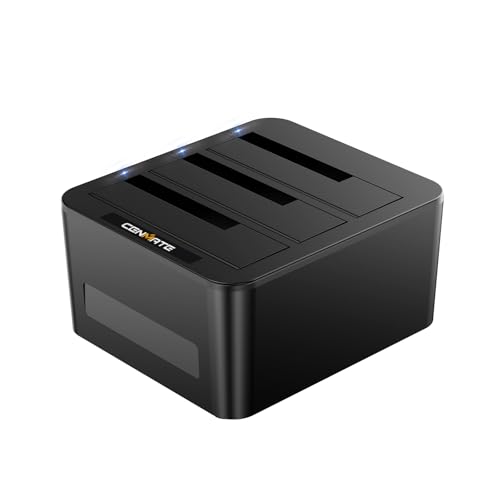
Three tool-free bays at up to 20 TB each, hot-swappable over one USB 3.0 cable.
When one bay stops being enough, this CENMATE is the value bridge into multi-drive territory. It holds three 2.5 or 3.5-inch drives with up to 20 TB each, reaching 60 TB total. For a small business or a home archive that has outgrown individual enclosures, that is a lot of consolidated storage over a single USB cable.
Hot swapping is the real convenience: you can pull and replace a drive without powering the whole box down, which speeds up any backup rotation. It is tool-free both ways, and it ships with a USB A/C 3.0 cable so old and new machines connect. Transfer runs at up to 5Gbps, which CENMATE frames as ten times faster than USB 2.0 — for mixed-media backups that is comfortable.
Here is the honest picture you should carry in. Reliability is the thing owners praise most, and the build quality reads solid, but the connectivity and USB experience split opinion — some setups hum along, others hit port quirks. If you need guaranteed simultaneous access to all three bays, confirm your host’s setup first. For straightforward drive-shelf duty where you mount one or two at a time, it earns its keep.
Where it fits: a tidy three-drive shelf at mid-tier cost, with the hot-swap convenience that makes backups less of a chore.
Plan around: the shared-cable reality of multi-bay boxes — you may not see every drive at once on every host.
Made for: the person with three loose drives who wants them on one tidy desk cable.
Not for: anyone expecting RAID mirroring — this is a reader, not a redundant array.
6. VANTEC NST-371C31-BK USB 3.1 Gen 2 Type-C 3.5 in. Enclosure

A metal tank of an enclosure built to sit there quietly running for months.
Vantec’s NexStar Gx takes the long-view approach. The aluminum casing reads solid the moment you lift it, and owners who have left one going for months at a stretch back that up — one noting seven months of continuous use with no trouble. It handles SATA 6.0 Gb/s drives over a USB 3.1 Gen 2 Type-C connection, and ships with both C-to-C and C-to-A cables so a USB-C laptop or an older USB-A desktop both connect from the start.
The build quality is the clear draw — it tops what buyers praise here, with reliability right behind. Assembly is straightforward, and transfer speeds impress for a 3.5-inch dock, with real figures above 120MB/s reported. It works across PC, Mac, and Linux, and handles HDDs, SSDs, and hybrid drives.
Two things to weigh: the thermal story splits, with some finding it stays cool and others reporting it warms up, so leave the metal exposed rather than tucked behind a monitor. Compatibility also lands mixed — it is not universal with every host, and the mounting point seems to suit some better than others. For a workstation enclosure you simply trust, this is a strong, quiet record backed by frequent praise.
The case for it: an aluminum single-bay with a genuine reputation for running steadily, month in and month out.
The consideration: give it airflow — the metal shell wants to breathe, not hide.
Go here when: the enclosure will live plugged in on a desk for the long haul and build durability matters most.
Look on if: you need multi-bay capacity or a quick-swap workflow.
7. StarTech S351BMU33ET 3.5in SATA

The dual-port workhorse for people who swap drives without a tray, a screw, or a second thought.
StarTech built this one for the IT bench. A trayless metal design means drives slide in and out with next to no fuss — no caddy, no screws. That makes it the enclosure for data recovery, archiving, or clone work where you are changing drives several times a day. The listing frames it as the IT pro’s choice, and the two-year backing with free technical help matches that positioning.
Two connection options set it apart: a USB 3.0 port with transfer speeds up to 5Gbps, and an eSATA port for a direct SATA link. eSATA (External SATA — a cable that carries the drive’s native signal outside the case) matters if your machine has that port and you want the drive to behave like an internal one. It handles SATA I and II drives as well, so older units are not left out.
The fanless design keeps it quiet — no whirring to distract you — and the compact footprint saves space. What owners praise most is the quality of the build and how reliably it works, including units running around the clock. The one honest caveat is heat, a frequent gripe because passive cooling only goes so far with a hard-working drive — an occasional owner finds it needs more airflow than expected.
For the tool bag: dual USB/eSATA inputs and tool-free swaps make this a recovery-day dependable.
Keep it in mind: fanless means silent, but also means the drive relies on airflow around the metal — don’t box it in.
Tempting for: techs and tinkerers who switch drives often and value an eSATA path.
Keep looking if: you just want a cheap one-drive dock — the value picks cover that.
8. CENMATE 4 Bay Hard Drive Enclosure with Cooling Fan

A four-bay aluminum vault for consolidating a pile of drives onto one very large shelf.
Four bays and 80 TB total is the headline. Each slot handles up to 20 TB, so this CENMATE turns a drawer of loose drives into one stacked unit. For a creative pro with years of project drives or a small team archiving media, freeing that much desktop space is the reason to buy it.
Cooling gets real attention here: an aluminum-alloy body with a 2-inch fan moves air across the drives to keep them stable during long transfers. CENMATE is upfront that the fan runs around 40-50 decibels, so it is not silent — do not park it on a recording desk. Data runs at up to 5Gbps over USB 3.0, driven by the JMS567+JMB575 chipset, and a DC 12V adapter provides steady power. It works across Windows, Mac, and Linux.
Read the fine print on the eSATA port (an external SATA connection) before you buy: the listing warns it does not work with a computer’s SATA-to-eSATA adapter, hot swapping is not supported, and the host’s eSATA port needs RAID support to reach more than one bay. That makes USB the practical everyday route. Owners point to the capacity and the tidy consolidation as the win, with setup described as simple. Buy it for its bays and its storage ceiling, not for the eSATA path.
Why it lands here: the most bays for the money, with active fan cooling and a big 80 TB ceiling.
Be realistic about: noise and the eSATA caveats — treat USB as the main road.
Right for: big archives that need four drives stacked and cooled in one unit.
Wrong for: a silent room or a workflow depending on eSATA multi-bay access.
9. WAVLINK 4-Bay Hard Drive Enclosure USB-C 3.2 with HDMI
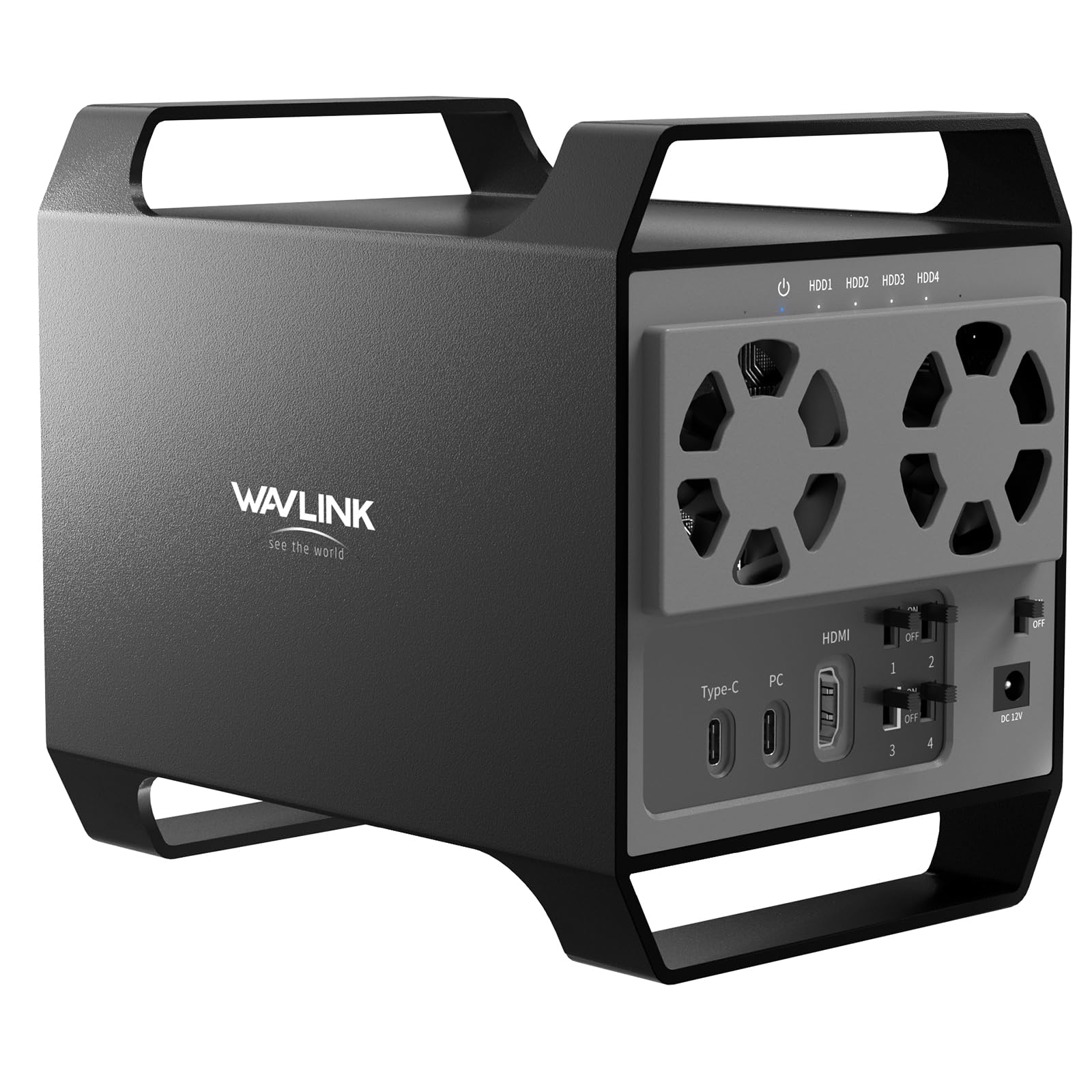
The four-bay dock that doubles as a display hub — storage and screen out of one USB-C cable.
This WAVLINK is the fastest multi-bay here and the most capable. The USB 3.2 Type-C port reaches up to 10Gbps, which beats the 5Gbps on both CENMATE boxes above and puts it in a different league for moving huge files. Four SATA 6Gbit/s bays hold 3.5-inch and 2.5-inch drives up to 4x32TB — 128 TB total — so your media library and game drives can finally share one tower.
It is not only storage. There is a second USB 3.2 Type-C port for peripherals or daisy-chaining, and an HDMI output that supports up to 4K@60Hz. That turns the dock into a hub: drives on one side, a display on the other. Cooling is handled by dual fans that switch on automatically at 48°C, so the drives stay calm during heavy jobs. Each of the four bays also has its own on/off switch for hot-swapping without powering the whole unit down.
A few specifics to respect: the HDMI output only works if your host’s USB-C port carries video, using the C-to-C cable — otherwise the port stays dark. And for 2.5-inch drives you need separate mounting brackets that are not included. The thing buyers praise most is reliability, with the aluminum build close behind and speed rounding out the approval. For a one-cable desk that runs drives and a monitor together, few boxes do more.
Every box ticked
- 10Gbps USB-C 3.2 — the quickest multi-bay transfer rate in the lineup.
- 128 TB total across four bays, each with an independent power switch.
- HDMI up to 4K@60Hz and a second USB-C port make it a full dock.
- Dual fans auto-start at 48°C to keep drives cool.
Mind the fine print
- HDMI needs a host USB-C port that carries video — many older machines will not light it up.
- 2.5-inch drives require separate mounting brackets that are not included.
The one to beat if: you want fast storage and a display dock sharing a single USB-C cable.
Hold off if: your laptop’s USB-C port does not output video, or you only run 2.5-inch drives.
Know the Specs
Transfer Rate and UASP
Transfer rate is how fast data crosses the cable, measured in Gbps (gigabits per second). A 5Gbps box moves a large file quickly, while a 10Gbps unit like the WAVLINK clears the heavy end faster. UASP is the protocol layer that keeps multiple read/write requests in flight at once instead of waiting in line — so folders of small files feel snappier than the raw Gbps number implies. Look for both the USB generation and the word UASP together.
The 12V Power Adapter
A 3.5-inch desktop drive spins a physical platter and needs more current than a USB port can supply, which is why every enclosure here includes a 12V power adapter. Steady 12V power keeps the drive from spinning up and down mid-transfer, which is what causes errors and dropped connections. A 12V/2A supply is the common standard. Never expect a 3.5-inch drive to run bus-powered — it will not.
Capacity Ceiling
Each enclosure’s controller chip has a maximum drive size it can address, printed in terabytes on the listing. A 20 TB cap means a bigger drive may not be fully readable through that box. Match the ceiling to the drive you plan to use, and leave room for a future upgrade. Multi-bay units multiply this: the CENMATE 4-bay reaches 80 TB, the WAVLINK 128 TB.
Cooling and Materials
Aluminum shells conduct heat away from the drive better than plastic, and vents or a built-in fan push that heat out. A spinning drive runs warm by nature, and sustained heat is what shortens its working life. Passive designs rely on airflow around the case, so do not bury one behind a monitor. Active designs with fans cool harder but add noise — the CENMATE 4-bay’s fan runs around 40-50 decibels, for example.
Common Questions
Will a 3.5-inch enclosure work with a 2.5-inch laptop drive?
Do I need a power adapter for a 3.5-inch hard drive?
What is UASP and does it actually speed up transfers?
Can I leave my hard drive enclosure plugged in all the time?
Is eSATA faster than USB 3.0 on these enclosures?
Why do multi-bay enclosures sometimes only show one drive?
Are these enclosures the same as a NAS or RAID box?
How do I safely disconnect the enclosure without losing data?
Will a metal enclosure run cooler than a plastic one?
The Bottom Line
For most people, the winning sata 3.5-inch hdd enclosure is the RSHTECH Upgraded 3.5″ Aluminum because it pairs the widest single-bay capacity at 24 TB with a 2-in-1 USB-A/C cable that fits nearly any machine, and it idles itself after 10 minutes to spare the drive. If you want the fastest single-drive transfers, the ORICO DD35-C3 climbs to USB 3.2 Gen 2 speeds with built-in protection circuitry. And for a one-cable desk running several drives plus a monitor, the WAVLINK 4-Bay packs 10Gbps USB-C and 4K HDMI into one aluminum tower. Match the bay count and capacity ceiling to your drive and your workflow, and the enclosure becomes a cable you never think about.
How we choose
We do not accept paid placement. Every pick is matched to a real buyer and a real use-case; we do not hands-on test units.
Sources
Specifications: manufacturer listings and product documentation. Review insights: verified customer reviews, as of November 2026. Pricing: not shown on this page (it changes often); check the current price via the retailer link.
As an Amazon Associate, Tactical Gear Guy earns from qualifying purchases. This does not affect which products we feature.