Specs are compiled from manufacturer listings and verified buyer reviews and can change over time — please confirm the key details on the product page before buying.
You need a fan that slips into a space a standard 25mm-thick case fan simply won’t fit — a low-profile CPU cooler, a Mini-ITX box, a tight radiator sandwich. Nearly every pick here is a thin-frame 120mm fan at roughly 15mm or less, so the short answer is: buy the fan whose thickness, connector type and noise figure match your exact gap, not the one with the biggest number on the box. One honest heads-up before we start: a few picks on this list get close to the thin target rather than hitting it exactly, and each review says so plainly so you are never surprised at the door.
This guide is built by comparing the manufacturers’ published specifications and the patterns across verified customer reviews, so you get each pick’s real strengths and trade-offs instead of marketing spin.
Thin fans trade airflow and pressure for space, so the fan you pick has to match your cooler, your header and your tolerance for noise — this is where the best thinnest 120mm fan choice actually matters. Picking the right thinnest 120mm fan is about matching spec to space, not chasing a headline figure.
Top Picks


How To Choose The Best Thinnest 120mm Fan
The whole game with a thin 120mm fan is fitting it where a normal 25mm fan refuses to go. Get the thickness and the connector wrong and it does not matter how good the fan is — it will not sit in your cooler or spin at the speed you expect. Work through these four checks and you will land on the right one fast.
Frame thickness comes first
Measure the clearance you actually have before anything else. A 15mm fan saves 10mm over a standard 25mm fan, and in a low-profile cooler or a slim radiator slot that 10mm can be the difference between fitting and not. A few picks here run at 12mm or 15.6mm rather than a clean 15mm, so check the exact figure against your gap.
Connector and speed control
A 4-pin PWM fan (pulse-width modulation — the motherboard throttles its speed automatically) lets the board ramp the fan up and down as your CPU heats up. A 3-pin fan runs at a fixed speed unless your board or a separate controller dials the voltage. If you want the fan to sit silent at idle and spin up under load, the 4-pin picks are the ones to look at.
Airflow and static pressure
Airflow, measured in CFM (cubic feet per minute), tells you how much air the fan moves in open space. Static pressure, measured in mmH₂O, tells you how hard it can push through a radiator or a dense heatsink. For a case vent, airflow rules; for a radiator, pressure matters more. A thin fan can do both, but rarely at the top of both scales.
Noise and bearing type
The dB(A) figure is the fan’s rated noise, and lower is quieter — but a fan you can throttle down is often quieter in practice than a fixed-speed fan rated lower on paper. Bearing type hints at lifespan: fluid dynamic and dual-ball bearings are built for long service, while cheaper sleeve designs wear faster. Match the bearing to how many hours a day the fan will spin.
Side-by-Side Comparison
| Model | Best For | Thickness | Max Speed | Noise | Amazon |
|---|---|---|---|---|---|
| Noctua Chromax Black Swap 120mm★ Best Overall | Quiet all-black builds | 15mm | 1850 rpm | 23.9 db | Amazon |
| Scythe Kaze Flex II 120 SlimBest Value PWM | Slim PWM on a budget | 15mm | 1800 rpm | 27.8 db | Amazon |
| SilverStone Air Slimmer 120Best for Radiators | Radiator pressure | 15.6mm | 1800 rpm | 31.7 db | Amazon |
| ARCTIC P12 Slim PWM PST (3 Pack) | Multi-fan value | 15mm | 2100 rpm | 0.3 sones | Amazon |
| Noctua NF-A12x15 FLX | Fine-tuned silence | 15mm | 1850 rpm | 23.9 db | Amazon |
| AC Infinity MULTIFAN S7-P | Cabinet and AV cooling | 1 in per fan | 1600 rpm | 19 db | Amazon |
| KEYFANCLUB 120x120x15mm PWM | Multi-voltage tinkering | 15mm | 1800 rpm | 28 db | Amazon |
| SilverStone Air Slimmer 120 ARGB | Lit slim builds | 15.6mm | 1500 rpm | 31.7 db | Amazon |
| SXDOOL 120mm Slim Fan 12mm | Tightest budget gap | 12mm | 1400 rpm | 18 db | Amazon |
Detailed Reviews
1. Noctua Chromax Black Swap 120mm Fan
Our pick — 4.5+★ from 850+ verified ratings; the strongest balance of quality and price.
A 15mm slim fan that stays near-silent and lets the motherboard decide the speed.
For a quiet, all-black Mini-ITX build that needs one thin fan and no further fuss, start here. It measures 120x120x15mm — the 15mm frame is what lets it drop into a low-profile CPU cooler or a cramped ITX case where a standard 25mm fan will not go. The 4-pin PWM connector (the fourth pin lets your motherboard control speed automatically) gives it a broad 450-1850rpm range, and at 0% PWM it stops entirely for semi-passive builds that stay silent until the CPU actually warms up.
Noise is the headline here. Noctua rates it at max. 23.9 dB(A) — a whisper-level figure — and the Advanced Acoustic Optimisation frame plus Flow Acceleration Channels are the engineering working to keep turbulent noise down. Owners back this up in force: quality and noise are what the review pages return to again and again, which is why it sits at 4.5+ stars across 800+ ratings. The all-black chromax.black.swap design also ships with self-adhesive red, black, white, blue, yellow and green anti-vibration pads (8 of each colour) so you can colour-match your build rather than hide a beige fan.
Chromax black finish
- 15mm frame fits low-profile coolers and slim ITX cases
- 450-1850rpm PWM range stops at 0% for semi-passive silence
- 23.9 dB(A) max noise keeps it quiet under load
- Fibre-glass reinforced PBT frame and anti-vibration pads
1850RPM noise
- At 270 g it is the heaviest pick here, heavier than the ARCTIC P12 Slim at 85 g
- Needs a 4-pin PWM header to open up its full speed control
- One fan per pack, so multi-fan builds add up
quiet builds: you want a near-silent, colour-matched 15mm fan and have a free 4-pin header.
budget builds: you need three fans in one box or your board only offers 3-pin control.
2. Scythe Kaze Flex II 120 Slim PWN Premium Slim PC Fan
The slim PWM fan that gives a space-starved ITX build room to breathe.
Scythe rebuilt the fan frame here to sit 1mm slimmer than the original Kaze Flex, which matters if every millimetre in your Mini-ITX case counts — and the 120x120x15mm footprint is the thin size that gets you there. Its 11 highly optimised blades are shaped to pull the maximum CFM out of that narrow frame, and the 4-pin connector hands speed control back to your motherboard.
The long-term part is the fluid dynamic bearing (it runs on a thin film of lubricant instead of metal-on-metal contact), rated for up to 120,000 hours. That rating is what makes it a fit-once-and-forget fan. Its pressure shaft and bearing are machined to tight tolerances so the motor stays stable at its 1800rpm ceiling.
slim 120 frame: it carries a 4.5+ star score, matching the Noctua’s number if you’re weighing them side by side — though from a much smaller pool of buyers.
low static pressure: Scythe rates it at 27.8 db, so it runs louder on paper than the Noctua’s 23.9 db. If silence at full tilt is your priority, spend a little more on the Noctua instead.
tight cases: a slim ITX cooler where you want PWM control and long bearing life without paying flagship money.
radiator push: your whole build is tuned for sub-25 dB operation.
3. Silverstone Air Slimmer 120 Fan
The pressure specialist built to shove air through a radiator, not just move it around.
When your slim radiator sandwich is starved for push, this is the fan that answers. It pushes up to 63.67 CFM versus the ARCTIC P12 Slim’s 34.51 CFM, from a 15.6mm frame that still slots into space-limited builds. The unique 9-blade scimitar design is aimed at high air pressure, the quality that lets a fan force air through a dense radiator or heatsink rather than bouncing off it.
Cooling is the theme that wins people over, with airflow and cooling performance both called out positively in the review pages. Quality leads the pack as the most-praised trait, and it holds 4.0+ stars across 200+ ratings. Its all-copper Fluid Dynamic Bearing (a lubricant-flooded metal bearing built for smooth, long-life spinning) pairs with 0 ~ 1800 RPM full-range PWM, so your board can dial it right down at idle.
Here is the trade-off you need to hear before buying: noise is mixed. It is rated at up to 31.7 dBA, the louder end of this list, so at full tilt it is audible where the Noctua is not. If you want a radiator fan that pushes hard, this delivers — if you want absolute quiet, look up the list.
airflow swaps: a slim radiator or heatsink that needs real static pressure and you can live with some fan noise under load.
silent setups: the build lives in a bedroom and silence is the whole point.
4. ARCTIC P12 Slim PWM PST (3 Pack)

Three slim fans in one box, and the lightest of the bunch at 85 g each.
If you are outfitting a whole small-form-factor case rather than filling one slot, buying three slim fans at once is the smarter move — and each one weighs just 85 g versus the 270 g Noctua. The 15mm installation height means they go where a 25mm fan will not, and their static-pressure optimisation makes them suitable for heatsinks and radiators too.
These fans are tuned for quiet, and it shows in the ownership pattern: noise is the trait owners return to most, with quality right behind it. The 300-2100rpm range via the 4-pin PWM PST connector lets the board keep them slow and hushed until load demands more. Airflow runs to 34.51 CFM per fan with 1.33 mmH₂O of static pressure — modest numbers, but the point here is three of them working together.
three pack value: three fans with PWM control and a low-noise reputation for the cost of one premium slim fan — the crowd favourite on this list by a wide margin.
PST daisy chain: per-fan airflow of 34.51 CFM trails the SilverStone Air Slimmer’s 63.67 CFM, so a single-radiator push is not this kit’s job.
multi fan builds: you are filling multiple slots in one SFF build and want quiet fans that throttle with your board.
single fan need: you need one high-pressure fan for a dense radiator.
5. Noctua NF-A12x15 FLX, High-Performance Quiet Slim Fan 120mm

Three switchable speed settings give you manual control over the noise you live with.
Noctua’s FLX version is the fan for people who would rather set the speed themselves than trust the motherboard. It runs at 1850, 1400 or 950 RPM thanks to Low-Noise Adaptors (inline cables that step down the voltage), so you can dial in exactly how much airflow versus silence you want. The 120x120x15mm frame is the same 15mm slim profile that fits low-profile CPU coolers, HTPCs and ITX builds.
It sits at 4.5+ stars across 800+ ratings, and quality plus noise dominate what owners say about it. The A-series design with Flow Acceleration Channels and the Advanced Acoustic Optimisation frame is the reason it cools quietly, and at max. 23.9 dB(A) it sits at the quiet end of this list. Fit is also a strong point — it slides between a radiator and case wall with room to spare, which is exactly the kind of tight spot a 25mm fan cannot handle.
The catch is control method. This is a 3-pin Molex fan with a 3:4-pin adaptor included, so it does not ramp automatically with CPU temperature the way a true 4-pin PWM fan does. If your board cannot voltage-control a 3-pin fan, you get whatever the adaptors give you. Buy this to set once, not to automate.
quiet exhaust: builders who want to nail a specific noise level by swapping adaptors rather than leaning on software.
PWM-only boards: you want the board to manage speed by itself — the Chromax Black Swap is the PWM answer.
6. AC Infinity MULTIFAN S7-P Fan
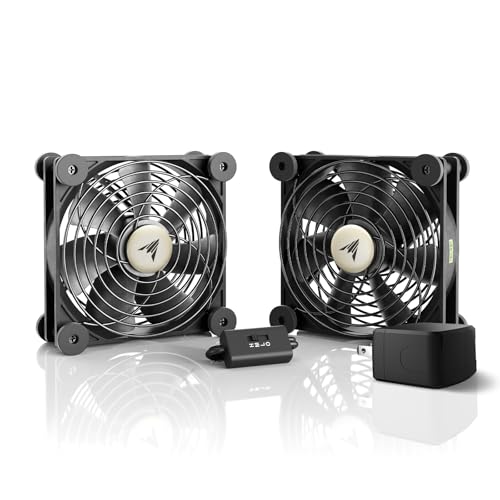
The only AC-powered pair here — plugs into the wall, cools a cabinet, not a CPU.
This one breaks from the PC-header crowd on purpose. It is a duo of AC-powered fans that plug straight into a wall outlet through the included Turbo power adapter, with a multi-speed controller to set noise and airflow yourself. That makes it a receiver, DVR, AV-cabinet or network-rack tool rather than a case-cooling part. Per fan it measures 4.7 x 4.7 x 1 in, so it is a slim enough frame to sit in tight gear cabinets.
Quiet is what owners talk about more than anything, and build quality follows close behind — it earns 4.5+ stars across 2,500+ ratings. The pair moves 104 CFM total, and its dual-ball bearings are rated for 67,000 hours of continuous running. The 19 dBA total-noise figure keeps it subtle enough for a living-room cabinet, and the noise-absorption pads underneath help it sit flat or stand upright without rattling.
The real limit is positioning: it is UL-certified for electronics cooling and powered from the mains, not from a PC fan header. If you were hoping to bolt this to a motherboard fan header and control it in BIOS, this is the wrong tool — that job belongs to the PWM picks above.
cabinet cooling: you need to push heat out of an AV cabinet, closet or small network rack with no PC inside.
PWM control: you need a fan header-driven part inside a computer case.
7. KEYFANCLUB 120x120x15mm Fan
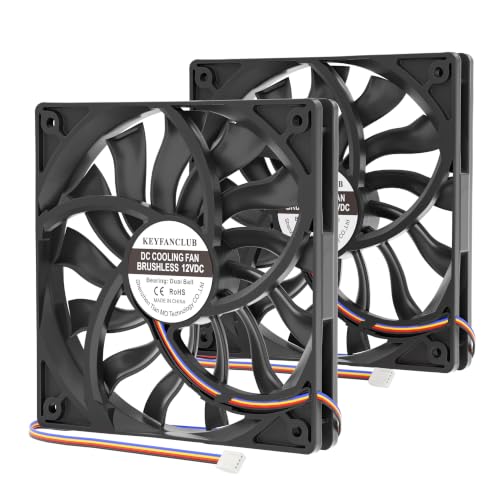
Dial it from 600 to 1800 RPM depending on how much voltage you feed it.
This fan is for tinkerers who want one slim 15mm part that behaves differently at different voltages. Feed it 3.2V and it idles at 600 RPM and 0.1W; feed it 6V and it climbs to 1100 RPM; 9V gets you 1500 RPM; and 12V tops it out at 1800 RPM and 2.8W. That range means you can trade silence for airflow without any software at all.
At full speed it pushes 53 CFM while rated at 28 dBA, and the dual-ball bearing is built to cut friction noise over long runs. The 4-pin PWM connector keeps it compatible with most DIY cooling controllers, and the 15mm frame fits SFF cases, radiators and CPU coolers where a 25mm fan will not. You get a 2-pack, so two spare spots get filled at once.
4 pin PWM: spanning 3.2V to 12V gives it a working range most slim fans here do not offer at all.
off brand support: its 28 dBA rating sits above the Noctua’s 23.9 dBA, and 53 CFM trails the SilverStone’s 63.67 CFM — a middle-of-the-road slim fan, not a top of either scale.
cheap PWM swap: DIY builders wiring fans into a custom controller and happy to set voltage by hand.
premium builds: you want plug-in-and-forget motherboard control — a plain 4-pin PWM fan is simpler.
8. SilverStone Air Slimmer 120 ARGB Fan
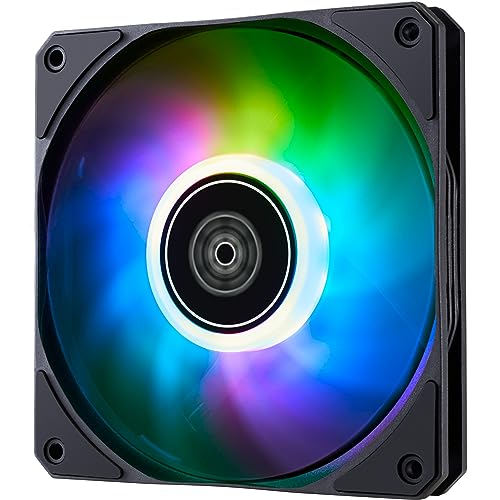
Same slim scimitar blade as the radiator pick, now with addressable RGB on board.
If your SFF build has a glass panel and you want light inside it, this ARGB version of the Air Slimmer dials the look up while keeping the 15.6mm slim frame that fits space-limited builds. The 9-blade scimitar design is tuned for high air pressure at 1500rpm, and SilverStone also positions it as an effective exhaust fan for moving large volumes of heat out of a system.
The trade-off is noise and speed. It is rated at 31.7 dBA, the louder end of this group, and its 1500rpm ceiling is lower than the non-ARGB Air Slimmer’s 1800rpm. So you are paying the slim-and-lit premium for aesthetics more than raw performance. It holds 4.0+ stars across a modest pool of 30+ ratings, which makes it a confident pick for looks and exhaust duty rather than a benchmark chaser.
lit slim builds: a slim showcase build where the lighting matters and the fan is mainly an exhaust.
non RGB cases: you want maximum speed or the quietest possible slim fan.
9. SXDOOL 120mm Slim Fan 120X12mm Thickness DC 12V with 3-Pin

The one that squeaks under every other frame here — a genuine 12mm slim.
When nothing else will fit, this is your last-millimetre option. It stands just 12mm thick, thinner than the 15mm fans here, which is what makes it ideal for the tightest SFF cases, low-profile CPU coolers and slim water-cooling radiators. It also runs at just 1400rpm, well below the ARCTIC’s 2100rpm, so it is the gentlest spinner on the list.
On paper it is also the quietest value here: 18 dBA, 39 CFM, 3-pin connector, and a 1-year manufacturer’s warranty. But this is the honest caution of the roundup — the ownership picture on noise and performance is genuinely split. Some builds run it very quietly, others find it far louder than the rating suggests, and value feedback is just as divided. Its 4.0+ star score comes from a small pool of dozens of ratings.
Given that, treat it as a gap-filler for the case where thickness is the one thing that matters. If a 15mm fan fits, buy a 15mm fan — the smoother, more consistent picks sit higher up this list.
thin gaps: filling a gap that is closer to 12mm than 15mm, where no thicker fan will squeeze in.
dense fins: a 15mm fan will fit — you get more predictable noise and airflow up the list.
Know the Specs
Frame Thickness (mm)
This is the number that decides whether the fan fits at all. A 15mm fan is 10mm thinner than a standard 25mm fan, so it drops into a low-profile cooler or a slim radiator slot that a full-width fan cannot enter. Some picks here run at 12mm or 15.6mm, so measure your real clearance and compare it to the exact figure on the box, not to a rounded idea of “slim.”
PWM vs 3-Pin Control
A 4-pin PWM fan (pulse-width modulation) lets your motherboard vary its speed automatically with temperature, so it idles quiet and spins up only under load. A 3-pin fan runs at a fixed voltage speed unless your board voltage-controls it. If quiet-then-loud automation matters, choose 4-pin; if you want to set speed by cable adaptor, 3-pin does that job.
Airflow (CFM) and Static Pressure (mmH₂O)
CFM, or cubic feet per minute, measures how much air a fan shifts in open space — the higher the number, the more it moves. Static pressure measures how hard it can push that air through resistance like a radiator or dense heatsink. A case vent wants airflow; a radiator wants pressure. Thin fans rarely top both scales, so pick the one that matches your job.
Noise (dB(A)) and Bearing Type
The dB(A) figure is the fan’s rated sound level, and lower is quieter — but a fan you can throttle down usually beats a fixed-speed fan on paper. Bearing type hints at lifespan: fluid dynamic and dual-ball bearings are built to spin for a long time, while cheaper sleeve designs wear faster. Match the bearing to how many hours a day the fan will run.
Common Questions
Will a 15mm slim 120mm fan fit where a standard 25mm fan will not?
Do I need a 4-pin PWM fan or is 3-pin fine?
Can a thin 120mm fan cool a radiator as well as a full-width fan?
What does static pressure in mmH₂O actually mean for my build?
How long will a slim 120mm fan last before it needs replacing?
Is a 12mm fan quieter than a 15mm one?
Can I power a slim 120mm PC fan from a wall outlet?
What connector does a slim case fan use, and will it fit my motherboard?
How do I choose between the ARCTIC 3-pack and a single premium slim fan?
Does an ARGB slim fan cost me cooling performance?
The Bottom Line
The fan that earns the top spot is the Noctua Chromax Black Swap — a 15mm frame, a whisper-quiet 23.9 dB(A) rating, PWM control that stops at 0%, and a 4.5+ star reputation that matches the best on this list. If you need to fill several slots in one small-form-factor build, the ARCTIC P12 Slim 3-pack hands you three quiet, lighter-at-85g fans with PWM control. And for a slim radiator that needs real pressure, the SilverStone Air Slimmer 120 pushes 63.67 CFM where the ARCTIC manages 34.51 CFM. One last nudge: the Noctua and the Scythe both hold a 4.5+ star score, so if budget matters, the Scythe delivers the same rating with long bearing life for less.
How we choose
We do not accept paid placement. Every pick is matched to a real buyer and a real use-case; we do not hands-on test units.
Sources
Specifications: manufacturer listings and product documentation. Review insights: verified customer reviews, as of November 2026. Pricing: not shown on this page (it changes often); check the current price via the retailer link.
As an Amazon Associate, Tactical Gear Guy earns from qualifying purchases. This does not affect which products we feature.