Specs are compiled from manufacturer listings and verified buyer reviews and can change over time — please confirm the key details on the product page before buying.
Your TV’s back has a hole pattern 400mm wide by 300mm tall, and most wall mounts won’t fit it. A 400×300 bracket needs holes spaced exactly that way, and a 300×400 or 400×400 plate won’t line up. That’s the whole problem. Below are five mounts that genuinely carry the 400×300 pattern, sorted by what each does best, so you can pick the right one in a couple of minutes instead of measuring your TV twice and hoping.
This guide is built by comparing the manufacturers’ published specifications and the patterns across verified customer reviews, so you get each pick’s real strengths and trade-offs instead of marketing spin.
You will see the difference between a flush tilt bracket, a long-reaching arm, and a branded slim mount, plus the one spec that decides whether your studs can hold the thing up. The quickest read for anyone mounting a big screen is this breakdown of the vesa 400×300 wall mount options that actually fit that hole pattern.
Top Picks


How To Choose The Best VESA 400×300 Wall Mount
Start with the back of your TV, not the product page. Measure the horizontal distance between the top two threaded holes and the vertical distance between the top and bottom holes. If you get 400mm across and 300mm down, you need a mount whose compatibility list includes 400×300 — a bracket that only lists 400×400 has its holes too far apart vertically to bolt on.
The hole pattern is a hard filter, not a preference
Every mount here explicitly lists 400x300mm in its supported patterns, which is why they made the cut. A 400×300 pattern is common on mid-size and some large flat panels, but it sits in an awkward middle ground. It’s smaller than the full 400×400 pattern used by many big screens, and larger than the 200×200 and 300×300 layouts on smaller sets. That’s exactly why so many generic brackets skip 400×300 and list only 400×400.
Weight rating and stud spacing decide whether the wall holds
A load rating in pounds tells you what the steel is built to carry. What it cannot tell you is whether your wall is ready. All five of these mounts go into wood studs, solid brick, or concrete — none of them are approved for drywall alone, so you either find studs or you plan for masonry anchors. Check stud spacing too: some brackets need 16-inch centers, one here handles up to 25 inches of wall plate width for 24-inch studs.
Tilt, swivel, and extension change how the room works
A flush tilt bracket keeps the screen tight to the wall and fights glare by angling the panel down. A full-motion arm pulls the TV out into the room so you can aim it at a sofa, a kitchen counter, or a treadmill. Longer extension means more reach and more leverage on the wall, so the steel and the studs both have to be up to it. Pick the movement you will actually use — tilt for glare, swivel for a second seat, extension for a kitchen or gym — not the movement the box brags about.
Side-by-Side Comparison
| Model | Best For | Screen Range | Max Load | Movement | Amazon |
|---|---|---|---|---|---|
| Mounting Dream Tilt MD2165-LK★ Best Overall | Flat-to-wall glare control | 42–70 in | 132 lbs | Tilt 20° | Amazon |
| USX STAR Full Motion BracketBest Value | Big screens on a budget | 37–90 in | 132 lbs | Swivel ±45°, tilt, level | Amazon |
| VideoSecu MW480B | Long 24-inch reach | 40–80 in | 135 lbs | Swivel, tilt, 24 in extension | Amazon |
| MOUNTUP MU0015 | Heaviest panels | 47–90 in | 200 lbs | Swivel, tilt, 24.4 in extension | Amazon |
| Samsung WMN-B16FB/ZA | Slim look on Samsung sets | 56–75 in | — | Swivel, tilt | Amazon |
Detailed Reviews
1. Mounting Dream Tilt TV Wall Mount for 42-70 Inch TVs
Our pick — 4.5+★ from 121,000+ verified ratings; the strongest balance of quality and price.
The bracket that holds the screen 1.6 inches off the wall and still angles it down.
This is the pick for anyone who wants the TV to look like part of the wall. It sits just 1.6 inches from the plaster in its low-profile position, so the screen reads as a framed picture rather than a piece of hardware. That 1.6-inch gap is the whole reason to choose a tilt bracket over a full-motion arm — nothing swings into the room and nothing collects dust behind the panel.
Glare is the other job. You can angle the panel forward up to 20 degrees, which pushes reflections off a window or a ceiling light downward and out of your eyeline. Compare that with the 12 degrees of forward tilt on the VideoSecu arm later in this list, and the Mounting Dream gives you a meaningfully steeper downward angle for rooms where the light comes from above. It covers screens from 42 to 70 inches and carries up to 132 lbs, with the full pattern list running from 200×100 up to 600x400mm — 400×300 included.
Mounting is a three-step job with hardware sorted into pre-labeled bags, and it goes into 16, 18, or 24-inch wood studs or concrete and brick. Concrete anchors ship on request, and drywall-only installation is not an option here. The steel body and the 10-year warranty are why this one sits at the top of the list rather than being just another cheap plate.
What earns it the top spot
- 1.6-inch flush profile keeps a 42–70 inch screen close to the plaster
- Full 20-degree forward tilt for overhead light and window glare
- Pre-labeled hardware bags plus a 10-year warranty
- Fits 16, 18, and 24-inch stud spacing along with brick and concrete
Where it asks something of you
- The tilt action divides people — some find it stiff, some find it loose, so set the tension before the TV goes up
- No swivel and no extension, so the screen stays pointed straight ahead
- Not approved for drywall on its own
Reach for this if: you want a big screen hugging the wall and you only need to fight glare, not reposition the TV around the room.
Think twice if: you need to swing the panel toward a second seating area — this bracket never leaves the wall.
2. USX STAR Full Motion TV Wall Mount Bracket
Full-motion movement across the widest screen range here, from 37 all the way to 90 inches.
Most 400×300 brackets top out around 70 or 80 inches. This one keeps going to 90, and it still holds the same 132 lbs as the Mounting Dream tilt above. So a large panel is not off the table just because you want an articulating arm. Swivel runs plus or minus 45 degrees, tilt runs +5 to -15 degrees, and the bracket levels plus or minus 4 degrees after it is on the wall. That ±4-degree leveling adjustment saves you from drilling a second set of holes.
The dual articulation arm folds down to 2.52 inches from the wall in its home position and reaches out to 16.61 inches. That is a shorter reach than the MOUNTUP’s 24.4 inches and shorter than the VideoSecu’s 24 inches, so this is the arm for a room where you want angle rather than a lot of travel. Cable ties are included to keep the wires tidy along the arm, and the box carries a drilling template, a bubble level, and hardware in pre-labeled bags.
Stud fit is the part to check before you order. It works with 8, 12, and 16-inch wood stud spacing, plus solid brick or concrete. Concrete anchors are sent on request at 10x50mm. Mounting a 40-inch set is a short job by all accounts — buyers report it can be done in 15 minutes — and the mount has proven strong enough for 65-inch Samsung panels.
Where the money goes: you get a 90-inch ceiling on screen size, ±45° swivel, and leveling adjustment, on a bracket that lists 400×300 among nine supported patterns. That combination of a 90-inch screen ceiling, ±45° swivel, and leveling is what makes this the value pick rather than the cheapest plate on the shelf.
The honest limit: the ±45° swivel is measured at the joint and the actual angle narrows as the screen gets bigger, so a 90-inch panel will not swing as far as a 55-inch one on the same arm.
Suits: a living room with one main sofa and a second chair off to the side, where you want to aim a 75 or 85-inch screen without paying premium-bracket money.
Less ideal for: very deep rooms — 16.61 inches of extension will not bridge a wide gap between the wall and the seating.
3. VideoSecu 24 Inch Extension Full Motion TV Wall Mount

The arm built for awkward walls, with a plate wide enough to span 24-inch studs.
Twenty-four inches of extension is the headline, and it retracts to 2.8 inches when you push it back. That 24-inch travel turns a TV into a positionable screen: pull it out toward a kitchen island, angle it at a treadmill, then push it back to 2.8 inches when the room goes back to normal. The wall plate is the other unusual part — it spans up to 25 inches, so it fits both 16 and 24-inch stud spacing without a separate adapter.
On the numbers, this arm tilts 12 degrees forward and 8 degrees backward. That’s a shallower forward angle than the 20 degrees you get from the Mounting Dream tilt bracket. So if your only problem is a ceiling light reflecting off the screen, the flush bracket does that job better. What the VideoSecu gives you instead is full articulation: swivel, rotate, and tilt on a plate rated to 135 lbs across screens from 40 to 80 inches, with 400×300 sitting inside a pattern list that runs to 684×400.
The steel is heavy — 24 lbs of bracket before the TV goes anywhere near it — and the construction is the reason it earns its keep. An HDMI cable and mounting screws come in the box, and the arm has cable management built in.
The standout spec: a 25-inch-wide wall plate is rare on a 400×300 mount, and it is what makes this the easy answer when your studs are 24 inches apart and nobody else’s bracket will line up.
Worth knowing before you lift it: the 24-lb bracket mass is real weight above your head, so plan for two people at install. A few buyers find the whole assembly wants to shift slightly once loaded, so torque the arm bolts properly rather than hand-tight.
Pick this one for: rooms where the TV needs to travel — an open-plan kitchen, a home gym, a workshop bench — and for walls with 24-inch studs that narrower plates cannot reach.
Look elsewhere if: you only need glare control and a flat profile; the extra depth and weight buy you nothing in that setup.
4. MOUNTUP Heavy Duty Full Motion TV Wall Mount
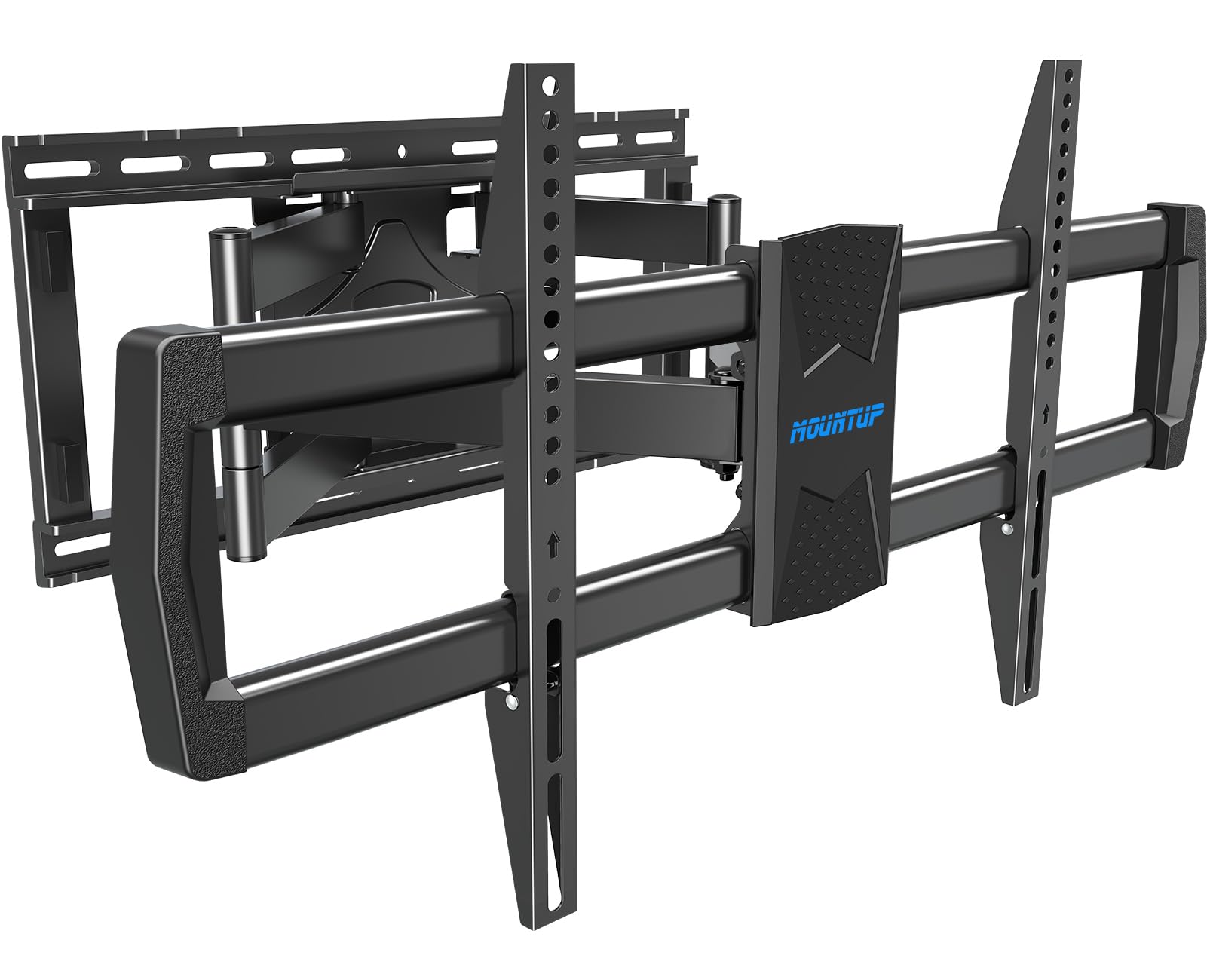
A 200 lb rating on a full-motion arm — the biggest panel in the room has somewhere to go.
Load rating is where this one separates itself. The Mounting Dream tilt takes 132 lbs, the USX STAR full-motion takes the same 132 lbs, and this MOUNTUP takes 200 lbs on an arm that swings. If you are hanging a 90-inch set and still want it to move, that gap in rated capacity is the reason to look here. It spans 47 to 90 inches, fits 16, 18, and 24-inch wood studs plus brick and concrete, and supports patterns from 200×100 up to 800x400mm with 400×300 in the list.
Movement is generous: 45 degrees of swivel in either direction, 5 degrees of tilt up and 10 degrees down, and plus or minus 1 degree of leveling after mounting. Extension reaches 24.4 inches and retracts to 3.7 inches. Against the USX STAR’s 16.61-inch reach and 2.52-inch retraction, the MOUNTUP reaches noticeably farther — and needs more wall clearance behind the panel when it folds back. A dual articulating frame with six support points is what keeps the screen from drifting or sagging at full extension.
The heavy panels are the ones this was built for. As owners mention, the mount holds an 85-inch model without trouble, and it has carried a 125-pound TV with no drama. A step-by-step template, a magnetic bubble level, and a full hardware kit come in the box. Drywall alone is out; concrete anchors are available on request at 10x50mm.
Why the heavy-set crowd buys it
- 200 lb rating gives real headroom on a swinging arm
- 24.4-inch reach with a 3.7-inch fold-back
- Magnetic bubble level and installation template in the box
- Leveling adjustment after mounting saves a second drill pass
The catch worth planning around
- That 3.7-inch retraction is deeper than a flush bracket, so a slim look is not what you get
- At full 24.4-inch extension the leverage on the wall is real — studs and correct anchoring matter more here than on any tilt plate
- Premium-tier bracket, so you are paying for capacity you may not need on a 55-inch screen
Built for: an 85 or 90-inch panel in a big room where the screen has to swing toward different seats.
Overkill for: anything under 47 inches or a wall where the TV will never move — a plain tilt bracket does that cheaper and flatter.
5. Samsung Full Motion Slim TV Wall Mount WMN-B16FB/ZA

A branded slim bracket that hides the hardware — if your TV is on the compatibility list.
This mount exists for one look: the screen sitting as close to the wall as the panel allows, with nothing chunky showing underneath. Samsung states a minimum of 19.5mm of distance between wall and TV, and that figure can vary with your wall type and how you install it. It supports the 400×300 and 400×400 patterns and fits screens from 56 to 75 inches.
Compatibility is the whole decision with this one, and Samsung spells it out by year. The list runs across their 2021, 2022, 2023, and 2024 model lines — QN90A and QN800A, the S90B and QN95B, the S90C and QN90C, and up through the QN900D, S95D, and DU8000 sets. If your panel is not named there, this bracket is not for you no matter how good it looks. Unlike the universal brackets above, which bolt to almost any 400×300 screen, this one is a matching part for a specific family of TVs.
Where it wins is the finish. A stainless steel body and a slim arm give the cleanest wall-to-screen line in this group, and the swivel and tilt let you aim the panel without breaking that look. The trade-off is that adjustability is the most contested part of the design — buyers have mixed experiences with the tilt range, fit, and how solid the whole thing feels once it is up. Treat it as a wall-flush display mount that moves a little, not a heavy articulating arm.
Note what you are buying: a 5 kg stainless steel bracket with a 19.5mm minimum wall gap, built to disappear behind a compatible Samsung screen.
The trade-off to weigh: tilt and swivel range varies by model, and the mount asks you to confirm your exact panel against a year-by-year list before you order — get that wrong and nothing else about it matters.
Right answer for: a Samsung 56–75 inch set from the listed model years where the priority is a smooth wall look with a small amount of movement.
Wrong answer for: any other brand, or anyone who wants a long throw and heavy-load capacity — the universal brackets above cover that ground.
Know the Specs
The VESA pattern, in plain terms
VESA is just the industry standard for the four threaded holes on the back of a flat panel. The numbers are millimetres — 400×300 means the horizontal holes are 400mm apart and the vertical holes are 300mm apart. A mount listing 400×300 supports that layout. A mount listing only 400×400 does not, because its vertical holes sit 400mm apart. Always match the pattern exactly; there is no adapter trick that makes a 400×400 plate hold a 400×300 panel safely.
Load rating and what it really covers
The load rating in pounds is the weight the bracket’s steel is designed to carry — 132 lbs on the tilt bracket and the USX STAR, 135 lbs on the VideoSecu, 200 lbs on the MOUNTUP. It is not a wall rating. Your wall still has to be wood studs, brick, or concrete, and none of these mounts are approved for drywall alone. Pair the rating with your stud spacing: 8, 12, and 16-inch spacing is common, and the VideoSecu’s 25-inch wall plate is the one here that spans 24-inch studs.
Tilt versus swivel versus extension
Tilt angles the panel down to cut glare — 20 degrees on the Mounting Dream, 12 degrees forward on the VideoSecu, +5/-15 degrees on the USX STAR, 5 up and 10 down on the MOUNTUP. Swivel turns the screen left and right; extension pulls it away from the wall, from 16.61 inches on the USX STAR up to 24.4 inches on the MOUNTUP. More extension means more reach into the room and more leverage on the wall, so the bracket and the studs both carry more load.
What the wall gap does for your room
A flush mount keeps a low profile — 1.6 inches on the Mounting Dream — so the TV sits like a picture frame. A full-motion arm folds down to somewhere between 2.52 and 3.7 inches depending on the model. The Samsung slim mount is built entirely around this number, holding a minimum 19.5mm gap to make the screen look flush. Decide which look you want — 1.6 inches flush or 2.52 to 3.7 inches on an arm — before you decide which movement you want, because the two pull against each other.
Common Questions
Will a 400×300 wall mount fit a TV that lists 400×400?
Can I mount a 400×300 bracket on drywall without studs?
How do I know if my studs are 16 or 24 inches apart?
Is a tilt mount or a full-motion mount better for glare?
How much weight can a 400×300 mount safely hold?
Does a longer extension arm put more stress on the wall?
Will the Samsung slim mount work with a non-Samsung TV?
What is the difference between 400×300 and 600×400 mounts?
Do I need to add a leveling adjustment after mounting?
How close to the wall can a full-motion mount actually sit?
The Bottom Line
For most people mounting a 400×300 panel, the Mounting Dream MD2165-LK is the sensible buy. It gives you a 1.6-inch flush profile, 20 degrees of tilt to kill glare, and steel rated to 132 lbs, all backed by a 10-year warranty. It’s the crowd favorite by a wide margin, and its 20-degree tilt tension is the one thing to set before the TV goes up.
If you want the screen to move, pick by reach. The USX STAR covers 37 to 90 inches with ±45° swivel at the value end of the range. The MOUNTUP MU0015 takes a 200 lb panel out to 24.4 inches when you have a genuinely heavy set. And if your studs are 24 inches apart, the VideoSecu MW480B and its 25-inch wall plate solve a problem the others cannot. For a compatible Samsung panel where the look matters most, the Samsung WMN-B16FB/ZA is the one that disappears into the wall — just confirm your model year first.
How we choose
We do not accept paid placement. Every pick is matched to a real buyer and a real use-case; we do not hands-on test units.
Sources
Specifications: manufacturer listings and product documentation. Review insights: verified customer reviews, as of November 2026. Pricing: not shown on this page (it changes often); check the current price via the retailer link.
As an Amazon Associate, Tactical Gear Guy earns from qualifying purchases. This does not affect which products we feature.