Specs are compiled from manufacturer listings and verified buyer reviews and can change over time — please confirm the key details on the product page before buying.
If your desktop still pulls its internet through an old Wi-Fi 6 card, the bottleneck is probably not your router — it is the card sitting in your PCIe slot. A Wi-Fi 7 card lets your PC talk to a Wi-Fi 7 router over the 6 GHz band, where 320 MHz channels and Multi-Link Operation (MLO, which uses two bands at once for a steadier link) do the heavy lifting. The catch most buyers hit first: platform support. Several of these cards are Intel-motherboard-only or Windows 11-only, so checking your board and OS before you order saves a return.
This guide is built by comparing the manufacturers’ published specifications and the patterns across verified customer reviews, so you get each pick’s real strengths and trade-offs instead of marketing spin.
Every pick below is a true 802.11be card, sorted by what it actually does for a desk-bound PC. You will see which ones need an Intel board, which ones run on AMD and Linux, and which ones ship an antenna you can move to a window. Here is the honest read on the best Wi-Fi 7 card for PC upgrades.
Top Picks


How To Choose The Best Wi-Fi 7 Card for PC
Three things decide whether a Wi-Fi 7 card is a smart buy for your build: whether your motherboard chipset is supported, whether your operating system is supported, and whether the antenna can reach a spot where the signal is actually good. Get those three right and the speed follows; get any one wrong and you are troubleshooting instead of browsing.
Check your chipset before anything else
Several Wi-Fi 7 cards here are built on the Intel BE200 module, which is locked to Intel-chipset motherboards and will not run on an AMD Ryzen board at all. Others use MediaTek modules (MT7925) that work on both AMD and Intel. Open Settings, then System, then About, and note your processor and Windows version before you buy. It takes seconds and prevents the most common return in this category.
Windows 11 versus Windows 10
Most Wi-Fi 7 cards in this list are Windows 11 only — a few explicitly state they do not support Windows 10 and below. One pick here supports Windows 10 and 11 64-bit, and one adds Linux and macOS. If you are on Windows 10, that narrows your list fast, so read the compatibility line on each card rather than assuming.
Antenna placement decides your real speed
A PCIe card sits at the back of a metal case, which is the worst place in the room for radio reception. A magnetic antenna on a 2m cable lets you move the signal pick-up to the top of the case, a metal shelf, or a window frame. A card with a flexible external antenna and a magnetized base usually outperforms one with fixed rear antennas for the same router.
Side-by-Side Comparison
| Model | Best For | Peak Data Rate | Motherboard Support | OS Support | Amazon |
|---|---|---|---|---|---|
| TP-Link Archer TBE400E★ Best Overall | Most buyers with a Windows 11 PC | 6500 Mbps | AMD/Intel | Windows 11 | Amazon |
| GLOTRENDS BE8774 (Intel BE200)Highest Peak Rate | Intel boards + movable antenna | 8774 Mbps | Intel only | Windows 11 24H2+ | Amazon |
| GLOTRENDS BE6500 (MT7925)AMD + Linux Pick | AMD, Linux, and macOS builds | 2.4 Gbps | AMD + Intel | Win 11 / Linux / macOS | Amazon |
| OKN WiFi 7 BE200 9.3Gbps | Windows 10 holdouts on Intel | 9.3 Gbps | Intel only (not AMD) | Windows 10 / 11 64-bit | Amazon |
| UGREEN BE6500 | Plug-in-the-USB driver install | 2882 Mbps (6 GHz) | AMD/Intel | Windows 11 | Amazon |
| GIGABYTE GC-WIFI7 | Simple spec sheet, Windows 10 floor | 5800 Mbps | Desktop PCIe x1 | Windows 10 | Amazon |
| MSI Herald BE9400 | Linux desktops and easy install | 5764 Mbps (6 GHz) | Desktop PCIe | Linux / Windows | Amazon |
| ASUS PCE-BE6500 | Adjustable antennas, Win 11 | 2882 Mbps | Desktop PCIe | Windows 11 | Amazon |
| TP-Link Archer TBE550E | Top tri-band speed + LED base | 9300 Mbps | AMD/Intel | Windows 11 | Amazon |
Detailed Reviews
1. TP-Link WiFi 7 BE6500 PCIe WiFi Card (Archer TBE400E)
Our pick — 4.5+★ from 150+ verified ratings; the strongest balance of quality and price.
The card most desktop owners should slot first: real Wi-Fi 7, real Bluetooth 5.4, no AMD lockout.
The headline on the Archer TBE400E is the tri-band speed ceiling of 6500 Mbps, split as 2882 Mbps on the 6 GHz band, 2882 Mbps on 5 GHz, and 688 Mbps on 2.4 GHz. That 6 GHz figure matters because that band is where neighbours’ routers and microwave ovens do not crowd you — so your ping stays tight during a match and your 4K stream stops stuttering mid-scene. It supports both AMD and Intel motherboards, which is the single biggest reason it takes the top spot: you are not locked out by your chipset.
Multi-Link Operation is the feature you feel day to day. When your router also speaks Wi-Fi 7, MLO combines frequency bands so a dropped packet on one band reroutes on another — the connection holds through a busy house full of phones and streaming sticks. Add WPA3 encryption and Bluetooth 5.4 over the bundled header cable, and you can pair a controller or headset without buying a separate dongle. What wins people over here is reliability: the link stays steady through long sessions.
The honest catch is the operating system: it supports Windows 11 (64-bit) only, and explicitly not Windows 10 and below. If you are still on Windows 10, this is not your card — the OKN or GIGABYTE pick further down covers you. For everyone on a modern Windows 11 build, this is the balanced choice that plays nice with both motherboard camps.
Reasons it earns the top slot
- 6500 Mbps tri-band with 2882 Mbps on the uncrowded 6 GHz band
- Works on AMD and Intel boards — no chipset lockout
- MLO plus WPA3 for steadier links and stronger encryption
- Bluetooth 5.4 and both standard and low-profile brackets in the box
Where it draws the line
- Windows 11 (64-bit) only — not Windows 10 or older
- Wireless speed still capped by your router and ISP plan
Reach for this if: you have a Windows 11 desktop on either an AMD or Intel board and want the safest all-round Wi-Fi 7 upgrade.
Look elsewhere if: you are still running Windows 10 — this card will not install for you.
2. GLOTRENDS BE8774 WiFi 7 PCIe Card (Intel BE200)
The Intel-board specialist with an antenna that reaches the window instead of the back panel.
Serial numbers give the story away here. This card is rated at 8774 Mbps against the TP-Link Archer TBE550E’s 9300 Mbps, and it beats the GLOTRENDS BE6500’s 2.4 Gbps handily — so if you want sheer peak link rate on an Intel board, this is the one to shortlist. The 2×2 6dBi antenna rides on a 2m cable with a magnetic base, which means you can stick the pick-up on top of the case, a metal shelf, or a window frame. Getting the antenna out of a metal desk corner does more for real-world signal than any spec upgrade.
Under the hood it is the Intel BE200 module, delivering 574 Mbps on 2.4 GHz, 2400 Mbps on 5 GHz, and 5800 Mbps on 6 GHz with 320 MHz channels, 4K-QAM, and MLO. Bluetooth 5.4 runs over the bundled USB cable so Wi-Fi and Bluetooth work at the same time from one PCIe x1 slot. This is a heavier, more substantial package than the BE6500 sibling — 0.4 kg versus 0.19 kg — reflecting the metal-shielded module and the longer antenna lead.
The mandatory caveat is platform: Intel motherboards running Windows 11 version 24H2 (build 26100) or later, and nothing else. It does not work on AMD boards, Windows 10, Windows 7, or macOS. If you are unsure, the manufacturer points you to Settings, System, About to confirm — worth doing before you order, because the return is otherwise a foregone conclusion.
Why the antenna wins: a movable 2m magnetic antenna is the single most useful physical feature on a PCIe card, because your PC case is the enemy of radio reception.
The 10-second homework: verify Intel chipset plus Windows 11 24H2 before buying, or this becomes the wrong card for a perfectly good PC.
The right pick for: Intel-chipset Windows 11 24H2 machines that want maximum link rate with an antenna they can aim.
Do not buy it for: any AMD Ryzen build — the BE200 module will not run there.
3. GLOTRENDS BE6500 WiFi 7 PCIe Card (MT7925)
If your desktop runs Ryzen, Linux, or macOS, this is the Wi-Fi 7 card most likely to actually work.
Here is the defining spec: this is one of very few desktop Wi-Fi 7 cards with macOS support alongside Windows 11 and Linux, and it runs on AMD Ryzen and Threadripper as well as Intel chipset boards. That open up gaming rigs, workstations, and Hackintosh builds other cards simply refuse. The data rate is stated honestly at 2.4 Gbps, which is the class-name reality for the 6.5 Gbps tri-band tier on a 2×2 client — something many listings do not say out loud.
The tri-band splits as 688 Mbps on 2.4 GHz, 2882 Mbps on 5 GHz, and 2882 Mbps on 6 GHz with 160 MHz channels, 4K-QAM, and MLO. The 6 GHz band is the clean lane — no neighbour routers, no microwave interference — so latency for gaming and VR drops noticeably. Dual Bluetooth covers both BT 5.4 for earbuds and trackers and BT 2.1 for legacy controllers and headsets, using one PCIe slot instead of two. At 0.19 kg it is also the lighter of the two GLOTRENDS cards here.
Windows 11 will not install this card automatically — that is normal for Wi-Fi 7 chipsets and not a fault. You download the BE6500 driver package (version 2026.26.40.3.67 covers both WLAN and Bluetooth) from the product description, run it, restart, and the card is live. GLOTRENDS technical support replies within a day if something goes sideways, and a 30-day manufacturer-defect warranty backs it.
The compatibility payoff: AMD, Linux, and macOS support in one card is rare in this category and worth the manual driver step alone.
Read before you buy: the 2.4 Gbps figure is the real per-band peak, not a marketing cut — plan around that number.
Your card if: you are on AMD Ryzen, Linux, or macOS and the Intel BE200 cards are non-starters for your build.
Skip past it if: you want a one-click Windows setup with no driver file to download.
4. OKN WiFi 7 PCIE Card 9.3Gbps 802.11BE (Intel BE200)

A 9.3 Gbps Intel BE200 card that still installs on Windows 10, 64-bit.
Peak data rate hits 9.3 Gbps here, driven by 320 MHz channels and 4K-QAM — making it the fastest-stated card in the early part of this list and a genuine step above the 6500 Mbps TP-Link TBE400E. Bluetooth 5.4 adds lower latency and more channel capacity for a controller or headset. The practical win, though, is the OS line: driver support covers Windows 10 and 11 64-bit, so Windows 10 holdouts get a Wi-Fi 7 upgrade other cards deny them. It fits PCIe x1, x4, x8, or x16 slots, so almost any desktop can take it.
Buyers report throughput that matches or exceeds Gigabit Ethernet on a wired LAN. That is the standard to hold it to, because the card’s ceiling is your router and ISP plan. It ships with two high-gain antennas, a Bluetooth cable, and a low-profile bracket for mini towers. You do need to install drivers manually — search “BE200” on the Intel website and grab the Wi-Fi and Bluetooth packages.
Compatibility is the thing to check: it explicitly does not work with AMD motherboards, and buyers who tried it on AMD systems report it failing to work. That is a fit mismatch, not a defect, so verify your chipset is Intel before ordering. If you are on Intel plus Windows 10, this is the card that gets you into Wi-Fi 7 without a platform rebuild.
What earns it a spot
- 9.3 Gbps peak rate with 320 MHz and 4K-QAM
- Windows 10 and 11 64-bit driver support
- Fits PCIe x1, x4, x8, or x16 slots
- Bluetooth 5.4 plus both standard and low-profile brackets included
The trade you accept
- Not compatible with AMD motherboards
- Drivers must be downloaded from Intel and installed manually
Built for: Intel-based Windows 10 desktops that want maximum stated speed and can live with a manual driver install.
Wrong turn if: your board is AMD — the compatibility miss is real and well documented.
5. UGREEN WiFi 7 BE6500 PCIe WiFi Card
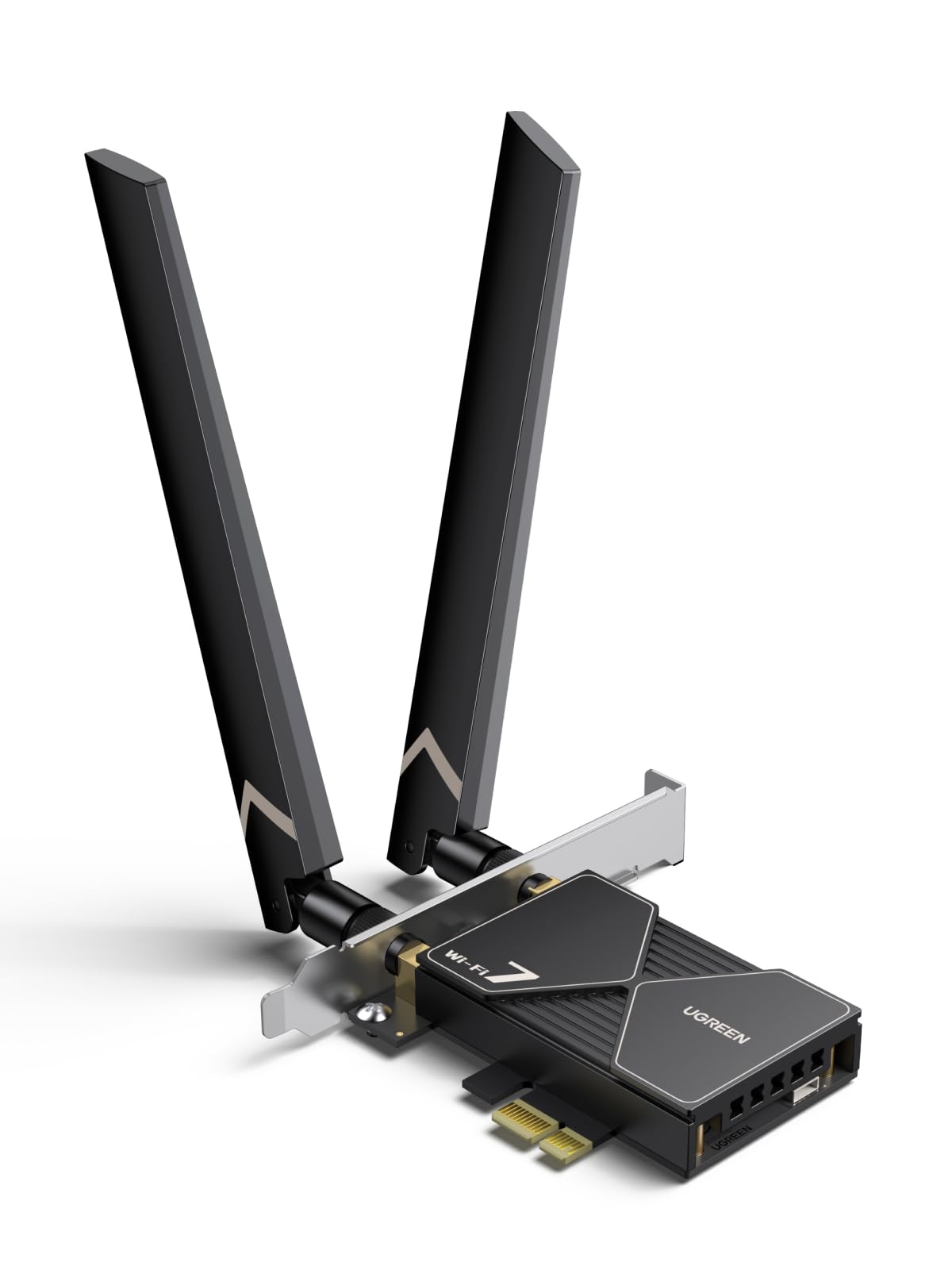
The card that hands you the driver on a stick so there is nothing to hunt down online.
The BE6500 tri-band tops out at 2882 Mbps in the 6 GHz band with 160 MHz bandwidth, and UGREEN’s own note is honest: pair it with a Wi-Fi 7 router to reach BE6500 speed. The flexible 6dBi high-gain antenna can be angled for more signal strength and range, which is exactly what a back-panel PCIe slot needs. What can’t be left out: the driver is pre-installed on a USB stick in the box, so you plug in, follow the steps, and stop hunting Intel’s website for a package.
MLO is pitched at gaming — intelligently selecting the optimal signal path for a more stable link, with picture and sound staying in sync during a co-op match. Bluetooth 5.4 lets you run headphones, keyboard, and mouse at once; the manufacturer’s note is to disable your PC’s built-in Bluetooth before you use it. Installation is where this card wins most praise — buyers consistently describe it as easy to get up and running. Buyers also single out build quality.
The caveat to weigh is reliability: experiences split, with some cards running flawlessly and others needing troubleshooting. That split is the one thing to keep in mind. It also supports Windows 11 only (except Windows 11 21H2), so Windows 10 users should look at the OKN or GIGABYTE cards instead. For a Windows 11 desktop where you would rather not touch a driver website, the USB-driver convenience is worth the trade.
The convenience factor: a USB stick with the driver already on it removes the biggest friction point for first-time Wi-Fi 7 installers.
One note of caution: reliability is the mixed signal in owner feedback — buy it knowing you may need a driver reinstall first.
Best match: Windows 11 desktops of any chipset where a fuss-free driver install matters most.
Weigh the alternative if: rock-solid reliability is your top priority over install convenience.
6. GIGABYTE WiFi 7 GC-WIFI7 PCIe Expansion Card

A no-drama Wi-Fi 7 board from a familiar brand, with Windows 10 support in the box.
The advertised ceiling is 5800 Mbps across the 2.4 GHz, 5 GHz, and 6 GHz bands with 320 MHz channel support. Bluetooth lands at 5.3 rather than the 5.4 on most cards here — one step behind, still fine for controllers and headsets. MLO lets the card hold connections on two bands at once, and MRU (Multiple Resource Units, which helps the router carve up airtime more efficiently) improves interference mitigation and OFDMA efficiency. 4K-QAM pushes more data through each signal.
The minimum OS version here is Windows 10, which makes it one of only two cards in this list that officially reaches below Windows 11. Owners mention easily hitting gigabit speeds through it and describe installation as straightforward. The spec sheet is thin compared to what TP-Link or ASUS publishes, so expect a functional, no-frills package rather than a tooled-up one.
For a Windows 10 desktop with a PCIe x1 slot free, this is the least-fussy way to move to 802.11be without changing your operating system. The 0.24 kg package is mid-weight for the category — lighter than the GLOTRENDS BE8774 at 0.4 kg but heavier than the BE6500 sibling.
The simple read: Windows 10 support and predictable speeds above a gigabit, with a thinner spec sheet than the premium picks.
Suits you when: Windows 10 is non-negotiable and you want a known brand with a straightforward install.
Consider passing if: you want Bluetooth 5.4 or the biggest published spec sheet.
7. MSI Herald WiFi 7 PCIe Card BE9400 Tri-Band
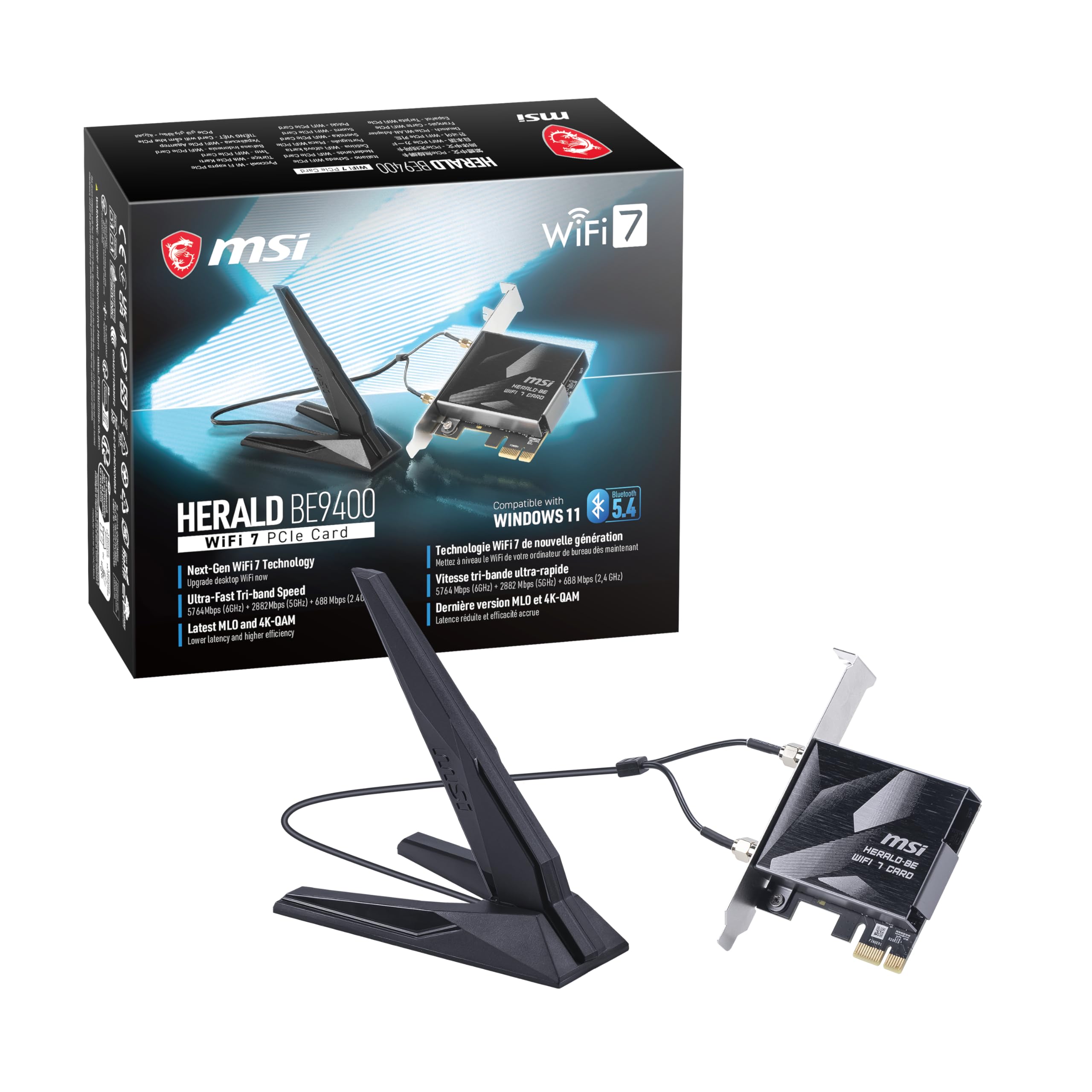
The BE9400 label promises 5764 Mbps on 6 GHz — and Linux owners get along with it.
Look at the tri-band split here: 5764 Mbps on 6 GHz, 2882 Mbps on 5 GHz, and 688 Mbps on 2.4 GHz. That 6 GHz number is a step above the 2882 Mbps 6 GHz ceiling on the TP-Link TBE400E and UGREEN cards, making it the sharper pick if the clean band is where your traffic lives. MLO combines multiple links for more stable, lower-latency connections, and 320 MHz channels on 6 GHz provide an interference-free lane. External antennas on a magnetized base let you angle reception away from the metal case.
Compatibility is what wins owners over here — it works with Linux, and getting it running required no special setup in at least some cases. Speed improvements in upload and download are also part of the picture. Bluetooth 5.4, a USB cable, antenna, and installation guide all ship in the box, and at 9.6 ounces it is the heaviest card in this group, reflecting the magnetized antenna base and cabling hardware.
The trade-off is thin data: this card carries the fewest buyer ratings of the mid-field, so you are buying on a smaller track record than the TP-Link or UGREEN picks. If you want a Linux-capable Wi-Fi 7 card with a serious 6 GHz rate, this is a strong fit — just know the crowd behind it is smaller.
Real Linux traction: compatibility, not just speed, is what owners highlight — an unusual win in a Windows-dominated category.
The smaller track record: fewer ratings behind it than the mainstream picks, so expect less collective experience to lean on.
The pick for: Linux desktops that want a 5764 Mbps 6 GHz ceiling and a magnetized antenna to aim.
Think twice if: you want a huge base of owner feedback before spending.
8. ASUS BE6500 Tri Band PCI-E WiFi 7 (PCE-BE6500)

Adjustable external antennas and 4096-QAM, tuned for Windows 11 desktops fighting dead zones.
ASUS sells this as 2.4X faster than the last generation, and the underlying specs back that direction: an all-new 6 GHz band plus 4096-QAM modulation (which packs more data into each signal) reduces congestion and raises network capacity. Adjustable external antennas let you position the card for the best reception, which is the feature that matters most in a room with thick walls or a case tucked under a desk. The stated data rate is 2882 Mbps, with WPA3 security and OFDMA/MU-MIMO for handling multiple devices at once.
Bluetooth 5.4 brings security, reliability, and energy-efficiency improvements over Bluetooth 5.3. Installation is the thing buyers praise most about this card — described as easy to get in and running. The 3.2-ounce weight keeps it light on the board. It supports Windows 11 only per the minimum OS version, and ASUS lists it as TAA Compliant.
The compatibility record is mixed: some customers note it performs as well as Ethernet, while others hit Windows 11 compatibility issues. That split is worth knowing before you order. If your setup is a clean Windows 11 desktop and adjustable antennas solve a specific dead-zone problem, this is a solid choice — just budget a little troubleshooting time for the driver side.
Where it shines: adjustable antennas plus 4096-QAM for a congested room where you need to aim the signal.
What to prepare for: compatibility is the mixed note — some Windows 11 machines need extra attention before the card behaves.
Match it to: Windows 11 desktops with a fixed dead zone that adjustable antennas can reach around.
Not the first call if: you want the longest owner track record in this list.
9. TP-Link WiFi 7 BE9300 PCIe WiFi Card (Archer TBE550E)
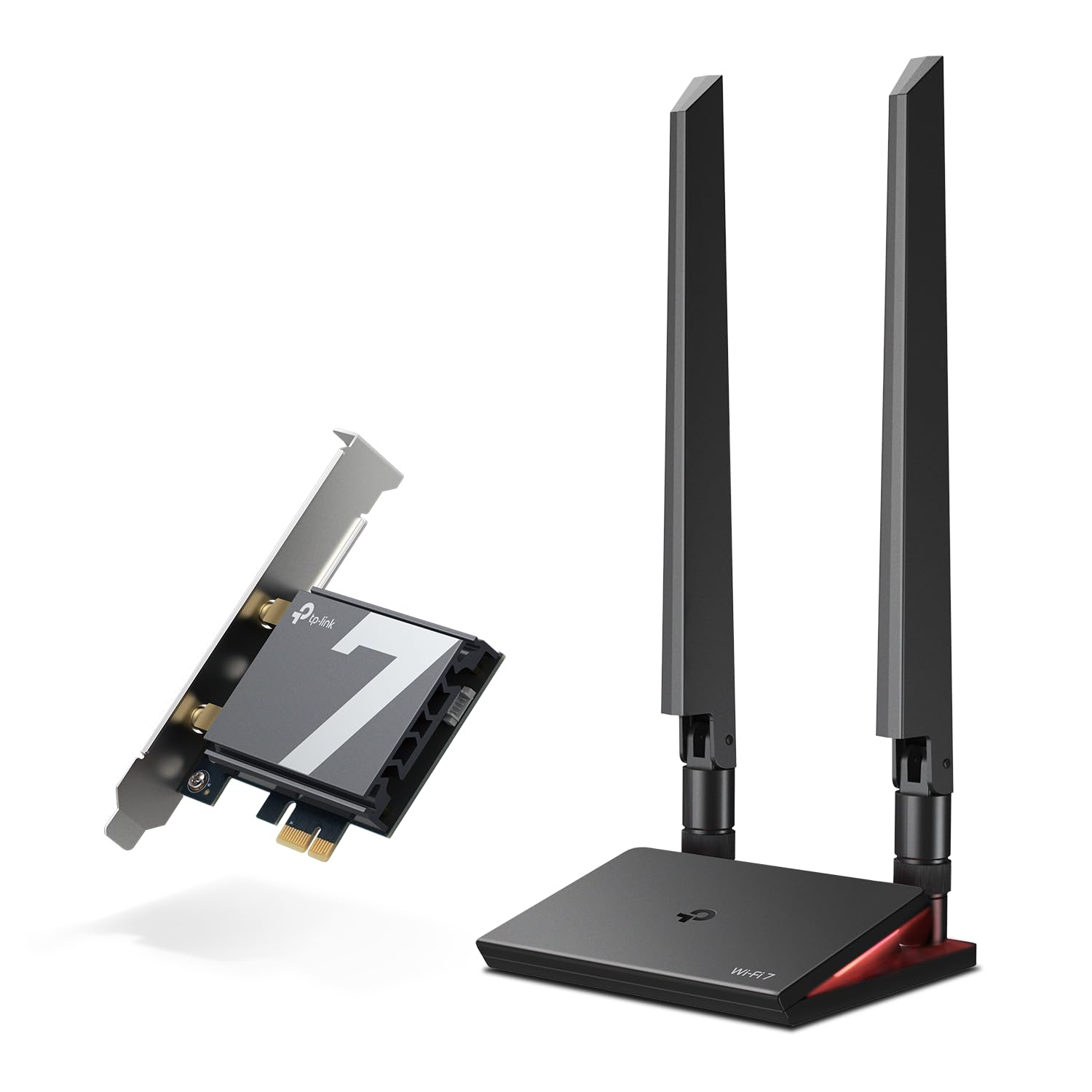
The fastest published ceiling in this lineup: 9300 Mbps across three bands, with a light-up antenna base.
Speed is the marquee: up to 5760 Mbps on 6 GHz, 2880 Mbps on 5 GHz, and 688 Mbps on 2.4 GHz, powered by 4096-QAM and 320 MHz channels. That tri-band split sits above the TP-Link TBE400E’s 2882 Mbps 6 GHz figure, so if raw link rate is your priority, this is the card. It supports AMD and Intel boards both, unlike the Intel-only BE200 cards, so most modern desktops can take it.
The antenna package is where it distinguishes itself. Two multi-directional high-performance antennas sit on a magnetized base with a 1m braided RF cable, so you can place the pick-up anywhere on your desk to find the optimal reception spot. A multicolor status LED on the base shows network state through a responsive touch switch — a small aesthetic bonus rather than a speed factor. A WPA3 protocol plus MLO and OFDMA/MU-MIMO keep latency low on a busy network.
Owner reports put real-world speeds in the 700–900 Mbps range, call installation easy, and praise compatibility with new routers. Reliability is the mixed note — some units work flawlessly while a few stop working within a month. That reliability split is the one piece of feedback to keep in mind. For a Windows 11 desktop with an AMD or Intel board and a serious Wi-Fi 7 router, this is the top-speed card in the group.
Speed and antenna reach: 9300 Mbps ceiling with a 1m braided cable and a base you can park anywhere, wired for anyone.
The one honest caution: reliability is mixed in owner feedback, so a quick return-window check is sensible.
Your best bet for: AMD or Intel Windows 11 builds where maximum published speed and antenna flexibility come first.
Look at alternatives if: you want the longest reliability record rather than the highest number.
Know the Specs
Peak Data Rate (Mbps)
This is the combined top link rate the card and a matching Wi-Fi 7 router can negotiate across all three bands. A number like 6500 Mbps or 9300 Mbps describes the ceiling of the radio link — not your internet download speed, which is still capped by your ISP plan and router. Use it to compare cards to each other, not to your broadband bill.
Bands and 6 GHz
Wi-Fi 7 cards split traffic across 2.4 GHz, 5 GHz, and 6 GHz. The 6 GHz band is the clean, uncrowded lane — no neighbour routers, no microwave interference — which is why the 6 GHz figure on each card deserves more attention than the 2.4 GHz number. Look for 320 MHz channels if you want the widest lane on that band.
MLO (Multi-Link Operation)
MLO lets the card hold a connection on more than one band at once, rerouting data if one band gets busy. In practice that means tighter ping in games, steadier video calls, and fewer mid-stream stalls on a crowded network. It requires a Wi-Fi 7 router to function — on an older router, the card still works, just without the MLO advantage.
Chipset and OS Lock-In
The chip inside determines your compatibility. Intel BE200-based cards work on Intel motherboards and Windows 11 only (the OKN pick also lists Windows 10 support). MediaTek MT7925-based cards run on AMD and Intel, and one adds Linux and macOS support. Check your motherboard chipset and Windows version before you buy — that is the biggest decider in this category.
Common Questions
Will a Wi-Fi 7 PCIe card work on an AMD Ryzen motherboard?
Do I need a Wi-Fi 7 router to use one of these cards?
Why does my Wi-Fi 7 card not install its driver automatically on Windows 11?
Can a Wi-Fi 7 card work with Windows 10?
Does the card’s highest Mbps number mean my download speed will match it?
What does the 6 GHz band actually change in day-to-day use?
Will a magnetic external antenna improve my signal over the card’s own antennas?
What is the difference between 320 MHz and 160 MHz channels?
Does the Bluetooth version on the card matter for a controller or headset?
Can I use the card in an x4, x8, or x16 slot if my x1 slot is covered?
The Bottom Line
If you want a Wi-Fi 7 upgrade that works on the widest range of Windows 11 desktops, the TP-Link Archer TBE400E is the one to pick — AMD and Intel compatible, 6500 Mbps tri-band with a 2882 Mbps 6 GHz lane, MLO, and Bluetooth 5.4. For an Intel-board build where peak link rate and a movable antenna are the priority, the OKN BE200 card pushes 9.3 Gbps and also runs on Windows 10, while the TP-Link Archer TBE550E tops the published ceiling at 9300 Mbps with a 1m braided antenna base. If your desktop runs AMD Ryzen, Linux, or macOS, the GLOTRENDS BE6500 MT7925 card is the one that will actually work for you.
The one clear rule for this purchase: verify your chipset and your operating system before you click buy. Every card in this list does its job well when it matches your platform, and the returns happen when it does not.
How we choose
We do not accept paid placement. Every pick is matched to a real buyer and a real use-case; we do not hands-on test units.
Sources
Specifications: manufacturer listings and product documentation. Review insights: verified customer reviews, as of November 2026. Pricing: not shown on this page (it changes often); check the current price via the retailer link.
As an Amazon Associate, Tactical Gear Guy earns from qualifying purchases. This does not affect which products we feature.