Specs are compiled from manufacturer listings and verified buyer reviews and can change over time — please confirm the key details on the product page before buying.
If your wrists ache by mid-afternoon, the fix is usually to stop forcing both hands onto one slab of keys. A split keyboard cuts the board into two halves, so each hand sits at shoulder width and your wrists stop bending outward to reach the keys. The catch is that “wireless” and “split” get sold together loosely, and plenty of listings hide a cable between the halves. Below you get nine boards that genuinely run free of wires, sorted by what each one actually does well.
This guide is built by comparing the manufacturers’ published specifications and the patterns across verified customer reviews, so you get each pick’s real strengths and trade-offs instead of marketing spin.
The trade-offs here are real: battery size, key count, and how far apart the halves can sit all change what your desk day feels like. Everything below is filtered to boards that actually cut the cord, so you can pick the right one for your setup with confidence in these wireless split keyboards.
Top Picks


How To Choose The Best Wireless Split Keyboards
Start with the one question that eliminates half the market: do the two halves talk to each other over the air, or does a cable still run between them? Several boards on this list link the halves with a wire and only free you from the computer. Others, like the Perixx and the Kinesis Freestyle2 Blue, put real distance between the halves with nothing connecting them.
Decide how far apart you actually need the halves
Shoulder-width spacing is the whole point of a split board, so the separation figure matters more than almost any other spec. The Kinesis Freestyle2 Blue gives you a standard 9″ of separation, and the Kinesis Advantage360 opens to 10″ with its included cable. If you mostly type at one desk and never move the halves, a smaller figure is fine.
Match the key count to the work you do
A full 104-key layout keeps a number pad and dedicated function row, which is what the Nulea RT05 delivers. Compact 65% and 75% boards drop keys you may never touch and free up desk space, which is what the RK Royal Kludge S70 and both Epomaker models do. If you live in a spreadsheet, count the keys before you commit.
Weigh battery size against backlighting
Battery capacity is listed in mAh (milliamp-hours — a rough measure of how long a charge lasts). The RK S70 carries 3150mAh, while the Meetion combo runs 500mAh in each half. Backlighting is the biggest drain: the Nulea RT05 shuts its backlight off below 10% battery to keep the keys working, which tells you how much light costs you.
Side-by-Side Comparison
| Model | Best For | Keys | Wireless | Battery | Amazon |
|---|---|---|---|---|---|
| Meetion Split Curve + Mouse★ Best Overall | Full desk setup on a budget | Full-size | 2.4G USB | 500mAh (each) | Amazon |
| Nulea RT05Full-Size Favorite | Number-pad users who want backlight | 104 | 2.4G + Bluetooth | 2000mAh | Amazon |
| Perixx PERIBOARD-624BCord-Free Halves | Truly cord-free halves | 84 | RF wireless | — | Amazon |
| RK Royal Kludge S70 | Mechanical feel and tenting | 74 | 2.4G / Bluetooth / USB-C | 3150mAh | Amazon |
| R-Go Ergonomic Split | Carrying between office and home | 78 | Bluetooth 5.0 | — | Amazon |
| Epomaker Split70 | QMK/VIA tinkerers with a knob | 72 | 2.4G / Bluetooth / USB-C | 3000mAh | Amazon |
| Kinesis Freestyle2 Blue | Separation with optional tenting | Standard | Bluetooth | — | Amazon |
| Epomaker Split65 | Compact mechanical with hot-swap | 68 | 2.4G / BT 5.0 / USB-C | — | Amazon |
| Kinesis Advantage360 Pro | Contoured key wells, full programmability | 108 | Bluetooth | — | Amazon |
Detailed Reviews
1. MEETION Ergonomic Keyboard and Mouse
Our pick — 4.0+★ from 100+ verified ratings; the strongest balance of quality and price.
A whole wrist-friendly desk in one box: split keyboard, palm rest, and a vertical mouse that share a single receiver.
The most complete starting point on this list is the one that hands you everything at once. This Meetion set pairs a full-size split keyboard with a firm pillow-shaped PU palm rest and a vertical mouse, all running off one shared USB-A receiver. If you are setting up a home office from scratch and want the ergonomic basics without buying three separate items, this is the package that gets you there.
The keyboard itself measures 19.09 × 10.04 × 1.83 inches — deliberately wider than a standard full-size board. That extra width is what lets each hand sit at a comfortable angle instead of reaching inward. The concave curvature follows the shape of your palms, and every key is tilted to keep your fingers moving in a more natural arc. The mouse adds four adjustable DPI settings (800, 1200, 1600, and 2400 — dots per inch, a measure of how far the cursor travels per inch of hand movement) plus silent buttons and a side scroll wheel.
Battery is where this set makes its compromise. Both the keyboard and the mouse carry 500mAh built-in batteries rated for up to one month of continuous use on a full charge. That is a fraction of what the RK Royal Kludge S70’s 3150mAh cell holds, so plan on charging more often if you type all day. Also read the fine print on the USB-C port: it is an adapter, not a receiver, and it must plug into the included USB-A receiver to work. The set talks to your computer from up to 33 feet away.
What earns its place
- Keyboard, wrist rest, and vertical mouse all share one USB-A receiver.
- The 19.09-inch width gives each hand real room to sit at an angle.
- Firm PU palm rest stays put instead of sliding around under your wrists.
- Works with both Windows and Mac systems from the start.
Where it asks patience
- The 500mAh battery in each half needs charging far more often than the bigger cells elsewhere on this list.
- The USB-C port is only an adapter and will not work on its own without the USB-A receiver.
- At roughly two pounds and over 19 inches wide, it takes real desk space.
Buyers with carpal tunnel single out the comfort, and the tilt adjusts in either direction to match your arm angle. The purple finish is a genuine talking point too, and the whole set is priced as value rather than premium.
Reach for this if: you want a matched keyboard-and-mouse ergonomic setup for a fixed desk and prefer to buy once.
Look elsewhere if: you need long stretches between charges or a compact footprint that fits a small tray.
2. Nulea RT05 Wireless Ergonomic Keyboard
Keeps every key you already know, then curves and splits them so your shoulders can drop.
If your job runs on a number pad, this is the split board that does not make you relearn your muscle memory. The Nulea RT05 keeps 104 keys — the same count as a standard full-size keyboard — but splays and curves them so your arms land in a relaxed position. It is the pick for anyone who tried a compact split board and gave up on hunting for the keys they use every hour.
Switching between machines is where this one separates itself. Bluetooth and 2.4G USB together let it hold connections to three devices at once, and a button press moves you between them mid-task. Start an email on your computer, hop to your phone for a text, then come back without re-pairing anything. The 2000mAh internal battery recharges over USB-C, and four adjustable tilt legs give you three different tilt levels to dial in.
The backlighting is a genuine 7-color system with 3 brightness levels, covering blue, green, red, cyan, purple, yellow, and white. Keep one honesty note in mind: when the battery drops below 10%, the keyboard shuts the backlight off to keep the keys working. That behavior tells you light is the biggest drain on the charge. The board’s build quality is what buyers bring up first — it lands better than the listing photos suggest.
The practical read: 104 keys, three-device switching, and a 2000mAh cell make this the safest first split keyboard for an office worker who refuses to give up a number pad.
The honest catch: battery reports split both ways — some get long stretches, others watch it drain fast, so how much backlight you run will decide which camp you land in.
Suits you when: you want familiar full-size typing with the wrist relief of a split curve.
Think twice if: desk space is tight — this is a full-width board.
3. Perixx PERIBOARD-624B US, Wireless Ergonomic Split Keyboard
The whole point of a split board, done properly — two independent halves and no wire in sight.
Most boards on this list still link their halves with a cable. The Perixx PERIBOARD-624B does not, and that is its entire reason to exist. You can set the two halves down wherever your arms want them, with no charging cord and no connection wire running between them. For a desk where you shift position through the day, that freedom is the feature that matters.
It runs on 84 keys in a curved, split-key design, with keys sloped to guide your arms and hands into a more natural typing position. Adjustable tilt on the bottom offers several positions so you can match your own posture instead of the other way around. The switches are low-profile membrane keys with long travel distance — the amount each key sinks when pressed — which is meant to give a satisfying feel while cutting down on accidental keystrokes.
This is also where I have to be straight with you. The typing experience splits opinion cleanly: some find it easy, others genuinely struggle with the key feel. Latency — the delay between a keypress and the letter landing on screen — is the recurring sore point in the mixed wireless feedback. Buyers agree on the ergonomics and overall keyboard quality, and the strain relief across shoulders, elbows, and wrists is what holds up.
Reasons it stands apart
- Two truly independent halves with no cable running between them.
- 84 keys with curved, sloped split-key geometry.
- Adjustable tilt with several positions underneath.
- Long key travel that is designed to cut mistyping.
Trade-offs to weigh
- Key feel divides people — some adjust fast, others never settle in.
- Latency shows up as the loudest complaint in the wireless reports.
- Windows only, so Mac users need a different pick.
Best match: a Windows desk where you reposition the halves constantly and want zero connecting cable.
Not for you: fast-paced typists who notice even small input delay.
4. RK ROYAL KLUDGE S70 Ergonomic Split Keyboard
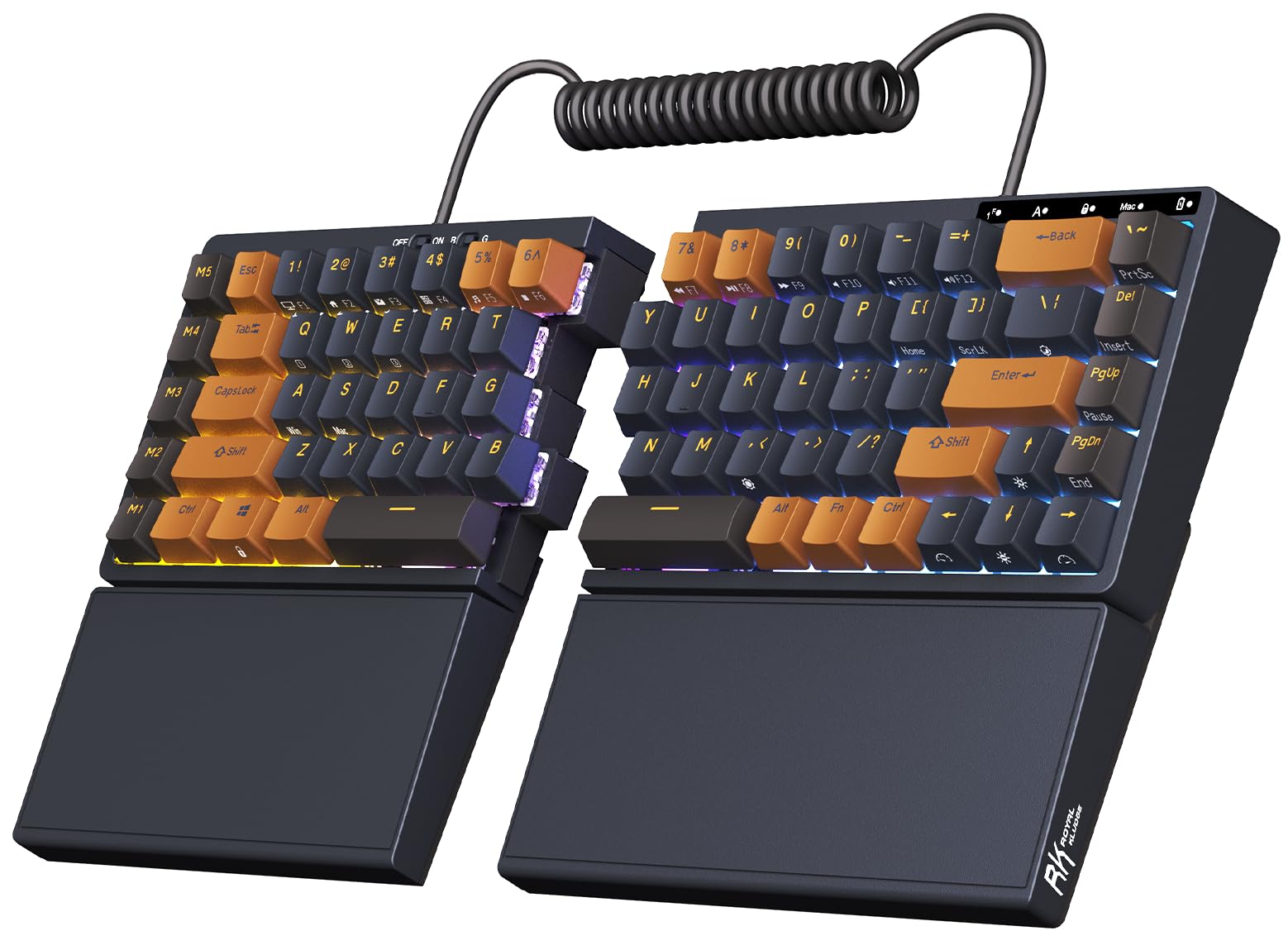
A 3150mAh cell and eight tenting feet make this the endurance machine of the split crowd.
Battery anxiety disappears with this one. The RK ROYAL KLUDGE S70 carries a 3150mAh battery — the largest on this entire list, and roughly six times the 500mAh cell in the Meetion set above. RK rates it for up to two weeks without the backlight on. If you resent hunting for a charging cable every few days, that capacity is the number that matters.
The ergonomics go further than most. Eight adjustable feet let you raise or tent each half into a more natural angle, which many split boards skip entirely. You can link the two halves with the coiled cable when you want them fixed in place. The left half has its own built-in battery, so it keeps wireless range and macro key functionality even on its own — a genuine one-handed option.
For mechanics, the tactile brown switches give a slight bump with every press, and the hot-swap socket accepts both 3-pin and 5-pin switches with no soldering. Five programmable macro keys sit on the left, and RK’s software lets you remap keys and tune the RGB lighting. Typing feel and build quality are exactly what buyers respond to — the keystroke has a punchy, almost retro character that mechanical fans tend to love.
Why it lands: 75% compact layout, a 3150mAh battery, eight tenting feet, and hot-swap sockets together make this the most flexible mechanical split board in the mid-range.
One thing to know: adjustability splits opinion — the tenting setup works well for some desks and takes fiddling to get right on others.
Pick this when: you want a mechanical typing feel and long battery life without paying premium prices.
Skip if: you need a number pad — the 75% layout drops it.
5. R-Go Ergonomic Split Keyboard
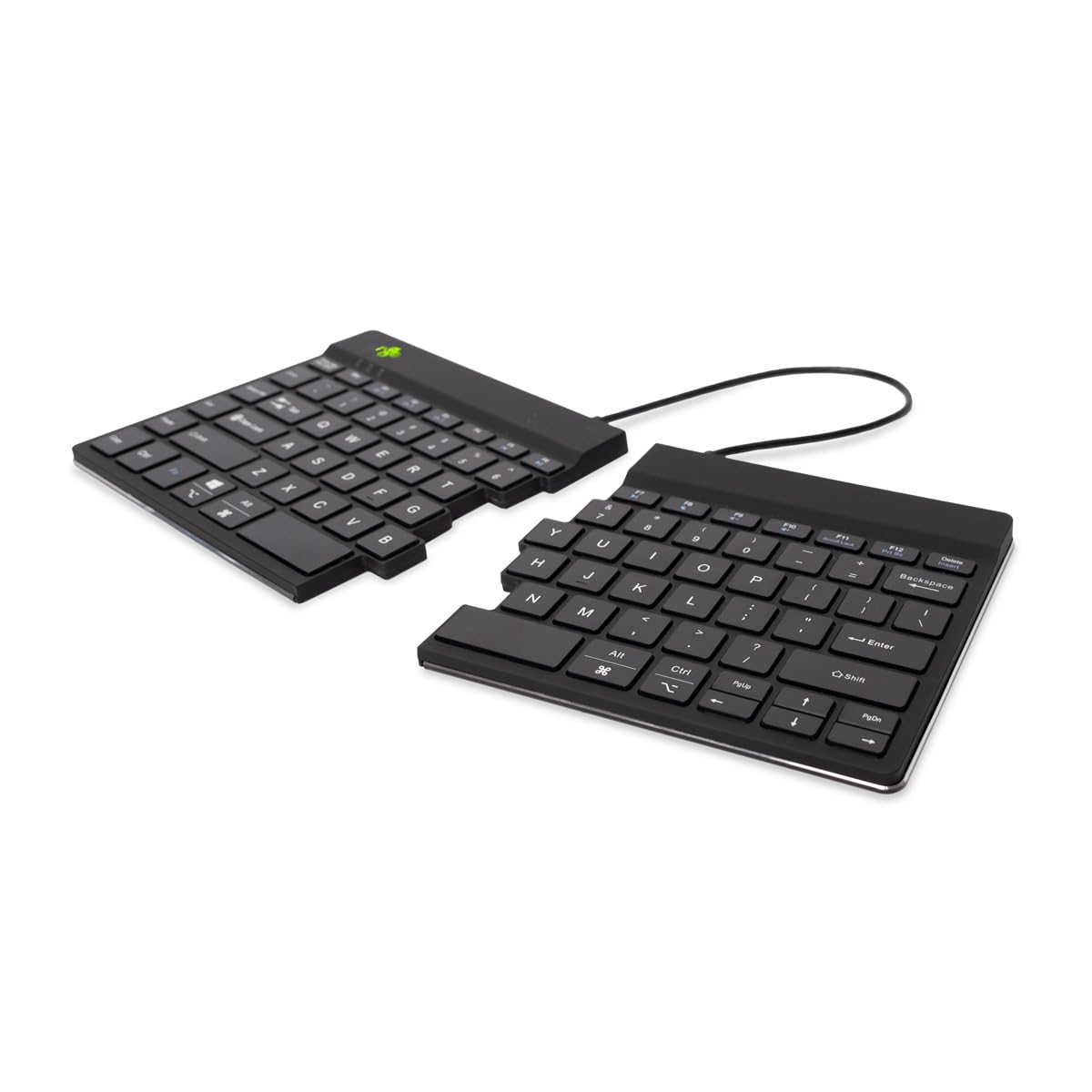
A split board thin enough and light enough to live in your laptop bag.
Most split keyboards stay bolted to one desk. This R-Go board weighs 350 grams and measures 0.35 inches thin, so it slides into a laptop bag and travels without complaint. If you work between an office desk and a kitchen table, that portability is why you would choose it over a heavier mechanical split board.
The two halves can be placed wherever your shoulders want them, and the flexible cables come in 11.64″ and 19.69″ lengths to suit different desk setups. The compact design keeps your hands within shoulder width, the core ergonomic principle behind any split board. Scissors mechanism switches give light keystrokes that ask less muscle tension than a heavy mechanical key.
The extra here is software. The R-Go Break tool drives LED indicators that behave like a traffic signal: green for healthy work, orange for a short break, and red when you have missed one. It is a nudge to stand up and move, built right into the board. Bluetooth 5.0 handles the connection, and it works with both Windows and MacOS.
Where it performs
- 350 grams and 0.35 inches thin — genuinely bag-friendly.
- Two halves reposition to keep hands at shoulder width.
- R-Go Break LED indicators nudge you toward breaks.
- Windows and MacOS support via Bluetooth 5.0.
What to plan around
- A smaller overall footprint means fewer keys than a full board.
- Light scissor keystrokes suit some typists better than others.
- Thin profile offers less palm support than a full wrist rest delivers.
Made for: the commuter who wants ergonomic typing in whatever chair they land in.
Consider another: if you want a weighted mechanical feel and a built-in wrist rest.
6. EPOMAKER Split70 Wireless Ergonomic Keyboard

A 70% split mechanical board that you program down to the last key and turn a knob to control.
This is the board for the tinkerer. QMK/VIA support — open firmware that lets you remap any key and build layers — means nothing on the Split70 is fixed. You can set macros for work, accessibility shortcuts, or just personal preference, all through VIA software with a custom JSON file. If you have ever wanted a keyboard that bends to your workflow instead of the reverse, this delivers that.
The layout is a 70% split with 72 keys, and you can detach the halves or link them with a cable. A rotary knob handles volume, brightness, and multimedia with a single spin. The Wisteria Linear V2 switches come factory-lubed for a smooth, creamy keystroke, and the hot-swap socket takes any 3/5-pin switch if you want to change the feel. Five layers of padding — latex, IXPE switch pad, PET pad, bottom sponge, and bottom silicone — sit under the gasket-mounted plate to soften the sound.
On connectivity it covers a lot: Bluetooth 5.0, 2.4GHz wireless, and USB-C wired, with up to five paired devices at once. A 3000mAh battery and 71 south-facing RGB LEDs complete the picture, with 1000Hz polling on 2.4GHz and cable for low latency in games. The gasket mount and thick padding are the details that make this feel more expensive than its tier suggests.
The inside edge: 3000mAh battery, 72 keys, and full QMK/VIA programming put serious control in your hands — this is a board you shape, not one you adapt to.
Worth flagging: the 70% split layout drops the function row entirely, so plan your macros before you commit.
For you if: you enjoy programming layers and want a mechanical split board that sounds as good as it feels.
Look past it if: you want plug-and-play with zero software setup.
7. KINESIS Freestyle2 Blue Wireless Ergonomic Keyboard for PC

Nine inches of separation between halves, and a name that ergonomic buyers keep coming back to.
Quality is the word that follows this board everywhere. The Freestyle2 Blue splits into two halves with a standard 9″ of separation, so each hand sits where your shoulder wants it rather than where a single slab forces it. Low-force tactile keyswitches keep the press light. It pairs over multichannel Bluetooth with any Bluetooth-enabled device — desktop, laptop, smartphone, or tablet — and works with Windows, Linux, and Android.
What you are really paying for is the ecosystem around it. Kinesis sells palm supports, plus VIP3 and V3 lifters for tenting and a numeric keypad, so the board grows with your setup over time. It weighs 2 pounds and measures 16.4 × 9.4 × 1 inches, which keeps it steady on a desk without being a burden to move. Buyers keep returning to the same two benefits: better posture and less wrist strain.
The honest counterweight is Bluetooth. Connections run flawlessly for plenty of people and take patience for others, and the learning curve on the split layout is real at first. Battery life lands somewhere in the middle of the pack. None of that erases the core appeal: this is a board with a long track record and a strong accessory path.
The case for it
- Standard 9″ separation lets each hand sit at shoulder width.
- Multichannel Bluetooth pairs with desktop, laptop, phone, or tablet.
- Optional palm supports, V3 and VIP3 lifters, and a numeric keypad extend the setup.
- Low-force tactile keyswitches keep typing light.
The case against rushing
- Bluetooth reliability divides people — some connect instantly, others struggle.
- Split layouts take a period of adjustment before typing speed returns.
- Tenting lifters and palm supports are extras, not included.
Worth choosing: you want a proven split ergonomic board with a serviceable upgrade path.
Think twice: if you want everything built in from day one.
8. EPOMAKER Split65 QMK/VIA Programmable Keyboard

The smallest of the mechanical splits, with a sound profile that punches well above its size.
If desk real estate is your problem, start here. The Split65 uses a 65% split layout with 68 keys — the most compact mechanical option on this list. You can detach the halves entirely or adjust their angle and distance to suit your arms. PBT gradient keycaps in Cherry profile keep the surface durable through heavy use.
Sound and feel get real attention. Four layers of damping — Poron sandwich foam, IXPE switch pad, PET pad, and Poron socket pad — sit under a top-mounted structure to kill hollow noise and deliver a deep, satisfying thock. A south-facing RGB array covers 16.8 million colors and dozens of preset effects, and the hot-swappable PCB takes mainstream 3/5-pin switches if you want to swap the feel later. NKRO and anti-ghosting mean no chattering or double inputs during long sessions.
Connectivity runs Bluetooth 5.0, 2.4GHz wireless, and USB-C cable, with up to five paired devices and a knob for volume and brightness. The metal knob adds a solid feel to each turn. Value is where this one splits opinion — some find it priced high for what you get. Bluetooth lag is the other honest note: several buyers report noticeable delay over wireless, so heavy typists may prefer the 2.4GHz receiver or the cable. Quality itself, though, is what buyers praise.
Why it works: 68 keys, QMK/VIA programming, and four layers of sound damping make this the go-anywhere split for people who care about acoustics.
Where it stumbles: Bluetooth lag is real for some owners, so plan on the 2.4GHz dongle for serious typing.
Choose it when: you want a compact split mechanical with rich sound and deep customization.
Look elsewhere if: you need reliable Bluetooth and nothing else.
9. KINESIS Advantage360 Professional Split Ergonomic Keyboard

Scalloped key wells that cradle your fingers, thumb keys, and a 10-inch split — this is the deep end of the pool.
Nothing else on this list looks or types like the Advantage360. Its patented design sets each hand into a concave key well — keys arranged in bowls that follow your finger lengths — with a thumb cluster, orthogonal layout (keys lined up in straight columns instead of staggered), integrated tenting, and built-in palm supports. The split design separates up to 10″ with the included cable, and three adjustable tenting heights fit different body types.
The switches are Kailh Box Pink Silent stems, rated for 50M presses, with low activation force and a linear feel. Silent mechanical construction means you get mechanical feedback without the clack. Backlighting is optional, and the whole board is fully programmable — power users can rebuild the base layout through GitHub or a web-based GUI. A three-year warranty and US tech support back it up.
You need to know what you are signing up for. The learning curve here is steep, and it is the most common friction point in the reviews. Bluetooth performance is the other split note — some report solid connections, others report poor ones. The palm supports are built in, though premium palm pads are sold separately. Build quality and the ergonomic payoff — less wrist strain and shoulder tension after long sessions — are what hold up.
Why it stands alone
- Contoured key wells, thumb keys, and orthogonal layout in one design.
- Three adjustable tenting heights and up to 10″ of split separation.
- Kailh Box Pink Silent switches rated for 50M presses.
- Fully programmable through GitHub or a web-based GUI, plus a three-year warranty.
What it asks in return
- The learning curve is steep — expect a real adjustment period.
- Bluetooth reliability is uneven across owners.
- Premium palm pads are sold separately, not included.
Made for: the typist ready to invest in a completely different way of typing.
Not for you: if you want a familiar layout you can type on immediately.
Know the Specs
Battery capacity in mAh
mAh stands for milliamp-hours, a measure of how much charge a battery holds. A bigger number generally means fewer charging breaks. The RK S70’s 3150mAh cell and the Epomaker Split70’s 3000mAh cell sit at the top of this list, while the Meetion set runs 500mAh in each half. Backlighting drains a charge fastest — the Nulea RT05 turns its backlight off below 10% to keep the keys alive, so turn the lights down if you want longer stretches.
Separation distance and tenting
Separation is how far apart the two halves can sit, and it decides how naturally your arms rest. The Kinesis Freestyle2 Blue offers a standard 9″, and the Advantage360 opens to 10″ with its cable. Tenting raises the inner edge of each half so your wrists stay straighter. The RK S70 uses eight adjustable feet, and the Advantage360 offers three tenting heights. If you plan to tent, check that the board supports it rather than assuming.
Key count and layout percentage
Layout percentages describe how much of a full keyboard you keep. A 100% board carries every key including the number pad, which the Nulea RT05 does with 104 keys. A 75% board like the RK S70 drops the number pad, a 70% board like the Epomaker Split70 goes smaller still, and the Split65’s 65% layout is the most compact. Fewer keys free up desk space; more keys mean less retraining.
Switch type: membrane vs mechanical
Switch type decides how each keypress feels. Membrane keys, like those in the Meetion and Perixx boards, use a rubber dome under each key and tend to be quieter. Mechanical switches, like the RK S70’s tactile brown or the Epomaker boards’ linear Wisteria, use a physical spring mechanism and can be hot-swapped on some models. Hot-swap means you can pull a switch out and push a new one in without soldering.
Common Questions
Do the two halves of a split keyboard need a cable between them?
Will a split keyboard work with my Mac?
How long does the battery last on these split keyboards?
Can I use a split keyboard for gaming?
What does hot-swappable mean on a mechanical keyboard?
Is a split keyboard better than a standard keyboard for wrist pain?
Do I need a wrist rest with a split keyboard?
How far apart should I set the two halves?
What is QMK or VIA, and do I actually need it?
Can I switch between a PC, tablet, and phone on one split keyboard?
The Bottom Line
For most desks, the wireless split keyboards winner is the Meetion Split Curve set, because it hands you a split keyboard, a firm palm rest, and a vertical mouse on one shared receiver — a complete ergonomic desk without three separate purchases. If mechanical feel and battery life matter more, grab the RK Royal Kludge S70 and its 3150mAh cell. And for truly cord-free halves you can place anywhere, the Perixx PERIBOARD-624B is the one to reach for.
How we choose
We do not accept paid placement. Every pick is matched to a real buyer and a real use-case; we do not hands-on test units.
Sources
Specifications: manufacturer listings and product documentation. Review insights: verified customer reviews, as of November 2026. Pricing: not shown on this page (it changes often); check the current price via the retailer link.
As an Amazon Associate, Tactical Gear Guy earns from qualifying purchases. This does not affect which products we feature.