Specs are compiled from manufacturer listings and verified buyer reviews and can change over time — please confirm the key details on the product page before buying.
You already aim better with a mouse than with a thumbstick — the problem is that most console shooters only listen to a controller. An Xbox controller mouse setup fixes that by letting you plug a keyboard and mouse into a small adapter box, then feeding your movement and aim into the console as controller input. The nine options below cover that whole job, from a licensed 8BitDo mouse that talks to Xbox directly to a premium converter that expects you to read a setup guide before you frag anything.
This guide is built by comparing the manufacturers’ published specifications and the patterns across verified customer reviews, so you get each pick’s real strengths and trade-offs instead of marketing spin.
Plug-and-play boxes suit most people, while high-end converters reward tinkerers. Know which camp you sit in before you spend, because the wrong one becomes a paperweight on your shelf — the quickest way to sort that out is this breakdown of the xbox controller mouse market.
Top Picks


How To Choose The Right Xbox Controller Mouse Setup
Two very different products get sold under the same label. One is a mouse built for Xbox — it connects straight to the console and needs no adapter box at all. The other is an adapter that lets you use any keyboard and mouse you already own on Xbox games. Some adapters, like the 8BitDo dock, even store the wireless receiver for you.
Wired or wireless — decide this first
Most converter boxes are strict about peripherals. The 8BitDo mouse gives you three connection modes — Bluetooth, 2.4G wireless and wired USB-C — so you can pick the one that suits your desk. The leadjoy VX2 AimBox takes the opposite stance: only single-function wired keyboards and mice are supported, and common wireless brands like Logitech and Corsair are called out as incompatible. Check your own keyboard and mouse against the adapter’s supported list before you buy, because a wireless set that the box refuses to see is the most common reason a converter gets returned.
The Xbox authentication quirk
Microsoft’s consoles expect a real controller to be present. Several adapters handle this with an authentication port: the CHEERKONTEK AX360P says it requires the original controller for proper connection, with the mouse acting as the right stick. The Mcbazel XIM Matrix spells out the same requirement per console — an Xbox controller for Xbox output, a DualShock 4 v2 for PS4. A plug-and-play box skips that fuss entirely, which is why it suits most casual players.
Polling rate and sensitivity range
Polling rate is how many times per second your mouse reports its position to the console, measured in hertz (Hz). The 8BitDo mouse reaches 8000Hz over a wired connection and 4000Hz on 2.4G wireless, with Bluetooth capped at 125Hz. The AIMZENIX Blader Pro is tuned for mice running a standard 1000Hz rate. Higher numbers mean finer aim at the cost of more data flying around — and your monitor and console still cap the feel.
Side-by-Side Comparison
| Model | Best For | Connection Type | Ports | Max Sensitivity | Amazon |
|---|---|---|---|---|---|
| 8BitDo Retro R8 Mouse★ Best Overall | Playing straight on Xbox, no box | Bluetooth / 2.4G / USB-C | — | 26000 DPI | Amazon |
| leadjoy VX2 AimBoxBest Value | Simple app setup on a budget | Micro USB / USB-C | 5 | — | Amazon |
| IOGEAR KeyMander 2 3PlayMost Portable | Sharing one keyboard across 3 devices | USB-C | 4 | — | Amazon |
| HYCARUS HC-30050 | One-to-many keybinds, no software | USB-A | 5 | — | Amazon |
| AIMZENIX Blader Pro | Stable 1000Hz response on a budget | USB-A | 6 | — | Amazon |
| NEXiLUX NXL-95237 | Keyboard, mouse and adapter in one | USB | — | — | Amazon |
| Mcbazel XIM Matrix | Tournament-grade aim handling | USB | 4 | — | Amazon |
Detailed Reviews
1. 8BitDo Retro R8 Mouse with Charging Dock – Xbox Edition
Our pick — 4.5+★ from 200+ verified ratings; the strongest balance of quality and price.
The only pick here that skips the adapter box entirely and just works on Xbox.
An officially licensed Xbox mouse means you plug the receiver or cable into the console and start playing — there is no converter, no app mapping session, no authenticating controller left dangling from a USB port. That license is why it takes the top spot for most people. The crowd figures back it: 4.5+ stars from 200+ buyers, and the thing that wins people over is how it sits in the hand, with its retro shape drawing far more praise than any other quality.
The sensor is the serious part. A PAW 3395 optical sensor is the chip that reads your desk surface and turns movement into on-screen motion, and this one supports 6 sensitivity levels running from 50DPI to 26000DPI. Polling rates go from 125Hz to 8000Hz, though only on the wired USB-C connection — 2.4G wireless tops out at 4000Hz, and Bluetooth is fixed at 125Hz. In plain terms, wired gives you the fastest report rate and Bluetooth gives you the laggiest, so plug in when a match matters. The dock doubles as a storage cubby for the wireless receiver and, per the maker, helps extend the signal.
Four programmable side buttons and the Kailh Sword GM X micro switches round it out — those switches use a pre-compression system the maker says cuts dead travel so each click feels crisp. Button responsiveness and weight are the two areas buyers split on, so if you like a heavy mouse or a featherweight one, check the listed weight against what you normally use before committing. The big caveat is simple: this is a mouse, not a converter. If you want to keep your own favorite keyboard and mouse and run them through a box, you need one of the adapters further down.
Xbox-themed retro shell
- Official Xbox license — no adapter box, no mapping app, no auth controller
- Wide sensitivity range (50DPI to 26000DPI) with 6 selectable levels
- Charging dock that stores the 2.4G receiver and helps extend the signal
- Four programmable side buttons plus Kailh Sword GM X switches with a pre-compression system
charging dock footprint
- 8000Hz polling is wired-only; Bluetooth is stuck at 125Hz
- Button responsiveness and weight both split buyers — try before you settle
- It is a mouse only, so it will not run your own keyboard through a converter
Xbox setup owners: you want mouse aiming on Xbox with zero setup homework and a desk dock for the receiver.
wired-only fans: you already own a keyboard-and-mouse combo you refuse to give up — an adapter serves you better.
2. leadjoy VX2 AimBox Keyboard Mouse Adapter
The volume seller of the converter world — 1,500+ ratings and a genuinely fast app setup.
If you judge an adapter by how many people have actually used one, this is the pick: 1,500+ ratings across a wide audience, which for an accessory this niche is a lot of hands. The draw is the Vlead app, where you map the mouse, camera, joystick, keybinds and lighting without memorizing key-combo shortcuts. The maker’s own pitch is that you skip the firmware-and-forum-tutorial grind.
Peel back the marketing and the compatibility rules matter more than anything. Only single-function wired keyboards and mice are supported — wireless peripherals, named examples being Logitech and Corsair, simply are not. There is no PlayStation 5 support either, so this is an Xbox One, Xbox Series X/S and PS4 box. A 3.5mm headset jack lets you run voice chat through the adapter rather than hunting for a second port, and the maker’s agility translation technology claims 1:1 movement between your mouse and the game.
Here is the honest picture buyers need to weigh. Sentiment splits right down the middle: plenty of people report it working flawlessly, and a matching group report it not working at all. Reading the manual before connecting is the maker’s own warning, and it is the difference between a smooth session and a dead box. Treat it as a great deal for a wired-only setup and a gamble if your peripherals are wireless. Compared with the AIMZENIX Blader Pro, this one runs a 0.5 A current rating versus the Blader Pro’s 2 A — the Blader Pro is built to push more power to hungry peripherals.
four-console AimBox support: wired keyboard and wired mouse only. If that describes your desk, the app setup is quick and the headset jack is a genuine win.
firmware gear checks: no PS5, and wireless Logitech or Corsair peripherals are out. Read the manual before the first connection.
cross-platform switchers: wired-peripheral players who want app-based mapping without a learning curve.
single-console players: anyone with a wireless mouse or a PS5 under the TV.
3. IOGEAR KeyMander 2 3Play Keyboard/Mouse Sharing Switch
One keyboard and mouse, hot-key switching between three machines without unplugging anything.
Most adapters serve one console at a time. This one is a sharing switch first — it lets a single keyboard and mouse hop between up to three PCs and game consoles with a hot key. The crossover function adds something unusual: you can swap controllers between PS4, Xbox One and Nintendo Switch. That hot-key switching makes it the desk-clearing pick for a house with more than one console wired to the same monitor.
The size is the tell. At 4.3 x 2.6 x 0.91 inches it is a chunkier box than the AIMZENIX Blader Pro at 2.09 x 0.71 x 3.23 inches — a 2.1x gap on the listing dimensions — and at 8.8 ounces it is 49% heavier than the CHEERKONTEK AX360P at 5.92 ounces. That weight is what you pay for four ports and a hot-key switch built in. Custom key mapping, mouse sensitivity and macro functions come through the Android and iOS apps, and IOGEAR backs it with lifetime US-based technical support.
The honest trade-off arrives fast: at 3.5+ stars across a modest review pool, sentiment is nowhere near the 4.5+ star leader, and the complaints cluster around getting it dialed in. This is a box that rewards patience with the app rather than one that just works. If you only have one console and one keyboard, the simpler AIMZENIX Blader Pro serves you with less fiddling. If three machines share one desk, the switching alone is worth the setup time.
shared desk setups: you run multiple consoles or PCs off one monitor and want a hot-key switch instead of cable swapping.
wireless purists: you want a single-console solution that works on the first try.
4. HYCARUS HC-30050 Keyboard and Mouse Adapter

Built for players who map one key to many actions and switch loadouts mid-match.
Key mapping is the whole personality of this box: one-to-many keybinds with no software download at all. It supports one-to-many keybinds with no software download at all, plus mouse side-key mapping — so your thumb buttons earn their keep in shooters. Multiple keybind profiles for different games are saved in the adapter, and the maker points to video tutorials for setting them up. A one-click switch flips you between profiles inside the game rather than in a menu.
Driver-free plug-and-play keeps the fuss low, and it covers PS4, Xbox One, Nintendo Switch and PS3. A 3.5mm headset jack works across Xbox One, PS4 and Switch and lets you hear footsteps more clearly while keeping voice chat in the loop. The maker describes a low-latency, low-power chip driving the input, which matters most in fast shooters where a sluggish translation reads as aim drift.
At 3.5+ stars from a modest review base, this sits in the middle of the pack — solid for the player who will use the mapping features, less compelling for someone who just wants to plug in and play. The one-to-many bindings are only worth the setup time if you actually customize. A plain wired set and a default profile gets you gaming in minutes, but it will not sing until you build a layout. Compared with the leadjoy VX2 AimBox, the HC-30050 plays nicer with mixed peripherals — the leadjoy box locks out wireless entirely.
budget HC-30050 adapter: one-to-many binds, mouse side-key mapping and one-click profile switching, all without a software install.
tuning-dependent aim: the mapping features only pay off if you take the time to set them up. Leave it stock and you are using an average adapter.
cheap entry point: players who treat keybinds as part of the loadout and switch profiles between games.
plug-and-play seekers: someone who plays one shooter with default controls.
5. CHEERKONTEK AX360P Keyboard and Mouse Adapter
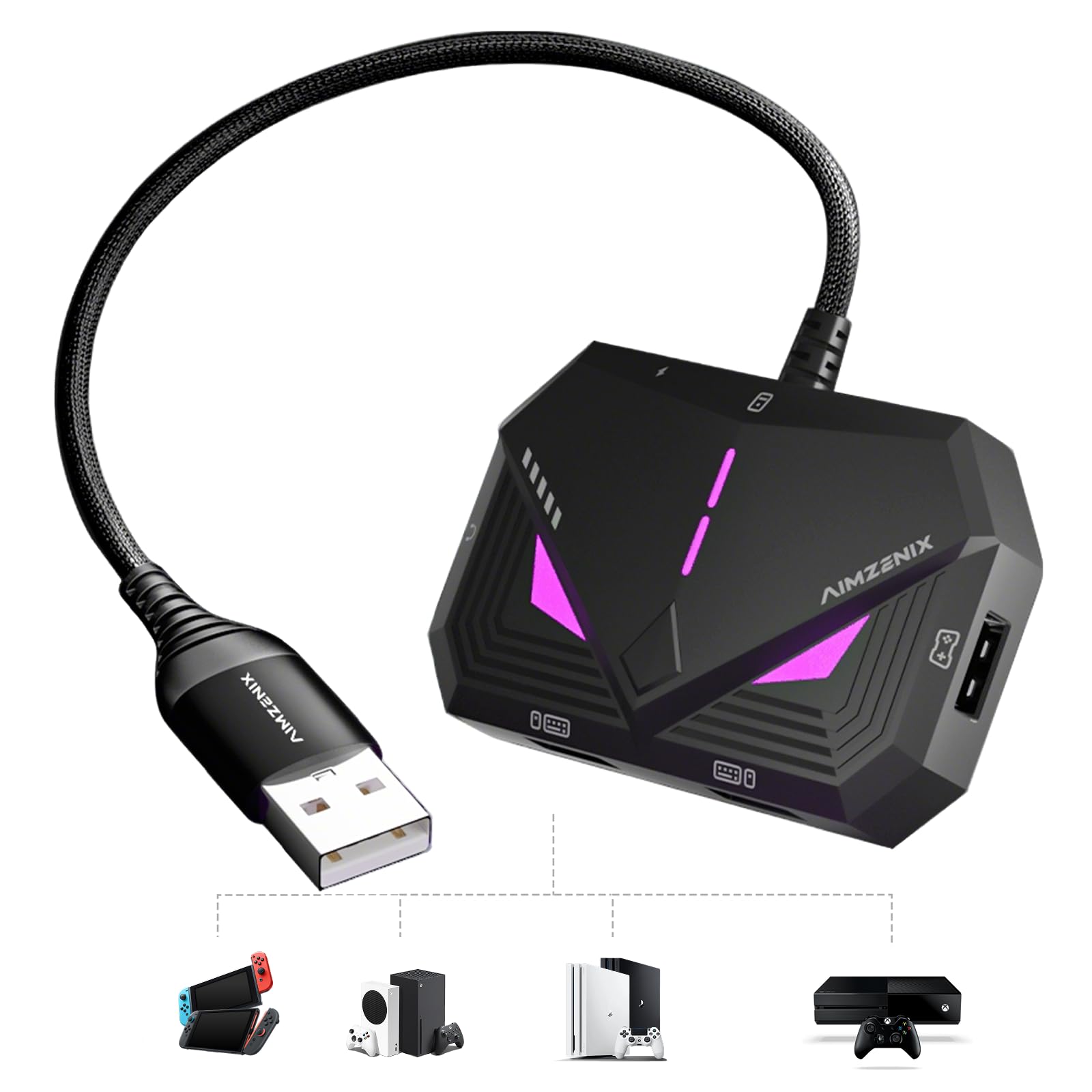
A compact, power-friendly box tuned for a steady 1000Hz mouse and rated at 2 A for RGB-heavy gear.
Two things stand out on the spec sheet. It is built around a standard 1000Hz mouse polling rate — the report rate most gaming mice run at — with RGB indicators that flash to confirm connection and device status. And it is rated at 2 amps versus the leadjoy VX2 AimBox’s 0.5 A, which is the headroom that keeps power-hungry RGB peripherals from dropping out mid-session.
Setup runs through the GEEKVICE app over Bluetooth, where you customize key mappings, adjust basic mouse sensitivity, and apply official game presets with a single tap. A dedicated USB-C 5V auxiliary power port exists specifically to stabilize high-power RGB gear. The integrated USB-A console cable keeps the wiring tidy, and the maker calls out support for most standard wired and 2.4GHz wireless keyboards and mice — a broader net than the wired-only leadjoy box.
Know the limits before you buy. Bluetooth-only, magnetic-switch, Hall effect and optical keyboards are explicitly not supported, so a fancy optical board will not talk to it. It covers Switch 2, Switch, PS4, Xbox Series X/S and Xbox One — no PS5. And it is a new listing with a thin review base, so there is no long track record yet. The product itself is the lightest full converter in this lineup at 109 g, with 6 ports, and the fit for most buyers depends on whether your keyboard makes the supported list.
Blader Pro low latency: 1000Hz optimization, a 2 A rating for RGB-heavy rigs, a dedicated USB-C aux power port and the broadest wired-plus-2.4GHz peripheral support among the budget converters.
fine print on setup: Bluetooth-only, magnetic-switch, Hall effect and optical keyboards are out. Check your board before you check out.
competitive shooter fans: you run a standard wired or 2.4GHz gaming board and want app presets without a learning curve.
casual couch players: your keyboard uses optical or magnetic switches — they are not supported.
6. NEXiLUX NXL-95237 Pro Gaming Keyboard and Mouse Combo

One box with the keyboard, the mouse and the adapter already built in — no separate converter to buy.
If you own none of the gear yet, this is the shortest path. The NEXiLUX is a full combo — keyboard and mouse plus a built-in adapter for Switch, PS3, PS4, Xbox One and Xbox 360. A 360-degree analog stick handles movement, four special gaming keys run macros and turbo functions, and a 4-position adjustable wrist rest lets you set the angle you actually type at. QWERTY layout, USB connection, Windows support.
Understand what you are getting. The built-in converter means no separate box to buy, but it also means you cannot swap in your favorite keyboard or mouse later — those are the ones inside the box. The 3.5mm headphone jack keeps voice chat wired in, and the analog stick gives you finer movement than WASD alone. It is the heaviest option in this lineup at 16 ounces, which is the weight of a full keyboard coming along for the ride.
Sentiment here is the weakest of the group, so treat this as a convenience play rather than a top-performer. If you already own a gaming keyboard and mouse you love, putting them through a converter like the AIMZENIX Blader Pro gets you further. If your desk is empty and you want one purchase that covers console mouse play, the combo removes the guesswork about whether your peripherals are compatible. That certainty is the real product here.
first adapter buyers: someone starting from scratch who wants keyboard, mouse and adapter in a single box.
premium peripheral owners: you already own gear you trust — a standalone converter preserves it.
7. Mcbazel XIM Matrix Multi-Input Adapter Converter

The heavyweight converter — 1,500+ ratings, serious tech, and a setup that demands real patience.
This is the most technically ambitious box in the lineup. XIM’s proprietary Smart Translator handles precision aim, and Smart Actions is a built-in input automation engine covering scenarios like Auto Fire, Recoil Control, Radial Menus, Weapon Loadouts, Looting and custom WASD layouts — configured through the XIM Manager App. It accepts mice, keyboards, gyro controllers and wired or wireless Xbox, PlayStation and Switch controllers. The responsiveness draws the most praise from the crowd that has it dialed in.
The setup demand is the entire story. A Windows PC or Mac is required for the firmware update, and that update must happen first even on a new device. Every configuration runs through the XIM Manager App — iOS 17+, Android 9+ or Windows 10/11 x64 — paired through the app itself rather than your phone’s Bluetooth settings. PS5 play requires a wired Ethernet connection for both the console and the Matrix, and the Ethernet cable is not included. The maker states plainly that if you are not comfortable with technical setup, this product may not be right for you.
Read the limits before you commit. It is an input adapter and does not add aim assist. Genuine first-party controllers are required for PlayStation and Nintendo, though licensed third-party wired controllers work on Xbox, one at a time. High-power RGB peripherals can cause disconnects, so the maker suggests disabling RGB or using a powered USB hub. The ban-risk notice is also here in black and white: input adapters may violate some game publishers’ Terms of Service. For a dedicated player who will do the homework, it leads the pack on capability. For anyone else, it is more configuration than most people need.
XIM Matrix multi-input: Smart Translator aim, the Smart Actions automation engine, and support across mice, keyboards, gyro and gamepads on Xbox, PlayStation and PC.
steep setup curve: a firmware update on PC or Mac first, app-only pairing, a wired Ethernet run for PS5, genuine first-party controllers on PlayStation and Nintendo, and a ToS check with your game publisher.
dedicated power users: players who will follow the setup steps to the letter and want the broadest input support on the market.
quick-start shoppers: if reading a setup guide feels like a chore, a plug-and-play box gets you playing tonight.
Know the Specs
Polling Rate (Hz)
Polling rate is how often your mouse tells the console where it is, measured in hertz — once per second times that number. A 1000Hz mouse reports a thousand times a second, which is the standard most gaming mice and adapters target. The 8BitDo Retro R8 pushes to 8000Hz over wired USB-C and 4000Hz on 2.4G wireless, while its Bluetooth mode sits at 125Hz. Higher rates mean finer aim, but your console and display still cap the practical feel.
DPI and Sensitivity Levels
DPI (dots per inch) is how far the cursor travels for each inch you move the mouse — higher numbers mean a twitchier pointer. The 8BitDo mouse supports 6 sensitivity levels from 50DPI to 26000DPI, letting you dial in a slow, precise setting for sniping or a fast one for close quarters. Most adapters let you adjust sensitivity through their phone app instead.
Authentication Ports and Original Controllers
Xbox and some PlayStation setups check for a genuine controller before they accept input. That is why converters like the CHEERKONTEK AX360P require the original controller, and why the XIM Matrix wants a DualShock 4 v2 for PS4 output. The authentication port is the dedicated USB slot that controller plugs into. Leave it empty and the box may not pass through to the console.
Power and Peripheral Load
Converters draw power over USB and pass some to your peripherals, so the current rating matters — it is how much electrical current the box can supply. The AIMZENIX Blader Pro is rated at 2 A with a dedicated USB-C 5V auxiliary port for RGB-heavy gear, while the leadjoy VX2 AimBox is rated at 0.5 A. A keyboard with heavy LED lighting can trip a power fault, which is worth checking before you blame the adapter.
Common Questions
Do I need an adapter to use a mouse on Xbox?
Will a wireless mouse work with a keyboard and mouse adapter?
Why does my adapter need the original controller plugged in?
What polling rate should my mouse run at on a console adapter?
Can I use an Xbox controller mouse setup on PS5?
What does 1000Hz polling actually change in a match?
Will my magnetic switch or optical keyboard work with these adapters?
Is a keyboard and mouse adapter against the rules in online games?
Do I need a PC to set up a premium converter?
The Bottom Line
For most people, the winner is the 8BitDo Retro R8 Mouse because it is officially licensed for Xbox, so there is no adapter box, no app mapping and no controller tethered to the console — you plug in and play. The strongest converter for a wired-peripheral setup is the leadjoy VX2 AimBox, which pairs a huge install base with a fast phone-app setup. And if you want the deepest aim tuning and will do the firmware homework, the Mcbazel XIM Matrix is the most capable box here.
One honest nudge: the 8BitDo is the highest-scoring pick in this lineup, and its retro ergonomics are what earn it the top slot — if you are on the fence between a licensed mouse and a converter, start there and only move to an adapter if you insist on your own keyboard.
How we choose
We do not accept paid placement. Every pick is matched to a real buyer and a real use-case; we do not hands-on test units.
Sources
Specifications: manufacturer listings and product documentation. Review insights: verified customer reviews, as of November 2026. Pricing: not shown on this page (it changes often); check the current price via the retailer link.
As an Amazon Associate, Tactical Gear Guy earns from qualifying purchases. This does not affect which products we feature.