Specs are compiled from manufacturer listings and verified buyer reviews and can change over time — please confirm the key details on the product page before buying.
If you play emulated games on a PC, the controller is the one part you will replace first — and the reason is almost always the same: the analog sticks start drifting. A drifting stick makes Mario walk left when you let go, ruins a fighting-game input, and quietly sabotages every save state you reload. The fix is a controller with Hall Effect sticks — magnetic sensors that read position without physical contact, so there is no wear surface to grind down — and that single spec separates the picks below.
This guide is built by comparing the manufacturers’ published specifications and the patterns across verified customer reviews, so you get each pick’s real strengths and trade-offs instead of marketing spin.
You will see which layout suits which emulator, why wired and wireless matter differently for retro play, and where each controller honestly falls short. The short version: an xbox controller for emulator setups live or die on stick longevity and button feel, not on RGB.
Top Picks


How To Choose The Best Xbox Controller for Emulator Play
Emulator software does not care what logo is on your controller — it cares that the inputs arrive fast and stay accurate. That is why the three things worth checking before you buy are stick technology, connection type, and how many extra buttons you can remap. Get those right and a mid-range pad with Hall Effect sticks will outlast a fancier one with worn potentiometers.
Stick tech comes first: Hall Effect versus standard potentiometer sticks
Standard sticks use a physical wiper that rubs as you move, and that rubbing is what produces drift over time. Hall Effect sticks use magnets instead of a rubbing wiper, so there is no contact surface to wear out. For emulator players this matters because many classic titles have no deadzone option — a drifting stick means your character creeps even with your hands off.
Wired or wireless — which suits your emulator setup
A wired pad plugs in and just works, with no pairing step and no battery to think about mid-session. Wireless gives you couch freedom, but you add a pairing step and a charging routine. If your emulator box sits at a desk, wired is the simpler choice; if it lives under a TV, wireless earns its keep.
Extra buttons and trigger stops for emulated titles
Back buttons let you map save-state hotkeys, fast-forward, or rewind without lifting your thumbs off the sticks. Trigger stops shorten the pull distance on the triggers, which helps in emulated shooters. Neither is required, but both are the difference between menu-diving and playing.
Side-by-Side Comparison
| Model | Best For | Stick Tech | Connection | Extra Buttons | Amazon |
|---|---|---|---|---|---|
| XBOX Wireless Gaming Controller Ice Breaker★ Best Overall | All-round emulator pad | — | Bluetooth, USB-C | Share button, app remap | Amazon |
| Hyperkin DuchesS Wired ControllerZero-Drift Value | Retro feel, zero drift | Hall Effect joysticks | USB | Share button | Amazon |
| PowerA Advantage Plus Wired ControllerTunable Sticks | Adjustable stick height | Hall Effect modules | USB-C | 2 mappable buttons | Amazon |
| GameSir T7 Pro Wired Controller | RGB retro styling | Hall Effect sticks | Wired | 2 remappable back buttons | Amazon |
| Hyperkin The Competitor Wired Controller | Symmetrical layout fans | Hall Effect joysticks | USB | 2 programmable rear buttons | Amazon |
| FLYDIGI VADER 5S Wired Controller | Adjustable stick tension | Hall Effect sticks | Wired | 6 remappable buttons | Amazon |
| GameSir G7 Pro Wireless Controller | High polling, wireless | Mag-Res TMR sticks | 2.4G, Bluetooth 5.3, USB-C | 4 programmable buttons | Amazon |
| ASUS ROG Raikiri II | Low-latency PC play | Anti-drift TMR joysticks | 2.4GHz RF, Bluetooth, USB-C | 4 programmable rear buttons | Amazon |
| Turtle Beach Victrix Pro BFG Reloaded | Modular fightpad setups | Hall Effect sticks | Wired, Bluetooth, USB | 4 mappable quick-action buttons | Amazon |
Detailed Reviews
1. XBOX Wireless Gaming Controller Ice Breaker
Our pick — 4.5+★ from 750+ verified ratings; the strongest balance of quality and price.
The official pad that emulator software expects — and that owners trust most.
Start with the reason this one sits at the top: Windows knows it on sight. Pairing with an Xbox controller over Bluetooth or USB-C means most emulator front-ends already have a working profile, so you spend your evening playing rather than mapping buttons. The Ice Breaker’s real draw, though, is staying power — up to 40 hours of battery life, which for a couch emulator box means you charge it roughly once a week, not once a night.
That matters for emulation because every extra input is a hotkey you can assign — save state, load state, fast-forward, rewind — without touching a keyboard. The rubberized grips on the back cases also earn their keep in long sessions, and the dedicated Share button and app-based button mapping round out the customization.
The honest catch is durability. A pattern in the feedback is that these pads eventually develop problems, with some owners reporting failures at around five months, and value for money splits opinion. It also carries no Hall Effect sticks, so if drift is the exact problem you are trying to escape, the Hyperkin DuchesS below is the more direct answer. Still, this is the crowd favorite at 4.5+ stars across 750+ ratings, and the winner stands — acknowledging that the Hyperkin has more reviews while scoring lower.
Why it earns the crown
- Plug-and-play recognition in Windows and most emulator front-ends over Bluetooth or USB-C
- Up to 40 hours of battery life — a weekly charge, not a nightly one
- 19 buttons, the most here, giving you the deepest hotkey menu
- Rubberized back grips and textured triggers for marathon sessions
Where it gives ground
- No Hall Effect sticks, so drift is still a long-term risk
- Durability and value both split opinion in the feedback
- At 14.08 ounces it is one of the heaviest picks here
Reach for this if: you want the path of least resistance — a pad Windows and your emulator already understand, with the biggest battery and the most buttons.
Look elsewhere if: drifting sticks are the specific thing you are trying to leave behind; a Hall Effect pad fits that job better.
2. Hyperkin DuchesS Wired Controller
The controller that answers the drift question before you have to ask it.
Hall Effect joysticks are the headline, and they are the reason to look here first if drift has burned you before. Magnetic sensors read your stick position with no physical contact, so there is no wear surface to grind down over a thousand hours of emulated platformers. Hyperkin pairs that with a modernized Xbox Controller S shape, which means the layout in your hand feels familiar from the first minute.
What wins people over is the overall build — the controller quality is the most-praised thing about it by a wide margin, with ergonomics a distant second. It is also compact next to the Ice Breaker: 6 x 3 x 2.5 inches against that pad’s 6.91 x 5.61 x 2.76 inches. Officially licensed, with a Share button and impulse triggers for tactile feedback, and it sits at 4.0+ stars across 950+ ratings.
Two honest notes. The Back and Start button placement is the recurring gripe — some find it odd — so if you rely on those for menu navigation in your emulator, expect an adjustment period. And it is wired only over USB, which is a feature for desk setups and a limitation for couch setups.
The real question: does Hall Effect at this price beat an official pad with better name recognition? For drift prevention, yes — the sticks are the whole point, and Hyperkin delivers them with a licensed shell.
One thing to plan for: the Back and Start buttons sit where some hands do not expect them, so give yourself a session to relearn.
Best fit: emulator players who have already lost one pad to drift and refuse to lose another.
Think twice: if your setup lives across the room and you need wireless freedom — this one is USB only.
3. PowerA Advantage Plus Wired Controller
Twist the sticks taller mid-game — no tools, no parts swap, no pause.
Stick height changes how a controller feels in a way most pads never let you adjust — until this one. The Quick-Twist thumbsticks click between three height settings, Standard, Medium and Tall, and you change them mid-game with a twist. For emulator play that is genuinely useful: a taller stick gives finer control in a precision platformer, while a shorter one feels quicker in a fighting game.
The sticks themselves use Hall Effect modules, so the height adjustment comes without the drift tax. Two mappable buttons can be programmed on the fly without digging into system settings, which is the fastest route to save-state and fast-forward hotkeys. At 10.24 ounces, versus the Ice Breaker’s 14.08 ounces, you will notice the difference in a long session.
The caveat worth weighing: durability is the recurring note, with buttons wearing down over time. It is also the lowest-rated pick in this lineup at 4.0+ stars, so go in with realistic expectations about how many years you will get. If you want the most trustworthy build, the Hyperkin above has the edge.
Where it shines: the on-the-fly stick height is a feature no other controller in this list offers, and Hall Effect sticks keep the adjustment drift-free.
Where it asks patience: button wear is the theme in the feedback — treat the face buttons kindly and it will reward you.
Pick this one for: a desk-based emulator setup where you want to tune stick feel per game without buying three pads.
Pass on it if: you want the longest-lived build in this lineup — durability is where the feedback is thinnest.
4. GameSir T7 Pro Wired XBOX Controller
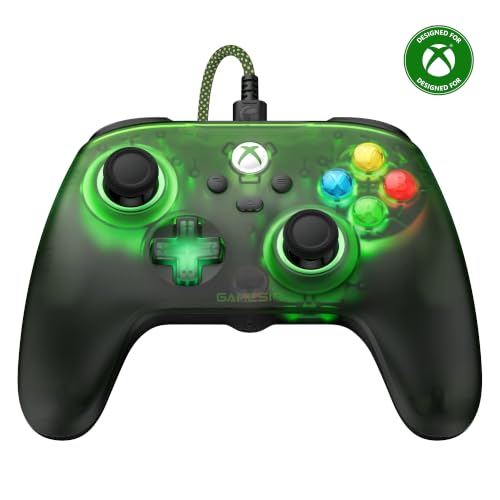
Translucent green shell, orange RGB, and Hall Effect sticks that will not drift.
This pad looks like it walked out of a 2001 magazine ad — a gradient translucent green shell with dynamic RGB glow. Style aside, the hardware is serious about drift: magnetic Hall Effect sticks (sensors that use magnets instead of rubbing parts, so they don’t wear out) with no physical wear, rated for up to 5 million stick cycles. That’s the sort of figure that makes an emulator player feel better about buying once rather than twice.
Trigger stops let you switch from full analog pull to a short throw for faster response in shooters, which is handy when a retro FPS gets competitive. There are two remappable back buttons for save hotkeys, Hall Effect triggers, a 3.5mm headset jack, and the GameSir Nexus software for remapping and sensitivity. It weighs 0.3 kg. For reference, it carries 16 buttons to the Ice Breaker’s 19.
One thing to know before you commit: the controller quality earns most of the praise, but reliability is mixed, with issues around the pad randomly powering off. If your emulator marathon needs a dead-steady connection, that is the risk to weigh.
This one is for: players who want drift-proof sticks, trigger stops, and a look nobody else in the room has.
Worth knowing: reliability is the weak point — random power-offs are the recurring report — so a desk setup you can replug easily suits it best.
5. Hyperkin The Competitor Wired Controller
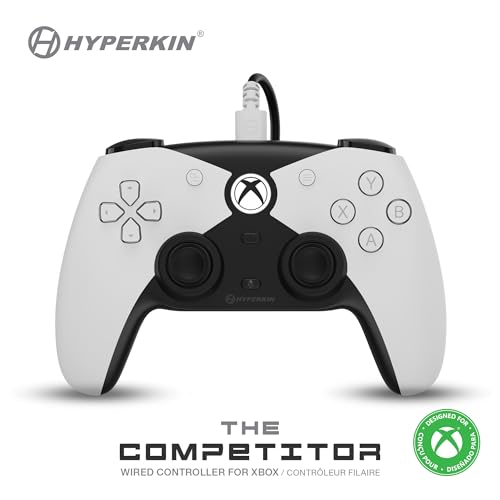
Sticks side by side in the middle — a layout PlayStation-trained thumbs will recognize.
If your emulator history is mostly PlayStation, this layout is the one your hands already know. Both analog sticks sit level and centred for ambidextrous control, rather than offset the way Xbox pads position them. That symmetric stance is a real preference thing, and it is the reason to pick this over the DuchesS, which uses the classic offset Xbox shape.
Hyperkin backs it with Hall Effect joysticks and Hall Effect triggers, so drift should not be the problem it is on older pads. Two programmable rear buttons give you save-state access without leaving the sticks. It is the lightest of the Hyperkin pair at 200 g, against the DuchesS at 243 g, which you feel in longer sessions. The styling is futuristic — a sleek shell with a translucent D-pad and four action buttons — and it sits at 4.0+ stars across 630+ ratings.
Joystick feel is the consensus win — smooth is the word that keeps coming up — and ergonomics get regular props. The trade-off is that it is wired only, so it belongs at a desk, and the futuristic look is a taste call rather than a safe one.
Why thumbs click with it: the symmetrical sticks sit level and centred, so if you grew up on PlayStation-style emulated titles, movement inputs land where your muscle memory expects them.
The trade: a futuristic shell that will not suit everyone, and USB-only connectivity.
Choose this if: you want Hall Effect sticks in a symmetrical layout and you play at a desk.
Cross it off if: you need offset sticks or wireless freedom — both are missing here.
6. FLYDIGI VADER 5S Wired Controller
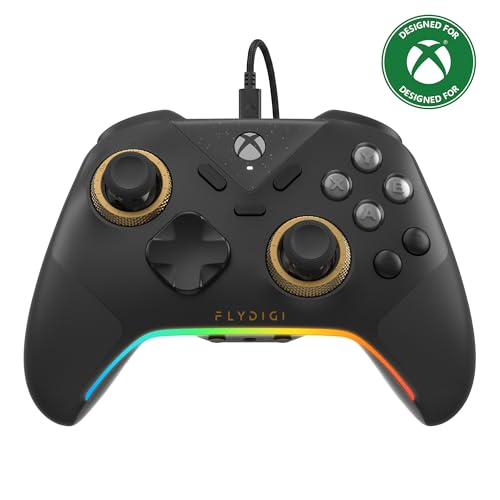
Dial the sticks from 40gf to 100gf and feel the difference on the next input.
This is the most tunable pad in the list, and the numbers say why. The FORCEFLEX structure lets you physically adjust joystick tension from 40gf to 100gf on the fly — lighter for fast FPS flick shots, tighter for measured steering. That is a range no other controller here offers, and you do it without opening software or swapping parts.
On top of that, the triggers switch between micro-click for rapid fire and Hall Effect linear for smooth throttle, and there are four motors for rumble across grips and triggers. The sticks are Hall Effect, so there is no drift and no deadzone, and there is a 3.5mm headset jack.
What wins people over is quality, with value a clear second and stick performance close behind. For a desk-based emulator setup that matters less, but plan for full hands.
What you gain
- Adjustable stick tension from 40gf to 100gf, on the fly, no software
- Six remappable buttons — the deepest customization in this list
- Switchable trigger modes for shooters or racers
- Hall Effect sticks with zero drift and zero deadzone
What it asks of you
- At 450 g it is the heaviest controller in this comparison
- Six extra buttons is a lot to program — expect a learning session
Built for: tinkerers who want a controller that adapts to every genre rather than one that does one thing well.
The honest limit: heavy hands will feel the 450 g by the end of a long evening.
7. GameSir G7 Pro Wireless Gaming Controller
A 1000Hz polling rate that keeps every input tight, even wireless.
Polling rate is the number emulator players should care most about above all else on this pad. It reads at 1000Hz, meaning the controller reports your input to the PC a thousand times a second, which is the kind of responsiveness that keeps fast inputs landing on the right frame. The Mag-Res TMR sticks blend potentiometer precision with Hall Effect durability, so you get a stable high polling rate without drift over time.
This is a tri-mode controller — 2.4G wireless for Xbox and PC via the dongle, USB-C for a wired link, and Bluetooth 5.3 for Android. There is a 1200mAh battery inside, plus a charging station that starts feeding the pad the moment you set it down. Four programmable buttons is the most in the wireless group alongside the ROG, and Hall Effect analog triggers have a Hair Trigger Mode you activate by holding M plus LT or RT.
The praise concentrates on feel and stick stability — it sits securely during play with a grip texture that holds. The genuine trade-off is price tier: this is the premium end, and it was never meant to undercut the wired mids. If lag and drift are your two biggest fears, that is the value here.
what separates it: a 1000Hz polling rate (it reports its position to your PC 1,000 times a second, so fast inputs land where you aim) is a genuinely high number on a wireless pad. It also comes with a charging cradle, so the pad is always topped up and ready.
What it costs you: it is a premium-tier spend, and the 12-button count is lower than several cheaper pads here.
This suits: couch emulator players who want wireless freedom without giving up a 1000Hz link.
Skip if: you need the maximum button count — the wired pads above have more.
8. ASUS ROG Raikiri II Xbox Wireless Gaming Controller
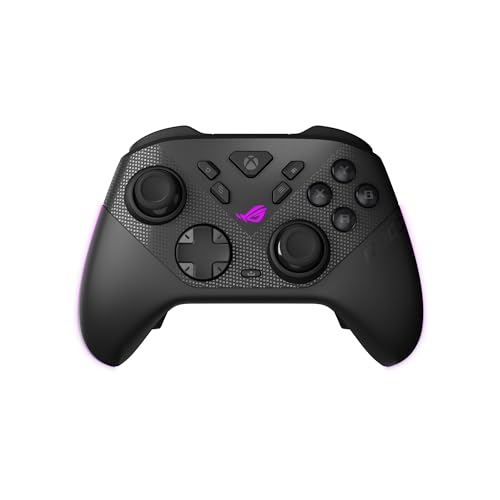
Built for the desk: a 1000Hz link, micro-switch everything, and four rear buttons.
The Raikiri II is aimed squarely at the PC player, and it shows in the inputs. Micro-switch buttons on the D-pad, ABXY, bumpers and rear buttons give instant, tactile actuation, and the dual-mode triggers switch between short-travel micro-switch and full-travel TMR sensor. Both trigger types in one controller means you set it for the game, not the other way around.
On the connectivity side you get tri-mode — low-latency 2.4GHz RF, Bluetooth, or wired USB-C — with ROG SpeedNova Wireless on the 2.4GHz band. The 1000Hz polling rate carries across both the wired and 2.4GHz modes, which is the same number the GameSir G7 Pro offers. Anti-drift TMR joysticks promise accuracy at a lower power draw than Hall Effect, and the package includes a carrying case that charges the pad inside it, a charging stand, and two detachable joystick caps.
Here is where I have to be straight with you: build quality splits opinion, and connectivity problems are a common theme, with frequent drops reported. The stick movement and button response earn praise, but if your emulator setup demands a rock-steady link, weigh that against the lag advantage. It is the lowest-rated pick here at 4.0+ stars.
The appeal: 1000Hz polling in both wired and 2.4GHz wireless modes, plus micro-switch everything and swappable trigger feel — a PC-first spec sheet.
The real risk: connection drops are the recurring report, so a backup cable is sensible insurance.
Worth it for: PC emulator players chasing the lowest latency and willing to manage a fussy wireless link.
Consider the alternative: if a stable connection matters more than milliseconds, the wired Hyperkin pads are duller but steadier.
9. Turtle Beach Victrix Pro BFG Reloaded Wireless Gaming Controller

Swap modules, not controllers — including a six-button fightpad for emulated arcade fighters.
Most controllers make you pick a layout. This one lets you change it. Three customizable modules with built-in Hall Effect technology mean you can physically swap the stick and D-pad arrangement, and the package includes 11 interchangeable components plus a module tool. The one that should catch an emulator player’s eye is the ergonomically enhanced six-button fightpad module with Kailh microswitches — the layout emulated fighters and arcade titles were designed around.
There are four mappable quick-action buttons for hotkeys, five-stop Hall Effect clutch triggers with a hair-trigger mode, and a built-in 3.5mm audio jack with a lifetime subscription to Dolby Atmos. It runs wired or wireless with up to a 20-hour rechargeable battery, is officially licensed by Xbox, and ships with a carrying case. Customizability is the second-most-praised trait after overall controller quality, which tracks with a pad designed around swapping.
The honest caveat: this is the premium-tier spend of the group, and triggers and button responsiveness split opinion, with some finding certain buttons get in the way of regular use. If your emulator library is mostly fighting games and arcade classics, that modular fightpad justifies the layout gymnastics. If not, a simpler pad serves you better.
The standout: 11 interchangeable components and a dedicated fightpad module let one controller cover arcade fighters and standard 3D games without buying twice.
The caution: trigger feel divides opinion, and it is the priciest tier here — make sure the modular angle is what you actually need.
Made for: emulator players whose library leans on six-button arcade fighting games and who want one controller to cover everything else.
Not for: anyone who just wants a plug-in-and-play pad — the modular depth costs you, and the trigger feedback will not suit every hand.
Know the Specs
Hall Effect and TMR Sticks
Hall Effect sticks use magnets to sense position with no physical contact, so unlike wiper-based sticks there is no wear surface to drift over time. TMR (tunnel magnetoresistance) is a related magnetic sensing technology that controller makers use for lower power draw and high stability. Either one is a genuine upgrade over standard sticks for emulator play.
Polling Rate
Polling rate is how many times a second your controller reports its position to your PC — 1000Hz means a thousand reports a second, versus the hundreds you get from a standard connection. Higher is generally better for tight inputs in fast games, though at some point your own reflexes become the limit. It matters most for competitive emulation.
Trigger Stops and Hair-Trigger Mode
A trigger stop mechanically shortens how far the trigger pulls before it registers, so the input fires sooner. Useful for shooters where you want every frame. Hair-trigger mode is the software or hardware version of the same idea — activate it and the trigger actuates almost instantly.
Connectivity — Wired versus Wireless for Emulators
USB-C or USB-A wired connections are plug-and-play with no pairing step and no latency concern. 2.4GHz wireless uses a dongle for a low-latency link, while Bluetooth is the easiest but typically the least snappy. For a desk-based emulator setup, wired is simpler; for a couch setup, 2.4GHz earns its keep.
Common Questions
Will an Xbox controller work with emulators like RetroArch or Dolphin on Windows?
Do I need Hall Effect sticks for emulator play?
Does a wired controller have less input lag than a wireless one?
Can I remap buttons on these controllers for save-state and fast-forward hotkeys?
Will these controllers fit my hands if I have smaller or larger hands?
What is the difference between a controller’s Share button and a remappable back button?
How long will a wireless controller’s battery last between charges?
Is a modular controller worth it for retro fighting games?
Do Hall Effect triggers improve emulated racing games?
What happens if a controller I buy gets stick drift down the line?
The Bottom Line
For most emulator setups, the xbox controller for emulator winner is the Xbox Wireless Gaming Controller Ice Breaker. Windows and your emulator front-end recognize it instantly, so you plug in and play without mapping buttons. It gives you up to 40 hours of battery, and it carries the most buttons for hotkeys. If drift prevention is your priority, the Hyperkin DuchesS is the direct answer with Hall Effect sticks. And for arcade fighters and modular setups, the Victrix Pro BFG Reloaded is the one to reach for. The Ice Breaker is the pick with the strongest owner support — 750+ ratings behind it — and that is the nudge worth following.
How we choose
We do not accept paid placement. Every pick is matched to a real buyer and a real use-case; we do not hands-on test units.
Sources
Specifications: manufacturer listings and product documentation. Review insights: verified customer reviews, as of November 2026. Pricing: not shown on this page (it changes often); check the current price via the retailer link.
As an Amazon Associate, Tactical Gear Guy earns from qualifying purchases. This does not affect which products we feature.