Specs are compiled from manufacturer listings and verified buyer reviews and can change over time — please confirm the key details on the product page before buying.
Your Xbox 360 will not read a disc, and a replacement drive is the fix — but only if you match the model number printed on your old drive’s label first. Get that check wrong and the new drive sits in its box while your console stays open on the floor. This guide covers seven replacement disc drives for the original Xbox 360 and the Slim, sorted by which console they fit and how much work the swap takes.
This guide is built by comparing the manufacturers’ published specifications and the patterns across verified customer reviews, so you get each pick’s real strengths and trade-offs instead of marketing spin.
Replacing a dead optical drive is one of the few repairs left that a careful owner can still do at the kitchen table. Below you will find the honest fit notes, the firmware catch nobody mentions up front, and the exact specs that separate a smooth repair from a paperweight, all in one place for the xbox 360 disc drive.
Top Picks


How To Choose The Best Xbox 360 Disc Drive
You can’t just drop in an Xbox 360 disc drive and play. A replacement drive is a bare optical unit — the motor, laser, and tray mechanism that reads your game discs — and it usually needs a firmware flash (a software update to the drive’s chip) or a board swap before your console will accept it. Pick wrong and you have spent money on a part that will never spin a disc in your machine.
Match the model number, not the console name
The original “phat” Xbox 360 and the later Slim use physically different drives. The original 360 most often carries a Lite-On DG-16D2S, while the Slim runs a DG-16D4S or DG-16D5S. Before you order anything, pull your old drive and read the label on its metal housing — that model code is the only reliable way to know what fits. A drive listed for the Slim will not mount in the original console, and the reverse is just as true.
Understand the board swap before you buy
Most of these drives ship without your console’s DVD key, which is stored on the drive’s circuit board. The workaround is to open both drives and move your original board into the new drive body — no soldering, but fiddly ribbon cables and tiny screws. Some listings say a firmware flash is required instead. Either way, plan on an hour of careful work with good light and a small Phillips screwdriver, or hand the job to someone who has done it before.
Check the interface, read speed, and cache
Inside the console these drives talk over a SATA connection (the flat internal cable standard used by hard drives). Several of the drives here list SATA 3.0 Gb/s and an 8X DVD read speed, with 2 MB of cache memory to buffer the disc data. Those specs tell you the drive is built to the console’s original spec, so game loads behave the way they did before the old drive failed. A listing that omits these details is worth a second look.
Weigh “new” against “pulled from a console”
Some of these units are genuine new stock, and some are disassembly parts — drives pulled from consoles and split for parts, which can arrive with minor cosmetic scratches on the outer casing. The seller’s own wording tells you which you are getting. If a scuffed housing would bother you, read the listing carefully; if you only care that it reads discs, a pulled unit can be the smarter buy.
Side-by-Side Comparison
| Model | Best For | Console Fit | Interface / Read Speed | Cache | Amazon |
|---|---|---|---|---|---|
| BenQ VAD6038★ Best Overall | Original 360 owners who want a BenQ-branded unit | Xbox 360 | 1.2 MB/s media speed | — | Amazon |
| econoLED Lite-On DG-16D4S / DG-16D5SEasiest Install | Straightforward Slim installs | Xbox 360 Slim | SATA 3.0 Gb/s / 8X DVD | 2 MB | Amazon |
| LeHang DG-16D4S | Matching a 9504 firmware Slim | Xbox 360 Slim | SATA 3.0 Gb/s / 1200 KB/s | 2 | Amazon |
| Honglei Lite-On DG-16D4S HW 9504 | Fixing “Open Tray” and disc-read errors on Slim | Xbox 360 Slim | SATA (Serial ATA) | 2 | Amazon |
| VUFVOID Lite-On DG-16D2S | Original 360 firmware-compatible swaps | Xbox 360 (DG-16D2S / DG-16D2S-09C) | SATA 3.0 Gb/s | 2 | Amazon |
| USonline911 DG-16D2S-09C | Matching a -09C hardware label exactly | Xbox 360 | SATA 3.0 Gb/s | — | Amazon |
| Honglei DG-16D2S | The most-reviewed original-360 pick | Xbox 360 | — | — | Amazon |
Detailed Reviews
1. BenQ VAD6038 Drive For Xbox 360
A genuine BenQ-branded drive with a full year of coverage behind it.
For an original Xbox 360 owner who wants a name-brand optical unit rather than a generic pull, this is the pick. The VAD6038 is sold as OEM parts, meaning genuine manufacturer stock rather than a copy, and it carries a 1 year warranty — a real safety net most replacement drives skip entirely. Its media speed is listed at 1.2 MB/s, the rate at which it pulls data off the disc.
What wins people over is the brand and the coverage together. The trade-off is honest and worth planning for: the listing itself says a firmware flash or a logic board swap may be required, so this is not a drop-in part. It is the most-reviewed BenQ unit here, and buyers split on whether it reads discs cleanly from the start. Buy it expecting to do the board work, and the OEM parts and 1 year warranty make it a sound buy.
The console fit is the original Microsoft Xbox 360 only, it ships boxed, and the housing is gray. If your machine already carries a BenQ-family drive, this keeps you in familiar territory. If it does not, check your label first — this unit is built around the BenQ VAD6038 model number and nothing else.
Who this earns its keep for
- Genuine OEM BenQ parts, not a generic copy
- 1 year warranty — rare among replacement drives
- Boxed packaging protects the unit in transit
What to plan around
- Firmware flash or board swap may be required, per the listing
- Reliability feedback is mixed, not settled
- Fits the original 360 only, not the Slim
Reach for this if: your original 360 already runs a BenQ-family drive and you want the warranty and OEM branding.
Look elsewhere if: you own a Slim — this unit is not built for that console.
2. XBox 360 Slim LITE-ON DG-16D4S DG-16D5S
The Slim drive that owners describe as about as simple as pulling a PC board.
If you own an Xbox 360 Slim and a small Phillips screwdriver, start here. This drive is built for the Slim chassis and lists an 8X DVD read speed — the rate at which the laser pulls game data off the disc — plus a SATA 3.0 Gb/s interface, the internal cable standard the console expects. That combination means game loads behave the way they did before your old drive quit.
The install is where this drive earns its label. Owners describe the swap as about as easy as changing the old PC board, which is exactly the board-swap method most Slim repairs use. Functionality draws a split reaction — some units work perfectly with the console and some do not — so treat it as a good bet rather than a guarantee. At 1.2 pounds, the unit feels like a real optical assembly and not a hollow shell.
It carries 2 MB of cache memory to buffer disc data, ships boxed, and fits Microsoft Xbox 360 Slim only. It will not help an original 360 owner. The verdict: for a Slim with a dead laser and a patient owner, the install ease alone justifies it.
The install case: the board-swap method that most Slim owners already need is exactly what this drive is set up for, so the hardest part is the same work you were going to do anyway.
And the honest caveat: the seller describes mixed results on functionality, so order it with the expectation that you may need to troubleshoot the board connection before it reads.
Matches best: Slim consoles and anyone comfortable opening a console case with a small screwdriver.
Not the pick for: the original 360 — the fit is Slim-only.
3. DG-16D4S DVD Drive Xbox 360 SLIM

A precise-match Slim drive that tells you its firmware and hardware version up front.
A Slim repair goes sideways when you cannot confirm which firmware the new drive carries. This LeHang unit names it outright: F/W Version 9504, H/W Version A0A0, and MS P/N X851278-003. If your old drive’s label shows those same markings, you have a genuine match rather than a hopeful guess — and that is the single most useful thing a listing can tell you.
Under the housing it is a proper internal unit with a Serial ATA connection and SATA 3.0 Gb/s spec, plus a media speed of 1200 KB/s and 2 units of cache memory. The drive reads discs at the rate the Slim was built around, so your installed games and movie discs load normally.
What you give up is brand backing. LeHang is the manufacturer, the ASIN carries no customer review data at all, and there is no warranty language in the listing to point to. That makes it a spec-led buy for someone confident enough to check their own label and do the swap themselves. Confirm those three code strings before you order and you have done the important part.
Buy this when: your Slim’s original label reads F/W 9504 and H/W A0A0 and you want a drive that confirms it matches.
Hold off when: you want warranty support or buyer feedback to lean on — this listing offers neither.
4. LITE-ON DG-16D4S DG-16D5S HW 9504
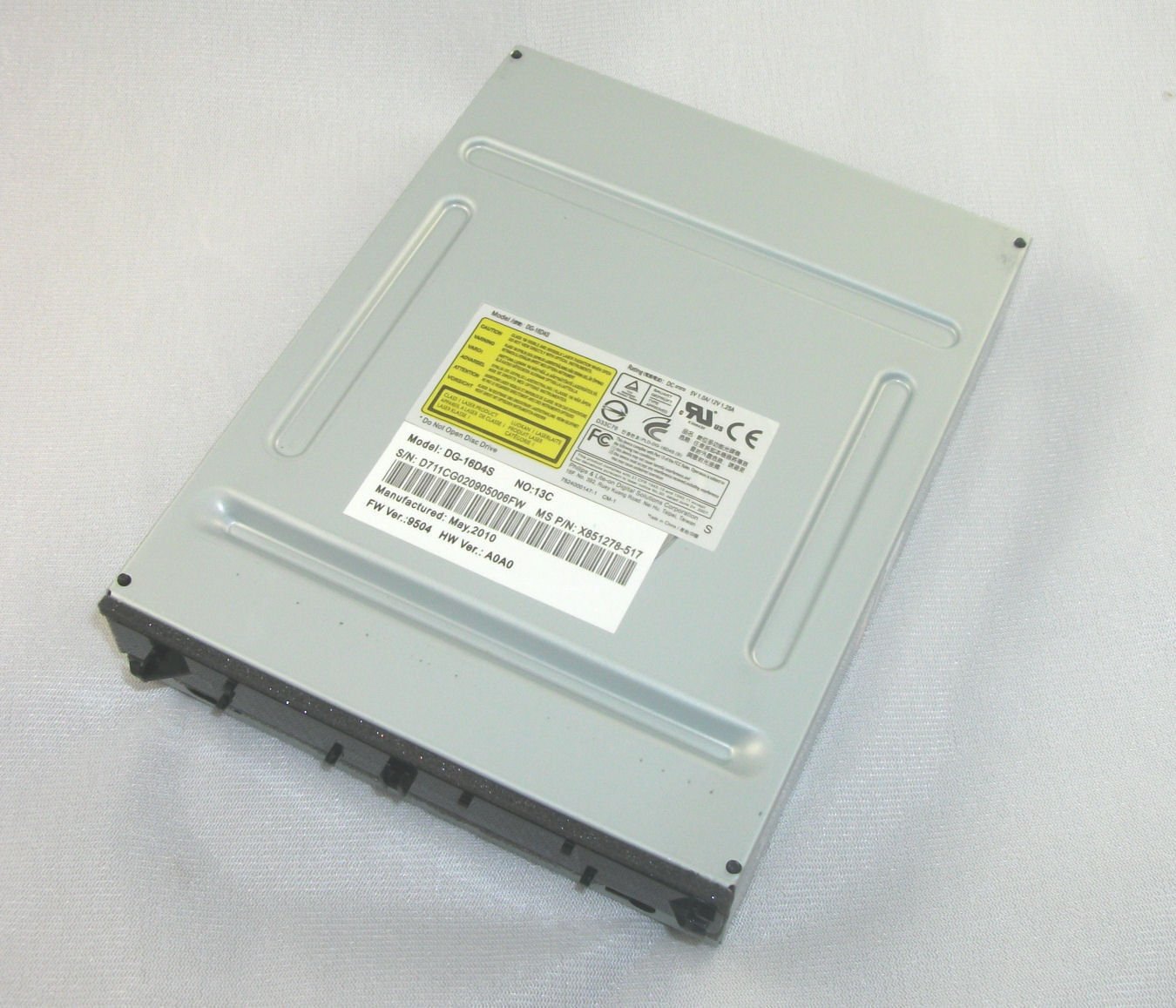
Aimed squarely at the “Open Tray” error that kills Slim disc reading.
That “Open Tray” message, or a tray that will not stay closed, is the classic sign the drive mechanism itself is done. This unit is sold specifically to fix those symptoms on the Xbox 360 Slim, along with plain disc-reading problems. It is the HW 9504 version, and the listing states no soldering is required — so the job is screws and ribbon cables, not a hot iron.
Buyers report it is easy to install and a solid replacement, but the listing itself shows a split verdict: some say it works exactly as expected while others say it will not read games, DVDs, or CDs at all. That is a real risk with any aftermarket optical drive. At 1.76 ounces it feels light in the hand, so handle the tray carefully when you seat it.
Here is the caution the seller repeats twice: an improper install can damage the part and that damage is on the buyer. The listing also recommends professional installation. If you have never opened a Slim, watch a teardown video through once before you start. Choose it for the exact symptom, not for the brand on the box.
The symptom match: the seller names “Open Tray” errors and stuck trays as what this drive addresses, which makes it a targeted fix rather than a guess.
One thing to own up to: results are mixed in the listing’s own summary, and the seller puts installation damage on the buyer — so your care during the swap matters as much as the part.
The right buyer: a Slim owner staring at “Open Tray” who has watched the teardown and is ready to work carefully.
Think twice if: you have never opened a console and would rather not risk the install.
5. Lite-On DG-16D2S DVD-ROM

A featherweight original-360 drive that asks you to flash or swap first.
At 0.08 kg this is the lighter of the two DG-16D2S bodies in this group — the matching USonline911 unit comes in at 0.05 kg, so the two are in the same pocket-weight bracket. It fits both the DG-16D2S and DG-16D2S-09C designs inside the original Xbox 360, and the listing says each part is tested and quality controlled before it ships. The SATA 3.0 Gb/s interface and 2 MB cache keep it to the console’s original spec.
The seller is refreshingly blunt: you will need to either flash the new drive or swap your existing drive’s motherboard into it. It also states this is a disassembly part pulled from an original device and may carry minor scratches on the casing. If a scuffed housing would annoy you, the seller says plainly not to order it. No instructions are included, and professional installation is recommended.
Functionality feedback is split between working fine and not working at all, and the condition drew criticism because some units are clearly not new. That is a fair knock on a part sold as a pulled unit. Go in with eyes open: the ABS plastic housing and SATA connection match the original 360’s spec.
Where it shines
- Tested and quality controlled before shipping, per the seller
- Fits both DG-16D2S and DG-16D2S-09C designs
- 0.08 kg body keeps shipping and handling light
Where it tests your patience
- Requires a firmware flash or board swap to work
- Cosmetic scratches possible on a pulled part
- No instructions included — installation is on you
Go for it if: you already know how to swap a drive board and do not mind a scuffed housing.
Pass on it if: the word “scratches” makes you want a sealed, pristine unit.
6. Replacement Lite-On DG-16D2S(-09C) DVD Drive for Xbox 360

Built for the -09C revision and it warns you to check the label first.
The -09C revision of the DG-16D2S does not always play nice with parts built for the plain DG-16D2S, and this USonline911 unit names the -09C model number directly in its title. Its own listing puts the check in capital letters: confirm the original model number on your drive’s hardware label before buying. Do that and you have skipped the most common reason an original-360 drive swap fails.
The body is ABS plastic with a SATA 3.0 Gb/s connection, and at 0.05 kg it is the lighter of the two DG-16D2S bodies here — the VUFVOID unit weighs 0.08 kg. Like the rest of this family, it needs either a firmware flash or a board swap, and no instructions come in the box.
This is also a disassembly part, so the casing may show minor scratches from storage. Only 10+ ratings back it up so far and there is no written review guidance to lean on, which makes it a pick for someone who trusts their own label check over crowd wisdom. If you can confirm the -09C marking, the exact-model match is the whole point.
Worth it for: an original 360 whose drive label reads -09C, where an exact revision match saves a return.
Skip the guesswork: if your label is ambiguous, order a plain DG-16D2S instead.
7. DG-16D2S Honglei
The most-established DG-16D2S drive here, sold since October 2010.
This DG-16D2S carries the deepest review base of any drive in this guide. It is a Lite-On Phillips drive built to replace a non-working Philips Lite-On unit in the original Xbox 360. At 1.3 pounds it is the heavier of the two DG-16D2S bodies in this guide; the LITE-ON Philips DG-16D4S/DG-16D5S Slim unit sits at 1.2 pounds.
Value and reliability feedback both split down the middle: some say it is worth it and runs going strong, others say it broke like the old one. Compatibility is the loudest concern — for some owners it fails to play both DVDs and Xbox games. Read that as a fit warning rather than a reason to walk: the drive still needs the flash-or-swap step, and a botched swap lands you exactly in that complaint.
The part has been around since October 2010, which is why the review base is so thick compared with the rest of the list. Final read: it is the safest-known quantity in this group for an original 360, as long as you are ready to do the board work the rest of these drives also demand.
The long-history argument: a replacement part that has been sold since October 2010 carries more owner experience than any newcomer here, so the risks are more predictable.
The recurring concern: compatibility complaints are the loudest thread, and they track with installs that skipped the firmware or board step.
The solid bet: original-360 owners who want the most established part and will do the swap methodically.
Look elsewhere if: you want a drive that arrives ready with no board work at all.
Know the Specs
Model Number (DG-16D2S vs DG-16D4S)
This is the code stamped on your old drive’s metal label, and it is the one spec that decides fit. The DG-16D2S family lives inside the original Xbox 360; the DG-16D4S and DG-16D5S live inside the Slim. Buy the wrong family and the drive will not mount or connect. Always pull your old drive and read the label before ordering.
SATA Interface and Cache
SATA is the internal cable standard the console uses to talk to the drive. Several of these units list SATA 3.0 Gb/s with 2 MB of cache — the small buffer that holds disc data before the console reads it. Matching these keeps game loads at the speed the console was designed for.
Read Speed (8X DVD)
Read speed is how fast the laser pulls data off the disc. An 8X DVD drive matches the original spec, so installed games and movie discs load the way they always did. A listing that omits read speed is not necessarily bad, but it leaves you guessing.
Firmware and Hardware Version
Drive labels carry codes like F/W 9504 and H/W A0A0. These tell you which revision of the drive your console expects. When a listing names its firmware version, compare it to your old label before you buy — a mismatch can leave you needing a flash you did not plan for.
Common Questions
Will a Slim drive work in my original Xbox 360?
Do I have to flash the firmware or swap the board?
What does “Open Tray” error mean and will a new drive fix it?
Are these drives new or pulled from other consoles?
How do I find my current drive’s model number?
Is the BenQ VAD6038 a direct drop-in for any Xbox 360?
Does an 8X DVD read speed matter for game loads?
Can I install one of these without any tools or experience?
What is the difference between the DG-16D2S and the DG-16D2S-09C?
Will a replacement drive include instructions?
The Bottom Line
For most original-360 owners the xbox 360 disc drive winner is the BenQ VAD6038 — a genuine OEM unit with a 1 year warranty and a clear model number to match against your label. If your machine is a Slim with a failing tray, grab the econoLED Lite-On DG-16D4S/DG-16D5S, which owners describe as easy to install. And if you want the most established part for an original 360 and will do the board work methodically, the Honglei DG-16D2S has the deepest history in this group. Whichever you choose, confirm the model number on your old drive’s label first — that single step is what turns a replacement part into a working console.
How we choose
We do not accept paid placement. Every pick is matched to a real buyer and a real use-case; we do not hands-on test units.
Sources
Specifications: manufacturer listings and product documentation. Review insights: verified customer reviews, as of November 2026. Pricing: not shown on this page (it changes often); check the current price via the retailer link.
As an Amazon Associate, Tactical Gear Guy earns from qualifying purchases. This does not affect which products we feature.