Specs are compiled from manufacturer listings and verified buyer reviews and can change over time — please confirm the key details on the product page before buying.
If your Zoom calls sound like you are talking through a paper bag, the fix is almost never your internet — it is the microphone sitting on your desk. A dedicated external mic picks up your voice close to the source, so colleagues hear you clearly instead of hearing your keyboard, your fan, and the echo bouncing off the far wall.
This guide is built by comparing the manufacturers’ published specifications and the patterns across verified customer reviews, so you get each pick’s real strengths and trade-offs instead of marketing spin.
The options here split into three clear jobs: personal mics that sit inches from your face, group speakerphones that cover a whole room, and studio units for recording. What follows is a straight read on which one fits your calls, with the honest catch on each. The list below narrows the search for the Best Zoom External Mic to the models worth your desk space.
Top Picks


How To Choose The Best Zoom External Mic
The right mic for your calls depends on one question: are you the only person speaking, or are you sharing a table with several?
Solo at your desk vs. a room full of people
A personal mic stays close to your mouth, so it hears you and little else — that is the setup for a home office or a single-person desk. A conference speakerphone sits in the middle of a table and listens outward across the room. Buying a room mic for a solo desk wastes money; buying a close mic for a group meeting leaves the people at the far end sounding faint.
Pickup distance is the number to check. Some conference units reach voices many feet away, while a close-talker expects you to stay within arm’s reach of the capsule.
USB is the simple path, XLR is the serious path
A USB mic travels straight into your laptop with the included cable — nothing else to power. That is why most people buy one. An XLR mic uses the round three-pin connector, which plugs into an audio interface or mixer, not your computer directly. XLR gives a studio more control but means extra hardware and setup, so it is the wrong start for plain Zoom meetings.
Pickup pattern decides what gets heard
A cardioid pattern focuses on the area in front of the capsule and turns away from the sides. If your desk sits below a noisy street or beside an air vent, that one-direction focus is a real advantage. An omni pattern hears the whole room and suits group tables. Some mics let you switch between patterns, so one unit handles both jobs.
Side-by-Side Comparison
| Model | Best For | Connection | Pickup Pattern / Type | Frequency Range | Amazon |
|---|---|---|---|---|---|
| Logitech Creators Blue Yeti★ Best Overall | Solo streamers and podcaster-quality voice | USB | Cardioid, omni, bidirectional, stereo | 20 hz – 20 khz | Amazon |
| FIFINE K669BBudget Champion | Budget desk mic for calls and gaming | USB Type-A / USB Type-C | Cardioid condenser | 20Hz-20kHz | Amazon |
| Movo MC1000Room Filler | Hybrid meeting rooms and classrooms | USB | 180 degree arc, 20 ft range | 50hz 20khz | Amazon |
| AIRHUG Conference Speakerphone | Portable group calls via Bluetooth | Bluetooth + USB Type-C | 360 degree pickup, 6 ft | 24 KHz | Amazon |
| Zoom ZDM-1 | Broadcast-quality recording on an XLR chain | XLR (wired) | Super cardioid dynamic | — | Amazon |
| BOYA BY-GM18CU | Desk lecterns and video conferences | USB Type-C | Cardioid gooseneck | — | Amazon |
| Dell Speakerphone SP3022 | Teams-certified office desk calls | USB-A or USB-C | Full duplex speakerphone | — | Amazon |
| Logitech Blue Yeti Nano | Compact solo mic with two patterns | USB | Cardioid and omni | 20000 hertz | Amazon |
Detailed Reviews
1. Logitech Creators Blue Yeti USB Microphone (Blackout)
Our pick — 4.5+★ from 57,000+ verified ratings; the strongest balance of quality and price.
Four pickup patterns in one metal body, so your voice fills the call instead of the background.
The Yeti earns the top spot because it does the one thing most Zoom buyers underestimate: it lets you change how it listens. That is the four pickup patterns — cardioid, omni, bidirectional and stereo — and each one is a different way of deciding what reaches your listeners. For a solo call you set cardioid so it hears you and turns away from the rest of the room. For a shared table you switch to omni and the whole group is picked up. A three-capsule array behind the grille is what makes that possible, and it is why this unit can stand in for several mics at once.
You get full, natural voice quality: the manufacturer lists a 20 hz – 20 khz frequency range (the span of low-to-high pitches the capsule can capture), so deep voices and crisp consonants both come through. Most owners mention sound quality first. You control monitoring right on the mic: headphone volume, pattern selection, instant mute and mic gain are all onboard, so you hear yourself live with no delay while you talk. Setup is plain USB into your PC or Mac, with no drivers to chase.
The catch is honest and worth knowing before you buy. The metal body feels solid in the hand, but durability is the split opinion here — many say it is built to last, while others report it failing after roughly seven months. Treat it as a desk fixture rather than something you toss in a bag, and it will serve you well. The crowd record is strong: 4.5+ stars from tens of thousands of owners, which is exactly what you want to see on a first pick.
What earns it the top slot
- Four pickup patterns — one unit covers a solo desk and a small group
- 20 hz – 20 khz range catches low voices and sharp consonants alike
- Onboard gain, mute, headphone volume and pattern buttons mean no software digging
- Metal enclosure and no-latency headphone monitoring for live checks
Where it asks for care
- Durability is the split note — keep it parked on a desk
- Its 20 hz – 20 khz span is a full-range condenser, not a portable travel unit
Built for: the solo host or streamer who wants one mic that can also handle a two-person interview.
Weigh first: if you need something you can throw in a laptop bag every day, the fixed desk footprint is a mismatch.
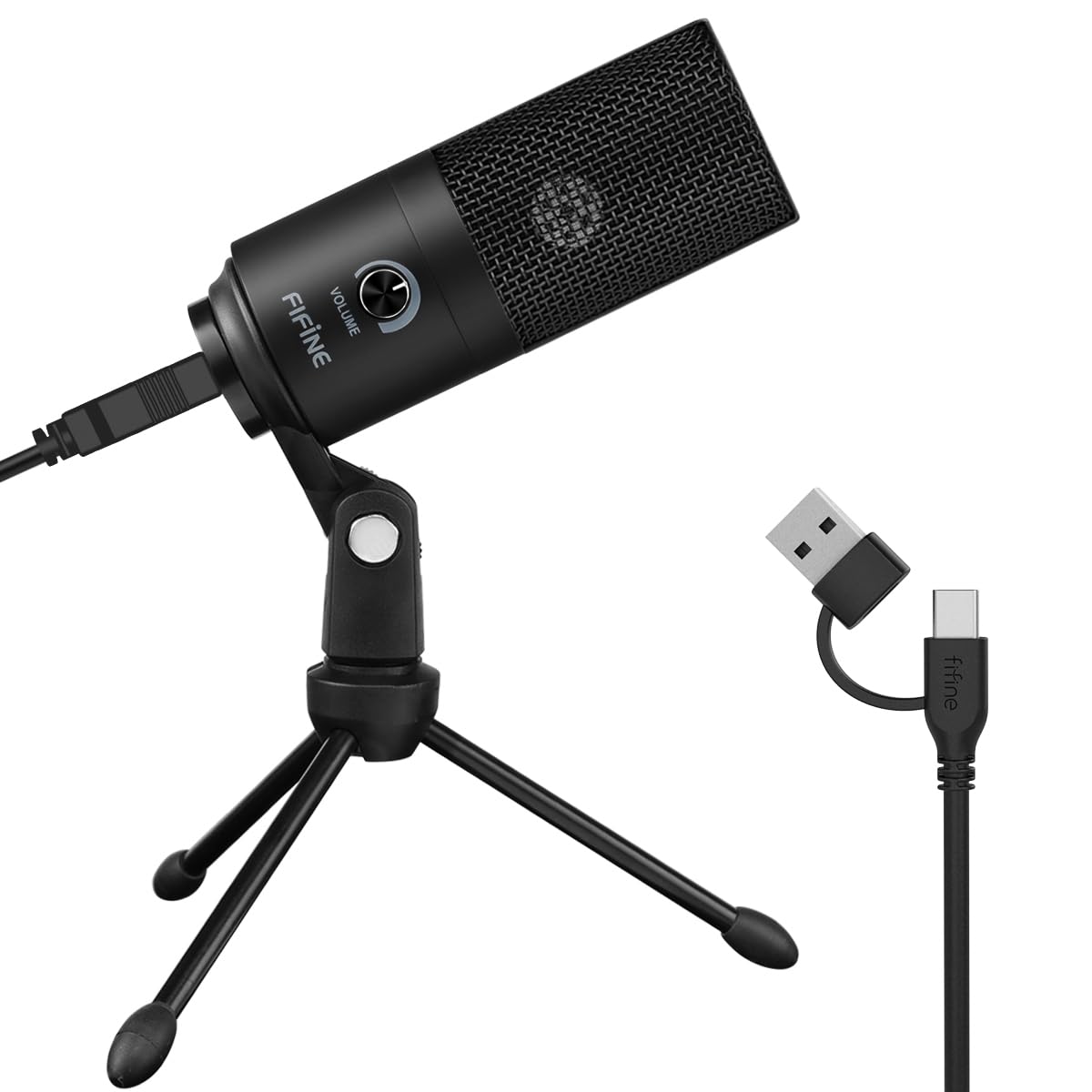
2. FIFINE K669B USB Condenser Microphone
The call-quality upgrade that costs less than a takeaway dinner and takes a minute to set up.
The FIFINE lists just 16 db of self-noise, a low hiss floor that keeps a quiet condenser sounding clean in a small room. Set it on its tripod stand, run the included 5.9-foot USB cable to your laptop, and you are live in Zoom without installing anything. The cardioid capsule aims at your voice and turns away from the sides, so keyboard taps and a humming fan sit further back in the mix.
The volume knob is the quiet hero of this design. It lets you raise or lower the input at the mic itself, and you can dial it all the way down when you need privacy between calls. Compatibility is broad — it handles Discord, OBS, Teamspeak, Cortana and Zoom, and it works on desktop, laptop, and PS4 or PS5 over USB-B to USB-A/C. The one thing to note is that it does not work with Xbox or phones, so it is a computer-first mic.
Owners talk about the sound and the price together more than anything else, and both hold up — you get clear, smooth vocal capture for very little. The mixed note is background noise, which some find less controlled than they hoped, and durability has drawn split reports after extended use. Neither outweighs what you pay. For a first external mic on a tight budget, this is the easy answer.
Best-value read: 16 db of self-noise and a usable volume knob make this the strongest entry-level pick for solo Zoom use.
Know before buying: Xbox and phone owners are out — it is built for PC, Mac, and PlayStation.
Reach for this if: you want a clear voice on calls today without spending much.
Look elsewhere if: you meet on a phone or an Xbox, since those are outside its compatibility list.
3. Movo MC1000 USB Conference Microphone
One mic in the middle of the table, and the whole meeting gets heard.
The number that defines the MC1000 is its 20 ft pickup range across a 180-degree arc — a half-circle of coverage that lets a single unit replace a row of mics in a hybrid meeting room. Its 50hz 20khz frequency range is narrower on the low end than the Yeti’s 20 hz – 20 khz span, which is a fair trade for a mic designed to project voices rather than capture music. In practice the reach is the point: buyers routinely report voices staying audible from the far corners of the room.
Setup is the other strength. There are no drivers, no batteries and no software install — the 6.5-foot USB cable runs from your laptop to the middle of the table, you pick it as your microphone, and you are done. It shows up as a standard USB mic on both Windows and Mac, so Zoom, Teams, Google Meet and Webex all see it without trouble. A built-in headphone jack lets you monitor the mic live, which means you can confirm the room sounds right before anyone joins.
The unit is compact enough to move between rooms or pack in a laptop bag, so one mic can serve the conference room and the home desk. The catch is honesty about what it is not: a polycarbonate body, not a metal studio shell, and a narrow 4.0+ star record compared to the volume leaders here. For the classroom or the shared table, that trade makes sense.
Made for: hybrid meetings, lectures and any table where several people talk into one device.
The trade-off: not the pick for a single close-talker — its wide pickup is wasted on one voice at a desk.
4. AIRHUG Conference Speaker and Microphone

A puck-shaped speakerphone that turns any table into a conference room, wirelessly if you want.
The AIRHUG answers the traveler’s problem: not every meeting room has a decent mic. This unit gives you both a speaker and a mic in one small body, with 360-degree pickup that reaches voices within 6 ft — suited to a 4-6 person table. Its 25 db sensitivity figure suits a device built to gather a room rather than one voice in close. A 48,000 samples/sec rate keeps conference audio clear, and a DSP chip with echo cancelling targets the hollow sound that ruins group calls.
The dual connection is what makes it travel-friendly. You can run Bluetooth and a USB-C cable at once, so a laptop and a phone can share it. It covers Windows, Mac OS, Android and Linux over USB, and pocket-size means it fits a suitcase corner with the included carry bag. Its noise reduction works across a stated 100Hz-24khz band to cut background rumble, and it also handles music playback between calls.
Sound quality is the honest split here — plenty find it clear and love it for Zoom and Teams, while others find it disappointing. With a 4.0+ star record, this is the pick for someone who values a compact, wireless travel solution over the best possible audio. If pristine voice is your priority, a close mic wins.
The travel argument: 360-degree pickup, Bluetooth plus USB-C, and a carry bag make this the easiest unit to share across rooms.
The honest split: 4.0+ stars reflects real variety in how people hear it — a fine group-call tool, not the audiophile choice.
Pick it for: business trips and ad-hoc huddles where portability matters more than audio polish.
Step back if: you want broadcast-grade voice and will always meet at one desk.
5. Zoom ZDM-1 Dynamic Microphone

The recording-studio approach: a heavy metal body that shuts out the room instead of inviting it in.
A dynamic capsule behaves very differently from the condensers above — it captures loud sources without strain and rejects the room around it. Here that focus comes from a super cardioid polar pattern, which is a tighter pickup than plain cardioid, so the mic listens at a narrow angle in front and stays quieter off to the sides. The large-diaphragm dynamic design and high SPL handling (the ability to take loud sound without distorting) make it a natural fit for close voice work, and an internal shock mount reduces bumps and handling thumps.
The connection is the big difference to plan for: this is a wired XLR mic, the round three-pin pro connector, so it will not plug straight into your laptop. You need an audio interface or mixer in the chain. Once it is there, the all-metal body and grille stand up to daily studio use, and the size stays manageable — roughly 454 g — so it sits comfortably on a boom arm. Buyers describe the sound as approaching far pricier microphones, which is the value story on this one.
The catch is twofold. That plastic mount included with the mic has drawn complaints of breaking after several uses, so budget for a better shock mount or arm. And noise pickup is a mixed note — some find it rejects the room well, others hear rattling when they move. It is also the pick with the lighter review base here, so treat it as a specialist choice: superb while it is on a proper stand and interface.
For the voice pro: podcasters and voice-over artists already running an XLR interface who want a warm, isolated capture.
Not a plug-and-play Zebra: without an interface, it cannot reach your laptop at all.
6. BOYA BY-GM18CU Gooseneck Condenser Microphone

An 18-inch bendable neck that reaches your mouth from across the lectern.
The BY-GM18CU is the lectern and front-desk answer. Its 18-inch bi-fold gooseneck bends to whatever angle your position needs, so the capsule can sit close to the speaker’s mouth even when the base rests far below. A cardioid pattern keeps the pickup aimed forward, which is precisely what you want in a lecture hall or a video conference where one voice should carry. It plugs in over USB-C with the included USB-A to USB-C cable and needs no batteries — a plain plug-and-play desk mic.
You hear yourself before you go live, thanks to a 3.5mm headphone jack underneath that lets you monitor what the capsule hears in real time. One-touch mute with LED status makes it easy to kill the mic between segments, and the foam windscreen helps soften plosives (the puffs of air on hard consonants). The base is weighted at around 600 g, which is what keeps the tall neck from tipping over on the desk.
Two honest notes. Functional performance is exactly what owners highlight — they speak of it working well in classrooms and meetings — but the mute switch has gathered complaints that it does not always behave. And at 4.0+ stars from a modest base, it is a specialist fit rather than a crowd favorite. If you need a fixed-position desk or podium mic with a reach that ordinary stands cannot match, this is a genuinely useful tool.
Where it shines: the 18-inch gooseneck and 3.5mm monitoring jack solve a podium setup that a tripod mic cannot handle.
The honest caveat: the one-touch mute has drawn enough complaints that you should confirm it works on arrival.
Made for: lecterns, reception desks and fixed conference stations that need a flexible reach.
Think twice if: quick mute reliability is essential — check the switch early.
7. Dell Speakerphone SP3022

The office-standard desk bar that carries official certification for both Teams and Zoom.
Certification is the whole story here. This speakerphone is Microsoft Teams Certified and Zoom Certified, which means the platforms have validated it works as intended — fewer mysteries when you join a call. Its compact shape sits on a monitor base or beside a laptop, and it connects over USB-A or USB-C to a PC or a Mac mini. The clean fit makes it an easy permanent fixture on an office desk.
Full duplex audio with AI noise cancellation lets several people speak at once and still be heard, which ordinary half-duplex speakerphones cannot manage. What wins people over is the sound — described as excellent with no echo — and the reliability across Teams calls. LED indicators show your Teams status, call and hang-up, volume, and mic mute or unmute at a glance, and an MS Teams button jumps straight to meetings and notifications.
The point of contrast with the AIRHUG is connection philosophy: the Dell is a wired office device, while that one adds Bluetooth for travel. Where the Dell asks for patience is the controls — they have drawn mixed feedback — so expect to learn its button layout. At 4.0+ stars, this is the pick for the desk that lives in meetings.
Why certified matters: dual Teams and Zoom certification plus full duplex with AI noise cancellation is a proven combination for busy call desks.
Worth knowing: it is USB-only for connection — no wireless option — and its controls need a little getting used to.
Fits: the permanent office desk that needs certified Teams and Zoom performance with LED call status.
Doesn’t fit: anyone who wants to roam with a wireless speakerphone.
8. Logitech for Creators Blue Yeti Nano USB Microphone

The Yeti’s little sibling keeps the broadcast sound and drops the bulk.
If the full Yeti’s footprint feels large for a crowded desk, the Nano trims it down while keeping the family sound. Two custom mic capsules produce that broadcast-quality voice, and the pickup options cover cardioid for a solo call and omni for a group — two patterns rather than the full-size model’s four. A 20,000 hertz frequency response is the spec that carries the detail you hear on stream, and the compact base includes cable management so your desk stays clear.
Monitoring is onboard: a headphone output and volume control give you no-latency monitoring, so you hear your own voice in real time instead of guessing. Mute and pattern switches sit on the unit. Blue VO!CE software adds effects and modulation for streamers who want a polished sound, and setup is plain plug-and-play on Mac or PC over the included USB cable. It also adapts to a boom arm through the included 1/4-inch to 5/8-inch adapter.
Owners find it genuinely high quality and easy to hear, and plenty call it good value with a quick setup. The honest notes: reliability has picked up some mixed reports, and durability is the weakest signal in its record, so keep it on a desk rather than a rucksack. At 4.5+ stars, it sits level with the top pick on satisfaction in a smaller body. Compared with the full Yeti, you give up two patterns and some onboard control for a tidier footprint.
The compact case: two capsules, cardioid and omni patterns, and no-latency headphone monitoring in a desk-friendly shape.
The trade-off: durability is the weak spot in its record — treat it as a stay-at-home mic.
Choose it when: desk space is tight but you still want genuine broadcast voice for Zoom and streaming.
Pass if: you need all four pickup patterns — that is the full Yeti’s job.
Know the Specs
USB vs. XLR connection
A USB mic carries both audio and power over one cable, so it plugs straight into your laptop with nothing else to buy. An XLR mic uses the round three-pin pro connector and needs an audio interface or mixer between it and your computer. For plain Zoom calls, USB is the simpler route; XLR is the choice once you are building a proper recording chain.
Pickup pattern
The pattern is the shape of the area the mic listens to. Cardioid aims forward and ignores the sides, which suits one speaker at a desk. Omni hears the whole room, which suits a group table. Super cardioid is a tighter forward cone than plain cardioid, so it isolates your voice even more. Some units switch between patterns so one mic covers several setups.
Audible noise and sensitivity
Audible noise is the mic’s own background hiss, and a lower number means a quieter floor between your words. Sensitivity is how readily the capsule reacts to sound. A close voice mic tends to run quieter, while a conference device tuned to gather a whole room reads differently. Match the figure to the job rather than chasing the biggest number.
Frequency range
Frequency range is the span of pitches a mic can capture, written in hertz (Hz). A wider span like 20 hz – 20 khz covers deep voices up to bright consonants. A narrower span like 50hz 20khz trims the deepest bass, which is fine for speech across a room. For voice calls, both are plenty; for music, the wider range gives more body.
Common Questions
Will a USB mic work in Zoom without extra software?
Can I use an XLR mic like the Zoom ZDM-1 directly with my laptop?
How far away can a conference mic pick up my voice?
Do I need a mic with echo cancellation?
Is a dynamic mic better than a condenser for Zoom calls?
What does the pickup pattern cardioid and omni actually mean for a meeting?
Will a gooseneck mic fit a tall lectern?
Can I monitor my own voice while on a call?
Does Bluetooth work for a Zoom speakerphone?
What frequency range do I need for clear voice?
The Bottom Line
For most people shopping for the zoom external mic, the winner is the Logitech Creators Blue Yeti because its four pickup patterns let one mic handle a solo desk and a small group, all over plain USB. If a tight budget is your reality, the FIFINE K669B delivers clear cardioid voice at an entry-level price. And for a hybrid meeting table where several people speak, the Movo MC1000 covers a 20 ft range from a single point.
How we choose
We do not accept paid placement. Every pick is matched to a real buyer and a real use-case; we do not hands-on test units.
Sources
Specifications: manufacturer listings and product documentation. Review insights: verified customer reviews, as of November 2026. Pricing: not shown on this page (it changes often); check the current price via the retailer link.
As an Amazon Associate, Tactical Gear Guy earns from qualifying purchases. This does not affect which products we feature.