Specs are compiled from manufacturer listings and verified buyer reviews and can change over time — please confirm the key details on the product page before buying.
You want a small printer that spits out a real photo from your phone in about a minute, with no ink cartridges to buy ever again. That is exactly what ZINK (Zero Ink) mini printers do — the color lives inside the paper, so the printer is just a heating head in a pocket-sized shell. Below are the six that hold up.
This guide is built by comparing the manufacturers’ published specifications and the patterns across verified customer reviews, so you get each pick’s real strengths and trade-offs instead of marketing spin.
Some models nail skin tones and some run warm or blue, and the difference often decides whether the prints end up on your fridge or in a drawer. Here is a clear look at the best Zink Mini Photo Printer options and who each one suits.
Top Picks


How To Choose The Best Zink Mini Photo Printer
Start with paper, not the printer. Every ZINK mini printer here prints on 2″ x 3″ sticky-back paper, so the printer body itself is mostly a transport mechanism plus a heating head. That means the things you should actually compare are color handling, connection type, print time, and how many sheets you get before a recharge.
Zero ink is not zero paper cost
ZINK paper has dye-based crystals embedded inside the sheet. The printer heats tiny dots and the crystals change color, so there is no ink, toner, or ribbon to replace. Your running cost is the paper, and paper is sold in packs of sheets. Buy a printer that ships with paper in the box and you can start the same day.
Read the color complaints, not the star count alone
A mini printer can be easy to set up and still print a face with a blue cast. Several of these models get mixed or negative notes specifically on color — one tends toward an orange tint, another runs blue and pink. Look at whether the maker has tuned skin tones, because a portrait is the one thing you will print most.
Connection type decides how fast you start printing
Most of these printers pair over Bluetooth, which is a short-range radio link to your phone. The Kodak Step adds NFC, meaning you can tap the phone to the printer to connect. Bluetooth 5.0 on the Canon Ivy 2 is the newer version of that same radio link and tends to pair more reliably with modern phones.
Print speed and battery in prints, not hours
Printers here are listed around a page per minute. The Canon Ivy 2 gives you a real figure: up to 50 seconds for the first page. Battery life on the Kodak Step is listed as 25 photos on a full charge, which is the number to compare against — a day trip that needs 30 prints will run the battery flat.
Side-by-Side Comparison
| Model | Best For | Print Size | Connection | Print Speed | Amazon |
|---|---|---|---|---|---|
| Canon Ivy 2 Mini Photo Printer★ Best Overall | Best overall for sticky prints | 2″ x 3″ peel & stick | Bluetooth 5.0 | Up to 50 sec first page | Amazon |
| Xiaomi Portable 3×6 Instant Photo PrinterSlim Contender | Thin body, wide app support | 3×6 ZINK sticky-back | Bluetooth via app | — | Amazon |
| Zink Kodak Step Printer (Sticker Edition) | Tap-to-connect Android users | 2″ x 3″ sticky-back | Bluetooth or NFC | 1 page per minute | Amazon |
| KODAK Step Slim Instant Smartphone Photo Printer | Slimmest body on the list | 2″ x 3″ sticky-back | Bluetooth | 1 page per minute | Amazon |
| HP Sprocket Portable 2×3 (Blush Pink) Bundle | Bundle value with case and paper | 2″ x 3″ sticky-back | Bluetooth | 1 page per minute | Amazon |
| Kodak Step Slim Kit (20 Paper, Case, Album) | Full scrapbook starter kit | 2″ x 3″ sticky-back | Bluetooth / USB | 1 page per minute | Amazon |
Detailed Reviews
1. Canon Ivy 2 Mini Photo Printer
Our pick — 4.5+★ from 4,500+ verified ratings; the strongest balance of quality and price.
The one that wins on tuning, not just on being small — sharpened skin tones and a peel-and-stick back.
The Ivy 2 is the pick that actually did the work on image quality. Canon lists specific improvements for this model — tune skin tone colors, better photo contrast, and tune photo sharpness. That matters because a face is the thing you print most on a 2×3 sticky sheet, and skin tone is the first thing that looks wrong when a ZINK printer is lazy about color. Ease of use is what people talk about most after quality here, so the setup side is not the barrier.
Connection is where this one leads the group. It uses Bluetooth 5.0, the newer version of the short-range radio link to your phone, and Canon says compatibility covers iOS and Android devices plus tablets. Print speed is listed at up to 50 seconds for the first page, so you can shoot and stick a photo inside a minute. At 145 g the body is light enough to live in a jacket pocket without you noticing it.
Be honest about color before you buy. The blend draws a mix of reactions — good photos from some, tinted results from others, with blue and pink casts named more than once. Canon’s tuning pushes the odds in your favor, but this is a ZINK printer and it will not match a lab print. The box includes a 10-sheet paper pack and a SMART SHEET, plus a USB-C charging cable, so you can print the same day it arrives.
The case for the Ivy 2
- Skin tone, contrast, and sharpness were all tune on this model, not carried over
- Bluetooth 5.0 pairing with iOS, Android, and tablets
- Up to 50 seconds to a first print, so you stick it while the moment is fresh
- 145 g and a PEEL & STICK back — goes anywhere flat
Where it asks you to be patient
- Color casts still show up in some prints, mostly blue and pink
- No ink to buy, but the ZINK paper is the ongoing cost
- Print quality reactions split — expect a phone-screen gap
Right call for: anyone printing portraits and selfies who wants the best-tuned color in this group and a sticky back on every sheet.
Honest limit: if you need lab-accurate color every single time, a ZINK printer of any brand will frustrate you.
2. Xiaomi Portable 3×6 Instant Photo Printer
A passport-sized slab for people who want color depth on paper that sticks to a mirror or a lid.
What defines the Xiaomi here is how little room it takes up. Its body measures 4.89″D x 3.35″W x 0.97″H, so it sits far shallower front-to-back than the Kodak Step Slim at 0.9″D x 3.25″W x 4.9″H. Practically, that means this one sits deeper and flatter in a bag pocket while the Kodak stands taller. Neither takes real space, but the footprint shapes how you pack it.
The rest of the spec sheet is straightforward. It prints on ZINK sticky-back paper, drives from an app on iOS and Android, and carries 24 bits per pixel color depth, which is the standard color data per dot the printer reads from your photo. The hardware interface is USB for charging, and it keeps a 24-bit color pipeline through to the print. What you do not get here is any published print-speed or battery figure, so treat the day-out plan as one pack of paper, not a day of printing.
ZINK is the whole reason this category exists, and it is worth restating for this model specifically: no cartridges, no ribbons, colors embedded in the paper. That is the trade you make — a sticky-back 2″ x 3″ keepsake instead of a full-size glossy print. The app control method keeps the printer itself to a single button at most, so all of the framing and filters happen on your phone screen.
Best-fit buyer: travelers and laptop-lid decorators who want a flat, small body and do not need a published speed rating.
The gap to know: without a stated prints-per-charge figure, you cannot plan battery endurance before you buy.
Grab this if: a compact footprint and app-driven iOS/Android printing are your two priorities.
Look elsewhere if: you want a documented print time or battery count to compare — the Kodak models publish theirs.
3. Zink Kodak Step Printer (Sticker Edition)

Tap the phone, print the selfie — and 25 photos on a single charge before you hunt for a cable.
The Step connects two ways: Bluetooth, or NFC, which is the tap-to-connect radio in many Android phones. That second option removes the pairing screens entirely — you hold the phone near the printer and it links. If you have ever fumbled a Bluetooth menu while people wait for their photo, that shortcut is the argument for this model over the Canon above.
Battery is the other number that matters here, and Kodak actually publishes it: prints 25 photos on a full charge. That is your real-day budget — a birthday party with 30 keepsakes needs a mid-party top-up or a second session. The paper is 2″ x 3″ sticky-back with embedded dye crystals, and Kodak rates those prints resistant to moisture, rips, tears, and smudges, which suits a fridge door or a water bottle. Color and black-and-white print speed are both listed at 1 page per minute.
The free KODAK App covers the editing side — collages, filters, borders, stickers, text — and Kodak puts edit-to-print at less than 60 seconds once the photo is ready. The printer is described as palm-sized and under a pound, so the whole kit fits in one hand. It ships with paper in the box, so you can print the day it arrives.
Suits you if: you have an NFC-capable phone and want the fastest possible connection plus a published 25-print battery figure.
Skip if: you only use iOS — iPhone does not do NFC this way, so you fall back to Bluetooth.
4. KODAK Step Slim Instant Smartphone Photo Printer
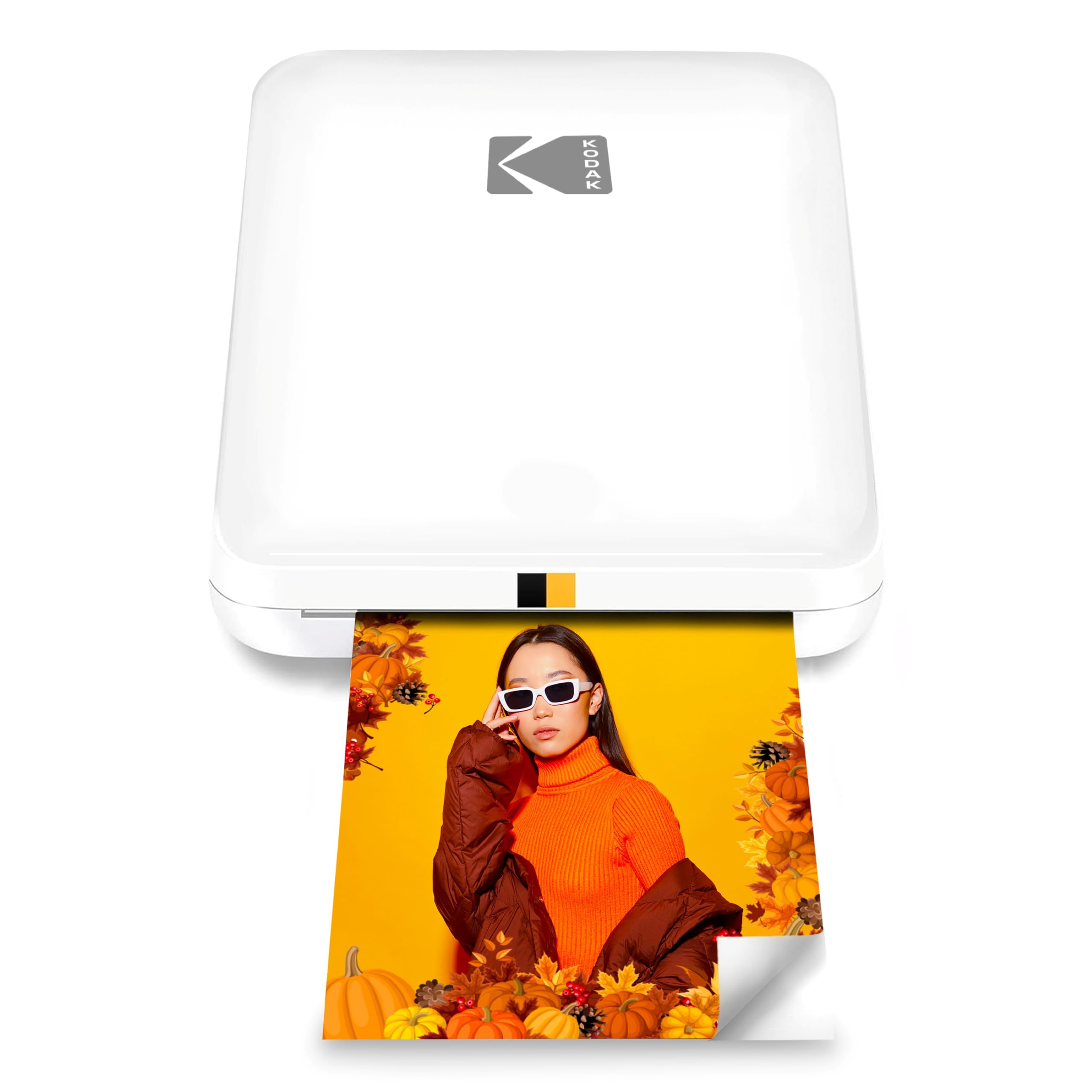
Built for the inside pocket — a 0.9″ shell that behaves like a wallet and not like a gadget.
The Step Slim exists for one reason: it disappears when you carry it. It measures 0.9″D x 3.25″W x 4.9″H, so it stands tall and thin instead of wide and deep like the Xiaomi. Drop it in a shirt pocket or the front of a backpack and you forget it is there. Kodak bills it for influencers, photographers, and scrapbookers, and the glossy shell is a design choice, not a hidden feature.
Color printing runs at 1 page per minute for both color and black-and-white. Photos develop dry to the touch on ZINK 2″ x 3″ sticky-back paper, and Kodak puts print time at under a minute with no wiring or computer step — you connect over Bluetooth to the KODAK STEP Prints app and print. The app carries frames and stickers if you want to dress up a photo before it comes out.
The honest read: ease of use is what wins people over here, and the recurring gripe is picture quality and staying power — the print sometimes disappoints, and a few units quit early. It is a slim, low-hassle printer, not a photo lab, and the color profile will not flatter every shot. Expect a fun keepsake rather than a lab print, and this one delivers.
Why it earns a slot: the thinnest body here at 0.9″ depth, with a sub-minute ZINK print and app frames for scrapbook pages.
Fit note: picture quality draws mixed reactions, so treat this as a keepsake printer, not a portfolio tool.
Reach for it when: pocketability is the deciding factor and you want a slim printer that takes up no room.
Think twice if: you need every print to be gallery-sharp — this one prioritizes the shell over the sensor-to-paper path.
5. HP Sprocket Portable 2×3 (Blush Pink) Bundle

The pink one that ships with paper, a 20-sheet pack, and a case — so day one is a photo day.
Buy the Sprocket bundle and you skip the awkward first week of hunting for paper. The box includes the printer, a 20-sheet ZINK paper pack, and a deluxe case. For a gift or a first mini printer, that combination is the practical difference between a gadget that gets used and one that waits. Paper is 2″ x 3″ glossy sticky-back with the color embedded inside, and HP rates those sheets resistant to water, smudges, and tears.
The app side is the Sprocket’s real personality. You get filters, frames, stickers, borders, and emojis, plus augmented reality — the HP app layers hidden videos and print queues onto the app view, so a printed photo can open up extra content on the phone. The print speed and color rate are listed at 1 page per minute. It is a Bluetooth printer that works from iOS and Android phones.
Color is the caveat to weigh. There is a recurring note of an orange tint in printed pictures, so warm skin tones can drift. Everything else lands positive — the prints come out cute and clear for most buyers, the app is intuitive, and the size and portability are exactly what the category promises. If you want a bundle that is ready from the start, this is the one; if color fidelity is everything, the Canon tuning above is the safer bet.
Best for: gifting or a first printer, because the 20-sheet paper pack and deluxe case come in the box.
Caveat: an orange tint shows up in some prints, so very warm skin tones may need a tweak in the app first.
6. Kodak Step Slim Kit (20 Paper, Case, Album)

A whole scrapbook starter in one box — printer, 20 sheets, album, markers, and sticker sets.
This is the same slim Step hardware, packed for a project. You get the printer, a 20-pack of ZINK paper, a case, a photo album, markers, and sticker sets — everything you need to print and build a page in one sitting. It shares the 0.9″D x 3.25″W x 4.9″H body and the 16-ounce weight of the Step Slim, so the difference here is the contents of the box, not the printer.
The printing itself is ZINK 2″ x 3″ sticky-back at 1 page per minute for both color and black-and-white, controlled from the KODAK STEP Prints app on Android or iOS. Photos develop dry to the touch, so you can stick one on an album page and write on the border with the markers right away — that is the workflow the kit is built around. The USB hardware interface covers charging.
Go in knowing the print quality is the debated part. Reactions split between perfect and disappointing, and reliability gets a similar mix, so this is not the pick to choose if you need a guaranteed flawless run for an event. It is the pick for someone who wants one purchase to cover printing and crafting, and who is happy to deal with a ZINK printer’s normal color quirks. The 16-ounce weight reflects the extra kit inside the box, not a heavier printer.
The reason to pick it: album, markers, and sticker sets in the same box turn a printer purchase into a finished craft project.
What to weigh: print quality and reliability readings split, so plan around a backup pack of paper rather than one perfect session.
Choose it for: gifting to a scrapbooker or crafter who wants the full project kit in one order.
Not for: anyone who wants the strongest color reputation — the Canon above is the tuned performer, this one is the all-in-one kit.
Know the Specs
ZINK (Zero Ink) Technology
ZINK is paper with dye-based crystals embedded inside the sheet. The printer heats dots of those crystals and they change color to form the image. That is why the printer needs no ink cartridge, toner, or ribbon — the color travels with the paper. It also means the printer body stays small and light, which is the whole point of a mini printer you can carry.
2″ x 3″ Sticky-Back Paper
This is the standard print size across ZINK mini printers — a small rectangle about the size of a business card, with adhesive on the back. You peel it and stick it to a fridge, a laptop lid, a locker, or a scrapbook page. The paper is the ongoing cost of ownership, so paper packs and bundles with sheets included change the day-one value.
Bluetooth vs NFC Connection
Bluetooth is a short-range radio link that pairs your phone to the printer; you select the printer once and it reconnects later. NFC is a tap-to-connect radio that links when the phone is held close, which skips the pairing screens. The Kodak Step offers both. The others here are Bluetooth printers, and the Canon uses Bluetooth 5.0, the newer version of the standard.
Print Speed and Prints Per Charge
Print speed is given in pages per minute or seconds to first print, and it is what sets the real feel of a printer. The Canon Ivy 2 lists up to 50 seconds for the first page; several Kodak models list 1 page per minute. Battery is often quoted in prints per charge — the Kodak Step lists 25 photos on a full charge — which is more useful than hours because it counts the actual thing you do.
Common Questions
Do ZINK mini printers need ink cartridges?
Will a ZINK mini printer work with my iPhone?
How big are the photos a mini printer makes?
How long does the battery last on a mini photo printer?
Why do the colors look off in some ZINK prints?
Can I print photos without a phone connection?
Is ZINK paper waterproof?
What is the difference between the Kodak Step and the Kodak Step Slim?
Does a mini printer kit come with paper and a case?
How fast does a ZINK mini printer print a photo?
The Bottom Line
For most people shopping the zink mini photo printer category, the Canon Ivy 2 is the pick to make, because it is the one model with an explicitly tuned image path — tune skin tone colors, improved contrast, and tune sharpness — plus Bluetooth 5.0 and a peel-and-stick back on every sheet. If tap-to-connect on Android plus a published 25-print battery is your priority, the Kodak Step covers that. And for a full scrapbook build with album, markers, and stickers in one box, the Kodak Step Slim Kit is the project-in-a-box choice. Buy the one whose connection and color tuning match how you actually print, and add an extra paper pack to the order.
How we choose
We do not accept paid placement. Every pick is matched to a real buyer and a real use-case; we do not hands-on test units.
Sources
Specifications: manufacturer listings and product documentation. Review insights: verified customer reviews, as of November 2026. Pricing: not shown on this page (it changes often); check the current price via the retailer link.
As an Amazon Associate, Tactical Gear Guy earns from qualifying purchases. This does not affect which products we feature.