Specs are compiled from manufacturer listings and verified buyer reviews and can change over time — please confirm the key details on the product page before buying.
You are building around an Intel Core Ultra chip, and the board you pick decides whether the whole build feels easy or fights you for a weekend. Every board here runs the Z890 chipset (Intel’s top-tier consumer chipset for Core Ultra Series 2), takes DDR5 memory, and has Wi-Fi built in. The real differences are in the power design, the memory speeds each board will hold, how many M.2 storage slots you get, and how friendly the build actually is.
This guide is built by comparing the manufacturers’ published specifications and the patterns across verified customer reviews, so you get each pick’s real strengths and trade-offs instead of marketing spin.
What follows walks you through the specs that actually matter, then nine real boards matched to real builds, so you can choose with confidence instead of guesswork when you shop for a Z890 DDR5 Wi-Fi Motherboard.
Top Picks


How To Choose The Best Z890 DDR5 Wi-Fi Motherboard
A Z890 board is the foundation of an Intel Core Ultra build. Get the foundation right and every part you add later just works. Get it wrong and you spend your evenings chasing boot errors. Here are the decisions that actually change your experience.
Start with the socket, not the brand
The socket is the physical bed your processor sits in. Z890 boards use the LGA 1851 socket, which is built for Intel Core Ultra Series 2 chips. A board with a different socket simply will not accept that processor, so confirm LGA 1851 on the spec sheet before anything else. The chipset itself (Z890) is what open up overclocking and the fast PCIe 5.0 lanes, so it is worth insisting on.
DDR5 speed and what the MT/s number means
DDR5 is the current generation of system memory, and MT/s (megatransfers per second) describes how fast it can shuffle data. Boards list a rated memory clock, and higher is better for heavy multitasking and CPU-bound work. One catch worth knowing: the high numbers usually require enabling an XMP profile in the BIOS. XMP is a saved memory setting that tells the board to run your RAM at its advertised speed instead of a safe default.
Power stages decide your overclocking ceiling
The power stages (often written as something like 16+1+2) are the components that feed clean power to the CPU. More stages and higher amp ratings mean steadier power under load. If you plan to run a high-end Core Ultra chip flat out, a beefier stage count and a large VRM heatsink keep things cooler and more stable.
M.2 slots and PCIe 5.0 lanes
M.2 slots are where your NVMe storage drives plug in directly, no cables needed. PCIe 5.0 is the fastest current expansion standard, and a PCIe 5.0 x16 slot gives a modern graphics card the most bandwidth available. Count your M.2 slots before buying if you like keeping multiple fast drives inside the machine.
Wi-Fi 7 and wired networking
Wi-Fi 7 is the newest wireless standard, and it can use wider channels for higher throughput. Wired LAN speeds range across these boards too, from 2.5GbE up to 10GbE. That number is the wired network port’s top speed, and it matters if you move big files across a local network.
Side-by-Side Comparison
| Model | Best For | Memory Clock | Max Memory | M.2 Slots | Amazon |
|---|---|---|---|---|---|
| GIGABYTE Z890 AORUS Elite WIFI7★ Best Overall | Balanced all-rounder | 5600 MHz | 256 GB | 4x M.2 | Amazon |
| MSI PRO Z890-S WiFi WhiteWhite Build Pick | White-themed builds | 8600 MHz | 256 GB | 3x M.2 | Amazon |
| ASUS TUF Gaming Z890-PLUS WiFiAesthetic Match | Tough long-haul builds | — | 192 GB | 4x M.2 | Amazon |
| MSI MAG Z890 Tomahawk WiFi | Gaming performance per dollar | 7800 MHz | 256 GB | 4x M.2 | Amazon |
| GIGABYTE Z890 AORUS Master | 10GbE workstation speed | 5600 MHz | 256 GB | 5x M.2 | Amazon |
| ASUS ROG Strix Z890-E Gaming WiFi | Maximum expansion | — | 192 GB | 7x M.2 | Amazon |
| NZXT N9 Z890 | Flagship show builds | 8600 MHz | — | 5x M.2 | Amazon |
Detailed Reviews
1. GIGABYTE Z890 AORUS Elite WIFI7
Our pick — 4.5+★ from 100+ verified ratings; the strongest balance of quality and price.
The Z890 board that fits almost every Core Ultra build without asking you to compromise.
Want the safest place to put your money in this lineup? The GIGABYTE Z890 AORUS Elite WIFI7 gives you the full Z890 feature set without the top-tier price. That means an LGA 1851 socket (the CPU socket built for Intel Core Ultra Series 2 chips), DDR5 memory across four DIMM slots (the long slots that hold your RAM sticks), PCIe 5.0 (the fastest graphics and storage connection here), Thunderbolt 4 (a fast 40Gbps port for drives and docks), Wi-Fi 7 and 2.5GbE LAN (a 2.5-gigabit wired network port). A 16+1+2 power design with 80A Smart Power Stages (the components that feed voltage to the CPU) keeps a high-core chip stable under heavy load instead of dipping.
The build-friendliness is where it quietly wins. The M.2 EZ-Latch means your storage drives click into place without a screw and a prayer. The PCIe EZ-Latch does the same for your graphics card, and the WIFI EZ-Plug removes the fiddly antenna wiring that trips up first builds. A sensor panel link is there if you want an on-board status readout. Backed by a 5-year warranty, it is a board you can install and then forget about.
Performance is what wins people over — it is the aspect owners bring up more than any other, and the follow-up praise lands squarely on build quality. Setup is easy, and the Wi-Fi 7 connection gets called out as a real plus rather than a spec-sheet footnote. One honest note on memory: the rated 5600 MHz is the baseline, so if you are chasing higher DDR5 speeds, plan on enabling XMP and checking the module list first. At 694 g it is far lighter than the AORUS PRO ICE’s 2000 g, which mostly tells you the ICE uses a much heavier heatsink stack.
What earns the top slot
- 16+1+2 power stages at 80A keep a Core Ultra chip fed steadily under load
- M.2 EZ-Latch, PCIe EZ-Latch and WIFI EZ-Plug turn a tense first build into a calm one
- Wi-Fi 7 plus 2.5GbE LAN covers both wireless and wired fast networking
- Four M.2 slots and Thunderbolt 4 give you room to expand later
- A 5-year warranty is the longest coverage in this lineup
Where it asks for a little planning
- 5600 MHz rated memory clock means high-speed DDR5 needs XMP set up in BIOS
- Just 2.5GbE wired networking, so network-heavy workflows may want more
Pick this one: a first-time Core Ultra build, or any build where you want everything to just work on the first try.
Look past it only if: you need 10GbE wired networking or five M.2 slots from the start.
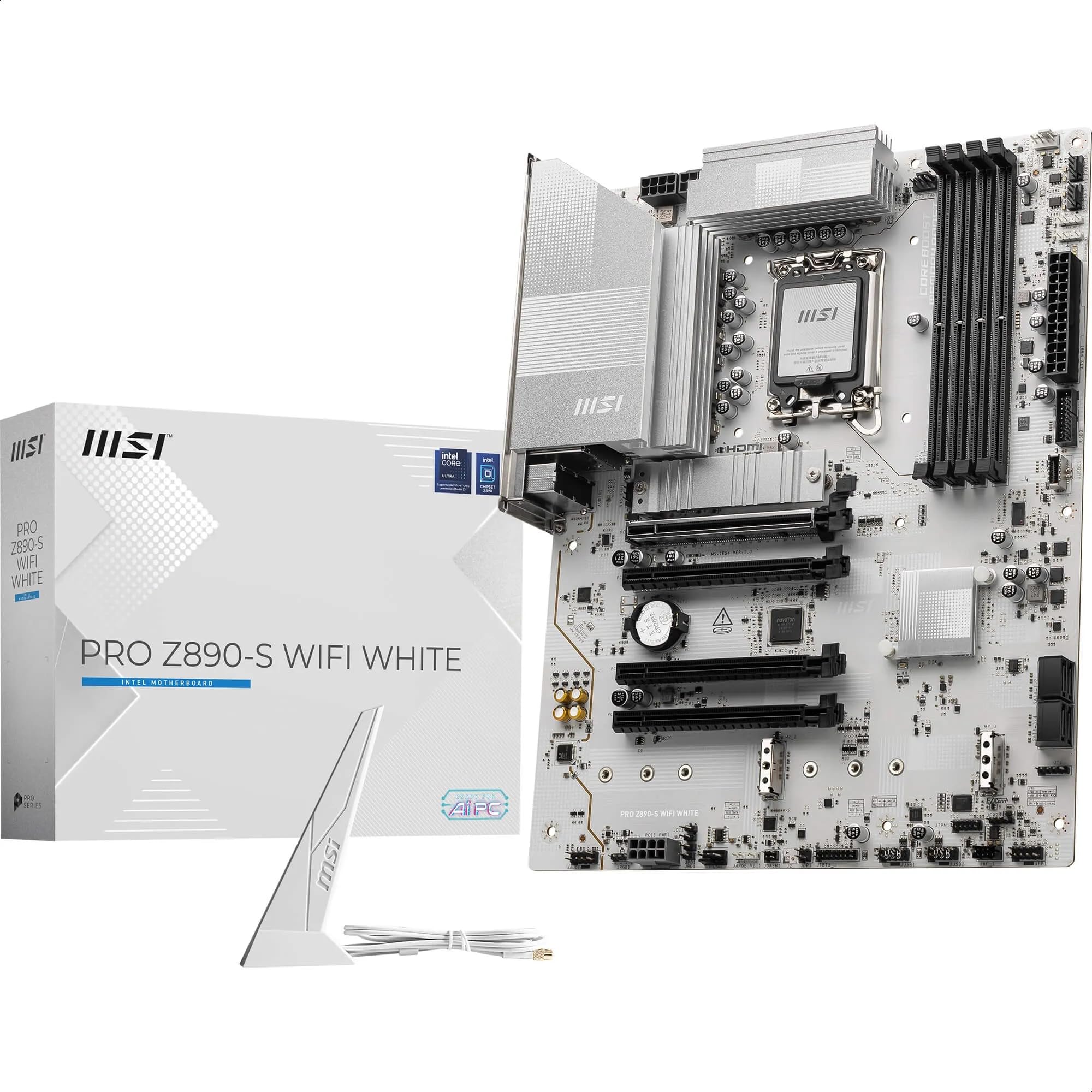
2. MSI PRO Z890-S WiFi White
A white ATX board rated for 8600 MHz DDR5, with a clean finish that matches a white case and fans.
If your build has a white case and white fans, dropping a black board in it feels like a wasted opportunity. The MSI PRO Z890-S WiFi White solves that with a clean white finish across an ATX layout, and it does not sacrifice speed to get there. Its four DDR5 DIMM slots are rated for 8600+ MT/s with overclocking, which is a notable step above the 5600 MHz baseline on the GIGABYTE AORUS Elite and ICE boards. Higher memory speed helps in workloads that shuffle huge data sets, like video editing timelines and heavy multitasking.
Cooling is taken seriously here. MSI fits 7W/mK MOSFET thermal pads (the “W/mK” is how well a pad conducts heat away) plus extra choke pads and an extended heatsink. A dedicated M.2 Shield Frozr cover sits over the Gen5 storage slot to keep a fast drive from slowing itself down. Storage splits into one M.2 Gen5 x4 slot at 128Gbps and two M.2 Gen4 x4 slots at 64Gbps, so you get one blazing drive position plus two fast ones.
The rear panel covers the practical bases: Thunderbolt 4 Type-C with display output, Wi-Fi 7 with Bluetooth 5.4, and 2.5Gbps LAN. The 12 Duet Rail Power System with P-PAK stages handles the Core Ultra chip, and Core Boost keeps clocks steady under bursts. This board has thinner review data than the GIGABYTE and ASUS picks, so it is best chosen for its white finish and memory rating rather than a long track record.
Where the money goes: a 8600 MHz DDR5 rating and a white ATX finish you rarely find together, plus three M.2 slots and a Gen5 position with its own heatsink cover.
The honest catch: fewer Amazon reviews than the top picks means a smaller pool of owner experience to lean on, so buy it for the specs and the colour, not the crowd.
Reach for this if: your build is white inside and you want the memory headroom that comes with an 8600+ MT/s rating.
Skip if: you want a long verified track record behind your purchase, or you need more than three M.2 slots.
3. GIGABYTE Z890 AORUS Elite WIFI7 ICE
A TUF-series board built for people who would rather grind a PC for five years than rebuild it.
The TUF Gaming Z890-PLUS leans into durability with a 16+1+2+1 power stage design using 80A DrMOS components, ProCool power connectors, an 8-layer PCB, alloy chokes and durable capacitors. Even if you do not recognize every term, the message is simple: these are the parts that resist strain and heat over a long life. An 8-layer circuit board also spreads electrical load more evenly than a thinner one. At 2.1 kg it is one of the heavier boards here, sitting far above the 1.61 kg of the MSI PRO Z890-S White.
ASUS adds its AI Cooling II and AI Networking II tools, which are automated helpers that tune fan curves and network priority so you do not have to. Thermal design is thorough: large VRM heatsinks, M.2 and PCH heatsinks, hybrid fan headers and Fan Xpert 4 for fan control. Four M.2 slots and 192 GB of memory capacity handle a serious storage loadout and a large RAM pool.
Here is the honest part you should hear before deciding. Owner feedback on this board is genuinely split on performance, with some very happy and others reporting trouble, and the connectivity reports are mixed as well. The setup side is more consistent, with installation often described as easy. Treat it as a board that serves many well but has the widest spread of owner experience in this lineup, so buy it for the durability spec sheet and be ready to work through any early setup quirks.
Built to take a beating: 80A DrMOS stages, ProCool connectors and an 8-layer PCB are the kind of internals that matter for a machine running hard day after day, and AI Cooling II keeps fan tuning hands-off.
The honest caveat: real-world performance results vary more widely here than on the GIGABYTE picks, so it suits builders who like to tinker and troubleshoot rather than those who want a plug-and-play first boot.
A solid call for: long-haul workstations where durable capacitors and a thick PCB matter more than a shiny signature feature.
Think twice if: you want the most consistent first-boot experience, where the AORUS Elite has the steadier record.
4. MSI MAG Z890 Tomahawk WiFi

The gaming board that gets the balance of 7800 MHz memory, price and features right for most rigs.
The Tomahawk line has a long reputation for hitting the value mark, and this Z890 version follows the pattern. It carries a 7800 MHz rated memory clock, comfortably above the 5600 MHz on the GIGABYTE AORUS Elite boards, so it leaves more room for fast DDR5. The Wi-Fi 7 module uses a 320MHz channel and reaches a maximum transmission speed of 5.8Gbps, which is the kind of headroom that keeps wireless gaming smooth. Wired networking tops out at 5Gbps LAN.
Cooling is designed for high-end processors. The extended PWM heatsink and enhanced circuit design let a demanding Core Ultra chip run at full speed without folding under heat. Quadruple M.2 connectors handle maximum storage performance, and the board supports dual-channel DDR5 up to 256GB. That memory ceiling equals the GIGABYTE boards and sits above the 192GB limit on the ASUS TUF and ROG Strix picks.
Gamers keep picking this board because buyers report it as strong value for the features on offer, and owners mention installation is easy. The included driver USB flash drive (a stick with the board’s software already on it) saves you the usual first-boot scramble for drivers. Build quality and appearance both draw positive words, and performance is the most-discussed topic of all. One mixed report worth knowing: some owners have found the Ethernet port not working, so test your wired port early.
The gamer’s read: 7800 MHz memory, Wi-Fi 7 with a 5.8Gbps max and 5Gbps LAN cover competitive play, while the extended PWM heatsink keeps a hot chip running at speed. A driver flash drive in the box makes the first setup smooth.
Worth checking on arrival: with Ethernet being a mixed report, confirm your wired port works within the return window so you are not relying on Wi-Fi alone.
Right for: gamers who want fast memory and Wi-Fi 7 without paying flagship board prices.
Not the fit if: wired networking is your primary connection and you want zero risk on the Ethernet port.
5. GIGABYTE Z890 AORUS Master

10GbE wired networking and the beefiest power design GIGABYTE puts in a mainstream board.
Move huge files across a home network or run a home server and the AORUS Master is the board to pick. Its 10GbE LAN port (a 10-gigabit wired connection) is the fastest in this lineup, quadruple the speed of a 2.5GbE port, so large transfers finish far sooner. Power is the other reason it earns its name: an 18+1+2 design with 110A Smart Power Stages, the strongest stage count and amp rating among the AORUS boards here, keeps a top Core Ultra chip fed even under sustained loads.
You also get dual Thunderbolt 4, five M.2 slots, PCIe 5.0, Wi-Fi 7, front USB-C, the Sensor Panel Link and the full EZ-Latch toolkit, plus the same 5-year warranty as its siblings. Five M.2 slots puts it level with the PRO ICE on storage expansion, and a step above the four-slot Elite boards.
The story owners tell is one of straightforward quality — the board’s construction earns the most praise, with the generous USB port count standing out next to it. Performance draws a split response, with plenty of high marks alongside a smaller group reporting issues, which is the note to keep in mind. Compare it to the ASUS ROG Strix Z890-E above: the ROG wins on M.2 slot count with seven versus five, while this board wins on wired networking with 10GbE over the ROG’s 2.5GbE.
Best in class here: 10GbE LAN is a single clear reason to choose this board, and 18+1+2 power stages at 110A back it up for a top-end chip.
The smart buy for: content creators and home-lab users who want the fastest wired port available on a Z890 board.
Think again if: you want maximum M.2 expansion instead — the ROG Strix offers seven slots to this board’s five.
6. ASUS ROG Strix Z890-E Gaming WiFi

Seven M.2 slots make this the storage king of the group — no adapter, no compromise.
Seven M.2 slots is a number that stops a storage-heavy builder in their tracks. That is more than any other board here, and it means you can run a boot drive plus six more fast NVMe drives without ever adding a card. If you juggle game libraries, raw footage and virtual machines, that expansion ceiling alone can justify the step up. Power is right there too: 18(110A)+2(90A)+1(90A)+2(80A) stages with ProCool II connectors, MicroFine alloy chokes and premium metallic capacitors.
ASUS packs in its AI Overclocking, Cooling II and Networking II tools, plus memory technologies called DIMM Fit, DIMM Flex and AEMP III that are designed to simplify memory tuning. For a builder who does not want to hand-tune timings, those helpers take the guesswork out of hitting higher DDR5 speeds. Memory capacity lands at 192 GB, which is below the 256 GB ceiling on the GIGABYTE and MSI boards, so plan for that if a massive RAM pool is your goal.
Owners see this board’s quality as its strongest trait, with performance drawing praise right behind it. The full feature set, the appearance and the USB port count all earn positive words, and the seven M.2 slots get singled out specifically. A quick start guide smooths the setup. One recurring note is stability, which is a mixed report, so budget a little time to update firmware after the first boot rather than assuming day-one perfection.
What justifies the flagship price
- Seven M.2 slots is class-leading here for anyone building a multi-drive workstation
- 18+2+1+2 power stages with pro-grade chokes and capacitors feed high-end CPUs
- AI Overclocking, Cooling II and Networking II take tuning work off your plate
- Memory tools like DIMM Fit and AEMP III simplify the DDR5 speed chase
Details to plan around
- 192 GB memory ceiling sits below the 256 GB GIGABYTE and MSI boards
- Stability is a mixed report, so set aside time for firmware updates after assembly
Made for: creators and power users who want the largest M.2 fleet and top-tier power stages in one board.
Not for: builders who need a 256 GB RAM ceiling or who want a hands-off, no-updates first boot.
7. NZXT N9 Z890

A full-metal cover hides the circuit board for a clean, modern look in a glass-panel build.
Most boards show off their bare PCB and heatsink fins. The NZXT N9 takes the opposite route with a full-metal cover concealing the board for a clean, modern look, finished with onboard RGB lighting. It is a design statement as much as a component, and in a glass-panel build it changes the whole read of the interior.
Under that cover sits a 20+1+1 power phase design with 110A Smart Power Stages on an 8-layer, 2-ounce copper PCB. The extra copper helps carry current efficiently, which supports stable overclocking. The RL-ILM socket design is intended to improve thermal contact and reduce mounting pressure on the processor. Memory lands at a rated 8600 MHz across four dual-channel DIMM slots, matching the MSI PRO Z890-S White as the fastest memory rating here.
Heavy loads stay cool here thanks to a VRM heatsink array (metal blocks that pull heat off the power components) with a fin stack, heat pipe, thermal pads and dual PWM fans, plus dedicated M.2 heatsinks for your drives. Connectivity brings Thunderbolt 4, Wi-Fi 7 with a 320MHz channel (a wide lane that carries more data at once), and 5GbE. Storage splits into one PCIe 5.0 M.2 slot and four PCIe 4.0 M.2 slots. This is the highest-tier board in the group and carries the smallest pool of owner feedback, so you are buying it mostly on its spec sheet and its looks — a fair reason, as long as you know that going in.
what separates it: a 20+1+1 phase design with 110A stages, a full-metal cover, dual PWM VRM fans and an 8600 MHz memory rating (the speed of RAM it is rated to run) make it the most visually distinct board here.
Choose it for: a flagship showcase build where the inside of the case is meant to be seen.
Pause if: you want a deep track record of owner experience to lean on, since this board has the thinnest feedback pool in the group.
Know the Specs
Power stages and the VRM
The VRM is the cluster of components that turns your power supply’s output into a clean, steady feed for the CPU. A figure like 16+1+2 or 20+1+1 describes how many stages handle the CPU cores, the integrated memory controller and the graphics portion. Higher amp ratings (like 80A, 90A or 110A) mean each stage can carry more current safely. For a high-core Core Ultra chip pushed hard, more stages and bigger amps keep volts stable and heat lower.
DDR5 memory speed (MT/s)
MT/s measures how many million data transfers your memory completes each second. Boards quote a rated memory clock, and hitting the top end typically needs an XMP profile turned on in the BIOS. Four DIMM slots means you can fill all four, though running two matched sticks is the common path to the highest rated speeds. Memory capacity ceilings here range from 192 GB to 256 GB, which tells you the maximum total RAM the board supports.
M.2 slots and PCIe generations
An M.2 slot is a small socket on the board where an NVMe storage drive mounts directly, avoiding cables and drive bays. PCIe generation (4.0 versus 5.0) sets the bandwidth ceiling, so a Gen5 M.2 slot moves data faster than a Gen4 one. Similarly, a PCIe 5.0 x16 slot gives your graphics card the widest pipeline available. Count both the M.2 slots and the generation of each, since one fast slot plus slower extras is common.
Wi-Fi 7 and LAN speed
Wi-Fi 7 is the newest wireless standard, and it can use a wider 320MHz channel for higher throughput. Wired LAN figures like 2.5GbE, 5GbE and 10GbE describe the maximum speed of the physical network port. Higher is better for moving large files between machines on the same network. If you mostly browse, 2.5GbE is plenty; if you run a home server or edit from network storage, the faster ports pay off.
Common Questions
Will a Z890 board work with my Intel Core Ultra processor?
Do I need XMP to reach the advertised DDR5 speed?
How many M.2 drives can I fit, and does that matter?
Is Wi-Fi 7 worth it over an older Wi-Fi standard?
What is the difference between 2.5GbE, 5GbE and 10GbE LAN?
How much RAM can these Z890 boards hold?
Do I need a specific power supply connector for these boards?
Are the M.2 and PCIe EZ-Latch features worth having?
What does the power stage number like 16+1+2 actually mean?
Can a white motherboard go in any case?
The Bottom Line
For most builders, the z890 ddr5 wi-fi motherboard winner is the GIGABYGB/”>GIGABYTE Z890 AORUS Elite WIFI7 because it pairs a steady 16+1+2 power design with the EZ-Latch build tools that make a first build calm instead of tense. If you want a white finish with faster memory headroom, grab the MSI PRO Z890-S WiFi White. And for a storage-heavy rig that needs the most drive slots, the ASUS ROG Strix Z890-E Gaming WiFi is the board to reach for.
One honest nudge before you commit: the GIGABYTE AORUS Elite is the crowd favourite for reliability and first-boot smoothness, holding a 4.5+ rating across 100+ ratings. That record lines up with the easy setup and solid construction owners describe again and again.
How we choose
We do not accept paid placement. Every pick is matched to a real buyer and a real use-case; we do not hands-on test units.
Sources
Specifications: manufacturer listings and product documentation. Review insights: verified customer reviews, as of November 2026. Pricing: not shown on this page (it changes often); check the current price via the retailer link.
As an Amazon Associate, Tactical Gear Guy earns from qualifying purchases. This does not affect which products we feature.