Specs are compiled from manufacturer listings and verified buyer reviews and can change over time — please confirm the key details on the product page before buying.
Most smart-lock letdowns trace back to one mismatch: you bought a lock, but you needed a radio. A Z-Wave deadbolt (a lock that talks over Z-Wave, a low-power wireless radio) never reaches your phone on its own. It talks to a hub (a small box that bridges your devices to the internet), and that hub talks to your phone. Match the radio to your hub and the lock works; mismatch it and you own a very expensive keypad. Get it wrong and you own a very expensive keypad. The eleven locks below all carry a real Z-Wave radio inside, so your choice depends on fit, code capacity, and how much abuse your front door takes.
This guide is built by comparing the manufacturers’ published specifications and the patterns across verified customer reviews, so you get each pick’s real strengths and trade-offs instead of marketing spin.
Every lock below works only with a compatible Z-Wave hub you supply separately, so check your system first. Door thickness, hub brand, and weekly code count decide the pick, so this breakdown starts with compatibility rather than cosmetics.
Top Picks


How To Choose The Best Z-Wave Smart Lock
Start with the hub, not the lock. A Z-Wave lock is a radio device and it needs a controller — Ring Alarm, SmartThings, Wink, Vera, Home Assistant, Alarm.com — to accept remote commands. Without that hub you get keypad entry and nothing else. Check that your system’s app lists the lock’s brand and model before you buy anything.
Match the lock to your door, not the other way round
Door thickness decides fit more often than people expect. Most of these locks fit 1-3/8 inch to 1-3/4 inch doors, and the Yale models stretch up to 2-1/4 inch. Backset — the distance from the door edge to the centre of the bore hole — is usually 2-3/8 inches or 2-3/4 inches. Measure both before you order, because a lock that does not sit flush is a lock you will return.
Count the codes you actually hand out
Code capacity ranges from 20 up to 250 unique user codes across this list. A two-person household barely needs 20. A rental, a dog walker, a cleaner, and a rotating cast of family members can burn through 30 quickly. If you manage guests, favour the higher-capacity locks, because deleting a stale code is easier than collecting a key.
Decide if you want a keyway at all
Some of these locks include two physical keys as a backup. The Yale Assure SL is fully key-free by design, which removes the lock-picking and key-copying route but means you rely entirely on batteries and codes. There is no wrong answer, but know which side you are on before you install.
Side-by-Side Comparison
| Model | Best For | User Codes | Connectivity | Battery | Amazon |
|---|---|---|---|---|---|
| Kwikset Home Connect 620★ Best Overall | Everyday front-door security | Up to 250 | Z-Wave | 4 AA, 12 months or longer | Amazon |
| Kwikset SmartCode 916 (99160-020)SmartThings Pick | SmartThings households | Up to 30 | Z-Wave | 4 AA, 12 months or longer | Amazon |
| Yale Assure SLEntry-Level Touchscreen | Key-free living | Not stated | Z-Wave | 4 AA included | Amazon |
| Alfred DB1-B-BL | Phone-first entry | 20 | Bluetooth + Z-Wave Plus | 4 AA | Amazon |
| ULTRALOQ Bolt Z-Wave | Weather-exposed doors | Not stated | Z-Wave Long Range | 4 AA, lithium-friendly | Amazon |
| Schlage Connect Camelot | Widest hub compatibility | Up to 30 | Z-Wave Plus | Not stated | Amazon |
| Schlage BE469ZPVCAM619 | Built-in alarm needs | Not stated | Z-Wave | Not stated | Amazon |
Detailed Reviews
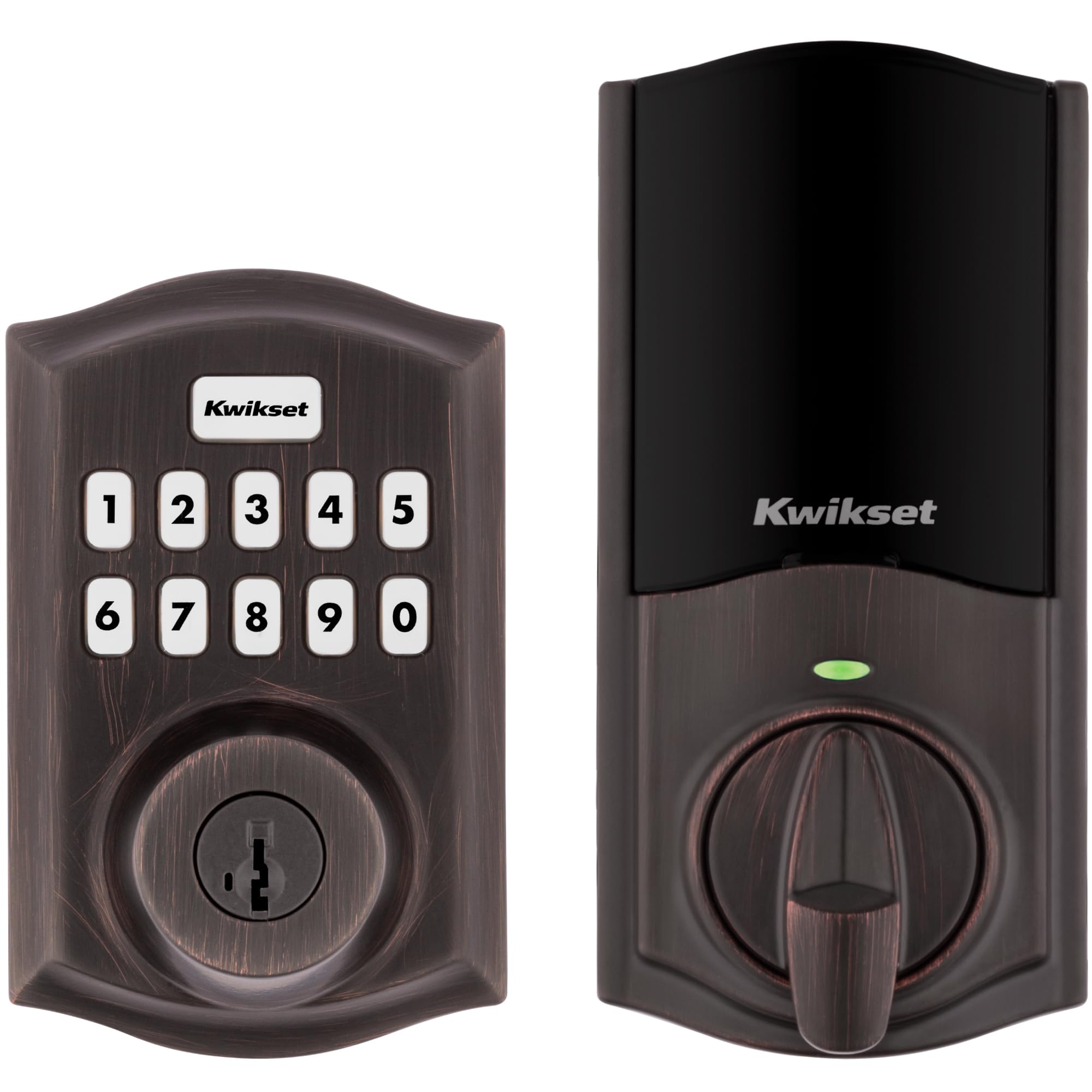
1. Kwikset Home Connect 620 Smart Lock
Our pick — 4.0+★ from 750+ verified ratings; the strongest balance of quality and price.
The deadbolt that hands out 250 separate codes and still asks nothing of your phone.
This is the pick for the household that wants keyless entry to work even when the internet is down. It runs on a Z-Wave 700 chipset and talks directly to whatever hub you own — Ring Alarm, SmartThings, Alexa, Google Assistant. The illuminated keypad means a code works in the dark without a flashlight, and one-touch locking means you press once on the way out and keep walking. One press on the way out locks the door, no key to fish for with your hands full.
Where it pulls ahead of the rest is code management. You get up to 250 user codes, against 30 on the SmartCode 916 further down this list — a genuine difference if you run a rental or have a wide circle of family and tradespeople coming through. The motorised deadbolt is described as fast and quiet, so it does not announce every entry to the street. Installation takes a screwdriver and fits doors between 1-3/8 inch and 1-3/4 inch thick.
Battery life is listed at 12 months or longer on the four included AA cells, and the SmartKey system lets you re-key the cylinder yourself in seconds if a key ever goes missing. Be realistic about the size of the thing: at 3.4 pounds it is a substantial unit, which is noticeable if you are mounting it into a hollow or thin door. The trade-off is honest — it needs a Z-Wave hub before any remote feature works, and the smart-home magic stops entirely without one.
Where this deadbolt carries the day
- Up to 250 user codes — a huge jump over the 30-code locks here
- Illuminated keypad keeps late-night entry simple
- Z-Wave 700 chipset works with Ring Alarm, SmartThings, Alexa and Google Assistant
- Re-key the cylinder yourself with SmartKey in seconds
- 4 AA batteries included and rated 12 months or longer
What you should weigh first
- No remote access at all without a compatible Z-Wave hub
- At 3.4 pounds it is a substantial build
- Keypad-only entry, no touchscreen glass to swipe
Built for: households with a Z-Wave hub already in place and more than a handful of people needing entry.
Think again if: you are renting and cannot install a hub, because the keyless part works but every remote feature stays locked.
2. Kwikset HomeConnect 620 Z-Wave Smart Lock
A screwdriver, a standard door, and a keypad you can press any button on to lock.
The Yale Assure Lock is the one to consider if you want the install to be genuinely trivial. It replaces an existing deadbolt on standard doors from 1-3/4 inch to 2-1/4 inch thick, needs no extra holes drilled, and comes with mounting hardware and batteries in the box. Two physical keys ship alongside, so you are not fully dependent on the electronics on day one.
Locking is a one-press affair — hit any button on the way out, or switch on auto relock and let the lock handle it. One-press locking matters most with shopping bags or a sleeping child in your arms. It pairs with Samsung SmartThings, Ring Alarm, Wink, and works with Alexa through a compatible hub. There is no Yale app for this model, so your control lives inside whichever hub system you already run.
Be clear-eyed about the feedback pattern here. The functionality side of this lock draws mixed reports — it works great for plenty of owners and draws button-related gripes from others. Reliability is likewise split, with some describing quick, responsive locking and others wanting better. Easy installation is the part that holds up best. At 16 ounces it is a light unit to handle on a ladder, and the bronze finish suits a traditional door better than a glossy plastic face would.
Best fit for: a straightforward replacement on a standard door where you want keypad entry plus a physical key backup.
Worth knowing: expect to lean on your hub’s app for scheduling, since Yale does not supply its own here.
Suits you when: you want a light, simple deadbolt with an included keyway and a fast install.
Not the one for: anyone who needs rock-solid button response above all else, since that area draws mixed feedback.
3. Kwikset SmartCode 916 Z-Wave Deadbolt
The touchscreen deadbolt that has quietly become the default for SmartThings homes.
Owner sentiment on this lock is unusually consistent on one point: build quality is the thing that wins people over, with more than seventy reviews circling back to it. That tracks with a metal-bodied deadbolt that uses an illuminated touchscreen instead of rubber buttons, so there is nothing to wear through after a few winters. Installation draws a similar volume of praise, which matters because a lock you fit yourself is only as good as the instructions that come with it.
The practical numbers are modest but sensible. You get up to 30 programmable user codes for family, friends, the dog walker, or a cleaner — enough for a normal household, tight if you run a rental with frequent turnover. Auto-lock can be set to fire after 30 seconds, which suits an entry door you want shut behind you. It runs on four AA batteries rated 12 months or longer, and the lifetime mechanical and finish warranty with a one-year electronics warranty is a rare bit of long-term cover in this category.
Here is the fair warning. Compatibility with Samsung SmartThings is the single most argued-about subject in the feedback — some owners get a clean pairing, others hit friction. Battery life, key codes, and touch sensitivity all draw recurring complaints rather than isolated ones, so go in expecting the touchscreen to want a firm, deliberate press. It remains a strong pick; just do not buy it assuming the pairing is automatic.
What the metal body buys you
- Build quality is the most-praised element by a wide margin
- Illuminated touchscreen with no buttons to wear out
- Up to 30 user codes for regular household access
- Lifetime mechanical and finish warranty plus 1 year on electronics
Where it will test your patience
- SmartThings pairing is the most contested topic in the feedback
- Touch sensitivity asks for a deliberate press, not a quick tap
- Battery life and key-code entry draw recurring complaints
Pick it for: a SmartThings household that wants a metal-bodied touchscreen and a long warranty.
Pass on it if: you need more than 30 codes or expect the touchscreen to respond to the lightest brush.
4. Kwikset 99160-002 916 SmartCode Deadbolt
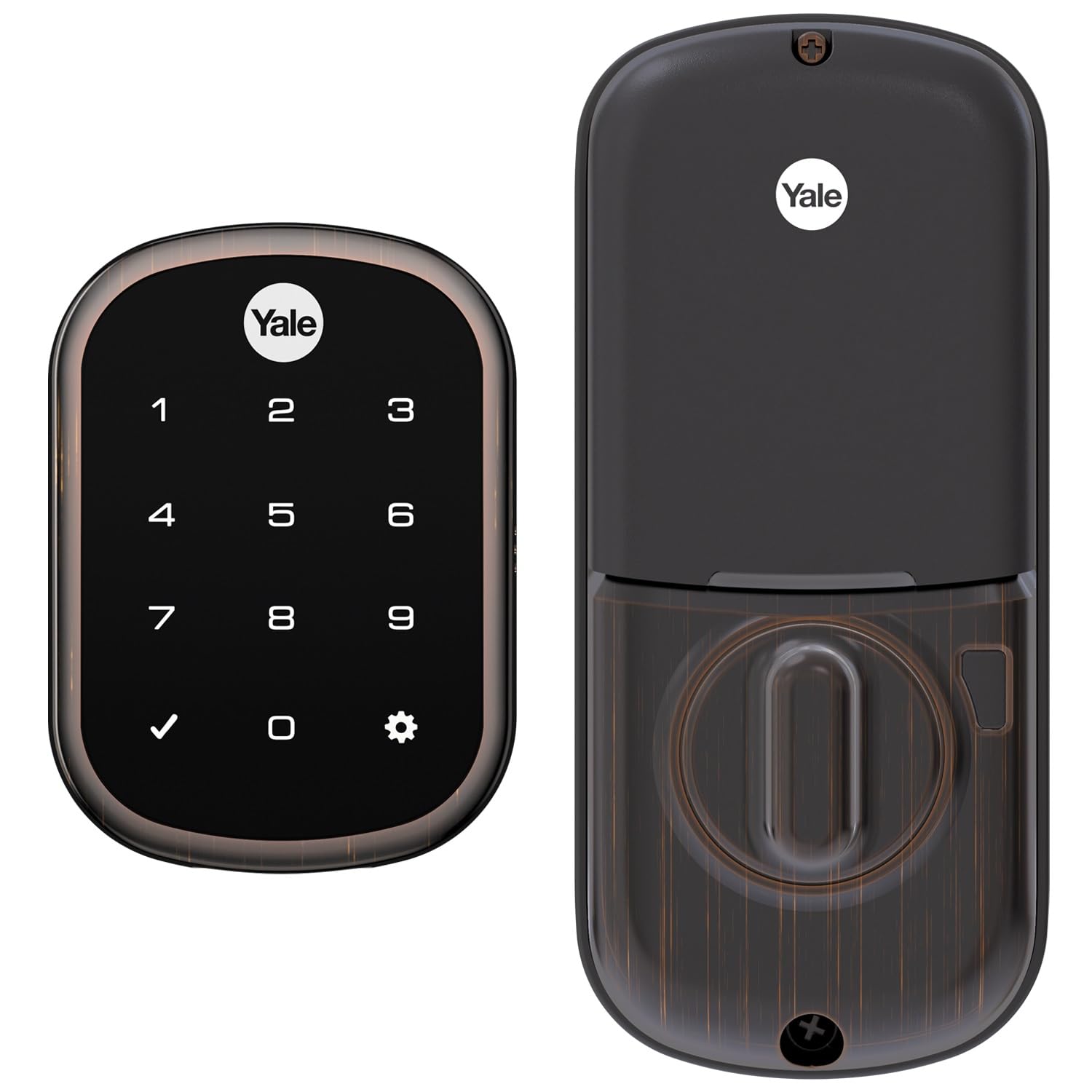
No keyway, no spare key under the mat, and a backup battery terminal for the worst day.
This is the lock for someone who has decided the key is the problem. The Assure SL is 100 per cent key free — there is no cylinder to pick or copy, which removes an entire category of security worry if your previous deadbolt had a key floating around. Locking happens when you press any button or let auto relock do it. It fits standard doors from 1-3/8 inch to 2-1/4 inch thick, and mounting hardware plus batteries are in the box.
This pick earns its slot on the battery side: a 9V battery terminal lets you power the lock from outside if the internal cells go flat, so you are not stuck in the rain waiting for a locksmith. Four AA batteries come in the box. It pairs with SmartThings, Ring Alarm, and Wink, and works with Alexa through a compatible hub. There is no Yale app, so your remote features live inside your existing hub app. Customers note that programming is straightforward, which is refreshing given how often smart locks bury their menus.
The concern to weigh is reliability over time. Multiple reports describe the lock stopping working, and Alexa integration is the fussier end of the smart features for some owners, while SmartThings pairing is described as solid. Measure your backset, cross bore, and door thickness before you order — Yale flags this explicitly, and with no keyway there is no fallback if the fit is off. A 3-pound metal build with a bronze finish that looks at home on a period door
Why go key-free: tamper-proof by design and immune to copied keys, with the 9V terminal as your insurance against flat batteries.
The trade-off: some reviewers point out units that stop working, so keep the purchase where returns are simple.
Made for: owners who want the cylinder gone entirely and never want to think about a spare key again.
Second thoughts if: you expect flawless Alexa control or you have not measured your door yet.
5. Alfred Touchscreen Keypad Pin + Bluetooth + Z-Wave + Key Entry (DB1-B-BL)
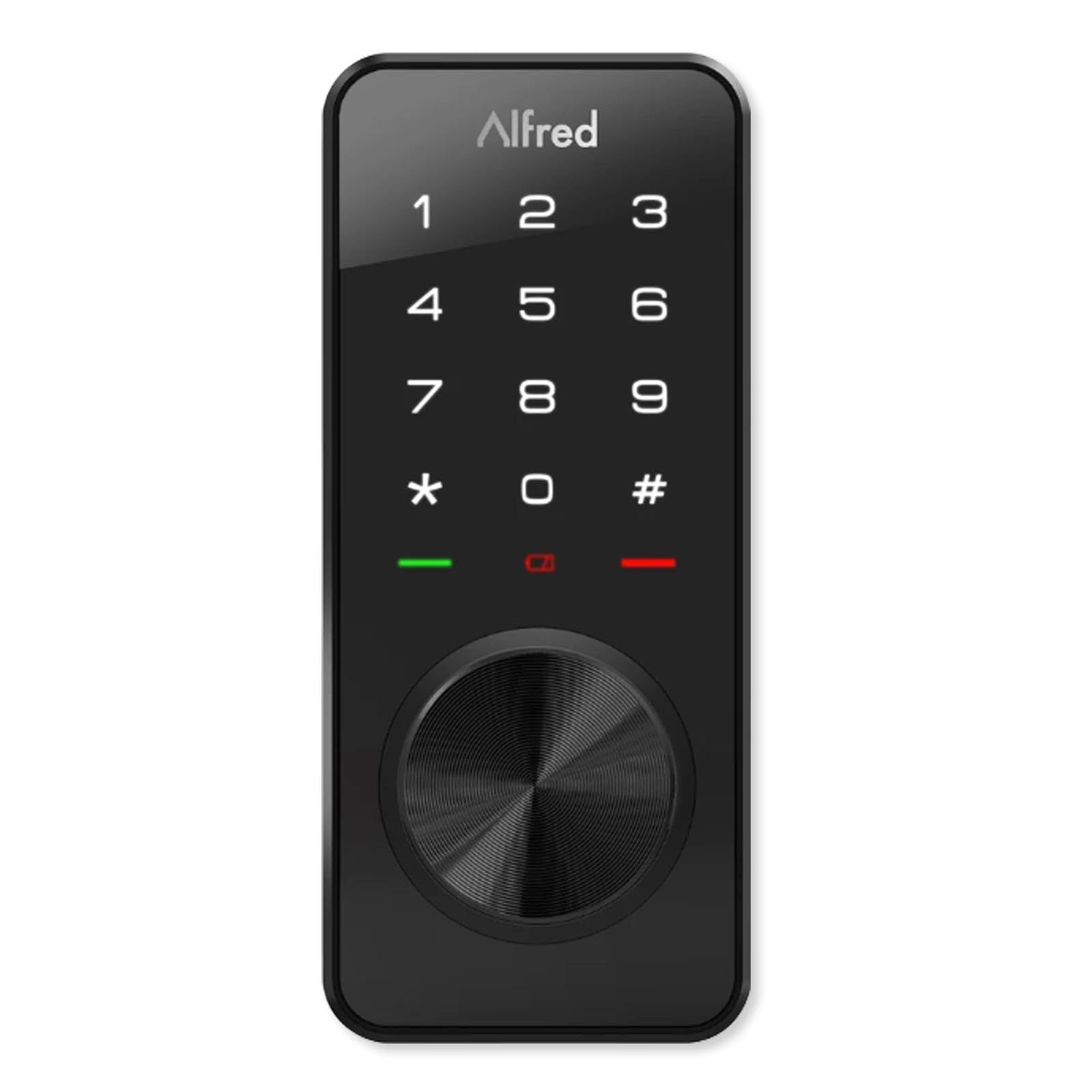
Walk up with your phone in your pocket and the door open up itself.
Bluetooth on the Alfred DB1-B open up the door on a single touch as you walk up with your phone. With your phone nearby, the lock open up on a single touch — no code to tap, no keypad to find in the dark. For the times your hands are full or your phone is buried, the touchscreen keypad and the physical keyway are both still there. Three ways in, so you are never locked out by one failing.
The Alfred app handles the remote side: see who entered and when, and set up 20 unique codes, including single-use and timed codes. That single-use feature is genuinely useful for a delivery driver or a one-off visitor — the code dies after it is used, so there is nothing to revoke later. Z-Wave Plus sits inside for connection to select smart home hubs, alongside SmartThings and Vera compatibility. It runs on four AA batteries, and an emergency micro USB power port means a flat battery does not become a locksmith bill.
Fitting is standardised rather than fussy: a 2-1/8 inch hole, an adjustable latch bolt with 2-3/4 inch and 2-3/8 inch backset options, three faceplates in the box, and support for doors from 35 mm to 50 mm thick. At 16 ounces it is light enough to fit without a second pair of hands. The honest limit is code capacity — 20 codes is the smallest count on this list, so a busy rental with rotating guests will hit the ceiling faster than it would on a 250-code Kwikset.
The three-ways-in argument
- Single-touch open up with your phone nearby
- Single-use and timed codes that expire on their own
- Micro USB emergency port prevents a battery lockout
- Three faceplates and adjustable backset cover most doors
Where it asks you to compromise
- 20 codes is the tightest capacity on this list
- Z-Wave Plus works only with select hubs
- Bluetooth convenience depends on your phone’s battery
Built for: phone-carrying owners who want the door to open as they walk up, with codes as backup.
Skip the upgrade if: you manage more than a couple of dozen regular visitors, because the code ceiling arrives quickly.
6. ULTRALOQ Bolt Z-Wave Deadbolt Smart Lock
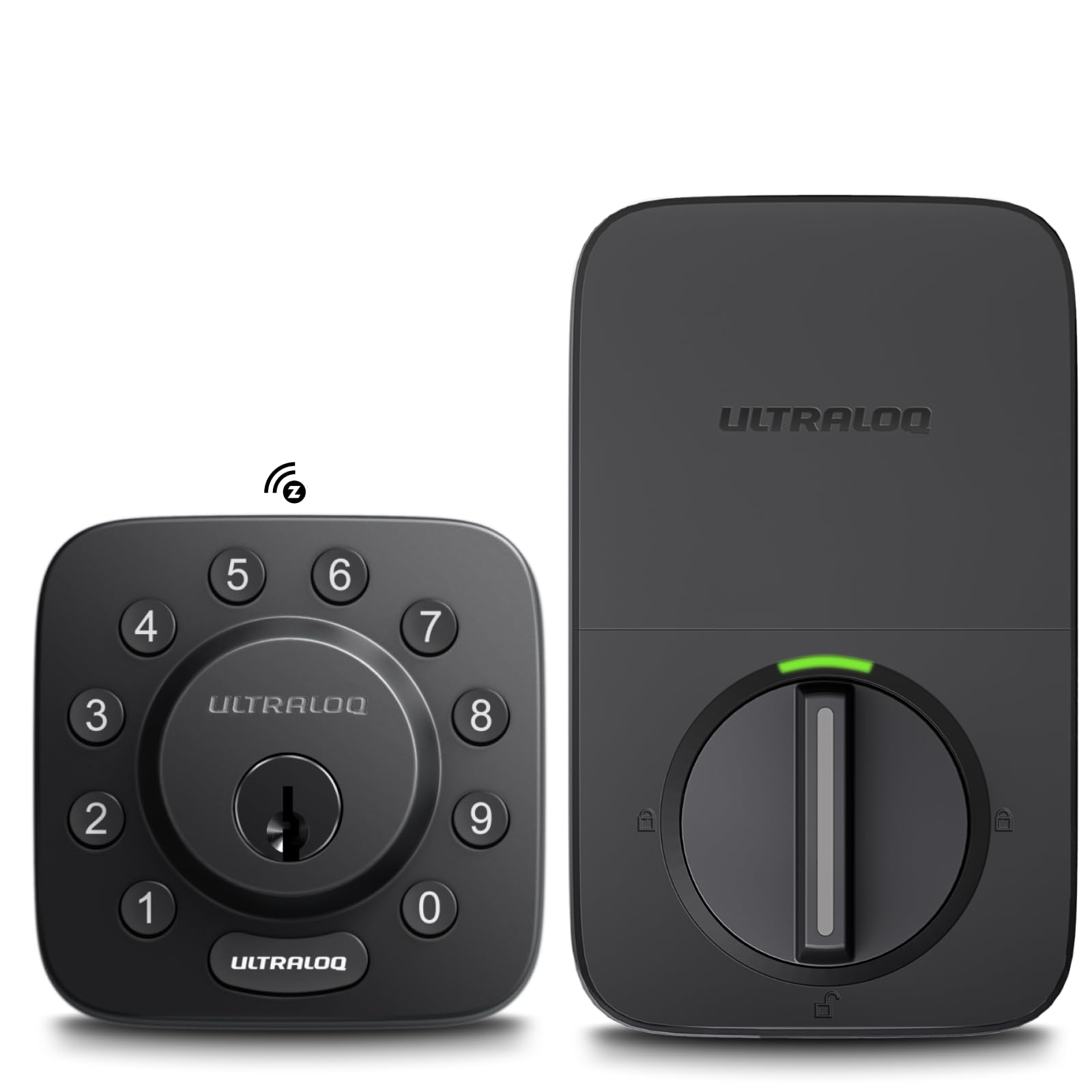
A zinc alloy deadbolt rated for rain, heat and cold, built for the door that takes a beating.
Most smart locks are built for a sheltered front door. This one carries an IP65 rating (a weather-seal score where 6 means dust-tight and 5 means it shrugs off water jets), so it handles rain and dust rather than just a drizzle. It also holds BHMA Grade 1 certification (the top security and durability grade from the Builders Hardware Manufacturers Association), the highest grade in this list. The body is zinc alloy. If your door faces the weather, or it guards a garage entry or a rental nobody babies, those two ratings are the reason to keep reading.
The radio is the other differentiator. It runs the Silicon Labs ZG28 chip with 800 Series Z-Wave Long Range, which is aimed squarely at large homes, detached garages, guest houses, and any property where coverage has been a weak point. It pairs with Alarm.com, Home Assistant, and SmartThings for remote lock and open up, code management, and activity alerts triggered by other Z-Wave devices. Auto lock and auto open up round out the daily routine, and keypad entry with two included keys covers the basics.
ULTRALOQ rates the battery performance as its strongest point, running on four AA cells with better longevity on lithium batteries. Installation is quoted at ten minutes with just a screwdriver, no wiring or drilling. The obvious caveat is that every remote feature is gated behind a compatible Z-Wave hub, and the promise of “industry-best” battery life is the manufacturer’s own claim rather than something you can verify from the spec sheet. Still, an IP65 Grade 1 deadbolt at 2.6 pounds is a serious piece of hardware for a hard-working door.
Standout spec: IP65 weather resistance and BHMA Grade 1 certification together put this among the toughest builds on the list.
Fair question: the battery longevity claim comes from ULTRALOQ itself, so treat it as a target rather than a measured result.
Choose this when: your door is exposed to the elements or sits far from your hub in a large property.
Less compelling if: your door is sheltered and close to the hub, where the weatherproofing earns nothing extra.
7. Schlage Connect Camelot Smart Deadbolt
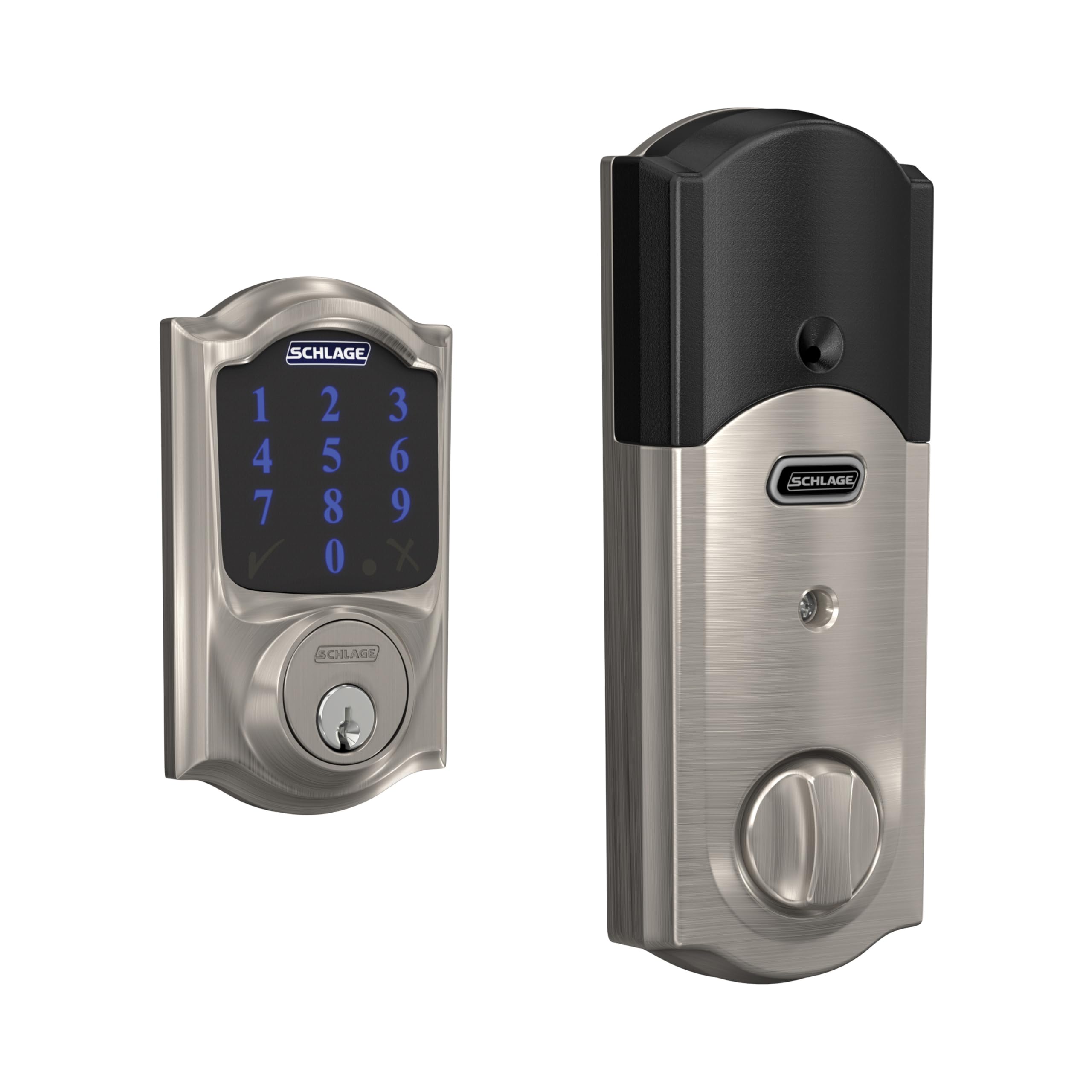
The deadbolt that will talk to nearly any Z-Wave system you already own.
Schlage’s Connect is the safe bet for the household that has not settled on one ecosystem. It works with Samsung SmartThings, Ring Alarm, Nexia, Vera, and Alexa and Google Assistant through a compatible system — that spread is wider than almost anything else here. If you are not sure what your next hub will be, this lock is less likely to become a brick when you change systems.
You can share up to 30 access codes so nobody needs a spare key. Installation uses Snap ‘n Stay, which holds the deadbolt onto the door so both hands stay free while you work — a genuinely thoughtful bit of design for a solo install. It is guaranteed to fit standard doors from 1-3/8 inch to 1-3/4 inch with a 2-3/8 inch or 2-3/4 inch backset.
The record here is long, and it is mixed on the hardware side. Some owners describe the lock stopping after a couple of months, while plenty of others report straightforward installs and a finish that matches their door hardware neatly. Installation and appearance are the parts that hold up, and at 3.5 pounds it feels like the solid metal deadbolt it is. Go in knowing that long-term reliability is the area to watch, and that a generous return window is your friend.
Compatibility reading: SmartThings, Ring Alarm, Nexia, Vera, Alexa and Google Assistant coverage makes this the most flexible pairing on the list.
The thing to watch: long-term reliability draws mixed reports, so buy it somewhere you can return it easily.
Made for: anyone who has not committed to one smart home system and wants room to switch later.
Not ideal if: you want a proven multi-year track record above all else.
8. Schlage BE469ZPVCAM619 Connect Camelot Touchscreen with Built-in Alarm & Z-Wave

A deadbolt that raises its own alarm when someone tries the door while you are out.
The BE469ZPVCAM619 raises its own alarm at the door, even when your wider alarm system is off. The BE469ZPVCAM619 alerts you to potential security threats at the door itself, which means a warning fires even if your wider alarm system is off or your phone is in another room. An anti-pick shield protects the cylinder against tampering, and BHMA grades it best in security, durability, and finish at ANSI Grade 1.
The touchscreen is a resistive type with a matte finish that resists fingerprints and smudges, so the glass does not advertise which four digits you keep pressing. It works with Alexa, Nexia, Samsung SmartThings, Wink, and more, and remote capability comes through Z-Wave. Fitting is broad: doors from 1-3/8 inch to 1-3/4 inch, a 2-3/8 inch or 2-3/4 inch backset, and standard pre-drilled doors are guaranteed — mounting hardware, keys, and a security token are in the box.
Now the part you should hear plainly. This lock’s feedback is genuinely divided. Installation is the consistent bright spot, but the functionality draw mixed reviews — some find it excellent and others find it not working properly. There is also real dissatisfaction on the value side from owners who expected more. At 4 pounds it is a heavy, solid unit that suits a front door on a home that wants the alarm feature. If you do not need the built-in alarm, the plainer Schlage Connect above is the easier recommendation.
What justifies the premium tier: a built-in alarm plus an anti-pick shield and ANSI Grade 1 rating is a level of door-level security nothing else here matches.
The honest split: functionality draws mixed reports, so buy it for the alarm feature, not for flawless operation.
Right for you when: you want an alarm at the door itself and a matte touchscreen that hides your code from prying eyes.
Hold off if: you only need remote entry, because you are paying extra for an alarm you will not use.
Know the Specs
Z-Wave, Z-Wave Plus and Long Range
Z-Wave is the wireless language these locks speak to your hub. Z-Wave Plus is a newer version with better range and pairing. Z-Wave Long Range goes further still — it opens a direct connection to your hub instead of hopping through mesh nodes, which is why it matters in a big house or a detached garage. None of them replace your hub; they only decide how reliably the lock reaches it.
User Codes and Programming Codes
A user code is the PIN someone types to enter. A programming code is the master PIN that lets you add or delete user codes. Capacity varies widely — from 20 up to 250 across this list — so count the people, cleaners, dog walkers and guests who need access before you choose. A single-use or timed code is worth having if you hand out access often.
Door Thickness and Backset
Door thickness is how thick the door slab is; backset is the distance from the door’s edge to the centre of the bore hole. Most locks here fit 1-3/8 inch to 1-3/4 inch doors, with the Yale models reaching up to 2-1/4 inch. Backset is usually 2-3/8 inches or 2-3/4 inches. Measure both before ordering — a lock that does not seat cleanly will not bolt correctly.
Auto-Lock Timers and Battery Life
Auto-lock is the setting that re-locks the door behind you on a timer. Intervalshere range from a fixed 30 seconds on some models to five selectable steps (30 sec, 1 min, 3 min, 5 min, 10 min) on the HomeConnect 620 Long Range. A shorter timer suits a busy rental; a longer one suits tradespeople moving in and out. Battery life is usually stated in months — most here run on four AA cells rated 12 months or longer, with the Yale Assure SL adding a 9V terminal so a flat battery never locks you out.
IP Ratings and BHMA Grades
An IP rating tells you how well a lock resists weather — IP65 on the ULTRALOQ Bolt means it is built for rain and dust. A BHMA grade ranks security and durability, with Grade 1 the highest tier, carried by both the ULTRALOQ Bolt and the Schlage BE469ZPVCAM619. If your door faces the street and the weather, these two ratings belong on your shortlist ahead of finish choices.
Keyway vs Key-Free Design
A keyed lock ships with physical keys as a backup, and some add SmartKey so you can re-key the cylinder yourself in seconds. Key-free locks like the Yale Assure SL remove the cylinder entirely, so there is no key to copy or pick. Key-free is more tamper-resistant but demands a plan for dead batteries — look for a 9V or micro USB emergency port if you go that route.
Common Questions
Do I need a separate hub for a Z-Wave smart lock to work?
Will a Z-Wave lock work with Ring Alarm?
How many user codes do I actually need on a smart lock?
What door thickness does a Z-Wave deadbolt fit?
How long do the batteries last in a Z-Wave smart lock?
Is Z-Wave Long Range better than standard Z-Wave?
Can I use a Z-Wave lock without any app at all?
What is the difference between a keypad and a touchscreen deadbolt?
What happens if my Z-Wave hub goes offline?
Can a Z-Wave smart lock trigger other devices in my home?
The Bottom Line
Which z-wave smart lock belongs on your door depends first on the hub you already own. Want the widest safety net? The Kwikset Home Connect 620 wins on breadth: 250 user codes, an illuminated keypad, a Z-Wave 700 chipset (the radio generation that pairs with most hubs) and a 12-month-or-longer battery rating cover almost any household, which is why it holds the top slot. If your hub sits far from the door, the HomeConnect 620 Long Range keeps the same lock logic with a direct line home. And if the door faces real weather, the ULTRALOQ Bolt earns its place with IP65 and BHMA Grade 1 — nothing else here pairs those two ratings.
How we choose
We do not accept paid placement. Every pick is matched to a real buyer and a real use-case; we do not hands-on test units.
Sources
Specifications: manufacturer listings and product documentation. Review insights: verified customer reviews, as of November 2026. Pricing: not shown on this page (it changes often); check the current price via the retailer link.
As an Amazon Associate, Tactical Gear Guy earns from qualifying purchases. This does not affect which products we feature.