Specs are compiled from manufacturer listings and verified buyer reviews and can change over time — please confirm the key details on the product page before buying.
If you own both Z-Wave and Zigbee gear, the hub decides whether commands land instantly or lag — and whether your lights still respond when the internet drops. A multi-protocol hub carries both radios in one box, so you stop buying a separate bridge for each. Below are three hubs that support both radios from the start, ranked by local processing, radio count, and setup difficulty.
This guide is built by comparing the manufacturers’ published specifications and the patterns across verified customer reviews, so you get each pick’s real strengths and trade-offs instead of marketing spin.
You will see which hub runs automations offline, which packs the most radios, and which is easiest for a first-time setup.
Top Picks
How To Choose The Best Z-Wave and Zigbee Hub
Start with one question: does the hub speak both Z-Wave and Zigbee from the start, with no add-on module? Many “smart hubs” handle only one radio, forcing a second bridge for the other. Every pick here covers both, so the real decision is whether automations run on the hub or the cloud, and how many radios you want in one box.
Local processing versus cloud dependence
A local-first hub runs your routines on the device itself instead of on a remote server. That means a motion sensor still trips the lights when your broadband is down, and commands land in a fraction of the time. Cloud-tied hubs can feel fine on a good day but stall when the connection hiccups, which is exactly the complaint that shows up in multi-protocol hub reviews.
Radio range and the two-antenna question
Z-Wave and Zigbee both build a mesh, meaning each powered device relays signal onward. In a large or device-dense home the weak link is usually the hub’s own radio reach. A hub with a dedicated external antenna per protocol (one for Z-Wave, one for Zigbee) holds a steadier mesh than one relying on internal antennas alone. If your hub sits in a basement corner, this is the spec that decides whether your far-end sensors stay connected.
Subscriptions and long-term cost
Some hubs give you the hardware and then charge monthly for the features you actually wanted. A no-subscription platform puts every automation and integration in your hands from day one. Ask this before you buy anything: can I build a multi-condition rule without paying a recurring fee?
Side-by-Side Comparison
| Model | Best For | Protocols | Processing | Footprint | Amazon |
|---|---|---|---|---|---|
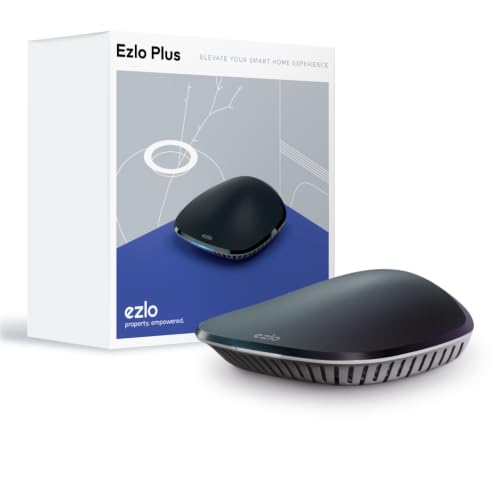
| Ezlo Plus★ Best Overall | Voice-first beginners | Z-Wave, Zigbee, Wi-Fi (via Alexa/Google) | Cloud / app-based | Black enclosure, Ethernet to router | Amazon |
| Hubitat Elevation C-8 Pro | Local-first tinkerers | Matter 1.5, Z-Wave 800 LR, Zigbee 3.0, Bluetooth | Local on-hub | 2.95 x 3.23 x 0.67 in, 2.56 oz | Amazon |
| Homey Pro (Early 2023) | Multi-brand one-box control | Z-Wave Plus, Zigbee, Wi-Fi, BLE, Infrared, Matter, Thread | Local on-premise | 5.04 x 5.04 x 1.57 in, 1.43 lb | Amazon |
Detailed Reviews
1. EzloPlus Smart Home Hub with Zigbee & Z-Wave
The voice-first hub that talks to both radios and folds your Alexa gear into the same app.
The Ezlo Plus earns the top slot on breadth, not on price. It runs MiOS by Ezlo — the company’s own operating system built for a whole property — and it handles Z-Wave, Zigbee, and RF devices from most manufacturers on one platform. That matters most if you already own a mix of locks, sensors, and cameras and want one dashboard instead of three apps. You also get control from the web or a phone, at home or away.
Where it pulls ahead for a beginner is voice. Connect it to Amazon Alexa or Google Assistant and you can then speak to thousands of Wi-Fi smart devices that the hub itself does not radio-connect to — bulbs, motion sensors, smart locks and switches. Setup is deliberately straightforward: plug the included Ethernet cable into your router, open the in-app guide, and follow along. It wants an internet-connected Wi-Fi router with a free Ethernet port, and your phone needs iOS 9.0 or later or Android 8.1 or later.
The honest catch is reliability — it is the most-discussed theme in this hub’s feedback, and it splits both ways. When it works, owners are happy; when it doesn’t, the symptoms cluster around devices refusing to connect and Alexa integration dropping. If your household depends on rock-solid automations every single night, weigh that carefully. The hub’s own makers also offer to integrate a device that isn’t working for you, which takes some sting out of a stubborn pairing.
What lands well
- Speaks Z-Wave, Zigbee, and RF plus thousands of Wi-Fi devices through Alexa or Google, so one app covers a mixed house
- Setup centers on the bundled Ethernet cable and an in-app guide, which suits a first-time buyer
- Control from phone, tablet, or web, at home or anywhere
- Handles smart locks, sensors, cameras, doorbells, and lights from most brands
Where it asks patience
- Stability is the mixed theme: some owners sail, others hit dropped Alexa links and devices that won’t pair
- Cloud-and-app led, so it leans on your network more than a local-first hub
- Needs a free Ethernet port on your router, not just Wi-Fi
Reach for this if: you want the widest device mix under one roof and you lean on Alexa or Google to run the house by voice.
Look elsewhere if: your lights and locks must fire reliably every night with zero dropouts — the local-first picks below are built for exactly that.
2. Hubitat Elevation C-8 Pro Smart Home Hub
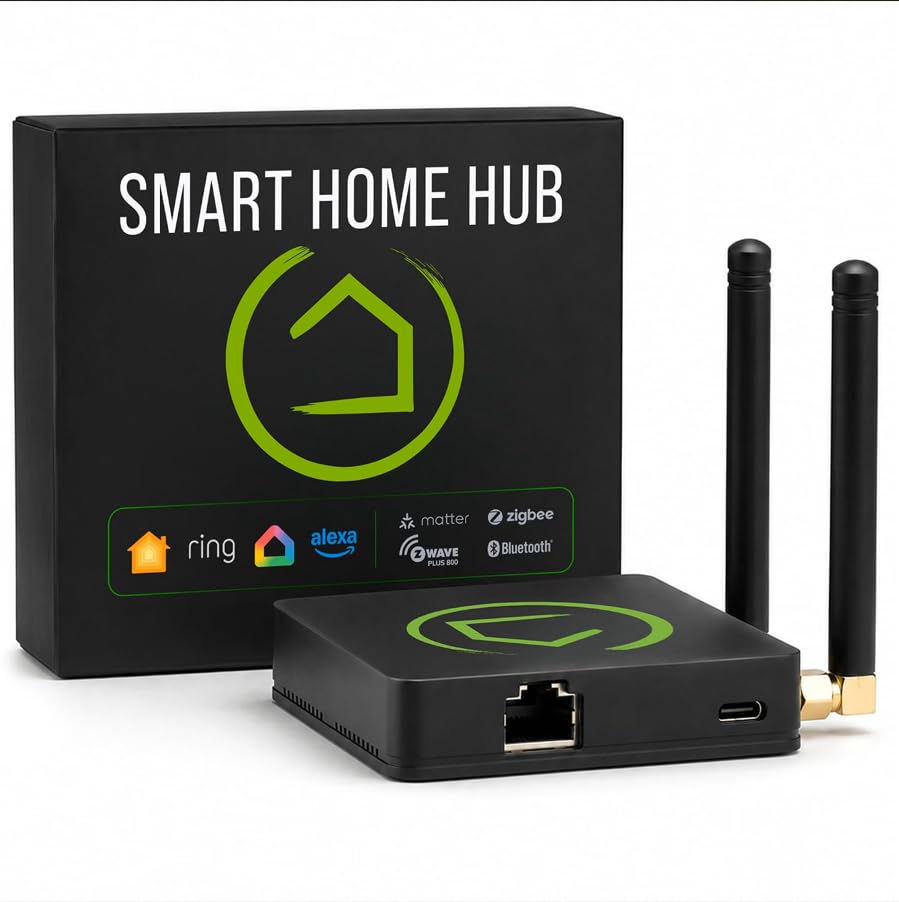
A tiny box that runs your whole routine on itself, internet or not.
The defining promise here is that the Hubitat runs automations directly on the hub, not on a remote server. Translate that into daily life: when your broadband drops, your lights, locks, thermostats, and routines carry on. Commands land near-instantly because nothing travels to a distant server and back. It is also the model in this group that carries Matter 1.5, Z-Wave 800 Series with Long Range, Zigbee 3.0, and Bluetooth in one unit — so existing gear stays compatible without extra bridges.
Size and reach set it apart in a big or busy home. It measures 2.95 x 3.23 x 0.67 inches and weighs 2.56 ounces, so it tucks onto a shelf out of sight. The Homey Pro measures 5.04 x 5.04 x 1.57 inches. It also carries two dedicated external antennas, one for Z-Wave and one for Zigbee, which extends wireless reach exactly where signal consistency is hardest to hold. Compatible with 1,000+ devices across 100+ brands, it leans into privacy by keeping device data at home.
Customisation is the second draw. The AI-assisted routine builder suggests automations from what you have connected, no programming needed, while Rule Machine lets you stack multi-condition logic — lighting scenes, geofenced arrivals, layered security responses, whole-home schedules. It plays nicely with Amazon Alexa, Google Home, and Apple HomeKit, and adds Ring camera integration. There is no recurring subscription; every automation and integration is there from setup, and platform updates have kept expanding compatibility without new hardware. A small catch worth knowing: this hub rewards a hands-on owner, so expect to read the step-by-step docs and dip into the active community for blueprints and drivers.
Why it earns the middle spot: local processing plus Z-Wave 800 Long Range and Zigbee 3.0 on dual external antennas is the combination that keeps a large mesh steady. Pair it with the no-subscription rule and the long-term math stays clean.
The one thing to accept: approachable as setup is, this is a tinkerer’s platform. If you want zero rules to write, the voice-led Ezlo Plus above is the gentler first step.
Best fit: the DIY builder who wants automations that survive an internet outage and does not mind writing a rule or two.
Think twice if: you would rather speak a command and never touch a rule engine.
3. Homey Pro (Early 2023) Smart Home Hub

Seven radios in one polished puck, so almost any brand you own has a home.
Homey Pro’s headline is simple: Wi-Fi, Zigbee, Z-Wave Plus, Infrared, BLE, Matter, and Thread — seven technologies in one local-first box. That is more protocols than any other smart home hub in this lineup, and it means your older IR-controlled gear, Bluetooth sensors, and Matter devices all live alongside the Z-Wave and Zigbee kit. The device library is the other big draw: it works with over 50,000 devices from more than 1,000 brands, spanning names like Sonos, Philips Hue, Kwikset, Govee, Aqara, TP-Link, iRobot, Ecobee, IKEA, Yale, LG, Dyson, Shelly, and Somfy. Because the platform is open, new devices are added daily through both official and community-built apps.
Everything processes on-premise. Your data is stored on Homey Pro itself and cloud dependence is kept to a minimum, so routines run at home rather than in a data centre. Building those routines happens through Homey Flow: switch the whole house off with one button, or have music start as you walk in, right from the Homey app or the web app for advanced flows. It also tracks real-time and historical energy usage and fires sensor alerts, and you can schedule usage around solar generation or dynamic tariffs.
It measures 5.04 x 5.04 x 1.57 inches at 1.43 pounds — so give it room rather than tucking it behind a shelf. The Hubitat measures 2.95 x 3.23 x 0.67 inches, and you feel the difference on a crowded shelf. What you are trading for the footprint is the widest brand coverage in the group, which is exactly why it suits a household that has collected gear from half a dozen ecosystems over the years.
Where it shines brightest: one box that absorbs Z-Wave, Zigbee, IR, Bluetooth, Matter, and Thread takes the “which bridge do I buy now?” question off the table. Energy tracking with solar and tariff scheduling is the extra most hubs simply don’t offer.
What to weigh: this is the premium tier, and the physical size reflects the radio count. It also leans on Homey’s own app ecosystem, so check your specific devices against the maker’s compatibility list before committing.
Choose this when: your home spans many brands and radio types and you want a single polished app doing all of it locally.
Skip past if: shelf space is tight or you already own only Z-Wave and Zigbee gear — the Hubitat covers those without the bulk.
Know the Specs
Z-Wave 800 Series and Long Range
Z-Wave is a low-power radio built for locks, sensors, and switches, and the 800 Series is its newer chip generation with improved reliability and mesh stability. Long Range extends that reach in a larger home. A hub that runs the 800 Series keeps your locks and sensors responsive even at the far edge of the house, especially when it carries a dedicated antenna for the job.
Zigbee 3.0
Zigbee is the other major low-power radio, common in bulbs, plugs, and sensors, and Zigbee 3.0 is its unified standard. Supporting both Z-Wave and Zigbee means you are not locked into one brand’s bulbs. The two radios travel differently through walls, so in a device-dense home, look for a hub that keeps a separate antenna for each.
Matter and Thread
Matter is a newer shared standard meant to let devices from different brands work under one controller, and Thread is a low-power radio some Matter devices use. A hub that adds Matter 1.5 and Thread future-proofs your setup, so a newer sensor does not force you to buy yet another bridge. Not every device you own will use it, but it widens the door over time.
Local processing
Local processing means the hub runs your routines on itself rather than on a remote server. The payoff is speed and resilience: lights respond near-instantly, and your automations keep firing when the internet drops. Cloud-tied hubs stall when the connection hiccups, which is why so much feedback in this category settles on where the automations actually run.
Common Questions
Do I really need a hub that supports both Z-Wave and Zigbee?
Will my routines still work when the internet goes down?
What is the difference between Z-Wave 800 Long Range and Zigbee 3.0?
Does a Zigbee hub also control my Wi-Fi smart plugs?
Do these hubs charge a monthly subscription?
How many devices can one hub handle?
Will a multi-protocol hub work with Apple HomeKit if I use an iPhone?
Where should I place the hub for the best Z-Wave and Zigbee range?
What do Matter and Thread add on top of Z-Wave and Zigbee?
Can I run solar scheduling or energy tracking on these hubs?
The Bottom Line
If your smart gear runs on both Z-Wave and Zigbee (two low-power radio standards that smart devices use to talk to a hub), start with the Ezlo Plus. It is the z-wave and zigbee hub that puts Z-Wave, Zigbee, and RF (radio-frequency) devices plus thousands of Alexa and Google Wi-Fi devices into one app you can run by voice. Want lights and locks that keep working when the internet drops? Pick the Hubitat Elevation C-8 Pro: it runs automations locally (on the hub itself, not the cloud), uses Z-Wave 800 Long Range (a newer Z-Wave radio that reaches farther), Zigbee 3.0, and charges no subscription. And if your house has collected gear from a dozen brands, the Homey Pro is the one to reach for, with seven radios and over 50,000 supported devices.
How we choose
We do not accept paid placement. Every pick is matched to a real buyer and a real use-case; we do not hands-on test units.
Sources
Specifications: manufacturer listings and product documentation. Review insights: verified customer reviews, as of November 2026. Pricing: not shown on this page (it changes often); check the current price via the retailer link.
As an Amazon Associate, Tactical Gear Guy earns from qualifying purchases. This does not affect which products we feature.