Specs are compiled from manufacturer listings and verified buyer reviews and can change over time — please confirm the key details on the product page before buying.
If your prints come out with rippled walls or a sagging top layer, the Z-axis is usually the guilty part — the vertical motion system that lifts the nozzle layer by layer. This guide separates two very different purchases: standalone Z-axis hardware you bolt onto an existing machine, and complete printers whose Z-axis design is the headline feature. Either way, you finish knowing which one fixes your problem.
This guide is built by comparing the manufacturers’ published specifications and the patterns across verified customer reviews, so you get each pick’s real strengths and trade-offs instead of marketing spin.
Matching the stroke length and mounting pattern to your frame matters more than any single rating.
Top Picks


How To Choose The Best Z-Axis 3D Printer
The single most common mistake is buying by the number printed biggest on the listing. A “350mm” actuator delivers 272.85mm of usable travel, not 350mm — the 77.15mm hardware stack eats the rest. Decide first whether you are upgrading a printer you already own or buying a whole machine, then work through the four checks below.
Effective Stroke Beats Advertised Length
Effective stroke is the real distance your carriage can travel — the number that decides whether a part fits. On these actuators the math is stated plainly in the listing: overall length minus 77.15mm of hardware. A 200mm module delivers 122.85mm of effective stroke, while the 350mm version delivers 272.85mm. Measure the height you need to print before you order, and add a margin.
Lead Screw Pitch And Layer Quality
Lead is how far the screw moves the carriage in one full turn, and every actuator here runs an 8mm lead. A finer pitch gives finer layer control; an 8mm lead favors speed and smooth travel over micro-adjustment. If your prints show a repeating band pattern at a fixed height, that is Z-wobble, and the usual culprits are a bent lead screw or a gantry that flexes.
Kits Versus Complete Printers
A conversion kit is cheaper on paper but asks you to disassemble your gantry and re-tram everything. A printer that ships with dual synchronized Z-axis lead screws saves that labor entirely. If your current machine already prints well and only wobbles, the kit is the smarter spend. If the frame is flexing under its own weight, no bolt-on part will fix it.
Mounting Pattern Compatibility
Every kit here is drilled for a specific frame. The MGN12 rail kit targets the Ender 3 family and includes 318mm rails, two fixing plates, and six spacers. The standalone actuators are generic DIY/CNC parts with a D20 L25 coupling that steps 8mm down to 6.35mm — check your stepper shaft diameter matches before ordering.
Side-by-Side Comparison
| Model | Best For | Effective Stroke | Overall Length | Item Weight | Amazon |
|---|---|---|---|---|---|
| 350mm 4080U Linear Actuator Kit★ Best Overall | Tall DIY builds | 272.85 mm | 399 mm | 3.05 lb | Amazon |
| Ender 3 Dual Z MGN12 Rail KitTargeted Upgrade | Ender 3 wobble fix | — | 318 mm rail | 0.81 kg | Amazon |
| 200mm 4080U Linear Actuator KitCompact Pick | Compact CNC builds | 122.85 mm | 249 mm | 2.28 lb | Amazon |
| Creality Ender 3 V3 SE | First printer | — | 15 in tall | 19.8 lb | Amazon |
| LONGER LK5 Pro | Big beginner projects | — | 11.81 x 11.81 x 15.75 in build | 26.4 lb | Amazon |
| Creality Ender 3 V3 Plus | Fast large-format output | — | 300 x 300 x 330 mm build | 30.6 lb | Amazon |
| IdeaFormer IR3 V2 Belt Printer | Endless-length printing | Infinite Z | 20.47 x 30.71 x 12.6 in | 44 lb | Amazon |
Detailed Reviews
1. 350mm 4080U Screw Slide Table Linear Actuator Kit
Our pick — 4.5+★ from 50+ verified ratings; the strongest balance of quality and price.
The longest stroke of the bare actuators, built for tall builds that need the extra travel.
This is the actuator to pick when your part is simply taller than the smaller modules allow. Slide the hardware stack out of the math and you get 272.85mm of usable travel, mounted on a 350mm aluminum section inside a 399mm overall body. For anyone building a custom Z-axis for a tall CNC or printer frame, that is the number that decides the purchase.
You get the same proven internals as the shorter modules in this guide. A D20 L25 flexible coupling (a springy connector that joins the motor to the screw) steps an 8mm shaft down to 6.35mm. The lead is 8mm, so the screw advances 8mm for each full turn. That coupling soaks up small misalignment between the motor and the screw, which is the usual cause of the binding that stalls cheap DIY actuators. The trade-off is length: at 399mm overall, this is the longest of the bare actuators in the comparison table. That length buys you 150mm more stroke than the 249mm module.
Where It Actually Delivers
- 272.85mm of effective stroke — the tallest travel of the standalone actuators here
- Flexible coupling handles 8mm to 6.35mm shafts, so it fits common NEMA-style steppers
- All-metal linear screw body for steady motion under a mounted load
- 4.5+ star owner rating across 50+ reviews
What You Give Up
- 3.05 pounds — the heaviest bare actuator here, so gantry balance matters
- Longer body needs real mounting space behind your frame
- Bare hardware only — no brackets, motor, or controller included
Go for this if: you are building a custom tall Z-axis and need every millimeter of travel a bare actuator can give.
Look elsewhere if: your frame is tight — the 3.05-pound, 399mm body needs clearance behind the machine.
2. Ender 3 Dual Z-axis MGN12 Linear Rail Guide Kit
A bolt-on cure for the Ender 3 gantry sag that makes one side of every print drift.
Prints that lean or thin out near the top on an Ender 3, Ender 3 Pro, Ender 3 V2, or Ender 3S point to a loose gantry, and this kit targets that exact family. It swaps the stock wheel-and-V-slot setup for two 318mm MGN12C linear rails (steel tracks that guide the gantry in a straight line) made of bearing steel. Those mount on aluminum fixing plates and spacers with a red oxidized finish. The stated purpose is to cut Z-axis stratification, offset, and distortion — the visible banding and leaning a loose gantry causes.
What sets this apart from the bare actuators on this list is that it needs no modification to install and arrives as a complete set: two fixing plates, six spacers, two rails, and the screw nuts. The one thing you must respect is the rail blocks. Two rubber stoppers keep each stainless MGN12C block on its rail, and the maker explicitly warns against sliding a block off the end, because the steel balls will scatter and you will not get them back in easily.
Honest read: this is a purpose-built upgrade, not a universal part. It is sized for one printer family, and the 3.7 overall rating reflects that a kit like this lives or dies on install skill — alignment, patience, and a careful hand with those rail blocks. Do the measurement and the fitting right and the payoff is a steadier gantry and cleaner walls; rush it and you will be chasing a crooked gantry all over again.
Reach for it if: an Ender 3-series machine is your platform and you want the wobble gone at the root.
Leave it alone if: your frame is a different brand — the rails and plates are drilled for Ender 3 geometry only.
3. 200mm 4080U Z-axis Screw Slide Table Linear Actuator Kit
Short, light, and precise — the actuator for small benches where space is the constraint.
The number that tells you everything here is 122.85mm of effective stroke. That comes from a 200mm aluminum section and a 249mm overall body, which makes this the shortest module in this whole roundup. For a small CNC router, a laser head mount, or a mini printer where the Z travel needed is modest, that compactness is a feature, not a limitation.
It also weighs the least of the bare actuators at 2.28 pounds, so it is the easiest of the group to hang off a light frame without throwing off balance. The coupling and screw are the same spec as its larger siblings — D20 L25, 8mm to 6.35mm, 8mm lead — so the install rhythm is identical. Push the travel requirement past this unit and you step up to the 250mm or 300mm versions instead.
Right-sized for benches: the all-metal screw body and included isolation columns, M5 screws, and Allen wrenches mean it arrives ready to bolt down.
The catch: 122.85mm of travel is genuinely limited. If there is any chance you will want to print taller parts later, buy the longer module once rather than this one twice.
Best for small benches: a compact CNC, laser, or mini printer build that needs a short, light Z-axis module with nothing wasted.
skip it if: your parts are tall — the 122.85mm stroke is the shortest travel here.
4. 250mm 4080U Aluminum Profile Z-axis Screw Slide Table Linear Actuator
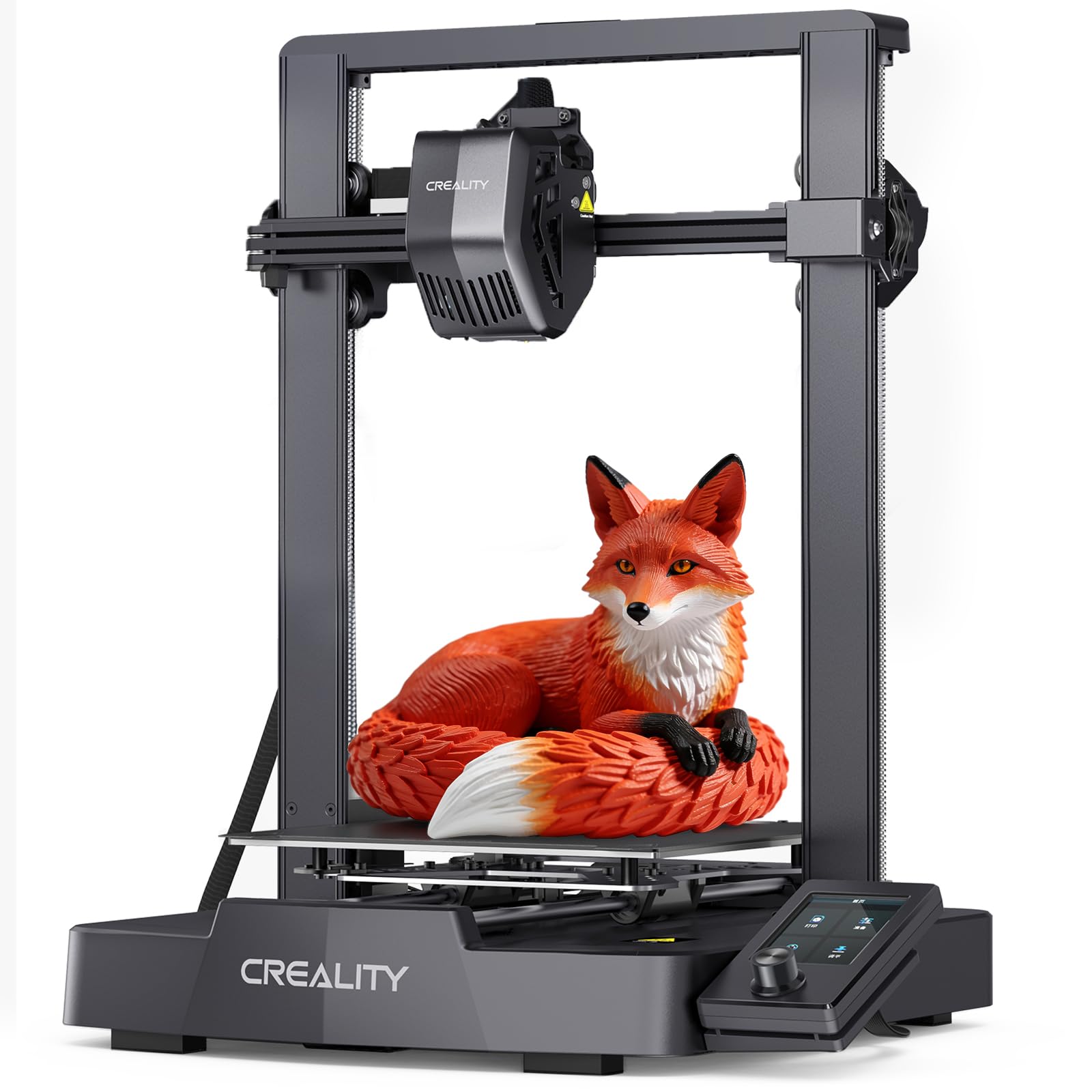
The one to buy if you want the Z-axis already solved and your first print today.
Most people asking for a Z-axis printing solution do not actually want to bolt on hardware — they want a machine that does not wobble in the first place. This is that machine for a first-timer. Dual synchronized Z-axis lead screws are built in, so the gantry is stabilized on both sides from the start. A CR Touch auto-leveling system handles the Z-offset calibration for you, which is the step that trips up most beginners on a cheap printer.
Around that sits a capable package. It prints at up to 250mm/s with 2500mm/s² acceleration, so a small part finishes in minutes rather than hours. A Sprite direct drive extruder (the motor sits right on the nozzle) feeds PLA, PETG, and TPU. You also get precision Y-axis linear shafts, a 32-bit silent mainboard, and a flexible PC spring steel build plate that lets a finished print pop off without a scraper. Buyers report it is easy to assemble and easy to use, and it works as a genuine on-ramp for a first printer.
The honest limit is scale. This is a small-format desktop printer, and the 250mm/s headline is the ceiling on this machine’s motion system, not a starting speed you should expect on carved detail work. It shines on prototypes and everyday parts; it is not a production machine.
Ideal first machine: a complete beginner who wants dual Z-axis stability and auto leveling without learning to tune a gantry.
Look higher if: you need big single-piece prints — this is a compact desktop format.
5. LONGER LK5 Pro 3D Printer, Dual Z-Axis
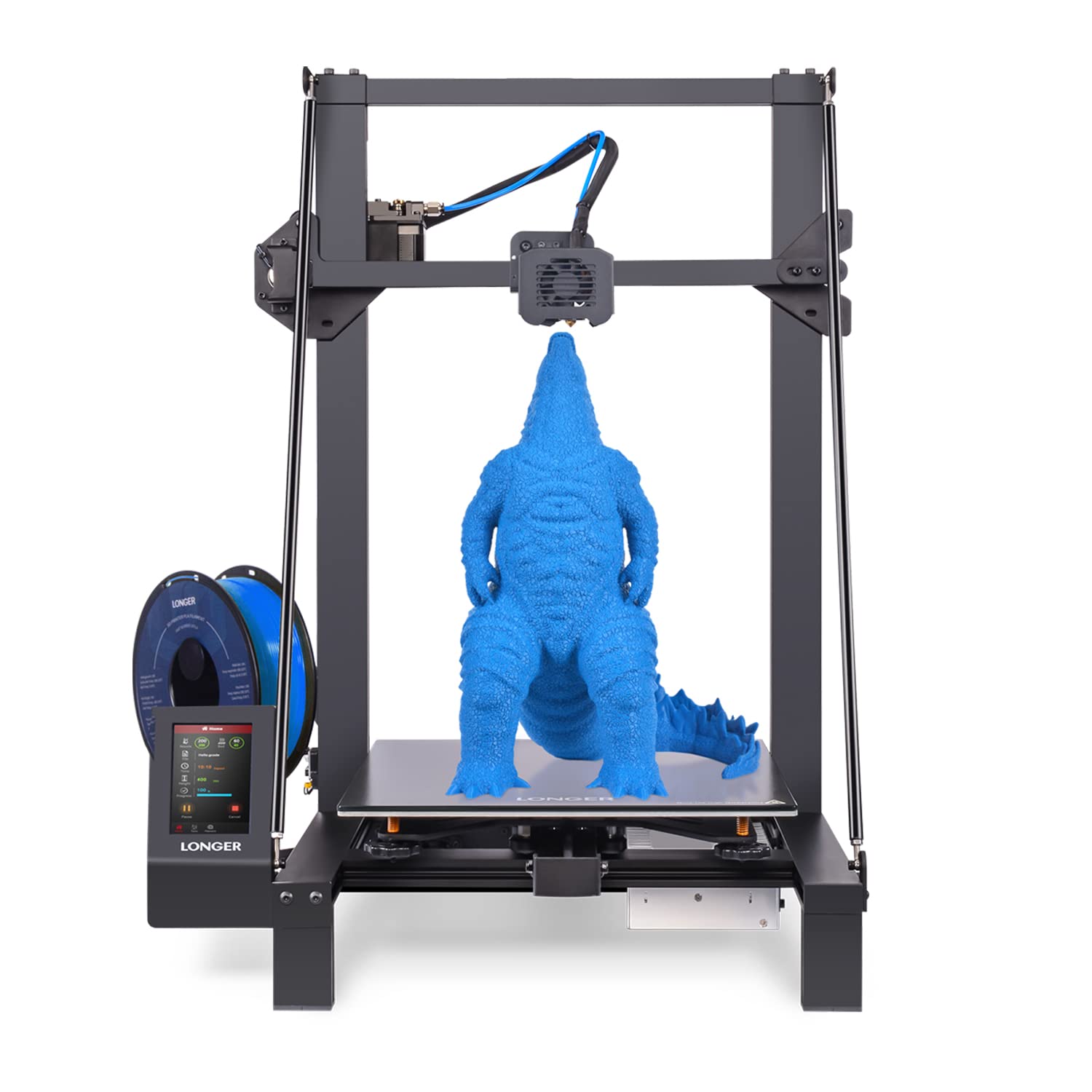
A tall build volume held stable by dual Z-axis screws and diagonal braces — the big-print value play.
Here the Z-axis is doing structural work, not just motion work. Dual Z-axis lead screws plus diagonal braces stiffen the gantry and cut vibration on a machine that reaches 300x300x400mm. That 400mm height is the whole point: it lets you print cosplay props, tall organizers, and oversized prototypes in one piece instead of gluing sections. You give up speed for that — 180mm/s against the 600mm/s of the Ender 3 V3 Plus, so the LOT is a stable big-print machine, not a sprint printer.
Long prints live or die on the small features, and this one has them. Filament runout and power-loss resume sensors pause the job and pick up from the last saved position. That is the difference between a 30-hour print surviving a power blink and starting over. A 4.3-inch color touchscreen handles control, and the machine arrives about 90% pre-assembled. TMC2209 silent drivers (stepper chips that smooth motor current) keep the motor noise down while you work nearby.
At 26.4 pounds it is 23.4 pounds heavier than the bare 200mm actuator — no surprise, since one is a whole printer and the other is a single Z module. The point is that this mass is what holds a tall gantry steady. Open-source firmware means you can edit the G-code as you learn.
The honest trade-off: big volume on a tall gantry always asks more of the Z-axis, and 180mm/s is deliberately conservative. That conservatism is a virtue for a beginner chasing a clean tall print, but anyone wanting speed should look at the V3 Plus.
Made for tall parts: cosplay, props, and large organizers where the 400mm height earns its keep.
Pass if: you need high-speed output — 180mm/s is the slow lane of this list.
6. Creality Ender 3 V3 Plus 3D Printer, CoreXZ

The speed machine that re-engineers the Z-axis with an optical shaft and belt to beat wobble at pace.
This printer’s Z-axis design is the story. Instead of relying on the gantry alone, it adds two support rods that connect the base to the top of the gantry, forming a rigid triangle that reduces Z-axis shaking at speed. The Z-axis itself uses a precision optical shaft driven by a synchronous belt, which the maker says smooths the layer pattern even when printing fast. With CoreXZ and dual Y motors, it hits 600mm/s and 20000mm/s² acceleration.
That speed is the headline and the reason to buy it over the LK5 Pro’s 180mm/s. The 300x300x330mm build volume lets you print life-size items in one piece, and the direct drive extruder adds a bolster spring and ball plunger for a claimed 1000h+ of clog-free extrusion. One-tap auto calibration covers Z-offset and leveling, and the tri-metal Unicorn nozzle has a hardened steel tip for long life and quick swaps.
What wins people over: print quality is the thing owners talk about most, with ease of use close behind — the prints come out good and the setup is quick.
What to weigh honestly: reliability splits owners. Many report it works flawlessly from the start, while others hit failed prints; the recurring Gripe is that this is a fast machine that rewards good settings and punishes sloppy ones. Respect the calibration and it shines; ignore it and it frustrates.
Reach for it if: you want the fastest large-format output of the printers here and will do the auto-calibration properly.
Think twice if: you want hands-off reliability — the fast motion system asks for attention.
7. Official IdeaFormer-3D IR3 V2 Conveyor Belt 3D Printer
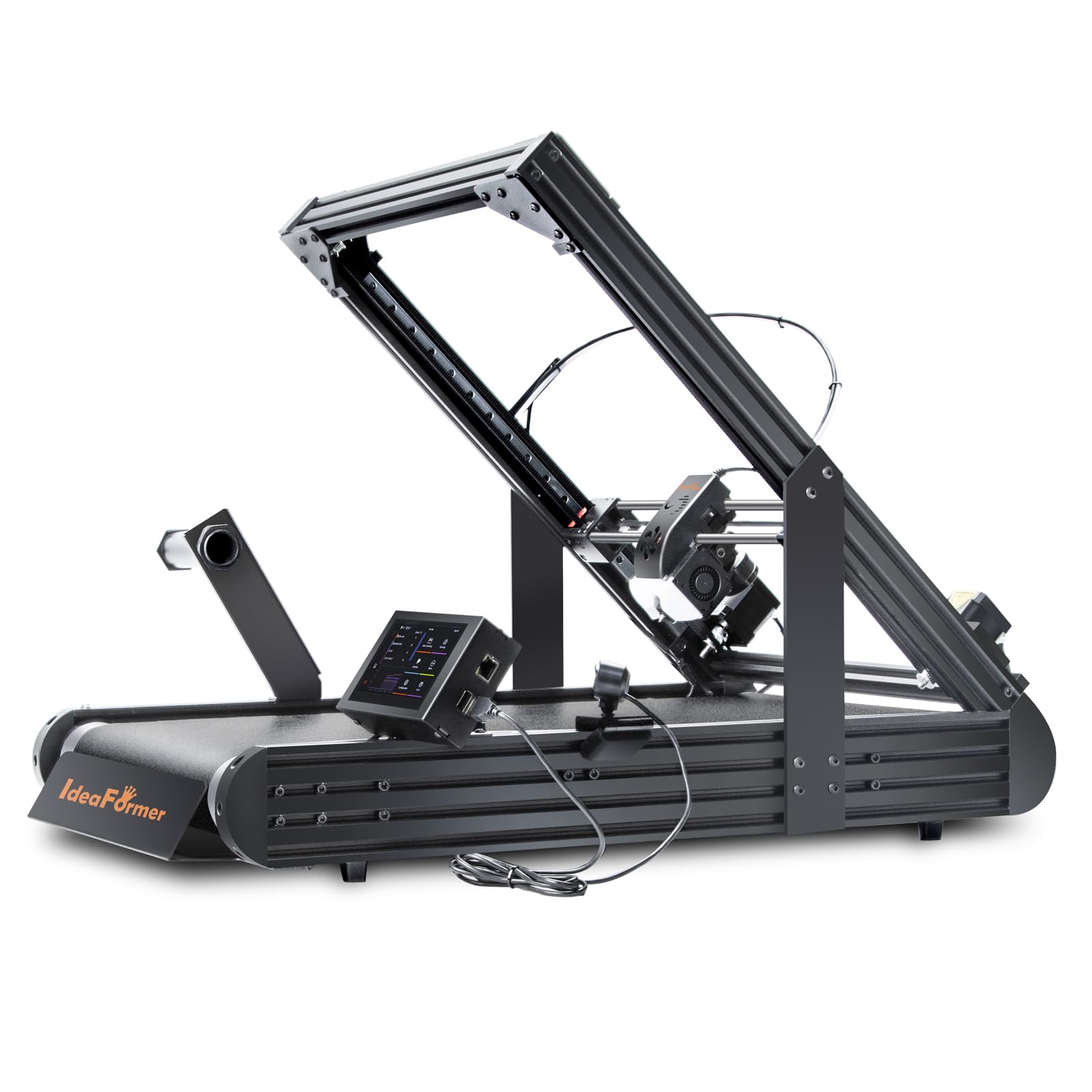
A conveyor belt that makes the Z-axis endless — print a part as long as you have filament for.
Every other machine here has a Z-height limit. This one’s is 250×250×∞mm. The rolling PEI-coated conveyor belt replaces the fixed gantry height entirely, so long models and batch runs print continuously without you stopping to clear a plate between jobs. If your work is cosplay armor, architectural models, or support-free overhangs, this changes what you can make on a single machine.
It runs on Klipper firmware with an integrated roller gearbox delivering up to 400mm/s, and a Y-offset strain sensor plus auto-leveling removes the calibration card and knob-screwing ritual. The metal belt handles PLA, PETG, ABS, TPU, ASA, and PP. At 44 pounds it is the heaviest unit in this roundup — 20.72 pounds heavier than the bare 200mm actuator — which tells you this is a bench-anchored production tool, not a toy you tuck on a shelf.
Print quality is the strength the community points to most, with setup ease close behind. The honest split is reliability and bed adhesion: some owners get great stick and flawless runs, others find the belt grip inconsistent and the performance short of the pitch. That is worth knowing before you commit to a belt format.
The pick for endless parts: production runs and long models where a fixed height is the real constraint.
Not the one if: you want simple, predictable desktop printing — the belt system asks you to learn its quirks.
Know the Specs
Effective Stroke Versus Overall Length
Effective stroke is the real travel your carriage gets — the hardware stack eats part of the advertised length. On these 4080U actuators the formula is overall length minus 77.15mm, which is why a 249mm module delivers 122.85mm of travel and a 399mm module delivers 272.85mm. Always plan around the effective figure, never the screw length. It is the number that decides whether a printed part physically fits in your machine.
Lead And The 8mm Turn
Lead is how far the screw advances the carriage per full rotation, and these units all run an 8mm lead — the screw moves 8mm in one turn. That pitch balances speed with smooth travel, and it is why the motion feels steady rather than jerky. If you ever swap to a finer pitch, the trade is slower Z movement for finer layer control. The coupling matters just as much: a flexible D20 L25 handles the 8mm to 6.35mm shaft mismatch and forgiving small alignment errors.
Dual Z-Axis Stability
Dual synchronized Z-axis lead screws lift the gantry from both ends, which is what stops the sag and lean a single-side screw can cause on a tall frame. On the Ender 3 V3 SE this is already built in; on an existing Ender 3 it is what the MGN12 rail kit adds. On a tall machine like the LK5 Pro, dual Z is paired with diagonal braces to keep a 400mm gantry from flexing. More vertical mass means more need for two screws and stiffening.
Belt And Optical Shaft Z
A belt-driven Z-axis, as on the V3 Plus, uses a synchronous belt on a precision optical shaft to smooth layer patterning at high speed. An infinite belt system, as on the IR3 V2, replaces the fixed height with a rolling conveyor so the print keeps going in Z with no ceiling. Both approaches trade a conventional lead screw’s simplicity for a specific benefit — speed in one case, endless length in the other.
Common Questions
Will the MGN12 rail kit fit my Ender 3 Pro?
What is the difference between overall length and effective stroke on these actuators?
Do these Z-axis actuators come with a motor?
Can I add dual Z-axis to a printer that only has one lead screw?
How is a belt printer’s infinite Z-axis different from a tall lead screw?
Which is faster, the Ender 3 V3 Plus or the LONGER LK5 Pro?
How much does each 4080U actuator weigh?
Do I need auto leveling on a Z-axis printer?
What lead do these screw actuators use, and does it matter?
Can a belt printer like the IR3 V2 handle materials my lead-screw printer cannot?
The Bottom Line
For most buyers, the pick is the 350mm 4080U Linear Actuator Kit. It pairs the longest effective stroke here (272.85mm) with a 4.5+ star rating across 50+ reviews. Its 3.05-pound body anchors firmly in a tall DIY build. If your real goal is stopping gantry wobble on an Ender 3, jump to the MGN12 rail kit. For a complete machine with the Z-axis already solved, the Ender 3 V3 SE gets a beginner printing fastest. The IdeaFormer IR3 V2 is the pick the moment your parts outgrow a fixed height.
How we choose
We do not accept paid placement. Every pick is matched to a real buyer and a real use-case; we do not hands-on test units.
Sources
Specifications: manufacturer listings and product documentation. Review insights: verified customer reviews, as of November 2026. Pricing: not shown on this page (it changes often); check the current price via the retailer link.
As an Amazon Associate, Tactical Gear Guy earns from qualifying purchases. This does not affect which products we feature.