Specs are compiled from manufacturer listings and verified buyer reviews and can change over time — please confirm the key details on the product page before buying.
If your viewers can hear your keyboard louder than your voice, you need a microphone with a tighter pickup pattern — and that is the whole game here. The picks below are all plug-and-play USB mics, meaning they connect with a single cable and need no separate audio interface, and every one of them is chosen for how it treats your voice on a live YouTube gaming stream rather than how it looks on a spec sheet.
This guide is built by comparing the manufacturers’ published specifications and the patterns across verified customer reviews, so you get each pick’s real strengths and trade-offs instead of marketing spin.
Some mics here use a cardioid pattern (picking up sound mainly from the front) while others use supercardioid (a tighter focus on the front that rejects more from the sides and rear). Both help, but the difference matters when a mechanical keyboard sits inches from the capsule. The picks below sort out which youtube gaming mic actually keeps your voice in front and your room noise behind it.
Top Picks


How To Choose The Best YouTube Gaming Mic
The mic that sounds great in a quiet bedroom can sound terrible in a room with a mechanical keyboard, a PC fan, and a roommate. So the first question you should answer is not “which mic is clearest” — it is “which mic ignores the most of my room.” Everything below flows from that.
Start with the pickup pattern, not the brand
A pickup pattern is the shape of the space the mic listens to. A cardioid pattern (heart-shaped, front-focused) picks up your voice while pulling back on the sides and rear. A supercardioid pattern is narrower still, aiming harder at the front and rejecting more from the sides — which is what you want when your keyboard sits just off to the left. Neither fixes a room that echoes badly, but the tighter pattern buys you a lot more forgiveness.
Decide if you need onboard controls or software
Onboard controls — a gain knob, a mute pad, a headphone jack — let you fix your levels mid-stream without alt-tabbing. Software gives you deeper shaping (EQ, filters, noise gates) but adds a step before you go live. If you stream fast and often, hardware knobs save you real time. If you record and edit, software depth usually wins.
Check the stand and mount situation before you buy
A mic on a desk stand picks up every bump and keystroke through the desk surface. A boom arm (an adjustable arm that clamps to your desk and holds the mic in the air) moves the mic away from those vibrations. Several picks here ship with a boom arm in the box. Others use standard 3/8-inch or 5/8-inch threads, which are the two common mounting sizes, so you can add an arm later without buying a new mic.
Side-by-Side Comparison
| Model | Best For | Pickup Pattern | Connection | Stand / Mount | Amazon |
|---|---|---|---|---|---|
| HyperX Quadcast 2 Frost★ Best Overall | Overall pick for streamers | — | USB Type-A | Removable shock mount | Amazon |
| HyperX SoloCast 2Best Value | Tight budgets, simple setups | Cardioid | USB Type-C | Tiltable weighted base, 3/8″ and 5/8″ threads | Amazon |
| Razer Seiren V2 XTyping Killer | Noisy rooms with typing | Supercardioid | USB | Desk stand with built-in shock absorber | Amazon |
| Razer Seiren V3 Mini | Small desks, compact builds | Supercardioid | USB Type-A | Tiltable stand, detachable for boom arm | Amazon |
| FIFINE AmpliGame AM8PROT | Full kit on a mid budget | Cardioid (XLR mode) | USB-A/USB-C and XLR | RGB boom arm included | Amazon |
| FIFINE AmpliTank K688T | Podcast-style desk rigs | Cardioid | USB and XLR | Heavy-duty boom arm included | Amazon |
| SteelSeries Alias | Big capsule, deep software | Cardioid | USB Type-C | Desktop stand or boom arm | Amazon |
| Sennheiser Profile Streaming Set | Warm voice, studio feel | — | USB | Boom arm included | Amazon |
| Audio-Technica AT2020USB-X | Clean studio-grade capture | Cardioid | USB Type-C to USB-A | Custom desk stand included | Amazon |
Detailed Reviews
1. HyperX Quadcast 2 Frost
Our pick — 4.5+★ from 450+ verified ratings; the strongest balance of quality and price.
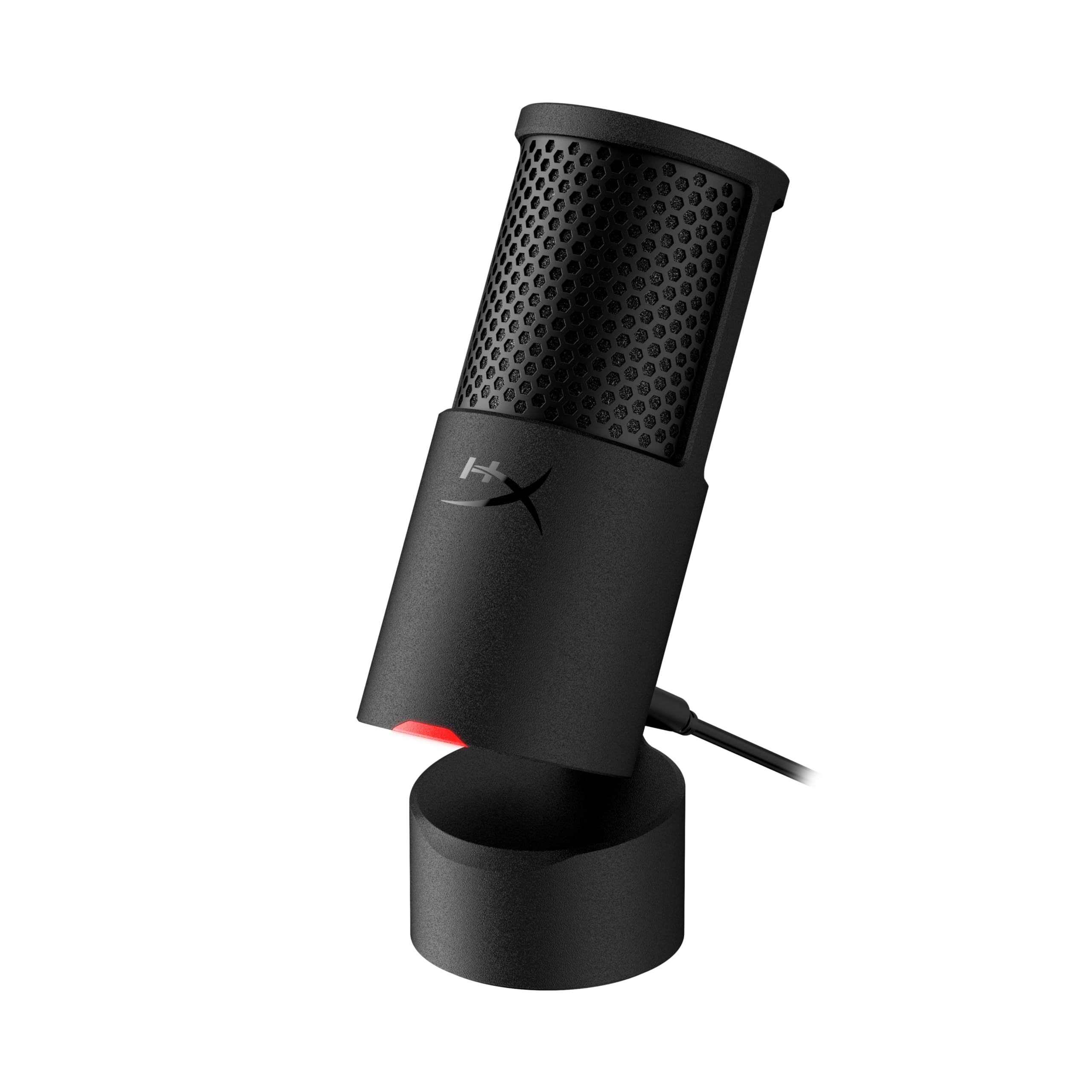
An aluminum-bodied USB condenser with a removable shock mount and tap-to-mute, built to keep desk knocks out of your stream.
What wins people over on the Quadcast 2 Frost is the raw microphone quality — it is the single most-discussed strength of this mic, and the sound that comes out of the aluminum body is full and clean without any processing. The housing is listed as aluminum, which is a real step up from the plastic shells on most mics in this price range, and it is a big part of why the whole thing feels like broadcast gear rather than a toy.
The onboard controls are the quiet luxury here. You get LED lighting, on-board controls, and a removable shock mount — that last part is a flexible cradle that isolates the capsule from desk bumps, so a slammed energy drink does not become a thud in your stream. Tap-to-mute on the top of the mic means you can silence yourself in a fraction of a second when a raid starts going badly. Everything runs over a single USB Type-A cable into a laptop or gaming console, so there is no interface, no XLR cable, and no setup ritual.
The one honest catch is the lighting. It is the aspect buyers push back on hardest, and the specific gripe is that you cannot change the light colour — so if you planned to match your stream’s RGB theme with a custom shade, that plan will not work. Treat the glow as a fixed accent, not a customisable light show. At 4.5+ stars across 400+ owners, the crowd verdict still lands firmly on the positive side, and the buyer consensus calls it the best gaming mic outright.
What earns the top spot
- Aluminum housing instead of the usual plastic shell, so it feels built to stay on your desk for years
- Removable shock mount kills desk knocks and keyboard thumps before they reach your broadcast
- On-board controls and tap-to-mute mean no alt-tabbing to fix your level mid-stream
- One USB Type-A cable to a laptop or console — no audio interface needed
Where it asks you to compromise
- The light colour is fixed, so this is not the mic for someone who wants to theme their RGB
- It is the heaviest, most desk-hungry of the picks here and is built for a permanent spot
Go for it if: you want one serious mic that handles voice, gaming chat, and podcast duty without extra gear — the aluminum body and shock mount do the heavy lifting.
Think twice if: your stream look depends on a specific light colour, because this one glows in a fixed shade.
2. HyperX SoloCast 2
A 24-bit/96kHz cardioid USB condenser with a foam pop filter, weighted tiltable stand, and 3/8-inch and 5/8-inch arm threads built in.
The number that matters here is 24-bit / 96kHz. Bit depth is how much detail the mic captures at each instant, and sampling rate is how many times a second it does it — 24-bit at 96kHz is studio-grade detail, and it is why voices come through full and rounded rather than thin and scratchy. Add the cardioid pattern, which listens mainly from the front and pulls back on the sides and rear, and you get a mic that tracks your face instead of your whole room.
What actually sells the SoloCast 2 is how much is built in. There is a foam pop filter on the front to break up hard “P” and “B” blasts, a tiltable stand with a weighted base, and mic-arm threads in both 3/8-inch and 5/8-inch sizes — the two standard thread sizes — so it can drop straight onto a boom arm later. A tap-to-mute pad with a red LED tells you at a glance whether you are live or silent, and the USB-C to USB-A cable keeps it plug-and-play.
HyperX’s NGENUITY software adds high-pass and low-pass filters plus voice enhancement, which is handy if your room rumbles. The honest caveat is noise handling — noise cancellation is the aspect buyers are split on, and the 79 db audible noise figure means this mic can pick up more room than you would like in a loud space. In a quiet bedroom it is superb; next to a screaming PC fan, lean on the software filters. One small bonus: it handles dictation input on a desktop computer too, so it earns a second life outside streaming.
Sharpest detail for the money: 24-bit / 96kHz capture is genuinely uncommon at this tier, and the built-in pop filter, stand, and dual-size arm threads mean you do not need to buy a single accessory to start streaming.
Room-noise reality check: the 79 db audible noise spec and the mixed feedback on noise cancellation mean a noisy room needs the free NGENUITY filters switched on. It is the lightest, simplest pairing mic here — compact enough that the base barely claims desk space.
Best for: a first-time streamer on a tight budget whose desk is small and whose room is reasonably quiet.
Not the one for: a setup with a roaring fan and a roommate, where the tighter-patterned Razer Seiren V2 X handles clutter better.
3. Razer Seiren V2 X
A 25mm supercardioid condenser that rejects typing and mouse clicks from the sides and rear.
If your keyboard is the enemy, this is the pick built to fight it. The supercardioid pattern is designed to suppress noise from the back and sides, and Razer specifically cites typing and mouse clicks as the things it leaves behind. That narrow focus is the whole reason to choose the V2 X over a wider-pattern mic. The 25mm condenser capsule (the part that actually turns your voice into a signal) adds sensitivity and accuracy, especially on higher frequencies — you get the crispness of your consonants without sounding brittle.
Two features then keep a live stream from falling apart. The integrated digital limiter automatically prevents clipping and peaking, so a sudden shout does not turn into a distorted mess in your viewers’ ears. A built-in shock absorber dampens knocks and bumps on the desk before they reach the audience. There is also a headphone jack for mic monitoring — plug a headset in and hear yourself in real time — plus gain and mute buttons right on the body, so no software detour is needed to fix your level mid-game.
The trade-off is compatibility. That is the aspect buyers are split on, and it is worth reading the listing carefully for your specific device before you pull the trigger. On a standard Windows PC this is a smooth, reliable microphone that owners compare favourably to much pricier studio brands. On an unusual setup, check first. Sound quality is the second most-discussed strength, which tells you the core job — voices that sound clear rather than picked-up-and-distant — is being done well.
The clatter solution: the supercardioid pattern and a 78 db audible noise figure combine to keep room clutter down, and the limiter makes an angry raid-night yell still sound controlled rather than cracked.
One detail to check: this mic is fussier than the others here about what it plugs into, so confirm your console or PC is a known good match before buying.
Pick this if: your mechanical keyboard lives right next to the mic and you want it silenced without a noise gate in software.
Look elsewhere if: you stream from an offbeat device, because compatibility is where this one draws its line.
4. Razer Seiren V3 Mini

A 3.59 x 3.59 x 6.38-inch supercardioid USB condenser with tap-to-mute and a detachable stand for tight desks.
Razer’s own dimensions tell the compact story: this mic measures 3.59 x 3.59 x 6.38 inches, which is a fair bit smaller than the 4.02 x 5.28 x 9.51 inches of the HyperX Quadcast 2 Frost. On a narrow desk shared with a monitor, keyboard, and mousepad, that difference is the whole argument. The white finish is also a straight upgrade if your setup is a light-coloured build rather than the usual black.
Small does not mean dumb here. A custom condenser capsule captures detail, especially at higher frequencies, and the supercardioid pattern keeps the focus on your voice while pushing typing and mouse clicks back. The tap-to-mute sensor on top silences you instantly, with an LED indicator so you can see your status at a glance. A built-in shock absorber in the tiltable stand dampens knocks, and the whole stand detaches when you want to move to a boom arm. It runs over USB Type-A into a PC or laptop, and it works with Discord, OBS Studio, and XSplit with no drivers at all.
Deeper setup lives in Razer Synapse, which lets you go from studio-level sample rates to separate playback and audience volume mixes. Its frequency range runs 20Hz to 20KHz, covering the span of human hearing. The honest note: a capsule this small has to work harder than a big one, and if you want a thick, radio-announcer low end, the Audio-Technica or Sennheiser picks deliver more body. As a small, quiet-room streamer, though, this is the tidy answer.
Desk-space arithmetic: under half a foot of footprint means it squeezes between a monitor and a mid-size keyboard without crowding the mouse.
Setup reality: no drivers, no software required, and it hooks straight into OBS and Discord — you can be live within minutes of unboxing.
Right for you if: a slim desk and a clean-looking white build matter as much as sound quality.
Pass it by if: you want a deep, full low end for a big podcast-style sound — the larger capsules here do that better.
5. FIFINE AmpliGame AM8PROT
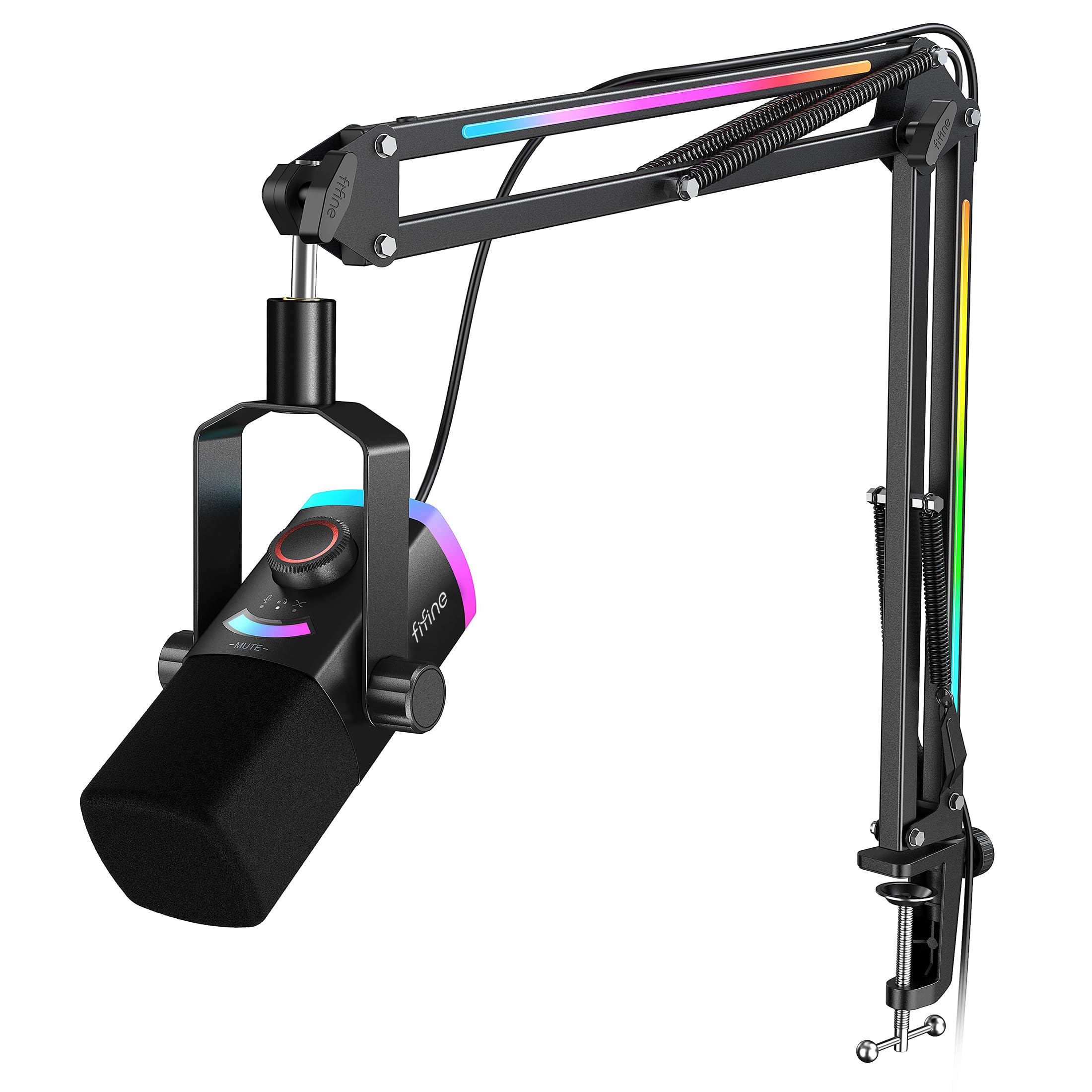
A dynamic XLR/USB mic kit with an RGB boom arm, C-clamp, 8.2ft cable, and windscreen in one box.
Buy the AM8PROT and you are not buying a microphone — you are buying a broadcast desk. The kit includes a dynamic microphone with an RGB boom arm, a C-clamp, and an 8.2ft USB-C to USB-A/C cable long enough to reach from the table edge to the back of your PC. The boom arm has maximum 30 inches of extension and multi-angle joints, which frees up desk space and keeps the mic off the surface where keyboard chatter lives. The arm itself is thickened to cut wobble noise, and a foam windscreen breaks up plosives — the harsh breath pops on “P” and “B” sounds.
The mic is a dynamic capsule with a cardioid pattern, and it can run over plug-and-play USB-A or USB-C to bounce between a desktop PC, a PS4, and a USB-C laptop, or over XLR when you want to feed an audio interface. Its XLR mode delivers 48kHz/24bit audio with a 115dB SPL rating and 75dB signal-to-noise ratio, which is the measure of voice against background hiss — the higher the better. There is a 3-in-1 knob for gain and headphone volume, plus a mix control to balance game audio against your commentary and a tap-to-mute pad with an LED panel to dodge hot-mic moments.
Then there is the RGB. The mic and boom arm offer 240+ colour combinations with beat modes that pulse to your game’s soundtrack. The FIFINE Genie desktop app adds independent mix channels, EQ shaping, and lighting sync across FIFINE gear. What buyers call out most is the dollar-to-sound ratio — this kit sounds richer than its tier suggests, and the plug-and-play USB-C connection means no fuss on day one. One thing to know: the dial and RGB features only work over USB, not XLR, so plan your setup around that.
The full-rig maths: mic, arm, clamp, cable, and windscreen all in one package means you are not hunting for a separate boom arm and 5/8-inch adapter on day one.
Dual-connection flexibility: start on plug-and-play USB and graduate to XLR with an interface later, so the mic grows with your channel.
Reach for this if: you want a complete streaming rig with lighting and a boom arm in a single purchase, without assembling parts.
Know before you buy: the knob and RGB only function over USB, so an XLR-only rig loses the fun extras.
6. FIFINE AmpliTank K688T

A dynamic cardioid XLR/USB mic on a metal boom arm rated to hold 2 kg, with a shock mount and windscreen.
What sets the K688T apart is the hardware around the mic. The boom arm is made of sturdy metal and rated to bear up to 2 kilograms, which is a lot of holding power for a mic arm — it grips the dynamic mic securely and cuts the collisions and vibrations that cause thumps. You can stretch it 180° vertically and 135° horizontally, so positioning it over your keyboard without blocking your monitor is genuinely easy. A shock mount and windscreen on the mic itself add another layer, suppressing the harsh noise from plosive bursts and low-frequency vibrations.
The capsule is dynamic with a cardioid pattern, and it brings a 130dB SPL rating — SPL is how loud a sound the mic can take before it distorts, so a high figure means you can shout without the signal breaking up. Background computer fans and hard drive noise get pushed back, which is the whole point of a dynamic mic in a gaming room. You can connect over plug-and-play USB for instant recording, or switch to XLR when you want to feed an audio interface or mixer and push the sound further. A tap-to-mute button and a gain knob handle levels without software, and a headphone monitoring jack with its own volume knob lets you hear yourself while you record.
Sound quality is the strongest thing about this rig, and the versatility of dual XLR and USB connections gets approving nods. The honest notes: adjustments, ergonomics, and noise level are the aspects where opinions split, so plan on a little fiddling to find the right angle and gain setting. The metal build is also weighty — this is a permanent desk rig, not something you toss in a bag.
The heavy-metal argument: a boom arm rated to 2 kg and a dynamic capsule with 130dB SPL means the K688T physically holds steady and takes loud voice peaks without flinching.
The adjustment caveat: mixed feedback on ergonomics and adjustability suggests you should budget half an hour to dial in the arm angle and gain before you go live.
Best match for: a YouTuber who records long sessions at a fixed desk and wants a solid metal arm plus dual-connection flexibility.
Not for you if: you move your gear between rooms — the heavy-duty arm and metal build are meant to stay put.
7. SteelSeries Alias USB Microphone

A cardioid USB-C condenser with a capsule SteelSeries calls up to three times bigger than rival mics, plus free Sonar software.
The headline here is the capsule size. SteelSeries builds the Alias around a capsule it describes as up to three times bigger than other mics, and a bigger capsule generally captures a wider range of vocals with more body — you get more of your voice, less of your room. The cardioid pattern keeps the focus in front of you. It runs into a PC over USB Type-C into a metal enclosure, and the 60 db audible noise figure is the lowest printed figure in this entire roundup, which points to a mic that is quiet at idle.
The Alias is also a software play. Sonar, SteelSeries’ free audio suite, handles mixing, easy drag-and-drop app routing, and AI noise cancellation — so game audio, chat, and voice all get their own channels without a hardware mixer. On the mic itself there is LED monitoring that shifts green-to-red so you can check levels and mute status at a glance, plus an RGB downlight that washes the desk from below. An integrated shock mount reduces unwanted vibrations, and it works with the included desktop stand or a boom arm sold separately.
Where to be careful: noise cancellation, build quality, and value all get mixed reads, and handling noise is the specific complaint — so mount it on a firm surface or an arm and let the shock mount do its job. The tone of your recordings is the strength people point to most. For a YouTuber who wants their voice to sound big and their software to be free, the Alias is a strong mid-premium call. For someone who wants knobs and manual control instead of a software suite, look elsewhere.
Why streamers shortlist it
- A capsule up to three times bigger than others means more vocal range, not a thin, nasal sound
- Sonar software includes AI noise cancellation and app routing at no extra cost
- Green-to-red LED monitoring makes your level obvious mid-stream
- Metal enclosure and an integrated shock mount hold up on a busy desk
Where opinions divide
- Handling noise is the recurring gripe — bump it and you may hear it, so good mounting matters
- Value is the mixed-read aspect, meaning the price feels high if you do not use Sonar
Suits you if: you want a big, full voice plus a free routing suite that keeps game audio and chat separate.
skip it if: you would rather twist a physical knob than configure app channels in software.
8. Sennheiser Profile

A cardioid USB condenser tuned for warm, natural voice, bundled with a boom arm, 3 m USB-C cable, and pouch.
If your voice sounds thin on stream, this is the mic that fixes it. Sennheiser tunes the Profile for a natural, warm sound that accents the body and presence of the human voice, which is exactly the character that flatters a gaming commentary track. The audible noise figure of 25 db is the quietest listed spec here by a wide margin, and audio sensitivity is rated at 125 db. The cardioid pattern, metal enclosure, and USB connection mean it slots cleanly into a PC or laptop setup.
The selling point most people land on is control at your fingertips. There are hardware controls on the body, so you can adjust your sound with the twist of a dial instead of diving into software — a real relief in the middle of a live moment. Sennheiser’s own pitch is that one simple connection gets you the sound you want, and it lines up with what buyers report. The Profile Streaming Set also includes a boom arm with a sleek modern design for optimal mic positioning, plus a 3 m USB-C cable and a mic pouch in the box.
What wins people over most is quality, and the natural, warm tone is the second big strength. Build quality and ease of setup both draw positive notes. Two things to weigh: the whole set comes in at 1628 g, so it is a substantial piece of desk furniture and not something to move around. And this is a voice-first mic — for loud, boomy game-chat yelling the dynamic mics here take punishment better. For clear, pleasant commentary, it is a refined choice.
The 25 db quiet: the lowest audible noise figure in the lineup means a clean, quiet background behind your voice, and the 125 db sensitivity means the mic hears small inflections as well as big ones.
Hardware-first soul: the twist-of-a-dial control philosophy is a genuine relief on a live stream, though the 1628 g set is meant to stay exactly where you put it.
Ideal for: a YouTuber with a naturally soft voice who wants a warm, studio-toned sound and hardware knobs rather than a software detour.
The mismatch: if you are a loud, excited shouter on party chat, a dynamic capsule rides those peaks better than a condenser this refined.
9. Audio-Technica AT2020USB-X Cardioid Condenser USB Microphone

The voiceover favourite with a smooth frequency curve and a silent touch mute.
This is the mic podcasters and voiceover artists reach for, and the reason sits in its sonic character. The AT2020USB-X delivers a smooth, extended frequency response that Audio-Technica says is suited to podcasting, home studio recording, field recording, voiceover, and on-stage use. A high-resolution AD converter (the chip that turns the analog signal into digital) records at 24-Bit/96 kHz, which is why voices come out clear and natural rather than flat. The cardioid directional pickup minimises background noise while keeping your voice at the centre.
The everyday usability is what makes it a streamer’s pick too. A built-in headphone jack lets you monitor directly from the mic, so you hear what your viewers hear. The soft-touch capacitive mute button (a touch pad rather than a clicky switch) silences you silently, and the two-state LED ring lights blue when powered and red when muted — an instant visual check. It all sits in a stainless steel enclosure with a custom desk stand and a USB-C to USB-A cable plus a USB-A to USB-C adapter in the box.
What wins people over is the sound quality, with good voice pickup called out specifically, and Mac users report it works cleanly there too. The honesty comes on the reliability side: this is the aspect with the widest split in opinion, and while most owners are happy, a small handful report a failure within a year. That is not a pattern so much as a reminder to buy from a seller that handles warranty swaps without drama. At a premium price, the value question is real — but if you want a mic your voice will grow into, this is it.
Studio-grade clean: 24-Bit/96 kHz AD conversion and a smooth extended frequency response are why this mic sounds easily natural rather than processed.
Watch the warranty: reliability is the mixed-read aspect, so buy from a seller known for easy replacements — the sound is worth it, but do not gamble on the paper trail.
Made for: creators who want one mic that will handle commentary now and podcast or voiceover work later without an upgrade.
The caution: at a premium price, pair it with a seller who honours warranty claims, because a small number of units stop working inside a year.
Know the Specs
Pickup pattern: cardioid vs supercardioid
A pickup pattern is the shape of the space a mic listens to. Cardioid is heart-shaped and front-focused, pulling back on the sides and rear. Supercardioid is narrower and rejects more from the sides — the one to choose when a mechanical keyboard sits just beside the mic. A tighter pattern is not a guarantee of silence, but it buys you room to be sloppy with placement.
Sample rate and bit depth
Bit depth is how much detail the mic captures at each instant; sampling rate is how many times a second it does that. 24-bit / 96kHz is studio-grade detail, and it keeps your voice full rather than thin. Most of these mics offer it, so use it as a baseline, not a differentiator. What makes more difference is how quiet the mic is at idle, which is what the audible noise figure measures.
Audible noise and what the number means
The audible noise figure, written in db, describes how much self-noise the mic produces. Lower is quieter: the Sennheiser Profile’s 25 db sits well below the 78–80 db figures seen elsewhere here, which points to a cleaner floor on quiet commentary tracks. High noise in a loud room is not fatal — you can filter it in software — but a low figure means less work later.
Shock mounts, boom arms, and handling noise
A shock mount is a flexible cradle that isolates the capsule from bumps. A boom arm is an adjustable arm that clamps to the desk and holds the mic in the air, away from the desk surface where keystrokes and knocks travel. Mics that ship with only a desk stand are more prone to picking up that contact noise, so if the included stand is thin, plan for an arm. The 3/8-inch and 5/8-inch threads are the standard mounting sizes, and several picks here offer both.
Common Questions
Will a gaming mic pick up my mechanical keyboard clicks?
Do I need an audio interface for a USB gaming mic?
Is a dynamic mic better than a condenser mic for streaming?
What does 24-bit / 96kHz actually mean for a gaming mic?
Will these mics work with OBS and Discord on a Mac or PC?
Which mic mounting thread sizes do I need for a boom arm?
Does a bigger mic capsule actually sound better on stream?
Should I buy a mic with a boom arm included or add one later?
How important is the audible noise figure?
Can I use a gaming mic for podcasting or voiceover later?
The Bottom Line
For most people shopping for a youtube gaming mic, the pick is the HyperX Quadcast 2 Frost — its aluminum build and removable shock mount make it the most complete all-rounder on this list, and it holds the top rating here at 4.5+ stars. If your keyboard is the problem rather than your voice quality, the Razer Seiren V2 X is the smarter buy: its supercardioid pattern is built to keep typing and mouse clicks out of your broadcast. And if you want the whole broadcast desk in one box, boom arm and lighting included, the FIFINE AmpliGame AM8PROT delivers the most gear per dollar. The crowd favorite among these is hard to argue with — the Quadcast 2 Frost’s 4.5+ stars across 400+ owners is a strong signal, but every pick here earns its place for a specific kind of gaming desk, and matching the pattern to your room matters more than chasing the biggest number.
How we choose
We do not accept paid placement. Every pick is matched to a real buyer and a real use-case; we do not hands-on test units.
Sources
Specifications: manufacturer listings and product documentation. Review insights: verified customer reviews, as of November 2026. Pricing: not shown on this page (it changes often); check the current price via the retailer link.
As an Amazon Associate, Tactical Gear Guy earns from qualifying purchases. This does not affect which products we feature.