Specs are compiled from manufacturer listings and verified buyer reviews and can change over time — please confirm the key details on the product page before buying.
Here is what you actually need to know before you buy: an XQD card reader lives or dies on one thing — whether the 10Gbps models hand you a real speed jump over the 5Gbps ones, and whether the slot you plug your card into actually reads it. Most of the disappointment in this category comes from readers that look right on the listing but fail on an XQD card, or from slim aluminum bodies that run hot and drop the connection mid-transfer. This guide sticks to readers that support the XQD format, lays out each one’s real trade-offs, and tells you which fits a Sony G-series card, a Lexar 2933x, or a mixed multi-camera bag.
This guide is built by comparing the manufacturers’ published specifications and the patterns across verified customer reviews, so you get each pick’s real strengths and trade-offs instead of marketing spin.
The picks below sort by speed, slot count, and how they behave under a long offload. The fastest way to cut that list down is to check one thing first: which card you shoot. Here is the shortlist that respects your xqd card reader needs without overspending on slots you will never fill.
Top Picks


How To Choose The Best XQD Card Reader
You are not shopping for a gadget here — you are shopping for a shorter wait between the shoot and the edit. The right reader empties a full XQD card in one steady pull and ships with the cable your laptop needs. The wrong one disconnects halfway through a big copy. So start with your cards, not the listing photos.
Match the slot to the card you actually own
XQD cards come in flavors like Sony’s G-series and M-series, plus Lexar’s 2933x and 1400x Mark cards. A reader that names those families is telling you it was built around them. The safest design is a single slot shared between CFexpress Type B and XQD, with a separate SD slot beside it — that covers a modern camera body and an older backup without an adapter.
Treat the headline speed as a ceiling, not a promise
A 10Gbps reader (that is ten gigabits per second, roughly the fastest a USB 3.2 Gen 2 port can push) has a higher ceiling than a 5Gbps one, so it hands you more headroom before your card becomes the bottleneck. But the card, the cable, and your computer’s port each cap the real number. If you are offloading a Sony XQD card from a mirrorless body, a 10Gbps reader is the one to buy so the reader is never the weak link.
Plan for heat on long dumps
Fast transfers generate heat, and heat is what stalls a big offload or drops the connection. An aluminum alloy shell spreads that heat instead of trapping it. Readers with a slim body and a metal case tend to hold steady through a long copy better than plastic ones.
Check the cable and the port on your device
USB-C and USB-A are not the same plug. A reader that ships both a USB-C-to-C and a USB-A-to-C cable saves you a dongle hunt. If you offload straight to a phone or tablet on location, confirm the reader supports Android or your tablet’s system, because a reader that only speaks Windows and Mac will leave you stuck.
Side-by-Side Comparison
| Model | Best For | Transfer Speed | Card Slots | XQD Support | Amazon |
|---|---|---|---|---|---|
| Rocketek 10Gbps CFexpress Type B / XQD / SD Reader★ Best Overall | Most buyers — one reader for CFexpress B, XQD, and SD | 10Gbps | 5-in-1 (dual slot) | Sony XQD G/M, Lexar 2933x/1400x | Amazon |
| Aiyingmei 5-in-1 XQD SD/TF Reader (USB-C)Budget Pick | Budget offload straight to a USB-C phone or tablet | 5Gbps | 5-in-1 (dual slot) | XQD card slot | Amazon |
| VELOGK 3-in-1 CFexpress / XQD / SD ReaderBackup Specialist | Backing up one card straight to a second card | 10Gbps | 3-in-1 (dual slot) | CFexpress Type B & XQD shared slot | Amazon |
| Rocketek 8-in-1 Multi XQD Reader | Mixed card libraries across several cameras | 10Gbps | 6-in-1 (XQD, SD, TF, CF, MS, XD) | Sony G/M, Lexar 2933x/1400x | Amazon |
| MTAKYI CFexpress Type B / XQD / SD Reader | Pocket-carry reader with both cables in the box | 10Gbps | 2 (CFexpress B/XQD + SD) | CFexpress Type B & XQD shared slot | Amazon |
| Rocketek 3-in-1 CFexpress B / XQD / SD (10Gbps) | Vloggers and travelers who want dual LED status lights | 10Gbps | 3-in-1 | CFexpress Type B & XQD shared slot | Amazon |
| Rocketek 3-in-1 CFexpress B / XQD / SD (USB-A/C) | Shooters who want a built-in USB-A/USB-C cable | 10Gbps | 3-in-1 | CFexpress Type B & XQD shared slot | Amazon |
| Rocketek 8-Slot All-in-One Reader | Multi-camera studios clearing several cards at once | 10Gbps | 8 slots | CFexpress B/A, XQD, SD, TF, MS, XD, CF | Amazon |
| Lexar Professional Workflow HR1 | Desktop editing stations built around a hub setup | USB 3.0 | 4-in-1 | XQD, SDXC, SDHC, CompactFlash | Amazon |
Detailed Reviews
1. Rocketek 10Gbps CFexpress Type B & XQD & SD Card Reader
Our pick — 4.0+★ from 850+ verified ratings; the strongest balance of quality and price.
The reader that turns a full XQD card into an empty one in a single steady pull.
The number that earns this top spot is 10Gbps — ten gigabits per second, the ceiling of a USB 3.2 Gen 2 port. That is the headroom you want so the reader never becomes the slow part of your workflow. The card and your laptop’s port each have a say in the final speed, but a reader that hits this ceiling means it can keep up with a fast card for the whole offload.
The 5-in-1 layout is what makes it the easy pick for a mixed bag. One single slot reads both CFexpress Type B and XQD cards, and a separate SD 3.0 slot handles SD, SDXC, SDHC, and RS-MMC. That means a Sony G-series or M-series XQD card and a Lexar 2933x or 1400x Mark card both have a home here — and so does the SD card from your backup body. It reads cards up to 2TB, and you get both a USB-C-to-C and a USB-A-to-C cable in the box, so a new MacBook and an older tower both work.
What wins people over is the shared CFexpress Type B / XQD slot paired with a separate SD slot, so both cards offload without an adapter. The body is an aluminum alloy shell that spreads heat instead of trapping it, which matters on a long copy. The honest catch sits in compatibility: a handful of owners hit a snag pairing it with a specific card or machine, so test your own card on day one. The other thing to know is the aluminum shell runs warm under a big dump — that is normal for a fast reader, but do not stack it under a notebook.
Where it pulls ahead
- 10Gbps ceiling keeps the reader out of your way — the card and port set the pace, not the reader.
- A shared CFexpress Type B / XQD slot plus a separate SD slot covers a modern body and a backup at once.
- Both USB-C and USB-A cables included, so no dongle hunt on location.
- Aluminum shell and an LED indicator for a quick connection check.
What to keep in mind
- Compatibility gets mixed feedback — confirm your exact card reads before a big shoot.
- The metal body runs warm during a long offload, which is normal but worth knowing.
Grab this one if: you shoot CFexpress Type B or XQD and want one reader that keeps pace with a fast card and covers SD on the side.
Think twice if: you only ever offload a single card type and never touch SD — a simpler two-slot reader will do the same job.
2. Aiyingmei 5-in-1 XQD SD/TF Card Reader (USB-C)
A pocket reader for offloading XQD straight to a USB-C phone on location.
If your offload happens on a phone or tablet rather than a desk, this one is built for exactly that. It runs on USB-C and tops out at 5Gbps — five gigabits per second — versus 10Gbps on the faster readers in this list. For a quick card check or a handful of clips offloaded straight to your phone, that speed is fine. For a full multi-gigabyte card dump on a tight deadline, the 10Gbps picks above will finish first.
The layout gives you one XQD slot and SD/TF slots beside it, and it reads and writes XQD and SD/TF at the same time. That is handy when you want to back a camera card up to a second card without a computer in the loop. The brushed aluminum and ABS body keeps it palm-sized, and there is no driver install — plug in and it reads. It lists a 1-year warranty and comes in grey.
The trade-off to weigh honestly is reliability. Reports are split — plenty of units work fine, and some owners ran into a reader that would not read their XQD card. That is a fit-and-unit issue, not a design flaw across the whole run, but it is the reason this one sits lower than the top picks. Buy it for phone-first offloads and simple backups, and test a card straight away.
The everyday read: fast enough for phone-first offloads at 5Gbps, and the simultaneous XQD-plus-SD read is the feature that earns its place.
Where it asks patience: reliability is a coin toss on some units, so verify your XQD card reads fine before you rely on it on a shoot day.
Reach for this if: you want a pocket USB-C reader to pull XQD and SD clips onto a phone or tablet without a laptop.
Look elsewhere if: you need a guaranteed full-speed offload of a big card to a desktop — the 10Gbps readers are the safer call.
3. VELOGK 3-in-1 CFexpress / XQD / SD Card Reader
Back up one camera card straight to another, then slip it into a pouch.
The point of the VELOGK is a 10Gbps (USB 3.2, also called USB 3.1 Gen 2) transfer with a dual slot that reads and writes two cards at the same time. That design is what lets you copy a CFexpress or XQD card directly to an SD card without a computer in the middle — a real backup in the field. Buyers report it moves a 45 GB file in under ten minutes, so a full XQD card clears in one sitting.
One slot takes CFexpress Type B and XQD together, and the second is for SD, so a Sony XQD card and an SD backup card both have a place. It handles capacities up to 2TB, needs no driver, and works across Android, Windows 2000 through 10, and Mac OS X and above. The brushed aluminum and ABS body comes with a handy pouch, and an LED keeps an eye on the connection.
Now the honest part. This reader gets very hot during use, and some units disconnect while transferring files. Heat and a mid-copy drop are the two things a photographer hates most, so plan around it — keep it on a hard surface with airflow, and copy large cards in one sitting rather than stacking several dumps back to back. If long hot offloads are your routine, the cooler aluminum-first picks above may treat you better.
Why it earns a look: the dual-slot card-to-card read and the 10Gbps ceiling make it a genuinely useful field backup tool, and the included pouch keeps it protected.
The catch: it runs hot, and heat plus the occasional disconnect is the trade-off on long transfers.
Best for: the shooter who wants to back one camera card up to a second card without lugging a laptop.
Skip if: your normal workflow is a long, back-to-back offload of several big cards — the heat is the one thing to respect here.
4. Rocketek 8-in-1 Multi XQD Reader

Six card slots for the shooter with a drawer full of different formats.
If you shoot across several camera bodies and card standards, the slot count is the whole reason to look here. This Rocketek lines up XQD, SD, TF, CF, MS, and XD slots, and it reads up to six cards at once — so you stop juggling separate readers. It covers Sony G-series and M-series XQD, plus Lexar 2933x and 1400x Mark cards, and reads SD cards up to 2TB.
Speed is a genuine strength: 10Gbps (USB 3.2 Gen 2) on tap, with backward compatibility to USB 3.1 Gen 1 for older ports. The all-metal aluminum alloy shell spreads heat and shrugs off pressure. It is palm-sized and rated for travel, so a shoot up a mountain or into the field is within its comfort zone. No driver is needed across Mac, Chrome OS, Linux, Android, and Windows XP through 11, and it comes with a USB-A/C to USB-C cable.
The catch here is mixed feedback. Some owners say it works exactly as described; others report it is not quite as advertised, and CF card compatibility drew the most split comments — one buyer found it handled a CFexpress Type B card beautifully. That is the reason to treat it as a great fit for XQD and SD work while you confirm your CF cards behave before you rely on it for a CF-only shoot.
The real pull: six slots and simultaneous reads across XQD, SD, TF, CF, MS, and XD keep a mixed-format photographer from needing a bag of adapters.
The honest note: CF card compatibility drew the most split comments, so test any older CF cards before a critical shoot.
Worth picking if: you regularly swap XQD, SD, and legacy formats across multiple cameras and want one reader on the desk.
Hold back if: your whole workflow is CFexpress Type B and SD only — a cleaner dual-slot reader covers it with less to go wrong.
5. MTAKYI CFexpress Type B / XQD / SD Card Reader
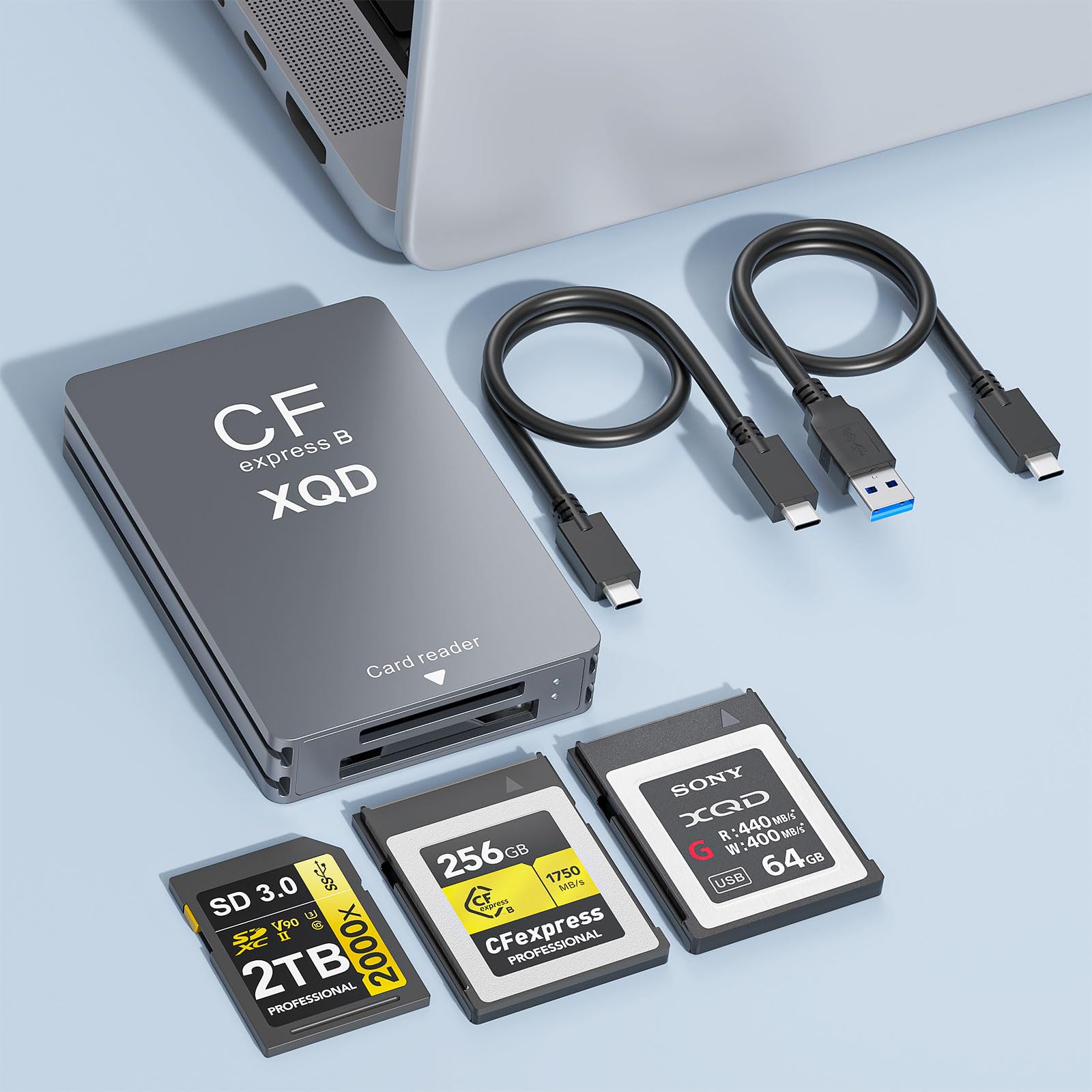
Palm-sized aluminum reader that carries both cables and both card types.
Two things make this one easy to slip into a camera bag. First, it ships with one USB-C-to-A cable and one USB-C-to-C cable, so a laptop and a phone both connect without hunting for a spare. Second, the aluminum alloy body is sized to fit a hand and drops into a pocket or a school bag. The 10Gbps (USB 3.2 Gen 2) ceiling keeps the reader ahead of slow cards, and it steps back smoothly to USB 3.0 and USB 2.0 on older machines.
The dual slot is the practical part — one side reads CFexpress Type B and XQD together, the other takes SD. Both cards can read and write at once, so you can copy one card to the other without unplugging anything. It handles capacities up to 2TB, is plug-and-play with hot-swapping, and an LED shows you the connection is live. Voltage and current protection guard your device if power wobbles. One clear limit: this reader is not compatible with CFexpress Type A cards.
For a photographer on the move, the palm-size aluminum body, both USB-C and USB-A cables, and the 10Gbps ceiling are what you are paying for. It is not a multi-card studio hub — it is the reader you keep in the bag so an offload never waits on a missing adapter.
The compact reality: both cables and both slots in a palm-size aluminum body make this a dependable travel companion, with a 10Gbps ceiling for fast cards.
The fine print: it does not read CFexpress Type A, so check your card standard before you commit.
Pick it up if: you want a pocketable reader that carries its own USB-A and USB-C cables and covers CFexpress B, XQD, and SD.
Look past it if: you shoot CFexpress Type A cards and need a reader that reads them.
6. Rocketek 3-in-1 CFexpress B / XQD / SD Reader (10Gbps)
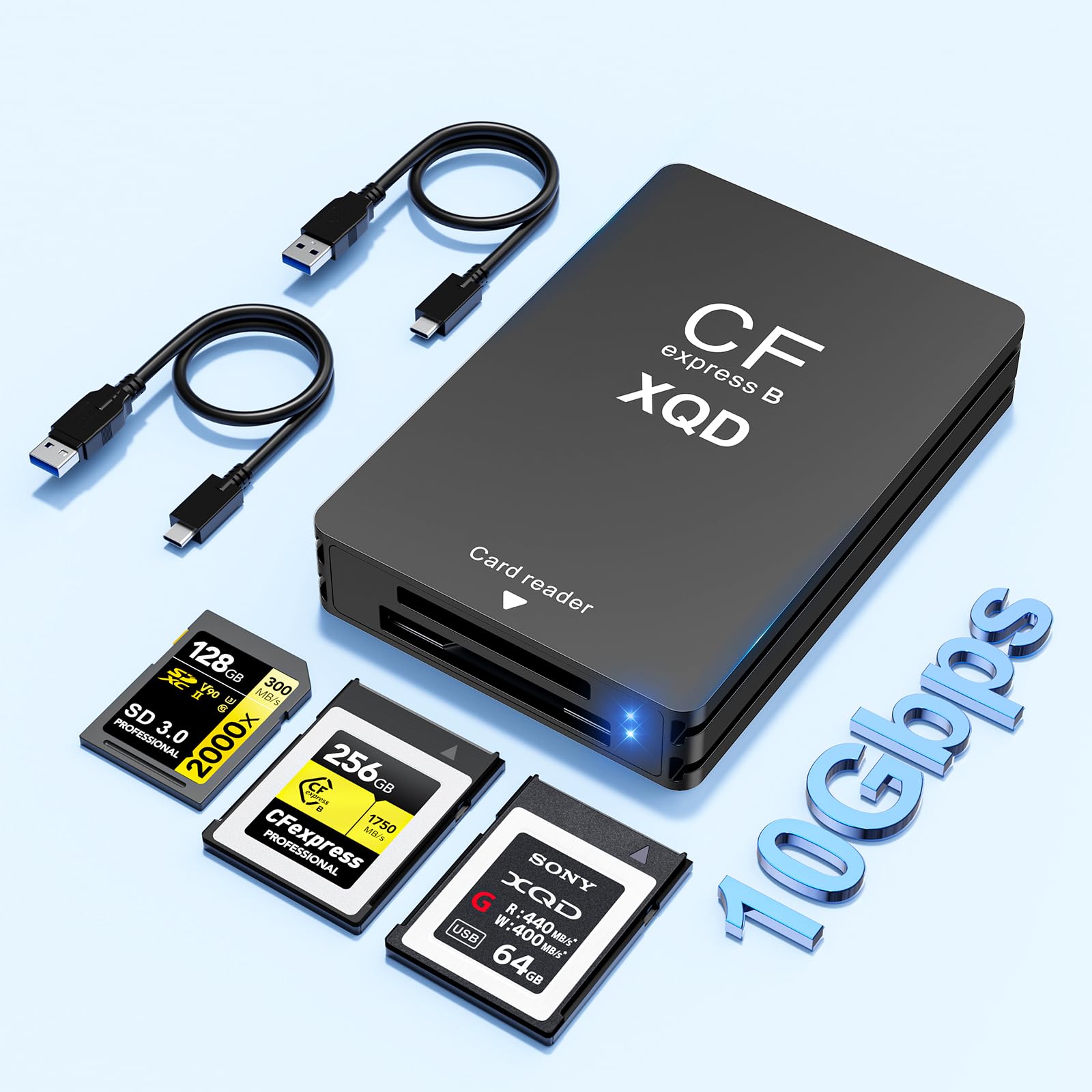
Two independent status lights so you can see each card working at a glance.
This Rocketek is the quiet detail pick. The standout is two independent LED indicator lights — one for the CFexpress Type B and XQD slot, one for SD — so on a dual offload you can see both cards reading, not just a single connection light. The transfer ceiling is 10Gbps over USB 3.1 Gen 2, which is enough headroom to move large RAW stills and HD video without the reader slowing you to a crawl.
The 3-in-1 layout shares one slot between CFexpress Type B and XQD, with a separate SD slot, and it handles cards up to 2TB in sizes like 32GB, 64GB, 128GB, and 256GB. It is plug-and-play with no driver, hot-swappable, and runs across Windows XP through 11, plus Mac OS. You get both a USB-A-to-C and a USB-C-to-C cable, and the aluminum body keeps it tough enough for travel. It also handles standard photo formats (JPEG, RAW) alongside video codecs including H.264 and MPEG-4.
Where the aluminum reader above leans into heat spreading, this one is the same idea in a slightly different shell — the metal body helps keep a long copy steady. If your whole kit is CFexpress Type B or XQD plus SD, this is a clean, strictly dual-purpose tool with no wasted slots.
The strong points
- Two independent LED lights show each card’s status during a dual offload.
- 10Gbps ceiling keeps a fast CFexpress Type B or XQD card moving.
- Both USB-A and USB-C cables in the box.
- Aluminum body and plug-and-play with no driver.
Then the fine print
- Dual-purpose only — one shared CFexpress B / XQD slot plus SD, so no CF, MS, or XD support.
- No CFexpress Type A support and a fixed set of slots.
The right fit for: vloggers and travelers who want to see both cards working at once and leave CF and MS cards at home.
A poor match for: anyone who still shoots legacy CompactFlash, Memory Stick, or XD cards and needs a slot for them.
7. Rocketek 3-in-1 CFexpress B / XQD / SD Reader (USB-A/C)

One built-in cable that flips between USB-A and USB-C, so it always plugs in.
The trick that sets this Rocketek apart is its built-in 2-in-1 USB-A/USB-C adapter cable. You flip the connector to match the port in front of you, so there is no separate cable to forget at home. Under that is the same 10Gbps (USB 3.1 Gen 2) transfer ceiling — good for large RAW bursts and video — and support for cards up to 2TB, including 4K/8K footage and standard formats like JPEG, RAW, H.264, and MPEG-4.
The dual slot reads CFexpress Type B and XQD together in one slot, with SD in the second — a straight offload from your main card to an SD backup card, no swapping. It is plug-and-play with no driver and works across Windows XP through 11, macOS, Linux, and Android. The aluminum shell is pocket-sized and spreads heat during a long transfer, which is where a plastic body with no airflow tends to falter.
Where the earlier Rocketek 3-in-1 leans on status lights, this one leans on plug convenience — the flip-cable is the feature you will notice every single time you sit down to offload. For a creator who moves between a USB-C laptop and a USB-A desktop, the flip connector means no dongle to leave behind.
What you get for the money: a 10Gbps transfer ceiling, a shared CFexpress B / XQD slot plus SD, and a flip cable that fits any port you meet.
What to note: the shared CF slot means no CFexpress Type A, and the fixed dual-purpose slot set is clean rather than broad.
Choose it when: you hop between a USB-C laptop and a USB-A desktop all week and want one reader that plugs into either without a spare cable.
Choose otherwise when: you need a dedicated slot for older cards like CF, MS, or XD — the higher-slot readers cover those.
8. Rocketek 8-Slot All-in-One CFexpress & XQD Reader
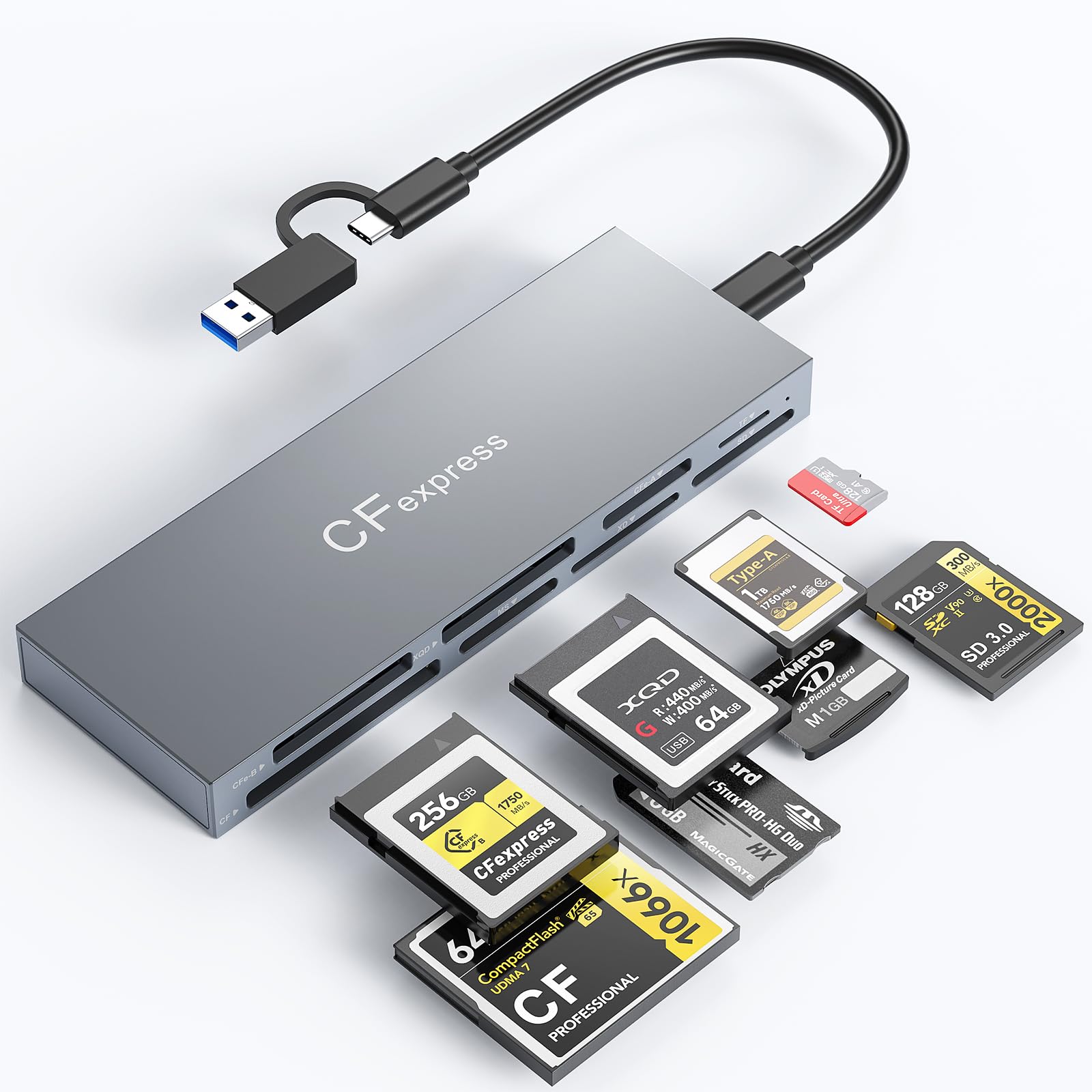
Eight slots that pull from every camera card in the studio at once.
This is the reader for the person who would otherwise line up four readers on the desk. Eight slots handle CFexpress B and A, XQD, SD, TF, MS, XD, and CF cards, and it reads all of them at once. That is the multi-camera workflow problem solved in one device — your main body, your backup, and a colleague’s card can all be picked up together.
The speed ceiling is 10Gbps over USB 3.2 Gen 2, backwards compatible with USB 3.1 and 3.0. It steps up when a CFexpress card needs emptying while you set up the next shot, and the maker notes real speed depends on your card and port — a fair point, because the port you plug into sets the actual pace. The aluminum alloy chassis is the part that matters for a big offload: it spreads heat so the reader stays steady when speed normally sags at the end of a long copy. It works with Windows, Mac OS, Linux, iPadOS, iOS, and Android, and the included 2-in-1 cable covers USB-C and USB-A.
The one trade-off is a modest ratings base compared with the top pick, but the badge it wears is the format breadth. If you clear cards from several camera bodies a day, its eight slots replace a shelf of single-format adapters. If you offload one card at a time, you are paying for slots you will never use.
The draw
- Eight slots read CFexpress B/A, XQD, SD, TF, MS, XD, and CF at once.
- 10Gbps ceiling and a 2-in-1 USB-C / USB-A cable.
- Aluminum chassis spreads heat on long, big offloads.
The trade-off
- A small ratings base, so fewer owner experiences to lean on than the top pick.
- All those slots are wasted on a shooter who offloads one card type at a time.
Fits like a glove: for a multi-camera studio or a busy event shooter who clears several cards at once.
Not for you if: you offload a single XQD card from one body — a two-slot reader keeps the desk cleaner.
9. Lexar Professional Workflow HR1 4-in-1 Hub

The stationary hub that lives on your editing desk, not in your camera bag.
The HR1 is the odd one out here, and deliberately so. It is a 4-in-1 hub on USB 3.0 — an older, slower standard than the 10Gbps readers — built to sit on a desktop and take XQD, SDXC, SDHC, and CompactFlash cards. That slot set covers a lot of real-world camera cards, QD included, which is why it earns a place on a list of XQD-capable readers. It is a hub, so it wants a permanent home by your monitor, not a pocket.
Because it runs USB 3.0, expect it to be the slowest option in this group on paper. For a desk workflow where you dump a card and edit on the same machine, that is often fine — it is the convenience of a fixed reader with a known place that keeps you moving. It supports Windows and Mac OS, is black and compact, and carries the Lexar Pro Workflow name.
The reason it lands near the bottom is the speed ceiling — the 10Gbps readers above will empty a big XQD card faster. Think of the HR1 as the tidy, always-there desktop reader, not the on-location speed tool. If you already run a desk setup and want one fixed home for your XQD and CompactFlash cards, its 4-in-1 set does that job without any drama.
The value read: a fixed 4-in-1 desk hub that covers XQD, SDXC, SDHC, and CompactFlash, so your cards always have a place to land.
The honest cap: USB 3.0 sets a lower speed ceiling than the 10Gbps readers here, so it is the slower pick for a big, fast offload.
Make room for it if: you edit at a desk and want a fixed reader for XQD plus CompactFlash and SD, always plugged in and ready.
Leave it if: you need maximum offload speed or a reader that travels with you.
Know the Specs
Transfer speed (5Gbps vs 10Gbps)
The Gbps figure is the reader’s ceiling — how many gigabits per second it can move in theory. A 10Gbps reader raises that ceiling over a 5Gbps one, so it is never the bottleneck when your card is fast. The real speed you see depends on three things: the card’s own read speed, the cable, and your computer’s port. On a slow port, both readers behave similarly — so match the reader to your machine and card, not just the bigger number.
Card slots and sharing
A slot count tells you how many cards can be read at once, but the design matters as much as the number. A shared slot that reads both CFexpress Type B and XQD covers two standards with one opening; a separate SD slot beside it lets you copy one card straight to another. Slot counts here range from a 2-slot dual reader up to an 8-slot hub — pick the smallest set that covers the cards you actually shoot.
Aluminum bodies and heat
Fast transfers produce heat, and heat is what makes a reader stall or drop connection during a long offload. An aluminum alloy shell spreads that heat out and holds the reader steady. A plastic body traps it. If you empty large cards regularly, a metal-bodied reader keeps a long copy more stable than a plastic one.
USB-C vs USB-A and cables
USB-C is the newer, smaller plug; USB-A is the older rectangular one. A reader that ships both a USB-C-to-C and a USB-A-to-C cable plugs into a modern laptop and an older desktop without a dongle. If you offload straight to a phone or tablet, confirm the reader lists Android or your tablet’s system, or it may not see the card at all.
Common Questions
Will an XQD card reader read my Sony G-series or Lexar card?
Do I need a 10Gbps reader or is 5Gbps enough?
Why does my card reader get hot during a big transfer?
Can I copy one camera card straight to another without a computer?
Will the reader work with my phone or tablet?
Does an XQD reader also read CFexpress Type B cards?
What is the difference between CFexpress Type A and Type B?
Do I need to install a driver to use these readers?
Can a reader take a card bigger than 1TB?
Should I get a portable reader or a desktop hub?
The Bottom Line
The winner for most shooters is the Rocketek 10Gbps CFexpress Type B & XQD & SD Reader — a 10Gbps ceiling, a shared CFexpress Type B / XQD slot, a separate SD slot, and both USB-C and USB-A cables in the box. It is the cleanest fit for a bag holding a CFexpress Type B body, an XQD backup, and an SD card. If you want a field backup without a laptop in the middle, reach for the VELOGK, whose dual slot copies card to card and moves a 45 GB file in under ten minutes — just respect the heat. And if your desk sits between several camera bodies, the 8-slot Rocketek clears CFexpress B/A, XQD, SD, TF, MS, XD, and CF at once, so a shelf of adapters becomes one box. Start with the top pick if you shoot both CFexpress Type B and XQD and want one reader that covers SD on the side.
How we choose
We do not accept paid placement. Every pick is matched to a real buyer and a real use-case; we do not hands-on test units.
Sources
Specifications: manufacturer listings and product documentation. Review insights: verified customer reviews, as of November 2026. Pricing: not shown on this page (it changes often); check the current price via the retailer link.
As an Amazon Associate, Tactical Gear Guy earns from qualifying purchases. This does not affect which products we feature.