Specs are compiled from manufacturer listings and verified buyer reviews and can change over time — please confirm the key details on the product page before buying.
The hard part of buying an XLR to 3.5mm cable is not sound quality — it is picking the right direction and the right wiring before you plug anything in. Most returns happen because a buyer grabbed a stereo-to-mono patch cable when they needed a splitter, or a plain adapter when their microphone needs power. This guide sorts the nine cables people actually buy, explains what each one physically does, and tells you which one matches your camera, mixer, phone, or recorder.
This guide is built by comparing the manufacturers’ published specifications and the patterns across verified customer reviews, so you get each pick’s real strengths and trade-offs instead of marketing spin.
Get the direction right and a passive patch cable just works, gig after gig. Here is how the wiring, the connector gender, and the cable length decide which of these XLR to 3.5mm options actually works in your setup.
Top Picks


How To Choose The Best XLR to 3.5mm Cable
Before you compare brands, settle one question: which end plugs into what? Everything else — length, shielding, gold plating — matters far less than getting the direction and the wiring right.
Direction: which device has the XLR and which has the mini-jack
A camera, phone, or laptop usually has the 3.5mm (1/8 inch) mini-jack socket. A mixer, PA speaker, or powered monitor usually has the XLR socket. Your cable has to run from one to the other, and the gender of each plug tells you which way it flows. A male XLR plug pushes into a female XLR socket, and the reverse is true as well.
Getting that wrong is the single most common reason a cable gets sent back. A female XLR end cannot plug into a mixer’s male XLR output, no matter how good the shielding is.
Stereo, mono, and what a Y-splitter really does
A simple 3.5mm to XLR cable takes the left and right channels from your phone or laptop and joins them into one mono feed on the XLR end. That is fine for feeding a mono mixer channel. A Y-splitter does the opposite job — it takes one 3.5mm output and breaks it into two separate XLR lines, one left and one right.
These are not interchangeable. If you need two channels on a mixer, a single mono cable will not do it.
TRS versus TRRS — the phone trap
A TRS plug has three metal sections (tip, ring, sleeve). A TRRS plug has four. Phones and newer tablets often combine headphone output and microphone input on one TRRS socket, so a plain TRS cable may not carry your microphone signal into them. If a phone is your recorder, check that the adapter is built for TRRS before you buy.
Plug-in power: the limitation no cable solves
Some small microphones — lavaliers and compact shotgun mics in particular — need a small voltage called plug-in power to work at all. A passive adapter or patch cable carries signal but cannot create that voltage. If your microphone is one of those, you need an adapter with power built in, not a straight cable.
Side-by-Side Comparison
| Model | Best For | Connector Direction | Length | Signal Type | Amazon |
|---|---|---|---|---|---|
| Disino 3.5mm to XLR Male Cable★ Best Overall | Phone or laptop into a mixer | 3.5mm TRS male to XLR male | 6.6 feet | Unbalanced, stereo-to-mono | Amazon |
| Disino 3.5mm to Dual XLR Male Y-SplitterBest Splitter | Feed left and right mixer channels | 3.5mm TRS male to 2 XLR male | 3.3 feet | Unbalanced splitter | Amazon |
| Disino Dual Female XLR to 3.5mm Y-SplitterReverse Flow | Mixer or interface into a camera or PC | 2 XLR female to 3.5mm TRS male | 3.3 feet | Unbalanced splitter | Amazon |
| Cable Matters 3.5mm to 2 XLR Cable | Two microphones into one camera | 2 XLR female to 3.5mm TRS male | 10 feet | Unbalanced splitter | Amazon |
| Cable Matters 3.5mm to XLR Cable | Shotgun mic into a DSLR | XLR female to 3.5mm TRS male | 6 feet | Balanced-capable patch | Amazon |
| Hosa XVS-102F Camcorder Cable | Compact camera rigs | XLR female to right-angle 3.5mm | 2 feet | Unbalanced patch | Amazon |
| Movо TCB2 XLR to TRRS Adapter | XLR mic into a phone, with monitoring | XLR female to 3.5mm TRRS male | Short adapter | TRRS splitter with headphone jack | Amazon |
| RØDE VXLR Adaptor | 3.5mm mic into an XLR recorder | 3.5mm TRS female to XLR male | Adapter body | Passive adapter | Amazon |
| Ancable 3.5mm to XLR 2-Pack | Keeping a backup adapter in the bag | 3.5mm TRS female to XLR male | Compact adapter | Passive adapter | Amazon |
Detailed Reviews
1. Disino 3.5mm to XLR Male Cable, 6.6 FT
Our pick — 4.5+★ from 900+ verified ratings; the strongest balance of quality and price.
The everyday patch cable that turns a phone or laptop into a proper mono feed.
If your source is a headphone jack and your destination is a mixer channel, this is the cable you want. It takes the left and right channels from a 3.5mm stereo output and joins them into a single mono signal on an XLR male plug — the wiring you need to feed one channel on a console, powered speaker, or PA.
The build is where it beats the bargain cables. The conductors are 20 AWG oxygen-free copper (a thicker, purer wire than bargain cables use), wrapped in aluminum foil shielding to block radio and electrical interference. That shielding is what keeps hiss and buzzing out of a long run. The PVC jacket measures 6.0mm across, and the 24k gold-plated 3.5mm plug has 360-degree grip treads so you can pull it out of a tight socket without yanking the cable.
Here is the catch you need to understand before ordering: this is an unbalanced cable, and the left and right channels are soldered together. That is perfect for a mono mixer channel and wrong for anything that expects a true balanced line. It also cannot feed two separate mixer channels — for that, you want the dual-XLR splitter below. Owners praise the overall quality most, and the value for the money comes up right behind it, though the sound-quality reports split between excellent and not-quite-right, so cable routing matters.
What earns the top spot
- 6.6 feet of 20 AWG oxygen-free copper gives you reach without a signal drop
- Foil shielding plus a 6.0mm PVC jacket keeps interference out of the line
- Step-down 3.5mm plug fits recessed phone and tablet ports
- Gold plating and grip treads make repeated plugging easy
Where it stops short
- Unbalanced only — the two stereo channels are merged into one mono feed
- Cannot split one source into two mixer channels
Made for: anyone running a phone, tablet, laptop, or MP3 player into a mono XLR input on a console or powered speaker.
Wrong tool if: you need two separate channels out of one 3.5mm source — reach for a dual-XLR splitter instead.
2. Disino 1/8 Inch to Dual XLR Male Y-Splitter Cable, 3.3 FT
One mini-jack in, two XLR lines out — left and right kept apart.
This is the cable for a DJ or laptop performer who needs both mixer channels fed from a single 3.5mm output. It splits one stereo mini-jack into two unbalanced XLR male plugs, one per channel, so your left and right stays separate instead of collapsing into mono.
Two details make it easy to live with. The XLR ends are colour coded — blue for left, red for right — and the split happens 19.6 inches (50 cm) from the XLR plugs, so you can spread the two connectors across widely spaced mixer inputs. The step-down 3.5mm plug reaches recessed ports on a phone or tablet, and the connectors are gold-plated with 360-degree grip treads.
The signal path uses 20 AWG oxygen-free copper with both foil and metal braid shielding, which is the combination that keeps hum off a long unbalanced run. The thing buyers keep coming back to is the quality of the build, with functionality close behind — it holds up over months of use. Durability is the one mixed note, so treat the split junction gently rather than tugging it. On the measurement front, the 1-meter run means this is a desk-length cable, not a stage-length one.
Channel clarity: red and blue XLR ends mean you can trace left and right by sight, no guessing at the mixer.
Sizing read: at 3.3 feet, plan this for a desk, booth, or close-set rack — a stage run will want more length.
Pick it when: one 3.5mm source needs to hit two separate XLR inputs on a mixer.
Keep shopping if: you only have one XLR channel to fill — a single-cable run is simpler.
3. Disino Dual Female XLR to 3.5mm Y-Splitter Cable, 3.3 FT
The mirror image of the splitter — two XLR sources down into one mini-jack input.
Here is the one buyers most often mix up with the splitter above. The two XLR ends are female, so they accept the male XLR outputs from a mixer, interface, or stereo line source. The single end is a 3.5mm mini-jack, which goes into a camera, laptop, or portable recorder that only offers a mini input.
Same family of parts as its sibling: 20 AWG oxygen-free copper, foil plus metal braid shielding, gold-plated connectors, and blue and red XLR ends for channel tracking. The split point sits 19.6 inches (50 cm) from the XLR ends, so the two plugs can reach ports set some distance apart. The build quality is what buyers talk about most, with functionality close behind, and it holds up well feeding a device like the Sound Devices Mix.
What it will not do is create a signal. Both XLR ends must be driven by a line-level source — this is an unbalanced interconnect, not an amplifier. And because it is unbalanced, long runs invite hum. Keep it short and close to the gear.
Right-direction check: female XLR ends mean the mixer or interface has the male outputs. Confirm that before ordering.
Suits: feeding stereo mixer or interface output into a camera or computer’s single mini-jack input.
Not the one if: you are going the other way, from a mini-jack source outward — that takes the male-XLR splitter.
4. Cable Matters 3.5mm TRS to 2 XLR Cable, 10 FT
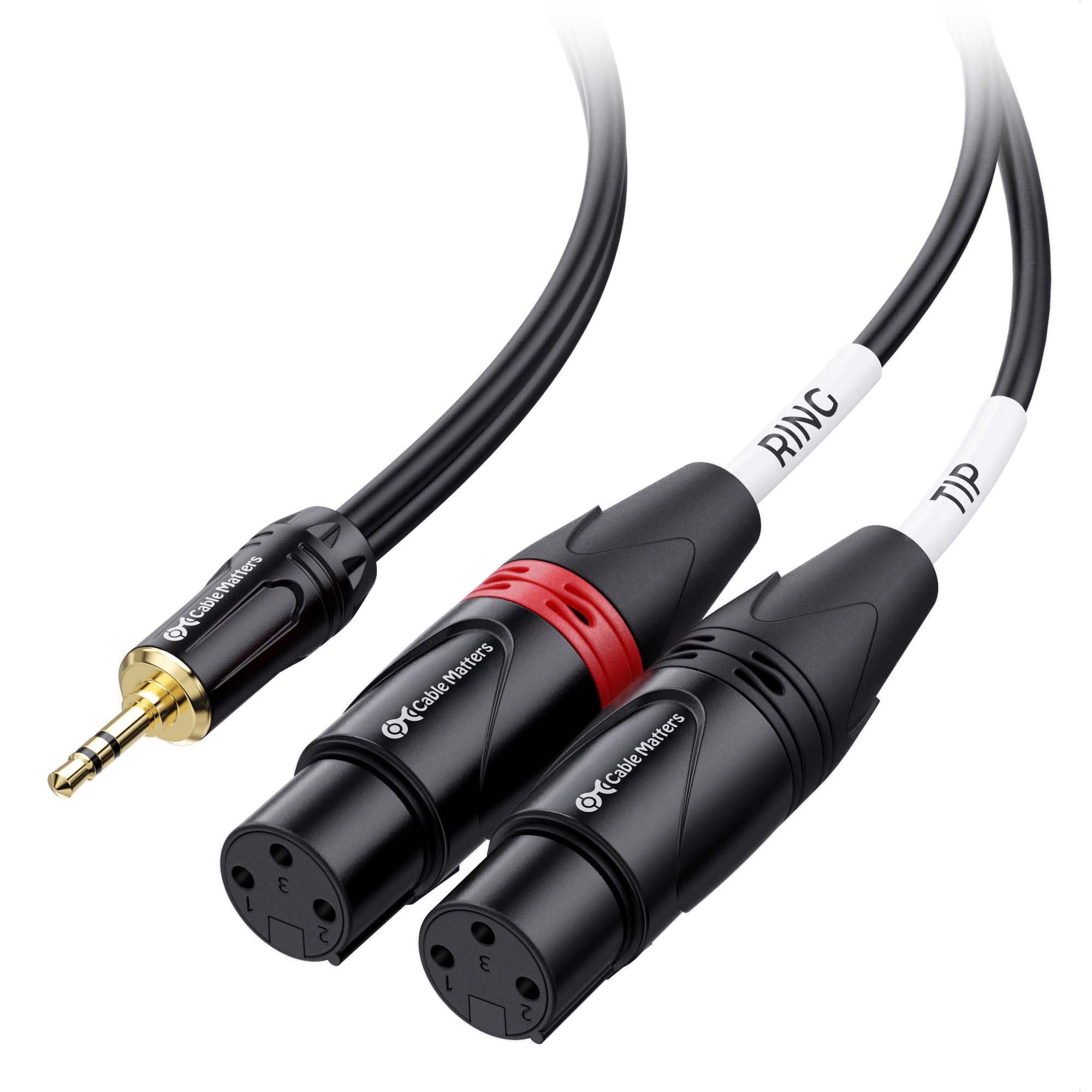
Ten feet of stereo split for two microphones running into one camera.
Two female XLR connectors feed one 3.5mm mini-jack here, which is the exact shape a camera rig with two microphones needs. Each XLR source gets its own channel on the mini-jack stereo input, so your left and right microphones stay separate all the way to the camera.
What makes it easy to set up is the labelling: a tip label and a ring label sit on the mini-jack end so you can tell which XLR is left and which is right without trial and error. That saves time when you are troubleshooting a dead channel. The construction matches the price tier — oxygen-free copper conductors, bare copper braided shielding to cut hum, and a flexible PVC jacket over gold-plated connectors.
Ten feet is the longest run in this group, and it matters: it lets you place the camera away from where the microphones sit. The trade-off is that ten feet of unbalanced cable is a lot of opportunity to pick up noise, so route it away from power lines. The build quality is the standout, and buyers who split wireless receivers out to a computer for editing report it doing that job cleanly.
Why it earns a place
- 10 feet gives real separation between camera and microphone position
- Tip and ring labels make left/right assignment obvious
- Individual jackets let the XLRs reach ports set well apart
- Braided shielding fights hum on an unbalanced run
The honest limits
- Ten feet of unbalanced cable invites noise if routed near power
- It is a split — it will not work as a single-cable feed
For the two-mic camera rig: a DSLR or camcorder recording two XLR microphones into one stereo input.
Ignore it if: your camera is inches from the microphone, where a short lead is cleaner.
5. Cable Matters 3.5mm to XLR Cable, Male to Female, 6 FT
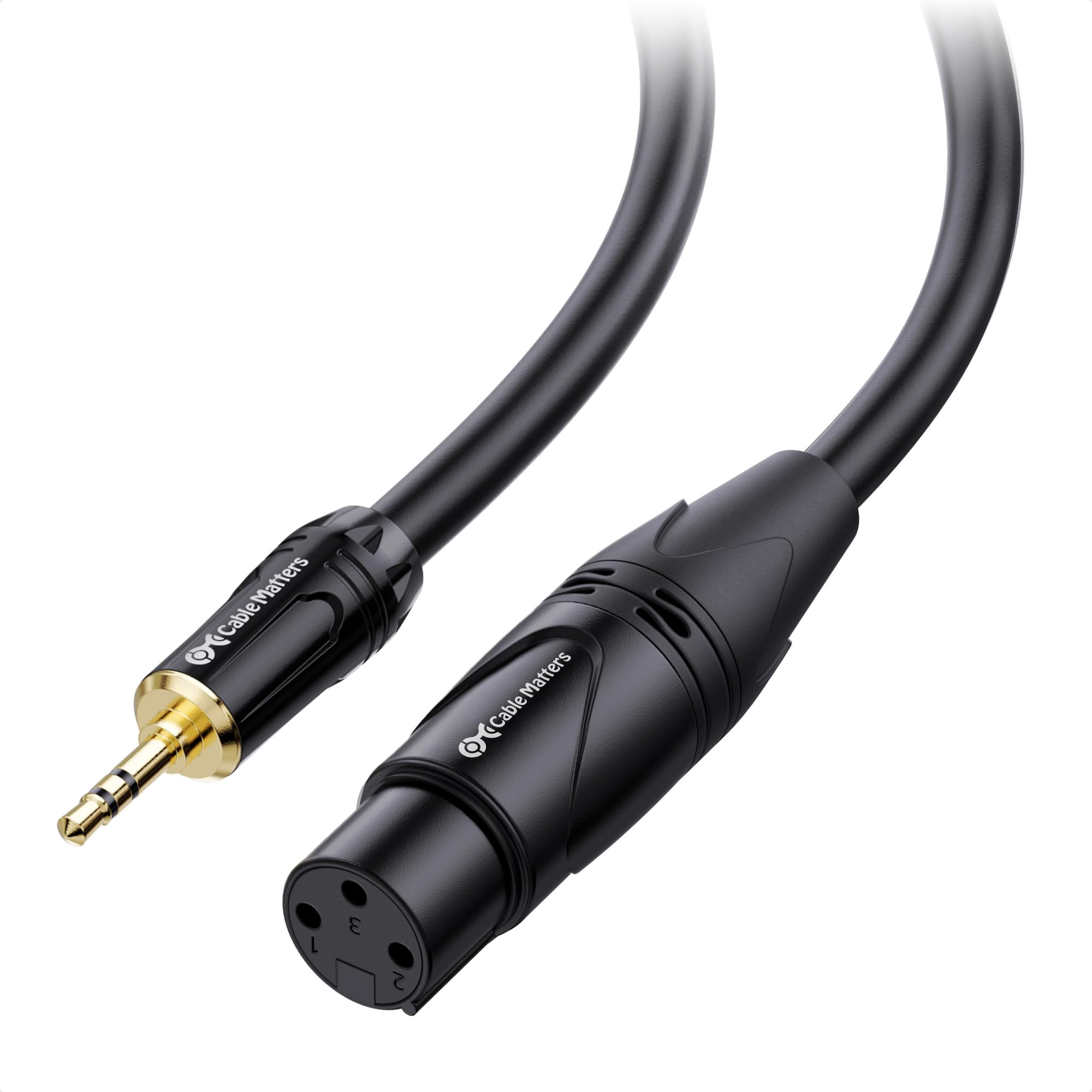
Built to carry a shotgun microphone’s XLR output down into a camera’s mini port.
The wiring on this one runs the opposite direction from the cables above. A female XLR connector accepts the male XLR output of a shotgun or condenser microphone, and the 3.5mm end feeds a DSLR, camcorder, digital voice recorder, or a computer’s mic input. That is the exact chain for shooting an interview or recording a podcast.
The mini-jack plug uses a step-down shape so it seats in recessed camera ports — a small thing that saves you when the port is tucked behind a body panel. Internally, oxygen-free copper conductors carry the signal, bare copper braided shielding cancels hum, and polyethylene insulation is there to keep the high frequencies intact. The connectors are gold-plated in a metal housing with molded strain relief to take the weight of a microphone.
It is a 6-foot run, and the spec that matters here is the gauge at 20 AWG, which is heavier wire than a bargain patch. That is part of why the build quality is what buyers bring up most, with value right behind it. If you are being honest about the limits: this is a stereo mini-jack into a mic chain, so it suits microphones with a standard wiring and not the small powered kind that need voltage. For a Nady CM-2S, an Azden SGM-1X, or an Audio-Technica AT875R, it is the right match.
Camera-side fit: the step-down 3.5mm plug reaches recessed mic ports on a DSLR or camcorder body.
No power here: it carries signal only — microphones needing plug-in power will not come alive through it.
Best matched to: a shooter going from an XLR shotgun mic into a camera, recorder, or computer mic input.
Think twice if: your microphone relies on plug-in power — this cable will not supply it.
6. Hosa XVS-102F Camcorder Microphone Cable, 2 Feet
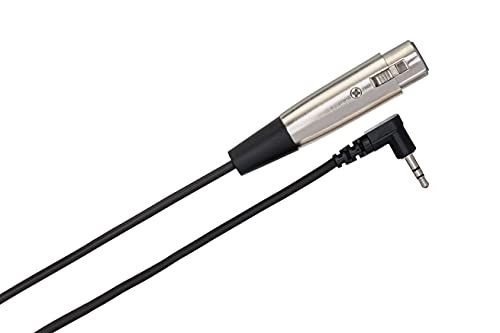
Two feet, right-angled — the cable that stays out of the way on a small camera.
The 2-foot length and right-angle plug are the whole point here. A female XLR connector takes your microphone’s XLR output, and the 3.5mm TRS end goes into a camcorder’s stereo input. The right-angle jack is the detail that earns it a slot: on a compact camera the plug turns along the body instead of sticking straight out, which cuts cable strain and stops the lead from swinging into the frame.
Length is 2 feet, which is about a third of the 6.6-foot Disino run reviewed at the top of this list. On a shoulder rig or a small gimbal that shortness is an advantage — there is no loop of slack to snag. It handles the standard job of connecting an XLR microphone to a camcorder’s 3.5mm stereo input, and it works with compact action cameras like the GoPro Black 3.
The honest trade-off is signal. Reports on audio quality split between clean and noisy, which is ordinary for a passive unbalanced patch — keep it clear of power cables and keep the run short, which the 2-foot length already handles. What people value most is that it simply functions, day after day, with build quality close behind. The right-angle design also means it will not suit a camera whose port sits flush on a flat panel.
Strain relief by design: the right-angle plug lies flat against the camera body, so nothing levers against the port.
Reach for it if: you shoot on a compact camera and want a tidy, short XLR-to-mini-jack link with no dangling slack.
Look elsewhere if: you need distance between camera and microphone, where a longer cable wins.
7. Movo TCB2 XLR Microphone to TRRS Smartphone Adapter

The phone-specific piece — four-pole TRRS out, plus a jack to hear yourself.
A smartphone’s combined headphone and mic socket is a TRRS socket (four metal sections instead of three). This adapter ends in a TRRS plug, which is the version a phone accepts, and it accepts a standard female XLR microphone on the other side. That makes it the one to consider for recording voice into a phone rather than a camera or mixer.
The headphone jack is what makes it useful on the move. A headphone jack lets you listen back to the recording through a compatible monitoring app, so you are not guessing whether the take came out. The connector is gold-plated and impedance-matched to cut interference.
Now the part that decides whether it works for you. There is no battery and no battery box, so it cannot power an XLR microphone that needs power — several condenser microphones fall into that group. The adapter is passive; it carries what the microphone produces and nothing more. Reports on how well it functions split both ways, and phone compatibility is uneven across models, so check your own handset’s socket before buying. As owners put it, it either matches your phone’s socket exactly or it does not.
What it does that the cables cannot
- TRRS plug matches the combined socket on phones and many tablets
- Dedicated headphone jack lets you monitor while you record
- Gold-plated, impedance-matched connector for a clean connection
Before you click buy
- No battery box — it cannot power a microphone that needs it
- Phone compatibility varies by model, so verify your handset first
Works for: recording an XLR microphone into a phone that has a combined TRRS socket, with live headphone monitoring.
Keep looking if: your microphone is a condenser that draws power — this passive adapter will leave it silent.
8. RØDE VXLR Mini-Jack to XLR Adaptor

A solid little barrel that turns a mini-jack mic into an XLR input fit.
Where the other cables are long runs, this is a short adapter body. A female 3.5mm TRS jack sits at one end for a microphone with a mini-jack output, and a male XLR plug at the other goes into a recorder, mixer, or camera with an XLR input. It measures 58.00mm high by 19.00mm wide by 19.00mm deep, so it packs into a bag with no bulk.
The connectors and strain relief sleeves are built to tight tolerances, which is the kind of thing that matters when an adapter rides in a bag between shoots. There is a 1-year warranty behind it. It sits at the premium end of this group of adapters, and it is the pick for a field recorder or camera that only has male XLR inputs but a microphone that only offers a mini-jack.
One compatibility point is worth knowing up front: it is not compatible with microphones that require plug-in power, such as the VideoMicro. The adapter is passive and carries signal only. Also note that it will not work with a mono 3.5mm jack — the input is a TRS stereo jack. If your microphone is a plug-in-power type or a mono output, this is not the adapter for that microphone.
Pocket-sized build: at 58.00mm by 19.00mm by 19.00mm with 48 g of weight, it disappears into a kit bag.
Choose this when: you have a mini-jack microphone and a recorder or camera with an XLR input.
Go a different way if: your mic needs plug-in power or outputs mono — this passive barrel cannot change that.
9. Ancable 3.5mm to XLR 2-Pack Adapter
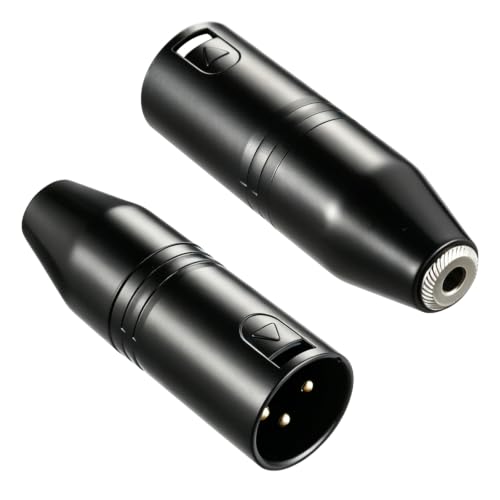
Two solid metal adapters for the price of the usual single — one to use, one spare.
The value here is in getting two adapters for the price of one. You get two adapters in the pack, so a spare lives in the bag for the day one goes missing or gets left on a lectern. Each one takes a standard 3.5mm TRS microphone and plugs into a standard XLR jack on a camcorder, recorder, or mixer, and it works the other way too, turning a phone or tablet’s 3.5mm output into a feed for a powered speaker or mixer.
The body is solid metal in a compact form, heavy duty for its size, and carries 12 months of warranty. Owners value the quality of the build most, with quality overall close behind. For a passive adapter, solid build is the right thing to be known for.
Two limits are worth naming. It fits standard TRS (tip, ring, sleeve) 3.5mm plugs only, so TS or TRRS jacks will not seat properly. And it is a passive adapter that will not pass phantom power through to a microphone that requires it. Reports on sound quality vary, with some finding it clean and others picking up static — a case where the adapter fits a simple chain but not every microphone.
The case for the pair
- Two adapters in one pack — a working spare for the kit bag
- Solid metal construction and a compact size
- Works in either direction between a 3.5mm jack and an XLR port
What to know
- Standard TRS only — will not seat a TS or TRRS plug
- No phantom power pass-through, so powered microphones are out
Good fit for: anyone who wants a spare adapter on hand for camera, recorder, or mixer jobs.
Not for you if: you need the barrel to feed a microphone that runs on phantom power.
Know the Specs
Connector gender and direction
A male XLR plug inserts into a female XLR socket, and the reverse. That physical fact decides which way a cable runs — from a microphone’s output into a camera, or from a mixer’s output into a portable recorder. Buying the wrong gender is the single biggest reason these cables get returned, so check your device’s socket before ordering. A female XLR end cannot push into another female socket no matter the brand.
Balanced versus unbalanced wiring
An unbalanced cable carries signal on one conductor plus a ground, and a balanced cable uses two conductors with a ground so the receiving end can cancel noise. Several cables here are unbalanced, which is fine for short runs from a phone or camera but pickier about hum over distance. Where a cable joins left and right into one mono feed, it cannot serve a two-channel mixer input that expects separate signals.
TRS versus TRRS plugs
A TRS plug has three metal sections (tip, ring, sleeve) and a TRRS plug has four, adding a fourth contact for a microphone combined with headphones. Phones and many tablets use TRRS sockets, so a plain TRS cable may not carry a microphone signal into them. Adapters built for phones end in a TRRS plug for that reason. A TRS-only adapter will not seat correctly in a TRRS socket.
Gauge and shielding
Cable gauge in AWG measures the conductor thickness — a smaller number means thicker wire. Several options here use 20 AWG oxygen-free copper, with foil and braided shielding to block radio and electrical interference. That shielding is what keeps hiss and hum out of a long run. A thicker jacket, like the 6.0mm PVC used here, protects the wire inside a busy bag or rig.
Common Questions
Will a 3.5mm to XLR cable work with my phone?
Can I plug an XLR microphone into a camera with a cheap patch cable?
What is the difference between a 3.5mm to XLR cable and a Y-splitter?
Will these adapters pass phantom power to a condenser microphone?
Why does my XLR to 3.5mm cable pick up hum or noise?
Can I use a dual XLR splitter to run two microphones into one camera input?
Does a right-angle 3.5mm plug matter for a camera rig?
What length of unbalanced XLR to 3.5mm cable is safe?
Can I use an XLR to 3.5mm adapter with a laptop instead of a camera?
Do I need a balanced cable between a mixer and a recorder?
The Bottom Line
For most people, the best xlr to 3.5mm pick is the Disino 3.5mm to XLR Male Cable because it handles the everyday job — a phone, tablet, or laptop into a mono mixer channel — with 20 AWG oxygen-free copper conductors and foil shielding that keep the signal clean. If you need to feed two separate mixer channels from one mini-jack source, reach for the Disino Dual XLR Male Y-Splitter instead. And if the job runs the other way — two XLR outputs into a camera or computer — the Cable Matters 3.5mm to 2 XLR Cable covers the two-mic rig at the longest run in this group.
One last nudge in the right direction: the direction and gender of the connector decide everything, and the RØDE VXLR and the Disino cables above are the ones to check against your own devices before you order. Match the connector gender to your gear, and the cable simply works.
How we choose
We do not accept paid placement. Every pick is matched to a real buyer and a real use-case; we do not hands-on test units.
Sources
Specifications: manufacturer listings and product documentation. Review insights: verified customer reviews, as of November 2026. Pricing: not shown on this page (it changes often); check the current price via the retailer link.
As an Amazon Associate, Tactical Gear Guy earns from qualifying purchases. This does not affect which products we feature.