Specs are compiled from manufacturer listings and verified buyer reviews and can change over time — please confirm the key details on the product page before buying.
Your Xiaomi TV is fine. The remote is what dies — buttons go mushy, voice search stops listening, and the pairing drops every few weeks. The fix is a replacement remote matched to your exact model number and paired once over Bluetooth. This guide covers four Xiaomi remotes, each tied to specific Mi TV and Mi Stick model codes.
This guide is built by comparing the manufacturers’ published specifications and the patterns across verified customer reviews, so you get each pick’s real strengths and trade-offs instead of marketing spin.
Matching the model number on the back of your TV is the whole game here, and the four picks below cover the common Mi TV and Mi Stick variants. Here are the remotes worth your money for a xiaomi tv remote control replacement.
Top Picks

How To Choose The Best Xiaomi TV Remote Control
A replacement remote only works if its model list includes yours. That single check saves you more returns than any other step. Everything else — voice control, button layout, range — is secondary to the compatibility line.
Start with your TV’s exact model number
Look at the sticker on the back of your TV. You want the full code, things like L55M6-ESG or MDZ-24-AA. A remote listed for the 4S and 4A will not necessarily drive a P1 or Q1, because different Mi TV generations use different remote protocols. Write your code down before you shop, and compare it word for word against the seller’s compatible list.
Voice control needs Bluetooth, not just infrared
Voice search only works over Bluetooth (a short-range wireless link), because your spoken command has to travel back to the TV. A plain infrared remote — the kind that needs to point straight at the screen — can change channels but cannot carry your voice. If the listing says “Voice Search” as an additional feature and “Bluetooth” as the connectivity type, you are in the right lane.
Check the pairing steps before you buy
Each seller publishes its own pairing sequence, and they differ. One model wants you to hold the Mi and Home buttons until a remote icon appears on screen. Another wants a 15-to-30-second hold on the red button underneath. Read that sequence at the listing level and make sure you are willing to do it. A remote that completes its pairing sequence on the first try usually holds the Bluetooth link.
Mind the battery type
Some remotes take 2 AAA batteries; others specify AAA or alkaline without a count. Batteries are often not included, so plan for that on day one. Buy the 2 AAA cells with the remote so setup isn’t delayed.
Side-by-Side Comparison
| Model | Best For | Buttons | Connectivity | Range | Amazon |
|---|---|---|---|---|---|
| IMAGILIVSPAS Voice Remote (XMRM-006)★ Best Overall | Mi Stick and 4S/4A boxes | — | Voice Control | — | Amazon |
| Azwok XMRM-M3 Replacement | L55M6-ESG and MDZ-24-AA sets | 20 | Bluetooth | 10 meters | Amazon |
| Lelukee Universal for Mi TV 4S 4A | Mi Box S / 4X and 4S/4A sets | 29 | Bluetooth | 10 meters | Amazon |
| Lelukee Remote for Mi TV P1/Q1 Series | P1, P1E, Q1 and Q1E sets | — | Bluetooth | 10 meters | Amazon |
Detailed Reviews
1. Xiaomi-Mi-TV Stick Box S/4S/4K XMRM-006
The workhorse replacement for anyone running a Mi TV Stick or an older 4S/4A box.
What sells this one is the pairing ritual, which is about as forgiving as these things get. Unplug and restart your TV box or Stick, pull the battery from the old remote, drop cells into the new one, then hold the APPs button and the Home button together until you hear a beep. That beep means you are done. No codes to type, no on-screen menu to fight.
The model coverage is the other reason it earns the top spot. It lists the Mi TV Stick Box S, 4S, 4K, and the MDZ-22-AB and MDZ-24-AA Stick codes — the exact codes a lot of people are staring at on their sticker right now. It runs on 2 AAA batteries, which are not included, so have a fresh pair ready before you start. The ABS plastic body and internal chips are the same construction the maker uses across its factory line, which is a fair sign this is not a fly-by-night shell.
The trade-off is that voice search is the headline feature and the controller type is listed as voice control, so you are paying for a mic you will either love or ignore. If you never speak to your TV, a plain button remote does the same job. The other catch is the seller’s model list — it names specific Stick and 4S/4A codes, so if your set is a P1 or Q1, this is the wrong table and you should scroll down to the Lelukee P1/Q1 pick instead.
What clicks into place
- Two-button pairing (APPs plus Home) with an audible beep to confirm
- Covers Mi TV Stick Box S, 4S, 4K plus MDZ-22-AB and MDZ-24-AA codes
- Voice Search built in as an additional feature
Before you check out
- Batteries not included — you need 2 AAA cells on hand
- Model list stops at Stick and 4S/4A families, not P1/Q1 sets
Reach for this if: your sticker says Mi TV Stick, 4S, 4K, MDZ-22-AB, or MDZ-24-AA and you want the least fiddly setup.
Look elsewhere if: you own a P1, P1E, Q1, or Q1E — the model list here does not cover that generation.
2. Azwok XMRM-M3 Voice Remote Control
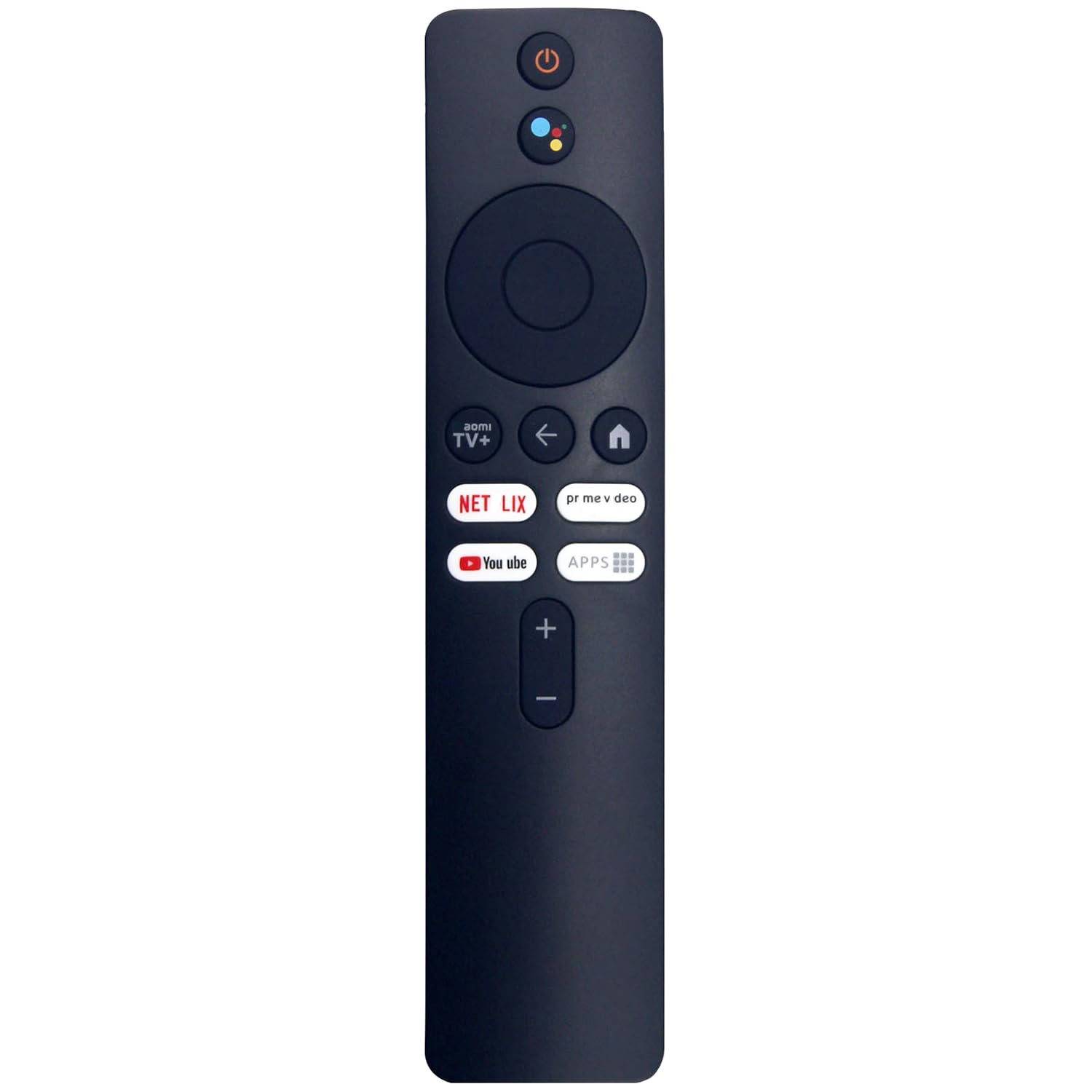
A tidy 46-gram replacement built for specific LG-panel Mi TV codes most buyers overlook.
Here is a fact worth comparing directly: this Azwok carries 20 buttons, while the Lelukee 4S/4A model below it carries 29. That is the verified gap between the two, and it tells you the design philosophy. Fewer keys means a cleaner, less cluttered layout that is easier to learn by touch — handy in a dark room. It also means fewer direct shortcuts to apps and settings, so more menu hopping.
The specs that matter for daily use are solid. It connects over Bluetooth, which is what lets voice search work without pointing at the TV, and it reaches 10 meters — enough to work from the far couch in a large living room. It is listed at 46 g, light enough that your wrist does not notice it during a binge. Batteries are alkaline, and the listing says it works as soon as cells go in, with no programming needed.
The model list is the whole reason to pick this one: L55M6-ESG, L55M6-ARG, and MDZ-24-AA. If that is your sticker, you have found your match, and the 12-month warranty backs it up. The honest limitation is exactly that narrowness — it supports a maximum of one device by design, so it is a replacement, not a universal spare for a second TV in the house. Think of it as a precise part, not a Swiss army knife.
Fit for the LCD crowd: the L55M6-ESG and L55M6-ARG codes are non-obvious panel variants, and very few replacement listings name them outright — that specificity is the value here.
Where it narrows: a 20-button pad suits voice-first users who bark orders at the TV; button-heavy types will miss shortcut keys.
Best matched to: owners of an L55M6-ESG, L55M6-ARG, or MDZ-24-AA set who want a Bluetooth voice remote with a warranty behind it.
Pass on it if: you want one remote to juggle two TVs — the supported device count maxes out at one.
3. Lelukee Universal Remote Control for Xiaomi Mi TV 4S 4A

The button-heavy option that covers the widest spread of Mi TV boxes in one remote.
If you like buttons, this is your pick. It packs 29 of them — the richest layout on this list, and the counterpart to the 20-button Azwok above. More keys means faster jumps to settings, apps, and inputs without wading through on-screen menus. The controller type is listed as both button control and voice control, so you get full tactile control plus a mic for Google Voice Assistant commands.
The compatibility brief is unusually generous. It is listed for Mi TV P1, Q1, 4S, 4A, and Q1E, plus Mi Box S and 4X — that is a lot of hardware for one remote. It runs Bluetooth for a 10-meter range, so voice commands carry across a large room without aiming. The color is yellow, which is a genuine practical bonus: it never disappears into a dark sofa cushion the way a black remote does.
Pairing takes a specific sequence, and it is worth reading twice. Unplug the TV, plug it back in, power on, then hold the MI button (just above the red square button) and the Home button (just above the yellow square button) until a remote icon appears and the two sync. Hold both buttons until the remote icon appears on screen and the two sync. The recurring trade-off with any voice remote is that a fresh pairing sometimes needs a second attempt — If the first attempt fails, repeat the full sequence from the TV power cycle.
The reasons it moves up the list
- 29 buttons — the fullest layout here — for quick access to menus and inputs
- Works across Mi TV P1, Q1, 4S, 4A, Q1E, Mi Box S, and 4X
- Yellow body is easy to spot on a dark couch
The honest friction
- Pairing demands the exact MI-plus-Home button sequence to sync
- One device support only — it will not run a second TV
Choose it when: you split time between a Mi Box S and a 4S/4A panel and want one remote that handles both, buttons first.
Skip if: you would rather tap once and be done than work through a multi-step pairing routine on setup day.
4. Lelukee Remote Control for Xiaomi TV P1, P1E, Q1, Q1E

Purpose-built for the newer P1 and Q1 panel generation — no universal guesswork required.
The defining spec here is narrow compatibility: Xiaomi TV P1, P1E, Q1, and Q1E, nothing else. That sounds like a limitation, and it is, but it is also the point. When a remote is engineered for a specific panel family, every button tends to map where you expect it. The listing tags it as ergonomic, which lines up with a person holding it through a two-hour movie without fidgeting.
This is the highest-rated pick of the four here, and that fits — owners who bought it for the right model seem to get exactly what they paid for. The Bluetooth link handles voice control and gives you a 10-meter reach, so you can talk to the TV from across a big room without pointing. It runs on AAA batteries and lists button control as the controller type.
Pairing is the one spot to slow down. Turn the TV on, hold the remote near it, and press the red wired button underneath for 15 to 30 seconds. When the TV shows the pairing screen, release and let it sync. If it does not take the first time, the seller says to repeat the steps — a fair warning for any Bluetooth pairing, not a defect. The other caveat: this one maxes out at one supported device, so it is a dedicated replacement rather than a family-room catch-all. For P1 and Q1 owners, though, it is the cleanest fit on the page.
The case for the extra buttons: purpose-built mapping on P1 and Q1 sets means the app and settings keys land where your thumb already reaches — no hunting through menus.
Know before you pair: the 15-to-30-second button hold feels long, and a failed first attempt means starting the sequence again.
Made for: anyone whose sticker reads P1, P1E, Q1, or Q1E and who wants a dedicated voice remote that maps correctly.
Not for: mixed households juggling more than one TV — this is a one-device remote by design.
Know the Specs
Bluetooth vs. infrared connectivity
Infrared remotes need a clear line of sight to the TV, like a flashlight beam. Bluetooth is a short-range radio link that does not — so a Bluetooth remote works from under a blanket or facing the wall. More importantly, voice search only functions over Bluetooth, because your spoken command has to travel back to the TV. Every remote on this list that claims voice control uses Bluetooth.
Button quantity
Button count is a proxy for how much you can do without the on-screen keyboard. A 29-button pad (like the Lelukee 4S 4A) gives you direct shortcuts; a 20-button pad (like the Azwok) keeps the surface clean and easy to learn by touch. Neither is better — it is a trade between speed and simplicity.
Maximum range
Range is the distance at which the remote still talks to the TV. A 10-meter figure covers most living rooms, letting you fire off a command from the far end of the couch. If your TV sits in a very large open-plan room, this is worth checking before you buy.
Battery type and count
Some remotes take 2 AAA cells; others specify AAA or alkaline without a count. Batteries are frequently not included. Check the battery type and count on the listing before you order so the remote works the moment it arrives.
Common Questions
Will this remote work with my Xiaomi Mi TV model?
Do I need to program a Xiaomi replacement remote?
Does voice search work on a replacement Xiaomi remote?
What is the difference between the 20-button and 29-button remotes?
Are batteries included with these remotes?
How far away can I use a Bluetooth Xiaomi remote?
Can one remote control two different Xiaomi TVs?
What should I do if pairing fails on the first try?
Does a Xiaomi replacement remote come with a warranty?
Will a Mi TV 4S remote work with a Mi TV P1?
The Bottom Line
For most people replacing a dead Xiaomi remote, the IMAGILIVSPAS Voice Remote is the easy call — it pairs with a two-button hold, covers the common Mi TV Stick and 4S/4A codes, and includes voice search. If your sticker is an L55M6-ESG or MDZ-24-AA, go with the Azwok XMRM-M3 and its 12-month warranty. P1 and Q1 owners should reach for the Lelukee P1/Q1 remote for the cleanest model match, and button-heavy users who want 29 keys get the Lelukee 4S 4A. Match the model number on your TV’s sticker first; everything else follows from it.
How we choose
We do not accept paid placement. Every pick is matched to a real buyer and a real use-case; we do not hands-on test units.
Sources
Specifications: manufacturer listings and product documentation. Review insights: verified customer reviews, as of November 2026. Pricing: not shown on this page (it changes often); check the current price via the retailer link.
As an Amazon Associate, Tactical Gear Guy earns from qualifying purchases. This does not affect which products we feature.