Specs are compiled from manufacturer listings and verified buyer reviews and can change over time — please confirm the key details on the product page before buying.
Most people hunting a replacement Xfinity remote are not chasing an upgrade — they are chasing back the voice button that stopped answering, or the keypad that went dark. The single most useful thing to know up front: the XR15 and XR11 are the two remotes that matter here, and they are not interchangeable across every set-top box. Match the model to your box first, and the rest of the choice gets simple.
This guide is built by comparing the manufacturers’ published specifications and the patterns across verified customer reviews, so you get each pick’s real strengths and trade-offs instead of marketing spin.
Some remotes pair themselves in seconds while others need a code typed in by hand, and one pitch here depends entirely on which box sits under your TV. This breakdown separates the pairings that stick from the ones that leave you pressing Setup in the dark — the short version of xfinity remote control shopping is picking your model number before anything else.
Top Picks


How To Choose The Best Xfinity Remote Control
An Xfinity replacement remote is not a universal remote. It is a remote built for one platform — Comcast’s X1 — and it either talks to your set-top box or it does not.
Model First, Then Buttons
The model name on the listing is the whole ballgame. The XR15 is the newer shape with a slimmer body and a full keypad; the XR11 is the older-style voice remote that many households already know by touch. A listing that says XR15 will not behave like an XR11, so check the model in your hand against the model in the title before you buy.
Button count is the quickest tell of which layout you are getting. An XR11 carries more dedicated keys than an older XR2 body, and a remote with fewer buttons can leave you hunting through on-screen menus for things that used to be one press away.
Voice And RF Only Work On Certain Boxes
Voice search is the feature most buyers are replacing a remote to get back, but it only works when your set-top box supports it. One replacement here states plainly that voice features are compatible only with the X1 set-top box, and that RF pairing — the “Aim Anywhere” mode that lets you point the remote at the wall — needs an XG1 or Xi3 box.
If you are not sure which box you own, that is worth two minutes of checking before you order. It is the difference between a remote that pairs itself and one that sits in a drawer.
Backlight, Power, And The Little Things
A backlit keypad lights the buttons when the room is dark, which matters for anyone watching with the lights off. A consolidated power button turns your TV and box on together once it is programmed with a valid TV code. And batteries included in the pack saves you the separate trip — several of these ship with them.
Side-by-Side Comparison
| Model | Best For | Model Type | Connection | Battery | Amazon |
|---|---|---|---|---|---|
| Xfinity Comcast XR15 Voice Control Remote★ Best Overall | Most households | XR15 | Bluetooth | 2 AA included | Amazon |
| XR15 Voice Control Backlight ReplacementStraight Swap | Straight swap for a dead original | XR15 | Radio Frequency | 2 AA included | Amazon |
| Replacement XR15 Voice Remote Control | Simple set-up on a budget | XR15 | Infrared | AAA | Amazon |
| XR2 v3-R TV Cable Remote | Legacy boxes, tight budgets | XR2 v3-R | Infrared | Alkaline included | Amazon |
| New XR11 Backlit Replacement | Hand-coded TV power control | XR11 | Infrared | — | Amazon |
| XR11 Voice Backlit Compatible | Buyers who accept cosmetic wear | XR11 – V | Infrared | — | Amazon |
| XR11 Premium Voice Activated | Multiple devices, best shown track record | URC4350B0C0-1-R | Infrared, Radio Frequency | 2 AA included | Amazon |
Detailed Reviews
1. XFinity XR15 Voice Control Remote
Our pick — 4.5+★ from 5,500+ verified ratings; the strongest balance of quality and price.
The XR15 that pairs itself and hands your voice back without a code sheet.
If your household lost its voice button and you want the least fiddly path back to it, this is the one. The XR15 remote arrives brand new and unopened in its plastic bag, with automatic pairing — a small thing that means the remote and your X1 box introduce themselves without you typing anything.
Voice control is the headline, and it covers more than channel changes. You can search for shows, pull recommendations, and jump to accessibility features like Closed Captioning, video description, and voice guidance straight from the remote. The consolidated power button turns your TV on with the same press once you program a TV code, so you are not juggling two remotes on the couch.
Ease of use is the most-praised trait on this listing, and it backs up the 4.5+ rating across 5,000+ owners. The honest catch sits with the buttons themselves: some find them harder to push than the original. Owner sentiment backs that up, and they are among the most-discussed gripes on the listing.
Two AA batteries come in the pack, and their longevity is one of the quieter compliments this remote earns.
Where It Earns Its Keep
- Automatic pairing takes the code-typing step out of set-up entirely.
- Voice search, recommendations, and accessibility features all sit on the remote.
- Consolidated power and TV power keys mean one press handles both.
- Two AA batteries included, so it works out of the bag.
Where It Asks Patience
- Stiffer button presses are the recurring grumble — the keys need a firmer push than the original.
- Durability feedback is mixed, so it is a replacement remote rather than a forever one.
The verdict: Buy this if your box is an X1, Xi6, Xi5, or XG2 and you want voice control back with the least effort.
Think twice if: you have a box outside that list, or you want the lightest-touch keys on the market.
2. XR15 Voice Control Remote Backlight Replacement
Twenty-four backlit buttons and a swap that stops the “where is the Guide button” shuffle.
This is a replacement-first buy. What lands with people is that it simply takes over from the original — it is the most-praised trait on the listing by a clear margin — because the programming and pairing happen almost immediately. Plug it in, follow the Xfinity prompt, done.
The 24-button backlit keypad is the reason it feels familiar. Every function from the original is there: Power, Vol, CH, a red-dot Record, the Xfinity menu button, Guide, Play/Pause, FF and Rew, and Exit. The backlight means you can find them with the lights down. It runs on 2 AA batteries included, over a stated maximum range of 10 meters.
The “Aim Anywhere” behavior is worth understanding before you buy. This remote uses radio frequency rather than a straight line-of-sight beam, so with a compatible box you can point it anywhere and it still lands. Compared with the entry-level XR2 — a 15-button infrared unit — this 24-button RF design is a genuinely different class of remote for daily channel surfing.
Where it gives up ground is voice: this listing is positioned as a backlit replacement, so read what it promises carefully if voice search is your whole reason for shopping. Set against the Best Overall XR15, it is the same body but a leaner pitch.
What buyers wanted most: a remote that vanishes into the role of the old one. That is exactly what this does.
The fine print: confirm voice search and your box model before ordering — this one leads with backlight and replacement, not voice.
Reach for this if: you want an XR15 body with a full backlit 24-button layout and instant pairing.
Look elsewhere if: voice search is non-negotiable and you need a listing that states it loudly.
3. XR15 Voice Remote Control
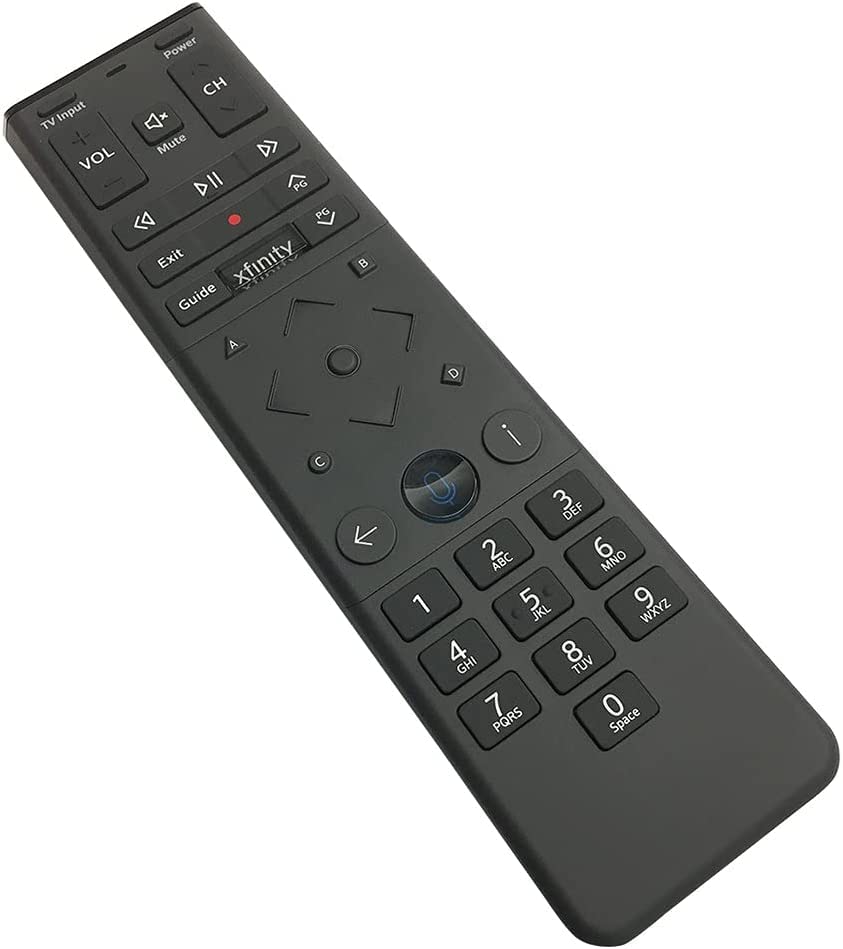
The no-drama XR15: it works, it sets up fast, and it does not ask much of you.
Functionality is the whole story here. This is an XR15 voice remote built for the X1, Xi6, Xi5, and XG2 boxes, and the thing people care about most is that it just works once you set it up. Set-up itself is quick — it is the second most-praised trait on the listing, and the two together tell you the remote is not fussy.
You get the full XR15 feature set: voice commands for navigating and searching, a backlit keypad, TV power and volume control, and access to accessibility features. The stated maximum range is 10 meters, and the maximum number of supported devices is 1. It takes AAA batteries rather than AA, which is the one detail to check against whatever you keep in the junk drawer.
A word on the connection: this is listed as an infrared remote, so it needs a clear line of sight to the box. That is fine in an open TV stand, less ideal if your box is tucked behind a cabinet door. The XR15 remote above with RF pairing is the better call in that situation.
Why it holds up: the simplest possible pitch — a working XR15 that sets up without headaches.
The catch worth knowing: it runs on AAA batteries and relies on line-of-sight infrared, so it is not the pick for a hidden box.
Pick this one when: you want an XR15 that works, sets up quickly, and keeps things simple.
Pass if: your set-top box lives out of sight behind a closed door.
4. XR2 v3-R TV Cable Remote Control, Battery Included, Black

An older, simpler XR2 body — right for the box you already have, not for everyone.
Start with the number that matters most here: 15 buttons. This is an XR2 v3-R, and its 15-button layout has a striking 67% gap in button count compared with the 25-button XR11 replacement further down. Fewer keys means less clutter on the remote and more digging through on-screen menus for things you used to press directly.
On the plus side, it arrives with an alkaline battery included and is described as ergonomic, so it sits comfortably in the hand. The connection is infrared with a stated maximum range of 10 meters and support for 1 device. If you owned an XR2 before and simply want the same shape back, this is the direct answer.
Be honest with yourself about the fit. Feedback on quality and reliability is genuinely split — many say it works perfectly, while a two-month failure is part of the record. Think of this as a low-cost match for a legacy setup rather than a long-term workhorse.
Who it fits: anyone replacing an old XR2 body on a legacy Comcast box who prefers a pared-back button count.
The trade-off: with only 15 buttons and a mixed reliability record, this is a practical stopgap, not a forever remote.
Best matched to: a legacy XR2 household that wants the same familiar, minimal remote back.
Skip if: you rely on dedicated buttons or want the more consistent build of the XR15 picks.
5. XR11 Backlit Remote Control Replacement
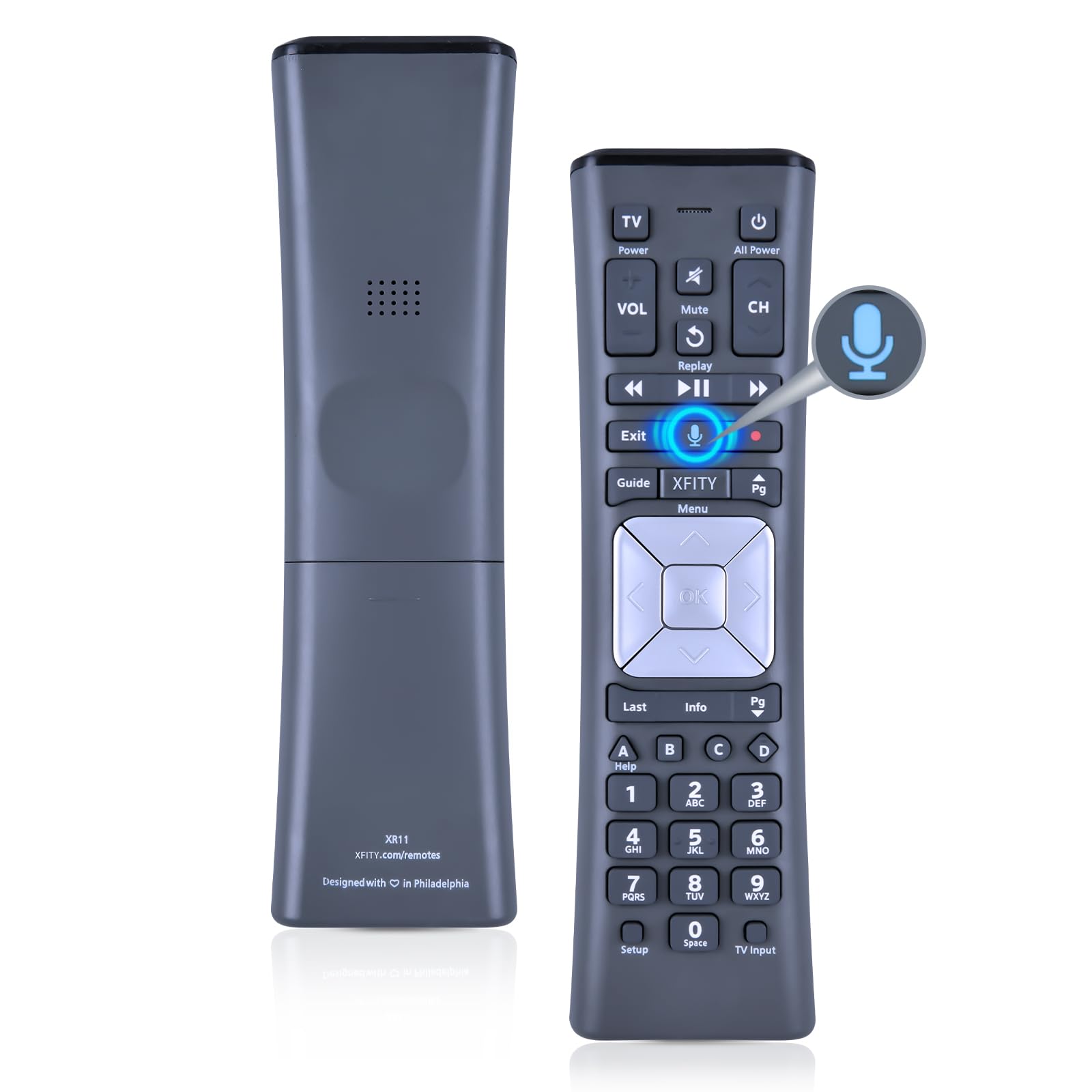
A 25-button XR11 that wants you to code it in yourself — good for the detail-minded.
This one expects a little homework, and rewards it. The XR11 v2 design works with the Xfinity X1 platform, and setting it up means holding Setup until the status light shifts from red to green, pressing Xfinity, then entering the three-digit code on your screen. TV power and volume take a separate five-digit code from the manufacturer list — LG, Samsung, Sony, Vizio and the rest each have their own.
What the effort buys you is control. The 25-button backlit keypad covers the full XR11 set, and RF “Aim Anywhere” lives here too — with a compatible box you can point it anywhere in the room. The stated maximum range is 40 feet, the longest listed in this lineup, so it reaches across a big room.
The body is high-quality ABS material and weighs 0.10kg (0.22lb), which makes it light enough to forget in your hand. One thing to plan for: two things you would normally find in the box — batteries — are not called out in this listing, so have AA cells ready before it arrives.
The real draw: a 25-button XR11 layout with a stated 40-foot range and full code-based control over TV power and volume.
What to expect: two separate code entries during set-up, and no batteries mentioned in the pack.
Worth choosing if: you are comfortable entering codes and want a wide-reaching XR11 with a full keypad.
Better to pass if: you want automatic pairing with nothing to type.
6. XR11 Voice Backlit Remote Control

Function first: a voice XR11 with visible wear on the back and a long warranty.
Read the condition note before anything else. This remote may arrive with scratches on the back and buttons that show signs of dirt, but the listing states it functions perfectly. If you care about a pristine remote on your coffee table, this is the one to walk past.
If function is what you are after, it delivers. Voice control works with the X1 set-top box, and RF pairing is available on the XG1 and Xi3 boxes — note that voice and pairing do not travel to every other box in the Comcast range. The stated maximum range is 15 meters, and the pairing routine is the standard XR11 sequence: hold Setup, press Xfinity, enter the three-digit code.
The standout here is the 360-day warranty return service, the most generous coverage in this lineup. As a replacement for a dead XR11, functionality is what buyers value most, and the remote is built for exactly that role.
What you are buying: a working voice XR11 with a full 360-day warranty behind it.
What you are accepting: cosmetic wear on the back and buttons, and voice/pairing limited to X1, XG1, and Xi3 boxes.
Choose it when: you want a functioning XR11 with warranty cover and do not mind cosmetic scuffs.
Steer clear if: a clean-looking remote matters to you, or your box is not an X1, XG1, or Xi3.
7. XR11 Premium Voice Activated Remote Control
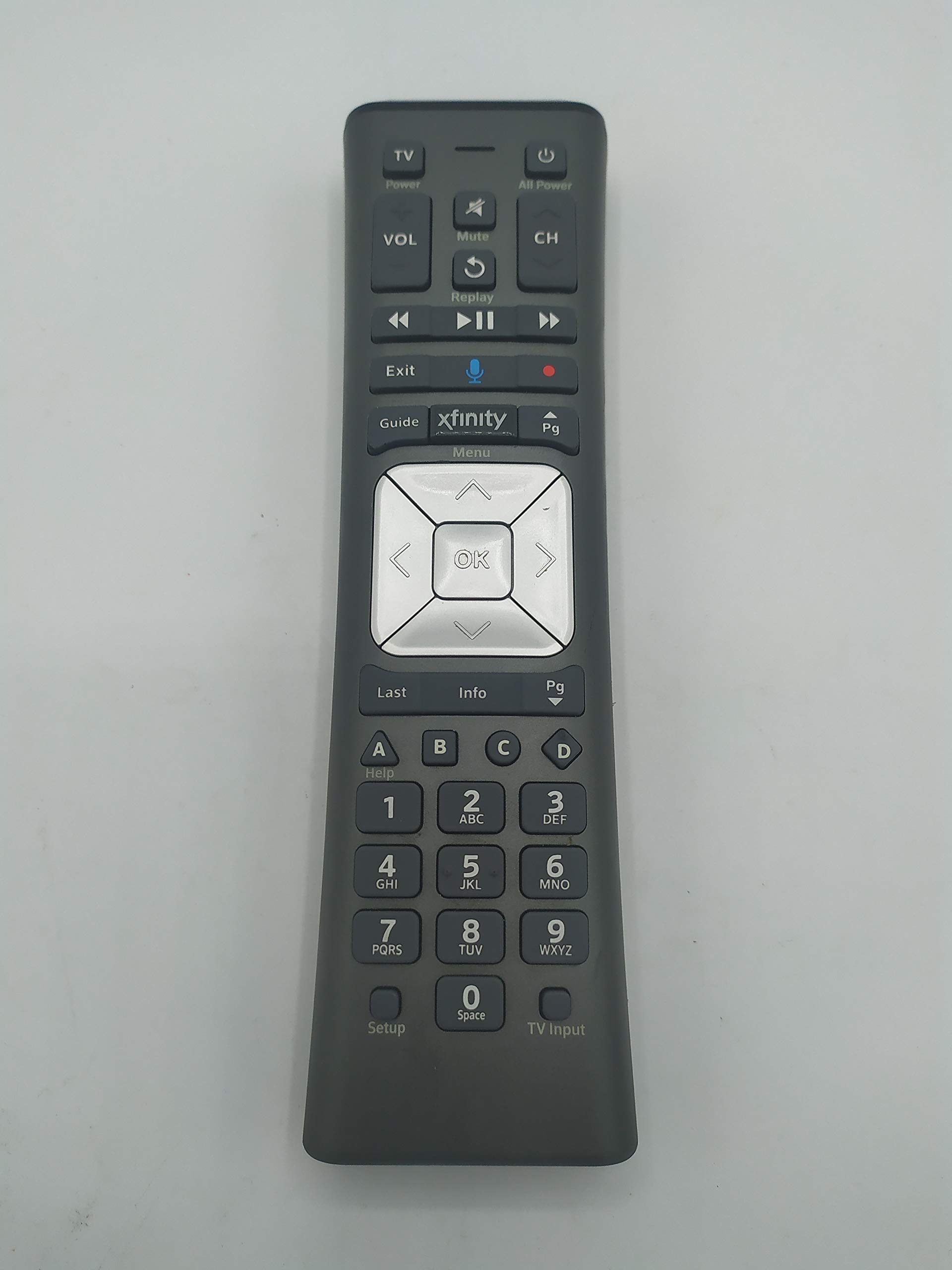
The XR11 v2 that runs three devices and has the longest track record here.
Here is the number that separates this XR11 v2 from the rest: it supports 3 devices, while every other remote in this lineup is capped at 1. That matters if you want one remote to run the TV and keep the box in line without swapping hardware around the room.
It carries both infrared and radio frequency, so the “Aim Anywhere” RF mode works on certain set-top boxes and HD DTA devices — a stated range of 30 feet, VS the 40-foot range on the code-driven XR11 above. Voice control and the backlit keypad are both here, along with quick access to Closed Captioning and voice guidance. TV input control rounds out the buttons, and two AA batteries are included.
Value is the most-praised trait on this listing. Value, ease of use, and compatibility are the three most-praised traits, and this one sits at 4.5+ across 1,500+ owners — the strongest shown track record in the lineup. Quality feedback is mixed, and the remote is a touch different in finishing, so treat it as a reliable daily driver rather than a jewelry-grade object.
Reasons It Leads The Value Race
- Supports 3 devices, unlike the single-device remotes elsewhere on this list.
- Infrared plus radio frequency with Aim Anywhere on compatible boxes.
- Voice control and backlit keys, plus TV input control.
- Two AA batteries included in the pack.
Small Print
- Quality feedback is mixed — it is a solid daily remote, not a premium build.
- 30-foot range sits under the 40-foot figure of the XR11 code-driven pick.
The strongest all-round argument: three-device support, voice, RF, and backlight in one XR11 v2 body.
One caveat: the build quality gets mixed feedback, so value is the point rather than finish.
Know the Specs
XR15 Versus XR11 — The Model Number
The XR15 and XR11 are two different remote bodies, not two names for the same thing. The XR15 is the streaming-era shape with automatic pairing on X1, Xi6, Xi5, and XG2 boxes. The XR11 is the older voice remote, and its voice features depend on the X1 set-top box, with RF pairing working on XG1 and Xi3 boxes. Match the model in the listing to the box under your TV before you buy.
Infrared Versus Radio Frequency
Infrared needs a clear line of sight — point the remote at the box or nothing happens. Radio frequency, sold as “Aim Anywhere,” bounces the signal so you can point it anywhere in the room. Specs list a maximum range in meters or feet; the XR11 code-driven pick states 40 feet, while several others state 10 meters. If your box hides behind a cabinet door, favor the RF versions.
Backlit Keypad And Button Count
A backlit keypad lights the buttons in a dark room, which is the difference between finding Guide by touch and fumbling. Button count tells you the layout: a 15-button XR2 body has far fewer direct keys than a 25-button XR11. More buttons mean fewer on-screen menus, but a busier remote. Pick the layout you already know.
Batteries And Device Support
Battery type is listed per remote — 2 AA in several packs, AAA in one, and sometimes a single alkaline included. Device support is the number of devices a remote can control; most here state 1, while the XR11 v2 lists 3. Check both before ordering so you are not hunting for cells or a second remote.
Common Questions
Will an XR15 remote work with my Xfinity X1 box?
Does the voice button work on every replacement remote?
What does Aim Anywhere actually let me do?
How long does an Xfinity remote last before I need to replace it?
Do I need to program the remote to turn my TV on and off?
Are batteries included with these replacement remotes?
Why do some remotes have fewer buttons?
Can one remote control more than one device?
Is an XR15 replacement better than an XR11?
What does a 360-day warranty cover on a replacement remote?
The Bottom Line
For most people replacing a dead or unresponsive remote, the xfinity remote control to buy is the XFinity Comcast XR15 Voice Control Remote — automatic pairing, voice search, and a consolidated power button in one bag. If you want the widest device support and the strongest shown track record, the XR11 Premium Voice Activated remote is the one, and it lists 3 devices where the rest list 1. And for anyone who wants to enter their own TV codes and reach across a big room, the New XR11 Backlit Replacement covers you with a 25-button keypad and a stated 40-foot range.
How we choose
We do not accept paid placement. Every pick is matched to a real buyer and a real use-case; we do not hands-on test units.
Sources
Specifications: manufacturer listings and product documentation. Review insights: verified customer reviews, as of November 2026. Pricing: not shown on this page (it changes often); check the current price via the retailer link.
As an Amazon Associate, Tactical Gear Guy earns from qualifying purchases. This does not affect which products we feature.