Specs are compiled from manufacturer listings and verified buyer reviews and can change over time — please confirm the key details on the product page before buying.
A wireless keyboard for your Xbox is not the same thing as a keyboard that happens to pair with it. You need one that wakes instantly from sleep, survives a full evening of chat and menu work, and holds its connection through a whole session. Most of the models below connect over 2.4GHz (a dedicated USB dongle that keeps lag low) or Bluetooth (a direct radio pairing with no dongle), so the real question is which one suits how you actually play.
This guide is built by comparing the manufacturers’ published specifications and the patterns across verified customer reviews, so you get each pick’s real strengths and trade-offs instead of marketing spin.
Some picks are clip-on chatpads that snap onto a controller, while others are full-size mechanical decks you pair with the console as a standalone board. Weighing connection type, battery capacity in mAh (milliamp-hours — how much charge the cell holds), and key count is exactly how you narrow down the Xbox Wireless Keyboard field to the one that fits your setup.
Top Picks


How To Choose The Best Xbox Wireless Keyboard
Start by deciding where your keyboard lives. A chatpad rides on the controller in your hands and is built for typing messages mid-match. A standalone deck sits on a desk or table and handles browsing, party chat, and menu navigation. These are different tools, and picking the wrong shape is the mistake that sends most buyers back to the listing page.
Chatpad or full keyboard
A chatpad adds a small key grid directly to a controller, so you can type a message without putting the controller down. A standalone deck gives you a proper typing surface and more keys. If your main goal is sending quick messages during a match, the chatpad wins on convenience. If you use your console for browsing, streaming, and long chat sessions, a full keyboard is the more useful purchase.
Connection: dongle or Bluetooth
A 2.4GHz connection uses a small USB receiver plugged into the console or PC, and it tends to be the most stable option for gaming. Bluetooth skips the dongle but can drop if there is interference in the room. Tri-mode boards give you both plus a USB-C wired fallback for charging. Look for a model that explicitly lists Xbox in its compatible devices, because not every wireless keyboard handles console pairing cleanly.
Battery, keys, and layout
Battery capacity is listed in mAh, and a higher number generally means more sessions between charges. Anti-ghosting is the feature that lets you press several keys at once without them cancelling out, which matters for chat shortcuts and game menus. Layout size is the other trade-off: a 60% or 75% board saves desk space, while a full-size deck keeps the number pad and dedicated function keys.
Side-by-Side Comparison
| Model | Best For | Keys | Connection | Battery | Amazon |
|---|---|---|---|---|---|
| 8Bitdo Retro 87 Mechanical Keyboard Xbox Edition★ Best Overall | Desk typing with a console look | 87 | 2.4G, Bluetooth, USB-C | — | Amazon |
| Logitech G PRO X TKL LightspeedTournament Pick | Competitive play on a desk | 104 | USB, RF, Bluetooth | — | Amazon |
| RedThunder K95 Wireless MechanicalSwitch Swapper | Tinkerers who swap switches | 95 | 2.4G, Bluetooth, USB-C | 8000 mAh | Amazon |
| Corsair K65 Plus Wireless 75% | Compact desk setups | 84 | Bluetooth, USB-C, Wi-Fi | 266hr rated | Amazon |
| Corsair K100 AIR Wireless | Thin, low-profile typing | 108 | wired, wireless | 50hr rated | Amazon |
| Redragon Wireless Gaming Keyboard K524 | RGB on a budget | 75% layout | Bluetooth, 2.4GHz, USB-C | 4000 mAh | Amazon |
| MoKo RGB Backlight Keyboard for Xbox Controller | Chatting without a desk | 47 | 2.4G wireless | Controller-powered | Amazon |
| 60% Wireless Gaming Keyboard and Mouse Combo | Small desk, mouse included | 68 | 2.4G wireless | 2000 mAh | Amazon |
| CHONCHOW Wireless Keyboard and Mouse | Cheap starter set | Full-size | 2.4G wireless | 2500 mAh | Amazon |
Detailed Reviews
1. 8Bitdo Retro 87 Mechanical Keyboard
Our pick — 4.5+★ from 450+ verified ratings; the strongest balance of quality and price.
The translucent green deck that makes owning an Xbox keyboard feel like a hobby.
You get 87 keys and a translucent green shell. It is a mechanical board that connects three ways — 2.4G (a dedicated USB dongle for low lag), Bluetooth, and USB-C — so you can run it to a PC on the dongle and a tablet on Bluetooth without re-pairing. Those 2.4G and Bluetooth paths are what make it a genuine Xbox-adjacent board rather than a wired desktop deck.
What wins people over is the build. Owners talk about the heft and finish of the case far more than anything else, and that is the part you feel every single day when you rest your hands on it. The Xbox-green translucent look is the second thing that keeps coming up — it earns its space on a shelf as much as a desk. Hot-swappable sockets mean you can pull a switch and drop in a different one without soldering, which is the upgrade path that keeps a keyboard interesting for years.
The honest catch is the lighting. The RGB divides opinion — some find it uneven next to the keycaps, and volume and customization settings draw mixed feelings too. This is a keyboard you buy for the feel and looks, not for a light show. If you need perfect per-key glow, that is a different purchase.
What the build gives you
- 87 mechanical keys with a case owners rate highly for feel and finish
- Three connection paths — 2.4G, Bluetooth, and USB-C — for multiple devices
- Hot-swappable sockets so you can change switches with no soldering
Where it asks patience
- RGB lighting divides opinion for evenness
- Volume and customization settings split reviewers
Reach for this if: you want a mechanical deck with real character that also works across a PC and a tablet.
Look elsewhere if: uniform, bright RGB is the main reason you are buying.
2. Logitech G PRO X TKL Lightspeed Keyboard
A tenkeyless deck built for the desk, not the couch — and it shows.
You free up a lot of mouse room when you drop the number pad. That is the whole idea behind the PRO X TKL: 104 keys including the standard layout, with GX Brown tactile switches (they give a small bump as you press, so you feel the actuation) topped with dual-shot PBT keycaps (a dense plastic that resists shine and wear). LIGHTSPEED is Logitech’s own low-lag wireless, and you also get Bluetooth and USB options, plus a volume roller and media controls.
Owners point to the construction first — the keycaps and case feel premium in the hand, and durability gets regular praise. Battery life is a strong suit too, with long stretches between charges. Against the 8Bitdo above, you are trading character and hot-swap sockets for a more conventional, tournament-oriented layout and a dedicated volume roller.
Sound is where buyers split. The tactile feel and the noise divide people — some love the thocky report of the keys, others find them loud enough to be a nuisance on calls. Compatibility and value also draw mixed views. It is a serious board for someone who wants a clean, quiet-ish gaming setup, and a poor fit for a shared room.
Built for the desk: PBT keycaps, GX Brown tactile switches, and a volume roller add up to a board that feels made for long sessions rather than couch chat.
Size trade-off: the tenkeyless layout drops the number pad, which you will miss if you do spreadsheet work or heavy menu navigation with a numpad.
Best for: players who want a clean, low-lag wireless deck with a proper volume roller and no number pad.
Think twice if: quiet is a hard requirement — the tactile switches are loud enough to draw comments.
3. RedThunder K95 Wireless Mechanical Keyboard
A tiny screen, a metal knob, and pre-lubed switches — the tinkerer’s board.
You can leave it unplugged for weeks, thanks to an 8000 mAh battery — the largest in this group by a wide margin. That is why it can run about 48 hours with the backlight on or roughly 266 hours with it off. The 1.14″ TFT screen (a small color display on the deck) shows settings, and the CNC knob turns to adjust volume, RGB, or language.
Then there is the construction. The gasket mount (a soft internal frame that lets the plate flex) plus five-layer shock absorption gives a softer, more even keystroke, and the pre-lubed linear pink switches arrive smooth from the start. You can pull those switches and drop in 3-pin or 5-pin alternatives with no soldering, and the box even includes spare switches and a puller. The qualities owners praise most are exactly this — the keyboard quality and the sound it makes.
Here is where you have to be careful. Reliability reports are the recurring dark spot on this board — some units stop responding or fail to power on, and a few do not charge properly over time. It is a genuinely good keyboard when it works, but it is the pick to buy if you want the features and can handle a warranty conversation if luck goes the other way.
The spec sheet earns its keep
- 8000 mAh battery — roughly 48 hours with backlight on, about 266 hours with it off
- Gasket mount with five-layer shock absorption for a softer keystroke
- Hot-swappable 3-pin or 5-pin sockets with spare switches included
- 1.14″ TFT screen and CNC knob for quick volume and RGB changes
The risk you accept
- Reliability reports recur — some units stop working or fail to turn on
- Charging issues surface for a portion of buyers over time
Pick this one if: the 8000 mAh battery and hot-swap sockets are what you came for and you are comfortable leaning on the warranty.
Not for you if: you want a board you can set up once and never think about again.
4. Corsair K65 Plus Wireless RGB Keyboard

A compact 75% deck rated to run for 266 hours on a single charge.
Eighty-four keys in a 75% footprint — that means you keep the arrow cluster and function row but lose the number pad, freeing up serious desk space. The headline spec is the 266-hour wireless battery rating with RGB off, which is a genuinely long stretch between charges. Pre-lubricated CORSAIR MLX Red linear switches (they press down smoothly with no bump) and PBT dye-sublimated keycaps that resist fading and shine round out the package.
The quiet is the surprise here. Owners appreciate the muted typing sound more than you would expect from a mechanical board, and the key feel and compact design draw steady praise. You get a multi-function rotary dial for volume and media, plus FN shortcuts for app control. Connection runs over low-latency 2.4GHz, Bluetooth, or USB-C wired, and there is AES encryption on the wireless link.
The trade-off is wireless reliability. Some owners find it rock solid, others report it disconnecting more often than they would like, and the RGB lighting draws mixed views. It is still the right call if desk space is tight and you want a board that feels premium without shouting about it.
The quiet compact: the 75% layout and muted keystroke make this the board to pick if your desk is small and your room is shared.
The honest wrinkle: wireless reliability splits opinion — some report disconnects, so plan to keep the USB-C cable handy for charging and as a fallback.
Your fit: a tight desk and a preference for quiet typing over a loud, tactile clack.
Not your fit: you need the numpad for work or want lighting that stays perfectly even.
5. Corsair K100 AIR Wireless RGB Keyboard

Eleven millimeters thin at its slimmest point, with a brushed aluminum frame.
If you like laptop keys and want that feel on the desk, this is the keyboard for you. It is 11mm at its slimmest point, wrapped in a brushed aluminum frame, and the CHERRY MX Ultra Low Profile switches actuate in just 0.8mm — an incredibly short press, which is why it responds so quickly on the trigger. You get 108 keys, per-key RGB, and up to 50 hours of wireless battery with backlighting on (or up to 200 hours with it off).
Connections are more flexible than most. SLIPSTREAM WIRELESS gives sub-1ms wireless (a hair under a millisecond of lag) on PC or Mac, low-latency Bluetooth covers up to three host devices, and USB wired brings AXON 8,000Hz hyper-polling. AES 128-bit encryption keeps the wireless link secure, and there is a volume roller and media keys.
The build is what owners keep returning to — several describe it as the best-feeling low-profile keyboard they have used, and the tactile chiclet keys get real praise. The catch is connectivity, which swings heavily for different buyers: some report a solid connection, others hit constant dropouts. This is a keyboard for the thin profile enthusiast, not the person who needs bulletproof wireless.
Rich in connection options: SLIPSTREAM, Bluetooth for up to three devices, and USB wired with 8,000Hz polling give you the most paths to a stable link in this list.
The known risk: connectivity experiences diverge sharply, so be ready to fall back to the wired USB option.
Worth it for: anyone who loves low-profile laptop keys and wants a slim board with real mechanical switches.
Skip the risk if: a rock-solid wireless connection is non-negotiable for you.
6. Redragon Wireless Gaming Keyboard 75%

A 75% tri-mode board that keeps the numpad out and the RGB in.
You can switch devices with hotkeys and side buttons, and there are three ways in: Bluetooth 5.0, 2.4G wireless, and USB-C wired. The 4000 mAh battery is a big part of the appeal: it is rated for up to 50 hours of continuous use with RGB on, or up to 300 hours with the lights off, and an auto-sleep kicks in after 2 minutes of inactivity. At 300 hours with the lights off, that covers a week of evening sessions unplugged.
You free up mouse room with the 75% tenkeyless layout, which drops the number pad. You also get 16.8 million RGB colors, 8 dynamic lighting effects, 6 custom DIY modes, and 7 solid color options, all adjustable in 5 brightness levels. There are 26 anti-ghosting keys (so simultaneous presses register cleanly) plus 12 multimedia keys. The Redragon packs 4000 mAh versus the CHONCHOW set’s 2500 mAh below — a meaningful gap in how long you go between charges.
What owners notice most is the typing feel and the value — it feels mechanical and taps fast without the mechanical price. The honest caveat is connectivity and sleep behavior: the connection draws mixed reports, and the auto-sleep sometimes triggers sooner than people expect. It is a good pick for a budget-conscious desk, not for someone who needs zero-fiddle pairing.
Battery lead: 4000 mAh here versus 2500 mAh in the CHONCHOW set below — noticeably more headroom between charges.
Pairing caveat: connectivity splits opinion and the auto-sleep can surprise you, so give the dongle a clear line to the console.
Made for: a budget desk that wants RGB and a long-lived battery without a mechanical price tag.
Pass on it if: you need a connection that never hiccups and never sleeps early.
7. MoKo RGB Backlight Keyboard for Xbox One Controller

Snap-on typing for your controller, complete with a headset jack.
Forty-seven keys that clip onto an Xbox One, One S, Series S, Series X, Elite, or Elite 2 controller — not the One X — and sit right below your thumbs. It clicks into the controller, runs on the controller’s power (keep the charge above 20% for normal use), and connects to the console over a 2.4G receiver with a 10-meter range. The 3.5mm audio jack lets you plug a headset straight into the keyboard.
This is the smallest option in this article — a chatpad you add to a controller, not a desk keyboard. The 47 keys are silicone-tipped, so you can read each letter in the dark, and the backlight turns off after 10 seconds idle and restores your last mode when powered on. It gives you three backlight modes: rainbow breathing, trichrome, and monochrome.
What owners highlight is look and lighting — the RGB and the ability to swap colors easily — along with the audio quality through the headset jack. The honest catch is response: reports split on whether it works reliably, with some finding it hit-or-miss. Treat it as a party-chat accessory rather than a daily typing surface, and keep the receiver close to the console.
The couch solution: 47 keys, a headset jack, and no desk required — the fastest way to answer messages without leaving the game.
Know the limit: responsiveness divides owners, so treat it as a messaging tool rather than a main keyboard.
Go for it if: you want party chat without a lap desk and already own a compatible Xbox controller.
Look past it if: you plan to type a lot or own the Xbox One X.
8. 60% Wireless Gaming Keyboard and Mouse Combo
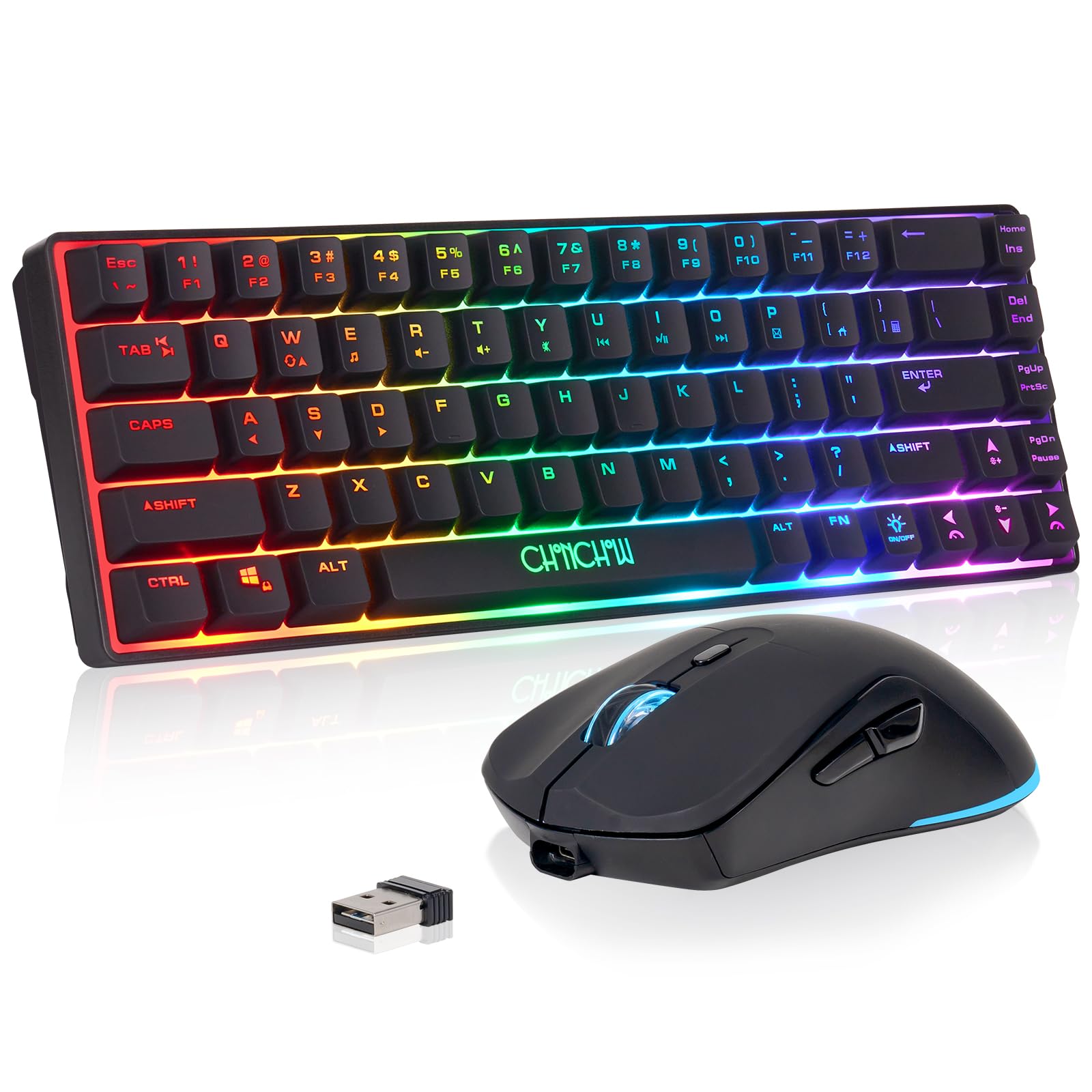
Sixty-eight keys, a mouse, and one USB dongle to run both.
A 60% layout strips the keyboard down to its core — 68 keys on a deck that measures 12.44 x 4.09 x 1.54 inches, so it tucks into a small desk or a backpack. The mouse and keyboard share one 2.4G USB adapter (find it on the back of the mouse) with a 10-meter range, and the keyboard carries a 2000 mAh battery while the mouse carries 500 mAh. Sleep mode wakes on any key.
For the size, it covers the basics. There are four brightness levels and three breathing speeds on the backlight, and the mouse adds seven colors. In USB mode it supports 19-key conflict-free typing. It lists compatibility with PC, laptop, PS3, PS4, PS5, Xbox, and Mac, so it drops in next to most consoles without extra setup.
The reviews here are genuinely split. Some find it works well with an Xbox Series X, while others run into dropped connections or a device that stops responding. There is also a reset sequence for when the mouse or keyboard loses its link, which tells you the manufacturer knows the pairing can slip. Buy it as a compact budget combo for a second setup, not a primary rig.
Two-in-one space saver: a 68-key deck and a mouse on one dongle make this the tightest full setup here.
The split: some owners find it works well with a Series X, others hit dropped links — keep the reset steps from the manual handy.
For you if: you want a tiny keyboard-plus-mouse set for a secondary console station.
Not for you if: your main gaming rig needs a flawless wireless link every session.
9. CHONCHOW Wireless Keyboard and Mouse
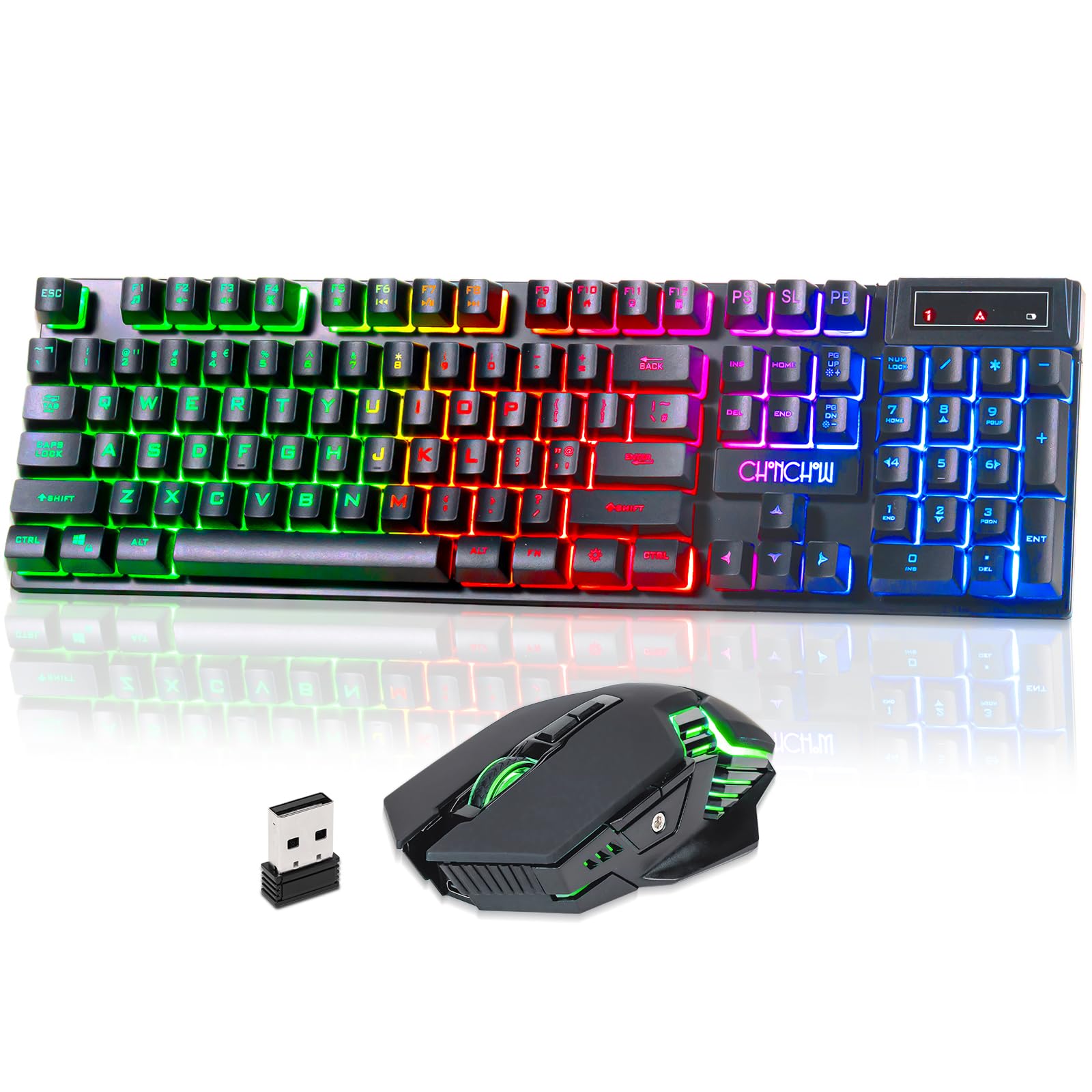
The cheapest way to get a lit keyboard and mouse running on a console.
Plug the tiny receiver in (it hides under the mouse) and both devices connect over 2.4G, with a 10-meter range. The keyboard carries a 2500 mAh battery, which the maker rates for months of continuous use on a full charge, plus an auto-sleep that wakes on any key and a separate power switch. You get 12 multimedia keys, 19 anti-conflict keys, and hovering translucent keys that are easier to read in a dim room. It lists compatibility with PC, laptop, PS3, PS4, PS5, Xbox, and Mac.
The Redragon above carries 4000 mAh to this set’s 2500 mAh, so the Redragon stretches further between charges. It makes up for that in kit completeness: you get the mouse in the box, and the mechanical-feel keys and three rainbow backlight modes give it more presence than a plain office set.
Set your expectations honestly. Reliability is the recurring theme — some units run fine for a year, others quit after a couple of weeks, and durability draws criticism. Buy this as a cheap starter set for light console use, not a long-term daily driver.
Full kit, low bar: keyboard and mouse in one box, with 2500 mAh, 12 multimedia keys, and 19 anti-conflict keys.
Know the ceiling: durability is the weak spot — expect a starter set for occasional use, not a board for years of daily typing.
Fits you if: you want a lit keyboard and mouse on a console setup for the lowest outlay.
Fit someone else if: you need a set that holds up to daily, long-term use.
Know the Specs
Battery capacity in mAh
Milliamp-hours (mAh) measure how much charge a battery can hold — think of it as the size of the fuel tank rather than the speed of the car. A higher number generally means more sessions between charges, though real-world runs depend on backlight brightness and connection type. The RedThunder K95’s 8000 mAh cell and the Redragon’s 4000 mAh cell lead this group, while the 2000 mAh and 2500 mAh combos trail. Most boards recharge over USB-C, so a larger tank mainly means charging less often.
Connection type: 2.4G, Bluetooth, or wired
A 2.4G connection uses a USB receiver and is usually the most stable for gaming, because it avoids the shared Bluetooth channel. Bluetooth skips the dongle but can drop when the room is busy with wireless devices. Tri-mode boards give you both plus a USB-C wired fallback, which is the safest setup since a failing wireless link still leaves you a cable. Look for explicit Xbox compatibility in the listing — it matters because pairing quirks are the most common complaint across this whole category.
Common Questions
Will any wireless keyboard work with an Xbox console?
Is a chatpad better than a full keyboard for Xbox?
How long does an Xbox wireless keyboard battery last?
Can I use a wireless keyboard and mouse on the same USB dongle?
Does a mechanical keyboard add lag on a console?
What does anti-ghosting mean on a gaming keyboard?
Are hot-swappable switches worth it on a wireless board?
Can I connect a wireless keyboard to both a PC and an Xbox?
Why do some wireless keyboards go to sleep too quickly?
Do I need a dongle for a Bluetooth keyboard on Xbox?
The Bottom Line
For most people, the xbox wireless keyboard winner is the 8Bitdo Retro 87 Mechanical Keyboard Xbox Edition because it pairs 87 keys and three connection paths with a case that feels genuinely great to type on — rated 4.5+ stars by 400+ owners. If low-lag competitive play on a desk is the priority, the Logitech G PRO X TKL Lightspeed gives you a clean tenkeyless layout and a volume roller. And if your typing happens on the couch, the MoKo RGB Backlight Keyboard snaps straight onto the controller and adds a headset jack. Whichever you choose, confirm Xbox compatibility on the listing first, then pick the battery and layout that match how you actually play.
How we choose
We do not accept paid placement. Every pick is matched to a real buyer and a real use-case; we do not hands-on test units.
Sources
Specifications: manufacturer listings and product documentation. Review insights: verified customer reviews, as of November 2026. Pricing: not shown on this page (it changes often); check the current price via the retailer link.
As an Amazon Associate, Tactical Gear Guy earns from qualifying purchases. This does not affect which products we feature.