Specs are compiled from manufacturer listings and verified buyer reviews and can change over time — please confirm the key details on the product page before buying.
A cheap dongle that pairs in seconds but drops out mid-match is worse than the cable you were trying to escape. This guide covers the adapters that genuinely hold a wireless link, which ones only work with certain controllers, and what the official IC chip actually changes in daily use.
This guide is built by comparing the manufacturers’ published specifications and the patterns across verified customer reviews, so you get each pick’s real strengths and trade-offs instead of marketing spin.
Most of these dongles look identical in the product photos, so the useful differences hide in controller support, connection stability, and how many pads you can run at once. Here is what actually separates a reliable pick from a frustrating one when you are shopping for the best Xbox Wireless Adapter Windows 11 setup.
Top Picks


How To Choose The Best Xbox Wireless Adapter Windows 11
What you are actually buying is a stable 2.4 GHz radio link between an Xbox pad in your hands and a PC a few feet away. The plastic shell, the packaging, and the manual tell you nothing about whether that link holds. Get the link right and you forget the dongle is there; get it wrong and you re-pair mid-match.
Start with the chip, not the casing
An adapter built around the official IC chip (the same controller-radio hardware Microsoft puts in its own receiver) tends to pair the way an Xbox console does — press the button on the pad, press the button on the dongle, done. Third-party chips can work, but they are where most of the connection complaints come from. When a listing names the official chip, that is the single most useful line on the page.
Check your controller generation before anything else
These receivers are built for Xbox One, Xbox One S, Xbox One X, and the Elite pads. They do not talk to Xbox 360 controllers, and they do not talk to third-party controllers or third-party wireless headsets. If your pad came bundled with a 360, no adapter on this list will help you, so sort that out before you buy.
Decide how many pads you need on one dongle
Several of these adapters host up to eight controllers at once, plus up to four chat headsets or two stereo headsets. That matters if you run local multiplayer on a TV-connected laptop. If you only ever use one pad, the eight-controller ceiling is irrelevant to you.
Know your Windows version
Windows 10 and 11 generally detect these adapters on plug-in. Windows 7 and 8 usually need a driver pulled from the Microsoft website first. If you are on an older machine, factor in five minutes of setup before you judge the adapter.
Side-by-Side Comparison
| Model | Best For | Controller Support | Windows Versions | Weight | Amazon |
|---|---|---|---|---|---|
| KOOWOD Wireless Adapter Dongle★ Best Overall | Official chip on a tight budget | Xbox One controllers | Windows 10, 11 | 0.01 kg | Amazon |
| Rzkipdy Wireless AdapterBest Value | Micro USB hookup for older laptops | Xbox One controllers | Windows 10, 11 | 0.01 kg | Amazon |
| Smlau XB2 Wireless Adapter | Widest Windows version coverage | Xbox One, Xbox Series X controllers | Windows 7, 8, 8.1, 10, 11 | 0.02 kg | Amazon |
| ELUTENG Xbox Adapter for PC | Elite Series 2 owners | Xbox One, Elite, One X, One S controllers | Windows 7 and up | — | Amazon |
| Muddlepaw USB Wireless Adapter | Eight-pad party setups | Xbox One, One S, One X, Elite 1, Elite 2 | Windows 7, 8, 10 | 0.03 kg | Amazon |
Detailed Reviews
1. KOOWOD Wireless Adapter Dongle
The official-chip dongle that treats pairing like a console does — press two buttons, forget about it.
Here is the number that decides this one: the KOOWOD runs an official IC chip, the same class of controller radio Microsoft builds into its own receiver. In practice that means you press the pairing button on the pad, press the button on the dongle, and Windows 11 sees a controller instead of a mystery USB device. It is also the lightest adapter here at 0.01 kg — versus the Muddlepaw’s 0.03 kg — so it hangs off a laptop port without levering the connector.
What buyers praise most is how little setup it demands. Setup is the thing buyers talk about most in a good way, and the low-latency reports back that up — this is a dongle you plug in once and then never think about. The 66% smaller shell than the original Xbox receiver means it will not block the USB port beside it, which matters on a laptop with two ports jammed together. Stereo audio and in-game chat both run over the link, so your headset does not need a second cable to the PC.
The recurring gripe is connection consistency. Some units hold a flawless link, and some lose the controller and need re-pairing — which is the honest trade-off of a budget third-party receiver even with the right chip inside. If your desk sits far from the PC or has a lot of metal and other wireless gear nearby, budget for a USB extension so the dongle sits in open air. This one is rated 4.0+ stars, and it earns the top spot on chip quality, controller support, and weight rather than on a runaway score.
What earns it first place
- Official IC chip — pairs like a console rather than a generic USB gadget
- 0.01 kg, the lightest adapter here, so it never pulls on a laptop port
- Hosts up to eight controllers plus four chat headsets or two stereo headsets
- 66% smaller body that will not crowd the neighbouring USB port
Where it can stumble
- Connection consistency varies unit to unit — some need re-pairing
- Xbox 360 controllers are not supported at all
- No driver path for Windows 7 or 8 — this is a Windows 10 and 11 adapter
Buy this one if: you are on Windows 10 or 11, own an Xbox One pad, and want official-chip pairing at the lowest weight on the list.
Think twice if: your controller is a 360 model or a third-party pad — neither will bind here.
2. Rzkipdy Wireless Adapter
An original-chip receiver that asks you to accept one real gamble on the connection.
The Rzkipdy carries the original IC chip and matches the KOOWOD almost line for line on paper — the same 66% smaller body, the same eight-controller ceiling, the same stereo audio and chat over the link. Where it differs is the connector: this one is listed as Micro USB, not a plain USB-A plug. That makes it the pick for an older laptop or tablet with a Micro USB port you still use, and the wrong pick for anyone expecting a straight USB-A dongle.
Setup is its strongest suit: plug-and-play on Windows 10 and 11, with the same two-button pairing sequence as an official receiver. If setup friction is what has kept you on a cable, this clears that bar comfortably.
Be clear-eyed about the rest. The most-discussed topic across the reviews is connectivity, and it splits hard: some units hold a great link, others drop the controller repeatedly. Quality complaints sit alongside those, so treat this as a value bet rather than a sure thing. Buy it where returns are painless, and if the first unit will not hold a link, swap it rather than living with it.
What lands well: Setup is the strong suit — plug in, pair, play, with the original IC chip doing the work Windows 11 expects.
The honest gamble: Connection stability is genuinely hit or miss across units, so buy this one with an easy return path in mind.
Reach for this if: your machine connects over Micro USB and you want original-chip pairing without much outlay.
Look elsewhere if: you need a plain USB-A dongle or you want the strongest stability record on this list.
3. Smlau XB2 Wireless Adapter

The one adapter here that stretches from Windows 7 all the way to Series X pads.
Software reach is the whole argument for the XB2. It covers Windows 7, 8, 8.1, 10, and 11 — a wider spread than the KOOWOD, which stops at Windows 10 and 11. It also explicitly takes the Xbox Series X controller alongside Xbox One pads, so if you have one newer pad and one older one on the same desk, this is the receiver that handles both.
Setup is genuinely quick. It uses the original chip, pairs with a powerful signal, and supports wireless stereo plus up to eight controllers at once. The 12-month warranty is the other practical detail — on a class of product where a dead unit is the main risk, a full year of cover is worth more than any feature on the spec sheet. At 0.02 kg versus the KOOWOD’s 0.01 kg, which you will not feel on a desktop and might on a tablet held in hand.
Two exclusions are worth reading before you click. Xbox 360 controllers will not work, and neither will third-party controllers or third-party wireless headsets. The stability reports also split — some run a clean link, others find it struggles to hold. Nothing on this list is immune to that, but know it going in.
Why it earns a place: Windows 7 through 11 plus Series X controller support is the broadest compatibility story on this list, backed by a 12-month warranty.
Know before you buy: Third-party controllers and third-party wireless headsets are both off the table, and connection stability varies by unit.
The right fit: mixed-generation setups where an older Windows machine shares a desk with a Series X pad.
The wrong fit: anyone pairing a third-party wireless headset alongside the controller.
4. ELUTENG Xbox Adapter

Built for Elite Series 2 owners who want the lightest possible plug-in and a year of cover.
If your controller is an Elite Series 2, the compatibility list is the first thing you check, and ELUTENG names it directly alongside Xbox One, One X, and One S pads. It also carries the longest cover here — a 365-day replacement warranty on top of a 30-day refund policy, which is the closest thing to insurance this category offers.
ELUTENG claims zero latency and an extended transmission range in a body smaller than the standard receiver, and the practical translation is a pad that responds without a visible delay and a link that survives a walk across the room. It is a non-OEM product, so Windows 11 will treat it as a generic wireless receiver, but plug-in detection is automatic on modern Windows.
Windows 7 and 8 users should expect a driver download from Microsoft before it works, and that is stated up front rather than buried. The stability picture is mixed — some PCs hold a clean link and others lose it after roughly ten to fifteen minutes of play. As with every adapter here, one bad unit is not the whole story, but it is the most likely thing to send you back to the listing.
The Elite-friendly bits
- Names Elite and Elite Series 2 controllers explicitly in its support list
- 365-day replacement warranty plus a 30-day refund policy
- Smaller body than the standard receiver with an extended transmission range
- Plug-in detection is automatic on modern Windows
The fine print that matters
- Non-OEM product — not an official Microsoft receiver
- Windows 7 and 8 need a driver download from Microsoft first
- Some PCs see the link fail after ten to fifteen minutes of play
Worth it for: Elite Series 2 and Elite owners who want a named-support list and the longest warranty here.
Not worth it for: Xbox 360 pads, which this adapter does not support.
5. Muddlepaw USB Wireless Adapter for Xbox One Controller
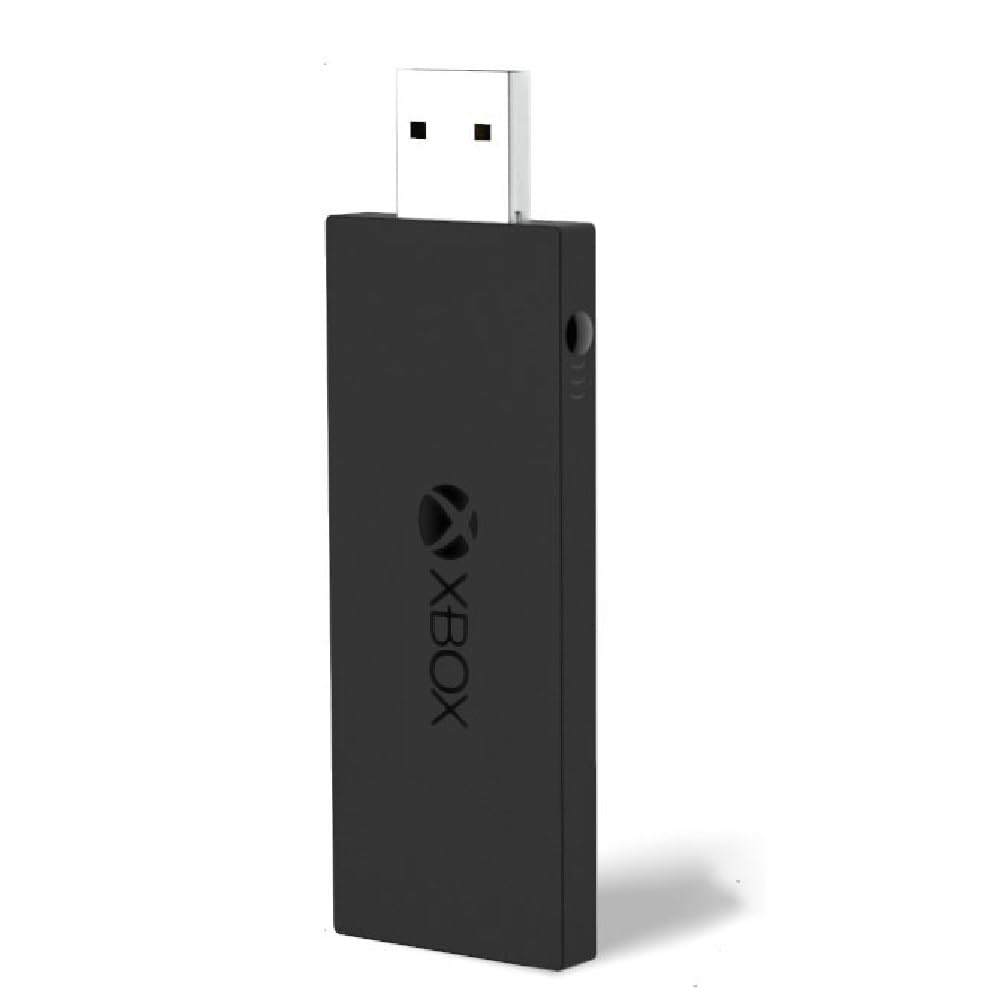
The party-night adapter with the widest controller list and the heaviest body here.
The controller roster on this one is the most generous on the list: Xbox One, One S, One X, Elite 1, and Elite 2 all in the same support line. Add the eight-controller ceiling and it is built for a room full of pads rather than a single-player desk. It is also the heaviest pick here at 0.03 kg — versus the KOOWOD’s 0.01 kg — which only matters if the dongle hangs from a tablet rather than sitting in a desktop port.
Muddlepaw markets it on ultra-low latency through faster data transmission, plus portability for taking to a friend’s house or a classroom. The listing quotes Windows 7, 8, and 10 support, so Windows 11 buyers should assume it will work as a generic receiver rather than something explicitly certified for it.
This one demands the most caution before you commit. The dominant theme in its feedback is reliability — adapters that stop connecting or never power on — with build quality and the lack of official Xbox branding close behind. It is not the pick to gamble on; it is the pick to buy when the eight-controller support is specifically what you need, and to return promptly if the first unit misbehaves.
Where it genuinely leads: Controller coverage and multi-pad capacity — One S, One X, Elite 1, and Elite 2 all supported with up to eight pads at once.
The reason to hesitate: Reliability complaints are the loudest theme, so this one is only worth it if the eight-pad support is a real requirement.
Suits you if: you regularly run local multiplayer and need Elite 2 pads on the same receiver as older Xbox One controllers.
skip it if: you want a single-player dongle you can plug in and trust — the reliability record here is the weakest on the list.
Know the Specs
Official IC Chip vs Original IC Chip
Both phrasings describe the same thing: the controller-radio chip that Microsoft builds into its own receiver, rather than a generic substitute. It matters because pairing is the first thing that goes wrong on a cheap dongle. With the right chip, you press the pair button on the pad, press the button on the receiver, and Windows sees a controller. With a weaker chip, the same sequence can take several attempts or drop out later. When a listing names the chip, treat that as the most useful spec on the page.
Controller Capacity and Headset Support
Capacity is how many pads a single dongle can host at once. Several adapters here take up to eight controllers, plus up to four chat headsets or two stereo headsets over the same link. For one-player gaming this is irrelevant. For a laptop hooked to a TV with friends over, it is the whole reason to pick one dongle over another. Check the headset figure separately — stereo audio and chat travel over the link, so a wired headset to the PC is not needed.
Windows Version and Driver Behaviour
Windows 10 and 11 usually detect these receivers the moment you plug them in. Windows 7 and 8.1 typically need a driver downloaded from the Microsoft website first, and that step catches people out who assume the dongle is faulty. Before you return anything, confirm your OS version is on the adapter’s supported list and install the driver if it is not automatic.
Adapter Weight and Physical Fit
Weight here sits between 0.01 kg and 0.03 kg, and the difference only shows up in two places: a dongle hanging from a laptop or tablet, and whether the shell blocks the USB port next to it. The lighter units at 0.01 kg dangle without pulling, and the 66% smaller bodies leave the neighbouring port usable. On a desktop tower, none of this matters.
Common Questions
Will these adapters work with my Xbox 360 controller?
Do I need to install a driver on Windows 11?
Can one adapter handle multiple controllers at the same time?
Why does my controller keep disconnecting mid-game?
Will a third-party controller or headset pair with these adapters?
Is an official Microsoft receiver better than these third-party dongles?
Do these adapters pass game audio and chat through to a headset?
Can I use one of these with a tablet instead of a desktop?
What happens if the adapter stops working after a few weeks?
The Bottom Line
For most people chasing the xbox wireless adapter windows 11 result, the KOOWOD Wireless Adapter Dongle is the pick — the official IC chip does the pairing work Windows 11 expects, and at 0.01 kg it disappears into a laptop port without dragging. If your controller is an Elite Series 2 and you want the longest warranty in the group, the ELUTENG adapter names your pad directly and backs it with a 365-day replacement. And if you still run an older Windows machine alongside a Series X controller, the Smlau XB2 covers Windows 7 through 11 where most of the others start at Windows 10.
The one honest nudge: connection stability is the weak seam in this entire category, not a flaw unique to any single adapter. Buy from a listing with a simple return path, test the link hard in the first week, and swap rather than tolerate dropouts. Do that, and any of these five will keep your Xbox pad cable-free.
How we choose
We do not accept paid placement. Every pick is matched to a real buyer and a real use-case; we do not hands-on test units.
Sources
Specifications: manufacturer listings and product documentation. Review insights: verified customer reviews, as of November 2026. Pricing: not shown on this page (it changes often); check the current price via the retailer link.
As an Amazon Associate, Tactical Gear Guy earns from qualifying purchases. This does not affect which products we feature.